MicroRos-Pi-W6100-EVB-Pico2
W6100-EVB-Pico2 joins ROS 2 over wired Ethernet: a 101-line micro-ROS UDP transport on W6100 sockets, publishing IMU, GNSS and servo topics.
0
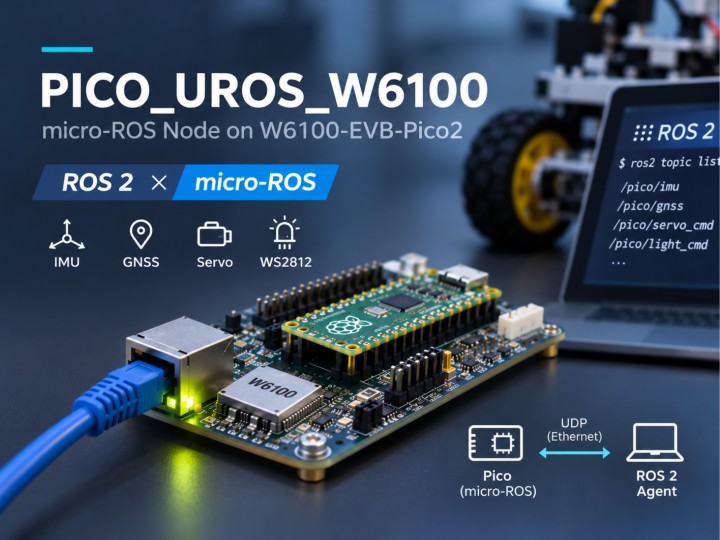
Components
Hardware components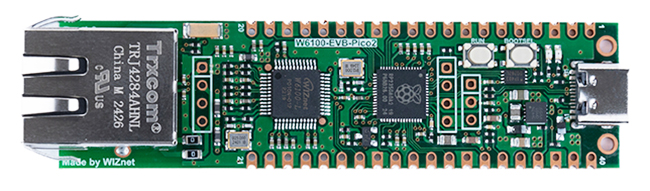
WIZnet - W6100-EVB-Pico2
x 1

Project description
Overview
PICO_UROS_W6100 is firmware that turns a W6100-EVB-Pico2 (RP2350 + WIZnet W6100) into a wired ROS 2 node. Built with micro-ROS on the Pico SDK, it publishes IMU and GNSS data as ROS 2 topics and accepts servo and light commands back, all over plain UDP on Ethernet. The part that connects micro-ROS to the W6100 is one short C file, src/wiz_udp_transport.c. The project is by FrazhyPE (MicroRos---Pi-Pico).
It is useful when a ROS 2 robot needs a small sensor-and-actuator board that plugs into the robot's Ethernet switch instead of a USB port: an IMU, GNSS, pan-servo and lights head on a mobile robot, a test rig that publishes known topics while you develop higher-level software, or a starting point for moving micro-ROS to another WIZnet board.
Three terms used below, in one line each:
- ROS 2 is robot middleware in which programs exchange data as named "topics" (for example
/pico/imu). - micro-ROS is a trimmed ROS 2 client that runs on a microcontroller, so the Pico itself can publish and subscribe to topics.
- micro-ROS agent is a small program on the PC or robot computer that relays the microcontroller's messages into the full ROS 2 network.
At a Glance
| Item | Value | Source |
|---|---|---|
| Board | W6100-EVB-Pico2 (RP2350) | CMakeLists.txt:5, CMakeLists.txt:76-79 |
| Ethernet driver | WIZnet ioLibrary, W6100 socket API | CMakeLists.txt:40-43 |
| Transport | UDP, hardware socket 0, local port 9999 | src/wiz_udp_transport.c:23, src/main.cpp:283 |
| Agent address | 192.168.123.18, port 8888 | src/main.cpp:280-284 |
| Pico address | 192.168.123.2 / 255.255.255.0, static | src/main.cpp:261-277 |
| ROS 2 node | node in namespace pico | src/main.cpp:1028 |
| Sensors and outputs | BNO08x IMU (I2C), GNSS (UART1), SCServo (UART0), WS2812, 5 GPIO outputs | src/main.cpp:61-69, src/main.cpp:146-161 |
| License | No license file in the repository | repository root |
Why It Is Worth a Look
Instead of a USB serial cable, this project connects micro-ROS to the agent over Ethernet. The Pico gets a fixed IP address, the agent listens on UDP port 8888, and the two talk across a normal switch. For a robot, that means the sensor board does not have to sit on a USB port of the main computer.
The second strength is how little glue it needs. micro-ROS lets you plug in your own transport through four callbacks: open, close, write, read. The author registers them in src/main.cpp:953-960, and all four live in src/wiz_udp_transport.c, a 101-line file. If you already know the ioLibrary socket(), sendto() and recvfrom() calls, you can read the whole transport in a few minutes.
The third strength is that it is a real robot node, not a hello-world. The code creates five sensor publishers and five command subscribers, each command with its own response topic (src/main.cpp:1043-1091). Sensor reading runs on the RP2350's second core and hands data to the network core through queues (src/main.cpp:1018-1022). It also has a recovery path: if the agent stops answering, the board reboots itself (see below).
How It Works
  BNO08x IMU ──I2C──┐
  GNSS ──────UART1──┤   Core 1: read sensors, drive servo
  SCServo ───UART0──┘        │  queues (q_imu, q_gnss, q_servo)
                             ▼
                     Core 0: micro-ROS node "pico/node"
                     (rclc executor, publishers, subscribers)
                             │  4 custom transport callbacks
                             ▼
                     wiz_udp_transport.c
                     socket(0, Sn_MR_UDP, 9999) / sendto / recvfrom
                             │  SPI (spi0)
                             ▼
                     W6100: UDP/IPv4, ARP, Ethernet
                             │  Ethernet cable
                             ▼
              micro-ROS agent  udp4 --port 8888  (192.168.123.18)
                             │
                             ▼
                     ROS 2 network: ros2 topic echo /pico/imu
At boot, main() initializes the W6100 (wiznet_init(), src/main.cpp:286-295), registers the transport, and then pings the agent in a loop while the WS2812 LED blinks red (src/main.cpp:974-989). Once the agent answers, the LED turns yellow, the GPIOs and UARTs are set up, core 1 starts, and the ROS 2 node is created. The node then waits until its clock is synchronized with the agent (src/main.cpp:1030-1040) so that message timestamps use ROS time.
What W6100 Actually Does
The transport calls the ioLibrary socket API. It opens hardware socket 0 in UDP mode (src/wiz_udp_transport.c:23), sends with sendto() (src/wiz_udp_transport.c:46), and receives with recvfrom() (src/wiz_udp_transport.c:73, :89). With this API the W6100 builds the UDP and IPv4 headers, resolves the agent's MAC address with ARP, and moves frames on the wire. The RP2350 does not run a TCP/IP stack such as lwIP; the CMake file compiles only wizchip_conf.c, socket.c and w6100.c from the WIZnet driver (CMakeLists.txt:40-43).
What the W6100 does not do is just as clear from the code:
- It does not know anything about ROS 2. Message serialization, the micro-ROS session with the agent, and the executor all run on the RP2350 inside
libmicroros.a. - It does not use IPv6 here. The five-argument
sendto()is the IPv4 form (lib/ioLibrary_Driver/Ethernet/socket.h:697), and the IPv6 fields innetinfoare left at zero (src/main.cpp:267-270). - It does not wake the MCU on new data. The read callback polls the receive-size register
getSn_RX_RSR()every 1 ms (src/wiz_udp_transport.c:84-86); the W6100 interrupt pin is not used by the transport. - There is no DHCP. The address is static and the gateway is
0.0.0.0(src/main.cpp:265,:275-276), so the agent must be on the same subnet, as the README also says.
The SPI wiring to the W6100 comes from the WIZnet port layer: spi0, SCK 18, MOSI 19, MISO 16, CS 17, RST 20, INT 21 (lib/port/ioLibrary_Driver/inc/wizchip_spi.h:48-56).
How Small Is the Custom Transport?
The whole transport is a global socket number and four functions. Opening the link is one ioLibrary call:
// src/wiz_udp_transport.c:23
g_sock = socket(0, Sn_MR_UDP, p->local_port, 0);   // hardware socket 0, UDP, port 9999
Writing a micro-ROS packet is one sendto() to the agent address stored in the transport parameters:
// src/wiz_udp_transport.c:46
int32_t r = sendto(g_sock, (uint8_t*)buf, (uint16_t)len, p->agent_ip, p->agent_port);
Reading has two paths. When micro-ROS asks for a zero timeout, the function checks once and returns (src/wiz_udp_transport.c:71-77). Otherwise it loops until the deadline, checking getSn_RX_RSR() and sleeping 1 ms when nothing has arrived (src/wiz_udp_transport.c:79-96). Checking the receive size first means recvfrom() is only called when a datagram is already waiting, so the call does not block.
The parameters are a small struct with the agent IP, agent port and local port (src/wiz_udp_transport.h:8-13). To move the board to your own network you change uros_params and netinfo in src/main.cpp and rebuild. That is the part most readers would copy into their own micro-ROS project.
What Keeps the Link Alive?
The main loop on core 0 spins the executor, publishes whatever core 1 has queued, and runs two timers.
Every 1 second it pings the agent up to 10 times with a 2 ms timeout (src/main.cpp:1254-1270). If a whole round fails, a counter goes up; three failed rounds in a row turn the LED blue and call watchdog_reboot() (src/main.cpp:1279-1284). After the reboot the board is back in the boot loop that waits for the agent. The logic is written so that a pulled cable or a restarted agent does not leave the node stuck in a dead session; the repository does not include a test log of this.
Every 30 seconds it re-synchronizes time with the agent (src/main.cpp:1288-1295). The sensor publishers use best-effort delivery, which drops a late sample instead of retrying (src/main.cpp:1044-1057); the command response topics use the default reliable setting (src/main.cpp:1064-1091).
Which ROS 2 Topics Does It Expose?
All names are relative to the pico namespace, so imu appears as /pico/imu. This table is taken from the code in src/main.cpp:1043-1091.
| Topic | Message type | Direction | Delivery |
|---|---|---|---|
imu | sensor_msgs/Imu | publish | best effort |
gnss/fix | sensor_msgs/NavSatFix | publish | best effort |
gnss/fix_quality | std_msgs/UInt8 | publish | best effort |
gnss/heading | sensor_msgs/Imu | publish | best effort |
gnss/heading_quality | std_msgs/UInt8 | publish | best effort |
servo/req | my_robot_msgs/ServoCmd | subscribe | default |
servo/resp | std_msgs/Bool | publish | default |
led_cop/req, led_light/req, led_cam1/req, led_cam2/req | std_msgs/UInt8 | subscribe | default |
led_cop/resp, led_light/resp, led_cam1/resp, led_cam2/resp | std_msgs/Bool | publish | default |
The output pins behind those topics are COP LED 0, COP pattern 5, LIGHT 14, CAM1 15, CAM2 26 and the WS2812 on 22 (src/main.cpp:146-157). The servo callback accepts angles up to 180 and passes the servo ID and angle to core 1 (src/main.cpp:646-663).
Where You Could Use It
- A sensor and light head on a ROS 2 robot. IMU, GNSS position and heading, a pan servo, and switched lights on one wired board. A comment at
src/main.cpp:281labels the agent address.18as "unitree" and.222as "pc", so the author appears to have run it against a robot computer as well as a desktop. - Replacing a USB-serial micro-ROS link. When the robot computer is already on an Ethernet switch, the Pico can sit anywhere on that switch instead of on a USB port.
- A test rig for ROS 2 tooling. Publish known sensor topics and toggle outputs from
ros2 topic pubwhile you develop the higher-level software. - A starting point for another WIZnet board. The port layer already lists W5100S, W5500, W6100 and W6300 EVB boards (
lib/port/board_list.h:2-11); the transport uses only generic socket calls.
Engineering Value and Source Limits
What is solid in the source. The transport is complete and small, the startup order (network, agent ping, time sync, node) is explicit, the two-core split is clean, and the reboot-on-lost-agent logic is easy to follow. All of the facts above come from the files cited.
Check before use.
- License. The repository has no license file. Ask the author before reusing the code.
- Development stage. The GitHub repository was created and pushed on 8 July 2026; its commit history carries dates from February to July 2026. There are no releases, test results, or photos of the hardware.
- README and code differ. The README lists
servo/reqasstd_msgs/UInt8and a singleled_camtopic (README.md:156,README.md:164). The code uses a custommy_robot_msgs/ServoCmdmessage and two topics,led_cam1andled_cam2(src/main.cpp:1060,src/main.cpp:1082-1088). Trust the code. - Custom message not included.
my_robot_msgsis not defined in this repository, so yourlibmicroros.amust be rebuilt with that message package, or you change the servo topic back to a standard type. - Fixed build paths.
CMakeLists.txt:6-7points the Pico SDK and micro-ROS SDK at$HOME/micro_ros_ws/src/.... Adjust them for your machine. - No measured numbers. The repository gives no latency, publish rate, or packet-loss figures for the UDP link.
Related WIZnet Maker Reading Path
- micro_ros_raspberrypi_pico_sdk — RP2040 and micro-ROS integration over USB, Wi-Fi and Ethernet; background for the SDK this project builds on.
- SabertoothMicroROSBridge — a micro-ROS bridge on RP2040 + W6100 that forwards ROS 2
cmd_velto a motor driver. - MicroROS-Pub — another micro-ROS publisher project on WIZnet Maker.
Source-Backed Summary
- PICO_UROS_W6100 makes a W6100-EVB-Pico2 a wired ROS 2 node through micro-ROS and a micro-ROS agent on UDP port 8888.
- The custom transport is
src/wiz_udp_transport.c, 101 lines, built on ioLibrarysocket(),sendto()andrecvfrom(). - The W6100 handles UDP/IPv4 and ARP; micro-ROS, serialization and the ROS 2 node run on the RP2350.
- It publishes IMU and GNSS topics and accepts servo and output commands, with a response topic per command.
- A 1 s agent ping with watchdog reboot after three failed rounds keeps the node from staying in a dead session.
- No license file, no releases, and the README is behind the code on two topics.
FAQ
Does the W6100 run ROS 2 or DDS?
No. The W6100 only moves UDP datagrams. micro-ROS and its link protocol to the agent run on the RP2350; the agent on the PC turns them into normal ROS 2 traffic.
Does the RP2350 run lwIP or another TCP/IP stack?
No. The build includes only the WIZnet socket driver, and the W6100 builds the UDP/IP packets and handles ARP in hardware. The RP2350 just hands it payloads.
Can I use DHCP or IPv6?
Not as written. The address is static and the transport uses the IPv4 form of sendto(). Both would need code changes.
What happens if the agent restarts?
After three failed one-second ping rounds the board reboots through the watchdog and waits at boot until the agent answers again.
Can I just follow the README topic list?
Use the code instead. The servo topic needs the custom my_robot_msgs/ServoCmd message, and the camera output is split into led_cam1 and led_cam2.
Can I reuse this code in my product?
The repository has no license file, so ask the author first.
한국어
개요
PICO_UROS_W6100은 W6100-EVB-Pico2(RP2350 + WIZnet W6100)를 유선 ROS 2 노드로 만드는 펌웨어다. Pico SDK 위에서 micro-ROS로 만들었고, IMU와 GNSS 데이터를 ROS 2 토픽으로 내보내며 서보와 조명 명령을 토픽으로 받는다. 모든 통신은 이더넷 위의 평범한 UDP다. micro-ROS와 W6100을 잇는 부분은 짧은 C 파일 하나 src/wiz_udp_transport.c다. 작성자는 FrazhyPE(MicroRos---Pi-Pico)다.
ROS 2 로봇에 USB 포트가 아니라 로봇의 이더넷 스위치에 꽂는 작은 센서·구동 보드가 필요할 때 쓸모가 있다. 이동 로봇의 IMU·GNSS·팬 서보·조명 헤드, 상위 소프트웨어를 개발하는 동안 정해진 토픽을 발행하는 시험 장비, 다른 WIZnet 보드로 micro-ROS를 옮길 때의 출발점이 대표적이다.
아래에서 쓰는 용어 세 개를 한 줄씩 설명한다.
- ROS 2는 로봇 프로그램들이 이름 붙은 "토픽"(예:
/pico/imu)으로 데이터를 주고받게 해 주는 미들웨어다. - micro-ROS는 ROS 2 클라이언트를 마이크로컨트롤러에서 돌 수 있게 줄인 것이다. Pico가 직접 토픽을 발행하고 구독할 수 있다.
- micro-ROS agent는 PC나 로봇 컴퓨터에서 도는 작은 프로그램으로, MCU가 보낸 메시지를 전체 ROS 2 네트워크로 중계한다.
한눈에 보기
| 항목 | 값 | 출처 |
|---|---|---|
| 보드 | W6100-EVB-Pico2 (RP2350) | CMakeLists.txt:5, CMakeLists.txt:76-79 |
| 이더넷 드라이버 | WIZnet ioLibrary, W6100 소켓 API | CMakeLists.txt:40-43 |
| 전송 방식 | UDP, 하드웨어 소켓 0, 로컬 포트 9999 | src/wiz_udp_transport.c:23, src/main.cpp:283 |
| agent 주소 | 192.168.123.18, 포트 8888 | src/main.cpp:280-284 |
| Pico 주소 | 192.168.123.2 / 255.255.255.0, 고정 | src/main.cpp:261-277 |
| ROS 2 노드 | 네임스페이스 pico의 node | src/main.cpp:1028 |
| 센서와 출력 | BNO08x IMU(I2C), GNSS(UART1), SCServo(UART0), WS2812, GPIO 출력 5개 | src/main.cpp:61-69, src/main.cpp:146-161 |
| 라이선스 | 저장소에 라이선스 파일 없음 | 저장소 루트 |
왜 눈여겨볼 만한가
이 프로젝트는 USB 시리얼 케이블 대신 이더넷으로 micro-ROS와 agent를 연결한다. Pico가 고정 IP를 갖고, agent는 UDP 8888 포트에서 기다리고, 둘은 일반 스위치를 거쳐 통신한다. 로봇 입장에서는 센서 보드를 메인 컴퓨터의 USB 포트에 꽂지 않아도 된다는 뜻이다.
두 번째 장점은 연결 코드가 아주 적다는 점이다. micro-ROS는 open, close, write, read 네 개의 콜백으로 사용자 전송 계층(custom transport)을 끼울 수 있게 해 준다. 작성자는 src/main.cpp:953-960에서 이 네 함수를 등록하고, 네 함수는 모두 101줄짜리 src/wiz_udp_transport.c에 들어 있다. ioLibrary의 socket(), sendto(), recvfrom()을 알고 있다면 전송 계층 전체를 몇 분 안에 읽을 수 있다.
세 번째 장점은 hello-world가 아니라 실제 로봇 노드라는 점이다. 센서 발행자 5개와 명령 구독자 5개를 만들고, 명령마다 응답 토픽을 따로 둔다(src/main.cpp:1043-1091). 센서 읽기는 RP2350의 두 번째 코어에서 돌고, 큐를 통해 네트워크 코어로 데이터를 넘긴다(src/main.cpp:1018-1022). agent가 응답하지 않으면 보드가 스스로 재부팅하는 복구 경로도 있다(아래 설명).
어떻게 동작하는가
  BNO08x IMU ──I2C──┐
  GNSS ──────UART1──┤   Core 1: 센서 읽기, 서보 구동
  SCServo ───UART0──┘        │  큐 (q_imu, q_gnss, q_servo)
                             ▼
                     Core 0: micro-ROS 노드 "pico/node"
                     (rclc executor, 발행자, 구독자)
                             │  custom transport 콜백 4개
                             ▼
                     wiz_udp_transport.c
                     socket(0, Sn_MR_UDP, 9999) / sendto / recvfrom
                             │  SPI (spi0)
                             ▼
                     W6100: UDP/IPv4, ARP, 이더넷
                             │  이더넷 케이블
                             ▼
              micro-ROS agent  udp4 --port 8888  (192.168.123.18)
                             │
                             ▼
                     ROS 2 네트워크: ros2 topic echo /pico/imu
부팅하면 main()이 W6100을 초기화하고(wiznet_init(), src/main.cpp:286-295), 전송 계층을 등록한 뒤 WS2812 LED를 빨간색으로 깜빡이며 agent에 반복해서 ping을 보낸다(src/main.cpp:974-989). agent가 응답하면 LED가 노란색으로 바뀌고, GPIO와 UART를 설정하고, 코어 1을 시작하고, ROS 2 노드를 만든다. 그다음 노드는 agent와 시계가 맞춰질 때까지 기다린다(src/main.cpp:1030-1040). 메시지 타임스탬프에 ROS 시간을 쓰기 위해서다.
W6100이 실제로 하는 일
전송 계층은 ioLibrary 소켓 API를 호출한다. 하드웨어 소켓 0을 UDP 모드로 열고(src/wiz_udp_transport.c:23), sendto()로 보내고(src/wiz_udp_transport.c:46), recvfrom()으로 받는다(src/wiz_udp_transport.c:73, :89). 이 API를 쓰면 W6100이 UDP·IPv4 헤더를 만들고, ARP로 agent의 MAC 주소를 찾고, 프레임을 선로에 싣는다. RP2350은 lwIP 같은 TCP/IP 스택을 돌리지 않는다. CMake 파일은 WIZnet 드라이버에서 wizchip_conf.c, socket.c, w6100.c만 컴파일한다(CMakeLists.txt:40-43).
W6100이 하지 않는 일도 코드에서 분명하다.
- ROS 2에 대해서는 아무것도 모른다. 메시지 직렬화, agent와의 micro-ROS 세션, executor는 모두 RP2350의
libmicroros.a안에서 돈다. - 여기서는 IPv6를 쓰지 않는다. 인자 5개짜리
sendto()는 IPv4 형태이고(lib/ioLibrary_Driver/Ethernet/socket.h:697),netinfo의 IPv6 필드는 0으로 남아 있다(src/main.cpp:267-270). - 새 데이터가 와도 MCU를 깨우지 않는다. read 콜백은 수신 크기 레지스터
getSn_RX_RSR()를 1 ms마다 확인하는 폴링 방식이다(src/wiz_udp_transport.c:84-86). 전송 계층은 W6100 인터럽트 핀을 쓰지 않는다. - DHCP가 없다. 주소는 고정이고 게이트웨이는
0.0.0.0이다(src/main.cpp:265,:275-276). README에도 적혀 있듯 agent는 같은 서브넷에 있어야 한다.
W6100과의 SPI 배선은 WIZnet 포팅 계층에서 온다. spi0, SCK 18, MOSI 19, MISO 16, CS 17, RST 20, INT 21이다(lib/port/ioLibrary_Driver/inc/wizchip_spi.h:48-56).
사용자 전송 계층은 얼마나 작은가
전송 계층 전체는 전역 소켓 번호 하나와 함수 네 개다. 연결을 여는 것은 ioLibrary 호출 한 줄이다.
// src/wiz_udp_transport.c:23
g_sock = socket(0, Sn_MR_UDP, p->local_port, 0);   // 하드웨어 소켓 0, UDP, 포트 9999
micro-ROS 패킷을 쓰는 것은 전송 파라미터에 저장된 agent 주소로 sendto() 한 번이다.
// src/wiz_udp_transport.c:46
int32_t r = sendto(g_sock, (uint8_t*)buf, (uint16_t)len, p->agent_ip, p->agent_port);
읽기는 경로가 두 개다. micro-ROS가 타임아웃 0을 요청하면 한 번만 확인하고 돌아간다(src/wiz_udp_transport.c:71-77). 그 외에는 기한까지 반복하면서 getSn_RX_RSR()를 확인하고, 아무것도 오지 않았으면 1 ms 쉰다(src/wiz_udp_transport.c:79-96). 수신 크기를 먼저 확인하기 때문에 recvfrom()은 데이터그램이 이미 도착해 있을 때만 불리고, 따라서 멈춰 서지 않는다.
파라미터는 agent IP, agent 포트, 로컬 포트를 담은 작은 구조체다(src/wiz_udp_transport.h:8-13). 보드를 내 네트워크로 옮기려면 src/main.cpp의 uros_params와 netinfo를 바꾸고 다시 빌드하면 된다. 대부분의 독자가 자기 micro-ROS 프로젝트로 가져갈 부분이 바로 이 전송 계층이다.
연결은 무엇이 유지하는가
코어 0의 메인 루프는 executor를 돌리고, 코어 1이 큐에 넣은 데이터를 발행하고, 타이머 두 개를 돌린다.
1초마다 agent에 2 ms 타임아웃으로 최대 10번 ping을 보낸다(src/main.cpp:1254-1270). 한 회차가 전부 실패하면 카운터가 올라가고, 세 회차 연속 실패하면 LED를 파란색으로 바꾸고 watchdog_reboot()를 호출한다(src/main.cpp:1279-1284). 재부팅하면 보드는 agent를 기다리는 부팅 루프로 돌아간다. 케이블이 빠지거나 agent가 재시작돼도 노드가 죽은 세션에 갇히지 않도록 짠 로직이다. 이 동작을 시험한 기록은 저장소에 없다.
30초마다 agent와 시간을 다시 맞춘다(src/main.cpp:1288-1295). 센서 발행자는 best-effort 전달을 쓴다. 늦은 샘플은 재전송하지 않고 버린다는 뜻이다(src/main.cpp:1044-1057). 명령 응답 토픽은 기본값인 reliable 설정을 쓴다(src/main.cpp:1064-1091).
어떤 ROS 2 토픽을 내보내는가
모든 이름은 pico 네임스페이스 기준이라 imu는 /pico/imu로 보인다. 이 표는 src/main.cpp:1043-1091의 코드에서 가져왔다.
| 토픽 | 메시지 타입 | 방향 | 전달 방식 |
|---|---|---|---|
imu | sensor_msgs/Imu | 발행 | best effort |
gnss/fix | sensor_msgs/NavSatFix | 발행 | best effort |
gnss/fix_quality | std_msgs/UInt8 | 발행 | best effort |
gnss/heading | sensor_msgs/Imu | 발행 | best effort |
gnss/heading_quality | std_msgs/UInt8 | 발행 | best effort |
servo/req | my_robot_msgs/ServoCmd | 구독 | 기본값 |
servo/resp | std_msgs/Bool | 발행 | 기본값 |
led_cop/req, led_light/req, led_cam1/req, led_cam2/req | std_msgs/UInt8 | 구독 | 기본값 |
led_cop/resp, led_light/resp, led_cam1/resp, led_cam2/resp | std_msgs/Bool | 발행 | 기본값 |
이 토픽들 뒤의 출력 핀은 COP LED 0, COP 패턴 5, LIGHT 14, CAM1 15, CAM2 26, WS2812 22번이다(src/main.cpp:146-157). 서보 콜백은 180 이하의 각도만 받고, 서보 ID와 각도를 코어 1로 넘긴다(src/main.cpp:646-663).
이런 곳에 사용할 수 있다
- ROS 2 로봇의 센서·조명 헤드. IMU, GNSS 위치와 방향, 팬 서보, 스위칭 조명을 유선 보드 하나로 묶는다.
src/main.cpp:281의 주석은 agent 주소.18을 "unitree",.222를 "pc"로 표시하고 있어, 작성자가 데스크톱뿐 아니라 로봇 컴퓨터를 상대로도 돌려 본 것으로 보인다. - USB 시리얼 micro-ROS 연결 대체. 로봇 컴퓨터가 이미 이더넷 스위치에 물려 있다면 Pico를 USB 포트가 아니라 그 스위치 어디에든 둘 수 있다.
- ROS 2 도구 개발용 테스트 장비. 상위 소프트웨어를 개발하는 동안 정해진 센서 토픽을 발행하고
ros2 topic pub으로 출력을 켜고 끈다. - 다른 WIZnet 보드로 옮기는 출발점. 포팅 계층에 이미 W5100S, W5500, W6100, W6300 EVB 보드가 정의돼 있고(
lib/port/board_list.h:2-11), 전송 계층은 일반 소켓 호출만 쓴다.
기술적 가치와 소스의 한계
소스에서 탄탄한 부분. 전송 계층이 완결돼 있고 작다. 시작 순서(네트워크, agent ping, 시간 동기화, 노드)가 명시적이고, 두 코어 분담이 깔끔하며, agent를 잃었을 때 재부팅하는 로직을 따라가기 쉽다. 위의 사실은 모두 인용한 파일에서 나왔다.
사용 전에 확인할 점.
- 라이선스. 저장소에 라이선스 파일이 없다. 코드를 재사용하기 전에 작성자에게 문의한다.
- 개발 단계. GitHub 저장소는 2026년 7월 8일에 만들어지고 푸시됐다. 커밋 기록에는 2026년 2월부터 7월까지의 날짜가 들어 있다. 릴리스, 테스트 결과, 하드웨어 사진은 없다.
- README와 코드가 다르다. README는
servo/req를std_msgs/UInt8로, 카메라 출력을led_cam토픽 하나로 적었다(README.md:156,README.md:164). 코드는 사용자 정의 메시지my_robot_msgs/ServoCmd와led_cam1,led_cam2두 토픽을 쓴다(src/main.cpp:1060,src/main.cpp:1082-1088). 코드를 기준으로 한다. - 사용자 정의 메시지가 들어 있지 않다.
my_robot_msgs는 이 저장소에 정의돼 있지 않다. 그 메시지 패키지를 넣어libmicroros.a를 다시 빌드하거나, 서보 토픽을 표준 타입으로 되돌려야 한다. - 빌드 경로가 고정돼 있다.
CMakeLists.txt:6-7은 Pico SDK와 micro-ROS SDK를$HOME/micro_ros_ws/src/...로 지정한다. 내 환경에 맞게 고친다. - 측정값이 없다. 저장소에는 UDP 연결의 지연, 발행 주기, 패킷 손실 수치가 없다.
관련 WIZnet Maker 읽을거리
- micro_ros_raspberrypi_pico_sdk — USB, Wi-Fi, 이더넷으로 RP2040과 micro-ROS를 연결하는 글. 이 프로젝트가 기반으로 삼는 SDK의 배경 설명이다.
- SabertoothMicroROSBridge — RP2040 + W6100 위의 micro-ROS 브리지로, ROS 2
cmd_vel을 모터 드라이버로 전달한다. - MicroROS-Pub — WIZnet Maker의 또 다른 micro-ROS 발행 프로젝트.
소스 기반 요약
- PICO_UROS_W6100은 micro-ROS와 UDP 8888 포트의 micro-ROS agent를 통해 W6100-EVB-Pico2를 유선 ROS 2 노드로 만든다.
- 사용자 전송 계층은 101줄짜리
src/wiz_udp_transport.c이고, ioLibrary의socket(),sendto(),recvfrom()위에 만들어졌다. - W6100은 UDP/IPv4와 ARP를 처리하고, micro-ROS·직렬화·ROS 2 노드는 RP2350에서 돈다.
- IMU와 GNSS 토픽을 발행하고, 서보와 출력 명령을 받으며, 명령마다 응답 토픽이 있다.
- 1초 간격 agent ping과, 세 회차 연속 실패 시 watchdog 재부팅으로 노드가 죽은 세션에 남지 않게 한다.
- 라이선스 파일과 릴리스가 없고, README가 두 토픽에서 코드보다 뒤처져 있다.
FAQ
W6100이 ROS 2나 DDS를 실행하나?
아니다. W6100은 UDP 데이터그램만 옮긴다. micro-ROS와 agent까지의 통신 프로토콜은 RP2350에서 돌고, PC의 agent가 이를 일반 ROS 2 트래픽으로 바꾼다.
RP2350이 lwIP 같은 TCP/IP 스택을 돌리나?
아니다. 빌드에는 WIZnet 소켓 드라이버만 들어가고, UDP/IP 패킷 생성과 ARP는 W6100이 하드웨어로 처리한다. RP2350은 보낼 데이터만 넘긴다.
DHCP나 IPv6를 쓸 수 있나?
현재 코드로는 안 된다. 주소는 고정이고 전송 계층은 IPv4 형태의 sendto()를 쓴다. 둘 다 코드 수정이 필요하다.
agent가 재시작되면 어떻게 되나?
1초 간격 ping 회차가 세 번 연속 실패하면 보드가 watchdog으로 재부팅하고, 부팅 단계에서 agent가 다시 응답할 때까지 기다린다.
README의 토픽 목록대로 쓰면 되나?
코드를 기준으로 한다. 서보 토픽은 사용자 정의 메시지 my_robot_msgs/ServoCmd가 필요하고, 카메라 출력은 led_cam1과 led_cam2로 나뉘어 있다.
이 코드를 내 제품에 써도 되나?
저장소에 라이선스 파일이 없으므로 먼저 작성자에게 문의한다.

