TinyDesk: A Windowed Text-Mode Desktop Served by an ESP32, with Optional W6100 Ethernet
TinyDesk draws a windowed desktop from an ESP32 into a serial terminal, with Wi-Fi, optional W6100 Ethernet, RS-485, and MQTT/Modbus apps.
0
Components
Hardware components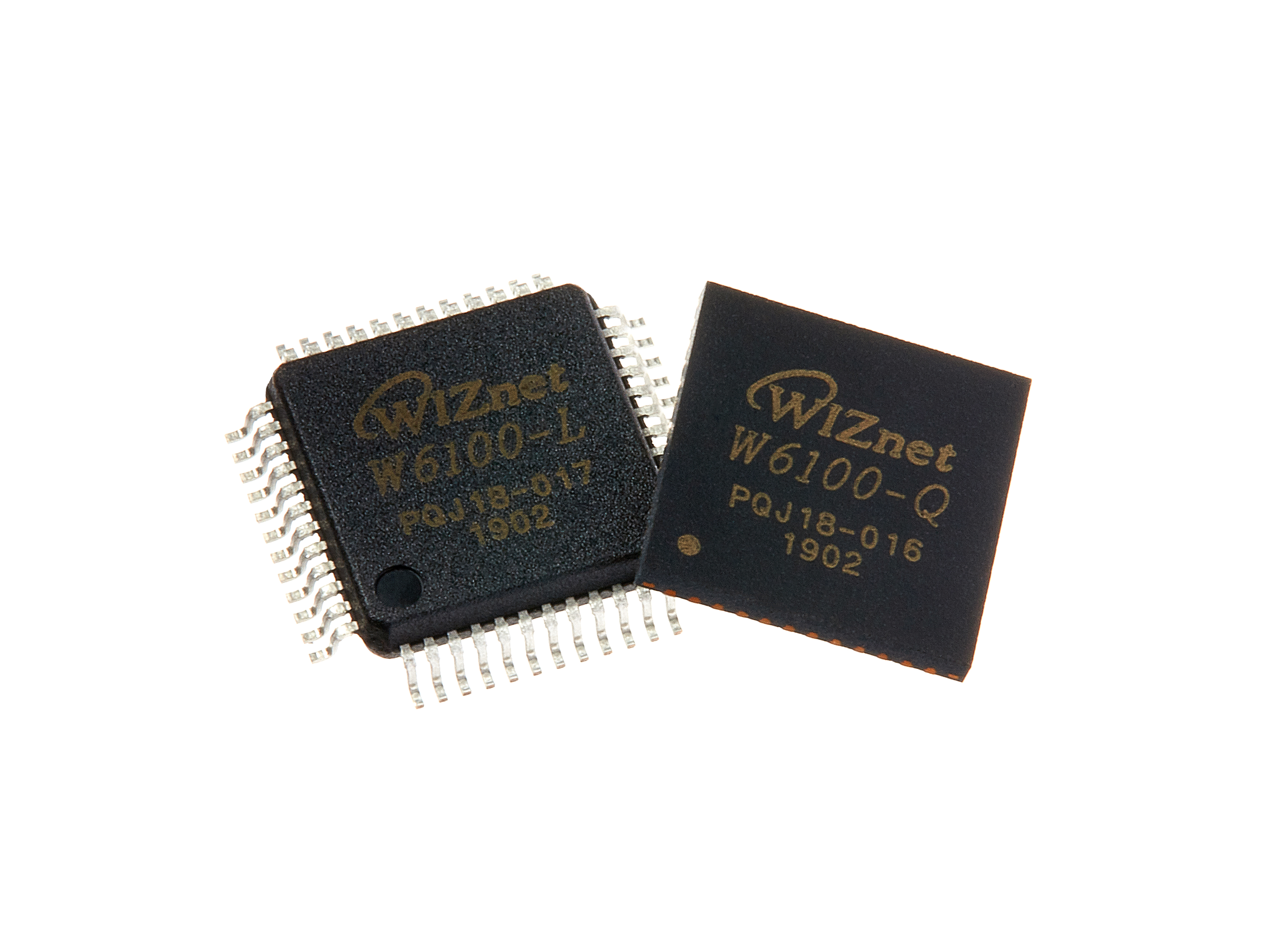
WIZnet - W6100
x 1

schikani/tinydesk
Project description
https://github.com/schikani/tinydesk
This article describes the repository as of 2026-09-28 (last push), at release v0.1.2, which the README labels a "Developer preview".
Overview
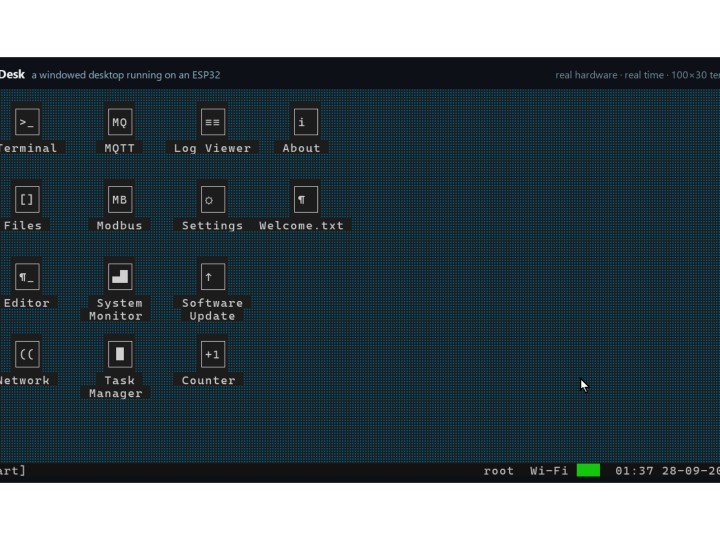
TinyDesk is a text-mode desktop environment that runs on an ESP32 and is displayed in an ordinary terminal over the board's serial port: overlapping, draggable windows, a taskbar and a start menu are drawn with ANSI escape sequences, and the keyboard and mouse are read back from the terminal. The board runs the desktop and the computer only displays it. Inside the desktop, a Terminal window hosts a full shell, TinyDesk Shell, and the firmware brings networking along with it: the README states that "Wi-Fi and W6100 Ethernet are available from the shell", and the build links the ESP-IDF W6100 driver component. Ethernet is optional and is switched on through a board configuration key, so this project is a case where a WIZnet W6100 is one of several network paths of a larger ESP32 system rather than its centre.
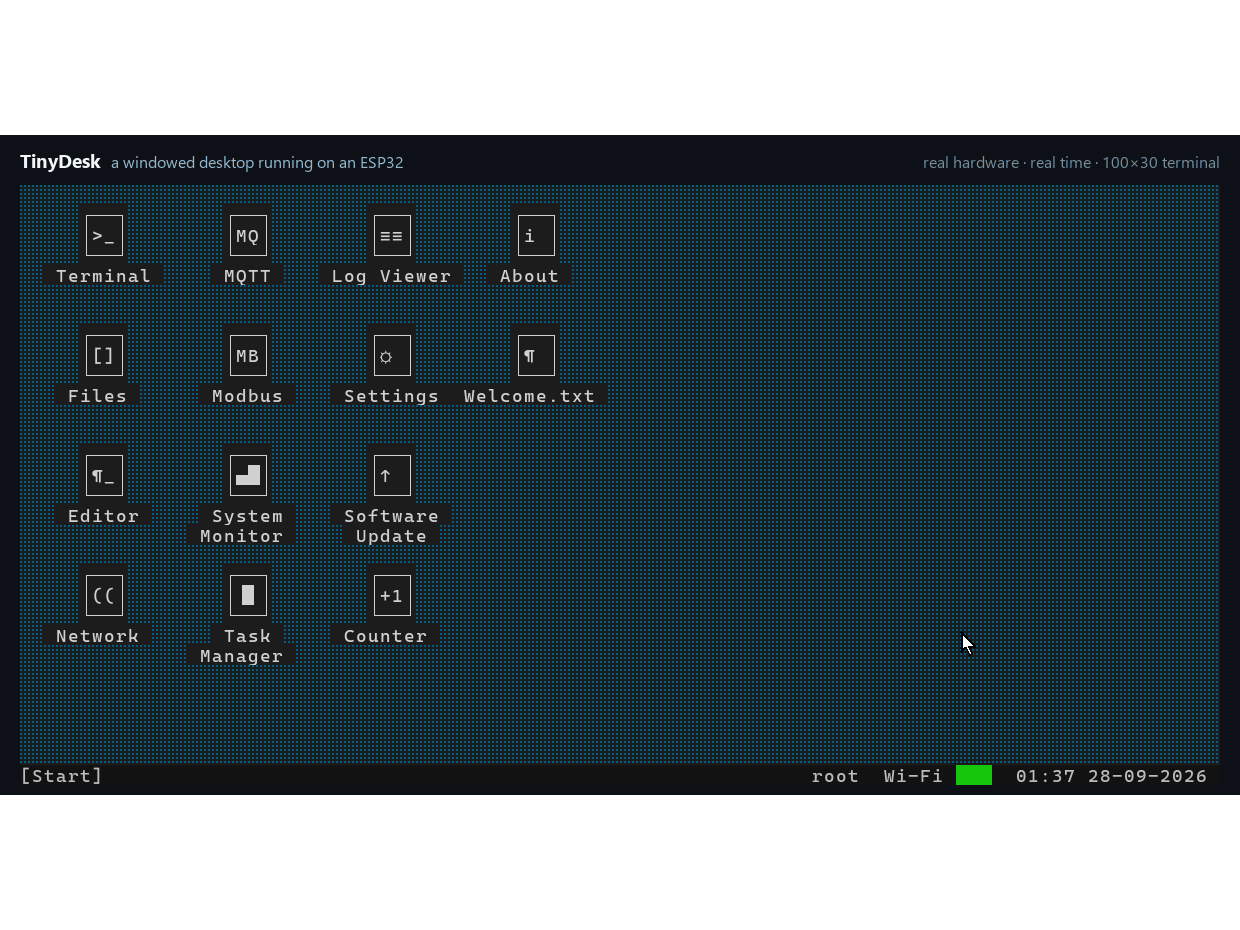
The README describes this capture as one continuous take from an ESP32 over USB serial at normal speed, in which Editor, Files, System Monitor and Terminal are opened, dragged and resized side by side before the About window is shown.
The core is written in portable C11 with no third-party dependencies. Screen buffers are allocated at initialization (pasted text can grow a heap buffer with realloc()), and only changed cells are sent each frame. Ports exist for ESP32 boards through ESP-IDF, for Linux and for Windows, and the README says a new target needs four functions. The bundled applications are Terminal (the shell), Files, Editor, Network, MQTT, Modbus (TCP and RTU), Task Manager, System Monitor, Log Viewer, Settings and Software Update (OTA), plus a small API for writing your own. Shell scripts with the .tdsh extension support variables, if/while/for, functions, pipes and redirection.
Hardware & Software Configuration
No display hardware is involved. The user needs a UTF-8 terminal with ANSI/VT cursor control and xterm mouse reporting, for example a configured PuTTY session or the project's web terminal, connected to the board's serial port. The README lists these desktop targets:
| Desktop target | Hardware | Console / limits |
|---|---|---|
| ESP32-C6 | 8 MB flash | Built-in USB Serial/JTAG |
| Classic ESP32 with PSRAM | 16 MB flash, PSRAM required | USB-UART, 921600 baud |
| Classic ESP32, 4 MB | PSRAM optional | USB-UART, 921600 baud; 80×25, no SSH server or OTA |
| PC | Linux, Windows with MinGW, or macOS | Compatible terminal; host simulator for development |
The ESP32 ports build with ESP-IDF 5.3.1: ports/esp32c6 for the ESP32-C6, ports/esp32 for the classic ESP32 with PSRAM, and ports/esp32-4mb for the 4 MB classic ESP32 without PSRAM. The PC build uses CMake and Ninja. The shell lives in a separate repository, tinydesk-shell, and is pulled in as the git submodule third_party/tdsh, so the repository must be cloned with --recursive. Prebuilt releases ship firmware images, the PC programs and SHA256SUMS.txt, and a browser-based installer can flash an ESP32 from Chrome or Edge without a toolchain.
Peripheral wiring is deliberately kept out of the source code. The RS-485 lines, the W6100 Ethernet controller, the SD card and the ESP32 console UART are described in a small key = value file: the user copies board.example.conf to board.conf in the port directory, and on a running board the same keys can be changed as root, for example board set rs485.1.tx 16, without rebuilding. The sdkconfig.defaults files of the ports repeat this: board wiring, including W6100 Ethernet, is not configured there. The CMake files of the ESP32 ports list the pinned third-party components as littlefs, wolfSSL, W6100 and libsmb2; wolfSSH and wolfSSL provide the SSH/SFTP server.
System Architecture
The ESP32 runs everything: the desktop core, the applications, TinyDesk Shell and the network services. The PC terminal is only a display and input device on the serial link. Network interfaces sit behind the shell, and remote clients reach the board over Telnet, SSH/SFTP or FTP, while the MQTT and Modbus apps talk to other devices.
flowchart TB
    PC["PC terminal<br/>PuTTY or web terminal"]
    subgraph ESP["ESP32 / ESP32-C6 firmware"]
        CORE["TinyDesk core (C11)<br/>windows, taskbar, apps"]
        SH["TinyDesk Shell<br/>Telnet, SSH/SFTP, FTP, SMB"]
        IP["ESP-IDF network stack"]
    end
    WIFI["Wi-Fi"]
    W6100["WIZnet W6100<br/>SPI, optional"]
    RS485["RS-485 lines<br/>Modbus RTU"]
    SD["SD card<br/>shared SPI bus"]
    NET["LAN clients<br/>MQTT, Modbus TCP"]
    PC <-->|USB serial| CORE
    CORE <--> SH
    SH <--> IP
    IP <--> WIFI
    IP <--> W6100
    SH <--> RS485
    SH <--> SD
    WIFI <--> NET
    W6100 <--> NET
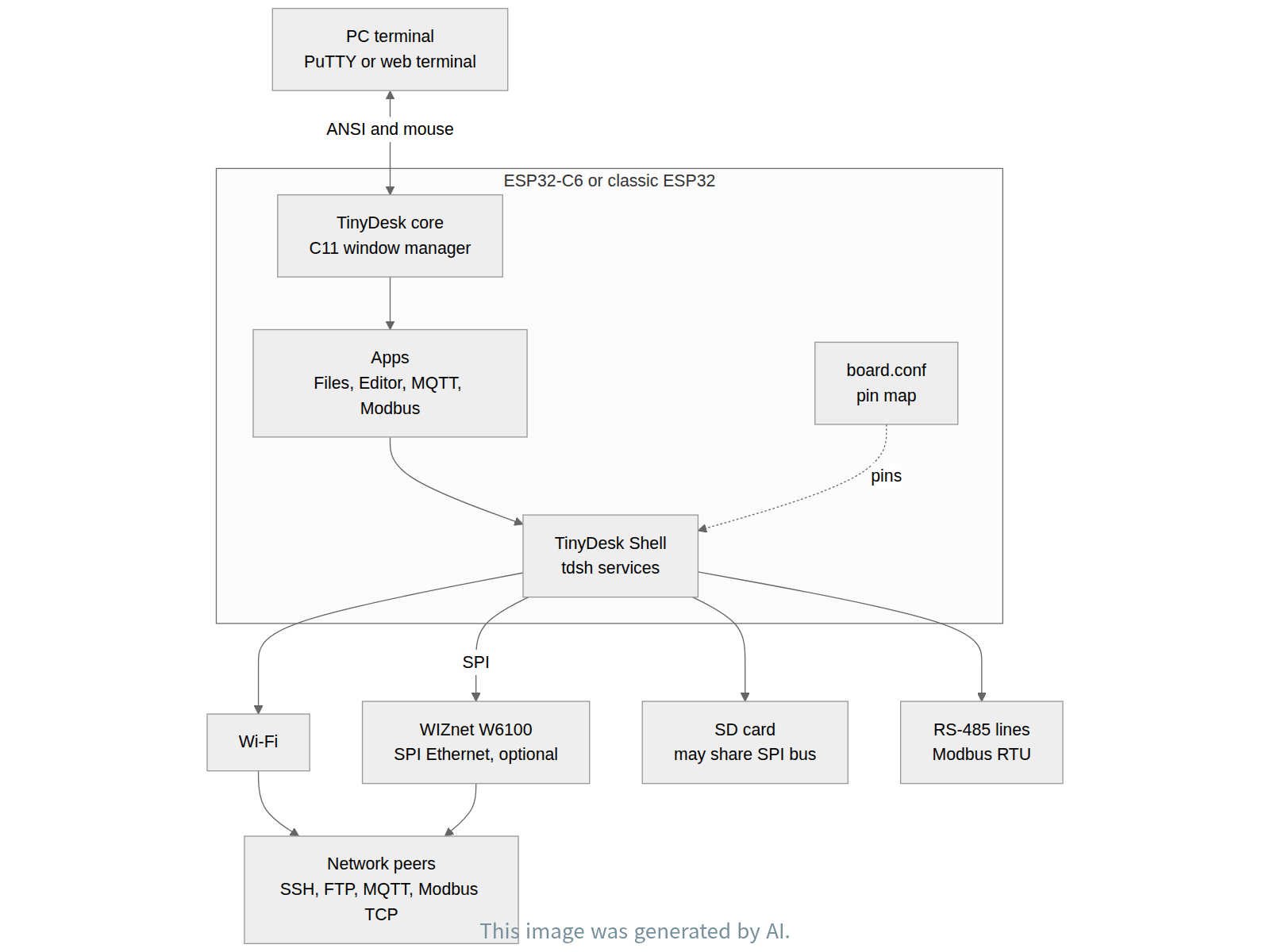
The desktop takeover over the network is a narrow, opt-in path: the README calls it optional and root-only, and it runs over unencrypted Telnet. SSH provides an encrypted shell and SFTP, but not the windowed desktop. Telnet starts disabled and needs an explicit Network setting, and Telnet, SSH and FTP refuse remote authentication while the factory root password is still set.
What Makes TinyDesk a Desktop Environment?
On Linux, desktop environments such as GNOME, LXDE, and LXQt provide a unified workspace for launching applications, managing windows, navigating files, and switching between tasks. TinyDesk brings a subset of this desktop experience to resource-constrained microcontrollers such as the ESP32.
Rather than offering only a command-line interface, TinyDesk provides overlapping and movable windows, a taskbar, a start menu, and integrated applications for file management, editing, system monitoring, and network operations. Users can interact with multiple tools through a familiar desktop-style workspace.
The key design decision is to separate the desktop experience from conventional pixel-based graphics. Instead of requiring a graphics display, framebuffer, and full graphical windowing stack, TinyDesk renders its interface using character cells and ANSI/VT terminal control sequences. A connected terminal handles visual presentation and input, while the ESP32 maintains application and window states.
This design offers several practical advantages:
Lower graphics overhead: Character-cell rendering avoids maintaining a conventional pixel framebuffer, while transmitting only changed cells reduces serial output.
Simplified hardware: A compatible terminal replaces the need for a dedicated graphics display and associated display interface.
Integrated device management: File operations, configuration, network utilities, and system monitoring are accessible within one workspace rather than through disconnected command-line tools.
Portability: A portable C11 core separates the desktop logic from platform-specific input/output implementations.
The trade-off is that TinyDesk cannot provide arbitrary pixel graphics or run existing Linux GUI applications. It recreates selected desktop interaction patterns rather than implementing a complete Linux desktop environment.
In this architecture, the optional WIZnet W6100 provides wired Ethernet connectivity for the ESP32's network applications and services. It does not perform desktop rendering. The result is a compact device-management environment that combines desktop-style interaction with embedded networking.
Role of the WIZnet W6100
In TinyDesk the W6100 is the wired Ethernet interface of the ESP32 firmware, offered next to Wi-Fi. Its presence in the build is visible in ports/esp32/CMakeLists.txt: lines 43 to 47 take the ESP-IDF component espressif__w6100 (the W6100 driver) and link it together with espressif__wiznet_common, with the comment "the W6100 driver needs wiznet_common". The 4 MB port does the same in ports/esp32-4mb/CMakeLists.txt, and the ESP32-C6 port pins espressif/w6100 and espressif/wiznet_common in ports/esp32c6/dependencies.lock.
Ethernet is not on by default. The example board configuration ports/esp32/board.example.conf has a section headed "W6100 Ethernet on SPI (VSPI)" whose eth.chip = w6100 line is commented out; the user enables the chip by setting that key in their own board.conf. The ESP32-C6 example, ports/esp32c6/board.example.conf, states it directly: "eth.chip = w6100 turns it on; eth.int = -1 polls every eth.poll_ms", so the interrupt line is optional and the driver can poll instead.
The data path is therefore: the ESP32 (classic ESP32 or ESP32-C6) drives the W6100 over SPI, on the VSPI bus of the classic ESP32; the espressif__w6100 component is an ESP-IDF Ethernet (esp_eth) MAC/PHY driver, so Ethernet frames go between the chip and the ESP32, where ESP-IDF's lwIP stack handles TCP/IP. On top of that stack sit the shell's network services (Telnet, SSH/SFTP, FTP, SMB mounts) and the desktop's MQTT and Modbus TCP apps, which carry data between the board and hosts on the LAN.
The SPI bus is shared as well. The release notes say to run board set sd.cs 22 when the SD card shares the W6100's eth.* bus, and docs/VALIDATION.md records a 16 GB SDHC card tested on the ESP32-C6 on the W6100's SPI bus with hwtest sd. RS-485 is a separate serial path, used by the Modbus RTU side of the Modbus app.
FAQ
Does TinyDesk need a display attached to the ESP32? No. The desktop is drawn with ANSI escape sequences into a terminal on the PC, over USB serial. The terminal must support UTF-8, ANSI/VT cursor control and xterm mouse reporting.
Is W6100 Ethernet always active? No. It is configured per board. Set eth.chip = w6100 in board.conf (the key is commented out in board.example.conf); on a running board, board keys can also be changed with board set as root.
Where are the pin assignments? Not in the code. RS-485 lines, W6100 Ethernet, the SD card and the ESP32 console UART come from board.conf, copied from board.example.conf in the port directory.
Which boards are supported? The ESP32-C6 with 8 MB flash, the classic ESP32 with 16 MB flash and PSRAM, and the classic ESP32 with 4 MB flash, which is limited to 80×25 and has no SSH server or OTA. A host simulator runs on Linux, Windows with MinGW and macOS.
What is the licence? The source code is MIT. The README notes that firmware built with wolfSSH and wolfSSL, including the prebuilt releases, is distributed under GPLv3 as a whole.
What should I do on first connection? You start as root. Run passwd locally (the old password is TinyDesk) before enabling remote access; remote logins are refused while the factory password remains.
About the Author
TinyDesk is developed by GitHub user schikani, who also maintains tinydesk-shell, the shell (tdsh) with its ESP-IDF services and host port that TinyDesk includes as a submodule. The project ships a documentation site, a browser-based installer and a web terminal at schikani.github.io/tinydesk-docs, and releases with firmware images and checksums on GitHub.
개요
TinyDesk는 ESP32에서 돌고, 보드의 시리얼 포트에 연결한 일반 터미널에 표시되는 텍스트 모드 데스크톱 환경이다. 겹치고 끌어 옮길 수 있는 창, 작업 표시줄, 시작 메뉴를 ANSI 이스케이프 시퀀스로 그리고, 키보드와 마우스 입력을 터미널에서 다시 읽어 들인다. 데스크톱을 실행하는 것은 보드이고 컴퓨터는 화면만 보여 준다. 데스크톱 안의 Terminal 창에서는 완전한 셸인 TinyDesk Shell이 돌며, 펌웨어에는 네트워크 기능이 함께 들어 있다. README는 "Wi-Fi and W6100 Ethernet are available from the shell"이라고 적고 있고, 빌드는 ESP-IDF의 W6100 드라이버 컴포넌트를 링크한다. 이더넷은 보드 설정 키로 켜는 옵션이므로, 이 프로젝트에서 WIZnet W6100은 더 큰 ESP32 시스템의 여러 네트워크 경로 중 하나다.
이 글은 2026-09-28(마지막 push) 시점의 저장소, 릴리스 v0.1.2를 기준으로 한다. README는 이 버전을 "Developer preview"라고 표기한다.
README 설명에 따르면 이 화면은 실제 ESP32에서 USB 시리얼로 정상 속도로 한 번에 찍은 것이다. Editor, Files, System Monitor, Terminal 창을 열고 나란히 끌어 옮기고 크기를 바꾼 뒤 About 창을 띄운다.
코어는 외부 의존성이 없는 이식 가능한 C11 코드다. 화면 버퍼는 초기화 때 할당하고(붙여 넣은 텍스트만 realloc()으로 힙 버퍼를 키울 수 있다), 매 프레임 바뀐 셀만 전송한다. ESP-IDF 기반 ESP32 보드, Linux, Windows 포트가 있으며, README는 새 타깃에 함수 네 개만 구현하면 된다고 말한다. 기본 앱은 Terminal(셸), Files, Editor, Network, MQTT, Modbus(TCP와 RTU), Task Manager, System Monitor, Log Viewer, Settings, Software Update(OTA)이고, 직접 앱을 만드는 작은 API도 있다. .tdsh 셸 스크립트는 변수, if/while/for, 함수, 파이프와 리다이렉션을 지원한다.
하드웨어·소프트웨어 구성
디스플레이 하드웨어는 쓰지 않는다. UTF-8, ANSI/VT 커서 제어, xterm 마우스 리포팅을 지원하는 터미널(예: 설정을 맞춘 PuTTY나 프로젝트의 웹 터미널)을 보드의 시리얼 포트에 연결하면 된다. README가 밝힌 데스크톱 타깃은 다음과 같다.
| 데스크톱 타깃 | 하드웨어 | 콘솔 / 제약 |
|---|---|---|
| ESP32-C6 | 8 MB 플래시 | 내장 USB Serial/JTAG |
| 클래식 ESP32 + PSRAM | 16 MB 플래시, PSRAM 필수 | USB-UART, 921600 baud |
| 클래식 ESP32, 4 MB | PSRAM 선택 | USB-UART, 921600 baud; 80×25, SSH 서버·OTA 없음 |
| PC | Linux, MinGW 기반 Windows, macOS | 호환 터미널; 개발용 호스트 시뮬레이터 |
ESP32 포트는 ESP-IDF 5.3.1로 빌드한다. ESP32-C6은 ports/esp32c6, PSRAM이 있는 클래식 ESP32는 ports/esp32, PSRAM 없는 4 MB 클래식 ESP32는 ports/esp32-4mb다. PC 빌드는 CMake와 Ninja를 쓴다. 셸은 별도 저장소 tinydesk-shell에 있고 git 서브모듈 third_party/tdsh로 들어오므로 --recursive로 클론해야 한다. 릴리스마다 펌웨어 이미지, PC 프로그램, SHA256SUMS.txt가 올라오며, 브라우저 설치 도구로 툴체인 없이 Chrome이나 Edge에서 ESP32를 플래시할 수도 있다.
주변장치 배선은 일부러 소스 코드 밖에 둔다. RS-485 라인, W6100 이더넷 컨트롤러, SD 카드, ESP32 콘솔 UART는 작은 key = value 파일로 기술한다. 포트 디렉터리의 board.example.conf를 board.conf로 복사해 고치고, 실행 중인 보드에서는 root로 board set rs485.1.tx 16처럼 같은 키를 재빌드 없이 바꿀 수 있다. 각 포트의 sdkconfig.defaults도 W6100 이더넷을 포함한 보드 배선은 여기서 설정하지 않는다고 적어 둔다. ESP32 포트의 CMake 파일은 고정된 외부 컴포넌트로 littlefs, wolfSSL, W6100, libsmb2를 나열하며, SSH/SFTP 서버는 wolfSSH와 wolfSSL이 맡는다.
시스템 구조
모든 처리는 ESP32가 한다. 데스크톱 코어, 앱, TinyDesk Shell, 네트워크 서비스가 모두 보드 위에서 돌고, PC 터미널은 시리얼 링크 너머의 표시·입력 장치일 뿐이다. 네트워크 인터페이스는 셸 뒤에 있으며, 원격 클라이언트는 Telnet, SSH/SFTP, FTP로 보드에 접속하고 MQTT·Modbus 앱은 다른 장치와 통신한다.
네트워크를 통한 데스크톱 접속은 좁게 열린 선택 경로다. README는 이를 선택 사항이자 root 전용이라고 하며, 암호화되지 않은 Telnet으로 동작한다. SSH는 암호화된 셸과 SFTP를 제공하지만 창 데스크톱은 제공하지 않는다. Telnet은 꺼진 상태로 시작해 Network 설정에서 명시적으로 켜야 하고, 공장 초기 root 비밀번호가 남아 있는 동안 Telnet, SSH, FTP는 원격 인증을 거부한다.
TinyDesk가 데스크톱 환경인 이유
Linux의 GNOME, LXDE, LXQt와 같은 데스크톱 환경은 애플리케이션 실행, 창 관리, 파일 탐색, 작업 전환 기능을 하나의 통합된 작업 공간으로 제공한다. TinyDesk는 이러한 데스크톱 환경의 핵심 사용 경험을 ESP32와 같은 자원 제약이 큰 마이크로컨트롤러에서 구현한 프로젝트다.
TinyDesk는 단순한 명령줄 인터페이스를 넘어 겹치거나 이동할 수 있는 창, 작업 표시줄, 시작 메뉴를 제공하며, 파일 관리, 텍스트 편집, 시스템 모니터링, 네트워크 관리 도구를 하나의 작업 공간에서 사용할 수 있도록 한다.
핵심 설계 전략은 데스크톱의 사용 경험과 픽셀 기반 그래픽 렌더링을 분리하는 것이다. 전용 그래픽 디스플레이나 픽셀 프레임버퍼, 완전한 그래픽 윈도잉 스택 대신 문자 셀과 ANSI/VT 터미널 제어 시퀀스로 인터페이스를 구성한다. 연결된 터미널이 실제 화면 표시와 입력을 담당하고, ESP32는 애플리케이션 및 창의 상태를 관리한다.
이러한 구조에는 다음과 같은 장점이 있다.
그래픽 처리 부담 감소: 픽셀 프레임버퍼를 유지하지 않고 문자 셀을 사용하며, 변경된 셀만 전송하여 시리얼 출력량을 줄인다.
하드웨어 구성 단순화: 별도의 그래픽 디스플레이 없이 호환 터미널을 통해 인터페이스를 사용할 수 있다.
장치 관리 편의성: 파일 관리, 설정, 네트워크 도구, 시스템 상태 확인 등을 여러 개의 독립된 명령줄 도구 대신 통합된 작업 공간에서 사용할 수 있다.
이식성: C11 기반 코어와 플랫폼별 입출력 구현을 분리하여 다양한 시스템에서 동일한 데스크톱 기능을 활용할 수 있다.
반면 임의의 픽셀 그래픽을 표현하거나 기존 Linux GUI 애플리케이션을 실행할 수는 없다. TinyDesk는 완전한 Linux 데스크톱을 이식한 것이 아니라, 그중 유용한 상호작용 방식을 임베디드 환경에 맞게 재구성한 것이다.
선택적으로 연결되는 WIZnet W6100은 ESP32의 네트워크 애플리케이션과 서비스에 유선 Ethernet 연결을 제공한다. 데스크톱 렌더링 자체를 담당하지는 않는다. 결과적으로 TinyDesk는 데스크톱 방식의 사용 편의성과 임베디드 네트워크 기능을 결합한 경량 장치 관리 환경이라고 볼 수 있다.
WIZnet W6100의 역할
TinyDesk에서 W6100은 ESP32 펌웨어의 유선 이더넷 인터페이스이며 Wi-Fi와 나란히 제공된다. 빌드에 들어가 있다는 근거는 ports/esp32/CMakeLists.txt에 있다. 43~47행이 ESP-IDF 컴포넌트 espressif__w6100(W6100 드라이버)을 가져와 espressif__wiznet_common과 함께 링크하며, 주석에 "the W6100 driver needs wiznet_common"이라고 적혀 있다. 4 MB 포트도 ports/esp32-4mb/CMakeLists.txt에서 같은 구성을 쓰고, ESP32-C6 포트는 ports/esp32c6/dependencies.lock에 espressif/w6100과 espressif/wiznet_common을 고정해 둔다.
이더넷은 기본으로 켜져 있지 않다. 예시 보드 설정 ports/esp32/board.example.conf에는 "W6100 Ethernet on SPI (VSPI)" 절이 있고 그 안의 eth.chip = w6100 줄은 주석 처리돼 있다. 사용자가 자기 board.conf에 이 키를 설정하면 칩이 켜진다. ESP32-C6 예시 ports/esp32c6/board.example.conf는 "eth.chip = w6100 turns it on; eth.int = -1 polls every eth.poll_ms"라고 직접 설명한다. 즉 인터럽트 선은 선택이고, 없으면 드라이버가 폴링한다.
데이터 흐름은 이렇다. ESP32(클래식 ESP32 또는 ESP32-C6)가 SPI로 W6100을 구동하며, 클래식 ESP32에서는 VSPI 버스를 쓴다. espressif__w6100 컴포넌트는 ESP-IDF 이더넷(esp_eth)의 MAC/PHY 드라이버이므로 칩과 ESP32 사이에는 이더넷 프레임이 오가고, TCP/IP 처리는 ESP32 쪽 ESP-IDF의 lwIP 스택이 맡는다. 그 스택 위에서 셸의 네트워크 서비스(Telnet, SSH/SFTP, FTP, SMB 마운트)와 데스크톱의 MQTT, Modbus TCP 앱이 보드와 LAN의 호스트 사이로 데이터를 주고받는다.
SPI 버스는 공유되기도 한다. 릴리스 노트는 SD 카드가 W6100의 eth.* 버스를 함께 쓸 때 board set sd.cs 22를 실행하라고 안내하고, docs/VALIDATION.md는 ESP32-C6에서 W6100의 SPI 버스에 붙인 16 GB SDHC 카드를 hwtest sd로 검증한 기록을 남겼다. RS-485는 별도의 시리얼 경로로, Modbus 앱의 RTU 쪽이 사용한다.
자주 묻는 질문
ESP32에 디스플레이를 달아야 하나? 아니다. 데스크톱은 USB 시리얼로 연결한 PC 터미널 안에 ANSI 이스케이프 시퀀스로 그려진다. 터미널은 UTF-8, ANSI/VT 커서 제어, xterm 마우스 리포팅을 지원해야 한다.
W6100 이더넷은 항상 켜져 있나? 아니다. 보드별로 설정한다. board.conf에 eth.chip = w6100을 넣으면 되며(board.example.conf에서는 주석 처리돼 있다), 실행 중인 보드에서는 root로 board set 명령을 써서 보드 키를 바꿀 수도 있다.
핀 배정은 어디에 있나? 코드에는 없다. RS-485 라인, W6100 이더넷, SD 카드, ESP32 콘솔 UART는 포트 디렉터리의 board.example.conf를 복사한 board.conf에서 읽는다.
어떤 보드를 지원하나? 8 MB 플래시의 ESP32-C6, 16 MB 플래시와 PSRAM이 있는 클래식 ESP32, 4 MB 플래시 클래식 ESP32다. 4 MB 판은 80×25로 제한되고 SSH 서버와 OTA가 없다. 호스트 시뮬레이터는 Linux, MinGW 기반 Windows, macOS에서 돈다.
라이선스는? 소스 코드는 MIT다. README는 wolfSSH와 wolfSSL을 포함해 빌드한 펌웨어(배포 릴리스 포함)는 전체적으로 GPLv3 조건으로 배포된다고 밝힌다.
처음 연결하면 무엇부터 해야 하나? root로 시작한다. 원격 접속을 켜기 전에 로컬에서 passwd를 실행한다(기존 비밀번호는 TinyDesk). 공장 초기 비밀번호가 남아 있는 동안에는 원격 로그인이 거부된다.
저자 소개
TinyDesk는 GitHub 사용자 schikani가 개발한다. 같은 저자가 TinyDesk에 서브모듈로 들어가는 셸 tdsh와 그 ESP-IDF 서비스·호스트 포트를 담은 tinydesk-shell도 관리한다. 문서 사이트, 브라우저 설치 도구, 웹 터미널은 schikani.github.io/tinydesk-docs에 있고, 펌웨어 이미지와 체크섬을 담은 릴리스는 GitHub에 올라온다.


