driver_locker-restapi-code
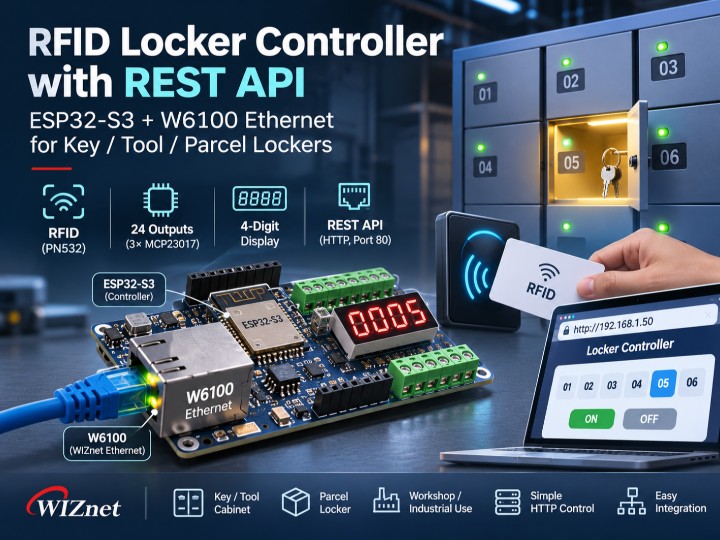
ESP32-S3 locker controller: W6100 Ethernet serves an HTTP page that shows PN532 RFID card UIDs, switches 24 relays and takes OTA updates.
0
Components
Hardware components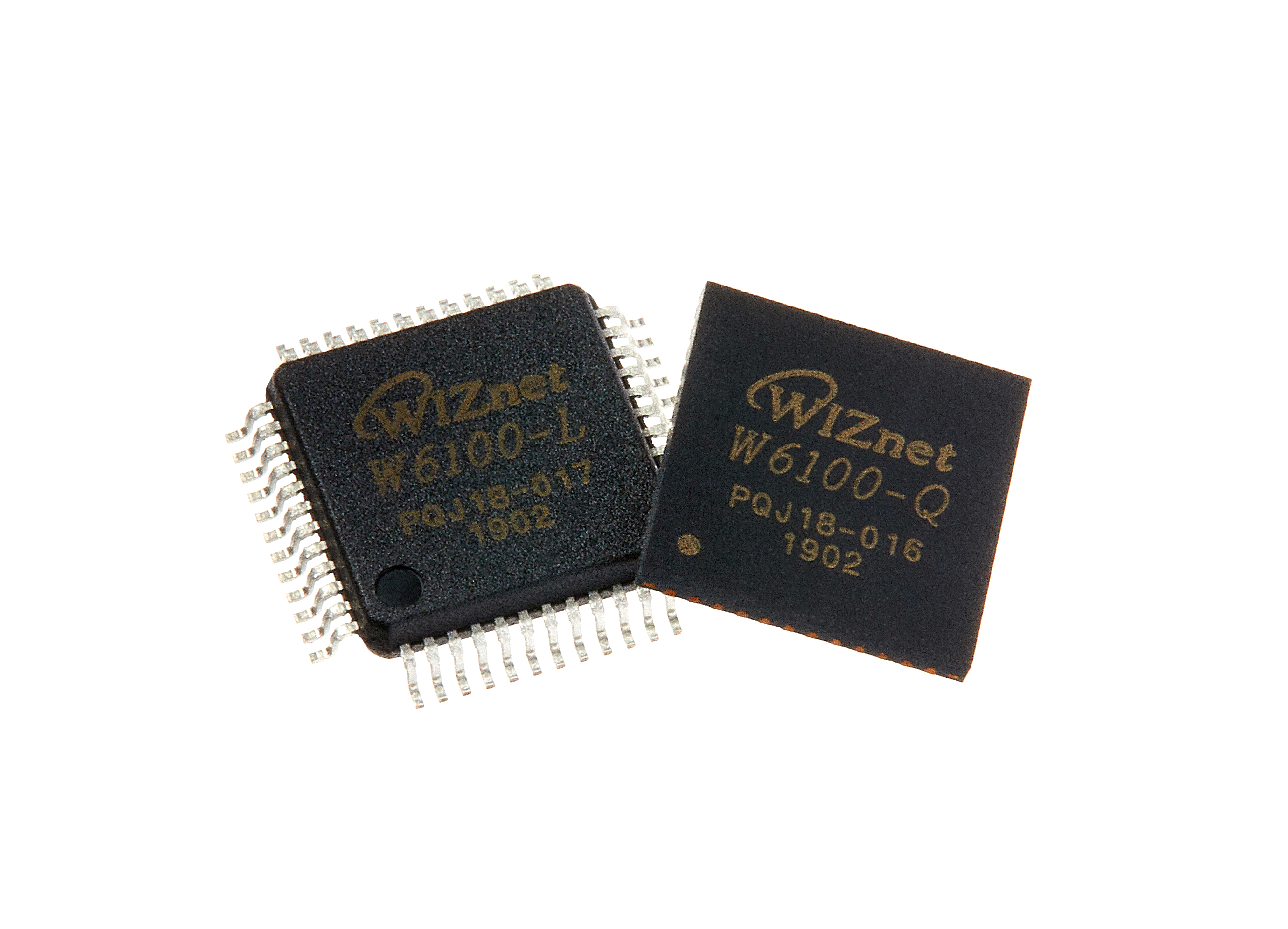
WIZnet - W6100
x 1

Espressif - ESP32-S3
x 1
Project description
Overview
driver_locker-restapi-code is firmware for a locker controller built from an ESP32-S3 and a WIZnet W6100 Ethernet chip. It reads RFID cards with a PN532 reader, switches up to 24 outputs through three MCP23017 I/O expanders, shows a number on a 4-digit 7-segment display, and puts all of it behind simple HTTP URLs served over the wired W6100 link; the code does not use Wi-Fi. The repository is by GitHub user krupecek (driver_locker-restapi-code, created 2026-06-24, last push 2026-09-19).
It is a practical base for cabinets that open a compartment after a card swipe under central control: key or tool cabinets in a workshop, vehicle key lockers at a depot, or parcel locker walls. Because each output is a plain URL, the same board also works as an Ethernet relay box for lab and test benches, switched from a script or curl.
At a Glance
- What it is: a small, readable Arduino firmware (10 source files) for a networked locker or key-cabinet controller. Comments and UI text are in Polish.
- Network: WIZnet W6100 on SPI,
CS = 10,RST = 14(config.h:22-24), driven through the third-party Arduino libraryEthernet_Generic(web.cpp:6). - Address: static IP
192.168.1.50, HTTP server on port 80 (web.cpp:9-12). - I/O: PN532 RFID reader at I2C
0x24(README.md:13), three MCP23017 at0x20/0x21/0x22(mcp23017.cpp:7), both on I2C pins 19/20. - Control surface:
/uid,/set,/on,/off, plus a browser OTA firmware update at/updateand/doUpdate. - Stage: prototype. The README says the prototype is being tested with ESP32 Arduino core 3.3.10 (README.md:7-9).
Why Is This Project Worth a Look?
A locker that hands out keys or tools needs three things: know who is standing in front of it (card reader), open the right door (outputs), and report to some central system (network). This repository does all three on one ESP32-S3 board with very little code, which makes it easy to read in one sitting and easy to adapt.
The choice of a wired link fits the job. A locker usually sits in a fixed spot in a workshop, depot, or office corridor, where a cable is more predictable than Wi-Fi. Here the whole control path goes through the W6100 Ethernet chip and nothing else.
The design is also honest about its role. The firmware does not keep a list of allowed cards. It reads the card, publishes the UID, and waits for commands. The decision of who may open which compartment lives on whatever system calls the URLs. For a fleet of lockers managed from one server, that split is a sensible starting point.
How Does It Work?
 PN532 RFID (I2C 0x24) ──┐
                         ├── I2C (SDA 19 / SCL 20) ──┐
 3x MCP23017 (0x20-0x22) ┘                           │
   24 outputs "Relay 1..24"                           │
                                               ┌──────┴───────┐
 4-digit 7-seg display ── GPIO (multiplexed) ──┤   ESP32-S3   │
   (task pinned to core 0)                     │  loop():     │
                                               │  rfidTask()  │
                                               │  webTask()   │
                                               └──────┬───────┘
                                                      │ SPI (CS 10, RST 14)
                                               ┌──────┴───────┐
                                               │    W6100     │  TCP server, port 80
                                               └──────┬───────┘
                                                      │ Ethernet
                                       Browser / locker management server
                                       GET /uid  /on?i=  /off?i=  /set?v=
setup() brings up I2C, the RFID reader, the display, the MCP23017 expanders, and finally the W6100 web server, logging each step to serial (ESP32_S3_PANEL.ino:18-55). The display refresh runs as its own FreeRTOS task pinned to core 0 (ESP32_S3_PANEL.ino:36-44), so the main loop only has two jobs: poll the card reader and answer HTTP requests (ESP32_S3_PANEL.ino:57-69).
Which HTTP Endpoints Does the Locker Expose?
The repository name says "restapi", and in practice the interface is a set of simple GET URLs. Each one is matched by text in the first request line inside handle() in web.cpp. Responses are plain text or HTML; there is no JSON.
| Request | What the firmware does | Response | Source |
|---|---|---|---|
GET / | Builds the control panel page | HTML | web.cpp:153-195 |
GET /uid | Returns the last card UID | text/plain: hex UID, or Brak (none) | web.cpp:120-127 |
GET /set?v=N | Shows N on the display if 0 to 9999 | panel HTML | web.cpp:132-138 |
GET /on?i=N | Turns output N (1 to 24) on | panel HTML | web.cpp:140-143 |
GET /off?i=N | Turns output N off | panel HTML | web.cpp:145-148 |
GET /update | Serves the firmware upload page | HTML | web.cpp:34-67 |
POST /doUpdate | Writes the uploaded .bin to flash and restarts | OK or 500 | web.cpp:72-115 |
The UID format comes from the reader code: each byte is printed as two hex digits and the string is upper-cased (rfid.cpp:58-63). Brak is the initial value of lastUID before any card is read (ESP32_S3_PANEL.ino:8).
Output numbering maps directly onto the expanders. setRelay() turns ID 1 to 24 into chip (id-1)/8 and pin (id-1)%8, keeps a shadow byte per chip, and writes it to port A (mcp23017.cpp:25-35). So outputs 1 to 8 are on 0x20, 9 to 16 on 0x21, and 17 to 24 on 0x22. Port B of each MCP23017 is not used, which leaves room for door-sensor inputs later. The code labels the outputs only as "Relay 1..24"; what they are wired to (lock solenoids, indicator LEDs) is not in the repository.
How Does a Card Swipe Reach the Browser?
The flow is a short chain. rfidTask() checks the PN532 at most every 200 ms and waits up to 100 ms for an ISO14443A card (rfid.cpp:45-55). When a card is found, the main loop copies its UID into lastUID (ESP32_S3_PANEL.ino:62-66).
On the network side, the panel page includes a small script that calls /uid once per second and swaps the displayed UID when it changes (web.cpp:164-173). A management server can do the same: poll /uid, look the card up in its own database, then call /on?i=N for the right compartment and /set?v=N to show a number on the display.
That last step is the integration work a builder adds. The firmware itself never compares the UID against a list and never opens an output on its own; the only places that call setRelay() are the /on and /off handlers.
What W6100 Actually Does
The W6100 is the only network interface in this firmware. webInit() pulses the reset pin low for 200 ms, waits 1 s, then calls Ethernet.init(W6100_CS) and Ethernet.begin(mac, ip) with a fixed MAC and IP, and starts an EthernetServer on port 80 (web.cpp:14-26). webTask() asks the server for a waiting client and hands it to handle() (web.cpp:198-201).
Ethernet_Generic is a third-party Arduino library by Khoi Hoang (version 2.8.1 in its library.properties). It drives the chip through the chip's own hardware sockets: opening, listening, sending, and receiving are register commands such as Sock_OPEN, Sock_LISTEN, and Sock_SEND written to the chip (socket_Impl.h). In plain terms, the W6100 handles TCP/IP itself, including the TCP connection for each HTTP request, while the ESP32-S3 only reads and writes the request bytes over SPI. The ESP32-S3 does not run its own TCP/IP stack for this link.
What the W6100 does not do here is just as clear. It does not parse HTTP; the string matching on the request line is ESP32-S3 code. It does not provide IPv6 in this setup: the library's README lists W6100 support "using IPv4" as done and IPv6 for W6100 as a to-do item (Ethernet_Generic README). There is no Wi-Fi fallback in the code, and no DHCP: the address is the fixed 192.168.1.50.
How Does Firmware Update over Ethernet Work?
For a device that will be bolted inside a cabinet, updating over the cable is a real convenience. GET /update serves a page where the user picks a .bin file; a script sends the raw file bytes with fetch('/doUpdate', { method: 'POST', body: file }) (web.cpp:47-61).
On the device, the handler reads headers until the blank line, takes the size from Content-Length, calls Update.begin() with that size, and streams the body from the W6100 socket straight into flash with Update.writeStream(c) (web.cpp:76-90). On success it answers OK and restarts the ESP32-S3 (web.cpp:92-102). Sending raw bytes instead of a multipart form keeps the parser short, which the author notes in the code comments.
Where Could You Use It?
- Key or tool cabinet in a workshop: card at the reader, server checks the employee, the right compartment opens.
- Vehicle key locker for a depot: fixed wiring, central log of who took which key.
- Parcel or locker wall: 24 outputs per board, the display shows a compartment or pickup number.
- Ethernet relay board for lab or test benches: the
/onand/offURLs are easy to call from a script orcurl. - Starting point for a W6100 + ESP32-S3 Arduino project: a compact example of
Ethernet_Generic, an HTTP server, and OTA on one board.
Engineering Value and Source Limits
The value is a complete, small control path: card in, UID out over Ethernet, outputs and display controlled over Ethernet, firmware updated over Ethernet. The code is short enough to read in full, and the split between I/O node and decision server is clean.
Check these points before using it:
- No license file. The repository has no license, so default copyright applies. Ask the author before reusing the code.
- No authentication. Every URL, including
/on,/off, and the firmware upload at/doUpdate, works for anyone who can reach the IP. For a locker, put it on an isolated network or add authentication first. - No access logic on the device. The firmware does not check cards against a list; your server must do that.
- Not all pins are in the repo. Only W6100
CSandRSTare defined.SPI.begin()is called without pins (web.cpp:21), so SCK/MOSI/MISO come from the board's default SPI pins. There is no schematic. - Fixed network settings. MAC
DE:AD:BE:EF:FE:01and IP192.168.1.50are hard-coded (web.cpp:9-10); change both when installing more than one unit. - Prototype stage. The latest commit message is "nojnowse-do-testow" (roughly "newest for tests"). There are no test results or field reports in the repository.
- Library status. The
Ethernet_Genericrepository is archived on GitHub. Build compatibility with the ESP32 Arduino core 3.3.10 named in the README is the author's setup; it is not documented in the library.
Related WIZnet Maker Reading Path
- How to build an offline-first ESP32-S3 access-control firmware with a W5500 Ethernet — the opposite design choice: access decisions made on the device.
- RP2350 RFID TCP Controller with W6300 Ethernet — RFID reader plus wired TCP on a different MCU and chip.
- Why Use an Async Web Server with W6100 on ESP32? — another way to serve HTTP from ESP32 over W6100.
- TinyDesk: A Windowed Text-Mode Desktop Served by an ESP32, with Optional W6100 Ethernet — W6100 on ESP32 in a very different application.
Source-Backed Summary
- ESP32-S3 locker controller firmware: PN532 RFID, three MCP23017 (24 outputs), 4-digit 7-segment display, W6100 Ethernet.
- W6100 on SPI with
CS = 10,RST = 14, driven by the third-partyEthernet_Genericlibrary through the chip's hardware sockets. - HTTP control:
/uid,/set?v=,/on?i=,/off?i=, plus OTA at/updateand/doUpdate. Plain text and HTML, no JSON. - Wired only, static IP
192.168.1.50, no Wi-Fi, no DHCP, no authentication. - Prototype stage, no license file.
FAQ
Does the locker decide by itself which card may open a door?
No. The firmware only reads the card and publishes its UID at /uid. Outputs change only when /on?i=N or /off?i=N is called, so the access decision belongs to the system that calls those URLs.
Does the ESP32-S3 run TCP/IP for the Ethernet link?
No. Through Ethernet_Generic, the W6100 opens, listens on, and manages TCP connections in its own hardware sockets. The ESP32-S3 handles the HTTP text and the application logic.
Is it a JSON REST API?
Not in the current code. Commands are GET URLs with query parameters, and responses are plain text (/uid) or the HTML panel page.
Can I use it over Wi-Fi?
Not as written. The code includes no Wi-Fi library and starts only the W6100 Ethernet server.
Is it safe to expose on an office network?
Not without changes. There is no login or token on any endpoint, including firmware upload. Keep it on an isolated network or add authentication.
Can I reuse the code in my product?
The repository has no license file. Contact the author before reuse.
ESP32-S3 사물함 컨트롤러는 W6100 이더넷으로 어떻게 릴레이 24개와 RFID 카드를 다루는가?
개요
driver_locker-restapi-code는 ESP32-S3와 WIZnet W6100 이더넷 칩으로 만든 사물함 컨트롤러 펌웨어다. PN532 리더로 RFID 카드를 읽고, MCP23017 I/O 확장 칩 3개로 출력 최대 24개를 켜고 끄며, 4자리 7세그먼트 표시기에 숫자를 띄운다. 이 기능 전부를 유선 W6100으로 서비스하는 단순한 HTTP URL 뒤에 두었고, 코드에서 Wi-Fi는 쓰지 않는다. 저장소는 GitHub 사용자 krupecek의 것이다(driver_locker-restapi-code, 2026-06-24 생성, 마지막 푸시 2026-09-19).
카드를 대면 중앙의 판단에 따라 칸을 여는 보관함의 기반으로 실용적이다. 작업장의 열쇠·공구함, 차고지의 차량 열쇠함, 택배 보관함 벽이 대표적이다. 출력 하나하나가 단순한 URL이라서, 같은 보드를 스크립트나 curl로 켜고 끄는 실험실·테스트 벤치용 이더넷 릴레이 박스로도 쓸 수 있다.
한눈에 보기
- 정체: 네트워크형 사물함·열쇠함 컨트롤러용 Arduino 펌웨어. 소스 파일 10개로 작고 읽기 쉽다. 주석과 UI 문구는 폴란드어다.
- 네트워크: WIZnet W6100을 SPI로 연결,
CS = 10,RST = 14(config.h:22-24). 서드파티 Arduino 라이브러리Ethernet_Generic으로 구동한다(web.cpp:6). - 주소: 고정 IP
192.168.1.50, HTTP 서버 포트 80(web.cpp:9-12). - I/O: PN532 RFID 리더 I2C
0x24(README.md:13), MCP23017 3개0x20/0x21/0x22(mcp23017.cpp:7). 둘 다 I2C 핀 19/20에 연결된다. - 제어 URL:
/uid,/set,/on,/off, 그리고 브라우저 펌웨어 업데이트(OTA)/update,/doUpdate. - 단계: 시제품. README에 시제품을 ESP32 Arduino core 3.3.10으로 테스트 중이라고 적혀 있다(README.md:7-9).
왜 눈여겨볼 만한가?
열쇠나 공구를 내주는 사물함에는 세 가지가 필요하다. 앞에 선 사람이 누구인지 알기(카드 리더), 맞는 칸 열기(출력), 중앙 시스템에 보고하기(네트워크). 이 저장소는 ESP32-S3 보드 하나에서 이 셋을 아주 적은 코드로 해낸다. 한 번에 다 읽을 수 있고, 고쳐 쓰기도 쉽다.
유선 연결 선택도 용도에 맞다. 사물함은 보통 작업장, 차고, 사무실 복도처럼 한자리에 고정된다. 그런 곳에서는 Wi-Fi보다 케이블이 예측 가능하다. 이 펌웨어는 제어 경로 전체가 W6100 이더넷 칩 하나를 통한다.
역할 구분도 분명하다. 펌웨어는 허용 카드 목록을 갖고 있지 않다. 카드를 읽고, UID를 공개하고, 명령을 기다린다. 누가 어느 칸을 열 수 있는지는 URL을 호출하는 쪽 시스템이 정한다. 서버 하나로 사물함 여러 대를 관리하려면 괜찮은 출발점이다.
어떻게 동작하는가?
 PN532 RFID (I2C 0x24) ──┐
                         ├── I2C (SDA 19 / SCL 20) ──┐
 3x MCP23017 (0x20-0x22) ┘                           │
   24 outputs "Relay 1..24"                           │
                                               ┌──────┴───────┐
 4-digit 7-seg display ── GPIO (multiplexed) ──┤   ESP32-S3   │
   (task pinned to core 0)                     │  loop():     │
                                               │  rfidTask()  │
                                               │  webTask()   │
                                               └──────┬───────┘
                                                      │ SPI (CS 10, RST 14)
                                               ┌──────┴───────┐
                                               │    W6100     │  TCP server, port 80
                                               └──────┬───────┘
                                                      │ Ethernet
                                       Browser / locker management server
GET /uid /on?i= /off?i= /set?v=setup()은 I2C, RFID 리더, 표시기, MCP23017, 마지막으로 W6100 웹 서버 순서로 초기화하고 단계마다 시리얼에 로그를 남긴다(ESP32_S3_PANEL.ino:18-55). 표시기 갱신은 코어 0에 고정된 별도 FreeRTOS 태스크로 돈다(ESP32_S3_PANEL.ino:36-44). 그래서 메인 루프는 카드 리더 확인과 HTTP 요청 응답 두 가지만 한다(ESP32_S3_PANEL.ino:57-69).
사물함은 어떤 HTTP 엔드포인트를 제공하는가?
저장소 이름에는 "restapi"가 들어 있지만, 실제 인터페이스는 단순한 GET URL 묶음이다. web.cpp의 handle()이 요청 첫 줄의 문자열을 찾아 분기한다. 응답은 일반 텍스트나 HTML이고 JSON은 없다.
| 요청 | 펌웨어 동작 | 응답 | 출처 |
|---|---|---|---|
GET / | 제어 패널 페이지 생성 | HTML | web.cpp:153-195 |
GET /uid | 마지막 카드 UID 반환 | text/plain: 16진수 UID 또는 Brak(없음) | web.cpp:120-127 |
GET /set?v=N | N이 0~9999면 표시기에 표시 | 패널 HTML | web.cpp:132-138 |
GET /on?i=N | 출력 N(1~24) 켜기 | 패널 HTML | web.cpp:140-143 |
GET /off?i=N | 출력 N 끄기 | 패널 HTML | web.cpp:145-148 |
GET /update | 펌웨어 업로드 페이지 제공 | HTML | web.cpp:34-67 |
POST /doUpdate | 업로드한 .bin을 플래시에 쓰고 재시작 | OK 또는 500 | web.cpp:72-115 |
UID 형식은 리더 코드에서 정해진다. 바이트마다 16진수 두 자리로 찍고 대문자로 바꾼다(rfid.cpp:58-63). Brak은 카드를 읽기 전 lastUID의 초기값이다(ESP32_S3_PANEL.ino:8).
출력 번호는 확장 칩에 그대로 대응한다. setRelay()는 ID 1~24를 칩 (id-1)/8, 핀 (id-1)%8로 바꾸고, 칩마다 상태 바이트를 기억해 포트 A에 쓴다(mcp23017.cpp:25-35). 따라서 출력 1~8은 0x20, 9~16은 0x21, 17~24는 0x22에 있다. 각 MCP23017의 포트 B는 쓰지 않으므로, 나중에 문 닫힘 센서 입력을 붙일 여유가 있다. 코드에서 출력 이름은 "Relay 1..24"뿐이다. 실제로 잠금 솔레노이드에 연결되는지, 표시 LED에 연결되는지는 저장소에 없다.
카드를 대면 브라우저까지 어떻게 전달되는가?
흐름은 짧다. rfidTask()는 PN532를 최대 200 ms마다 확인하고, ISO14443A 카드를 최대 100 ms 기다린다(rfid.cpp:45-55). 카드가 잡히면 메인 루프가 UID를 lastUID에 복사한다(ESP32_S3_PANEL.ino:62-66).
네트워크 쪽에서는 패널 페이지에 들어 있는 짧은 스크립트가 1초마다 /uid를 호출하고, 값이 바뀌면 화면의 UID를 교체한다(web.cpp:164-173). 관리 서버도 똑같이 할 수 있다. /uid를 주기적으로 읽고, 자기 데이터베이스에서 카드를 찾은 뒤, 맞는 칸에 /on?i=N을 보내고 /set?v=N으로 표시기에 번호를 띄운다.
마지막 단계는 만드는 사람이 붙여야 하는 연동 작업이다. 펌웨어 자체는 UID를 목록과 비교하지 않고, 스스로 출력을 켜지도 않는다. setRelay()를 부르는 곳은 /on, /off 핸들러뿐이다.
W6100이 실제로 하는 일
이 펌웨어에서 네트워크 인터페이스는 W6100 하나다. webInit()은 리셋 핀을 200 ms 동안 Low로 내렸다가 1초 기다린 뒤, Ethernet.init(W6100_CS)와 고정 MAC·IP로 Ethernet.begin(mac, ip)를 호출하고, 포트 80에 EthernetServer를 시작한다(web.cpp:14-26). webTask()는 서버에 대기 중인 클라이언트를 받아 handle()에 넘긴다(web.cpp:198-201).
Ethernet_Generic은 Khoi Hoang이 만든 서드파티 Arduino 라이브러리다(library.properties 기준 버전 2.8.1). 이 라이브러리는 칩 내부의 하드웨어 소켓으로 동작한다. 소켓 열기, 연결 대기, 송수신이 Sock_OPEN, Sock_LISTEN, Sock_SEND 같은 레지스터 명령으로 칩에 전달된다(socket_Impl.h). 쉽게 말해 HTTP 요청마다 생기는 TCP 연결을 포함해 TCP/IP 처리는 W6100이 직접 하고, ESP32-S3는 SPI로 요청 바이트를 읽고 쓰기만 한다. 이 링크를 위해 ESP32-S3가 자체 TCP/IP 스택을 돌리지 않는다.
W6100이 여기서 하지 않는 일도 분명하다. HTTP는 해석하지 않는다. 요청 첫 줄의 문자열 비교는 ESP32-S3 코드다. 이 구성에서는 IPv6도 쓰지 않는다. 라이브러리 README는 W6100 지원을 "IPv4로" 완료 항목에, W6100 IPv6 지원을 할 일 목록에 적고 있다(Ethernet_Generic README). 코드에 Wi-Fi 대체 경로는 없고, DHCP도 쓰지 않는다. 주소는 고정 192.168.1.50이다.
이더넷으로 펌웨어 업데이트는 어떻게 하는가?
캐비닛 안에 고정될 장치라면 케이블로 업데이트할 수 있다는 점이 실제로 편하다. GET /update가 .bin 파일을 고르는 페이지를 주고, 스크립트가 fetch('/doUpdate', { method: 'POST', body: file })로 파일 바이트를 그대로 보낸다(web.cpp:47-61).
장치 쪽 핸들러는 빈 줄이 나올 때까지 헤더를 읽고, Content-Length에서 크기를 얻어 Update.begin()을 호출한 뒤, Update.writeStream(c)로 W6100 소켓에서 받은 본문을 바로 플래시에 쓴다(web.cpp:76-90). 성공하면 OK를 응답하고 ESP32-S3를 재시작한다(web.cpp:92-102). multipart 폼 대신 원본 바이트를 보내서 파서가 짧아졌고, 작성자도 코드 주석에 그 이유를 적어 두었다.
이런 곳에 사용할 수 있다
- 작업장 열쇠·공구함: 카드를 대면 서버가 직원을 확인하고 맞는 칸을 연다.
- 차고지 차량 열쇠함: 고정 배선, 누가 어떤 열쇠를 가져갔는지 중앙 기록.
- 택배·보관함 벽: 보드 하나에 출력 24개, 표시기에 칸 번호나 수령 번호 표시.
- 실험실·테스트 벤치용 이더넷 릴레이 보드:
/on,/offURL을 스크립트나curl로 쉽게 호출. - W6100 + ESP32-S3 Arduino 프로젝트의 출발점:
Ethernet_Generic, HTTP 서버, OTA를 한 보드에 담은 작은 예제.
기술적 가치와 소스의 한계
가치는 작지만 완결된 제어 경로에 있다. 카드 입력, 이더넷으로 UID 출력, 이더넷으로 출력·표시기 제어, 이더넷으로 펌웨어 업데이트까지 다 있다. 코드는 전부 읽을 수 있을 만큼 짧고, I/O 장치와 판단 서버의 역할 구분이 깔끔하다.
사용하기 전에 다음을 확인한다.
- 라이선스 파일 없음. 저장소에 라이선스가 없으므로 기본 저작권이 적용된다. 재사용 전에 작성자에게 문의한다.
- 인증 없음.
/on,/off, 펌웨어 업로드/doUpdate까지 모든 URL이 IP에 접근할 수 있는 누구에게나 동작한다. 사물함 용도라면 분리된 네트워크에 두거나 인증부터 추가한다. - 장치 자체에 출입 판단 로직 없음. 펌웨어는 카드를 목록과 비교하지 않는다. 서버가 해야 한다.
- 핀 정보가 다 있지는 않음. 정의된 것은 W6100
CS,RST뿐이다.SPI.begin()을 핀 지정 없이 호출하므로(web.cpp:21) SCK/MOSI/MISO는 보드의 기본 SPI 핀을 따른다. 회로도는 없다. - 고정 네트워크 설정. MAC
DE:AD:BE:EF:FE:01과 IP192.168.1.50이 코드에 박혀 있다(web.cpp:9-10). 여러 대를 설치하면 둘 다 바꿔야 한다. - 시제품 단계. 최신 커밋 메시지는 "nojnowse-do-testow"(대략 "테스트용 최신본")다. 저장소에 테스트 결과나 현장 사용 기록은 없다.
- 라이브러리 상태.
Ethernet_Generic저장소는 GitHub에서 보관(archived) 상태다. README에 적힌 ESP32 Arduino core 3.3.10과의 빌드 호환은 작성자 환경 기준이며, 라이브러리 문서에는 나와 있지 않다.
관련 WIZnet Maker 읽을거리
- How to build an offline-first ESP32-S3 access-control firmware with a W5500 Ethernet — 반대 설계: 출입 판단을 장치에서 한다.
- RP2350 RFID TCP Controller with W6300 Ethernet — 다른 MCU와 칩에서 RFID 리더 + 유선 TCP.
- Why Use an Async Web Server with W6100 on ESP32? — ESP32에서 W6100으로 HTTP를 서비스하는 다른 방법.
- TinyDesk: A Windowed Text-Mode Desktop Served by an ESP32, with Optional W6100 Ethernet — 전혀 다른 응용의 ESP32 + W6100.
핵심 정리
- ESP32-S3 사물함 컨트롤러 펌웨어: PN532 RFID, MCP23017 3개(출력 24개), 4자리 7세그먼트 표시기, W6100 이더넷.
- W6100은 SPI,
CS = 10,RST = 14. 서드파티Ethernet_Generic라이브러리가 칩의 하드웨어 소켓으로 구동한다. - HTTP 제어:
/uid,/set?v=,/on?i=,/off?i=, OTA/update,/doUpdate. 일반 텍스트와 HTML, JSON 없음. - 유선 전용, 고정 IP
192.168.1.50, Wi-Fi 없음, DHCP 없음, 인증 없음. - 시제품 단계, 라이선스 파일 없음.
FAQ
사물함이 어떤 카드로 문을 열지 스스로 판단하는가?
아니다. 펌웨어는 카드를 읽고 UID를 /uid로 공개할 뿐이다. 출력은 /on?i=N이나 /off?i=N이 호출될 때만 바뀌므로, 출입 판단은 그 URL을 호출하는 시스템의 몫이다.
이더넷 링크의 TCP/IP를 ESP32-S3가 처리하는가?
아니다. Ethernet_Generic을 통해 W6100이 자기 하드웨어 소켓에서 TCP 연결을 열고, 대기하고, 관리한다. ESP32-S3는 HTTP 텍스트와 응용 로직을 처리한다.
JSON REST API인가?
현재 코드는 아니다. 명령은 쿼리 파라미터가 붙은 GET URL이고, 응답은 일반 텍스트(/uid)나 HTML 패널 페이지다.
Wi-Fi로 쓸 수 있는가?
작성된 그대로는 안 된다. 코드에 Wi-Fi 라이브러리가 없고 W6100 이더넷 서버만 시작한다.
사무실 네트워크에 그대로 연결해도 안전한가?
수정 없이는 안전하지 않다. 펌웨어 업로드를 포함해 어떤 엔드포인트에도 로그인이나 토큰이 없다. 분리된 네트워크에 두거나 인증을 추가한다.
내 제품에 코드를 재사용해도 되는가?
저장소에 라이선스 파일이 없다. 재사용 전에 작성자에게 문의한다.

