


P-Linked
A powerline + Matter smart-home capstone that turns wall outlets into the network. A homemade W5500 PCB is the key bridge.

WIZnet - W5500
x 1

No Ethernet Cable, No Wi-Fi — Just Plug Into an Outlet: 'P-LINKED', a W5500 Custom Board Bridging Powerline Communication and Matter
One-Line Summary
A capstone project that connects Matter smart-home devices by using the home's existing electrical wiring (wall outlets) as the data path — instead of Ethernet cable or Wi-Fi. A homemade W5500 PCB bridges the powerline and the Matter devices.
What Is This Project?
P-LINKED (Power Line Integrated Network Controlling Electronic Devices) is a university senior-design capstone project that connects and controls smart-home devices using electrical outlets as the network. The core idea is simple but bold: instead of running new Ethernet cable or relying on Wi-Fi, it uses the electrical wiring already inside the walls as the data communication medium.
Each device (hub and node) connects to a wall outlet through a powerline transceiver and communicates with the others over that powerline. In theory it supports IP communication up to 200 Mbps and up to 300 m of range. On top of that, it ties smart-home devices together with the Matter standard and controls them through Home Assistant.
Here, the WIZnet W5500 serves as the heart of the Ethernet link between the ESP32-S3 and the powerline modem. The developers designed their own ESP32-S3 Ethernet PCB carrying the W5500, and published the KiCad design files and even photos of the built board in the repository.
What WIZnet Brings: The Bridge Between Powerline and Matter
Powerline communication is compelling, but on its own it's just a "physical transport path." To actually exchange IP packets, you need an Ethernet interface. In P-LINKED, the W5500 handles exactly this.
The Path the Signal Travels
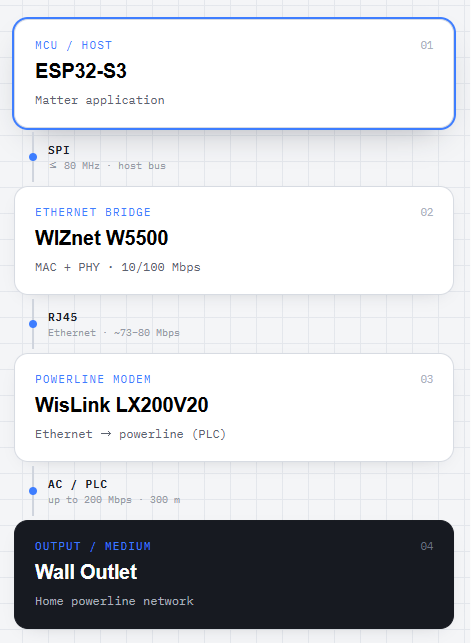
- ESP32-S3 runs the Matter application.
- W5500 attaches to the ESP32-S3 over SPI and, as an Ethernet controller with both MAC and PHY built in, provides the RJ45 wired interface.
- That RJ45 connects to the powerline modem (WisLink LX200V20 EVB), which converts Ethernet frames into powerline signals and sends them out over the outlet.
In other words, the W5500 is the standard Ethernet bridge between "the ESP32 (the Matter brain)" and "the powerline (the transport medium)." Because the W5500 embeds its TCP/IP stack in hardware, the ESP32-S3 can shed the burden of complex network processing and focus on Matter logic.
Why They Built a Custom PCB
Rather than using an off-the-shelf board, the developers designed their own ESP32-S3 Ethernet PCB carrying the W5500. The board is built to the same form factor as the powerline modem EVB (WisLink LX200V20) so it can stack directly on top. Its main features:
- ESP32-S3-WROOM-1-N16R8 + WizNet W5500 Ethernet controller
- UART/USB programming, both wired and wireless connectivity
- 5V/3.3V test points, grounded mounting holes, 2 RGB LEDs
- Full KiCad design files published (open hardware)
Planned future revisions include PoE (Power over Ethernet), faster connection speeds, configurable MAC address, and plug-and-play header pins.
How It Works: Hub and Nodes
P-LINKED uses a structure of one hub + multiple nodes.
Hub Built from a Raspberry Pi 4 and an ESP32-S3. On boot, the ESP32-S3 firmware shows "P LINKED" on an OLED (SSD1306), initializes Wi-Fi, then opens a socket server and waits for nodes to connect. The Raspberry Pi runs Home Assistant and becomes the center that manages the Matter devices.
Node An individual smart-home device. The repository includes two node examples.
- Temperature/humidity node: reads temperature and humidity with a BME280 sensor and sends them to the hub as a socket client
- Light node: a Color Temperature Light based on the ESP-Matter data model
Connection flow Each device joins the same powerline network through a powerline modem plugged into an outlet. It connects to the modem via W5500 Ethernet, and the modems communicate over the powerline by IP. On the network formed this way, the Matter devices are commissioned and registered into Home Assistant.
What's Worth Noting
- The idea of using powerline as the network medium: While most smart homes depend on Wi-Fi, Thread, or Ethernet, P-LINKED uses the electrical wiring already in the home as its communication path. Extending an IP network through outlets alone, with no new wiring, gives it clear novelty.
- A self-made, open W5500 custom PCB: Rather than relying on an off-the-shelf board, they designed a W5500-based Ethernet PCB themselves and published the KiCad files as open hardware. It becomes a real reference design for developers who want to integrate the W5500 into their own hardware.
- Matter + Home Assistant ecosystem: It adopts the Matter standard and Home Assistant rather than a proprietary protocol, aiming for an open smart home that isn't locked to a single vendor.
- Clear separation of roles: A clean layered structure where the ESP32-S3 handles Matter, the W5500 handles Ethernet, and the powerline modem handles transport. Each layer connects through standard interfaces (SPI, RJ45), making it easy to follow.
- Includes performance measurement: With an iperf example, it actually measures the Ethernet-segment bandwidth (roughly 73–80 Mbps), showing an effort to verify with numbers rather than vague claims.
Use Cases
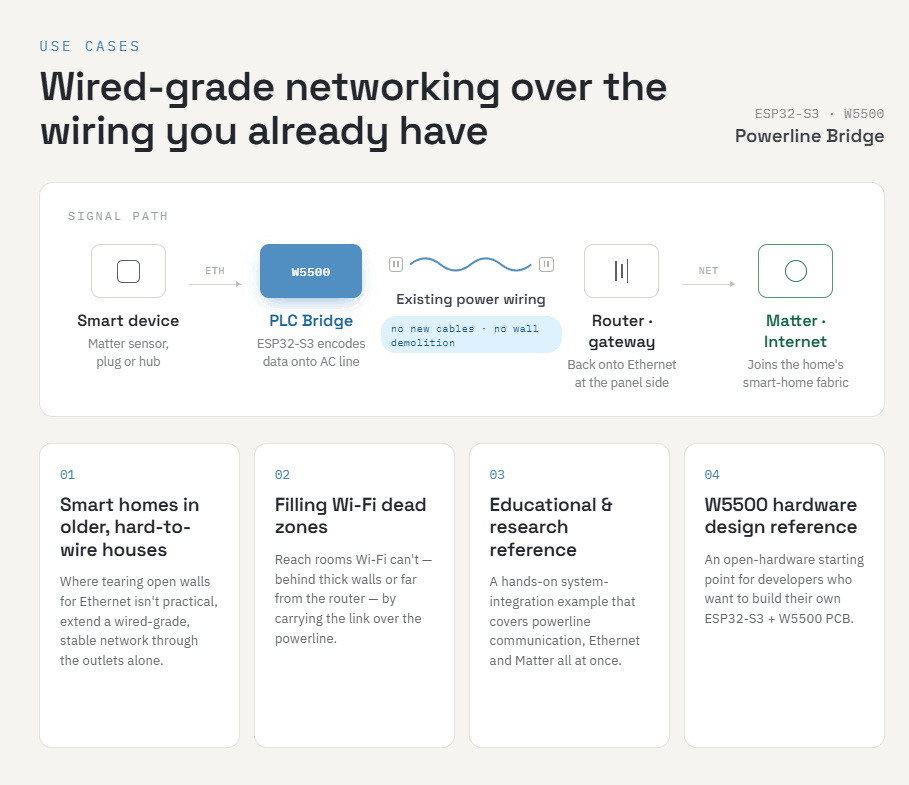
- Bringing smart-home capability to older houses that are hard to wire: In homes where tearing open walls to run Ethernet is impractical, extend a wired-grade stable network through outlets alone
- Filling Wi-Fi dead zones: Connect rooms that Wi-Fi can't reach due to thick walls or distance, via powerline
- An educational/research reference: A system-integration learning example that covers powerline communication + Ethernet + Matter all at once
- A reference for W5500 hardware design: An open-hardware starting point for developers who want to build their own ESP32-S3 + W5500 PCB
Comparison with Related Projects on WIZnet Makers
WIZnet Makers (maker.wiznet.io) also hosts projects that use the W5500 as a wired backbone for smart-home/IoT. Here are three that share P-LINKED's underlying motivation, compared based on their actual content.
Wired Thread Border Router: W5500 Ethernet Backhaul for Matter Smart Homes (Benjamin) An ESPHome-based project that attaches a W5500 to an ESP32-S3 over SPI to build the backhaul of a Matter/Thread smart home over wired Ethernet instead of Wi-Fi. It puts front and center the logic that "a border router should have a rock-solid connection to the network, but Wi-Fi adds latency and unreliability — so, Ethernet."
- Similarities: The ESP32-S3 + W5500 (SPI) combination, the "Wi-Fi is unreliable → wired is the answer" motivation, Matter smart home + Home Assistant integration, and the philosophy of offloading MCU burden via the W5500's hardware TCP/IP all overlap almost exactly with P-LINKED.
- Differences: Benjamin's is a border router that pulls a wireless mesh (Thread) down to wired, with the backhaul being ordinary RJ45 LAN. It's also closer to a single-firmware (29-line ESPHome YAML) proof of concept. P-LINKED, by contrast, replaces that wired segment with powerline, and includes multiple hub+node devices and a custom W5500 PCB.
HomeThread: Embedded Thread Border Router with Ethernet Backhaul and Dashboard (josephsr) A multi-component stack: a Thread border router built from an ESP32-S3 host + an ESP32-H2 radio co-processor + a W5500 wired backhaul, topped with a web dashboard and a device-registration (CoAP/CBOR) backend.
- Similarities: The structure of linking a Thread mesh to the LAN via ESP32-S3 + W5500 wired backhaul, and the layer separation of "low-power wireless mesh + stable wired backbone," resonate with P-LINKED's "nodes + wired (powerline) backbone" idea. The description of the W5500 handling MAC/PHY/TCP-IP in hardware to provide stable Ethernet without an OS-grade network stack is identical too.
- Differences: In HomeThread the wireless axis is Thread (802.15.4) and the backhaul is standard Ethernet, with weight placed on a management plane such as the dashboard and registration protocol. P-LINKED uses powerline as the transport medium instead of a wireless mesh, and focuses on standard Matter/Home Assistant control.
matter-esp32-modbus-tcp-bridge (mason) A bridge that uses an ESP32-S3-ETH + W5500 to read Modbus TCP data from a Solax inverter and expose it as Matter. The flow is inverter ↔ Modbus TCP ↔ ESP32-S3+W5500 ↔ Matter ↔ Home Assistant, with data collection, configuration, and device registration all happening within the local LAN, without the cloud.
- Similarities: The setup of running the Matter stack, web UI, and socket communication on top of an ESP32-S3 + W5500 wired-LAN foundation, and the orientation toward the open Matter + Home Assistant ecosystem, are the same as P-LINKED.
- Differences: mason's project is a gateway that attaches industrial equipment (an inverter) to a standard LAN, using the W5500 as plain RJ45 Ethernet. P-LINKED differs in its choice of medium — it hangs the same W5500 off a powerline modem to extend the network without new wiring.
In short, the approach of "using wired W5500 as a stable backbone for a Matter smart home," and its logic ("Wi-Fi is unreliable, so go wired"), already has several precedents on Makers and is identical to P-LINKED. What sets P-LINKED apart is swapping that wired segment for powerline to repurpose the existing electrical wiring as a network, and designing and publishing its own custom W5500 PCB.
Tech Stack Summary
| Item | Details |
|---|---|
| MCU | ESP32-S3-WROOM-1-N16R8 |
| Ethernet chip | WIZnet W5500 (SPI, 10/100 Mbps, hardware TCP/IP) |
| Transport medium | Powerline communication (WisLink LX200V20 EVB, up to 200 Mbps / 300 m) |
| Hub | Raspberry Pi 4 Model B + ESP32-S3 |
| Smart-home standard | Matter (ESP-Matter), Home Assistant |
| Hardware | Custom ESP32-S3 Ethernet PCB (KiCad, open hardware) |
| Roadmap | PoE, higher speed, MAC configuration, PnP headers |
FAQ
Q. If it's powerline communication, why is the W5500 (Ethernet) needed? The powerline modem only carries Ethernet frames by converting them into powerline signals. For the ESP32-S3 to talk to that modem in a standard way, it needs an Ethernet interface — and the W5500 provides exactly that Ethernet controller (MAC+PHY). In other words, the W5500 is the standard Ethernet bridge between the ESP32 and the powerline modem.
Q. Does the W5500 use hardware TCP/IP? The W5500 is a controller that embeds its TCP/IP stack in the chip hardware. That said, whether this project uses those hardware sockets directly, or uses the W5500 only as a MAC/PHY on top of ESP-IDF's software stack (lwIP), is hard to state definitively from the published configuration alone. What's certain is that the W5500 is used as an Ethernet controller attached to the ESP32-S3 over SPI.
Q. Is it a finished product? No. It's a university senior-design capstone project, whose core contribution lies in the system integration combining powerline and Matter, and in the custom W5500 PCB design.
Q. Does it support PoE? Not in the current revision. However, the repository's future-revision plans explicitly list PoE support, indicating an intent to combine power and data over a single cable.
Q. Why powerline instead of Wi-Fi? Wi-Fi is weak against walls, distance, and interference, and Ethernet cable has to be newly installed. Powerline uses the electrical wiring already present everywhere in the home, so the network can be extended with near-wired stability and no additional wiring — that's the motivation behind this project.
Project Links
- GitHub: znicholson17/P-Linked
- Custom W5500 PCB: ESP32_S3_ETH
- WIZnet W5500: https://docs.wiznet.io/Product/Chip/Ethernet/W5500
Related Projects on WIZnet Makers