How Does the eBUS Adapter Shield C5 Bring Heating Data to W5500 Ethernet?
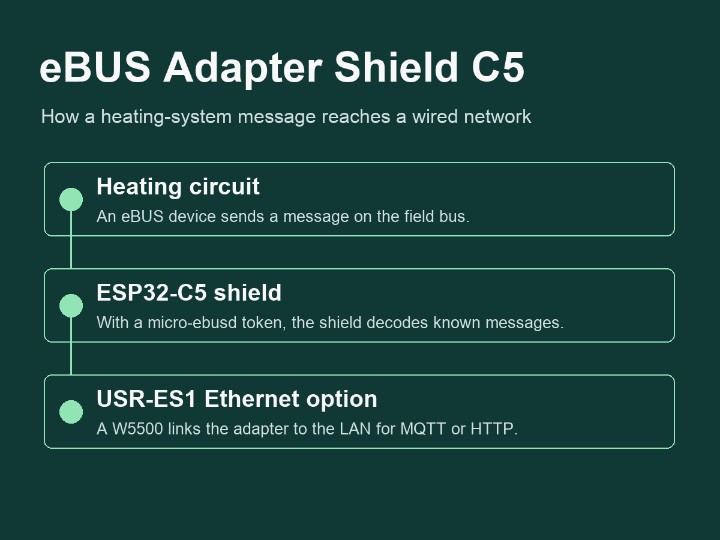
The eBUS Adapter Shield C5 pairs optional W5500 Ethernet with an ESP32-C5 that can decode heating messages for MQTT and HTTP using a micro-ebusd token.
0
Components
Hardware components
WIZnet - W5500
x 1

USR-ES1 add-on provides SPI Ethernet for the C5. The base product has onboard Wi-Fi.
Project description
How does a heating reading reach the LAN?
The eBUS Adapter Shield C5 connects an eBUS heating system to a wired network when fitted with a USR-ES1 module containing the WIZnet W5500. For a heating integrator, the Ethernet option lets an existing wired LAN reach equipment in a plant room. Consider an outdoor-temperature reading broadcast by a heating controller. The shield receives the message through its isolated eBUS interface. A decoder matches it to a known message definition, giving an application a sensor name, a value and a unit. The W5500 provides the Ethernet connection that carries the data. C5 hardware guide
Where does the decoding happen?
One installation runs ebusd on an existing computer. The shield forwards bus traffic over Ethernet and the computer interprets it. Another installation enables micro-ebusd on the ESP32-C5 with a separate token. That puts the decoder inside the adapter, so a monitoring client can contact it directly. Basic adapter status over MQTT is available without the token. On-device decoder · MQTT guide
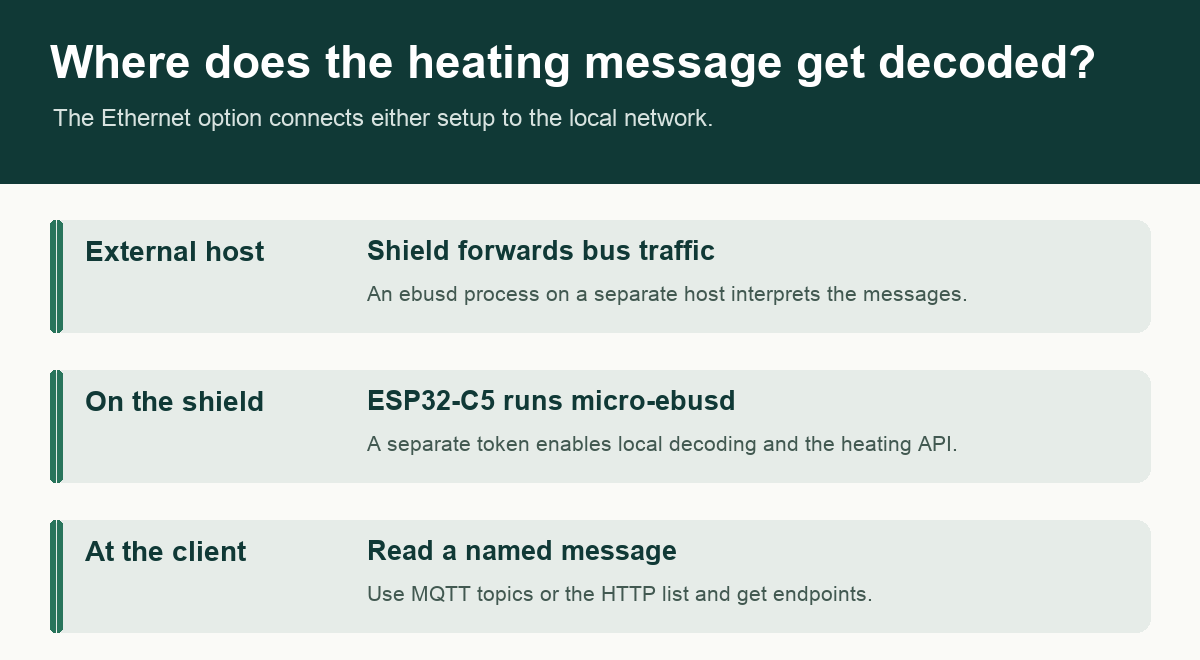
The wired module serves both arrangements. The location of the decoder determines which device exposes heating data.
What can an application read?
A useful first request is GET /api/v1/ebus/list. It tells the client which messages this installation recognizes. In the published example, a client can then request /api/v1/ebus/datetime/get?from=0 to inspect the cached reading without polling the heating bus. MQTT clients can subscribe under a circuit and message name to receive decoded fields as JSON. Available values and write support depend on the equipment and its message definitions. HTTP examples · MQTT topics
Which parts are included?
The German seller ebusd lists the shield at USD 32.90 and offers the USR-ES1 for an additional USD 6.50. The August 2026 C5 generation has 8 MB flash, 8 MB PSRAM and dual-band Wi-Fi. Its PCB measures 28 by 29 mm, a useful dimension when comparing cabinet space with the earlier shield. Budget for the Ethernet module and its connector as well. The on-board Wi-Fi gives the base unit a network path of its own. For a wired retrofit, check the controller uses eBUS, select the USR-ES1 when ordering, and use the fitting diagram to match the module orientation. The dealer gallery shows the actual shield boards. Product listing and photos · Generation comparison
Plan the connections in the plant room
On a wiring diagram, the shield sits between three distinct connections. The heating controller supplies data on its two-wire eBUS terminal. The board takes its own power, typically through USB-C. The RJ45 jack on the optional W5500 module connects to the local network. This matters when specifying a retrofit. An Ethernet drop reaches the plant room, but the installer still needs to allow for power at the adapter. The board isolates the bus electrically from its power source. The hardware guide identifies the eBUS connector as polarity-independent and lists 5 V at 400 mA as its recommended USB supply capacity. Hardware and power guide
The headers also affect what to buy. The USR-ES1 sold alongside the shield spans the W1 and W2L positions. The guide illustrates a second W5500 module style with a different orientation on W2. A buyer who already owns a module should compare the connector layout with the matching photograph before fitting it. The team recommends removing power, checking alignment and only then powering the assembly. The Ethernet module also occupies pins that would otherwise be available for expansion. That is worth settling while specifying a display or an additional sensor for the same enclosure. Ethernet fitting diagrams and pin assignments
Commission the link before looking for temperatures
For a system that already runs ebusd, the owner can keep the decoder on a Linux host, in a container or in a supported Home Assistant add-on. Configure the shield for its Ethernet host connection, obtain its LAN address and point the host daemon at that address. The first-steps guide uses an enhanced network device string ending in port 9999. A default host configuration may still point to a local USB serial device. Looking at this setting early can explain why a perfectly reachable shield has produced no readings in the existing application. First-steps guide
An installation using the on-board decoder follows a different sequence. The installer selects micro-ebusd in the adapter web interface, obtains its token and sets the desired message and polling options. Once the bus is connected, the adapter log can show both unrecognized traffic and messages it has successfully decoded. Those observations answer different commissioning questions. Seeing traffic establishes that messages are arriving. A decoded message adds evidence that the active definitions match at least part of the heating system. The vendor illustrates this with a heating status message containing separate temperature, pressure and operating-mode fields. Commissioning examples
Follow one reading from the bus into a chart
Start with the message directory returned by the HTTP list endpoint. An entry identifies the circuit and message and says whether it is passive or writable. A passive broadcast can yield a recorded value as the heating equipment talks to its peers. Other values only become available after an explicit read. The API exposes that distinction through its source parameter. Zero asks for a cached value, one allows a bus read if necessary, and two forces a request to the bus. A dashboard that refreshes several times while someone watches it can read a cached measurement without generating a fresh heating-bus exchange on every screen refresh. HTTP API reference
For continuous monitoring, the same data model carries over to MQTT. The configured topic prefix identifies the adapter, the suffix identifies the circuit and message, and field names in the JSON payload identify the individual values. A client subscribing to one named message can distinguish a sensor reading from its accompanying condition flag. A separate get topic requests an actively readable value. The decoded response arrives asynchronously on the data topic. A set request likewise requires a definition marked writable. A client can use the published message capabilities to decide which controls to display for the equipment actually installed. MQTT topic and response reference
The project shows a Home Assistant chart with heat-pump operating state, mixer status and multiple temperatures. It comes from one installation, so it provides a better commissioning model than a fixed promise about every boiler. Choose one known measurement and check that its changes are sensible before adding more entities. Discovery also has two specific prerequisites. The token must authorize it, and the adapter needs Home Assistant to publish its retained MQTT birth message to recognize an already-running instance. The adapter can publish numeric fields by default or filter discovery by message, keeping a dashboard focused on the values its operator needs. Discovery guide and field example
Distinguish link maintenance from a heating fault
A maintainer can trace an empty chart in stages. First establish whether the adapter is reachable on its wired LAN address. Then check the adapter log for heating-bus traffic and a decoded message, inspect that reading through HTTP and finally look for the corresponding MQTT topic. If HTTP already shows the expected field, the Home Assistant discovery configuration and broker are a more productive place to look than the eBUS wiring. If messages arrive but remain unknown, compatibility with the available message definitions deserves attention. This sequence follows the distinct interfaces the product exposes. Adapter setup · Message inspection
The change history is useful for identifying the software fitted to an installed adapter. The October 26 release made the Ethernet health check configurable and left it off by default. The November 1 update added optional persistence for manufacturer scan data. On November 9 the maintainers added experimental recording and visualization of eBUS signal edges and corrected a scan fallback case. A buyer diagnosing a timeout can therefore distinguish a network health setting, message discovery and physical bus activity. These are updates to the adapter firmware family, including the C5. The August C5 hardware launch and those later firmware changes have separate dates. Firmware change history
How does this relate to the C6?
Readers familiar with the earlier shield can compare the two network designs. Both accept an Ethernet module. The C5 brings a different MCU, additional memory and a smaller board to the same heating-system interface. Earlier C6 Maker article
Developers laying out a custom adapter can compare the add-on approach with the W5500 reference schematics for SPI Ethernet. For an existing C5 shield, use the module and orientation specified in the adapter guide. W5500 hardware design resources
FAQ
Q. Which Ethernet module should I select? The shop lists the USR-ES1, which carries the W5500.
Q. Does a wired installation require a separate computer? Only the external ebusd arrangement needs a host for decoding. A token lets micro-ebusd run on the adapter.
Q. Can I check which heating messages are available? With micro-ebusd enabled, the HTTP list endpoint returns the definitions recognized for that installation.
Q. What does a cached read do? A get request with from=0 asks for information already held by the decoder.
Q. How does Home Assistant learn about the measurements? Micro-ebusd provides an MQTT discovery integration for supported data. Home Assistant guide
Documents
-
C5 product listing and photos
Base shield and optional USR-ES1 module with separate pricing.
-
C5 hardware guide
Board architecture, isolation, network options and module fitting.
-
C5 and C6 hardware comparison
August 2026 C5 generation, memory and radio specifications.
-
micro-ebusd documentation
On-device decoding and the additional token.
-
MQTT topic reference
Status, decoded data, active read and write requests.
-
HTTP API reference
Lists and cached or active reads with per-installation message definitions.
-
Adapter firmware changelog
Dated changes to the shared adapter firmware.


