Sensy-One E1: Wired-Ethernet mmWave Presence Sensor for Home Assistant on ESP32-S3 and W5500
ESPHome firmware for an ESP32-S3 + W5500 + LD2450 sensor that tracks up to three targets in polygon zones and reports to Home Assistant over wired Ethernet.
0
Components
Hardware components
WIZnet - W5500
x 1

sensy-one/E1
Project description
Overview
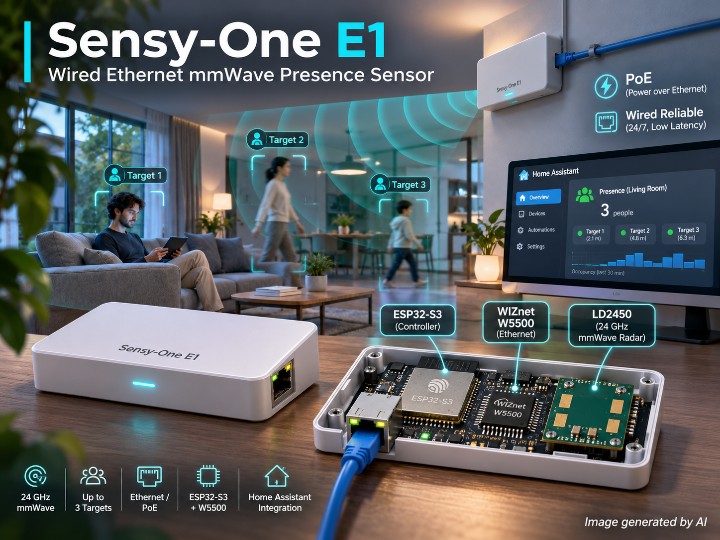
Sensy-One E1 is a small mmWave presence sensor built for Home Assistant: an ESP32-S3 reads a Hi-Link LD2450 24 GHz radar, tracks up to three people by X/Y position and speed, evaluates polygon detection zones, and publishes everything to Home Assistant through a WIZnet W5500 wired Ethernet port. The repository holds the ESPHome configuration and a custom C++ component that make up the device firmware, a browser-based Zone Editor, and the release channel used for OTA updates.
This article reflects the repository as of 2026-11-01, with the project version set to v1.2.6 in assets/source/main.yaml. The configuration file has no wifi: section, so the W5500 is the only network interface the firmware brings up. The README gives the reason for the wired choice in its own words: the sensor connects "over wired Ethernet using PoE or Ethernet + USB-C 5V", with "No wireless setup, no BLE", and is meant to deliver automations "without relying on Wi-Fi".
Hardware & Software Configuration
The device combines three main parts. The host is an ESP32-S3, declared in ESPHome as board: esp32-s3-devkitc-1. The radar is a Hi-Link LD2450, which the README describes as having a 6-meter range, a 120° field of view, and a 35° pitch angle. The network side is a WIZnet W5500 on the ESP32-S3's SPI bus. The README lists the enclosure as 25 mm × 30 mm × 75 mm, mounted with an adhesive strip rather than screws.
The W5500 wiring in main.yaml is MOSI on GPIO11, MISO on GPIO12, CLK on GPIO13, CS on GPIO14, RESET on GPIO9 and INT on GPIO10, with the SPI clock set to 25MHz. The README's "Build Your Own Solution" snippet places the LD2450 on a UART with TX on GPIO37, RX on GPIO38, at 256000 baud, no parity and one stop bit.
Power is the one part of the hardware the repository only partly documents. The README states that the E1 runs from PoE or from Ethernet plus USB-C 5V and mentions "a dedicated PoE module". The repository's product photos show an RJ45 jack and a USB-C port on the bottom face. However, there are no schematics or PCB files, so the PoE module itself is supported only by the README text.
On the software side, the firmware is an ESPHome project. The current main.yaml uses the ESP-IDF framework (type: esp-idf). The README's "Build Your Own Solution" snippet still shows framework: type: arduino with version: 2.0.9, which is outdated, so readers building custom firmware should follow main.yaml rather than the README snippet. The README also notes that moving from firmware v1.0.0 to v1.1.0 or later requires a one-time factory firmware installation "because we've switched frameworks". After that one-time step, OTA updates work normally.
The radar handling lives in a custom component under assets/source/components/e1/ (e1.h and sensor.py). The component checks LD2450 frame headers (buf[0]==0xAA && buf[1]==0xFF), loops over three target slots, and decodes coordinates and speed for each. It also classifies each target as Moving, Stationary or Holding and drops any target that falls inside the exclusion zone. Per-zone movement, presence and target-count sensors are computed in template lambdas in main.yaml, using a ray-casting in_poly test. The firmware supports three detection zones and one exclusion zone, each a polygon of up to eight points (if (n > 8) n = 8;). Each zone also exposes tunable entities such as "Zone 1 Presence Delay".
Zones can be drawn instead of typed. assets/config/zone_editor.html is a single HTML page that connects to the sensor's IP address, streams live targets from the device's /events endpoint, and writes zone points back through the ESPHome web server's number set calls. The README asks that the desktop running the editor be on the same network as the sensor.
Additional photos are available in the original repository: https://github.com/sensy-one/E1
System Architecture
flowchart LR
  R["Hi-Link LD2450<br/>24 GHz radar"] -->|"UART"| E["ESP32-S3<br/>e1 component"]
  E --> Z["Zone lambdas<br/>in_poly test"]
  E -->|"SPI 25MHz"| W["WIZnet W5500"]
  Z -->|"zone sensors"| W
  W -->|"native API"| HA["Home Assistant"]
  W -->|"REST + SSE"| ZE["Zone Editor<br/>browser"]
  W -->|"OTA manifest"| GH["GitHub releases"]
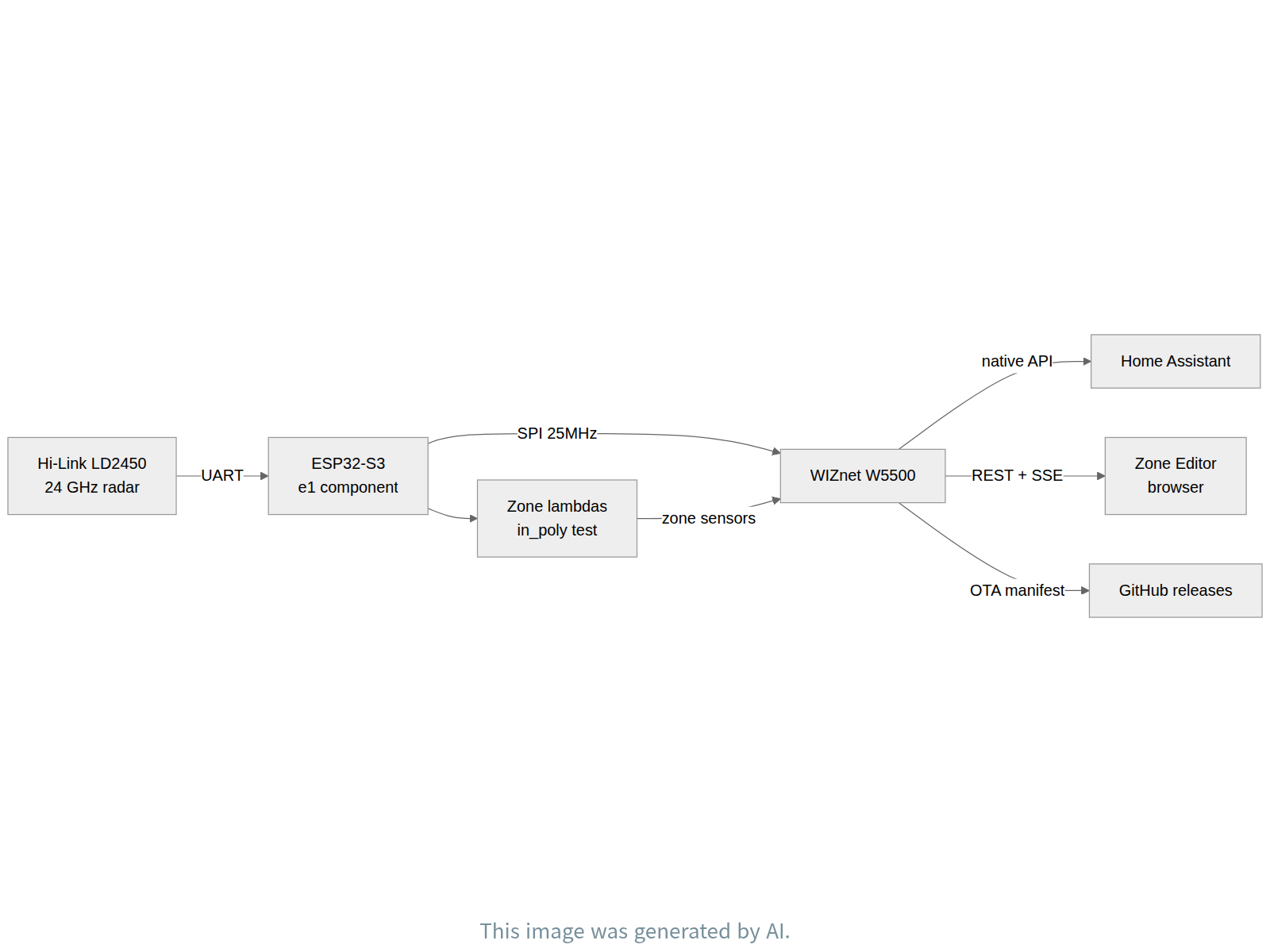
The data path starts at the radar. The LD2450 streams binary frames over UART. The e1 component validates each frame, extracts up to three targets, filters them against the exclusion polygon, and exposes per-target coordinates, speed and state as ESPHome sensors. Template lambdas in main.yaml then test each target against the three detection polygons and update the movement, presence and target-count entities for every zone.
All outward traffic goes through the W5500. Home Assistant reads the sensors through the ESPHome native API (api: block). The Zone Editor and the device's own web page use the web_server component: the editor subscribes to live updates on /events and posts new zone coordinates as number entities. Firmware updates use two paths. One is a manual upload through the web server's OTA page (ota: - platform: web_server). The other is an update: entity whose source is https://github.com/sensy-one/E1/releases/latest/download/manifest.json.
Market Perspective
The E1 sits in a crowded but clearly priced niche: mmWave presence sensors for Home Assistant. Most of that market is Wi-Fi. An Apollo Automation comparison table checked in 2026-10 puts Wi-Fi mmWave sensors between $25.99 and $82.99, and the two Wi-Fi models in that table that use the same LD2450 radar sell for $39.00 to $39.99 (Apollo comparison table). That table was published by Apollo, one of the competitors. PoE-capable finished products sit higher. Apollo's R PRO-1 is listed at $69.99 by the maker and $78.95 by a US reseller (Apollo R PRO-1). Everything Presence Pro is £67.00 (single source, Everything Smart shop). Sensy-One's own current PoE model is €94,95 (sensy-one.com). Several of these prices come from search snippets rather than loaded pages, and currencies and tax treatment differ. Even so, the PoE tier lands roughly 1.5 to 2 times above Wi-Fi products.
| Segment | Example products | Price range | Source |
|---|---|---|---|
| Wi-Fi mmWave presence sensors | Screek 1U to Aqara FP2 | $25.99 - $82.99 | Apollo comparison |
| Wi-Fi sensors with LD2450 | Everything Presence Lite Kit, Apollo MTR-1 | $39.00 - $39.99 | Apollo comparison |
| PoE mmWave sensors | Apollo R PRO-1, Everything Presence Pro | $69.99 - $78.95, €84.99, £67.00 | Ameridroid |
| Sensy-One successor (PoE + Wi-Fi) | E1 Pro Multi Sense | €94,95 | sensy-one.com |
| Core parts sample (LD2450 + ESP32-S3 module + 5V PoE PD module) | same-spec representative parts | €15.16 - €18.72 | DigiKey AG9905M |
| W5500 chip | WIZnet W5500 | $1.754 - $2.6426 (LCSC) | LCSC C32843 |
The reason for going wired is stated directly in the repository: Ethernet with PoE, with no wireless setup and no dependence on Wi-Fi. Competitors make the same argument. Everything Smart's hardware documentation describes Ethernet/PoE as "More reliable than WiFi for permanent installations" and "Ideal for ceiling-mounted deployments" (Everything Smart hardware overview). This is not a product for sites where wireless is impossible. It is a choice for permanent ceiling or wall installs in homes and small buildings, where one cable carries both power and data and Wi-Fi congestion is avoided. Sensy-One's own S1 is a Wi-Fi product, and the current E1 Pro supports both PoE and Wi-Fi (ESPHome device page). That E1 Pro also differs from this repository's E1: it uses an ESP32-C3 and an LD2460 radar, and its device page does not name the Ethernet chip, so whether it still uses a W5500 is unconfirmed.
Demand and volume figures are thin. The only volume numbers come from the maker's own posts. One reports 81 units of an earlier Wi-Fi sensor sold as of 2025-02-20 (Home Assistant community). A later post says the S1 sold more than 300 units soon after launch and that the maker had received "numerous questions about developing a PoE ... version" (Home Assistant community). Both are single-source, self-reported numbers. Sales figures for the E1 or E1 Pro themselves were not found. Research firms size the broader occupancy-sensor market at USD 2.75B for 2024 and USD 3.0B to 3.07B for 2025, with projected CAGR of 9.79% to 11.92% (IMARC, Roots Analysis). That market includes PIR and ultrasonic sensors for commercial lighting and HVAC, so these figures do not measure the Home Assistant mmWave PoE segment.
The gap to a product can be roughly bounded. Summing three core parts with EUR samples gives €18.72 at single-unit prices: OpenELab LD2450 €4,90, DigiKey Ireland ESP32-S3-WROOM-1-N8R8 €5.61 and DigiKey Ireland Silvertel AG9905M €8.21. Using DigiKey volume prices instead (€3.59821 at 1,950 units and €6.65775 at 1,000 units) with the same LD2450 price gives €15.16. The two modules are same-spec representative parts rather than confirmed E1 components. The W5500 chip ($1.754 to $2.6426 at LCSC, SGD 2.50263 to 4.76 at DigiKey Singapore), PCB, magjack, enclosure, assembly and certification are not included. The difference between that roughly €15 to €19 parts cost and the £67 to €94,95 retail price of PoE products is, by inference, the enclosure, assembly, firmware, support and distribution margin.
Role of the WIZnet W5500
The W5500 is the E1's only network interface. In assets/source/main.yaml, the ESPHome ethernet: block declares type: W5500 and wires it to the ESP32-S3 over SPI. The pins are MOSI GPIO11, MISO GPIO12, CLK GPIO13 and CS GPIO14, with RESET on GPIO9, the interrupt line on GPIO10, and clock_speed: 25MHz. There is no wifi: block in the file, so this is the default and only network path, not an option. Chip initialization is handled by ESPHome's built-in ethernet component, so the repository contains no separate W5500 driver code.
Everything the sensor exposes leaves the device through this port. Radar data enters the ESP32-S3 from the LD2450 over UART and is parsed by the e1 component (assets/source/components/e1/e1.h). Zone logic runs in main.yaml. The resulting entities then go out over TCP/IP through the W5500 to three consumers. Home Assistant receives them through the ESPHome native API. A browser running the Zone Editor reads live targets from /events and writes zone points back through the web server's REST calls (assets/config/zone_editor.html). The firmware's update: entity fetches the release manifest from GitHub over HTTP. Because the README says the E1 draws power from PoE, the same RJ45 cable is meant to carry both power and these data flows, although the PoE circuit itself is not documented in the repository.
FAQ
Does the E1 need Wi-Fi or Bluetooth for setup? No. main.yaml contains no wifi: section, and the README states "No wireless setup, no BLE". The sensor connects to Home Assistant over wired Ethernet through the W5500.
How is the firmware updated? The README tells users to download the OTA firmware from the GitHub releases page and upload it through the sensor's web server ("OTA Update"). The firmware also has an update: entity pointing at the release manifest. Upgrading from v1.0.0 to v1.1.0 or later needs a one-time factory firmware installation because the framework changed.
How do I recover a sensor that misbehaves? The README's troubleshooting step is to flash the latest factory firmware from the releases page. Connect the sensor to a PC over USB-C and install the file with the ESPHome Web Wizard.
How many zones can be defined, and how? Three detection zones and one exclusion zone, each a polygon of up to eight points. They can be drawn in zone_editor.html after entering the sensor's IP address. The computer running the editor must be on the same network as the sensor.
Can I build my own firmware? Yes. The full ESPHome configuration and the e1 component source are in assets/source/. Note that the README's sample snippet still shows the Arduino framework (version: 2.0.9), while the current main.yaml uses ESP-IDF.
Is the PoE hardware documented? Only in prose. The README describes PoE power and a dedicated PoE module, and the photos show the RJ45 and USB-C ports. The repository includes no schematics, PCB files or measurement logs.
About the Author
The project is published by the GitHub account sensy-one, the small company behind the Sensy-One range of mmWave presence sensors (homepage: sensy-one.com). The account lists no individual name. Besides the E1 repository, the README links to a separate Home Assistant add-ons repository from the same account that provides a newer Zone Editor. The team supports users through a Discord server and GitHub Issues, and has posted product updates on the Home Assistant community forum.
개요
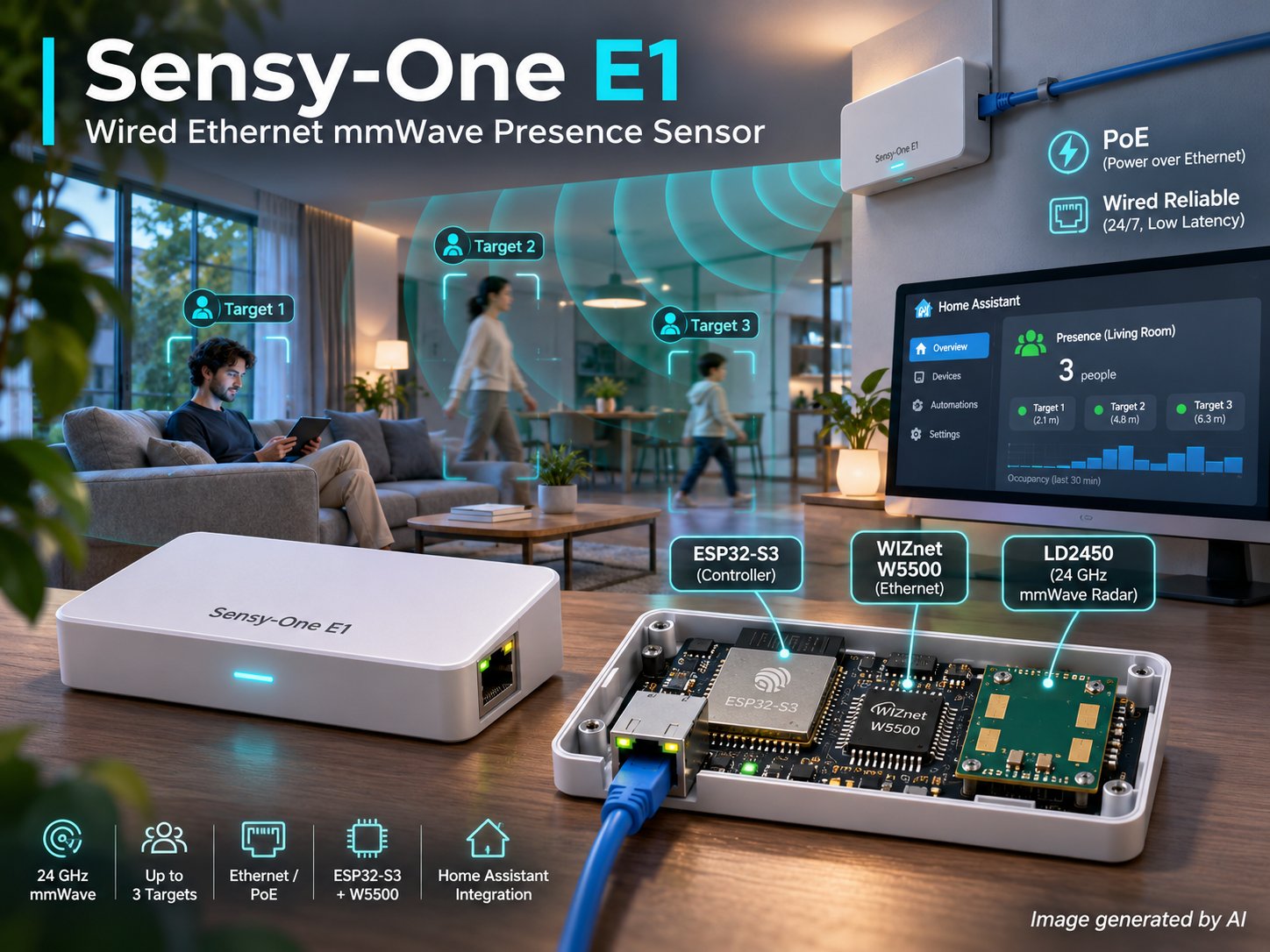
Sensy-One E1은 Home Assistant용으로 만든 작은 mmWave 재실 센서다. ESP32-S3가 Hi-Link LD2450 24 GHz 레이더를 읽어 최대 3명의 X·Y 위치와 속도를 추적하고, 다각형 검출 존을 판정한 뒤, 모든 결과를 WIZnet W5500 유선 이더넷 포트로 Home Assistant에 보낸다. 저장소에는 장치 펌웨어를 이루는 ESPHome 설정과 커스텀 C++ 컴포넌트, 브라우저용 Zone Editor, OTA 업데이트에 쓰는 릴리스 경로가 들어 있다.
이 글은 2026-11-01 시점의 저장소를 기준으로 하며, assets/source/main.yaml의 프로젝트 버전은 v1.2.6이다. 설정 파일에 wifi: 섹션이 없으므로 펌웨어가 올리는 네트워크 인터페이스는 W5500 하나뿐이다. README는 유선을 택한 이유를 직접 밝힌다. 센서는 "over wired Ethernet using PoE or Ethernet + USB-C 5V"로 연결되고, "No wireless setup, no BLE"이며, "without relying on Wi-Fi" 자동화를 하도록 만들었다는 것이다.
하드웨어·소프트웨어 구성
장치는 세 가지 주요 부품으로 이뤄진다. 호스트는 ESP32-S3이고 ESPHome에서는 board: esp32-s3-devkitc-1로 선언된다. 레이더는 Hi-Link LD2450이며, README는 탐지 거리 6 m, 시야각 120°, 피치각 35°라고 설명한다. 네트워크는 ESP32-S3의 SPI 버스에 붙은 WIZnet W5500이 맡는다. README가 밝힌 외형 크기는 25 mm × 30 mm × 75 mm이고, 나사 대신 접착 스트립으로 붙이는 방식이다.
main.yaml의 W5500 배선은 MOSI GPIO11, MISO GPIO12, CLK GPIO13, CS GPIO14, RESET GPIO9, INT GPIO10이고 SPI 클럭은 25MHz다. README의 "Build Your Own Solution" 예시는 LD2450을 UART(TX GPIO37, RX GPIO38, 256000 baud, 패리티 없음, 정지 비트 1)에 연결한다.
전원은 저장소가 일부만 문서화한 부분이다. README는 E1이 PoE 또는 이더넷 + USB-C 5V로 동작한다고 쓰고 "a dedicated PoE module"이 있다고 말한다. 저장소의 제품 사진에서도 아랫면의 RJ45 잭과 USB-C 포트가 보인다. 그러나 회로도나 PCB 파일이 없어서 PoE 모듈 자체는 README 문장으로만 뒷받침된다.
소프트웨어는 ESPHome 프로젝트다. 현재 main.yaml은 ESP-IDF 프레임워크(type: esp-idf)를 쓴다. 반면 README의 "Build Your Own Solution" 예시는 아직 framework: type: arduino, version: 2.0.9로 되어 있는 낡은 내용이다. 그러므로 펌웨어를 직접 빌드하려면 README 예시가 아니라 main.yaml을 따라야 한다. README는 v1.0.0에서 v1.1.0 이상으로 올릴 때 "because we've switched frameworks", 즉 프레임워크를 바꿨기 때문에 팩토리 펌웨어를 한 번 설치해야 한다고 적었다. 그 뒤로는 OTA 업데이트가 평소처럼 동작한다.
레이더 처리는 assets/source/components/e1/ 아래의 커스텀 컴포넌트(e1.h, sensor.py)가 맡는다. 이 컴포넌트는 LD2450 프레임 헤더(buf[0]==0xAA && buf[1]==0xFF)를 검사하고, 표적 슬롯 3개를 돌며 좌표와 속도를 풀어낸다. 표적마다 Moving·Stationary·Holding 상태를 나누고, 제외 존 안에 든 표적은 걸러 낸다. 존별 movement·presence·target count 센서는 main.yaml의 template 람다에서 ray-casting 방식의 in_poly 판정으로 계산한다. 검출 존은 3개, 제외 존은 1개이며, 모두 점을 최대 8개까지 찍는 다각형이다(if (n > 8) n = 8;). 존마다 "Zone 1 Presence Delay" 같은 조정용 엔티티도 있다.
존은 숫자를 입력하지 않고 그려서 정할 수도 있다. assets/config/zone_editor.html은 HTML 파일 한 장으로 된 도구로, 센서 IP 주소로 접속해 장치의 /events에서 실시간 표적을 받아 보여 주고, ESPHome 웹 서버의 number set 호출로 존 좌표를 장치에 쓴다. README는 편집기를 여는 데스크톱이 센서와 같은 네트워크에 있어야 한다고 안내한다.
추가 사진은 원본 저장소에서 볼 수 있다: https://github.com/sensy-one/E1
시스템 구조
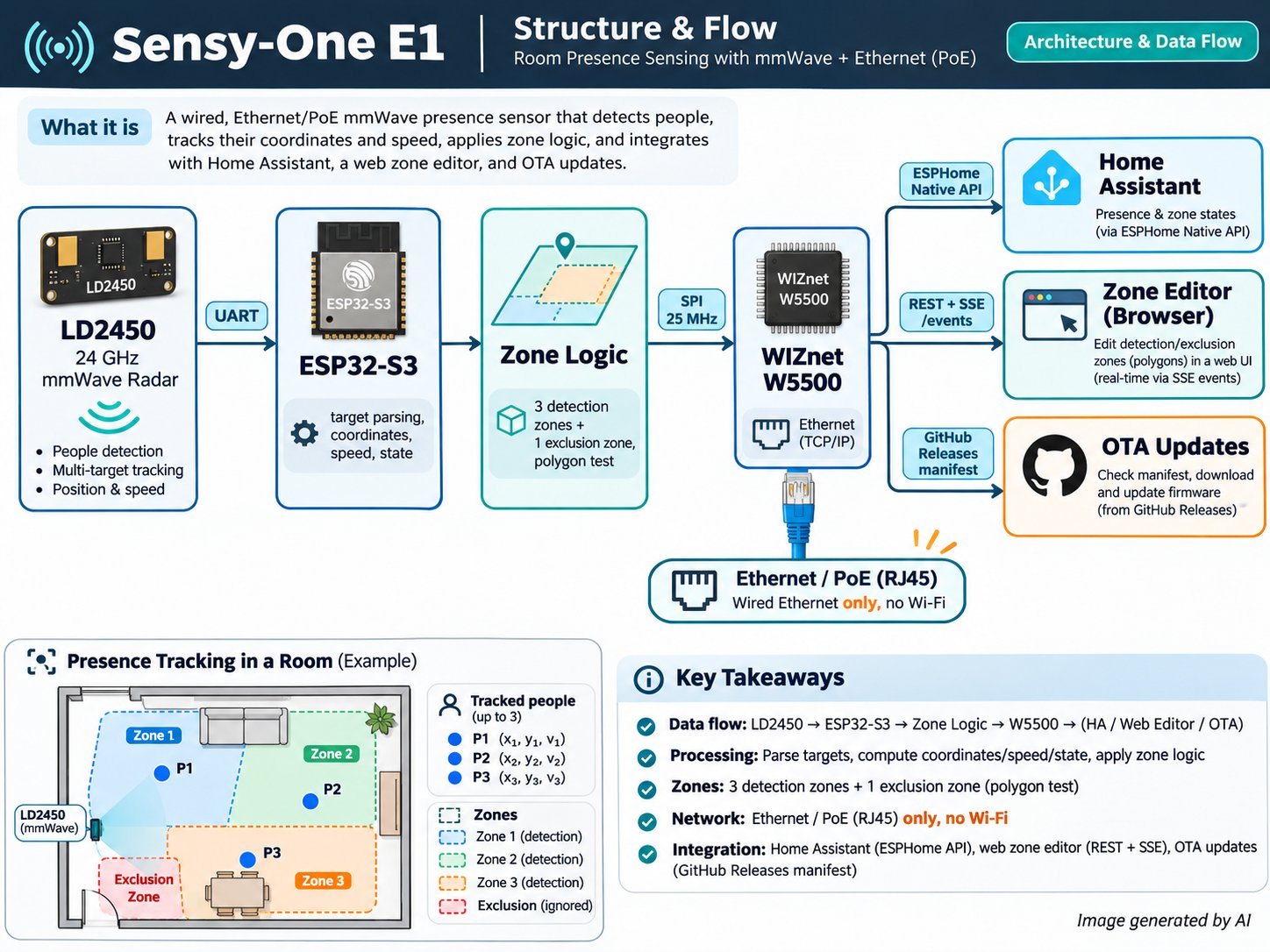
데이터는 레이더에서 출발한다. LD2450이 UART로 바이너리 프레임을 보내면 e1 컴포넌트가 프레임을 검증하고, 최대 3개 표적을 뽑아 제외 존 다각형으로 거른 뒤, 표적별 좌표·속도·상태를 ESPHome 센서로 내놓는다. 이어서 main.yaml의 template 람다가 각 표적을 검출 존 다각형 3개와 대조해 존마다 movement·presence·target count 엔티티를 갱신한다.
밖으로 나가는 트래픽은 모두 W5500을 거친다. Home Assistant는 ESPHome 네이티브 API(api: 블록)로 센서 값을 읽는다. Zone Editor와 장치 자체 웹 페이지는 web_server 컴포넌트를 쓴다. 편집기는 /events에서 실시간 갱신을 구독하고, 새 존 좌표를 number 엔티티 값으로 보낸다. 펌웨어 업데이트 경로는 두 가지다. 하나는 웹 서버의 OTA 페이지에 파일을 직접 올리는 방식(ota: - platform: web_server)이다. 다른 하나는 https://github.com/sensy-one/E1/releases/latest/download/manifest.json을 소스로 삼는 update: 엔티티다.
시장성 고찰
E1이 속한 시장은 Home Assistant용 mmWave 재실 센서로, 제품은 많지만 가격대가 뚜렷하다. 대부분은 Wi-Fi 제품이다. 2026-10에 확인한 Apollo Automation 비교표 기준으로 Wi-Fi mmWave 센서는 $25.99 - $82.99이고, 같은 LD2450 레이더를 쓰는 표 안의 Wi-Fi 제품 두 개는 $39.00 - $39.99다(Apollo 비교표). 이 표는 경쟁사 중 하나인 Apollo가 직접 만든 것이다. PoE를 지원하는 완제품은 더 비싸다. Apollo R PRO-1은 제조사가 $69.99, 미국 판매처가 $78.95에 올려 두었고(Apollo R PRO-1), Everything Presence Pro는 £67.00이다(단일 출처, Everything Smart 상점). Sensy-One의 현행 PoE 모델은 €94,95다(sensy-one.com). 이 가운데 여러 가격은 페이지를 직접 연 것이 아니라 검색 요약으로 본 값이고 통화와 세금 기준도 다르다. 그래도 PoE 제품군은 Wi-Fi 제품보다 대략 1.5 - 2배 높은 가격대에 있다.
| 구분 | 예시 제품 | 가격 범위 | 출처 |
|---|---|---|---|
| Wi-Fi mmWave 재실 센서 | Screek 1U ~ Aqara FP2 | $25.99 - $82.99 | Apollo 비교표 |
| LD2450을 쓰는 Wi-Fi 센서 | Everything Presence Lite Kit, Apollo MTR-1 | $39.00 - $39.99 | Apollo 비교표 |
| PoE mmWave 센서 | Apollo R PRO-1, Everything Presence Pro | $69.99 - $78.95, €84.99, £67.00 | Ameridroid |
| Sensy-One 후속 모델(PoE + Wi-Fi) | E1 Pro Multi Sense | €94,95 | sensy-one.com |
| 핵심 부품 견본(LD2450 + ESP32-S3 모듈 + 5V PoE PD 모듈) | 같은 사양의 대표 부품 | €15.16 - €18.72 | DigiKey AG9905M |
| W5500 칩 | WIZnet W5500 | $1.754 - $2.6426 (LCSC) | LCSC C32843 |
유선을 택한 이유는 저장소가 직접 밝힌다. PoE로 이더넷에 붙고, 무선 설정이 없으며, Wi-Fi에 기대지 않는다는 것이다. 경쟁사도 같은 논리를 편다. Everything Smart의 하드웨어 문서는 Ethernet/PoE를 "More reliable than WiFi for permanent installations", "Ideal for ceiling-mounted deployments"라고 설명한다(Everything Smart 하드웨어 개요). 이 제품은 무선을 쓸 수 없는 현장을 겨냥한 것이 아니다. 가정이나 소규모 건물의 천장·벽에 상시 설치할 때, 케이블 한 가닥으로 전원과 데이터를 함께 받고 Wi-Fi 혼잡을 피하려는 선택이다. Sensy-One의 S1은 Wi-Fi 제품이고, 현행 E1 Pro는 PoE와 Wi-Fi를 함께 지원한다(ESPHome 기기 페이지). E1 Pro는 이 저장소의 E1과 구성도 다르다. ESP32-C3와 LD2460 레이더를 쓰며, 기기 페이지가 이더넷 칩 이름을 밝히지 않아 W5500을 계속 쓰는지는 확인되지 않았다.
수요와 물량 근거는 적다. 물량 수치는 제작자 본인의 게시글뿐이다. 한 글은 이전 Wi-Fi 센서가 2025-02-20 기준 81대 팔렸다고 적었다(Home Assistant 커뮤니티). 이후 글은 S1이 출시 직후 300대 이상 팔렸고 "numerous questions about developing a PoE ... version"을 받았다고 밝혔다(Home Assistant 커뮤니티). 둘 다 단일 출처의 자기 신고다. E1이나 E1 Pro 자체의 판매 대수는 찾지 못했다. 조사기관들은 더 넓은 재실 센서 세계 시장을 2024년 USD 2.75B, 2025년 USD 3.0B - 3.07B, 전망 CAGR 9.79% - 11.92%로 추정한다(IMARC, Roots Analysis). 다만 이 시장은 상업용 조명·HVAC 제어용 PIR·초음파 센서까지 포함하므로, Home Assistant용 mmWave PoE 센서 시장의 크기로 볼 수는 없다.
제품화 격차도 대략 가늠할 수 있다. EUR 견본이 있는 핵심 부품 세 개를 1개 단가로 합하면 OpenELab LD2450 €4,90 + DigiKey 아일랜드 ESP32-S3-WROOM-1-N8R8 €5.61 + DigiKey 아일랜드 Silvertel AG9905M €8.21 = €18.72다. LD2450은 같은 가격에 두고 DigiKey 대량 단가(ESP32-S3 €3.59821, 1,950개 / AG9905M €6.65775, 1,000개)를 쓰면 €15.16이다. 두 모듈은 E1에 실제 들어간 부품으로 확인된 것이 아니라 같은 사양의 대표 부품이다. 이 합계에는 W5500 칩(LCSC $1.754 - $2.6426, DigiKey 싱가포르 SGD 2.50263 - 4.76), PCB, 매그잭, 케이스, 조립, 인증 비용이 빠져 있다. 핵심 부품 원가 약 €15 - €19와 PoE 완제품 소매가 £67 - €94,95 사이의 차이는 케이스·조립·펌웨어·지원·유통 마진에 해당한다고 추론할 수 있다.
WIZnet W5500의 역할
W5500은 E1의 유일한 네트워크 인터페이스다. assets/source/main.yaml의 ESPHome ethernet: 블록이 type: W5500을 선언하고, ESP32-S3와 SPI로 연결한다. 핀은 MOSI GPIO11, MISO GPIO12, CLK GPIO13, CS GPIO14이고, RESET은 GPIO9, 인터럽트는 GPIO10, 클럭은 clock_speed: 25MHz다. 파일에 wifi: 블록이 없으므로 이 경로는 켜고 끄는 옵션이 아니라 기본이자 유일한 네트워크 경로다. 칩 초기화는 ESPHome 내장 ethernet 컴포넌트가 맡으며, 저장소에 별도의 W5500 드라이버 코드는 없다.
센서가 내놓는 모든 정보는 이 포트로 장치를 떠난다. LD2450의 레이더 데이터가 UART로 ESP32-S3에 들어오면 e1 컴포넌트가 이를 해석한다(assets/source/components/e1/e1.h). 이어서 main.yaml이 존 판정을 한다. 그 결과 엔티티는 W5500을 거쳐 TCP/IP로 세 곳에 전달된다. Home Assistant는 ESPHome 네이티브 API로 받는다. Zone Editor를 연 브라우저는 /events에서 실시간 표적을 읽고 웹 서버 REST 호출로 존 좌표를 되돌려 쓴다(assets/config/zone_editor.html). 펌웨어의 update: 엔티티는 GitHub에서 HTTP로 릴리스 manifest를 가져온다. README에 따르면 E1은 PoE로 전원을 받으므로, 같은 RJ45 케이블 하나가 전원과 이 데이터 흐름을 함께 실어 나르도록 설계된 셈이다. 다만 PoE 회로 자체는 저장소에 문서화돼 있지 않다.
자주 묻는 질문
설정에 Wi-Fi나 블루투스가 필요한가? 필요 없다. main.yaml에 wifi: 섹션이 없고, README도 "No wireless setup, no BLE"라고 밝힌다. 센서는 W5500을 통한 유선 이더넷으로 Home Assistant에 연결된다.
펌웨어는 어떻게 업데이트하나? README는 GitHub releases 페이지에서 OTA 펌웨어를 받아 센서 웹 서버의 "OTA Update"로 올리라고 안내한다. 펌웨어에는 릴리스 manifest를 가리키는 update: 엔티티도 있다. v1.0.0에서 v1.1.0 이상으로 올릴 때는 프레임워크가 바뀌었기 때문에 팩토리 펌웨어를 한 번 설치해야 한다.
센서가 이상하게 동작하면 어떻게 복구하나? README의 문제 해결 절차는 releases 페이지에서 최신 팩토리 펌웨어를 받아 다시 굽는 것이다. 센서를 USB-C로 PC에 연결하고 ESPHome Web Wizard로 그 파일을 설치하면 된다.
존은 몇 개까지, 어떻게 정하나? 검출 존 3개와 제외 존 1개이며, 각 존은 점을 최대 8개까지 찍는 다각형이다. zone_editor.html에 센서 IP 주소를 넣고 캔버스에 그리면 된다. 편집기를 여는 컴퓨터는 센서와 같은 네트워크에 있어야 한다.
펌웨어를 직접 빌드할 수 있나? 가능하다. ESPHome 설정 전체와 e1 컴포넌트 소스가 assets/source/에 있다. 다만 README의 예시 스니펫은 아직 Arduino 프레임워크(version: 2.0.9)를 보여 주고, 현재 main.yaml은 ESP-IDF를 쓴다는 점에 주의해야 한다.
PoE 하드웨어는 문서화돼 있나? 글로만 설명돼 있다. README는 PoE 급전과 전용 PoE 모듈을 언급하고, 사진에는 RJ45와 USB-C 포트가 보인다. 저장소에는 회로도, PCB 파일, 측정 로그가 없다.
저자 소개
이 프로젝트는 mmWave 재실 센서 제품군 Sensy-One을 만드는 소규모 회사의 GitHub 계정 sensy-one이 공개했다(홈페이지: sensy-one.com). 계정에는 개인 이름이 나와 있지 않다. README는 E1 저장소 외에 같은 계정의 Home Assistant 애드온 저장소를 링크하며, 그곳에서 새 Zone Editor를 제공한다. 팀은 Discord 서버와 GitHub Issues로 사용자를 지원하고, Home Assistant 커뮤니티 포럼에도 제품 소식을 올려 왔다.
Market Evidence
| 주장 | 값 | 출처 URL | 날짜 | 확인 방식 | 종류 |
|---|---|---|---|---|---|
| Sensy-One 자사 몰의 현행 PoE 제품 판매가 | E1 Pro Multi Sense (PoE-WiFi) €94,95 | https://sensy-one.com | undated | page loaded | 1차 자료 |
| Sensy-One 자사 몰의 Wi-Fi·Zigbee 제품 판매가 | S1 Pro Multi Sense (WiFi) €54,95, S1 Pro Multi Sense (Zigbee) €64,95 | https://sensy-one.com | undated | page loaded | 1차 자료 |
| 유럽 판매처의 E1 Pro 판매가 | €94,95 (세금 포함), "WLAN und PoE", 최대 5인 | https://www.domadoo.fr/de/smart-home-alarmanlage/9122-sensy-one-multifunktionaler-mmwave-praesenzmelder-e1-pro-mit-wlan-und-poe-fuer-5-personen.html | undated | search snippet | 1차 자료 |
| 현행 E1 Pro의 구성 (저장소의 E1과 다름) | ESP32-C3, Hi-Link LD2460 24GHz (최대 5개 표적), Ethernet·2.4GHz Wi-Fi·BLE, PoE 급전. Ethernet 칩 이름은 페이지에 없음 | https://devices.esphome.io/devices/sensy-one-e1-pro/ | undated | page loaded | 1차 자료 |
| Sensy-One의 이전 Wi-Fi 센서 가격과 판매 대수 | €34.95 (eBay, 2025-02-16 작성자 답글), 2025-02-20 기준 81대 판매. 이 글의 센서는 Wi-Fi 방식이며 PoE 언급 없음 | https://community.home-assistant.io/t/sensy-one-mmwave-sensor-hi-link-ld2450-update-300-sensors-sold/846956 | 2025-02 | page loaded | 1차 자료 |
| PoE 버전 수요 신호와 S1 판매 대수 | 작성자 sensy-one이 "numerous questions about developing a PoE ... version"을 받았다고 쓰고, S1이 출시 직후 300대 이상 팔렸다고 밝힘. 답글 없음 | https://community.home-assistant.io/t/should-we-launch-a-poe-mmwave-sensor-next/863148 | 2025-03 | page loaded | 1차 자료 |
| 경쟁 PoE 제품 Apollo R PRO-1 제조사 가격 | $69.99 (LD2450, LD2412 선택) | https://apolloautomation.com/products/r-1 | undated | search snippet | 1차 자료 |
| Apollo R PRO-1 미국 판매처 가격 | $78.95 | https://ameridroid.com/products/r-pro-1-poe-mmwave-multisensor | undated | search snippet | 1차 자료 |
| Apollo R PRO-1 유럽 판매처 가격 | €84.99 (세금 포함) | https://www.domadoo.fr/en/smart-home-security-alarm/8309-apollo-automation-mmwave-poe-r-pro-1-multisensor-ld2450-and-ld2412-optional.html?domid=6 | undated | search snippet | 1차 자료 |
| 경쟁 PoE 제품 Everything Presence Pro 제조사 가격 | £67.00 (백오더 표시) | https://shop.everythingsmart.io/products/everything-presence-pro | undated | search snippet | 1차 자료 |
| Everything Presence Pro 구성과 유선 선택 이유 | 802.3af PoE (USB-C, 12-24V DC 대안), SEN0609·LD2450 레이더. "wire it like an access point instead of relying on Wi-Fi", "wired reliability" | https://selorahomes.com/devices/everything-smart-home/everything-presence-pro/ | undated | page loaded | 1차 자료 |
| 제조사 문서의 Ethernet/PoE 장점 서술 | Ethernet/PoE: "More reliable than WiFi for permanent installations", "Ideal for ceiling-mounted deployments". WiFi: "Good for locations without ethernet access". PoE 인젝터·스위치는 미포함 | https://docs.everythingsmart.io/s/products/doc/hardware-overview-gqc0XAh0e5 | undated | page loaded | 1차 자료 |
| Wi-Fi 방식 mmWave 재실 센서 가격대 (Apollo 비교표) | Screek 1U $25.99, Apollo MSR-2 $37.99, Everything Presence Lite Kit $39.00, Apollo MTR-1 $39.99 (LD2450), Aqara FP1 $49.99, Everything Presence One Kit $64.00, Aqara FP2 $82.99 | https://wiki.apolloautomation.com/products/general/comparisons | 2026-10 | page loaded | 1차 자료 |
| Everything Presence Lite 스위스 판매가 | CHF44,90 (세전 CHF41,54), LD2450, Wi-Fi·BLE | https://www.bastelgarage.ch/everything-presence-lite-mmwave-presence-sensor-esp32-home-assistant | undated | page loaded | 1차 자료 |
| 비교 사이트의 Wi-Fi 센서 가격 | Apollo MSR-2 $35.69, Aqara FP2 C$89.99 | https://smarthomecompared.com/presence-sensors/apollo-msr-2-vs-aqara-presence-sensor-fp2 | undated | page loaded | 1차 자료 |
| W5500 탑재 ESP32-S3 범용 보드 (Waveshare ESP32-S3-ETH) | $16.99 - $25.99 (변형별 가격 구분 없음), "Onboard W5500 Ethernet chip" | https://www.waveshare.com/esp32-s3-eth.htm | undated | page loaded | 1차 자료 |
| Waveshare ESP32-S3 PoE 보드 재판매가 | ESP32-S3-POE-ETH $66.19 (홍콩 발송) | https://www.newegg.com/p/1XZ-00UR-000H4 | undated | search snippet | 1차 자료 |
| 레이더 모듈 HLK-LD2450 가격 (원문에 모델명 있음) | 1개 $5.95, 500개 이상 $5.68 | https://electropeak.com/hi-link-ld2450-human-presence-radar-module | undated | page loaded | 1차 자료 |
| 레이더 모듈 HLK-LD2450 가격 | €4,90 | https://openelab.io/products/24ghz-human-motion-tracking-radar-module | undated | search snippet | 1차 자료 |
| W5500 칩 가격 (DigiKey 싱가포르) | 1개 SGD 4.76, 5,000개 SGD 2.50263, 표준 리드타임 20주 | https://www.digikey.sg/en/products/detail/wiznet/W5500/4425702 | undated | page loaded | 1차 자료 |
| W5500 칩 가격 (LCSC C32843) | 1개 이상 $2.6426, 1,000개 이상 $1.754 | https://www.lcsc.com/product-detail/C32843.html | undated | search snippet | 1차 자료 |
| ESP32-S3 모듈 가격 (같은 사양의 대표 부품 ESP32-S3-WROOM-1-N8R8, DigiKey 아일랜드) | 1개 €5.61, 1,950개 €3.59821 (VAT 제외) | https://www.digikey.ie/en/products/detail/espressif-systems/ESP32-S3-WROOM-1-N8R8/15295891 | undated | page loaded | 1차 자료 |
| ESP32-S3 모듈 가격 (같은 사양의 대표 부품 ESP32-S3-WROOM-1-N8R8, Maritex) | 1개 PLN 20.53, 650개 이상 PLN 13.88 (VAT 제외, 재고 0) | https://www.maritex.eu/en/product/espressif-esp32-s3-wroom-1-n8r8-rf-modules | undated | page loaded | 1차 자료 |
| 5V PoE PD 모듈 가격 (같은 사양의 대표 부품 Silvertel AG9905M, DigiKey 아일랜드) | 1개 €8.21, 1,000개 €6.65775 (VAT 제외), 5V 1.8A | https://www.digikey.ie/en/products/detail/silvertel/AG9905M/26251389 | undated | page loaded | 1차 자료 |
| 5V PoE PD 모듈 가격 (같은 사양의 대표 부품 Silvertel AG9905M) | 1개 $9.25, 500개 $7.41 | https://www.symmetryelectronics.com/products/silvertel/ag9905m | undated | search snippet | 1차 자료 |
| 재실(occupancy) 센서 세계 시장 규모 (IMARC) | 2025년 USD 3.0B, 2034년 USD 7.3B 전망, CAGR 9.79% (2026-2034) | https://www.imarcgroup.com/occupancy-sensor-market | 2026-03 | page loaded | 조사기관 추정 |
| 재실 센서 세계 시장 규모 (Roots Analysis) | 2025년 USD 3.07B, 2035년 USD 9.47B 전망, CAGR 11.92% | https://www.rootsanalysis.com/occupancy-sensor-market | 2025-03 | page loaded | 조사기관 추정 |
| 재실 센서 세계 시장 규모 (MarketsandMarkets) | 2024년 USD 2.75B, 2030년 USD 5.20B 전망, CAGR 11.2% | https://www.marketsandmarkets.com/Market-Reports/occupancy-sensor-market-3859894.html | 2025-02 | search snippet | 조사기관 추정 |


