EspHome-AwoX-BLE-mesh-hub
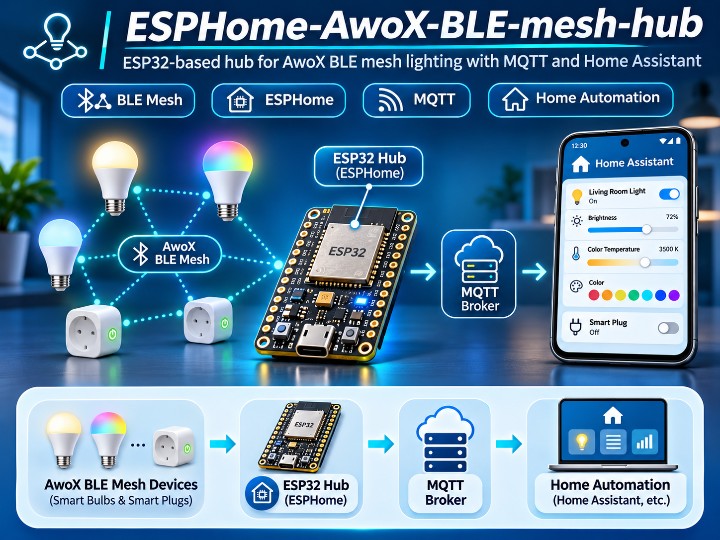
ESPHome AwoX BLE Mesh Hub connects AwoX/EGLO devices to Home Assistant using ESP32-S3 BLE Mesh and W5500 Ethernet for MQTT connectivity.
0
Components
Hardware components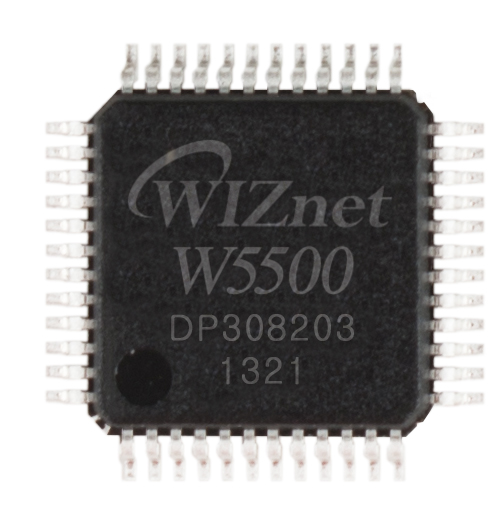
WIZnet - W5500
x 1

Seeed Studio - XIAO ESP32-S3 Plus
x 1
Project description
EspHome-AwoX-BLE-mesh-hub는 ESP32와 ESPHome을 이용해 AwoX, EGLO, KERIA 계열 BLE Mesh 조명과 스마트 플러그를 제어하고, MQTT를 통해 Home Assistant와 연동하는 오픈소스 프로젝트입니다.
기본 구성에서는 Wi-Fi를 사용할 수 있으며, Seeed Studio XIAO ESP32-S3 Plus + WIZnet W5500 Ethernet Adapter를 사용하는 별도의 wired configuration도 제공합니다.
W5500 구성에서는 BLE Mesh 통신은 ESP32-S3가 담당하고, MQTT/Home Assistant 연결은 W5500 Ethernet이 담당합니다.
1. System Architecture
전체 구조는 다음과 같습니다.
AwoX / EGLO / KERIA BLE Mesh Devices
                  │
                  │ BLE Mesh
                  ▼
          XIAO ESP32-S3
                  │
                  │ SPI
                  ▼
             WIZnet W5500
                  │
                  │ Ethernet
                  ▼
             MQTT Broker
                  │
                  ▼
            Home Assistant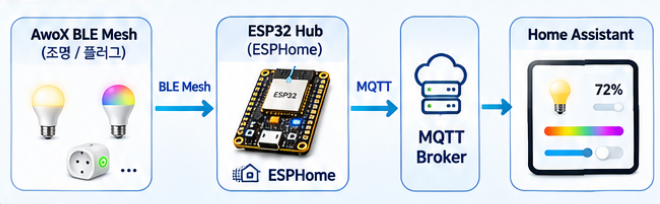
ESP32-S3는 BLE Mesh 장치를 검색하고 제어하며, MQTT Discovery를 통해 Home Assistant에 각 장치를 자동으로 등록합니다.
지원되는 주요 device type은 다음과 같습니다.
- RGB Light
- Dimmable Light
- White Temperature Light
- Smart Plug
- Group / Zone
각 장치는 product_id를 기준으로 기능이 매핑됩니다.
2. MQTT Discovery and Home Assistant
Hub가 BLE Mesh device를 발견하면 MQTT Discovery message를 전송합니다.
Home Assistant에서는 별도의 entity를 수동으로 생성하지 않아도 MQTT integration을 통해 조명과 플러그를 자동으로 인식할 수 있습니다.
BLE Mesh Device
      │
      ▼
ESP32-S3
      │
      ▼
MQTT Discovery
      │
      ▼
Home Assistant
AwoX에서 구성된 Group 또는 Zone도 Home Assistant에서 group entity로 사용할 수 있습니다.
BLE Mesh 연결은 RSSI, MAC address, mesh ID 등을 이용해 관리할 수 있으며, 여러 ESP32 Hub를 사용해 mesh 영역을 나누는 구성도 가능합니다.
3. W5500 Ethernet Instead of Wi-Fi
W5500 configuration에서는 기존 wifi: section을 ethernet: section으로 교체합니다.
ethernet:
  type: W5500
  clk_pin: GPIO7
  mosi_pin: GPIO9
  miso_pin: GPIO8
  cs_pin: GPIO2
  interrupt_pin: GPIO10
Hardware 구성은 다음과 같습니다.
| Component | Role |
|---|---|
| XIAO ESP32-S3 Plus | BLE Mesh 및 ESPHome 실행 |
| WIZnet W5500 | Wired Ethernet |
| MQTT Broker | Device message 전달 |
| Home Assistant | Smart-home control |
| PoE / USB-C | Hub power |
기존 Wi-Fi 구성:
ESP32-S3
├── BLE Mesh
└── Wi-Fi → MQTT
W5500 구성:
ESP32-S3
├── BLE Mesh
└── SPI → W5500 → Ethernet → MQTT
즉 BLE와 IP network를 서로 다른 interface로 분리합니다.
4. Ethernet Deployment
XIAO W5500 Ethernet Adapter는 PoE 또는 USB-C 전원으로 사용할 수 있습니다.
PoE 환경에서는 Ethernet cable 하나로 network와 power를 함께 공급할 수 있으며, PoE를 사용하지 않는 경우 USB-C 5V 전원이 필요합니다.
첫 firmware flash는 USB-C로 수행하고 이후에는 Ethernet을 이용해 OTA update가 가능합니다.
esphome upload --device <ip-address>VLAN 환경에서는 W5500이 untagged frame을 사용하므로 MQTT broker에 접근 가능한 VLAN의 access port에 연결합니다.
5. Related WIZnet Maker Projects
AwoX BLE Mesh Hub와 비교할 수 있는 WIZnet Maker 프로젝트 중 무선 device network와 W5500 Ethernet을 연결해 Home Assistant로 전달하는 구조를 가진 세 프로젝트를 선정했습니다.
Project Comparison
| Feature | AwoX BLE Mesh Hub | ESPHome Avi-on Mesh | ESP-NOW Gateway | PadSpan HA |
|---|---|---|---|---|
| MCU | ESP32-S3 | ESP32 | ESP32 | ESP32-S3 |
| WIZnet | W5500 | W5500 | W5500 | W5500 |
| Wireless Side | BLE Mesh | Bluetooth Mesh | ESP-NOW | BLE Scan |
| Ethernet Backhaul | ✅ | ✅ | ✅ | ✅ |
| MQTT | ✅ | ✅ | ✅ | Optional path |
| Home Assistant | ✅ | ✅ | ✅ | ✅ |
| Main Function | Lighting / Plug Control | Lighting Control | Relay / Switch Gateway | Presence Detection |
| Hybrid Network | Yes | Yes | Yes | Yes |
| W5500 Role | MQTT Ethernet | MQTT Ethernet | Gateway Ethernet | HA Ethernet |
Key Differences
AwoX BLE Mesh Hub는 AwoX/EGLO/KERIA 조명과 plug를 대상으로 하며, product_id와 MQTT Discovery를 이용해 Home Assistant에 device를 자동 등록합니다.
ESPHome Avi-on Mesh는 구조적으로 가장 유사하지만 Avi-on lighting ecosystem을 대상으로 하며, local Bluetooth Mesh lighting control에 초점을 둡니다.
ESP-NOW Gateway는 lighting mesh 대신 ESP-NOW relay/switch node를 사용하며, W5500을 gateway의 안정적인 upstream Ethernet으로 사용합니다.
PadSpan HA는 device control보다 BLE advertisement를 이용한 room-level presence detection에 초점을 둡니다.
ESPHome Avi-on Mesh
ESPHome Avi-on Mesh — WIZnet Makers
AwoX 프로젝트와 가장 직접적으로 비교할 수 있는 사례입니다.
ESP32가 Avi-on Bluetooth Mesh lighting을 제어하고, W5500 Ethernet을 통해 MQTT와 Home Assistant에 연결됩니다. LilyGO T-ETH-Lite W5500을 Ethernet gateway option으로 사용할 수 있으며, individual/group/broadcast lighting control과 MQTT auto-discovery를 지원합니다.
Avi-on Bluetooth Mesh
        │
        ▼
ESP32 Gateway
        │
        ▼
W5500 Ethernet
        │
        ▼
MQTT / Home Assistant
AwoX Hub와 동일하게 Bluetooth Mesh와 wired Ethernet을 분리한 smart-lighting gateway라는 점이 가장 유사합니다.
ESP-NOW Gateway for Home Assistant
ESP-NOW Gateway for Home Assistant over W5500 Ethernet
이 프로젝트는 ESP-NOW 기반 relay node와 Home Assistant 사이에 ESP32 + W5500 gateway를 배치합니다.
Field node와 gateway 사이에서는 ESP-NOW를 사용하고, gateway와 Home Assistant 사이에서는 W5500 Ethernet과 MQTT를 사용합니다. W5500은 DHCP/static IP와 MQTT network path를 담당합니다.
ESP-NOW Nodes
      │
      ▼
ESP32 Gateway
      │
      ▼
W5500 Ethernet
      │
      ▼
MQTT / Home Assistant
AwoX Hub와 wireless protocol은 다르지만 wireless field network와 wired smart-home backbone을 gateway에서 연결한다는 구조가 유사합니다.
PadSpan HA
PadSpan HA는 ESP32-S3가 BLE advertisement를 수집해 room-level presence를 판단하고 이를 Home Assistant에 전달하는 프로젝트입니다.
ESP32-S3 + W5500 ESPHome configuration을 사용할 수 있으며, BLE scanner는 무선으로 device를 감지하고 W5500은 Ethernet network path를 담당합니다.
BLE Tag / Phone
      │
      ▼
ESP32-S3
      │
      ▼
W5500 Ethernet
      │
      ▼
Home Assistant
AwoX Hub가 BLE Mesh device를 제어하는 프로젝트라면 PadSpan HA는 BLE advertisement를 수집·분석한다는 차이가 있습니다.
FAQ
Q. W5500은 Wi-Fi를 대체하나요?
네. W5500 configuration에서는 MQTT/Home Assistant network path가 Wi-Fi 대신 wired Ethernet을 사용합니다.
Q. BLE Mesh도 W5500을 통해 처리하나요?
아닙니다. BLE Mesh는 ESP32-S3가 담당하고 W5500은 Ethernet communication을 담당합니다.
Q. PoE를 사용할 수 있나요?
네. XIAO W5500 Ethernet Adapter는 PoE 환경에서 사용할 수 있으며, PoE가 없는 경우 USB-C 전원을 사용합니다.
Q. Ethernet OTA가 가능한가요?
네. 첫 USB-C flash 이후에는 IP address를 이용해 Ethernet으로 firmware를 upload할 수 있습니다.
EspHome-AwoX-BLE-mesh-hub is an open-source project that uses ESP32 and ESPHome to control AwoX, EGLO, and KERIA BLE Mesh lights and smart plugs, then integrates them with Home Assistant via MQTT.
While the default setup can use Wi-Fi, the project also provides a dedicated wired configuration for the Seeed Studio XIAO ESP32-S3 Plus + WIZnet W5500 Ethernet Adapter.
In this setup, ESP32-S3 handles BLE Mesh communication, while W5500 provides the Ethernet path for MQTT and Home Assistant connectivity.
1. Project Overview
The overall system can be summarized as follows:
AwoX / EGLO / KERIA BLE Mesh Devices
                  │
                  │ BLE Mesh
                  ▼
          XIAO ESP32-S3
                  │
                  │ SPI
                  ▼
             WIZnet W5500
                  │
                  │ Ethernet
                  ▼
             MQTT Broker
                  │
                  ▼
            Home Assistant
The ESP32-S3 scans, connects to, and controls BLE Mesh devices, then publishes their states and control interfaces through MQTT.
The project supports several device types, including:
- RGB lights
- Dimmable lights
- Tunable white lights
- Smart plugs
- Groups / zones
Each supported device is mapped by its product_id, allowing ESPHome to expose the right features to Home Assistant.
2. MQTT Discovery and Home Assistant Integration
One of the main strengths of this project is its automatic MQTT Discovery integration.
When the hub detects a supported BLE Mesh device, it publishes MQTT Discovery messages so that Home Assistant can automatically create the corresponding entities.
BLE Mesh Device
      │
      ▼
ESP32-S3 Hub
      │
      ▼
MQTT Discovery
      │
      ▼
Home Assistant
This means users do not have to manually define each light or plug inside Home Assistant.
The project also supports AwoX groups and zones, which can be exposed as group-style entities for easier smart-home control.
3. W5500 Ethernet Instead of Wi-Fi
A key variation of this project is the W5500 Ethernet-based deployment.
Instead of using wifi:, the project offers an ethernet: configuration for the W5500 adapter.
Example configuration:
ethernet:
  type: W5500
  clk_pin: GPIO7
  mosi_pin: GPIO9
  miso_pin: GPIO8
  cs_pin: GPIO2
  interrupt_pin: GPIO10
This changes the network topology from:
ESP32-S3
├── BLE Mesh
└── Wi-Fi → MQTT
to:
ESP32-S3
├── BLE Mesh
└── SPI → W5500 → Ethernet → MQTT
This separation is important because it allows the system to use:
- BLE Mesh for local device communication
- W5500 Ethernet for wired MQTT / Home Assistant connectivity
In other words, this is a hybrid smart-home gateway.
4. Hardware Configuration
The wired Ethernet version is based on the following hardware:
| Component | Role |
|---|---|
| Seeed Studio XIAO ESP32-S3 Plus | BLE Mesh hub and ESPHome controller |
| WIZnet W5500 Ethernet Adapter | Wired Ethernet connection |
| MQTT Broker | Message transport |
| Home Assistant | Home automation platform |
| PoE / USB-C | Power source |
The W5500 adapter provides a wired Ethernet path for MQTT and Home Assistant connectivity without using Wi-Fi.
The project also mentions that the board can be powered by:
- PoE, if the adapter supports it
- USB-C, when PoE is not used
5. Deployment Notes
A few practical deployment points are worth noting:
- The first flash must be done over USB-C
- After that, OTA update over Ethernet is supported
- W5500 uses untagged Ethernet frames
- In VLAN environments, the hub should be connected to an access port
- If PoE is not used, USB-C 5V power is still required
Typical OTA command:
esphome upload --device <ip-address>6. Related WIZnet Maker Projects
To better position this project, here are three comparable WIZnet Maker projects that use similar ideas such as wireless field communication + W5500 Ethernet + Home Assistant / MQTT integration.
Project Comparison
| Feature | AwoX BLE Mesh Hub | ESPHome Avi-on Mesh | ESP-NOW Gateway | PadSpan HA |
|---|---|---|---|---|
| MCU | ESP32-S3 | ESP32 | ESP32 | ESP32-S3 |
| WIZnet | W5500 | W5500 | W5500 | W5500 |
| Wireless Side | BLE Mesh | Bluetooth Mesh | ESP-NOW | BLE Scan |
| Ethernet Backhaul | ✅ | ✅ | ✅ | ✅ |
| MQTT | ✅ | ✅ | ✅ | Optional path |
| Home Assistant | ✅ | ✅ | ✅ | ✅ |
| Main Function | Lighting / Plug Control | Lighting Control | Relay / Switch Gateway | Presence Detection |
| Hybrid Network | Yes | Yes | Yes | Yes |
| W5500 Role | MQTT Ethernet | MQTT Ethernet | Gateway Ethernet | HA Ethernet |
Key Differences
ESPHome Avi-on Mesh
This is the most directly comparable project.
Like the AwoX hub, it uses Bluetooth Mesh for lighting control and W5500 Ethernet as the wired backhaul for MQTT and Home Assistant.
Similarities
- Bluetooth Mesh lighting control
- ESP-based hub
- W5500 Ethernet backhaul
- MQTT + Home Assistant integration
Difference
- This project targets the Avi-on lighting ecosystem, while the current project targets AwoX / EGLO / KERIA BLE Mesh devices
ESP-NOW Gateway for Home Assistant over W5500 Ethernet
This project uses ESP-NOW instead of BLE Mesh, but the architecture is still comparable.
Wireless nodes communicate with an ESP32 gateway, and the gateway uses W5500 Ethernet to connect to MQTT and Home Assistant.
Similarities
- Wireless field-side communication
- ESP32 gateway structure
- W5500 as Ethernet uplink
- Home Assistant integration
Difference
- Uses ESP-NOW
- Focuses on relay/sensor-style node communication rather than smart lighting
PadSpan HA
PadSpan HA is another useful comparison because it combines BLE-based sensing with W5500 Ethernet and Home Assistant.
Similarities
- ESP32-S3 based
- BLE-related application
- W5500 Ethernet support
- Home Assistant integration
Difference
- Focuses on presence detection
- Uses BLE advertisement scanning rather than BLE Mesh light control
FAQ
Q. Does W5500 replace Wi-Fi in this project?
Yes. In the Ethernet configuration, W5500 is used instead of Wi-Fi for MQTT and Home Assistant connectivity.
Q. Does W5500 handle BLE Mesh communication?
No. BLE Mesh communication is handled by the ESP32-S3. W5500 only provides the Ethernet network connection.
Q. Can it be deployed with PoE?
Yes. The W5500 adapter can be used in a PoE-based setup if supported, otherwise USB-C power is used.
Q. Does it support OTA updates?
Yes. After the initial USB flash, firmware updates can be performed over Ethernet.

