Azure IoT Edge Solution
Azure IoT Edge Solution
0
Components
Hardware components
WIZnet - W5500
x 1

Project description
eWBM provides devices to be connected to the Microsoft Azure network for the popular SaaS solution.
We used the Dev board of SE100 with an ethernet port to connect to the Internet to Azure as a cloud service platform
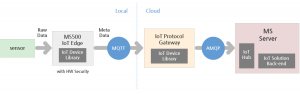 eWBM SE100 accommodates required software stack in it to be connected to the Azure system
 eSE100 Azure IoT S/W Architecture Block Diagram
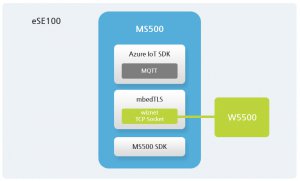 with the MS500 SDK and MBEDTSL, TLS communication is applied, and the Azure IoT SDK enables protocol communication in Azure.
eWBM SE100 accommodates required software stack in it to be connected to the Azure system
Solutions for security-enhanced Azure IoT Edge
The solution for eWBM eSE100 Azure IoT Edge uses the HW security feature of the MS500 to provide better IoT security at a low cost.- The secure boot feature with the MS500 helps you overcome the boot-stage security vulnerability of Azure IoT edge.
- The TLS solution ported to eSE100 hardware allows for better network security by allowing TLS to be easily used in small memory operating models. In particular, the hardware acceleration capability of the MS500 is used to support small memory, fast response, and quick connect compared to competing products.
The eSE100 Azure IoT Configuration
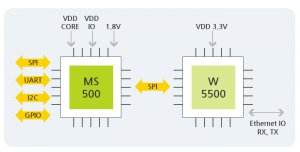
? eSE100 H/W Block Diagram
eSE100 Azure IoT S/W Architecture Block Diagram
with the MS500 SDK and MBEDTSL, TLS communication is applied, and the Azure IoT SDK enables protocol communication in Azure.
Communication Procedure
- SE100 and Azure server sectors are handshake for first-time TLS secure communications.
- When a TLS communication segment is connected, SS2E client and Azure Server initiate communication through the MQTT protocol. When the conditions required by Azure Server are met, final connection success is completed.
- After successful connection, the MQTT protocol initiates Publish/Subscribe communication according to the specification.


