Power Monitoring - CircuitSetup Expandable 6 Channel ESP32 Energy Meter Main Board
Power Monitoring
0
Components
Hardware components
WIZnet - W5500
x 1

Project description
원본 링크: https://www.aaroncake.net/house/automation/sensors.asp
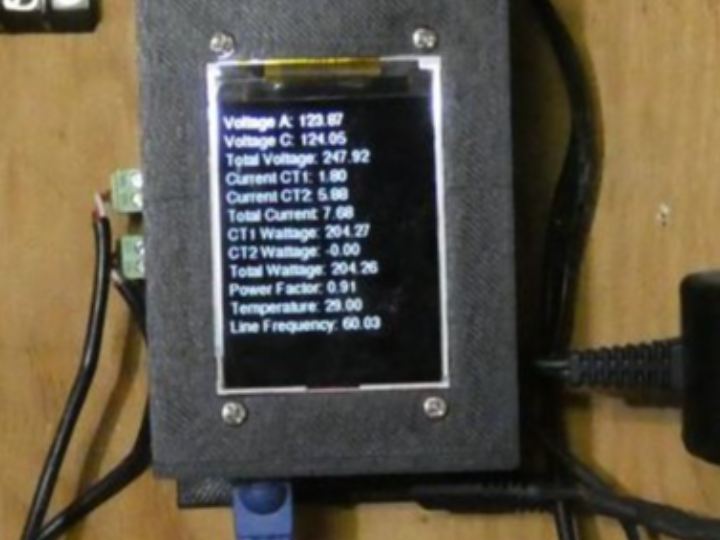
이 프로젝트는 Home assitance에서 전력 모니터링을 위한 프로젝트입니다.
메인보드는 CircuitSetup사의 "Expandable 6 Channel ESP32 Energy Meter Main Board"를 사용했습니다.
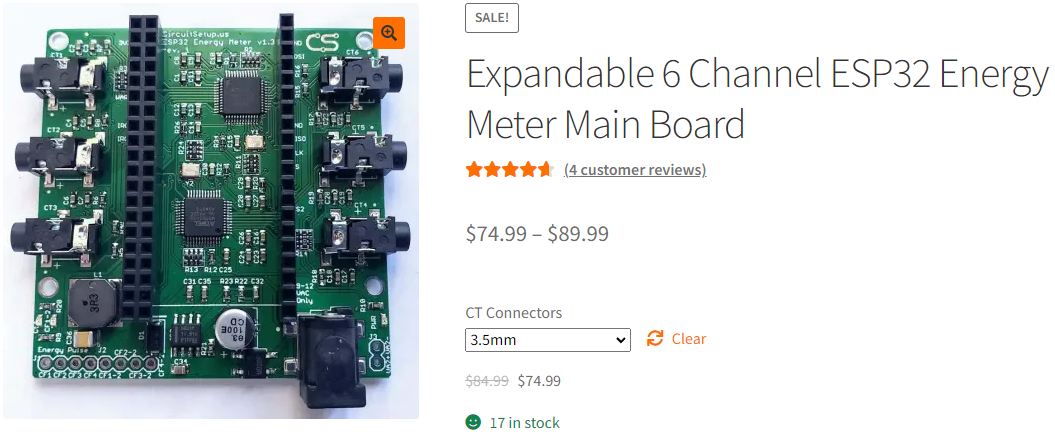
이 보드는 두 개의 Microchip ATM90E32AS 에너지 모니터 IC를 사용하며, 각각 3개의 전류 채널을 보유하고 있습니다.
Ethernet 통신을 위해 W5500가 실장된 모듈을 사용했고 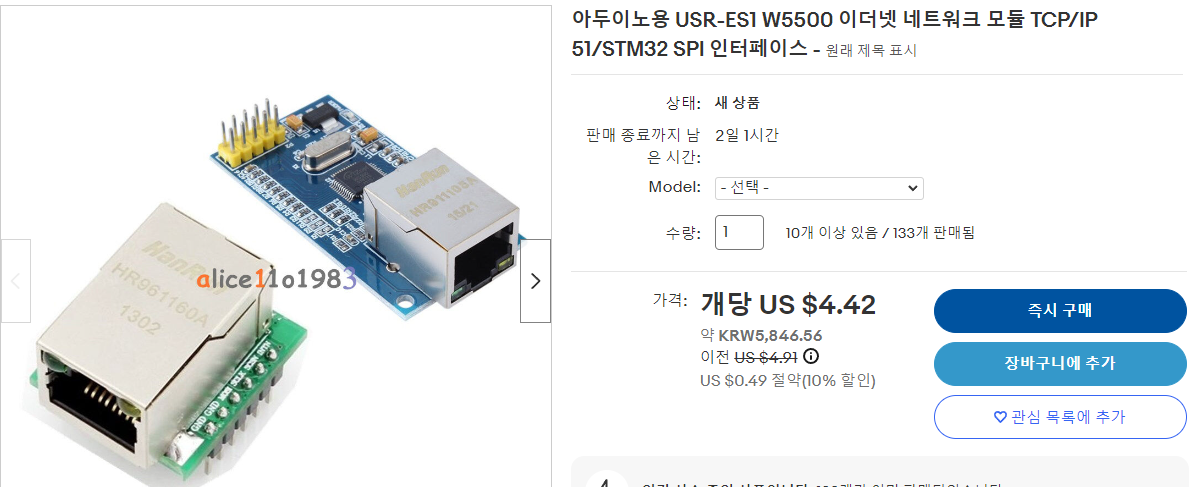
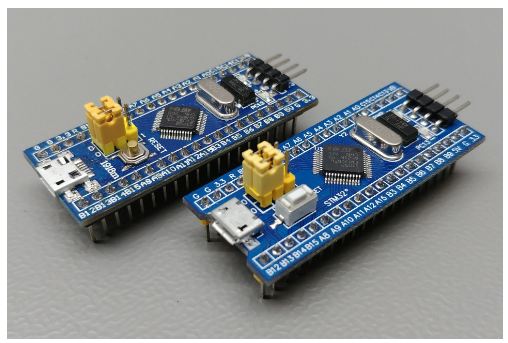
MCU로는 STM32F103C8T6가 실장된 Blue Pill
전류 측정은 CT 센서를 사용하고
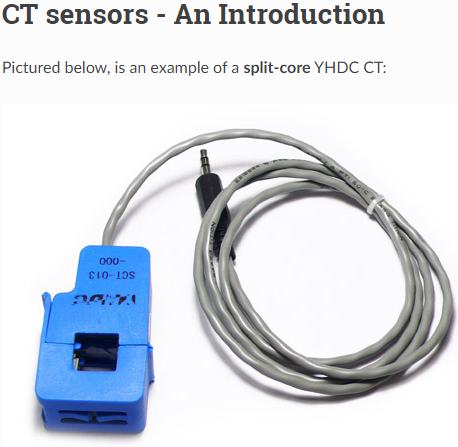
정보 디스플레이 용도로는 2.2" ILI9225 TFT display를 사용했습니다.
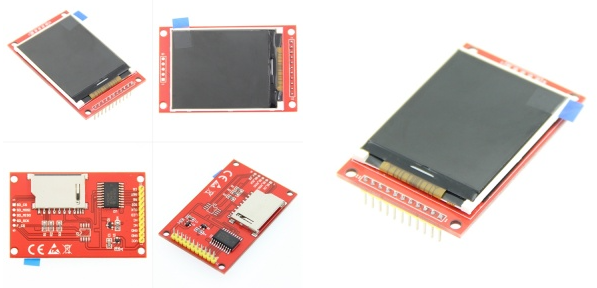
사용된 HW들은 저자가 제작한 PCB로 결합되고, 직접 설계한 3D 케이스로 프로젝트의 완성도를 높였습니다.
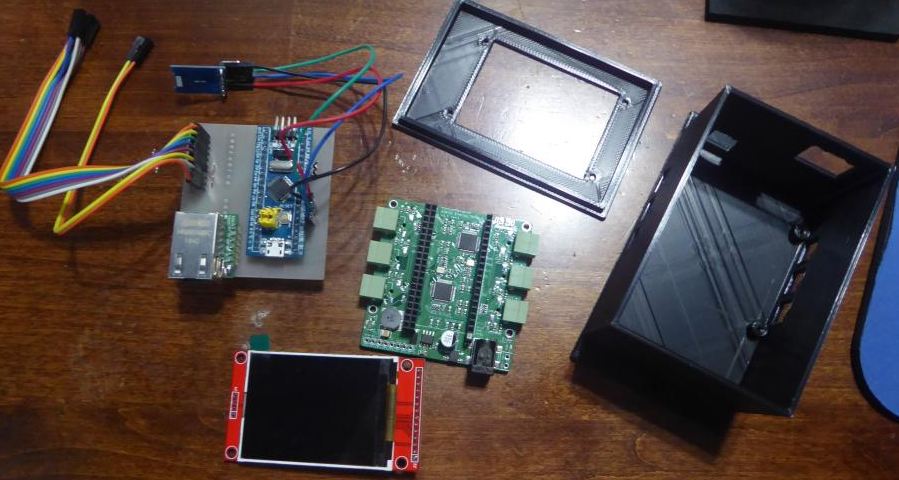
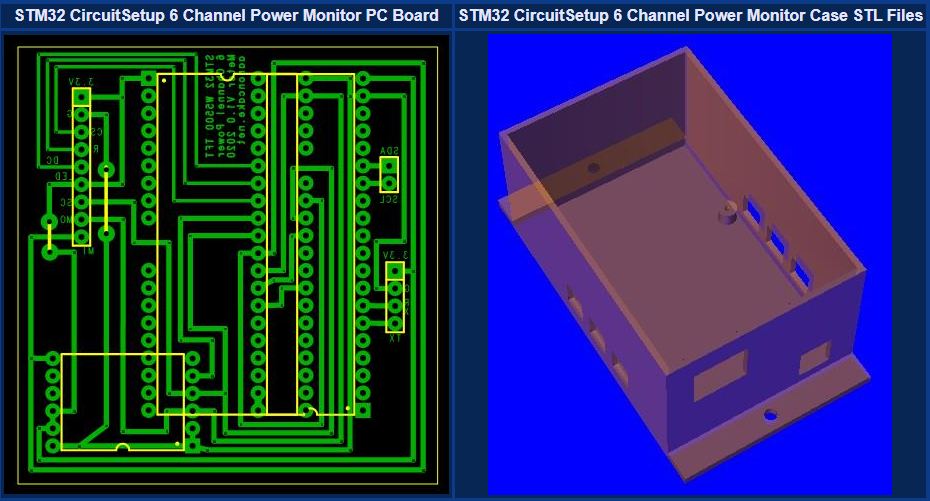
최초에는 MySQL을 사용하여 DB에 직접 데이터를 저장하려 했지만, 구현에 문제가 있어 MQTT를 사용했다고 합니다.
모니터링 지표는 전압, 전류, 와트, 역률, 온도 및 라인 주파수와 같은 다양한 매개 변수를 포함하며, 측정은 2초마다 이루어집니다.
아래는 저자가 공개한 펌웨어입니다.
/*
Circuit Setup 6 Channel Energy Monitor based on ATM90E32

For STM32F1, WizNet 5500 Ethernet

Version 1:
	-First version, basic functionality to send power readings via MQTT and display on screen, 2 current channels and voltage


To do:
	-Fix zero wattage reading (Change B to C)
	-Format screen instead of just dumping
	-Boot up info to screen

Libraries:
-ATM90E32: https://github.com/CircuitSetup/ATM90E32
-ArduinoJSON: https://arduinojson.org
-ILI9341 TFT:https://github.com/adafruit/Adafruit_ILI9341

*/


//SPI library for SPI bus (ATM90E32, Ethernet, etc.)
#include "SPI.h"


//ATM90E32 library for 6 channel energy monitor board
#include <ATM90E32.h>                                            // for ATM90E32 energy meter

//ArduinoJSON JSON library
#include <ArduinoJson.h>

//Ethernet library for W5500
#include <Ethernet.h>

//PubSubClinet library for MQTT
#include <PubSubClient.h>

//Adafruit libraries for ILI934 TFT screen
#include "Adafruit_GFX.h"
#include "Adafruit_ILI9341.h"
#include <Fonts/FreeSans9pt7b.h>


//ATM90E32 Calibration Variables

/***** CALIBRATION SETTINGS *****/
/*
 * 4485 for 60 Hz (North America)
 * 389 for 50 hz (rest of the world)
 */
unsigned short lineFreq = 4485;

/*
 * 0 for 10A (1x)
 * 21 for 100A (2x)
 * 42 for between 100A - 200A (4x)
 */
unsigned short PGAGain = 21;

/*
 * For meter <= v1.3:
 *    42080 - 9v AC Transformer - Jameco 112336
 *    32428 - 12v AC Transformer - Jameco 167151
 * For meter > v1.4:
 *    37106 - 9v AC Transformer - Jameco 157041
 *    38302 - 9v AC Transformer - Jameco 112336
 *    29462 - 12v AC Transformer - Jameco 167151
 * For Meters > v1.4 purchased after 11/1/2019 and rev.3
 *    7611 - 9v AC Transformer - Jameco 157041
 */
//unsigned short VoltageGain = 37495;                       //my 9VAC power adapter, "OEM"

unsigned short VoltageGain = 7559;                       //my 9VAC power adapter, "OEM"

/*
 * 25498 - SCT-013-000 100A/50mA
 * 39473 - SCT-016 120A/40mA
 * 46539 - Magnalab 100A
 */
unsigned short CurrentGainCT1 = 14250;					//my 100A CTs SCT013 100A:50mA
unsigned short CurrentGainCT2 = 14250;

const int CS_pin = PB0;                                 //CS pin for ATM90E32
//CS2 is PB1


//ATM90E32 Data Variables

float VoltageA = 0;
float VoltageC = 0;
float TotalVoltage = 0;
float CT1Current = 0;
float CT2Current = 0;
float TotalCurrent = 0;
float TotalWattage = 0;
float PowerFactor = 0;
float ATM90E32Temp = 0;
float LineFrequency = 0;
float CT1Wattage = 0;
float CT2Wattage = 0;


unsigned short sys0 = 0;
unsigned short sys1 = 0;
unsigned short en0 = 0;
unsigned short en1 = 0;


//TFT Screen
//TFT screen control pins
#define TFT_DC PA1
#define TFT_CS PA3
#define TFT_RST PA2


//variables and constants for send timer
unsigned long EnergyMonTelePreviousMillis = 0;                 //the last time the send interval check ran
const int EnergyMonitorTelemetryInterval = 2000;                   //the interval to send, milliseconds

//JSON related variables
StaticJsonDocument<512> EnergyMeterJSON;

//MQTT variables

char const* MQTTServer = "192.168.107.11";						//MQTT server address
char const* MQTTClientName = "energymon1";							//MQTT client name. Keep short, don't waste RAM
const char* EnergyMonitorMQTTTopic = "/energymon/energy/";			//MQTT topic to publish energy info on
const char* MQTTTelemetryTopic = "/energymon/tele/";				//MQTT topic to publish telemetry info
const char OnlinePayload[] = "ONLINE";								//MQTT payload to send when connected to broker
char MQTTEnergyJSON[256];											//cstring to hold JSON data to send via MQTT...might have to be bigger

//*************************************************
// Make sure to assign a unique MAC to each board!
//*************************************************

byte mac[] = { 0x21, 0xCA, 0x33, 0x4A, 0xED, 0x52 };

//initialize all the libraries


//initialize the ATM90E32
ATM90E32 eic{};                          //initialize the IC class


//Init TFT library with hardware SPI and control pins above
Adafruit_ILI9341 tft = Adafruit_ILI9341(TFT_CS, TFT_DC, TFT_RST);

//Initialize ethernet client as ethClient
EthernetClient ethClient;

//MQTT callback function, likely not needed, but here just in case
void MQTTCallback(char* topic, byte* payload, unsigned int length) {
}


//Init PubSubClient passing ethClient
PubSubClient MQTTClient(MQTTServer, 1883, MQTTCallback, ethClient);				//initialize PubSubClient as "MQTTClient"


void ConnectToMQTTBroker(bool ShowOnTFT) {

	while (!MQTTClient.connected()) {											// Loop until connected to MQTT broker

		Serial.println(F("MQTT: Attempting MQTT connection..."));
		if (ShowOnTFT) {
			//tft.println(F("MQTT: Attempting MQTT connection..."));
		}


		//if connected, publish ONLINE to /energymon/tele/
		if (MQTTClient.connect((char*)MQTTClientName)) {
			Serial.println(F("MQTT: Connected."));
			Serial.print(F("MQTT: "));
			Serial.print(MQTTTelemetryTopic);
			Serial.print(F(" = "));
			Serial.println(F("ONLINE"));

			if (ShowOnTFT) {
				//tft.println(F("MQTT: Connected."));
				//tft.print(F("MQTT: "));
				//tft.print(MQTTTelemetryTopic);
				//tft.print(F(" = "));
				//tft.println(F("ONLINE"));
			}

			MQTTClient.publish_P(MQTTTelemetryTopic, OnlinePayload, false);
		}


		//otherwise print failed for debugging
		else {

			Serial.print(F("MQTT: Connection failed. Retry in 5 seconds. Error: "));
			Serial.println(MQTTClient.state());
			if (ShowOnTFT) {
				//tft.print(F("MQTT: Connection failed. Retry in 5 seconds. Error: "));
				//tft.println(MQTTClient.state());
			}
			delay(5000);
		}
	}
}


void setup() {

    //open the serial port for debugging
    //Serial.begin(9600);
    Serial.begin(115200);
    delay(100);
    Serial.println(F("BOOT..."));

	Serial.println(F("TFT: Begin..."));
	tft.begin();

	//set up TFT screen to write boot info
	tft.fillScreen(ILI9341_BLACK);									//blank the screen by filling black
	tft.setRotation(2);
	tft.setFont(&FreeSans9pt7b);

    /*Initialise the ATM90E32 & Pass CS pin and calibrations to its library -
CODE IS CURRENTLY FOR SPLIT PHASE...NEED TO MODIFY FOR 6 CHANNEL */
    Serial.println(F("ATM90E32: Begin..."));
    eic.begin(CS_pin, lineFreq, PGAGain, VoltageGain, CurrentGainCT1, CurrentGainCT2, 0);			//3 current gains, last one set to 0 as not yet using 3rd channel
    Serial.println(F("ATM90E32: Success..."));
    delay(1000);


	Ethernet.init(PA4);					//initialize Ethernet with pin PA4 as CS

	// start the Ethernet and obtain an address via DHCP
	Serial.println(F("ETHERNET: Begin..."));

	if (Ethernet.begin(mac) == 0) {
		Serial.println(F("ETHERNET: FAIL. No DHCP."));
		if (Ethernet.hardwareStatus() == EthernetNoHardware) {
			Serial.println(F("ETHERNET: Hardware not found."));
		}
		else if (Ethernet.linkStatus() == LinkOFF) {
			Serial.println(F("ETHERNET: No link."));
		}

		Serial.println(F("STOP"));
		while (true) {
			delay(1);
		}

	}

	Serial.print(F("ETHERNET: Success. IP Addresss: "));
	Serial.println(Ethernet.localIP());


	delay(1500);

	ConnectToMQTTBroker(false);									//Connect to the MQTT broker


}

void loop() {

	ConnectToMQTTBroker(false);								//if not connected to MQTT broker, connect


    unsigned long CurrentMillis = millis();                 //get the current time count


    if (CurrentMillis - EnergyMonTelePreviousMillis >= EnergyMonitorTelemetryInterval) {
        EnergyMonTelePreviousMillis = CurrentMillis;                   //update the time the check last ran

		sys0 = eic.GetSysStatus0();														 //EMMState0
		sys1 = eic.GetSysStatus1();														 //EMMState1
		en0 = eic.GetMeterStatus0();														//EMMIntState0
		en1 = eic.GetMeterStatus1();														//EMMIntState1


		Serial.print(F("STATUS: System: S0:0x: "));
		Serial.println(sys0, HEX);
		Serial.print(F("STATUS: System: S1:0x: "));
		Serial.println(sys1, HEX);

		Serial.print(F("STATUS: Meter: E0:0x: "));
		Serial.println(en0, HEX);
		Serial.print(F("STATUS: Meter: E1:0x: "));
		Serial.println(en1, HEX);

		//if true the MCU is not getting data from the energy meter
		if (sys0 == 65535 || sys0 == 0) {
			Serial.println(F("ERROR: Not receiving data from energy meter - Check connection."));
		}

		//get voltage
		VoltageA = eic.GetLineVoltageA();
		VoltageC = eic.GetLineVoltageC();

		if (lineFreq = 4485) {
			TotalVoltage = VoltageA + VoltageC;						 //is split single phase, so only 120v per leg
		}
		else {
			TotalVoltage = VoltageA;								//voltage should be 220-240 at the AC transformer
		}

		//get current from both transformers and add for a total current measurement
		CT1Current = eic.GetLineCurrentA();
		CT2Current = eic.GetLineCurrentB();
		TotalCurrent = CT1Current + CT2Current;

		//get power. There seems to be no documumentation however guesses:
		TotalWattage = eic.GetTotalActivePower();								//total wattage
		PowerFactor = eic.GetTotalPowerFactor();
		CT1Wattage = eic.GetActivePowerA();										//CT1 wattage
		CT2Wattage = eic.GetActivePowerB();										//CT2 wattage

		ATM90E32Temp = eic.GetTemperature();
		LineFrequency = eic.GetFrequency();

		Serial.print(F("ENERGY: Voltage A: "));
		Serial.println(VoltageA);
		Serial.print(F("ENERGY: Voltage C: "));
		Serial.println(VoltageC);
		Serial.print(F("ENERGY: Total Voltage: "));
		Serial.println(TotalVoltage);
		Serial.print(F("ENERGY: Current CT1: "));
		Serial.println(CT1Current);
		Serial.print(F("ENERGY: Current CT2: "));
		Serial.println(CT2Current);
		Serial.print(F("ENERGY: Total Current: "));
		Serial.println(TotalCurrent);
		Serial.print(F("ENERGY: CT1 Wattage: "));
		Serial.println(CT1Wattage);
		Serial.print(F("ENERGY: CT2 Wattage: "));
		Serial.println(CT2Wattage);
		Serial.print(F("ENERGY: Total Wattage: "));
		Serial.println(TotalWattage);
		Serial.print(F("ENERGY: Power Factor: "));
		Serial.println(PowerFactor);
		Serial.print(F("ENERGY: Temperature: "));
		Serial.println(ATM90E32Temp);
		Serial.print(F("ENERGY: Frequency: "));
		Serial.println(LineFrequency);

		//tft.fillRect(0, 0, 240, 160,ILI9341_BLACK);
		tft.fillScreen(ILI9341_BLACK);

		tft.setCursor(0, 20);											//cursor at top left
		tft.setTextColor(ILI9341_WHITE);								//text size white and small
		tft.setTextSize(1.75);


		tft.print(F("Voltage A: "));
		tft.println(VoltageA);
		tft.print(F("Voltage C: "));
		tft.println(VoltageC);
		tft.print(F("Total Voltage: "));
		tft.println(TotalVoltage);
		tft.print(F("Current CT1: "));
		tft.println(CT1Current);
		tft.print(F("Current CT2: "));
		tft.println(CT2Current);
		tft.print(F("Total Current: "));
		tft.println(TotalCurrent);
		tft.print(F("CT1 Wattage: "));
		tft.println(CT1Wattage);
		tft.print(F("CT2 Wattage: "));
		tft.println(CT2Wattage);
		tft.print(F("Total Wattage: "));
		tft.println(TotalWattage);
		tft.print(F("Power Factor: "));
		tft.println(PowerFactor);
		tft.print(F("Temperature: "));
		tft.println(ATM90E32Temp);
		tft.print(F("Line Frequency: "));
		tft.println(LineFrequency);


		//add values for JSON collection (ArduinoJSON)

		EnergyMeterJSON["Sys0"] = sys0;
		EnergyMeterJSON["Sys1"] = sys1;
		EnergyMeterJSON["En0"] = en0;
		EnergyMeterJSON["En1"] = en1;

		EnergyMeterJSON["VltA"]=VoltageA;
		EnergyMeterJSON["VltC"] = VoltageC;
		EnergyMeterJSON["TtlV"] = TotalVoltage;
		EnergyMeterJSON["CT1"] = CT1Current;
		EnergyMeterJSON["CT2"] = CT2Current;
		EnergyMeterJSON["TtlCur"] = TotalCurrent;
		EnergyMeterJSON["CT1W"] = CT1Wattage;
		EnergyMeterJSON["CT2W"] = CT2Wattage;
		EnergyMeterJSON["TtlW"] = TotalWattage;
		EnergyMeterJSON["PwrFctr"] = PowerFactor;
		EnergyMeterJSON["ChpTmp"] = ATM90E32Temp;
		EnergyMeterJSON["LinFrq"] = LineFrequency;

		//output JSON to serial
		serializeJson(EnergyMeterJSON, Serial);

		//Publish via MQTT
		serializeJson(EnergyMeterJSON, MQTTEnergyJSON);
		MQTTClient.publish(EnergyMonitorMQTTTopic, MQTTEnergyJSON);


    }
}
저자가 설명하길 위 펌웨어는 기본 기능이 구현된 진행 중인 작업이고 TFT 화면을 초기화하고 이더넷 및 MQTT 연결을 설정한 다음 ATM90E32 에너지 모니터에서 데이터를 수집하고 표시하는 기능만 구현되어있다고 합니다.
이 프로젝트는 소스코드뿐 아니라 PCB와 3D 케이스의 step파일까지 공개된 프로젝트이므로
다른 유저들이 참고,활용하기 좋은 프로젝트입니다.
Original Link : https://www.aaroncake.net/house/automation/sensors.asp
This project is for power monitoring in a home assitance.
The main board is the "Expandable 6 Channel ESP32 Energy Meter Main Board" from CircuitSetup.
The board uses two Microchip ATM90E32AS energy monitor ICs, each with three current channels.
For Ethernet communication, he used a module with a W5500 mounted on it
The MCU is a Blue Pill with STM32F103C8T6 on board
Current measurement uses a CT sensor
For the information display, he used a 2.2" ILI9225 TFT display.
The HWs used were combined on a PCB made by the author, and the project was completed with a 3D case designed by him.
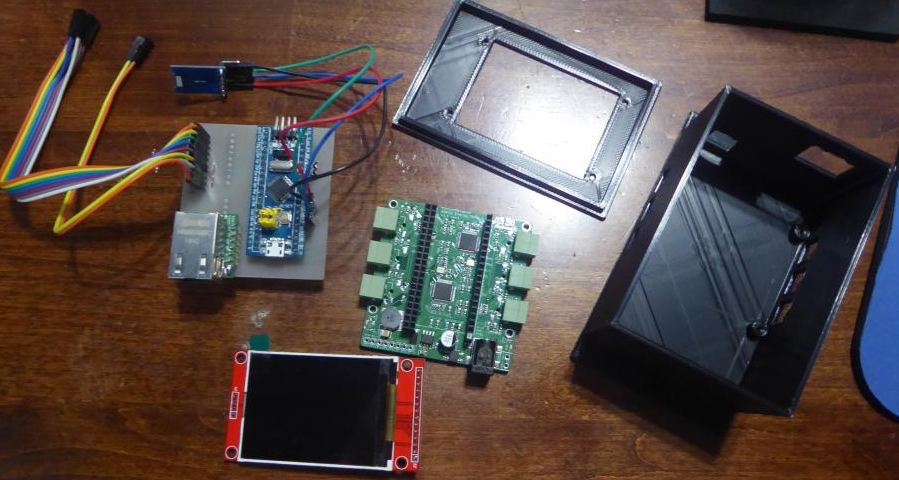
Initially, they were going to use MySQL to store the data directly in the DB, but there were implementation issues, so they used MQTT.
The monitored metrics include various parameters such as voltage, current, watts, power factor, temperature, and line frequency, and measurements are taken every 2 seconds.
Below is the firmware released by the author.
/*
Circuit Setup 6 Channel Energy Monitor based on ATM90E32

For STM32F1, WizNet 5500 Ethernet

Version 1:
	-First version, basic functionality to send power readings via MQTT and display on screen, 2 current channels and voltage


To do:
	-Fix zero wattage reading (Change B to C)
	-Format screen instead of just dumping
	-Boot up info to screen

Libraries:
-ATM90E32: https://github.com/CircuitSetup/ATM90E32
-ArduinoJSON: https://arduinojson.org
-ILI9341 TFT:https://github.com/adafruit/Adafruit_ILI9341

*/


//SPI library for SPI bus (ATM90E32, Ethernet, etc.)
#include "SPI.h"


//ATM90E32 library for 6 channel energy monitor board
#include <ATM90E32.h>                                            // for ATM90E32 energy meter

//ArduinoJSON JSON library
#include <ArduinoJson.h>

//Ethernet library for W5500
#include <Ethernet.h>

//PubSubClinet library for MQTT
#include <PubSubClient.h>

//Adafruit libraries for ILI934 TFT screen
#include "Adafruit_GFX.h"
#include "Adafruit_ILI9341.h"
#include <Fonts/FreeSans9pt7b.h>


//ATM90E32 Calibration Variables

/***** CALIBRATION SETTINGS *****/
/*
 * 4485 for 60 Hz (North America)
 * 389 for 50 hz (rest of the world)
 */
unsigned short lineFreq = 4485;

/*
 * 0 for 10A (1x)
 * 21 for 100A (2x)
 * 42 for between 100A - 200A (4x)
 */
unsigned short PGAGain = 21;

/*
 * For meter <= v1.3:
 *    42080 - 9v AC Transformer - Jameco 112336
 *    32428 - 12v AC Transformer - Jameco 167151
 * For meter > v1.4:
 *    37106 - 9v AC Transformer - Jameco 157041
 *    38302 - 9v AC Transformer - Jameco 112336
 *    29462 - 12v AC Transformer - Jameco 167151
 * For Meters > v1.4 purchased after 11/1/2019 and rev.3
 *    7611 - 9v AC Transformer - Jameco 157041
 */
//unsigned short VoltageGain = 37495;                       //my 9VAC power adapter, "OEM"

unsigned short VoltageGain = 7559;                       //my 9VAC power adapter, "OEM"

/*
 * 25498 - SCT-013-000 100A/50mA
 * 39473 - SCT-016 120A/40mA
 * 46539 - Magnalab 100A
 */
unsigned short CurrentGainCT1 = 14250;					//my 100A CTs SCT013 100A:50mA
unsigned short CurrentGainCT2 = 14250;

const int CS_pin = PB0;                                 //CS pin for ATM90E32
//CS2 is PB1


//ATM90E32 Data Variables

float VoltageA = 0;
float VoltageC = 0;
float TotalVoltage = 0;
float CT1Current = 0;
float CT2Current = 0;
float TotalCurrent = 0;
float TotalWattage = 0;
float PowerFactor = 0;
float ATM90E32Temp = 0;
float LineFrequency = 0;
float CT1Wattage = 0;
float CT2Wattage = 0;


unsigned short sys0 = 0;
unsigned short sys1 = 0;
unsigned short en0 = 0;
unsigned short en1 = 0;


//TFT Screen
//TFT screen control pins
#define TFT_DC PA1
#define TFT_CS PA3
#define TFT_RST PA2


//variables and constants for send timer
unsigned long EnergyMonTelePreviousMillis = 0;                 //the last time the send interval check ran
const int EnergyMonitorTelemetryInterval = 2000;                   //the interval to send, milliseconds

//JSON related variables
StaticJsonDocument<512> EnergyMeterJSON;

//MQTT variables

char const* MQTTServer = "192.168.107.11";						//MQTT server address
char const* MQTTClientName = "energymon1";							//MQTT client name. Keep short, don't waste RAM
const char* EnergyMonitorMQTTTopic = "/energymon/energy/";			//MQTT topic to publish energy info on
const char* MQTTTelemetryTopic = "/energymon/tele/";				//MQTT topic to publish telemetry info
const char OnlinePayload[] = "ONLINE";								//MQTT payload to send when connected to broker
char MQTTEnergyJSON[256];											//cstring to hold JSON data to send via MQTT...might have to be bigger

//*************************************************
// Make sure to assign a unique MAC to each board!
//*************************************************

byte mac[] = { 0x21, 0xCA, 0x33, 0x4A, 0xED, 0x52 };

//initialize all the libraries


//initialize the ATM90E32
ATM90E32 eic{};                          //initialize the IC class


//Init TFT library with hardware SPI and control pins above
Adafruit_ILI9341 tft = Adafruit_ILI9341(TFT_CS, TFT_DC, TFT_RST);

//Initialize ethernet client as ethClient
EthernetClient ethClient;

//MQTT callback function, likely not needed, but here just in case
void MQTTCallback(char* topic, byte* payload, unsigned int length) {
}


//Init PubSubClient passing ethClient
PubSubClient MQTTClient(MQTTServer, 1883, MQTTCallback, ethClient);				//initialize PubSubClient as "MQTTClient"


void ConnectToMQTTBroker(bool ShowOnTFT) {

	while (!MQTTClient.connected()) {											// Loop until connected to MQTT broker

		Serial.println(F("MQTT: Attempting MQTT connection..."));
		if (ShowOnTFT) {
			//tft.println(F("MQTT: Attempting MQTT connection..."));
		}


		//if connected, publish ONLINE to /energymon/tele/
		if (MQTTClient.connect((char*)MQTTClientName)) {
			Serial.println(F("MQTT: Connected."));
			Serial.print(F("MQTT: "));
			Serial.print(MQTTTelemetryTopic);
			Serial.print(F(" = "));
			Serial.println(F("ONLINE"));

			if (ShowOnTFT) {
				//tft.println(F("MQTT: Connected."));
				//tft.print(F("MQTT: "));
				//tft.print(MQTTTelemetryTopic);
				//tft.print(F(" = "));
				//tft.println(F("ONLINE"));
			}

			MQTTClient.publish_P(MQTTTelemetryTopic, OnlinePayload, false);
		}


		//otherwise print failed for debugging
		else {

			Serial.print(F("MQTT: Connection failed. Retry in 5 seconds. Error: "));
			Serial.println(MQTTClient.state());
			if (ShowOnTFT) {
				//tft.print(F("MQTT: Connection failed. Retry in 5 seconds. Error: "));
				//tft.println(MQTTClient.state());
			}
			delay(5000);
		}
	}
}


void setup() {

    //open the serial port for debugging
    //Serial.begin(9600);
    Serial.begin(115200);
    delay(100);
    Serial.println(F("BOOT..."));

	Serial.println(F("TFT: Begin..."));
	tft.begin();

	//set up TFT screen to write boot info
	tft.fillScreen(ILI9341_BLACK);									//blank the screen by filling black
	tft.setRotation(2);
	tft.setFont(&FreeSans9pt7b);

    /*Initialise the ATM90E32 & Pass CS pin and calibrations to its library -
CODE IS CURRENTLY FOR SPLIT PHASE...NEED TO MODIFY FOR 6 CHANNEL */
    Serial.println(F("ATM90E32: Begin..."));
    eic.begin(CS_pin, lineFreq, PGAGain, VoltageGain, CurrentGainCT1, CurrentGainCT2, 0);			//3 current gains, last one set to 0 as not yet using 3rd channel
    Serial.println(F("ATM90E32: Success..."));
    delay(1000);


	Ethernet.init(PA4);					//initialize Ethernet with pin PA4 as CS

	// start the Ethernet and obtain an address via DHCP
	Serial.println(F("ETHERNET: Begin..."));

	if (Ethernet.begin(mac) == 0) {
		Serial.println(F("ETHERNET: FAIL. No DHCP."));
		if (Ethernet.hardwareStatus() == EthernetNoHardware) {
			Serial.println(F("ETHERNET: Hardware not found."));
		}
		else if (Ethernet.linkStatus() == LinkOFF) {
			Serial.println(F("ETHERNET: No link."));
		}

		Serial.println(F("STOP"));
		while (true) {
			delay(1);
		}

	}

	Serial.print(F("ETHERNET: Success. IP Addresss: "));
	Serial.println(Ethernet.localIP());


	delay(1500);

	ConnectToMQTTBroker(false);									//Connect to the MQTT broker


}

void loop() {

	ConnectToMQTTBroker(false);								//if not connected to MQTT broker, connect


    unsigned long CurrentMillis = millis();                 //get the current time count


    if (CurrentMillis - EnergyMonTelePreviousMillis >= EnergyMonitorTelemetryInterval) {
        EnergyMonTelePreviousMillis = CurrentMillis;                   //update the time the check last ran

		sys0 = eic.GetSysStatus0();														 //EMMState0
		sys1 = eic.GetSysStatus1();														 //EMMState1
		en0 = eic.GetMeterStatus0();														//EMMIntState0
		en1 = eic.GetMeterStatus1();														//EMMIntState1


		Serial.print(F("STATUS: System: S0:0x: "));
		Serial.println(sys0, HEX);
		Serial.print(F("STATUS: System: S1:0x: "));
		Serial.println(sys1, HEX);

		Serial.print(F("STATUS: Meter: E0:0x: "));
		Serial.println(en0, HEX);
		Serial.print(F("STATUS: Meter: E1:0x: "));
		Serial.println(en1, HEX);

		//if true the MCU is not getting data from the energy meter
		if (sys0 == 65535 || sys0 == 0) {
			Serial.println(F("ERROR: Not receiving data from energy meter - Check connection."));
		}

		//get voltage
		VoltageA = eic.GetLineVoltageA();
		VoltageC = eic.GetLineVoltageC();

		if (lineFreq = 4485) {
			TotalVoltage = VoltageA + VoltageC;						 //is split single phase, so only 120v per leg
		}
		else {
			TotalVoltage = VoltageA;								//voltage should be 220-240 at the AC transformer
		}

		//get current from both transformers and add for a total current measurement
		CT1Current = eic.GetLineCurrentA();
		CT2Current = eic.GetLineCurrentB();
		TotalCurrent = CT1Current + CT2Current;

		//get power. There seems to be no documumentation however guesses:
		TotalWattage = eic.GetTotalActivePower();								//total wattage
		PowerFactor = eic.GetTotalPowerFactor();
		CT1Wattage = eic.GetActivePowerA();										//CT1 wattage
		CT2Wattage = eic.GetActivePowerB();										//CT2 wattage

		ATM90E32Temp = eic.GetTemperature();
		LineFrequency = eic.GetFrequency();

		Serial.print(F("ENERGY: Voltage A: "));
		Serial.println(VoltageA);
		Serial.print(F("ENERGY: Voltage C: "));
		Serial.println(VoltageC);
		Serial.print(F("ENERGY: Total Voltage: "));
		Serial.println(TotalVoltage);
		Serial.print(F("ENERGY: Current CT1: "));
		Serial.println(CT1Current);
		Serial.print(F("ENERGY: Current CT2: "));
		Serial.println(CT2Current);
		Serial.print(F("ENERGY: Total Current: "));
		Serial.println(TotalCurrent);
		Serial.print(F("ENERGY: CT1 Wattage: "));
		Serial.println(CT1Wattage);
		Serial.print(F("ENERGY: CT2 Wattage: "));
		Serial.println(CT2Wattage);
		Serial.print(F("ENERGY: Total Wattage: "));
		Serial.println(TotalWattage);
		Serial.print(F("ENERGY: Power Factor: "));
		Serial.println(PowerFactor);
		Serial.print(F("ENERGY: Temperature: "));
		Serial.println(ATM90E32Temp);
		Serial.print(F("ENERGY: Frequency: "));
		Serial.println(LineFrequency);

		//tft.fillRect(0, 0, 240, 160,ILI9341_BLACK);
		tft.fillScreen(ILI9341_BLACK);

		tft.setCursor(0, 20);											//cursor at top left
		tft.setTextColor(ILI9341_WHITE);								//text size white and small
		tft.setTextSize(1.75);


		tft.print(F("Voltage A: "));
		tft.println(VoltageA);
		tft.print(F("Voltage C: "));
		tft.println(VoltageC);
		tft.print(F("Total Voltage: "));
		tft.println(TotalVoltage);
		tft.print(F("Current CT1: "));
		tft.println(CT1Current);
		tft.print(F("Current CT2: "));
		tft.println(CT2Current);
		tft.print(F("Total Current: "));
		tft.println(TotalCurrent);
		tft.print(F("CT1 Wattage: "));
		tft.println(CT1Wattage);
		tft.print(F("CT2 Wattage: "));
		tft.println(CT2Wattage);
		tft.print(F("Total Wattage: "));
		tft.println(TotalWattage);
		tft.print(F("Power Factor: "));
		tft.println(PowerFactor);
		tft.print(F("Temperature: "));
		tft.println(ATM90E32Temp);
		tft.print(F("Line Frequency: "));
		tft.println(LineFrequency);


		//add values for JSON collection (ArduinoJSON)

		EnergyMeterJSON["Sys0"] = sys0;
		EnergyMeterJSON["Sys1"] = sys1;
		EnergyMeterJSON["En0"] = en0;
		EnergyMeterJSON["En1"] = en1;

		EnergyMeterJSON["VltA"]=VoltageA;
		EnergyMeterJSON["VltC"] = VoltageC;
		EnergyMeterJSON["TtlV"] = TotalVoltage;
		EnergyMeterJSON["CT1"] = CT1Current;
		EnergyMeterJSON["CT2"] = CT2Current;
		EnergyMeterJSON["TtlCur"] = TotalCurrent;
		EnergyMeterJSON["CT1W"] = CT1Wattage;
		EnergyMeterJSON["CT2W"] = CT2Wattage;
		EnergyMeterJSON["TtlW"] = TotalWattage;
		EnergyMeterJSON["PwrFctr"] = PowerFactor;
		EnergyMeterJSON["ChpTmp"] = ATM90E32Temp;
		EnergyMeterJSON["LinFrq"] = LineFrequency;

		//output JSON to serial
		serializeJson(EnergyMeterJSON, Serial);

		//Publish via MQTT
		serializeJson(EnergyMeterJSON, MQTTEnergyJSON);
		MQTTClient.publish(EnergyMonitorMQTTTopic, MQTTEnergyJSON);


    }
}
According to the author, the above firmware is a work in progress with basic functionality implemented, and only the ability to initialize the TFT screen, establish Ethernet and MQTT connections, and then collect and display data from the ATM90E32 energy monitor.
Since this project is publicly available, not only the source code, but also the step files of the PCB and 3D case.
It is a good project for other users to reference and utilize.


