ESP32-WIZnet Chip-DevKit Camera Streaming
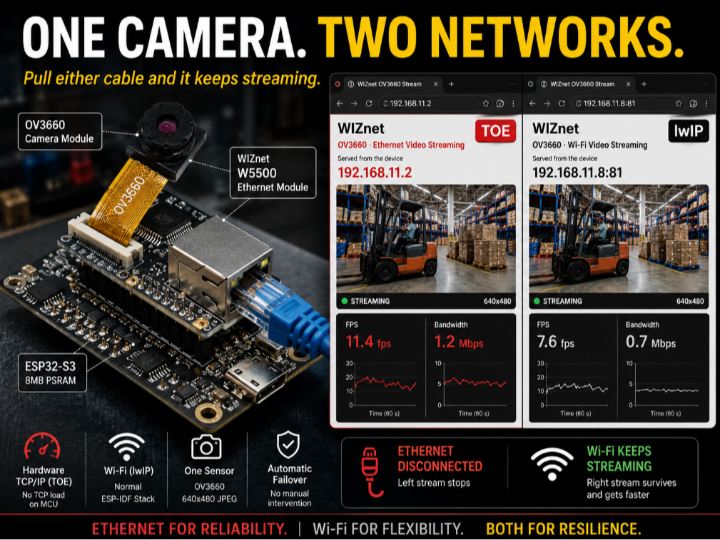
One ESP32-S3 streams the same camera over Ethernet (hardware TCP/IP) and Wi-Fi at once. Pull the cable and the surviving link gets 3x faster. Here is why.
1
Components
Hardware components
WIZnet - W5500
x 1

WIZnet - W6300
x 1
Project description
What You Will Build
One camera streaming to two browsers at once, over two completely different network stacks — and still streaming after you pull either cable.
Wi-Fi cameras die when someone parks a forklift in front of the AP. Ethernet cameras die when someone unplugs the wrong port in a cabinet. This one runs both at the same time, from one sensor, on one ESP32-S3.
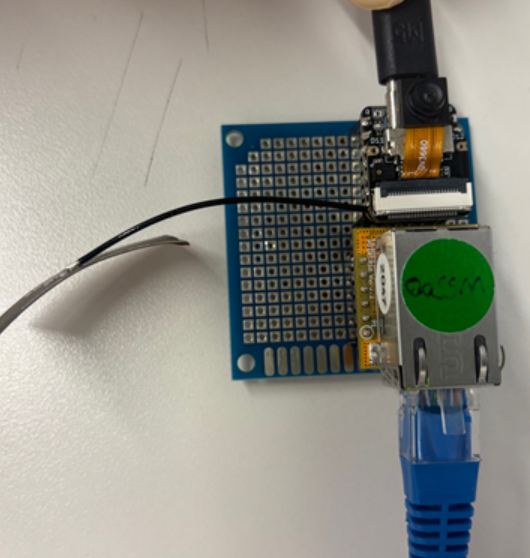
ESP32-S3, OV3660 on the ribbon, WIZnet module on SPI. Blue cable is Ethernet.
What is running when you are done:
- Port 80 → Ethernet, through the WIZnet chip's hardware TCP/IP. The MCU runs no TCP code.
- Port 81 → Wi-Fi, through lwIP on the MCU. The normal ESP-IDF way.
- A page that streams MJPEG, charts frame rate and link bandwidth, and exposes every sensor control.
Nothing is mirrored and nothing is proxied. Both servers grab their own frames from the same sensor.
What You Need
PSRAM decides which board works. A sensor frame does not fit in internal RAM at any useful size, so this is not negotiable.
| Board | Flash | PSRAM | This example |
|---|---|---|---|
| WIZnet ESP32-W5500 / W6300 Dev-kit | 16 MB | 8 MB octal | yes |
| Seeed XIAO ESP32-S3 Sense | 8 MB | 8 MB octal | yes |
| WIZnet ESP32-SoM | 2 MB | none | no |
The SoM runs the WebSocket and Modbus TCP examples comfortably, but it cannot run this one and no amount of configuration changes that.
The rest of the list:
- OV3660 camera module
- ESP-IDF v6.0 or later
- Ethernet cable, USB cable, and a Wi-Fi AP if you want the second interface
Hardware Setup
- Seat the camera ribbon in the connector.
- Wire the WIZnet module to the SPI pins for your board — the full pin table is in the example's README.
- Ethernet to your switch, USB to the PC.
Put the PC on the same subnet as the device's default address, 192.168.11.2. The pin map is the one thing worth double-checking before you power up; everything else in this post is recoverable.
Get the Example
The driver is on the ESP Component Registry. Create a project and pull it in.
idf.py create-project my_project
cd my_project
idf.py add-dependency "wiznet/wsm_driver==1.1.0"
idf.py set-target esp32s3
add-dependency writes main/idf_component.yml. set-target regenerates sdkconfig, so it has to run before menuconfig.
The component arrives with every example inside it:
managed_components/wiznet__wsm_driver/examples/camera_stream/Build this one as the example, not as a fresh project. Unlike the other examples,
camera_streamships ansdkconfig.defaultsthat carries the PSRAM and partition settings below. Start from a bare project and the camera fails at init with an error that points somewhere else entirely.
Configure
1. menuconfig — three items
idf.py menuconfigMain -> Component config -> WIZnet WSM Driver| Item | Default | What it decides |
|---|---|---|
| WIZnet chip | W5500 | Match your board. SPI pins and clock follow the chip automatically. |
| Network backend | TOE (hardware TCP/IP) | Whether the chip owns the TCP/IP stack, or the ESP32-S3's LwIP does. |
| W6300 QSPI mode | Quad | W6300 only. Set to Single if IO2/IO3 are not wired. |
Leave the backend on TOE. The whole comparison in this post is Ethernet through the chip's hardware stack against Wi-Fi through the MCU's software one. Switch the backend and the Ethernet side moves onto software LwIP too, and there is nothing left to compare.
Changing the backend later needs
idf.py fullcleanbefore you rebuild.
2. Three settings this example needs that the others do not
These ship in sdkconfig.defaults. Do not remove them.
| Setting | Why |
|---|---|
CONFIG_SPIRAM=y + CONFIG_SPIRAM_MODE_OCT=y | The hard requirement. Frame buffers live in PSRAM. A quad setting fails to detect octal PSRAM, and the camera then fails with ESP_ERR_NO_MEM — which does not name the real cause. |
CONFIG_ESPTOOLPY_FLASHSIZE_8MB + a 3 MB app partition | Room, not necessity. On a 16 MB board raise the flash size to match. |
CONFIG_ESP_CONSOLE_USB_SERIAL_JTAG=y | Frees GPIO43/44 for the WIZnet reset and interrupt lines. |
3. Addresses and ports
#define NET_IP_ADDR     {192, 168, 11, 2}
#define NET_SUBNET_MASK {255, 255, 255, 0}
#define NET_GATEWAY     {192, 168, 11, 1}

#define WIFI_SSID       ""      /* empty -> Ethernet only */
#define WIFI_PASS       ""

#define CAM_PORT        80      /* Ethernet */
#define WIFI_CAM_PORT   81      /* Wi-Fi    */
Leave WIFI_SSID empty for a first run. Get one stack working before adding the second.
Build & Flash
idf.py buildidf.py -p COM6 flash monitor # Windows
idf.py -p /dev/ttyUSB0 flash monitor # Linux / macOSRun
A correct boot names the PSRAM, the sensor, and then the network — in that order.
I (120)  esp_psram: Found 8MB PSRAM device
I (563)  camera: Detected OV3660 camera
I (914)  cam: sensor PID 0x3660 up at 640x480, quality 12, xclk 20 MHz
I (1070) wsm_driver_spi: W5500 version check OK: 0x04
I (1073) wiztoe_net: TOE up: 192.168.11.2 (WIZnet hardware TCP/IP)
I (1078) cam_server: [eth] camera server on port 80, 3 listeners (TOE)
If the PSRAM line is missing, stop — the camera will fail next and the error will point somewhere else.
Open http://192.168.11.2 and press START.
I (17012) cam_server: [eth] stream openedTest
Four things to do, in this order.
- Watch the charts. Frame rate and link bandwidth update once a second from
/api/status. - Change the resolution. The frame size and the frame rate should both move.
- Turn on the sensor's colour bar. It answers "is the network broken or the camera?" in about two seconds.
- Bring up Wi-Fi — fill in
WIFI_SSID, rebuild, and open port 81 in a second window.
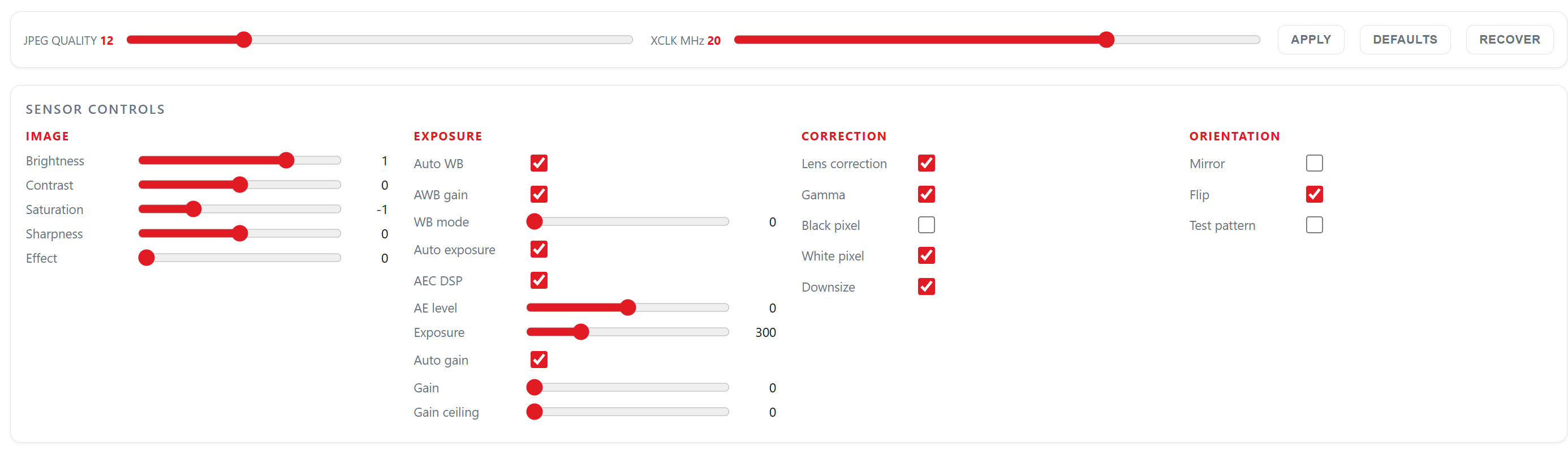
Image, exposure, correction, orientation. The panel is not written into the page — the firmware ships a list of 23 controls and the page builds itself from it.
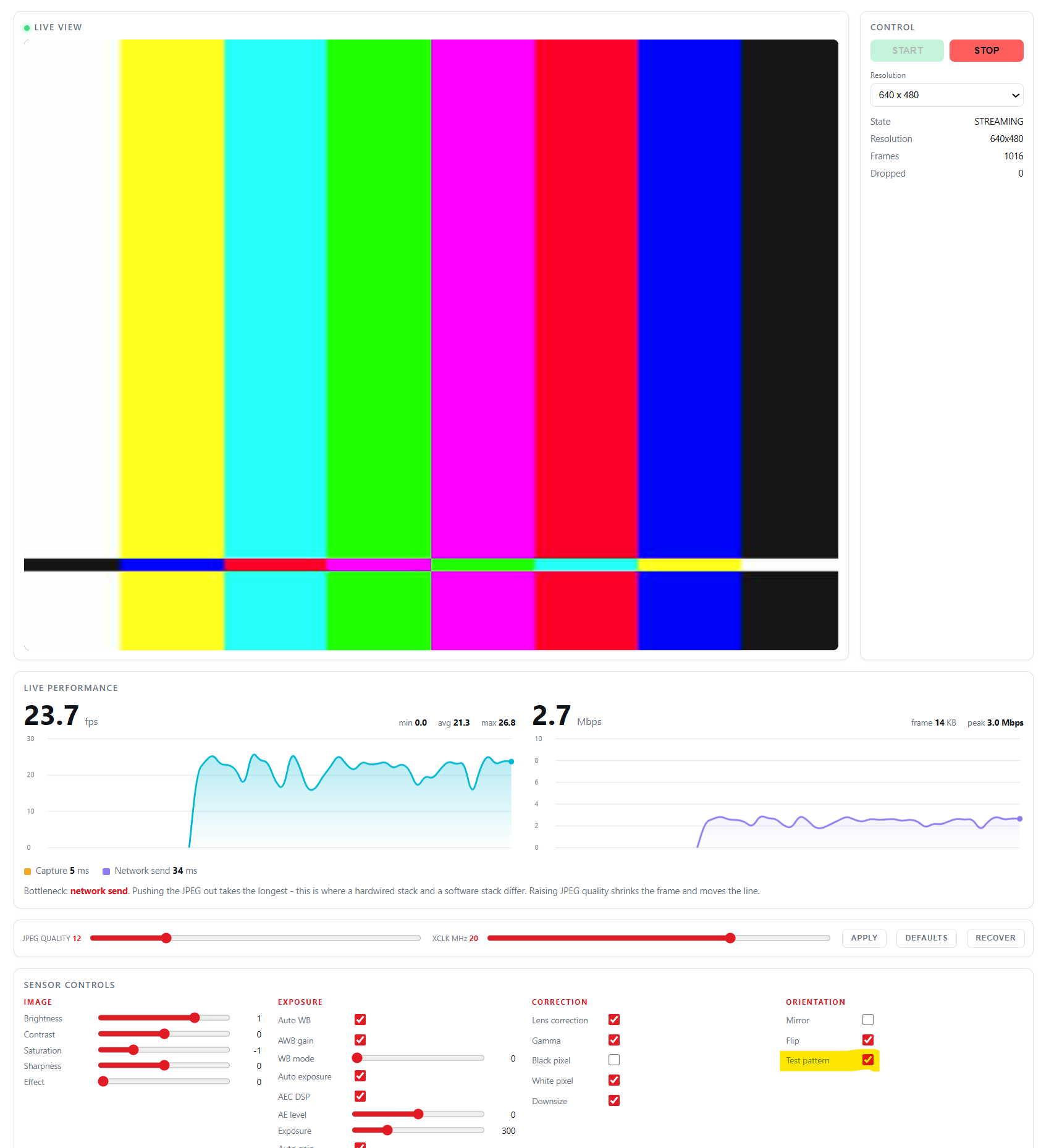
Colour bars generated inside the OV3660. Clean bars mean everything after the sensor is fine.
Expected Result
With both links up, two browser windows show the same sensor going out through two different stacks, each with its own frame counter.
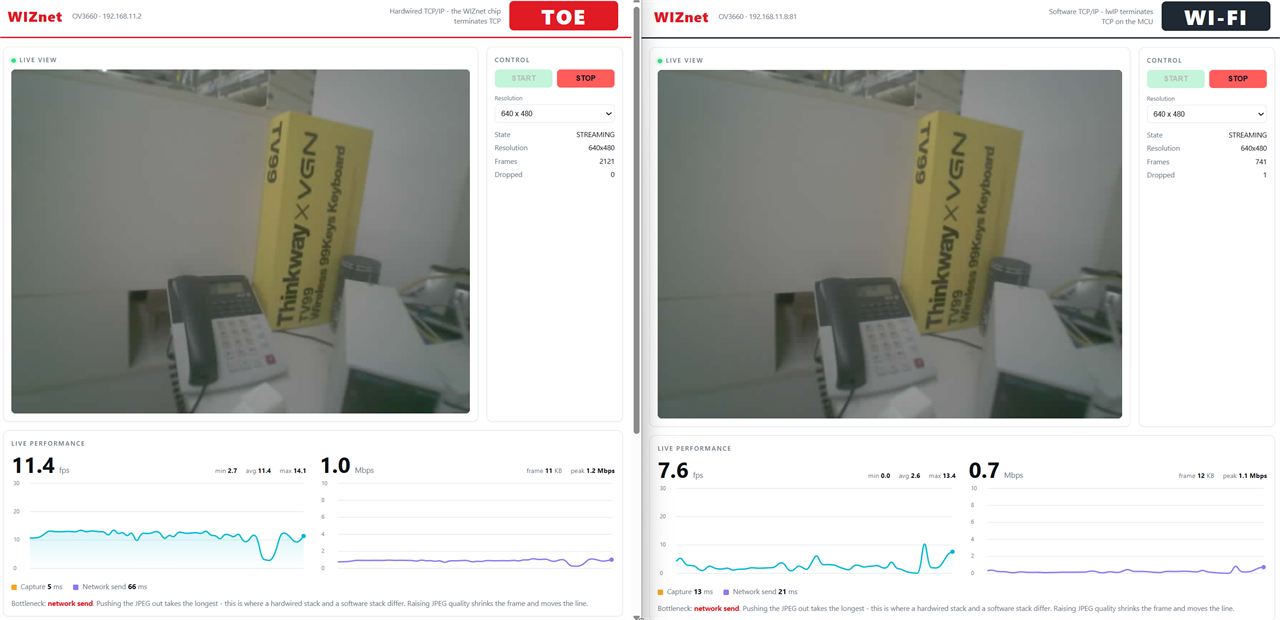
Both links up. Ethernet 11.4 fps on the left, Wi-Fi 7.6 fps on the right. Same sensor, same 640x480.
Ethernet alone, one client, JPEG quality 12, measured on a W5500:
| Resolution | Frame | Frame rate | Link |
|---|---|---|---|
| 320 x 240 | 5.3 KB | 27.3 fps | 1.16 Mbps |
| 640 x 480 | 23.5 KB | 25.3 fps | 4.80 Mbps |
| 800 x 600 | 32.0 KB | 18.3 fps | 4.69 Mbps |
These are end-to-end numbers, and part of what they measure is the client. The reported send time is the time until the peer drained the socket, so a client that falls behind shows up as slow sending. Treat the table as "this setup reached at least this", not as the chip's ceiling.
Try It Yourself
This is the part worth doing with both windows open.
Pull the Ethernet cable
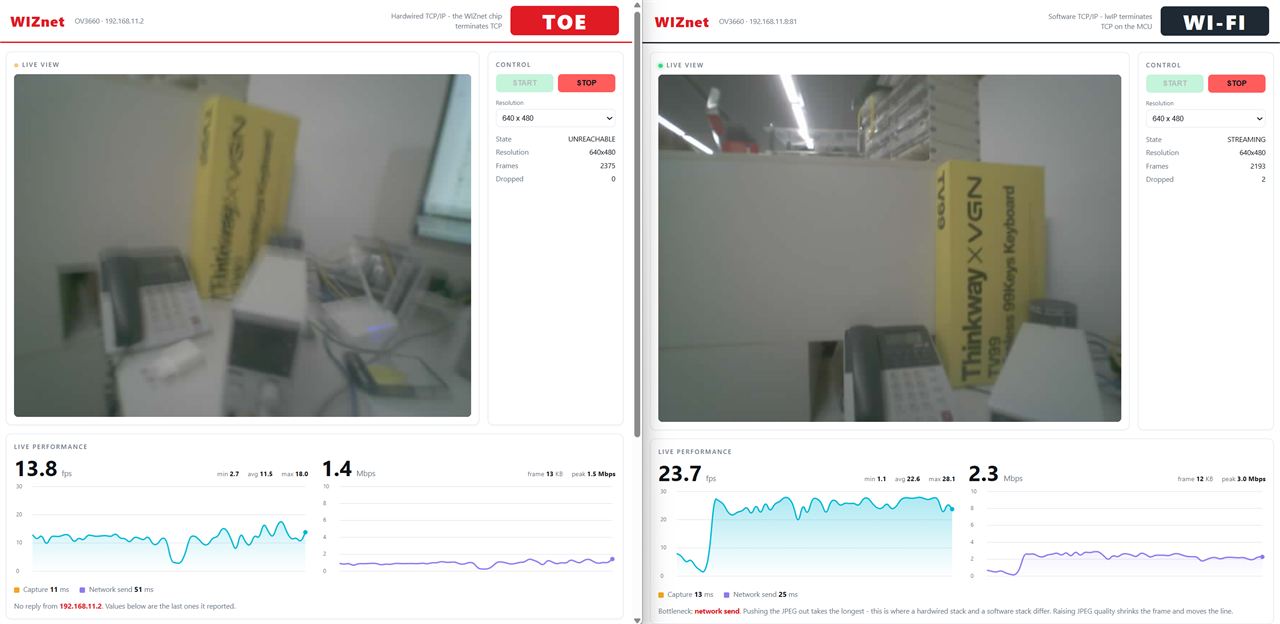
Five seconds later. Left: dead, frozen, amber. Right: still live — and three times faster.
| Wi-Fi side | Both up | Ethernet unplugged |
|---|---|---|
| Frame rate | 7.6 fps | 23.7 fps |
| Bandwidth | 0.7 Mbps | 2.3 Mbps |
| JPEG size | 12 KB | 12 KB |
Three times faster, from unplugging the other cable.
The JPEG size is in that table for a reason. Same 12 KB before and after, so this is not the picture getting simpler. Something was in the way, and it left.
Then plug it back in
Do not touch the browser. The Ethernet window should come back on its own within a few seconds. If you have to press START, the recovery path is not working — which is exactly the bug described further down.
How It Works
Why the survivor speeds up
One sensor, two servers, taking turns. The frame buffer belongs to the camera driver, so a server has to hold it for the entire send. While one holds it, the other waits.
With both links up:
- Ethernet: 5 ms grabbing the frame + 66 ms sending it = holds the camera 71 ms
- Wi-Fi: gets the leftovers → 7.6 fps, even though its own work takes 34 ms
Cable out:
- Wi-Fi has the camera to itself: 13 ms + 25 ms = 38 ms per frame → 23.7 fps
The arithmetic closes and nothing else changed.
The bottleneck was never the network. It was the camera they were sharing.
"So Wi-Fi beat the hardware stack?"
Someone is going to read 11.4 against 23.7 and say exactly that. Here is the honest answer.
Look at the send times: Ethernet 66 ms, Wi-Fi 25 ms. That gap is SPI. Every JPEG byte crawls to the chip over a 33 MHz bus. It is not the TCP stack, and widening the bus moves the number.
Speed was never what a hardware stack sells you. It sells you CPU. The Ethernet path runs no retransmit timers, holds no socket buffers, and wakes on no ACKs. You do not see that in a frame counter — you see it in what else the chip still has room to do.
accept() that is not accept()
Not a bug, but it catches everyone using a hardware TCP/IP chip.
I (1363) cam_server: [eth]  server on port 80, 3 listeners
I (2872) cam_server: [wifi] server on port 81, 1 listener
Three listeners on Ethernet, one on Wi-Fi, same job.
On lwIP, accept() hands you a new socket and the listener keeps listening — one listener, many clients. On the hardware stack the listening socket becomes the connection, so while a stream is open nobody is listening on that port.
The page holds /stream open forever while polling status every second. That is two live connections minimum, or the charts freeze. N clients means N listening sockets, and missing this makes a server look perfect until the second request arrives.
The chip has eight hardware sockets, IPv4 TCP and UDP only. That is the budget the Ethernet side spends its listeners out of, and it is worth knowing before you design around it.
The socket code is the ordinary socket code
Both servers in this example are the same C file. What differs is a small table of socket functions handed in at startup — and on the Ethernet side, those are the standard ones.
#include "net_backend.h"      /* wiznet_net_init(), wiznet_net_is_up() */
#include "lwip/sockets.h"     /* standard BSD sockets — include AFTER net_backend.h */

wiznet_net_init(&g_net_info);
while (!wiznet_net_is_up()) { }
SPI init, chip reset and network configuration happen in that one call, and after it socket(), accept() and send() work as usual. The driver intercepts the lwIP socket entry points at link time and routes them to the chip's hardware sockets.
That is the reason one codebase can serve two stacks here: neither side needed a special API, so the difference collapsed into which vtable gets passed in.
Include net_backend.h before lwip/sockets.h or the build fails on a SOCK_STREAM clash, and add REQUIRES wsm_driver to idf_component_register() in main/CMakeLists.txt.
Measurements
The frame rate that was set by a timeout constant
The first working version ran VGA at 14.5 fps, and the missing time was neither the sensor nor the link. Each idle listener was being offered a 20 ms accept window once per frame, and with two idle listeners that is 40 ms of dead time the stream paid for:
640x480   send 32 ms  ->  1/(0.032 + 0.040) = 13.9 fps   (measured 14.5)
800x600   send 68 ms  ->  1/(0.068 + 0.040) =  9.3 fps   (measured  9.5)
Dropping the accept window to 1 ms while any slot is streaming took VGA from 14.5 to 25.3 fps and SVGA from 9.5 to 18.3, with the status poll still answering every second.
The frame rate had been set by a constant rather than by the hardware. That is exactly the kind of thing this example exists to make visible.
Boot to both servers: 2.87 seconds
Read the timestamps rather than the words:
- Ethernet has an IP at 1.196 s
- Wi-Fi finishes DHCP at 2.844 s
The wire is ready 1.6 seconds earlier. No association, no DHCP round trip, no beacon to wait for. Cable in, link up — and that is on a good day with a strong AP.
Five things that broke on the way
1. Pulling the cable killed the board for 27 seconds. Six watchdog timeouts. The driver's send waited for space in the chip's TX buffer by hammering a register with no yield and no timeout. Cable out, that space never comes, the task never lets anything else run. Fixed in the driver: honour SO_SNDTIMEO, watch the socket state, and yield 1 ms per pass.
2. Fixing that turned the Wi-Fi picture black. Same shared camera — Ethernet held it while its socket retried, so Wi-Fi had nothing to send. Fixed with a 2 s send timeout on the stream socket, which only worked after the driver fix above.
3. Plugging the cable back in did nothing. Browsers do not retry a broken MJPEG stream, and the page only set img.src when you pressed START. Now the page watches the frame counter: server says "streaming" but the counter has not moved for three seconds means nothing is arriving, so ask for the stream again.
4. The page lied about being connected. The stall detector lived inside the status handler, which only runs when the status request succeeds. Pull the cable and the request itself fails, so the handler never runs, the dot stays green, and the frame rate sits frozen at its last value looking perfectly healthy.
Two failed polls now mean UNREACHABLE and an amber dot. It keeps showing the last numbers on purpose — they were true, and blanking them would throw away the comparison the page exists for.
How it was found: a screenshot of the failover showed both sides healthy. The screenshot was right. The page was wrong.
5. See accept() that is not accept() above. Not a bug, but the one that surprises people first.
Verification scope
Everything measured here was run on a Seeed XIAO ESP32-S3 Sense with an OV3660 and a W5500 module on SPI, TOE backend, over Ethernet and over Wi-Fi. The WIZnet ESP32-W5500 / W6300 Dev-kit carries the same octal PSRAM and runs the same firmware; the numbers above were not re-measured on it.
Where You Would Use This
- Machine vision on a production line. Wired into the PLC network where it belongs, with Wi-Fi as the backup nobody has to switch to.
- Unattended sites — pump stations, substations, rooftop plant. Ethernet while the cabinet is intact, Wi-Fi when a cable gets cut, chewed, or unplugged by the wrong person.
- Lab and test benches. On the lab switch for the recording PC, and on Wi-Fi for the phone in your hand while you are standing next to the rig.
Troubleshooting
| Symptom | Where to look |
|---|---|
Camera fails with ESP_ERR_NO_MEM | PSRAM. Check for Found 8MB PSRAM device at boot and that the octal setting is on. |
No PSRAM device line at all | The board has none. This example cannot run on it. |
| Version check fails after the camera comes up | SPI wiring or the chip selection in menuconfig. |
| Charts freeze while the picture keeps moving | Listener count. The status poll needs a socket of its own. |
| Picture is wrong but the colour bar is clean | Everything after the sensor is fine — look at lens, focus and lighting. |
Next Steps
- 66 ms of SPI is the Ethernet ceiling. A faster bus moves it directly — the W6300's quad mode is the obvious next thing to measure.
- The shared camera is the real ceiling. A frame buffer per interface would let both run flat out instead of taking turns.
- One trick worth stealing: the whole example includes lwIP in exactly one file. Everything else talks to a small socket vtable, and both servers start with the same function call and a different vtable. That is the entire reason one codebase serves two stacks.
The code is examples/camera_stream, which arrives with the component at managed_components/wiznet__wsm_driver/ and is also on GitHub. Pin maps, the full menuconfig list, and the Python test tools are in that example's README — better there than here, where they would rot.
The failover works, and nobody has to press anything. That was the point.
Was this what you needed?
Tell us how this would be used on your site, or what is missing. A repository issue or a comment below both work. What you tell us about your deployment is what sets the next priority.
- Repository: https://github.com/theoim/wsm_driver/tree/ionic-example/examples/camera_stream
- Board product pages: (link)
wsm_driver: https://github.com/Wiznet/wsm_driver

