How Does a Flipper Zero Run SSH Commands over W5500 Ethernet?
An ESP32-S3 runs libssh behind a Flipper Zero app, picking W5500 Ethernet or Wi-Fi per connection, on the author's own 4-layer add-on board with W5500 and RJ45.
0
Components
Hardware components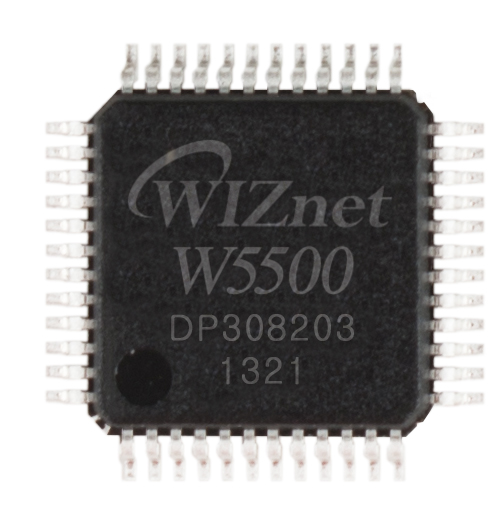
WIZnet - W5500
x 1

Project description
📚 Context: SeanChangX/flipper-ssh-runner — a Flipper Zero app and ESP32-S3 firmware that run SSH commands and scripts on remote hosts over wired Ethernet (W5500) or Wi-Fi, plus an add-on board that plugs straight onto the Flipper's GPIO header.
01 — How the work is split
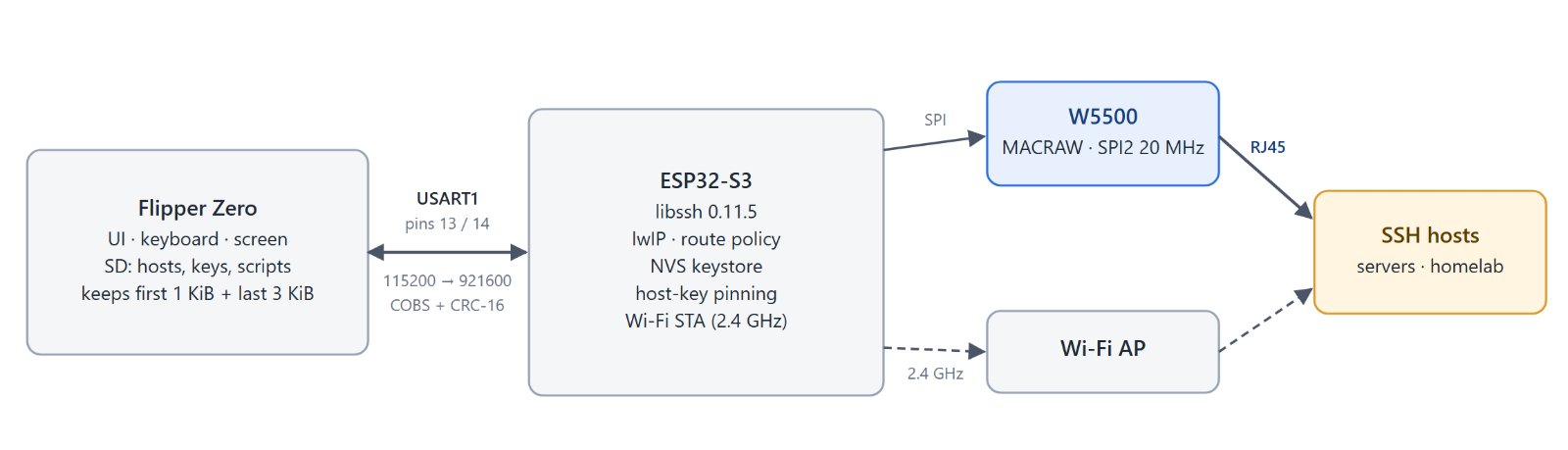
Pick a saved host on the Flipper, run a command or an SD-card script, and read the output with its exit code. The Flipper stays the UI; libssh, keys and both network interfaces live on the ESP32-S3. Two boards run the same firmware: a Waveshare ESP32-S3-ETH with three or four jumper wires, or the author's own add-on board (section 04).
| UART link | Value |
|---|---|
| Pins | Flipper 13 / 14 to ESP32 GPIO18 / 17 (UART0 avoided: its boot log would reach the Flipper) |
| Speed | starts at 115200, HELLO raises it up to 921600 |
| Frame | COBS, CRC-16, payload up to 512 B |
| Reliability | stop-and-wait, 200 ms timeout, 3 retries; tested with 10 % frame loss |
| Output | credit window of 1024 B; the Flipper keeps the first 1 KiB and last 3 KiB, so a command never stalls and its exit code always arrives |
| Scripts | up to 64 KiB, piped to bash -s or sh -s over stdin; nothing written on the target |
02 — Bringing up the W5500
ESP-IDF v5.5.6 drives the W5500 in MACRAW mode under lwIP, so TCP/IP and libssh run on the ESP32-S3 and the chip is its wired interface.
| Setting | Value |
|---|---|
| SPI | SPI2, 20 MHz (1–40 configurable) |
| SCLK / MOSI / MISO / CS | GPIO13 / 11 / 12 / 14 |
| INT / RST | GPIO10 / GPIO9, interrupt-driven |
| MAC | the ESP32's ESP_MAC_ETH, written with ETH_CMD_S_MAC_ADDR |
| No chip found | LAN disabled, Wi-Fi still comes up |
eth_w5500_config_t w5500 = ETH_W5500_DEFAULT_CONFIG(CONFIG_FES_W5500_SPI_HOST, &dev);
w5500.int_gpio_num = CONFIG_FES_W5500_INT_GPIO;
w5500.poll_period_ms = CONFIG_FES_W5500_INT_GPIO < 0 ? 10 : 0;
phy_cfg.reset_gpio_num = CONFIG_FES_W5500_RST_GPIO;
esp_eth_mac_t* mac = esp_eth_mac_new_w5500(&w5500, &mac_cfg);
esp_eth_phy_t* phy = esp_eth_phy_new_w5500(&phy_cfg);
03 — LAN or Wi-Fi, decided per connection
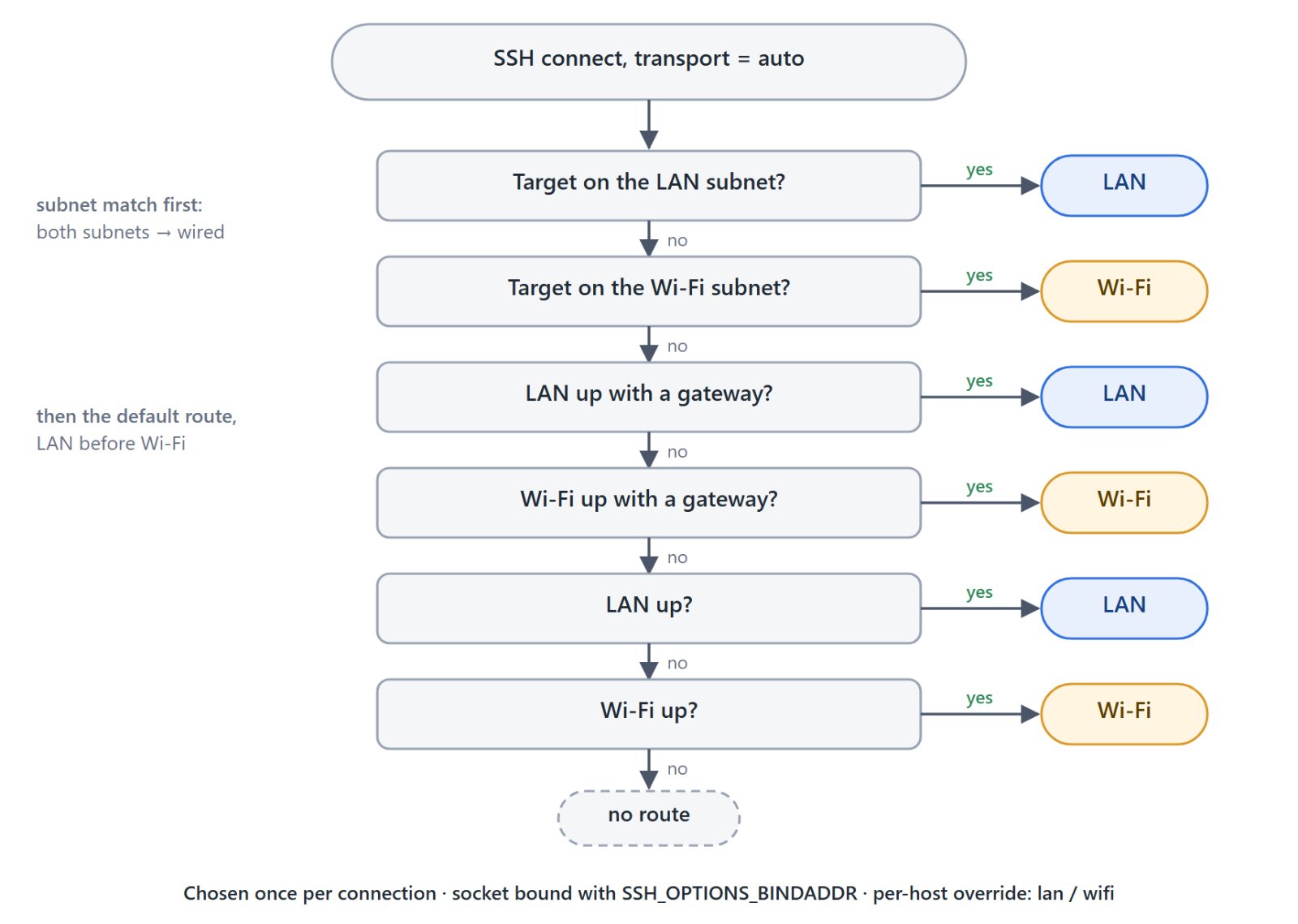
With both interfaces up, the routing table alone would send everything one way. route_pick_auto() picks per connection, and the SSH socket is bound to that interface's address with SSH_OPTIONS_BINDADDR. The host test explains the subnet check: before it, auto always took the LAN and a host on the Wi-Fi subnet never answered.
Ping works the same way: one request per interface, bound with esp_netif_get_netif_impl_index(), so one screen shows whether the cable and the radio both reach the target.
04 — The add-on board
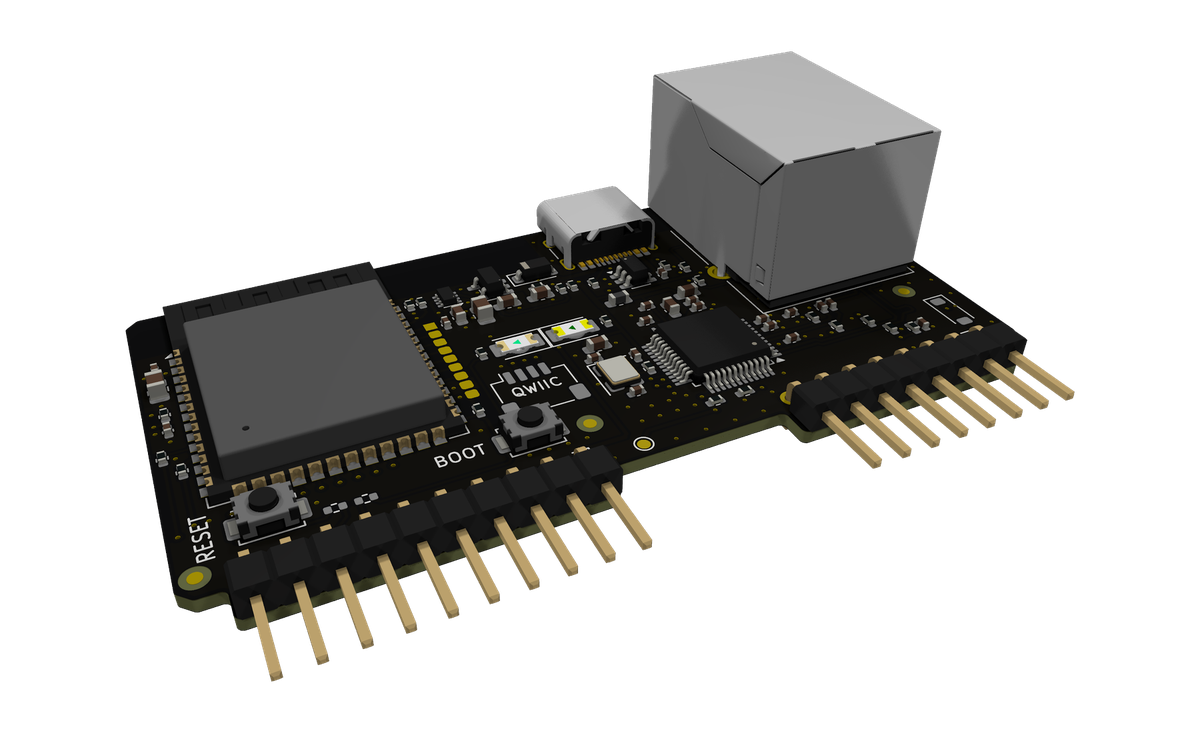
KiCad render of rev 0.1, from the repository.
| Item | Value |
|---|---|
| Board | 67.34 × 36 mm, 4 layers; KiCad 10, generated by Python and hand-routed |
| MCU | ESP32-S3-WROOM-1-N16R8 |
| Ethernet | W5500 LQFP-48, 25 MHz crystal, HanRun HY911105AE jack with magnetics and LEDs |
| PHY side | per WIZnet's reference schematic W5500-Ref-RJ45WithMag |
| SPI | direct, 30–40 mm on an inner layer over ground |
| CI | ERC, DRC with schematic parity, 45° track check |
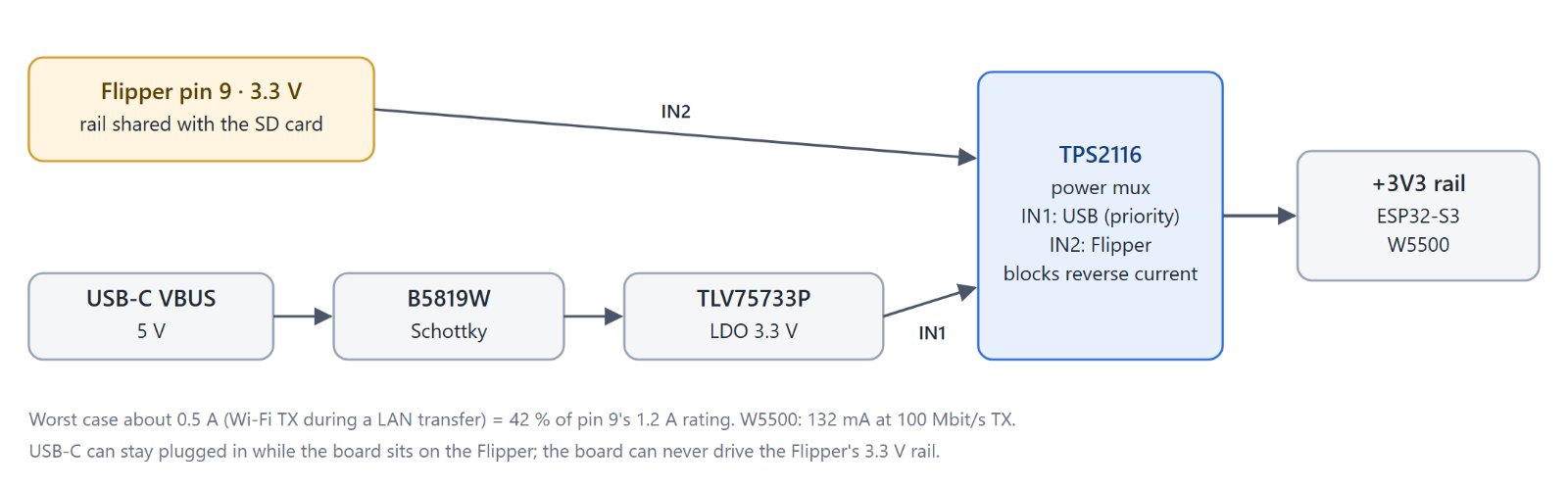
| Bring-up of rev 0.1 (BRINGUP.md) | Result |
|---|---|
| 3V3 on Flipper power | 3.30 V, mux drop about 20 mV |
| USB current | 67 mA blank, 88 mA idle, about 106 mA with Wi-Fi pinging |
| Boot | W5500 found over SPI, no brownout or watchdog reset |
| Load on Flipper power | about 30 min of SSH; 2 MB output byte-exact in 77 s |
| LAN | Ethernet through a cable to a switch works |
05 — Bench run and security
| Prototype, 10–11 min on Flipper pin 9 alone | Result |
|---|---|
| LAN flood ping, 1400 B | 160,225 sent, 4 lost (0.0025 %) |
| Wi-Fi flood ping, 1400 B | 98,546 sent, 11 lost (0.011 %) |
| 5 MB output over Wi-Fi | exit 0, about 25 KB/s |
| Reset counters | brownout 0, watchdog 0, crashes 0 |
| Security | Behaviour |
|---|---|
| Keys | Ed25519, ECDSA P-256/384/521, RSA ≥ 2048 (rsa-sha2); generated on the board if needed |
| Host keys | SHA-256 fingerprints pinned per profile in NVS: prompt, strict or off; several keys per profile for same-IP device fleets |
| Passphrases | entered once; up to 4 unlocked keys kept in RAM to skip the 11 s bcrypt step |
| eFuse option | HMAC key in eFuse, NVS encrypted, plaintext erased on next boot |
06 — Where it stands
- The interface is chosen when a session opens and the session stays bound to it.
- IPv4 configuration only; no PoE on the add-on; the W5500 has no auto-MDIX.
- The eFuse HMAC derivation is not yet verified on real silicon; the rest is tested with virtual eFuses.
- Rev 0.1 has one erratum (LED holes too small), fixed in rev 0.2.
Plugged into a switch port, it turns the Flipper into an SSH console that needs no laptop.
07 — Similar Projects on WIZnet Makers
- Flipper Zero as a 30-Tool LAN Swiss Knife — a W5500 on the Flipper's GPIO, driven by the Flipper itself. Here the W5500 sits behind an ESP32-S3.
- SSH Stamp — SSH from the other side: the board is the server and exposes a UART.
- W5500 Network Toolbox on an M5Stack CoreS3 — another handheld that checks the network at the port.
Q&A
Q. In what mode is the W5500 used?
MACRAW under ESP-IDF's lwIP. TCP/IP and libssh run on the ESP32-S3.
Q. Can it be built without the add-on board?
Yes, with a Waveshare ESP32-S3-ETH and jumper wires. On that board, do not plug in USB-C while Flipper pin 9 powers it; the add-on's power mux removes that restriction.
Q. Can it be reused?
Software GPL-3.0-only. Hardware CC BY-NC-SA 4.0; commercial use of the board needs the author's permission.
Original Link: https://github.com/SeanChangX/flipper-ssh-runner
W5500 bring-up: firmware-esp32/components/net/net.c · Interface choice: firmware-esp32/components/net/route_policy.c · UART protocol: docs/PROTOCOL.md · Board: hardware/DESIGN.md, hardware/BRINGUP.md
Documents
-
Firmware, Flipper app and PC tool
-
SSH Runner add-on board rev 0.1 (KiCad 10, Gerbers, BOM)


