Smart Internet Greenhouse IOT (Internet of Things)
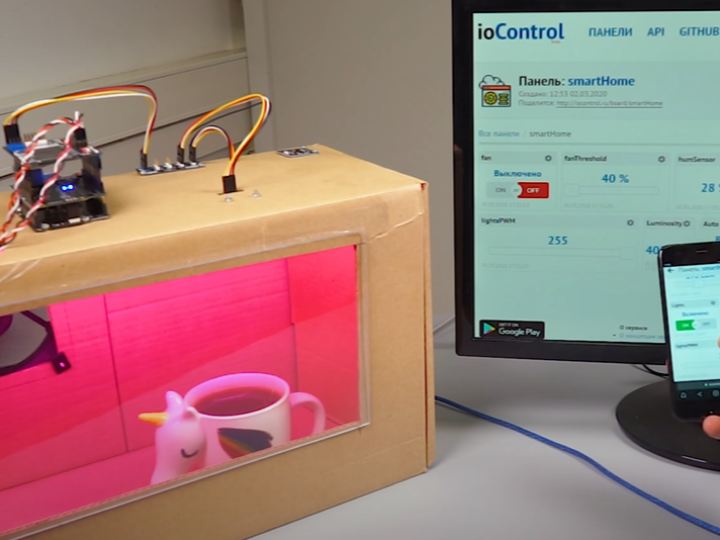
In this project, we will assemble a smart greenhouse controlled via the Internet using W5500 chip and the iocontrol.ru service.
9
Components
Hardware components
WIZnet - W5500
x 1

IARDUINO - iocontrol.ru
x 1
Project description
Description:
In this project, we will assemble a smart greenhouse controlled via the Internet. We will do this using Ethernet Shield on the W5500 chip and the iocontrol.ru service . The greenhouse can be managed and monitored from a smartphone, laptop, desktop computer, or anything that has an Internet connection and a modern browser.
Components Required :
- 1x Ethernet Shield W5500
- 1x Piranha ULTRA
- 1x Trema Shield
- 1x Spacers for Shield
- 1x i2C Hub (Trema module)
- 1x Temperature and humidity sensor, I2C-flash
- 1x Light sensor, light meter, I2C-flash
- 2x Power key (Trema module V2.0)
- 1x Load and voltage matched power supply. In our case, this is a 12V power supply. 2A.
- 1x RJ45-RJ45 wire
- 1x Router with free LAN port and Internet connection.
- Account on the site iocontrol.ru
Creating and configuring a panel on iocontrol.ru
- Create or log in to an account on the iocontrol website
- Click "Create Panel" . We come up with a name for the panel, for example "mySmartGreenhouse" (the name of the panel must be unique on the site. If there is already a panel with the same name, the site will notify you). Click Create .
- Create the following variables with the specified types
- fan , integer
- fanThreshold , integer
- humSensor , integer
- lightThreshold , integer
- Lights , integer
- LightsPWM , integer
- Luminosity , integer
- Auto , integer
- Temp , real floating point
- Now you need to customize the appearance of variable cards. To do this, go to the settings of each card by clicking on the gear in the upper right corner of the card, then select the appropriate items from the lists of settings (table below) and click on the Save button. You can learn more about setting up variable cards at this link.
Scheme of settings for variable cards in the panel on the site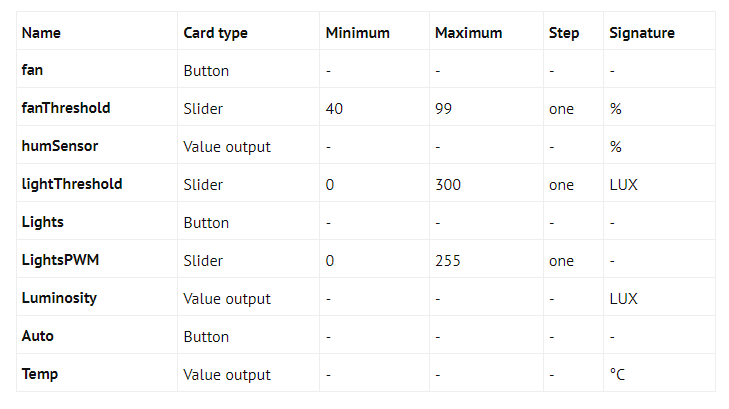
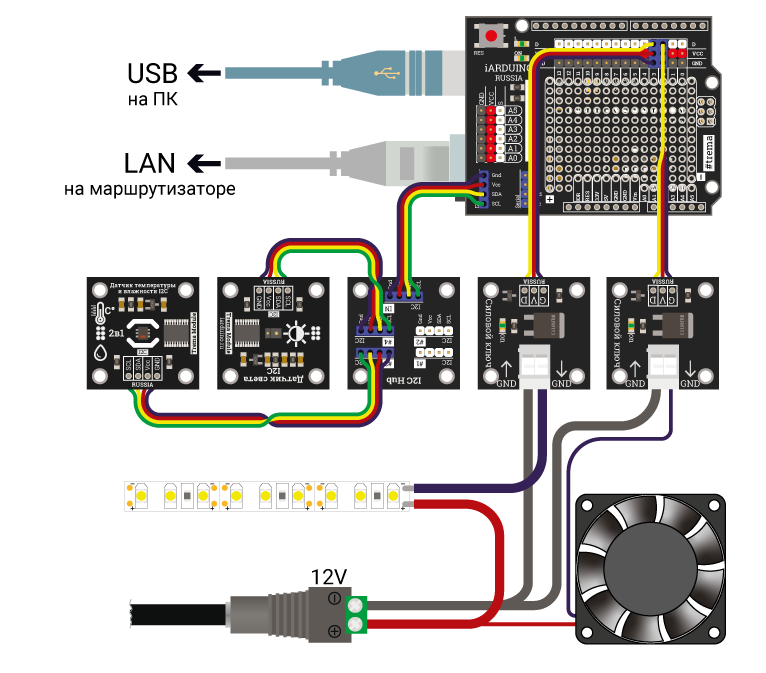
Connection
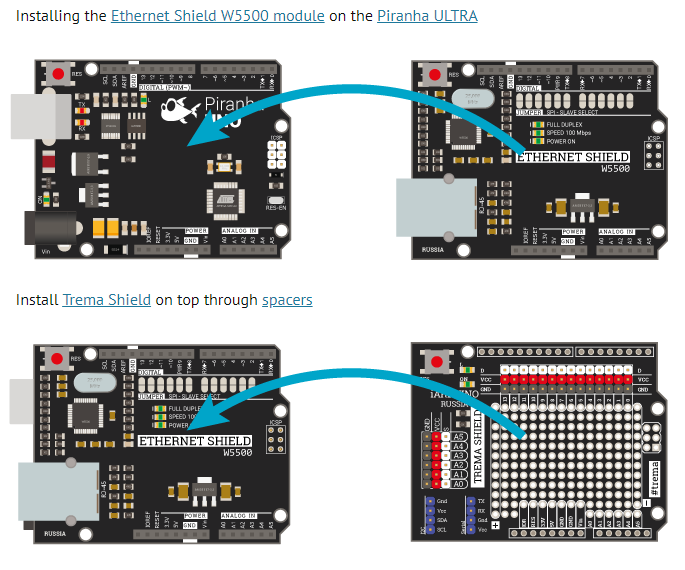
Connecting all modules to Trema Shield
Project Sketch
For this sketch to work, you need to replace the value of the myPanelName variable with the name of your panel that we created earlier. For example: const char* myPanelName = "mySmartGreenhouse".
// Connect the library for working with the ioControl service #include <iocontrol.h> // Connect the standard library for working with the Ethernet Shield via the SPI bus #include <SPI.h> #include <Ethernet.h> // Connect the sensor libraries humidity and light #include <iarduino_I2C_DSL.h> #include <iarduino_I2C_SHT.h>


// Define the outputs of the fan power switches and the LED strip #define FAN_PIN 2 #define LED_PIN 3


// Define constants On and Off #define On true #define Off false


// Instantiate (create) sensor library objects
iarduino_I2C_DSL lumSensor ;
iarduino_I2C_SHT humSensor ;

// Name of the panel on the site iocontrol.ru const char * myPanelName = "name_of_your_panel_on_the_site_iocontrol.ru" ; // Name of variables on the site const char * panelFan = "fan" ; const char * panelFanThreshold = "fanThreshold" ; const char * panelHumSensor = "humSensor" ; const char * panelLightThreshold = "lightThreshold" ; const char * panelLights


 = "Lights" ; const char * panelLightsPWM = "lightsPWM" ; const char * panelLuminosity = "Luminosity" ; const char * panelAuto = "Auto" ; const char * panelTemperature = "Temp" ;


// Create a client object of the EthernetClient class EthernetClient client ; // Create an iocontrol object by passing the name of the panel and client to the
constructor iocontrol mypanel ( myPanelName , client );


// Set a static IP address in case // dynamic address assignment fails IPAddress ip ( 192 , 168 , 1 , 177 ); IPAddress myDns ( 192 , 168 , 1 , 1 );


// // MAC addresses of the Ethernet shield. Must be unique on the network byte mac [] = { 0xFE , 0xED , 0xDE , 0xAD , 0xFA , 0xCC };


// Fan span and hysteresis variables unsigned long currentMillis = 0 ; // current millis unsigned long interval = 60000 ; // interval in ms bool fanHyst = false ; // fan hysteresis flag


// Variables for reading from the site ioControl bool Auto = false ; // automatic operation flag


// Variables for writing to the site ioControl int hum ; // humidity uint16_t lum ; // illumination float tem ; // temperature


void setup () { // Initiate operation on the serial port at 9600 baud Serial . begin ( 9600 );


    // Print to the serial port monitor // a message about the start of Shield's initialization Serial . println ( "Initialize Ethernet with DHCP:" );


    // If a connection with dynamic addressing has not been established, then if ( Ethernet . begin ( mac ) == 0 ) { // Display a message about this in the serial port monitor and Serial . println ( "Failed to configure Ethernet using DHCP" ); // check if the Shield itself is present if ( Ethernet . hardwareStatus () == EthernetNoHardware ) { // If the Shield is not found, then display the corresponding // message in the Serial port monitor .


            println ( "Ethernet shield was not found." ); // Stop the sketch while ( true ) {
                delay ( 1 ); } }


        // Check for a connection if ( Ethernet . linkStatus () == LinkOFF ) { // If the connection is not established, then display // the corresponding message in the Serial port monitor . println ( "Ethernet cable is not connected." ); }


        // Try to establish a connection using a static Ethernet IP address . begin ( mac , ip , myDns );


        // Output IP address to serial port Serial . print ( "My IP address: " ); Serial . println ( ethernet.localIP ( ) ); } // If the connection with dynamic addressing was established, then else { // Print the IP address to the serial port Serial . print ( "DHCP assigned IP" ); Serial . println ( ethernet.localIP ( ) ); }


    delay ( 1000 );

    // Initiate the light sensor
    lumSensor . begin (); // Initiate the humidity and temperature
    sensor humSensor . begin (); // Call the function of the first request to the service ioControl
    mypanel . begin (); }


void loop () { // Write variables from the mypanel object to local variables bool fan = mypanel . readBool ( panelFan ); int fanThreshold = mypanel . readInt ( panelFanThreshold ); int lightThreshold = mypanel . readInt ( panelLightThreshold ); bool lights = mypanel . readBool ( panelLights ); int lights PWM =


    mypanel . readInt ( panelLightsPWM ); // Write the auto operation flag to the global variable Auto = mypanel . readBool ( panelAuto );


    // If the humidity exceeds the set threshold if ( hum > fanThreshold && Auto ) { // set the fan flag
        fanHyst = true ; // write current millis
        currentMillis = millis (); // turn on the fan
        fanOn (); } // If not auto mode and the fan flag is set else if (! Auto && fan ) { // turn on the fan
        fanOn (); }


    // Otherwise, if the fan hysteresis flag is not set else if (! fanHyst ) { // Turn off the fan
        fanOff (); }


    // If the fan hysteresis flag is set // and the current interval has expired if ( fanHyst && ( millis () - currentMillis > interval )) { // reset the fan hysteresis flag
        fanHyst = false ; }


    // If the illumination is less than the set threshold if ( lum < lightThreshold && Auto ) { // Turn on the light
        lightsIn ( lum ); } // If not auto mode and the light flag is set else if (! Auto && lights ) { // Turn on lights
        lightsIn ( mypanel . readInt ( panelLightsPWM )); } // Else else { // turn off the light
        lightsOut ();


    }

    // Write the humidity sensor readings to the variable
    hum = int ( humSensor . getHum ()); // Write the light sensor readings to the variable
    lum = lumSensor . getlux (); // Write the temperature sensor readings to the variable
    tem = humSensor . getTem ();


    // Write the readings of all sensors to the mypanel object
    mypanel . write ( panelHumSensor , hum );
    mypanel . write ( panelLuminosity , lum );
    mypanel . write ( panelTemperature , tem );

    // If the readings are successfully written to the ioControl site if ( mypanel . writeUpdate () == OK ) { // write the readings to the serial port Serial . println ( "Updated" ); Serial . println ( "hum: " ); Serial . println ( hum ); Serial . println ( "lum: " ); Serial . println ( lum ); }


    // Read all panel variables from the site into the mypanel object
    mypanel . readUpdate (); }


// Function for turning on the fan void fanOn () { // Set the pin to which the fan is connected to the "output"
    mode pinMode ( FAN_PIN , OUTPUT ); // Set the level of logic "1" on the fan
    pin digitalWrite ( FAN_PIN , HIGH ); // If set to automatic, update the // fan switch on the if ( Auto )
        mypanel site . write ( panelFan , On ); }


// Function to turn off the fan void fanOff () { // Set the pin to which the fan is connected to the "input"
    mode pinMode ( FAN_PIN , INPUT ); // If set to automatic, update the // fan switch on the if ( Auto )
        mypanel site . write ( panelFan , Off ); }


// Function to turn on the LED strip void lightsIn ( int l ) { // Create a variable to calculate PWM uint8_t pwm = 0 ; // If the automatic mode is set if ( Auto ) // set the PWM inversely proportional to the illumination
        pwm = uint8_t ( map ( l , 0 , 300 , 255 , 0 )); // Otherwise else // set the PWM passed to the
        pwm function


        = uint8_t ( l );

    // Set the pin to which the LED strip is connected // to the "output"
    mode pinMode ( LED_PIN , OUTPUT ); // Set PWM on pin
    analogWrite ( LED_PIN , pwm );


    // If set to automatic mode, update the // light switch on the site if ( Auto )
        mypanel . write ( panelLights , On ); }


// Function to turn off the LED strip void lightsOut () { // Set the pin to which the fan is connected to the "input"
    mode pinMode ( LED_PIN , INPUT ); // If set to automatic mode, update the // light switch on the site if ( Auto )
        mypanel . write ( panelLights , Off ); }


