Smart Home Energy Management Controller with the Waveshare ESP32-S3-POE-ETH
open-source ESPHome configuration project that turns a Waveshare ESP32-S3-POE-ETH-8DI-8RO into a capable, production-ready Home Energy Management controller
0
Components
Hardware components
WIZnet - W5500
x 1

Project description
Project Introduction
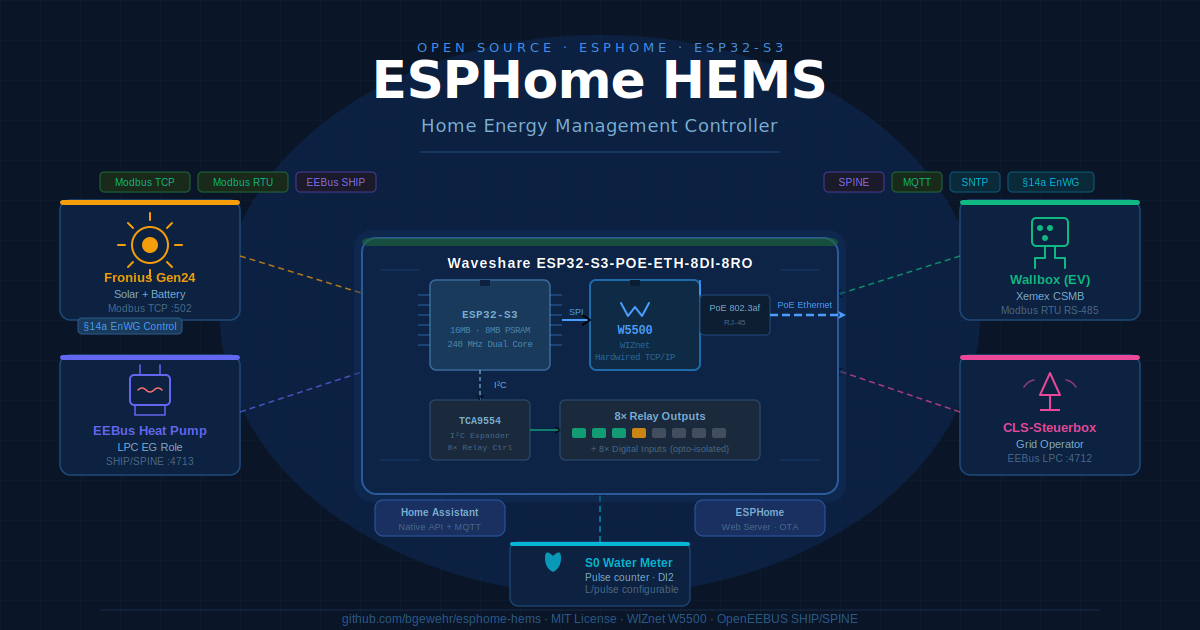
The esphome-hems project by bgewehr provides a complete ESPHome-based firmware configuration for a compact DIN-rail controller that sits at the heart of a modern European residential energy installation. It bridges the gap between a Fronius Gen24 solar inverter/battery system, an EEBus heat pump, a grid operator's §14a EnWG demand-response switch, a wallbox (EV charger), and a water meter — all in a single always-on device.
The project is notable for combining several industrial protocols typically found only in expensive proprietary energy management systems:
- Xemex CSMB Modbus RTU server emulation — making the ESP32 look like a certified grid current measurement box to a connected wallbox
- Fronius Gen24 Modbus TCP monitoring — reading solar production, battery state-of-charge, and grid power in real time, plus actively limiting battery discharge under §14a grid control events
- Native OpenEEBUS SHIP/SPINE — implementing the EEBus smart energy protocol natively on the microcontroller to communicate with a CLS-Steuerbox (grid operator demand-response unit) and an EEBus-capable heat pump gateway
- S0 pulse-counting water meter — reading a standard S0 water meter via a digital input, configurable liters-per-pulse
The firmware targets the Waveshare ESP32-S3-POE-ETH-8DI-8RO — a board that combines a powerful ESP32-S3 processor, 8 opto-isolated digital inputs, 8 relay outputs, and Power-over-Ethernet connectivity through a WIZnet W5500 SPI Ethernet chip.

System Architecture
The project is organized as a modular ESPHome configuration with a clear separation of concerns:
esphome-hems.yaml          ← Main node config (hardware, §14a logic, water meter)
├── xemex-csmb.yaml        ← Xemex CSMB Modbus RTU server (wallbox current limits)
├── fronius-gen24.yaml     ← Fronius Gen24 Modbus TCP client (solar/battery/grid)
└── eebus-openeebus.yaml   ← Native EEBus SHIP/SPINE (CLS-Steuerbox + heat pump)
Hardware Layer
The Waveshare board provides the physical interface to the real world:
| Resource | Function |
|---|---|
| W5500 SPI Ethernet | Wired PoE network connectivity |
| TCA9554 I²C expander | Controls all 8 relay outputs |
| GPIO 4–11 | 8 opto-isolated digital inputs (active-low) |
| GPIO 5 | S0 water meter pulse input (DI2) |
| GPIO 4 | §14a grid provider control switch (DI1) |
| GPIO 38 | WS2812 RGB status LED |
| GPIO 41/42 | I²C bus (SDA/SCL) for relay expander |
Connectivity & Protocols
Once powered over PoE, the controller maintains multiple simultaneous network connections through the W5500 Ethernet chip:
- Fronius Gen24 — Modbus TCP client on port 502, polling solar, battery, grid, EV, and heat pump power every 5 seconds
- Xemex CSMB server — Modbus RTU server (RS-485), emulating a certified current measurement box so the wallbox knows the available grid current per phase
- EEBus LPC (CS role) — TLS-encrypted WebSocket server on port 4712, receiving power limit commands from a CLS-Steuerbox (the grid operator's demand-response unit)
- EEBus WP (EG role) — TLS WebSocket server on port 4713, forwarding power limit commands to an EEBus-capable heat pump gateway
- MQTT — Publishing all sensor data to a home broker for Home Assistant integration
- ESPHome Native API — For direct Home Assistant entity integration
- Built-in web server — Status dashboard and diagnostic controls accessible on port 80
§14a EnWG Demand Response Logic
One of the project's key functions is implementing Germany's §14a Energiewirtschaftsgesetz (EnWG) — the regulation requiring "controllable consumption devices" (heat pumps, wallboxes, EV chargers) to accept temporary grid operator power limits. The controller handles this through three independent trigger paths:
- DI1 hardware input — A dry-contact relay signal from a CLS-Steuerbox directly wired to the board
- EEBus LPC — The digital EEBus protocol path from the same CLS-Steuerbox over IP
- Simulation switch — A Home Assistant-exposed switch for testing the 4200 W limit scenario
When any trigger activates, the controller simultaneously:
- Adjusts the Xemex CSMB Modbus RTU current limits (45 A per phase add-on)
- Activates Relay 1 (physical signal to the inverter or panel)
- Sends the 4200 W power limit to the EEBus heat pump via the
eebus_wpcomponent - Flashes the RGB LED red to indicate active grid control
- Logs and timestamps the event to Home Assistant
The Role of WIZnet W5500 in This Project
The W5500 is not just a commodity Ethernet chip in this build — it is the foundation that makes the entire multi-protocol architecture possible.
Why Wired Ethernet Is Essential
The controller runs four simultaneous TCP connections (Fronius Modbus, EEBus LPC server, EEBus WP server, MQTT), handles RS-485 Modbus RTU on a dedicated serial port, and publishes MQTT sensor data every 5 seconds. Wi-Fi would introduce:
- Non-deterministic latency that breaks the Modbus polling timing
- Disconnection risks that could leave the §14a relay state undefined
- RF interference in a metal DIN-rail cabinet near power electronics
The W5500's hardwired TCP/IP stack handles all socket operations in dedicated hardware, freeing the ESP32-S3's dual cores entirely for the EEBus TLS stack, Modbus parsing, and ESPHome component logic.
Power-over-Ethernet
The Waveshare board's PoE capability — powered by the W5500-based circuitry — eliminates the need for a separate 5 V power supply in the distribution cabinet. A single Cat5e cable carries both data and 5–30 V DC power. For a device that must be always-on and mounted in a sealed electrical cabinet, this is a significant reliability and installation advantage.
SPI Integration and PSRAM Coordination
The W5500 connects to the ESP32-S3 over SPI on dedicated GPIO pins (CLK: 15, MOSI: 13, MISO: 14, CS: 16, INT: 12). The project's firmware includes careful PSRAM and memory management specifically to keep the W5500's SPI DMA operations working correctly alongside the EEBus TLS sessions:
The EEBus TLS session buffers (~16 KB I/O each) can exhaust the internal SRAM that the W5500 SPI DMA driver needs for DMA-alignment copies. Without free internal SRAM,
heap_caps_aligned_alloc(MALLOC_CAP_DMA)fails and causes a crash.
The solution configured in the firmware allocates anything over 2 KB to the 8 MB Octal PSRAM, reserving internal SRAM for DMA-critical SPI operations and small buffers. This is a non-trivial integration challenge that the project solves transparently for end users.
Reliable EEBus SKI-based Trust
EEBus SHIP uses self-signed TLS certificates identified by a Subject Key Identifier (SKI) rather than a certificate authority. The W5500's reliable Ethernet link is important here: the TLS handshake must complete within the EEBus timeout window, and the peer certificate must remain in memory for SKI extraction. The project configures CONFIG_MBEDTLS_SSL_KEEP_PEER_CERTIFICATE to ensure the certificate is retained post-handshake — something that only matters on a stable, low-latency link.
FAQ
Q: What hardware do I need to build this?
You need the Waveshare ESP32-S3-POE-ETH-8DI-8RO board, which includes the ESP32-S3 processor, W5500 Ethernet with PoE, 8 relay outputs, and 8 digital inputs in a single package. You also need a network switch with PoE support (802.3af) or a PoE injector, an RS-485 adapter if you want the Xemex CSMB wallbox integration, and optionally the EEBus CLS-Steuerbox and heat pump.
Q: Does this require internet access or a cloud service?
No. Everything runs locally. The only external dependencies are SNTP for time synchronization (required for EEBus certificate validity) and the ESPHome build toolchain on a PC for initial firmware compilation. Home Assistant and MQTT broker are local as well.
Q: Can I use this without the EEBus components?
Yes. The configuration is modular — the eebus-openeebus.yaml package can be omitted if you don't have a CLS-Steuerbox or EEBus heat pump. The Fronius monitoring, Xemex CSMB emulation, water meter, and §14a DI1 hardware control all function independently.
Q: What is §14a EnWG and why does it matter?
§14a of the German Energiewirtschaftsgesetz (Energy Industry Act) requires grid operators to be able to temporarily reduce the power draw of controllable devices like EV chargers and heat pumps during grid congestion. In return, device owners receive a reduced network tariff. This controller implements the hardware and software interfaces needed to comply with this regulation automatically.
Q: How does the Xemex CSMB emulation work?
Many German-market wallboxes (EV chargers) use a Xemex CSMB device over Modbus RTU to read the available current per phase at the household connection point. This controller emulates that device, dynamically setting the available current based on real-time Fronius grid meter data. This allows the wallbox to charge the EV at the maximum available power without exceeding the grid connection limit.
Q: Is the EEBus implementation fully certified?
The project uses the openeebus-esphome component, which is a native ESP-IDF implementation of the EEBus SHIP/SPINE protocol stack. It covers the LPC (Limited Power Control) use cases relevant for CLS-Steuerbox and heat pump integration. Formal EEBus interoperability certification is a separate process; this is a maker/DIY implementation.
Q: Can I add more sensors or integrate other devices?
Yes — ESPHome's modular YAML system means you can add additional Modbus devices, MQTT sensors, GPIO-based sensors, and more to the main configuration. The web server dashboard and Home Assistant integration automatically expose new entities.
Q: How do I flash and configure the firmware?
- Copy
secrets.example.yamltosecrets.yamland fill in your network credentials, Fronius IP, MQTT broker, API key, and OTA password. - Install ESPHome (
pip install esphome). - Run
esphome run esphome-hems.yaml— ESPHome compiles the firmware and flashes it via USB on first run; subsequent updates can be done over-the-air.
Q: What programming languages and frameworks are used?
The configuration is primarily YAML (ESPHome declarative format), with inline C++ lambdas for logic that ESPHome's built-in components cannot express. The custom components (modbus_server, modbustcp) are written in C and C++. The OpenEEBUS component is an external ESP-IDF C++ library pulled from GitHub at build time.

