Hezhou Air105|Socket|UDP|TCP/IP|W5500|TCP&UDP Test|Server|Client|Official demo|Learning (8-2): Socke
Hezhou Air105|Socket|UDP|TCP/IP|W5500|TCP&UDP Test|Server|Client|Official demo|Learning (8-2): Socke
0
Project description
Basic information
Based on the Air105 development board: Air105 - LuatOS Documentation
Getting Started: Getting Started with Development - LuatOS Documentation
Discussion focus
Reproduce and analyze the UDP|TCP/IP connection example (server_demo.lua) in the official Socket network interface demo, and study and discuss related content.
Realize function
UDP |TCP/IP protocol analysis and Socket network interface connection example;
hardware preparation
One Air105 development board, one breadboard, W5500 network module, several wires.
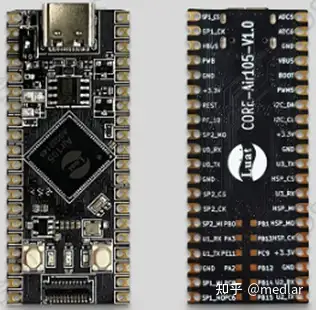
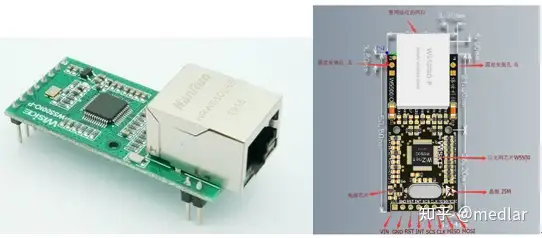
wiring:
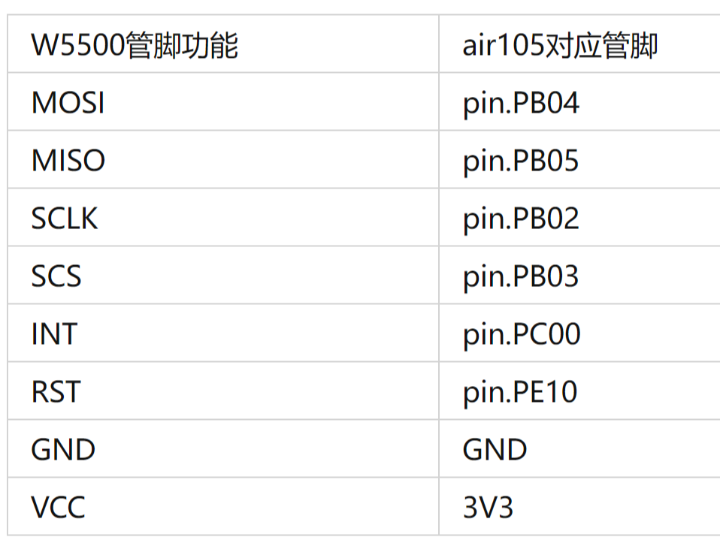
W5500 module is a standard SPI device, you can refer to medlar: Hezhou Air105|camera|capture|SPI|Serial serial port|TFLCD|Micro SD card|GC032A|USB to TTL|official demo|Learning (2-1): camera-capture : Wiring mode of external sd card in SPI interface.
W5500 wiring instructions:
| W5500 pin function | air105 corresponding pin | air105 pin function |
| SMOKE | pin.PB04 | SPI_2_MOSI |
| MISO | pin.PB05 | SPI_2_EYES |
| SCLK | pin.PB02 | SPI_2_CLK |
| SCS | pin.PB03 | SPI_2_CSN |
| INT | pin.PC00 | GPIO32 |
| RST | pin.PE10 | GPIO74 |
| GND | GND | GND |
| VCC | 3V3 | 3V3 |
PIN port setting: w5500.init(spi.SPI_2, 24000000, pin.PB03, pin.PC00, pin.PE10).
W5500.config() --The default is DHCP mode
Software version
AIR105:LuatOS@AIR105 base 22.10 bsp V0013
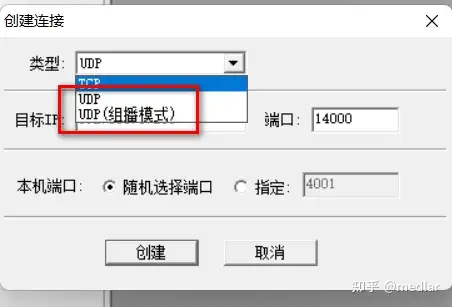
TCP&UDP test tool
routine
"server_demo" (official demo modification)
software use
Interface documents can refer to: socket network interface
w5500 Ethernet Driver - LuatOS Documentation
UDP(User Datagram Protocol)
The full name of the UDP protocol is the User Datagram Protocol. It is used to process data packets in the same way as the TCP protocol in the network. It is a connectionless protocol. In the OSI model, the fourth layer, the transport layer, is the upper layer of the IP protocol. UDP has the disadvantages of not providing data packet grouping, assembling and sorting of data packets, that is to say, after the message is sent, it is impossible to know whether it has arrived safely and completely.
It has the following characteristics:
1. For connectionless, you can send it as you want, and do not perform any operations on the data message
2. It has the functions of unicast, multicast and broadcast. Generally, it only distinguishes between unicast and group (broadcast). DNS servers are typically used.
3. UDP is packet-oriented
4. Reliability cannot be guaranteed, communication does not need to establish a connection, you can send it as you want, and you can transfer any data you receive, no backup data, and no feedback from the other party when sending data.
Furthermore, the network environment is good and bad, but because UDP has no congestion control, it will always send data at a constant speed. Even if the network condition is bad, the sending rate will not be adjusted. The disadvantage of this implementation is that it may cause packet loss when the network conditions are not good, but the advantage is also obvious. In some scenarios with high real-time requirements (such as conference calls), you need to use UDP instead of TCP.
5. The transmission overhead is small, and the data transmission is very efficient. Suitable for scenarios with high timeliness requirements (teleconferencing, streaming media, etc.)
TCP(Transmission Control Protocol)
Excerpted from TCP_Communication Encyclopedia (c114.com.cn)
Chinese interpretation: (RFC-793) Transmission Control Protocol
This protocol is mainly used to establish a virtual connection between hosts to achieve high-reliability data packet exchange. The IP protocol can divide and assemble IP data packets, but it is not clear whether the data packets are successfully sent to the target computer through the IP protocol. The use of the TCP protocol is different. In this protocol transmission mode, after the data packet is successfully sent to the target computer, TCP will request to send an acknowledgment; if the acknowledgment is not received within a certain time limit, then TCP will resend the data packet. . In addition, in the process of transmission, if out-of-order, lost and damaged data packets are received, TCP can also be responsible for recovery.
Transmission Control Protocol (Transmission Control Protocol, TCP) is a connection-oriented, reliable, byte stream-based transport layer communication protocol, usually described by RFC 793 of IETF. In the simplified OSI model of computer networks, it performs the functions specified by the transport layer.
In summary, TCP overcomes various shortcomings of UDP, but due to the confirmation handshake overhead of the server and client, the transmission efficiency is obviously restricted by other factors such as network transmission efficiency.
Precautions for using W5500 module
The W5500 module is used to realize the full hardware TCP/IP protocol stack, and supports TCP, UDP, ICMP, IPv4, ARP, IGMP, PPPoE and other protocols, which is more convenient to use. The official socket network interface library and the community W5500 library also encapsulate the network operation, which is convenient for developers to call.
Note:
1 About the IP of the intranet test
The IP of the W5500IO module and the IP of the test PC are in the same network segment, and there is no conflict. In DHCP mode, W5500 needs to be connected to a router.
2. The first byte of the MAC must be an even number, and the MAC addresses in the LAN cannot conflict.
3. When performing a communication test with a PC, it is recommended to close the firewall and wireless network card first.
4 If a Class C fixed IP address is used, it is recommended that the host number should be greater than 200 to avoid possible IP conflicts.
5. The socket transceiver buffer needs to be configured according to the chip requirements. For details, please refer to the W5500 data sheet.
The socket network interface library encapsulates the steps of the TCP connection according to the protocol label, and calls them directly. See the official demo for details (the routines are modified according to the debugging needs).
The main steps of a TCP/UDP connection
- SPI hardware initialization:
w5500.init(spi.SPI_2, 24000000, pin.PB03, pin.PC00, pin.PE10)2. IP and DNS configuration
DHCP mode (for example: access through a router, with DHCP function):
-- w5500.config()--默认是DHCP模式,免配置可直接使用
-- w5500.bind(socket.ETH0)  --config之后需要立即bind
Static mode:
--测试server模式的话,建议用静态IP和静态DNS,当然不是强制的
--设置静态IP和DNS后,log输出中显示手工设定IP,速度忧于DHCP
w5500.config("192.168.1.210","255.255.255.0","192.168.1.1",string.fromHex("d1f17f7f97ae6bea"))
w5500.bind(socket.ETH0)
3. The main() main program calls the example subroutine to realize the function
require "server_demo" General steps in a subroutine:
- Connection definition:
netc = socket.create(socket.ETH0, dName)
--socket.debug(netc, true)
socket.config(netc, port)
local function serTask(port)
local tx_buff = zbuff.create(1024)
local rx_buff = zbuff.create(1024)
local netc
local result, param, is_err, rIP, rPort
netc = socket.create(socket.ETH0, dName)
--socket.debug(netc, true)
socket.config(netc, port)
2. Establish a connection and realize the "handshake"
result = libnet.waitLink(dName, 0, netc)
result = libnet.listen(dName, 0, netc)
if result then
            result,_ = socket.accept(netc, nil)    --W5500的硬件协议栈不支持一对多
3. Connection success confirmation and sending and receiving message processing program (callback function or flag definition based on message passing)
if result then
                log.info("客户端连上了")
 libnet.tx(dName, 0, netc, "helloworld")
end
4. Close the connection, disconnect TCP, close the connection
libnet.close(dName, 5000, netc)5. Program processing coroutine
function SerDemo(port)
sysplus.taskInitEx(serTask, dName, netCB, port)
end
AIR105+W5500 as server, TCP mode example
Using DHCP mode, directly connected to the router of the network where the client is located.
The log of successful connection and normal network hardware:
[2022-12-20 15:42:09.474] main 664:bootloader build release Dec 14 2022 19:45:43!
[2022-12-20 15:42:09.474] Jump_AppRun 76:jump to 0x01010400 !
[2022-12-20 15:42:09.480] main 188:APP Build release Dec 14 2022 19:45:19!
[2022-12-20 15:42:09.480] I/main LuatOS@AIR105 base 22.12 bsp V0013 32bit
[2022-12-20 15:42:09.480] I/main ROM Build: Dec 14 2022 19:45:26
[2022-12-20 15:42:09.480] D/main loadlibs luavm 204792 15344 15344
[2022-12-20 15:42:09.480] D/main loadlibs sys   402120 51112 51616
[2022-12-20 15:42:09.521] w5500_ip_state 1115:ip 0 -> 1
[2022-12-20 15:42:09.523] w5500_ip_state 1115:ip 0 -> 1
[2022-12-20 15:42:09.631] w5500_link_state 1074:link 0 -> 1
[2022-12-20 15:42:09.631] w5500_nw_state 980:network ready
Program definition, send message program after successful connection:
 if result then
                log.info("客户端连上了")
 libnet.tx(dName, 0, netc, "helloworld")
 end
Static IP and DNS can also be used, such as:
--设置静态IP和DNS后,log输出中显示手工设定IP,速度忧于DHCP
w5500.config("192.168.1.210","255.255.255.0","192.168.1.1",string.fromHex("d1f17f7f97ae6bea"))
w5500.bind(socket.ETH0)
After using static IP, when receiving requests from other clients in the network,
LOG instance after connection:
[2022-12-20 15:34:17.162] w5500_link_state 1074:link 0 -> 1
[2022-12-20 15:34:17.162] w5500_nw_state 980:network ready
[2022-12-20 15:34:34.975] w5500_sys_socket_callback 1510:socket 3 connected
[2022-12-20 15:34:34.977] w5500_socket_accept 1997:client 192.168.1.117, 61760
[2022-12-20 15:34:34.977] I/?:0客户端连上了
[2022-12-20 15:34:34.977] I/?:04021206362464736
[2022-12-20 15:34:39.985] I/?:04021206362464736
[2022-12-20 15:34:45.027] I/?:04021206362464736
Client parameter configuration:
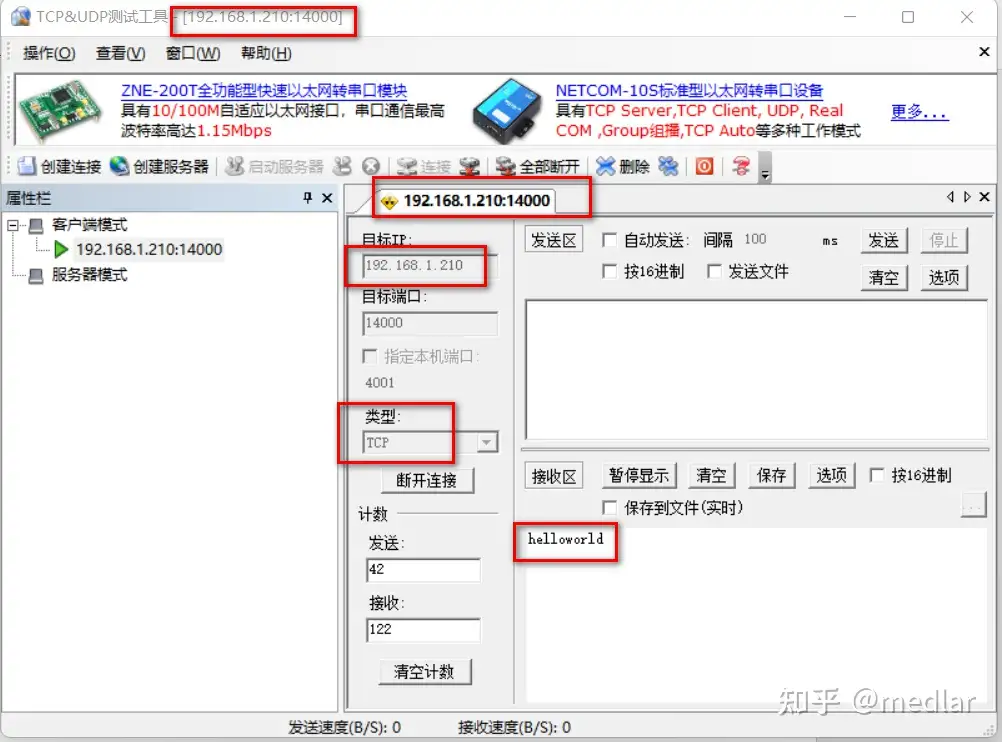
Example of message sending after connection:
After the TCP connection is established normally, the server responds helloworld. The sent string is transmitted to the server.
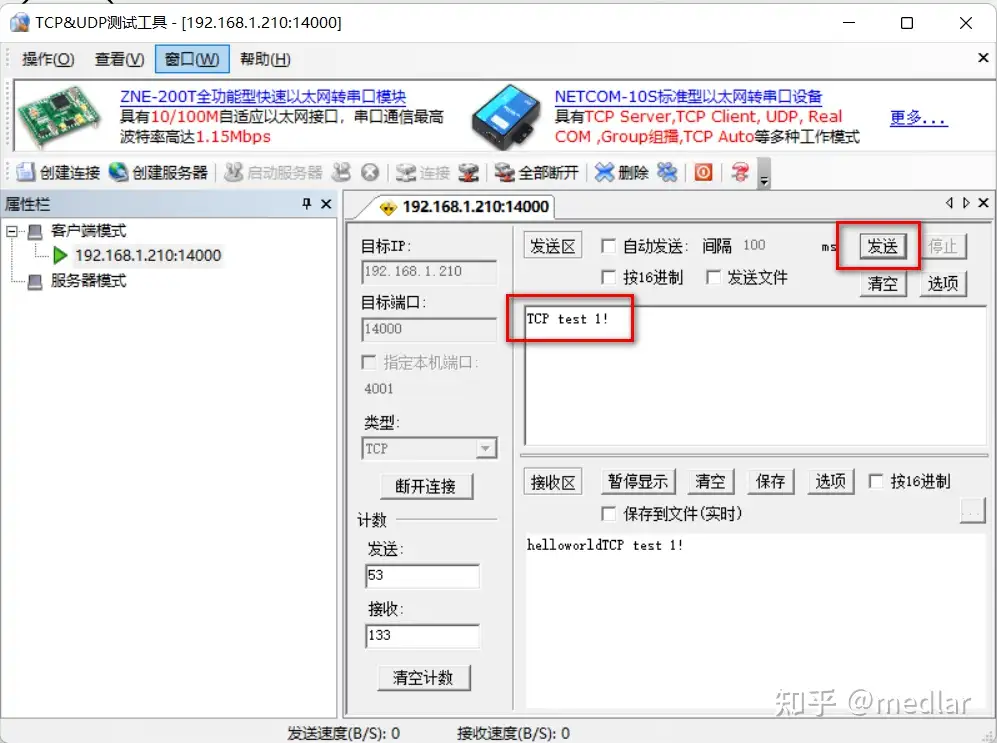
Received data length log:
[2022-12-20 15:38:00.461] I/?:-2145632226收到客户端数据,长度11
[2022-12-20 15:38:00.461] I/?:04021206362465904
AIR105+W5500 as server, UDP mode
The basic procedure is the same as TCP, the difference is:
1. The config parameters are different:
socket.config(netc, port, true) --true :UDP连接开关2. The server adopts the broadcast address:
 result = libnet.waitLink(dName, 0, netc)  -- network_default_socket_callback 2907:f2000000,-1,硬件离线,等待硬件上线
if result then
            result = libnet.connect(dName, 5000, netc,"255.255.255.255",0)    --W5500的硬件协议栈不支持一对多,port为任意数字,对端端口号不限制
UDP server configuration:
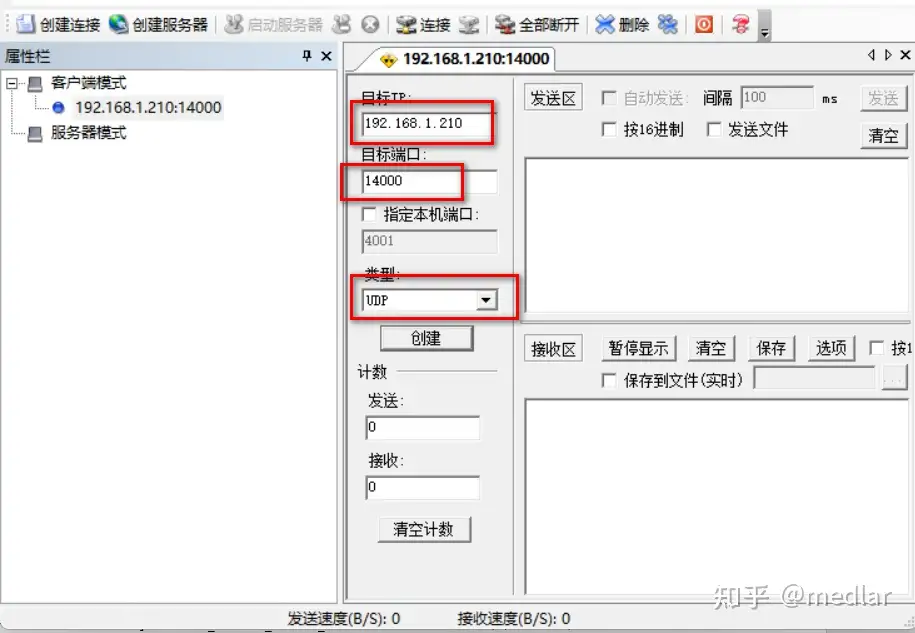
After the UDP service is started, the log:
[2022-12-20 15:56:53.755] network_default_socket_callback 2907:f2000000,-1,硬件离线,等待硬件上线
[2022-12-20 15:56:53.755] network_default_socket_callback 2911:f2000000,-1,硬件离线,等待硬件上线
[2022-12-20 15:56:53.755] w5500_ip_state 1115:ip 0 -> 1
[2022-12-20 15:56:53.785] network_default_socket_callback 2907:f2000000,-1,硬件离线,等待硬件上线
[2022-12-20 15:56:53.785] network_default_socket_callback 2911:f2000000,-1,硬件离线,等待硬件上线
[2022-12-20 15:56:53.785] w5500_ip_state 1115:ip 0 -> 1
[2022-12-20 15:56:53.895] w5500_link_state 1074:link 0 -> 1
[2022-12-20 15:56:53.895] network_default_socket_callback 2907:f2000001,-1,硬件离线,等待硬件上线
[2022-12-20 15:56:53.895] network_default_socket_callback 2911:f2000001,1,正在连接,等待连接完成
[2022-12-20 15:56:53.895] w5500_nw_state 980:network ready
[2022-12-20 15:56:53.895] network_default_socket_callback 2873:f2000009,1,正在连接,等待连接完成
[2022-12-20 15:56:53.895] network_default_socket_callback 2877:f2000011,1,在线,等待任意网络变化
[2022-12-20 15:56:58.915] I/?:-14021206368864832
Establishing a connection shows that the hardware is online and can communicate.
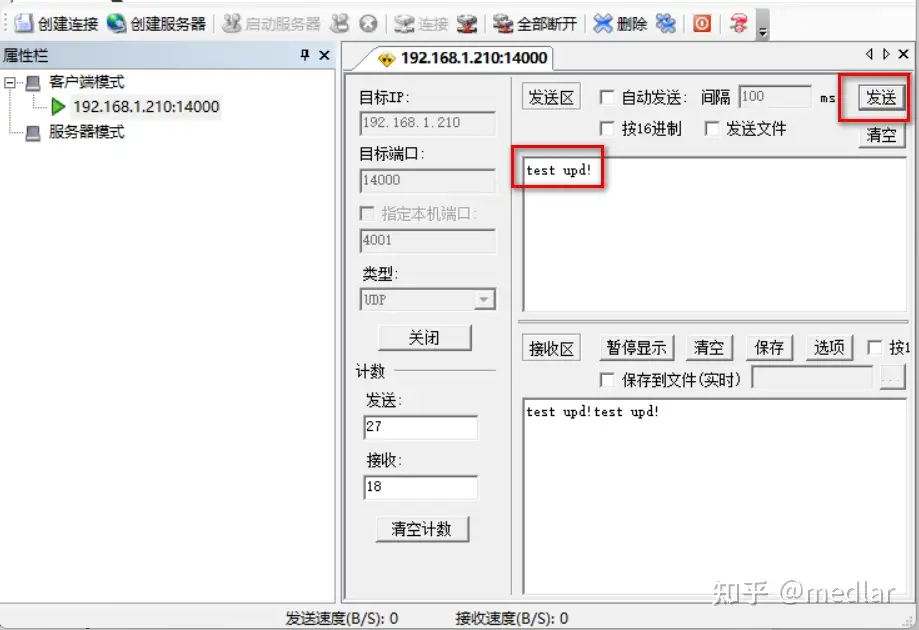
The Log file displays the received client data length and basic information such as IP and port.
[2022-12-20 16:09:54.028] I/?:-14021206365664832
[2022-12-20 16:09:54.764] I/?:-1收到客户端数据,长度9192.168.1.11758996

