STM32 + W5500 DNS porting implementation
This article introduce how to port DNS of W5500 to STM32 MCU
4
Components
Hardware components
M5Stack - LAN Module with W5500
x 1

Project description
什么是DNS?
DNS: Domain Name System,域名系统。简单理解,我们平时在浏览器上输入的都是域名,如www.baidu.com,这种域名便于人们的记忆和沟通。你可以很轻松的记住10个域名,但要你记住10个纯数字的ip地址,那就比较费劲了,但电脑通讯的时候是通过ip来通讯的。那么DNS就可以解决这个问题,把域名转化为IP地址。具体DNS的详细内容可参考该文章:http://blog.51cto.com/369369/812889
W5500的DNS移植过程
紧接上一篇文章,DNS的移植就比较简单。首先,还是添加驱动文件。
查询dns.h 头文件,有如下定义,DNS服务器的端口号是53,通讯的协议是UDP协议,默认的域名长度是16。
#define MAX_DOMAIN_NAME 16 // for example "www.google.com"
#define IPPORT_DOMAIN 53 ///< DNS server port number
1
2
DNS的配置主要调用了DNS_init和DNS_run函数,下面编写DNS的Test函数,向DNS输入域名,查看DNS是否返回这个域名的IP地址。具体代码如下:
#define SOCKET_DNS 2//定义一个SOCKET口,W5500有8个,0-7都行
wiz_NetInfo gWIZNETINFO = { .mac = {0x78, 0x83, 0x68, 0x88, 0x56, 0x38},
.ip = {192, 168, 4,17},
.sn = {255,255,255,0},
.gw = {192, 168,4,1},
.dns = {180,76,76,76},
.dhcp = NETINFO_DHCP};
uint8_t DNS_2nd[4]={168,126,63,1};//定义一个备用的DNS
uint8_t Domain_name[]="www.baidu.com";//域名
uint8_t Domain_IP[4]={0,};//存放DNS返回的域名对应的IP地址
1
2
3
4
5
6
7
8
9
10
void DNS_Test(void)
{
int8_t ret;
//打印出两个DNS
printf("\r\n=== DNS Client Example ===============\r\n");
printf("> DNS 1st : %d.%d.%d.%d\r\n", gWIZNETINFO.dns[0], gWIZNETINFO.dns[1], gWIZNETINFO.dns[2], gWIZNETINFO.dns[3]);
printf("> DNS 2nd : %d.%d.%d.%d\r\n", DNS_2nd[0], DNS_2nd[1], DNS_2nd[2], DNS_2nd[3]);
printf("======================================\r\n");
printf("> Example Domain Name : %s\r\n", Domain_name);
/* DNS client initialization */
DNS_init(SOCKET_DNS, gDATABUF);//初始化
/* DNS procssing */
if ((ret = DNS_run(gWIZNETINFO.dns, Domain_name, Domain_IP)) > 0) // try to 1st DNS,向gWIZNETINFO.dns这个DNS服务器查询Domain_name这个域名的IP地址,返回的IP地址存放到Domain_IP中
{
printf("> 1st DNS Reponsed\r\n");
}
else if ((ret != -1) && ((ret = DNS_run(DNS_2nd, Domain_name, Domain_IP))>0)) // retry to 2nd DNS
{
printf("> 2nd DNS Reponsed\r\n");
}
else if(ret == -1)
{
printf("> MAX_DOMAIN_NAME is too small. Should be redefined it.\r\n");
}
else
{
printf("> DNS Failed\r\n");
}
if(ret > 0)
{
printf("> Translated %s to %d.%d.%d.%d\r\n",Domain_name,Domain_IP[0],Domain_IP[1],Domain_IP[2],Domain_IP[3]);
}
}
1
2
3
4
5
6
7
8
9
10
11
12
13
14
15
16
17
18
19
20
21
22
23
24
25
26
27
28
29
30
31
32
33
34
DNS返回值有三个:-1、0和1,如下:
/*
* @brief DNS process
* @details Send DNS query and receive DNS response
* @param dns_ip : DNS server ip
* @param name : Domain name to be queryed
* @param ip_from_dns : IP address from DNS server
* @return -1 : failed. @ref MAX_DOMIN_NAME is too small \n //返回-1,输入的域名太长,定义的域名最大值太小
* 0 : failed (Timeout or Parse error)\n//返回-1,超时了
* 1 : success//成功
* @note This funtion blocks until success or fail. max time = @ref MAX_DNS_RETRY * @ref DNS_WAIT_TIME
*/
int8_t DNS_run(uint8_t * dns_ip, uint8_t * name, uint8_t * ip_from_dns);
1
2
3
4
5
6
7
8
9
10
11
12
调用DNS_Test()函数,进行DNS测试,向2个DNS查询www.baidu.com的IP地址。
void W5500_ChipInit(void)
{
W5500_RESET();
RegisterFunction();
ChipParametersConfiguration();
NetworkParameterConfiguration();
DHCP_SET();
DNS_Test();//DNS测试
}
1
2
3
4
5
6
7
8
9
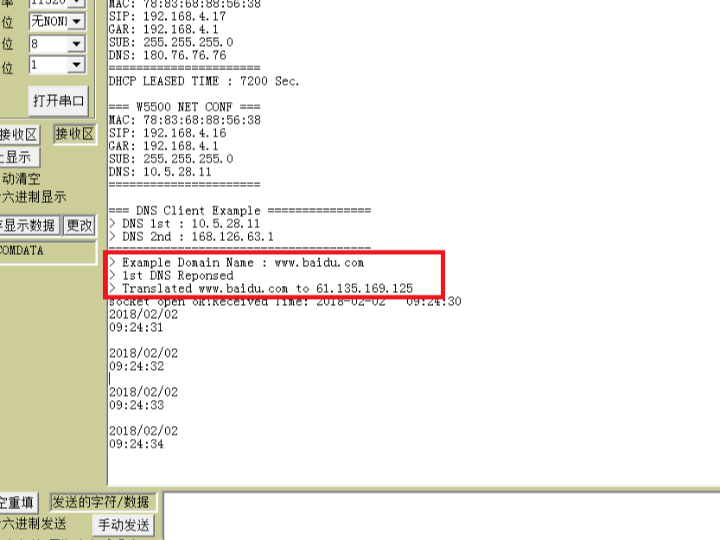
下载程序执行,串口的输出如下图:
可以看到向DNS查询域名www.baidu.com的ip时,第一个DNS响应了,得到域名对应的IP是:61.135.169.125。在浏览器中输入该地址,成功打开了百度,DNS解析成功。
移植的源程序见链接:https://download.csdn.net/download/u014470361/10234803
————————————————
版权声明:本文为CSDN博主「夜风~」的原创文章,遵循CC 4.0 BY-SA版权协议,转载请附上原文出处链接及本声明。
原文链接:https://blog.csdn.net/u014470361/article/details/79240054

