How Does a W5500 Network Toolbox Diagnose Ethernet from an M5Stack CoreS3?
Jesse Hills turns an M5Stack CoreS3 and W5500 PoE base into a touchscreen tester for link, DHCP, IPv6 and ping, after fixing a shared SPI bus in ESPHome.
0
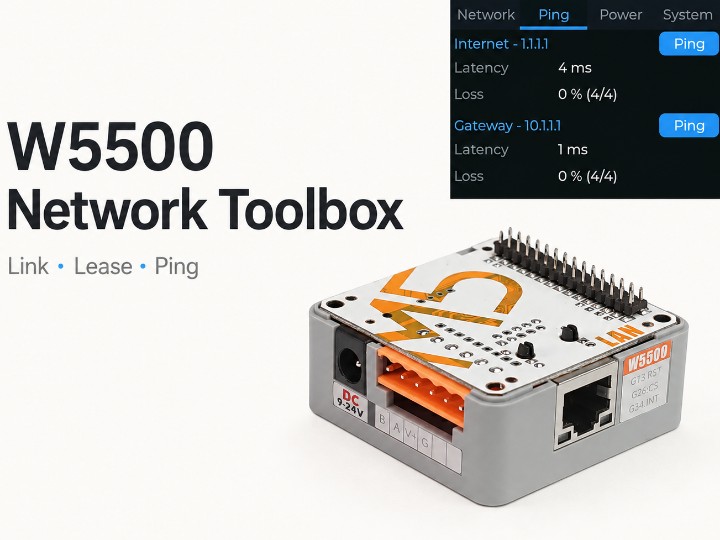
Components
Hardware components
WIZnet - W5500
x 1

Ethernet controller in M5Stack Base LAN PoE v1.2 (K012-C-V12). Shares the CoreS3 SPI bus with the LCD: CS GPIO9, RST GPIO7, INT GPIO14, 20 MHz.
Project description
📌 What Does Network Toolbox Tell You About an Ethernet Socket?
Jesse Hills is a developer at the Open Home Foundation in Wellington, New Zealand, who works on ESPHome, the open firmware framework used widely with Home Assistant. His Network Toolbox project turns an M5Stack CoreS3 touchscreen and an M5Stack Base LAN PoE v1.2 (SKU K012-C-V12, built around a WIZnet W5500) into a handheld Ethernet tester. The repository describes the goal in one line: "Plug into an unknown network and see the link, lease, addressing and reachability it gives you."
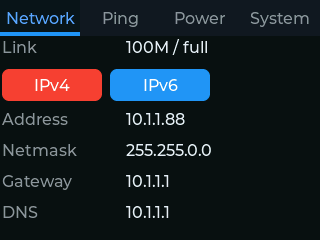
Original Network tab capture: Jesse Hills / Network Toolbox, Apache-2.0.
A link light on a wall socket answers only one question. Network Toolbox separates three failure points on one small screen: whether the cable has a physical Ethernet link, whether the network handed out an address, and whether the gateway and the internet answer. A technician can check a socket without configuring a laptop or connecting the device to any monitoring service first.
Hills added the CoreS3 configuration on 25 August 2026 and published release 26.8.1 the same day. The pull request that introduced it lists what was "Verified on hardware": boot on USB and on PoE, link transitions, DHCP lease, I/O expander register readback and the ping interface.
From Link to Lease to Reachability
The Network tab of Network Toolbox reports link speed and duplex, then the IPv4 address, netmask, gateway and DNS server. DHCP, the service that lends a new device an address and network settings, is a separate step from the electrical Ethernet link. An IPv4/IPv6 selector also shows the IPv6 global and link-local addresses.
The Network Toolbox firmware polls the physical link state every 250 milliseconds instead of relying only on the "got IP" event. That choice matters when a cable is pulled before DHCP finishes: an address event never fires, but the link poll still updates the screen. A socket with a working link and no lease therefore looks different from a dead socket.
The firmware has four tabs: Network, Ping, Power and System. Multicast DNS is disabled and the Home Assistant API is not configured, so the tester adds very little background traffic to the network it is examining. The System tab shows uptime, MAC address and firmware version, and can check for firmware updates.
⚙️ Role of the W5500 on a Shared SPI Bus
The W5500 in the Base LAN PoE v1.2 carries Ethernet frames between the RJ45 cable and the ESP32-S3 in the CoreS3 over SPI, a short serial bus between a processor and its peripherals. In the Network Toolbox YAML the W5500 uses chip select GPIO9, reset GPIO7 and interrupt GPIO14, with the SPI clock at 20 MHz. Clock, MOSI and MISO run on GPIO36, GPIO37 and GPIO35.
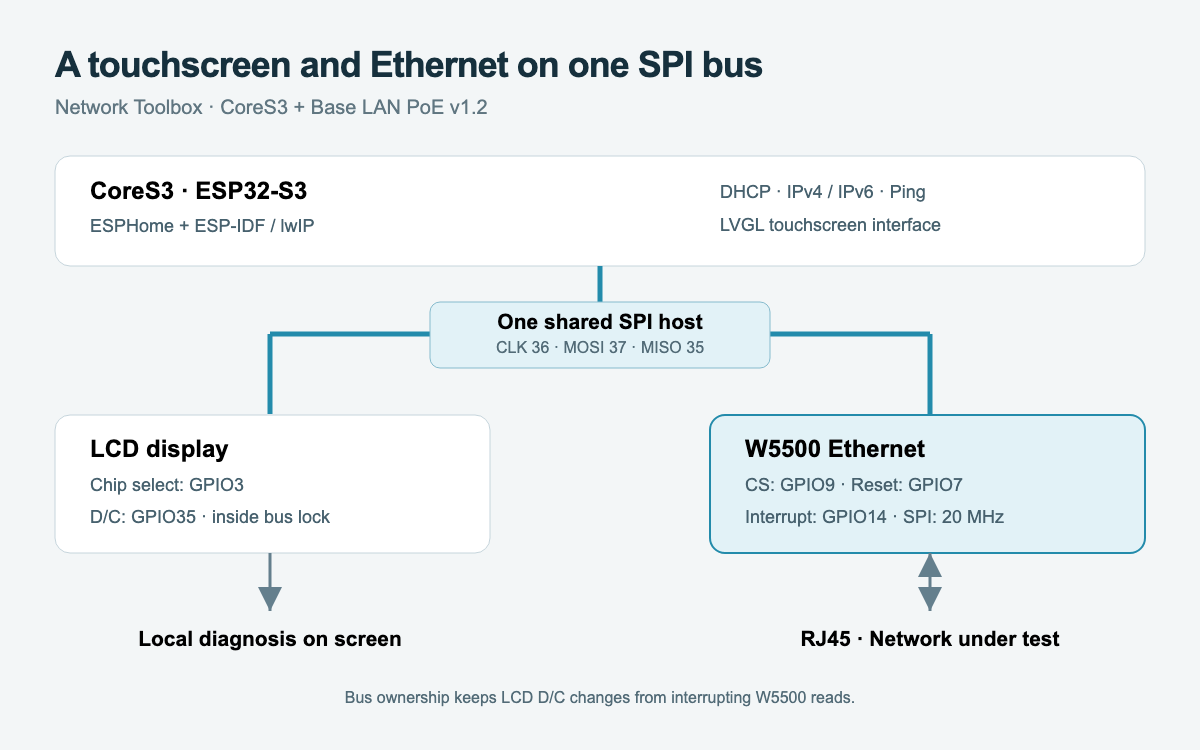
Generated technical diagram: the CoreS3 display and the W5500 share one hardware SPI bus.
The CoreS3 display sits on the same three SPI lines, so the W5500 and the LCD take turns on one bus. ESPHome could not express that arrangement before August 2026, because its Ethernet component expected a bus of its own. Hills wrote ESPHome PR 18530, which adds an optional spi_id so Ethernet can join an existing SPI bus. ESP-IDF's bus lock then serializes display and Ethernet transactions. PR 18530 merged on 25 August 2026.
The harder bug came from a single pin. On the CoreS3, GPIO35 is both SPI MISO and the LCD data/command (D/C) line. The ESPHome display driver toggled D/C outside the bus lock, so an LCD command could pull MISO low in the middle of a W5500 read. Hills reported truncated Ethernet frames followed by watchdog resets. ESPHome PR 18529, merged on 20 August 2026, moved the D/C changes inside the locked transaction.
The W5500 runs in frame mode on this build. ESPHome uses the ESP-IDF Ethernet driver for the W5500 and the lwIP software TCP/IP stack on the ESP32-S3, so DHCP, IPv6 and ping run on the processor rather than in the W5500's hardware sockets. The IPv6 addresses on screen come from that host stack. For Network Toolbox the W5500 is the wired interface that lets an ESP32-S3, which has no Ethernet MAC of its own, reach the cable at all.
Ping Shows the Path Beyond the Socket
Ping sends a small echo request and measures whether a destination replies and how long the round trip takes. Network Toolbox pings both the local gateway and an internet target, which separates "the router is reachable" from "the path past the router works". Opening the Ping tab starts a four-probe test, and buttons repeat the test on demand.
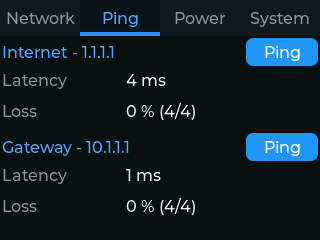
Original captured session: 4 ms to 1.1.1.1 and 1 ms to the gateway, four replies each. Results depend on the network under test.
The Network Toolbox ping component is a small C++ wrapper around ESP-IDF's esp_ping service. Its loss figure is calculated against the number of probes requested, not the number that were actually sent. If the cable is pulled halfway through a batch, the unsent probes still count as lost, so a cut test cannot be shown as 0% loss. Results are handed back to the main application task before the display updates, which keeps network work and screen work on the same schedule.
PoE and Power Direction in Network Toolbox
Power over Ethernet (PoE) delivers power over the same cable that carries data. The Base LAN PoE v1.2 contains the PoE power circuitry next to its W5500, and the CoreS3 can also run from USB. Power can flow across the M-Bus connector in either direction between the base and the CoreS3, depending on which supply is present.
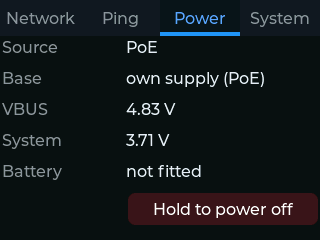
Original PoE screen capture: Network Toolbox reports supply source, base power direction and rail voltages.
Hills found that choosing the wrong direction at startup could cut the board's own supply. The firmware comment explains the trade-off directly: sourcing power from the CoreS3 is "correct on USB, fatal on PoE, and fatal is recoverable because cutting our own supply forces a cold boot." Network Toolbox writes a dirty flag to flash before the risky step and clears it only after surviving 15 seconds. The AW9523B I/O expander driver from M5Stack is used with reset disabled, so later initialization does not undo the power routing chosen early in boot.
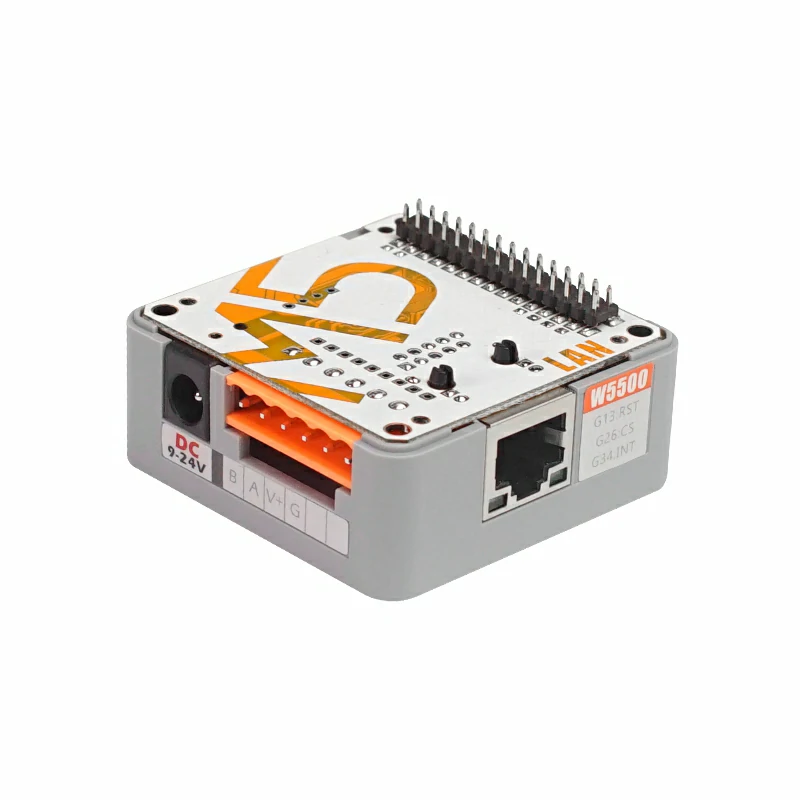
Base LAN PoE v1.2 hardware photograph: M5Stack. The CoreS3 touchscreen mounts on top of this base.
What Changed After ESPHome 2026.9.0
Both upstream fixes that Network Toolbox depends on are now in a stable ESPHome release. Comparing the merge commits of PR 18529 and PR 18530 against the ESPHome tag 2026.9.0 (released 16 September 2026) shows both commits are contained in that release, and 2026.9.1 followed on 29 September 2026.
The Network Toolbox repository has not caught up yet. As of 12 October 2026 the last code commit is still the 25 August screenshot update, the YAML still pulls github://pr#18530 as an external component, and a comment beside it still says the change is "Still pending upstream". Builders who compile from source today should know that the pin and the ESPHome dev requirement are leftovers rather than hard requirements, while the published 26.8.1 binaries remain the simplest way to install.
Release 26.8.1 includes factory and OTA images, checksums and a debug ELF. The Network Toolbox installation page flashes the CoreS3 over USB from a browser using the live firmware manifest. The HTTP update component in the YAML sets verify_ssl: false, so updates should come from a trusted network.
Where Network Toolbox Fits and What It Does Not Do
Network Toolbox is a connectivity checker for one specific hardware pair: an M5Stack CoreS3 with the Base LAN PoE v1.2. Network Toolbox reports link, lease, addressing and ping reachability. Network Toolbox does not certify cabling, map wire pairs, measure throughput or identify which switch port a socket leads to. The latency figures in the screenshots are one captured session from the author's network, not a benchmark.
No independent deployment report or review of Network Toolbox was found, and the repository has 3 stars at the time of writing. The value of the project is the documented engineering behind it: the shared-SPI fixes are upstream in ESPHome and benefit any board that puts a W5500 next to an SPI display.
Related WIZnet Maker Projects
M5STACK LAN Module W5500 With POE and LAN Module W5500 with PoE V12 introduce M5Stack's W5500 PoE base family as a commercial product. Those posts describe the hardware as sold; Network Toolbox shows a complete, released application that an ESPHome developer built on the current Base LAN PoE v1.2 (SKU K012-C-V12), including the shared-bus fixes that hardware needed.
Pocket-Sized Network Tester with W5500-EVB-Pico2 and OLED Display solves the same field problem, checking a socket's link and DHCP lease, on a battery-powered RP2350 board with a W5500 and a small OLED. Network Toolbox adds a touchscreen, IPv6, ping to gateway and internet, and PoE power on an ESP32-S3.
3.1K-View Flipper Zero Ethernet Tester (W5500) is another handheld W5500 tester, built as an add-on for a device people already carry. Comparing the two shows how the same W5500 role, a wired port for a host without its own Ethernet, fits very different form factors.
How to Bring Up W5500 Ethernet for a DEF CON Countdown Display on M5Stack CoreS3 SE? uses the same CoreS3 family with W5500 Ethernet for a display project. That build and Network Toolbox both have to share the CoreS3's limited pins between a screen and the Ethernet controller, which is exactly the problem the ESPHome fixes address.
❓ FAQ
Q. Which hardware does Network Toolbox target? Network Toolbox targets an M5Stack CoreS3 stacked on the M5Stack Base LAN PoE v1.2 (SKU K012-C-V12), whose Ethernet controller is a WIZnet W5500 connected over SPI at 20 MHz.
Q. Does Network Toolbox need Home Assistant? No. Network Toolbox shows everything on the CoreS3 touchscreen and leaves the Home Assistant API unconfigured, so the tester works on any network without a server.
Q. How can a W5500-based tester show IPv6 addresses? The ESP32-S3 runs the lwIP software TCP/IP stack, which handles IPv6. The W5500 provides the Ethernet frame interface that the host stack uses, so IPv6 support comes from ESPHome and ESP-IDF rather than from the W5500 hardware sockets.
Q. What does a working link with no DHCP lease mean on Network Toolbox? A working link with no lease means the cable and switch port are electrically fine but no DHCP server answered. Network Toolbox polls link state every 250 ms, so this state is visible even when no address event ever arrives.
Q. Can Network Toolbox be built with a stable ESPHome release? The two required ESPHome changes, PR 18529 and PR 18530, are both contained in ESPHome 2026.9.0. The repository still pins the pull request and the dev branch as of 12 October 2026, and the 26.8.1 release binaries can be flashed from the browser installer without building.
Documents
-
Network Toolbox source
Complete device YAML, local ping component, screenshots and Apache-2.0 license.
-
CoreS3 factory configuration
W5500 shared SPI pin map, IPv6, UI and power sequence.
-
Hardware implementation and test report
Maker report covering USB and PoE boot, link changes, DHCP and ping.
-
Original display captures
Seven actual panel captures; unit identifiers blurred by the author.
-
Release 26.8.1
25 August 2026 release with factory and update images, ELF and checksums.
-
USB installation page
Browser installation and live firmware manifest.
-
ESPHome shared SPI Ethernet support
Merged 25 August 2026, included in ESPHome 2026.9.0; adds spi_id so Ethernet can join an existing SPI bus.
-
LCD D/C bus-lock fix
Merged 20 August 2026, included in ESPHome 2026.9.0; keeps LCD D/C changes inside the SPI bus lock.
-
ESPHome 2026.9.0 release
16 September 2026 stable release that contains both shared-SPI fixes.
-
M5Stack Base LAN PoE v1.2
Official K012-C-V12 hardware documentation and photography.
-
Ping implementation
ESP-IDF ping wrapper and requested-probe loss accounting.
-
Espressif W5500 MAC driver
Frame-based W5500 driver and MACRAW socket configuration.


