Web UI to the NCD5500 Ethernet Module
Guide How to Upload a Web UI to the NCD5500 Ethernet Module
3
Components
Hardware components
WIZnet - W5500
x 1

NCD CONFIG TOOL - NCD CONFIG TOOL
x 1
Project description
NCD5500 Version Identification

Step 1 — Download ncd Ethernet config utility and web interface page
The ncd ethernet config utility can be used to change Ethernet module settings, upload new firmware or to uploaded web ui.
Step 2 — Connect the Ethernet Module and power it up
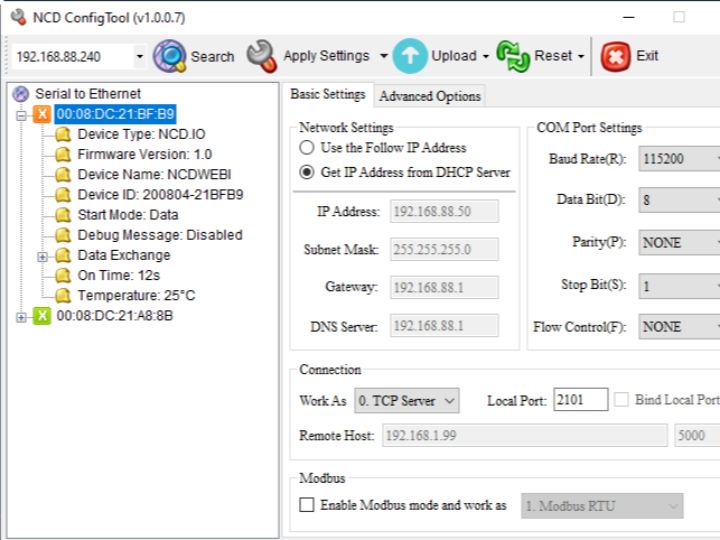
Once the Ethernet module is connected , open the config utility.
It will look something like this.
- MAKE SURE you have the latest version of software. In the upper left corner, it will say V1.0.7 or later.
- Open the Mac Address of the device and make sure the latest firmware is installed. The Device Name should Say NCDWEBI and the Firmware Version Should be 1.0 or later (this is the latest module we manufacture).
- A sticker that says “FW:ncdwebi” is printed on the top of all modules that support web page uploads.
- Slightly older modules will have the Device Name say NCDIO and the Firmware Version should be 1.3 or earlier as indicated in the software. These modules do not support uploading a custom web page. You will need to obtain the latest module from NCD to support custom web page uploads.
How to upload web interface ui
Click “Upload” button at the top and Select upload web page option.

Once the web interface is uploaded the module will reset itself.
Step 3– Open a web browser and go to the ethernet ip address

Default password is admin.
Once all done the wee interface will pop up


