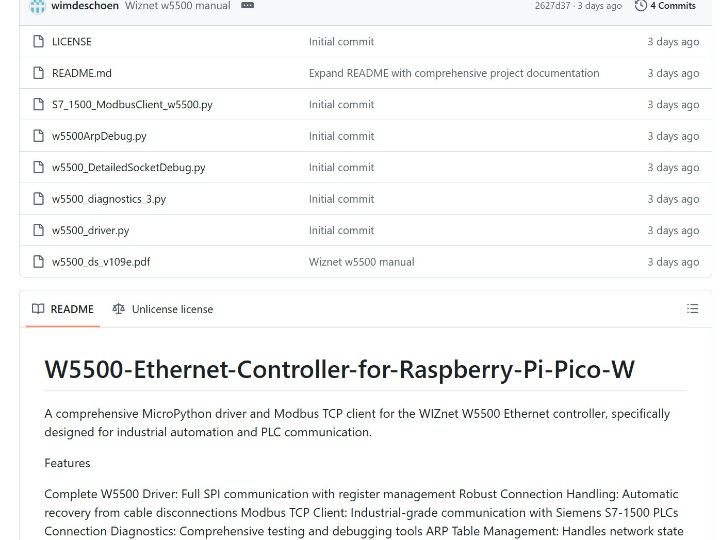
W5500-Ethernet-Controller-for-Raspberry-Pi-Pico-W
A comprehensive MicroPython driver and Modbus TCP client for the WIZnet W5500 Ethernet controller, specifically designed for industrial automation and PLC commu
0
Project description
W5500-Ethernet-Controller for Raspberry Pi Pico W
Project Overview
This project delivers a comprehensive MicroPython driver and Modbus TCP client for the WIZnet W5500 Ethernet Controller, enabling reliable communication between the Raspberry Pi Pico W and industrial PLCs (Programmable Logic Controllers) such as the Siemens S7-1500.
It is specifically designed for industrial automation environments, providing features like automatic recovery after cable disconnects, ARP table management, and detailed diagnostic tools.
From an R&D perspective, this project can serve as a valuable reference for:
Future Single Pair Ethernet (SPE) implementations
WIZnet driver improvement and optimization efforts
Key Features
Complete W5500 Driver: Full SPI register control and Ethernet stack integration
Robust Connection Handling: Automatic recovery from cable or network interruptions
Modbus TCP Client: Reliable industrial-grade communication with Siemens PLCs
Connection Diagnostics: Socket debugging, ARP resolution scripts, and improved diagnostic suite
Multi-Socket Management: Up to 8 simultaneous hardware sockets
MicroPython Optimized: Non-blocking operations, memory-efficient register access
Hardware Requirements
Raspberry Pi Pico W
WIZnet W5500 Ethernet Module
SPI Pin Wiring
| W5500 Pin | Pico Pin | Function |
|---|---|---|
| SCK | GP10 | SPI Clock |
| MOSI | GP11 | Master Out |
| MISO | GP12 | Master In |
| CS | GP13 | Chip Select |
| RST | GP15 | Reset |
| VCC | 3V3 | Power Supply |
| GND | GND | Ground |
Quick Start
Basic W5500 Setup
from w5500_driver import W5500 # Initialize hardware w5500 = W5500(sck_pin=10, mosi_pin=11, miso_pin=12, cs_pin=13, rst_pin=15) # Configure network w5500.set_mac_address("02:08:DC:15:00:28") w5500.set_ip_address("192.168.1.100") w5500.set_subnet_mask("255.255.255.0") w5500.set_gateway("192.168.1.1") # Check PHY status phy = w5500.get_phy_status() print(f"Link: {'UP' if phy['link'] else 'DOWN'}")Siemens PLC Communication
from w5500_driver import W5500 from siemens_modbus_client import SiemensModbusTCP # Initialize hardware w5500 = W5500(sck_pin=10, mosi_pin=11, miso_pin=12, cs_pin=13, rst_pin=15) # Create Modbus TCP client plc = SiemensModbusTCP(w5500, local_ip="192.168.123.29", plc_ip="192.168.123.10") if plc.connect(): # Read holding registers data = plc.read_holding_registers(0, 10) print(f"PLC Data: {data}") # Write to PLC plc.write_single_register(100, 1234) plc.disconnect()File Structure
├── w5500_driver.py # Core W5500 driver ├── siemens_modbus_client.py # Modbus TCP client for Siemens PLCs ├── detailed_socket_debug.py # Socket debugging tools ├── arp_debug_script.py # ARP resolution diagnostics ├── improved_diagnostics.py # Enhanced diagnostic suite └── simple_reset_test.py # Basic connectivity tests Core Components
W5500 Driver (w5500_driver.py)
Full SPI register access (VDM mode)
TCP/UDP socket management
Network configuration utilities
PHY status monitoring
Hardware/software reset
Siemens Modbus Client (siemens_modbus_client.py)
Supported Modbus Functions:
read_holding_registers(start, count) – FC3
write_single_register(address, value) – FC6
write_multiple_registers(start, values) – FC16
read_input_registers(start, count) – FC4
Built-in features: ARP management, auto-reconnect, industrial timeouts
Diagnostic Tools
improved_diagnostics.py → Run complete hardware tests
arp_debug_script.py → Clear ARP tables and fix link issues
simple_reset_test.py → Quick connectivity test
detailed_socket_debug.py → Monitor socket states
# Run diagnostics exec(open('improved_diagnostics.py').read()) # Clear ARP and reset from arp_debug_script import clear_arp_and_reset clear_arp_and_reset(w5500)Advanced Usage
Custom Retry Settings
w5500._write_reg(0x0019, 0x00, [0x13, 0x88]) # 500ms w5500._write_reg(0x001B, 0x00, 0x0F) # 15 retries Force ARP Mode
mr = w5500._read_reg(0x0000, 0x00, 1)[0] w5500._write_reg(0x0000, 0x00, mr | 0x02)Multiple Socket Management
status0 = w5500.socket_open(0, 0x01, 8000) # TCP status1 = w5500.socket_open(1, 0x02, 8001) # UDP for sock in range(8): w5500.socket_close(sock)Technical Specifications
SPI Modes: 0 & 3
SPI Frequency: Up to 80 MHz (tested at 10 MHz)
Socket Count: 8 independent hardware sockets
Buffer Size: 32KB (16KB TX + 16KB RX)
Protocols: TCP, UDP, IPv4, ICMP, ARP, IGMP, PPPoE
PHY: 10/100 Ethernet with auto-negotiation
Industrial Relevance & Future Outlook
Validates WIZnet W5500 as a robust solution for industrial automation and PLC communication
Provides open-source reference code for system integrators and engineers
Offers R&D teams valuable insights for:
Enhancing WIZnet’s driver ecosystem
Exploring Single Pair Ethernet (SPE) adoption
Building more resilient industrial networking stacks
Contributing
Test with real hardware
Ensure MicroPython compatibility
Include diagnostics for debugging
Document new features
Validate cable disconnect/reconnect scenarios
References
Siemens S7-1500 Modbus Documentation
Author: Wim Deschoenmaeker
Hardware: Raspberry Pi Pico W + WIZnet W5500
Application: Industrial automation & PLC communication

