wireless-ac-automation-esp32
wireless-ac-automation-esp32
0
Components
Hardware components
WIZnet - W5500
x 1

Espressif - ESP32
x 1
Project description
Summary
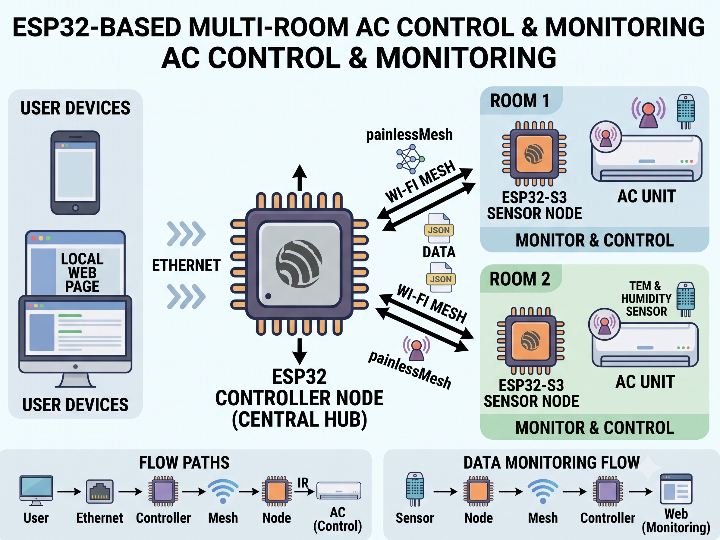
이 프로젝트는 ESP32 Controller Node와 ESP32-S3 Sensor Node를 이용해 여러 공간의 에어컨을 제어하고 모니터링하는 Home Automation 시스템입니다.
전체 시스템은 다음과 같은 흐름으로 동작합니다.
Browser → Ethernet → Controller Node → Wi-Fi Mesh → Sensor Node → IR → Air Conditioner
사용자는 PC나 스마트폰에서 Controller의 로컬 웹 페이지에 접속해 에어컨의 전원, 운전 모드, 팬 속도, 스윙, 설정 온도를 변경할 수 있습니다. Controller는 입력된 제어 정보를 JSON으로 변환한 뒤 painlessMesh를 통해 Sensor Node로 전달하며, Sensor Node는 IRremoteESP8266을 이용해 실제 에어컨에 적외선 명령을 전송합니다.
반대로 Sensor Node에서 DHT22로 측정한 온도와 습도는 다음 경로로 전달됩니다.
DHT22 → Sensor Node → Wi-Fi Mesh → Controller → Web Dashboard
Controller는 등록된 Sensor Node의 측정값과 온라인 상태를 관리하며, Ethernet 웹 서버와 Mesh 통신을 ESP32의 서로 다른 Core에서 처리하도록 구성되어 있습니다.
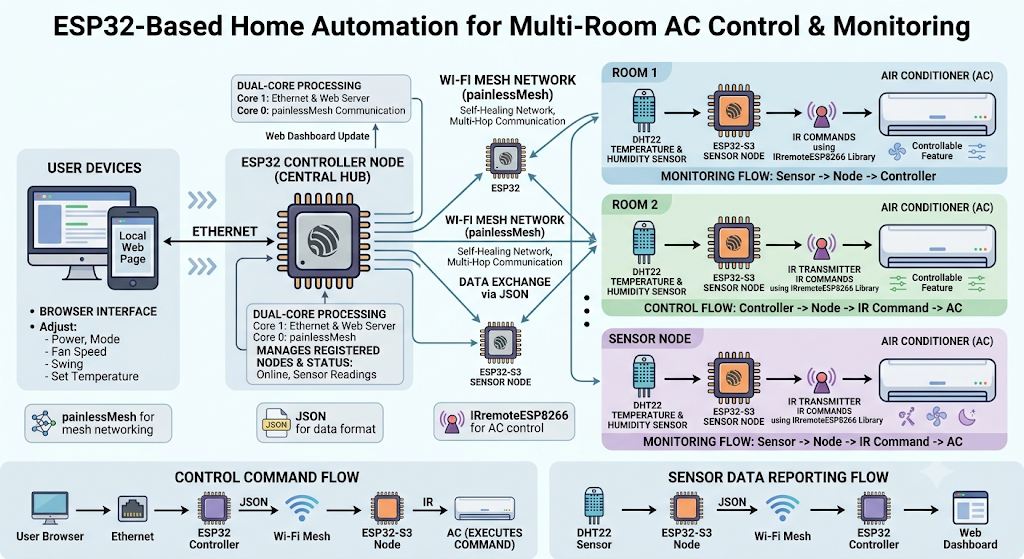
이미지 출처 : AI 생성
Where WIZnet Fits
이 프로젝트에서 WIZnet 제품이 들어가는 위치는 Controller Node의 유선 Ethernet 인터페이스입니다.
하드웨어 회로도에서는 WIZ850io가 사용됩니다. WIZ850io는 W5500 Ethernet Controller와 Transformer, RJ45 MAG-JACK을 하나의 모듈에 통합한 제품으로, ESP32와 SPI를 통해 연결됩니다.
WIZ850io 기준으로 전체 네트워크 구조를 보면 다음과 같습니다.
Browser / LAN
↓
WIZ850io (W5500)
↓ SPI
ESP32 Controller
↓ painlessMesh
ESP32-S3 Sensor Node
↓ IR
Air Conditioner
WIZ850io는 에어컨을 직접 제어하지 않습니다. 로컬 네트워크와 ESP32 Controller 사이의 안정적인 유선 Ethernet 연결을 제공하는 역할을 담당합니다.
W5500은 TCP/IP 처리를 하드웨어에서 수행하며, 8개의 독립적인 하드웨어 소켓과 총 32 KB의 내부 TX/RX 버퍼를 제공합니다. 따라서 ESP32는 Mesh 관리, 웹 UI, JSON 처리, 노드 관리와 같은 Home Automation 애플리케이션 로직에 집중할 수 있습니다.
이 프로젝트에서는 Ethernet과 Wi-Fi가 서로 다른 역할을 담당합니다.
WIZ850io Ethernet: Controller와 기존 LAN 사이의 유선 연결
Wi-Fi Mesh: Controller와 각 방의 Sensor Node 사이의 무선 연결
즉, 유선 Backbone과 무선 Sensor Network를 결합한 하이브리드 Home Automation 구조라고 볼 수 있습니다.
Implementation Notes
이 프로젝트에서 가장 주의해서 보셔야 할 부분은 회로도와 현재 펌웨어의 Ethernet 장치가 일치하지 않는다는 점입니다.
하드웨어 회로도에서는 WIZ850io를 사용하지만, 공개된 Controlling_node.ino에는 다음과 같이 ENC28J60용 라이브러리가 포함되어 있습니다.
파일: Controlling_node.ino
#include "painlessMesh.h"
#include <Arduino_JSON.h>
#include <SPI.h>
#include <EthernetENC.h>
#include <Preferences.h>
EthernetENC.h는 ENC28J60을 위한 Ethernet 라이브러리이므로 현재 공개된 Controller 펌웨어는 ENC28J60을 기준으로 작성된 버전입니다.
Ethernet 초기화 부분에서도 이를 확인할 수 있습니다.
파일: Controlling_node.ino
SPI.begin();

Ethernet.init(5); // CS pin for ENC28J60
Ethernet.begin(mac, ip, gateway, gateway, subnet);

server.begin();
주석에서도 GPIO 5가 ENC28J60의 CS 핀으로 명시되어 있습니다.
따라서 현재 프로젝트는 다음과 같이 구분해서 이해하시는 것이 정확합니다.
Hardware: ESP32 + WIZ850io
Published Firmware: ESP32 + ENC28J60 / EthernetENC
WIZ850io가 적용된 Controller 회로를 사용하려면 전체 애플리케이션을 다시 작성할 필요는 없습니다. 핵심은 Ethernet 드라이버와 초기화 계층을 W5500에 맞게 변경하는 것입니다.
기존의 다음 기능은 그대로 유지할 수 있습니다.
웹 UI를 통한 AC 제어
JSON 기반 상태 처리
painlessMesh 통신
Sensor Node 관리
NVS 설정 저장
IR 기반 에어컨 제어
즉, WIZ850io 적용은 시스템 전체를 변경하는 작업이라기보다 Controller의 외부 Ethernet 인터페이스를 회로도에 맞게 정리하는 작업에 가깝습니다.
Practical Tips / Pitfalls
회로도와 펌웨어를 함께 확인하셔야 합니다. WIZ850io가 회로도에 적용되어 있어도 현재 EthernetENC 기반 펌웨어를 그대로 사용할 수는 없습니다.
WIZ850io 적용 시 Ethernet 계층을 중심으로 수정하시는 것이 좋습니다. Mesh, JSON, NVS, 웹 UI, IR 제어 로직은 기존 구조를 유지할 수 있습니다.
SPI 연결을 확인하셔야 합니다. WIZ850io는 MOSI, MISO, SCLK, CS를 통해 ESP32와 통신하며 Reset과 Interrupt 신호도 제공합니다.
Controller의 IP 주소 정책을 정해 두시는 것이 좋습니다. Home Automation Controller는 항상 같은 주소로 접근하는 경우가 많으므로 정적 IP 또는 DHCP Reservation 방식이 관리하기 편리합니다.
Ethernet과 Mesh의 장애 처리는 분리하는 것이 좋습니다. LAN 연결이 끊어져도 Controller와 Sensor Node 사이의 Mesh 통신과 로컬 AC 제어가 유지되도록 구성하는 편이 안정적입니다.
현재 Dual-Core 구조는 유지할 가치가 있습니다. HTTP 서버와 Mesh 처리를 분리하면 웹 요청 지연이 Sensor Node 통신에 미치는 영향을 줄일 수 있습니다.
FAQ
Q: 왜 이 프로젝트에서 WIZ850io를 사용하나요?
A: WIZ850io는 W5500, Transformer, RJ45 MAG-JACK을 하나의 모듈에 통합한 Ethernet 솔루션입니다. Controller를 기존 LAN에 연결하면서 Ethernet 하드웨어 구성을 단순화하고, TCP/IP 처리를 W5500에 맡길 수 있습니다.
Q: ESP32와 WIZ850io는 어떻게 연결하나요?
A: SPI 인터페이스로 연결합니다. 기본적으로 MOSI, MISO, SCLK, CS 신호를 사용하며 Reset과 Interrupt 신호도 활용할 수 있습니다.
Q: WIZ850io는 이 Home Automation 시스템에서 어떤 역할을 하나요?
A: 사용자 브라우저가 접속하는 로컬 Ethernet 네트워크와 ESP32 Controller를 연결합니다. 이후 AC 제어 명령은 Controller가 처리하고 Wi-Fi Mesh를 통해 각 Sensor Node로 전달합니다.
Q: 회로도는 WIZ850io인데 왜 펌웨어에는 ENC28J60이 사용되나요?
A: 현재 공개된 하드웨어와 펌웨어가 서로 다른 Ethernet 구성을 기준으로 작성되어 있기 때문입니다. 회로도는 WIZ850io를 사용하지만, Controlling_node.ino는 EthernetENC.h와 ENC28J60용 초기화 코드를 사용하고 있습니다. 따라서 실제 WIZ850io 하드웨어에 적용하려면 Ethernet 드라이버를 변경해야 합니다.
Q: ENC28J60과 WIZ850io의 주요 차이는 무엇인가요?
A: WIZ850io에 탑재된 W5500은 TCP/IP 스택과 8개의 하드웨어 소켓, 32 KB의 내부 TX/RX 버퍼를 제공합니다. 따라서 ESP32가 네트워크 프로토콜 처리를 직접 담당하는 구조보다 Ethernet 기능을 별도 하드웨어로 분리하기 쉽습니다.
Summary
This project is a home automation system that uses an ESP32 Controller Node and ESP32-S3 Sensor Nodes to control and monitor air conditioners across multiple rooms or zones.
The overall system operates as follows:
Browser → Ethernet → Controller Node → Wi-Fi Mesh → Sensor Node → IR → Air Conditioner
Users can access the Controller's local web page from a PC or smartphone to adjust the air conditioner's power, operating mode, fan speed, swing settings, and target temperature. The Controller converts these control parameters into JSON data and sends them to the Sensor Node through painlessMesh. The Sensor Node then uses IRremoteESP8266 to transmit the corresponding infrared commands to the air conditioner.
Temperature and humidity data measured by the DHT22 on the Sensor Node travel in the opposite direction:
DHT22 → Sensor Node → Wi-Fi Mesh → Controller → Web Dashboard
The Controller manages measurement data and online status for registered Sensor Nodes. It is also designed to handle the Ethernet web server and Mesh communication on separate ESP32 cores.
Image Source : AI Generated
Where WIZnet Fits
In this project, the WIZnet product is used at the wired Ethernet interface of the Controller Node.
The hardware schematic uses the WIZ850io. The WIZ850io integrates the W5500 Ethernet Controller, transformer, and RJ45 MAG-JACK into a single module and connects to the ESP32 through SPI.
With the WIZ850io, the network architecture can be represented as follows:
Browser / LAN
↓
WIZ850io (W5500)
↓ SPI
ESP32 Controller
↓ painlessMesh
ESP32-S3 Sensor Node
↓ IR
Air Conditioner
The WIZ850io does not control the air conditioner directly. Its role is to provide a stable wired Ethernet connection between the local network and the ESP32 Controller.
The W5500 handles TCP/IP processing in hardware and provides eight independent hardware sockets with a total of 32 KB of internal TX/RX buffer memory. This allows the ESP32 to focus on home automation application tasks such as Mesh management, the web UI, JSON processing, and Sensor Node management.
Ethernet and Wi-Fi serve different purposes in this project.
WIZ850io Ethernet: Provides the wired connection between the Controller and the existing LAN.
Wi-Fi Mesh: Provides wireless communication between the Controller and Sensor Nodes installed in individual rooms.
The result is a hybrid home automation architecture that combines a wired backbone with a wireless sensor network.
Implementation Notes
One important point in this project is that the Ethernet device shown in the schematic does not match the Ethernet device used by the currently published firmware.
The hardware schematic uses the WIZ850io, while the published Controlling_node.ino includes the following library for the ENC28J60:
File: Controlling_node.ino
#include "painlessMesh.h"
#include <Arduino_JSON.h>
#include <SPI.h>
#include <EthernetENC.h>
#include <Preferences.h>
Because EthernetENC.h is an Ethernet library for the ENC28J60, the currently published Controller firmware is written for the ENC28J60 configuration.
This can also be confirmed in the Ethernet initialization code.
File: Controlling_node.ino
SPI.begin();

Ethernet.init(5); // CS pin for ENC28J60
Ethernet.begin(mac, ip, gateway, gateway, subnet);

server.begin();
The comment explicitly identifies GPIO 5 as the CS pin for the ENC28J60.
The current project should therefore be understood as follows:
Hardware: ESP32 + WIZ850io
Published Firmware: ESP32 + ENC28J60 / EthernetENC
Using the Controller hardware equipped with the WIZ850io does not require rewriting the entire application. The main requirement is to replace the Ethernet driver and initialization layer with one that supports the W5500.
The following application-level functions can remain unchanged:
AC control through the web UI
JSON-based state handling
painlessMesh communication
Sensor Node management
NVS configuration storage
IR-based air conditioner control
In other words, integrating the WIZ850io is primarily a matter of aligning the Controller's external Ethernet interface with the hardware schematic, rather than redesigning the entire system.
Practical Tips / Pitfalls
Check the schematic and firmware together. Even though the WIZ850io is used in the schematic, the current EthernetENC-based firmware cannot be used with it without modification.
Focus modifications on the Ethernet layer when integrating the WIZ850io. The existing Mesh, JSON, NVS, web UI, and IR control logic can remain unchanged.
Verify the SPI connections. The WIZ850io communicates with the ESP32 through MOSI, MISO, SCLK, and CS, and also provides Reset and Interrupt signals.
Define an IP address strategy for the Controller. Because a home automation Controller is often accessed through the same address, a static IP or DHCP reservation can simplify network management.
Handle Ethernet and Mesh failures independently. The system should ideally maintain Mesh communication and local AC control between the Controller and Sensor Nodes even if the LAN connection is lost.
The current dual-core architecture is worth keeping. Separating HTTP server processing from Mesh communication can reduce the impact of slow web requests on Sensor Node communication.
FAQ
Q: Why is the WIZ850io used in this project?
A: The WIZ850io integrates the W5500, transformer, and RJ45 MAG-JACK into a single Ethernet module. It simplifies the Ethernet hardware required to connect the Controller to the existing LAN while allowing the W5500 to handle TCP/IP processing.
Q: How does the WIZ850io connect to the ESP32?
A: It connects through the SPI interface. MOSI, MISO, SCLK, and CS are the primary communication signals, while Reset and Interrupt signals can also be used.
Q: What role does the WIZ850io play in this home automation system?
A: It connects the ESP32 Controller to the local wired Ethernet network accessed by the user's browser. The Controller then processes AC control commands and forwards them to each Sensor Node through the Wi-Fi Mesh network.
Q: Why does the firmware use the ENC28J60 when the schematic uses the WIZ850io?
A: The currently published hardware and firmware are based on different Ethernet configurations. The schematic uses the WIZ850io, while Controlling_node.ino uses EthernetENC.h and initialization code written for the ENC28J60. The Ethernet driver therefore needs to be changed when using the actual WIZ850io hardware.
Q: What is the main difference between the ENC28J60 and the WIZ850io?
A: The W5500 inside the WIZ850io provides a hardware TCP/IP stack, eight hardware sockets, and 32 KB of internal TX/RX buffer memory. This makes it easier to separate Ethernet protocol processing from the ESP32's application-level tasks than with an architecture in which the MCU handles more of the network protocol processing.


