Huawei-Modbus-TLS-Server
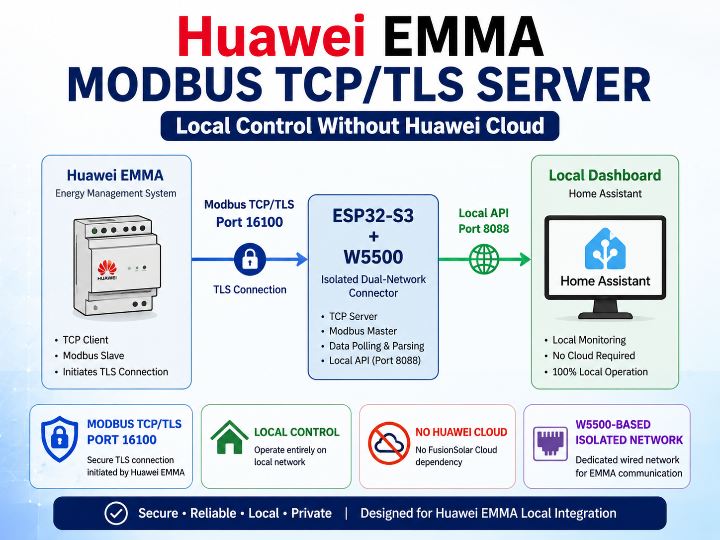
Huawei EMMA dials out over TLS as the TCP client, so a normal Modbus server cannot answer it. A W5500 gives that reverse link its own isolated LAN.
0
Components
Hardware components
WIZnet - W5500
x 1

Project description
COMPONENTS
| Component | Qty | Role in this project |
|---|---|---|
| WIZnet W5500 (product page) | x 1 | SPI Ethernet controller on the EMMA-facing side. It holds the fixed IP on the solar-installation LAN and terminates EMMA's inbound TCP session on port 16100. |
| LilyGO T-ETH-Elite (ESP32-S3 + W5500 / ETH1) | x 1 | Dual-network connector appliance. Wi-Fi faces Home Assistant, W5500 faces EMMA. |
| Huawei EMMA-A01 / A02 (with SUN2000 / LUNA / SmartGuard / SDongle / SCharger) | x 1 | The energy-management unit that opens the reverse TLS connection. |
| Home Assistant host (any) | x 1 | Owns the entities; talks to the connector over the authenticated API on port 8088. |
📌 Huawei-Modbus-TLS-Server는 무엇인가?
Huawei-Modbus-TLS-Server는 valexi7이 공개한 Huawei EMMA용 Home Assistant 관리 통합이자 리버스 Modbus/TLS 커넥터입니다. EMMA, SUN2000/LUNA, SmartGuard 토폴로지, SmartLogger, SDongle, SCharger의 데이터와 제어를 Home Assistant 장치로 노출하며, FusionSolar 클라우드 의존 없이 로컬 네트워크에서만 동작합니다.
핵심 답변: EMMA는 Modbus 클라이언트의 접속을 기다리지 않습니다. EMMA가 TCP 클라이언트로서 TLS 소켓을 먼저 열고, 그 위에서 Modbus 슬레이브로 응답합니다. 이 프로젝트는 그 연결을 수락한 뒤 Modbus 마스터가 되는 반대편 구현입니다.
왜 일반 Modbus TCP 서버로는 안 되나?
표준 Modbus TCP에서는 소켓을 여는 쪽이 곧 요청을 보내는 쪽입니다. EMMA는 이 역할을 절반만 뒤집습니다.
- EMMA가 TCP 클라이언트입니다. 설정된 "타사 관리 시스템" 주소의
16100포트로 TLS 접속을 시도합니다. - EMMA가 Modbus 슬레이브입니다. 연결이 되면 폴링을 기다립니다.
- 표준 Modbus 트래픽 전에 Huawei 사설
0x41시작 프레임을 먼저 보냅니다.
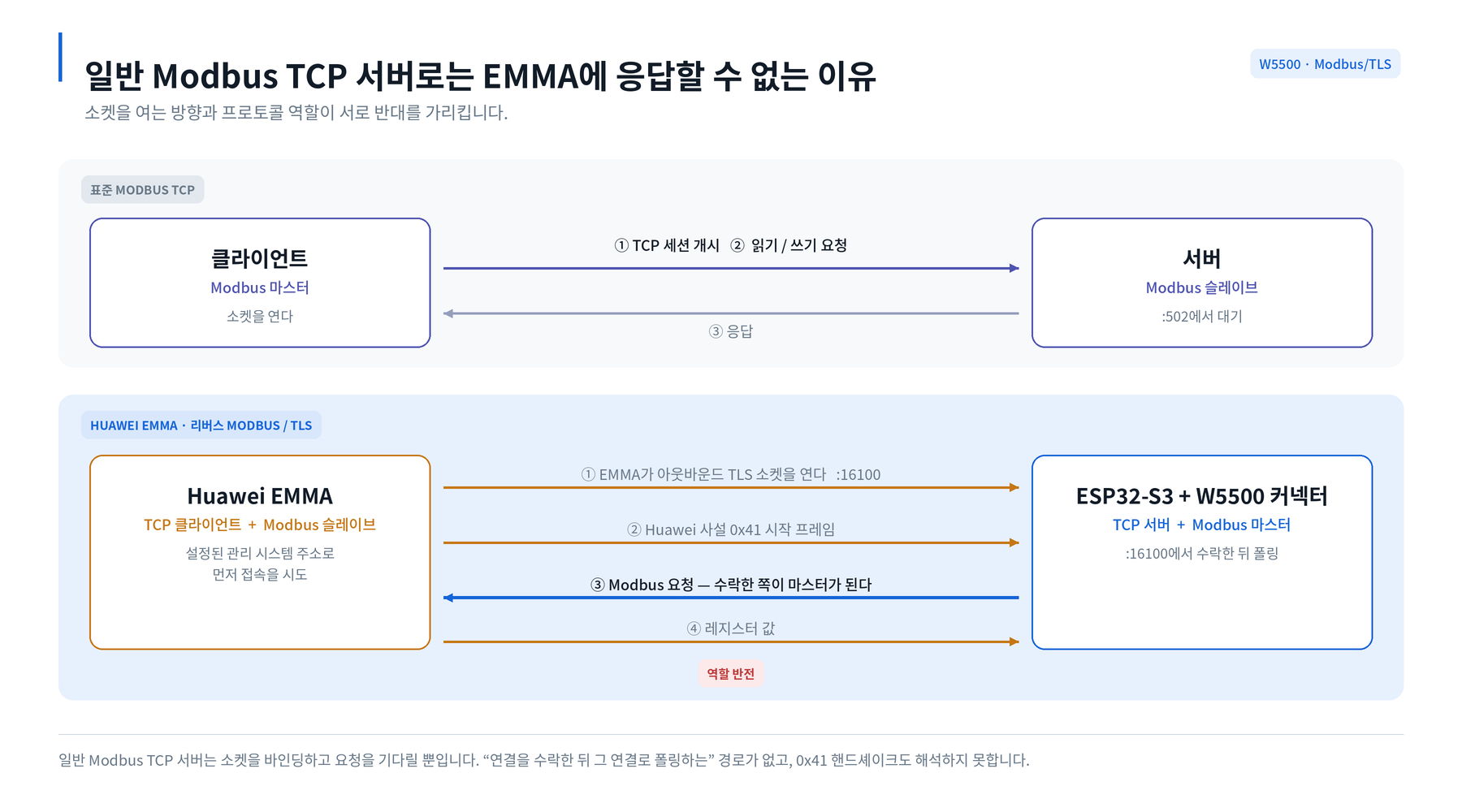
그림 1 — 표준 Modbus TCP에서는 소켓을 연 쪽이 곧 요청을 보내는 쪽입니다. EMMA에서는 소켓 방향과 프로토콜 역할이 서로 반대를 가리키며, 그 앞에 사설 0x41 프레임이 먼저 옵니다.
일반 Modbus TCP 서버는 소켓을 바인딩하고 요청이 오기를 기다릴 뿐, "연결을 수락한 뒤 그 연결로 요청을 보내는" 경로가 없고 0x41 핸드셰이크도 해석하지 못합니다. .
커넥터는 무엇을 하나?
- 고정된
huawei-solar3.0.6에서 생성한 레지스터 정의 740개 — 스칼라, enum, boolean, 타임스탬프, 비트필드, 문자열, 구조화된 기간 디코딩을 지원합니다. - 페이지 단위 토폴로지 탐색과 EMMA / 인버터·LUNA / 충전기 / SDongle / SmartLogger 역할별 라우팅.
- 3단계 폴링 — 실시간 텔레메트리 30초, 에너지·설정 5분, 정적 진단 30분. 인접 주소를 병합하되 한 요청당 125 레지스터를 넘지 않습니다.
- 구독 기반 폴링. 카탈로그 대부분은 비활성 상태로 생성되며, Home Assistant에서 엔티티를 활성화해야 해당 레지스터 폴링이 시작됩니다. 실제로 보는 값만 버스에 흐릅니다.
- 안전한 쓰기 — 범위 제한 숫자, enum, boolean, datetime, Huawei TOU 스케줄을 검증하고 읽기 확인 후 성공을 반환합니다.
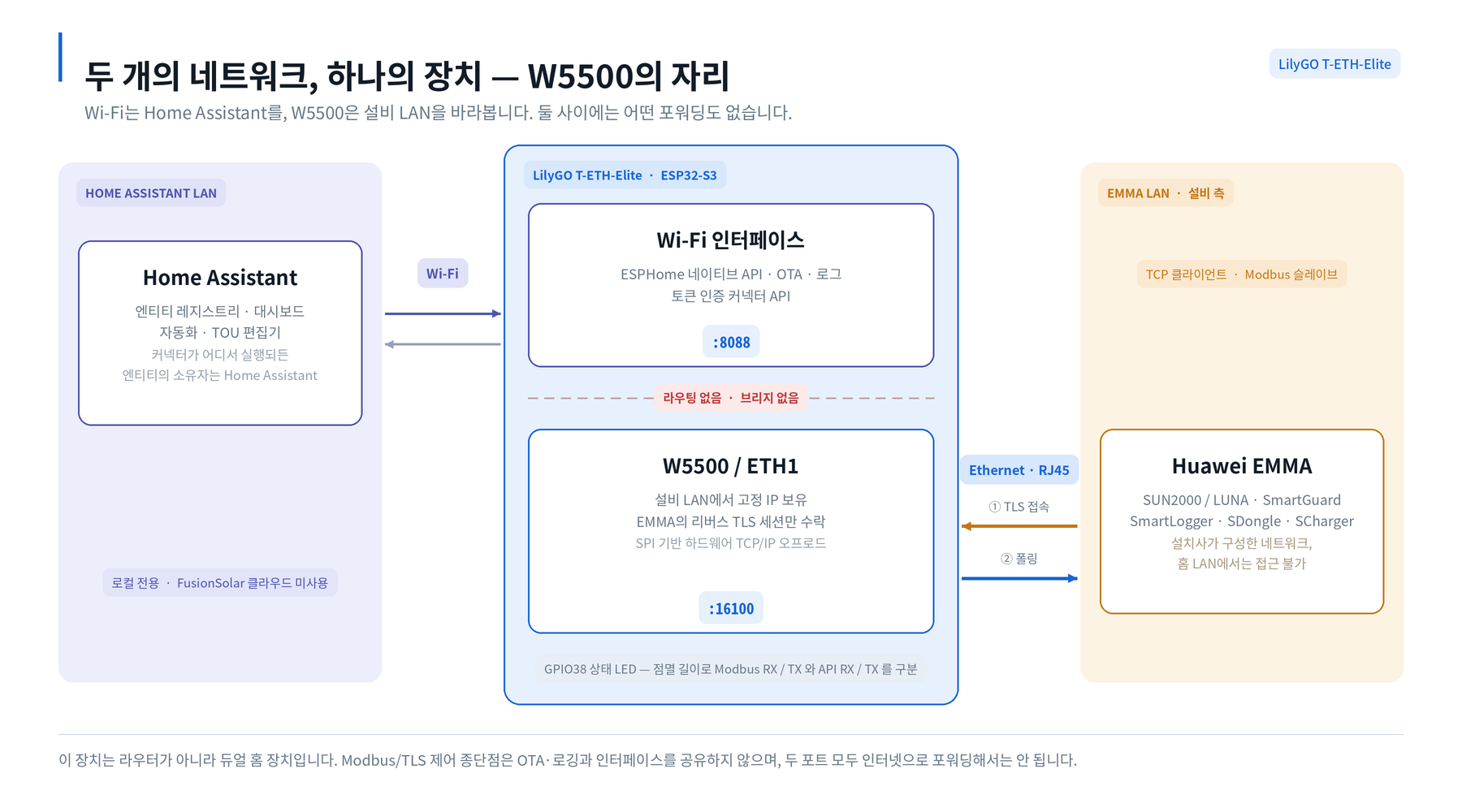
그림 2 — 레지스터 카탈로그는 비활성 상태로 생성됩니다. 엔티티를 활성화해야 해당 레지스터가 커넥터 구독에 들어가며, 3단계 폴링은 실제로 보고 있는 값만 전달합니다.
세 가지 런타임(Home Assistant 내장 / Linux 독립 Python / LilyGO T-ETH-Elite 기반 ESPHome)이 같은 통합, 같은 엔티티 카탈로그, 같은 /api/v1 계약을 공유합니다. 런타임을 바꿔도 엔티티·대시보드·자동화·장치 ID는 그대로 유지됩니다.
W5500은 어디에 들어가나?
Home Assistant LAN <-- Wi-Fi --> ESP32-S3 <-- W5500 / ETH1 --> EMMA LAN
       API / OTA                   :8088        TLS/Modbus :16100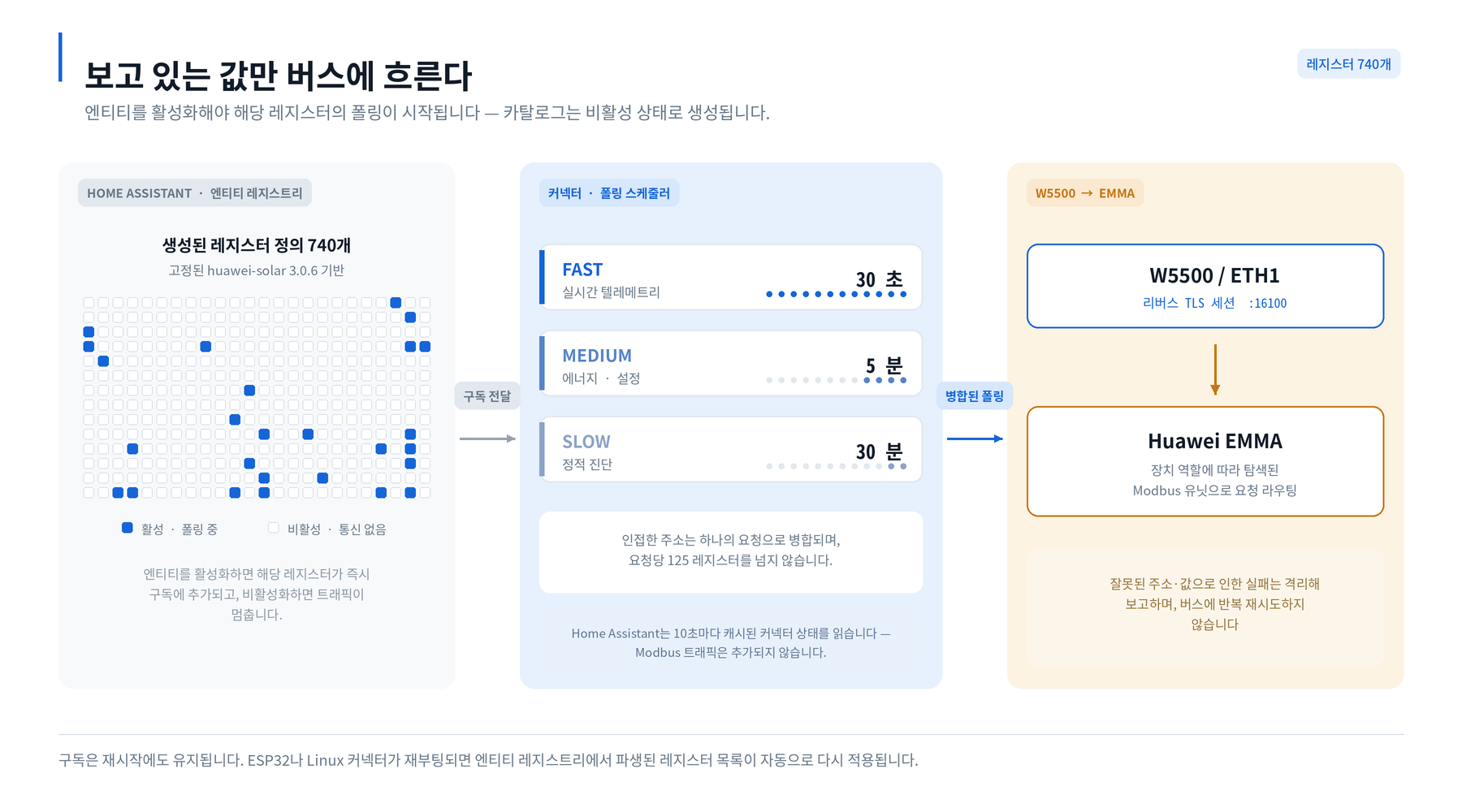
그림 3 — Wi-Fi는 ESPHome API·OTA·커넥터 API(8088)를, W5500은 설비 LAN의 고정 주소에서 EMMA의 리버스 TLS 세션(16100)만 담당합니다. 둘 사이에는 포워딩이 없습니다.
두 인터페이스는 의도적으로 서로 다른 네트워크를 바라보며, 이 장치는 라우터나 브리지가 아닙니다.
- Wi-Fi 측은 ESPHome 네이티브 API, OTA, 로그, 그리고 토큰 인증 커넥터 API(
8088)를 담당합니다. Home Assistant가 이쪽과 통신합니다. - W5500 측은 태양광 설비 LAN에서 고정 IP(
emma_eth_ip)를 갖고, EMMA의 리버스 TLS 연결(16100)만 수락합니다.
이 분리가 설계의 핵심입니다. 설치사가 구성한 EMMA 네트워크는 홈 LAN에서 접근할 수 없고, Modbus/TLS 제어 종단점은 OTA·로깅과 같은 인터페이스를 쓰지 않습니다. W5500은 EMMA 측 소켓과 링크 계층을 하드웨어로 처리하고, ESP32-S3는 TLS 세션, 0x41 해석, 레지스터 카탈로그, 폴링 스케줄러를 담당합니다.
ethernet:
  type: W5500
  # ... 보드별 SPI 핀 ...
  manual_ip:
    static_ip: 192.168.88.20
    gateway: 192.168.88.1
인증서는 python tools/generate_esphome_tls.py --server-name 192.168.88.20으로 생성하고, EMMA에는 ca-cert.pem만 신뢰 CA로 가져옵니다. 인증서 SAN은 EMMA에 설정한 W5500 IP 또는 DNS 이름과 정확히 일치해야 합니다.
참고할 만한 하드웨어 디테일 하나: T-ETH-Elite 빌드는 GPIO38 시스템 LED가 단색 이진 LED이기 때문에 색이 아니라 점멸 길이로 상태를 구분합니다. 짧게=Modbus RX, 중간=Modbus TX, 두 번=API RX, 길게=API TX. LED 하나로 양쪽 네트워크의 트래픽 패턴을 읽을 수 있습니다.
WIZnet의 역할: W5500은 에너지 관리 LAN으로 향하는 격리된 유선 경로입니다. 고정 주소로 EMMA의 아웃바운드 TCP 세션(
16100)을 종단하고, TLS·Modbus 마스터링·Home Assistant 엔티티 로직은 ESP32-S3가 처리합니다.
이 프로젝트가 유선 IoT 설계에 주는 시사점
대부분의 W5500 + ESP32 프로젝트는 Ethernet을 "더 안정적인 네트워크"로 씁니다. 이 프로젝트는 Ethernet을 "두 번째 네트워크"로 씁니다. 벤더가 통제하는 설비 LAN과 사용자의 홈 LAN 사이에 의도적인 분리를 두고, 애플리케이션 계층의 단일 통로만 남기는 구조입니다.
이 패턴은 태양광을 넘어 확장됩니다. 건물 제어기, 계량기, EV 충전기, HVAC 게이트웨이처럼 벤더 프로토콜로 사용자 망에 아웃바운드 접속하는 장비에는 모두 같은 형태가 적용됩니다. 벤더 세그먼트를 향한 저전력 SPI Ethernet 인터페이스, 운영자를 향한 별도 관리 인터페이스, 그리고 그 사이의 포워딩 없음.
유지보수 구조도 참고할 만합니다. 레지스터 메타데이터·포트·주기·한계값은 Python에 두고, python tools/generate_esphome_catalog.py가 ESP32 헤더 테이블과 JSON 계약을 생성하며, CI는 생성 파일이 낡으면 빌드를 실패시킵니다. ESP32 펌웨어 빌드에는 Python도 huawei-solar도 필요 없지만, 세 런타임 모두 하나의 원본에서 함께 바뀝니다.
관련 Maker 글
태양광 인버터 데이터를 W5500 유선으로 Home Assistant에 넣는 Maker 글이 두 편 더 있습니다. 전송 방식이 각각 달라, 본 프로젝트를 나란히 놓으면 리버스 TLS 링크가 무엇을 얻는지 드러납니다.
| 본 프로젝트 | OpenDTU-OnBattery | AhoyDTU | |
|---|---|---|---|
| 대상 장비 | Huawei EMMA / SUN2000 / LUNA | OpenDTU Fusion 경유 Hoymiles | Hoymiles 마이크로인버터 |
| 장비와의 연결 | Modbus over TLS, :16100 | 보드 레벨 연결 후 Ethernet | 서브기가 RF |
| 연결을 여는 쪽 | EMMA가 먼저 접속, 커넥터가 수락 후 폴링 | 컨트롤러가 외부로 접속 | 컨트롤러가 RF로 폴링 |
| W5500의 역할 | 경계 — 격리된 설비 LAN에서 리버스 세션 종단 | MQTT 브로커로 가는 유선 업링크 | 선택 사항, 사용자 정의 ETH 펌웨어 |
| Home Assistant 연동 | 전용 HACS 통합, 엔티티 740개 | MQTT 브로커 → Home Assistant | MQTT / JSON |
나머지 두 프로젝트는 이더넷을 하나의 평면 LAN 위 업링크로 씁니다. 본 프로젝트는 이를 네트워크 경계로 쓰며, 이 지점이 참고할 만한 부분입니다.
❓ FAQ
huawei_solar HACS 통합과 같은 건가요? 아닙니다. huawei_solar는 Modbus TCP 종단점으로 접속해 나가고, 이 프로젝트는 EMMA가 걸어오는 리버스 TLS 연결을 수락한 뒤 폴링합니다. 방향이 반대입니다.
0x41 프레임이 무엇인가요? EMMA가 표준 Modbus 트래픽에 앞서 보내는 Huawei 사설 시작 프레임입니다. 일반 Modbus 서버는 이를 해석하지 못해 핸드셰이크 단계에서 실패합니다.
W5500이 TLS나 Modbus 로직을 처리하나요? 아닙니다. W5500은 EMMA LAN에서의 하드웨어 TCP/IP 경로와 고정 주소를 제공합니다. TLS, 0x41 해석, 레지스터 디코딩, 폴링은 모두 ESP32-S3에서 실행됩니다.
ESP32가 두 네트워크를 브리지하나요? 아닙니다. 포워딩 없는 듀얼 홈 장치입니다. Wi-Fi는 ESPHome API·OTA·커넥터 API(8088), W5500은 EMMA의 TLS 연결(16100)만 담당합니다.
꼭 ESP32가 필요한가요? 아닙니다. 커넥터는 Home Assistant 내장 또는 Linux 독립 Python으로도 실행됩니다. ESPHome/W5500 런타임은 네트워크 격리와 낮은 대기 전력을 얻고 싶을 때 선택합니다.
클라우드를 거치나요? 아닙니다. 로컬 전용 동작이며, 두 포트 모두 인터넷으로 포워딩해서는 안 됩니다.
PROJECT DESCRIPTION
📌 What Is Huawei-Modbus-TLS-Server?
Huawei-Modbus-TLS-Server by valexi7 is a Home Assistant management integration plus a reverse Modbus/TLS connector for Huawei EMMA. It exposes EMMA, SUN2000/LUNA, SmartGuard topology, SmartLogger, SDongle and SCharger data and controls as Home Assistant devices, entirely on the local network with no FusionSolar cloud dependency.
It is not a generic Modbus gateway and not a fork of the existing huawei_solar integration. It solves one specific transport problem, and then builds a full entity catalog on top of it.
Direct answer: EMMA does not sit and wait for a Modbus client. EMMA opens an outbound TLS socket as the TCP client, and then answers as the Modbus slave. This project is the counterpart that accepts that connection and becomes the Modbus master.
Why Can't a Normal Modbus TCP Server Talk to EMMA?
In a textbook Modbus TCP deployment the roles line up neatly: the client opens the socket and the client sends the request. EMMA inverts half of that.
- EMMA is the TCP client — it dials out to a configured "third-party management system" address on port
16100, over TLS. - EMMA is the Modbus slave — once the socket is up, it waits to be polled.
- EMMA opens with a Huawei private
0x41startup frame before any standard Modbus traffic.
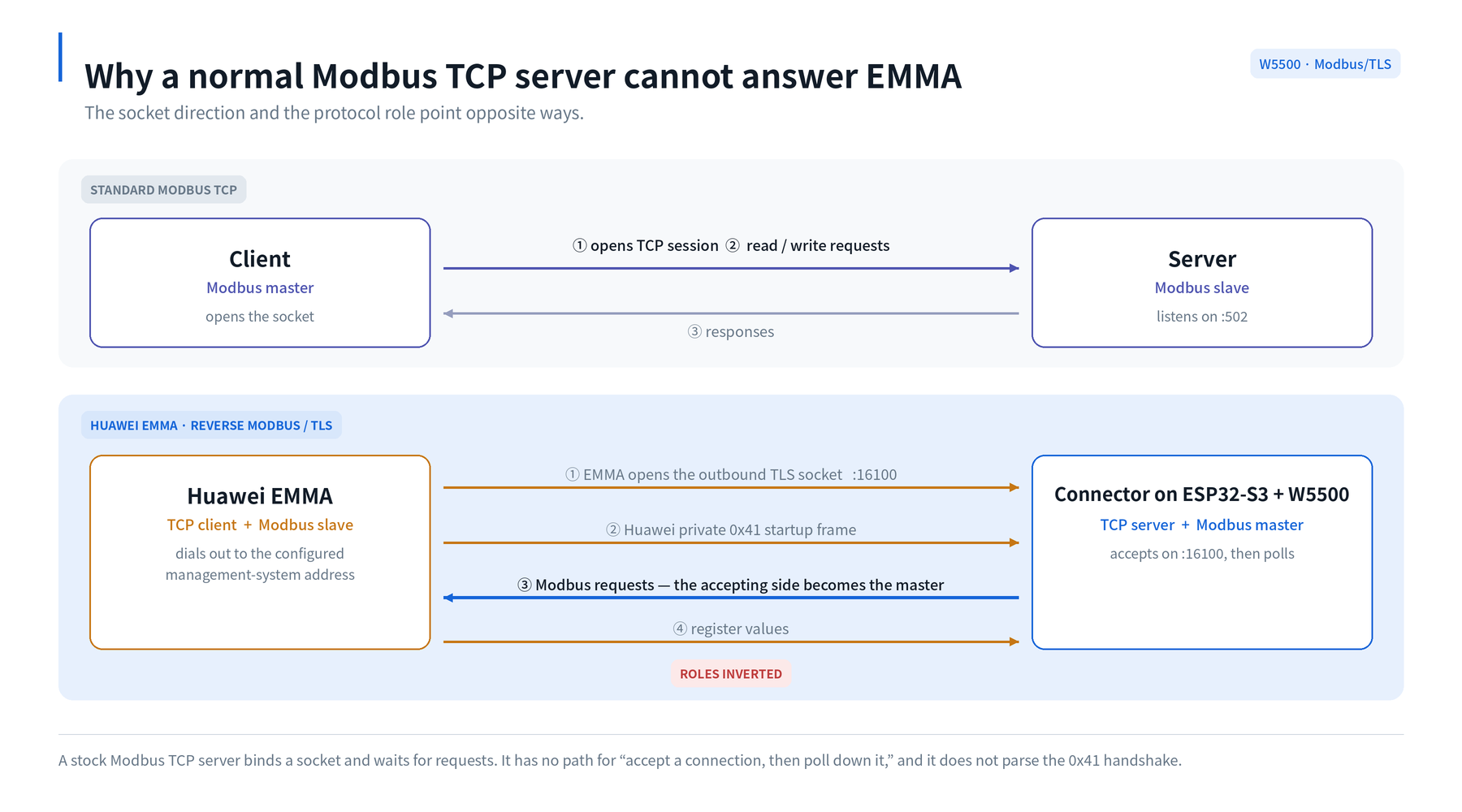
Fig. 1 — In standard Modbus TCP the side that opens the socket also sends the requests. With EMMA the socket direction and the protocol role point opposite ways, and a private 0x41 frame precedes everything.
A stock Modbus TCP server binds a socket and expects requests to arrive. It has no path for "accept a connection, then start issuing requests down it," and it will not parse the 0x41 handshake. That mismatch is the reason this repository exists.
What Does the Connector Actually Do?
Once the reverse link is established, the connector behaves like a well-mannered Modbus master:
- 740 generated register definitions, derived from a pinned
huawei-solar3.0.6, covering scalar, enum, boolean, timestamp, bitfield, string, and structured-period decoding. - Paged topology discovery, with device-role routing across EMMA, inverter/LUNA, charger, SDongle and SmartLogger.
- Three polling tiers — fast (30 s) for live telemetry, medium (5 min) for energy and configuration, slow (30 min) for static diagnostics — with adjacent addresses coalesced into single requests that never exceed 125 registers.
- Subscription-driven polling. Most of the catalog is created disabled. Enabling an entity in Home Assistant is what starts polling that register, and disabling it stops the traffic. The bus only carries what someone is actually looking at.
- Safe writes — bounded numbers, enums, booleans, datetimes and Huawei TOU schedules, each validated and read back before success is reported.
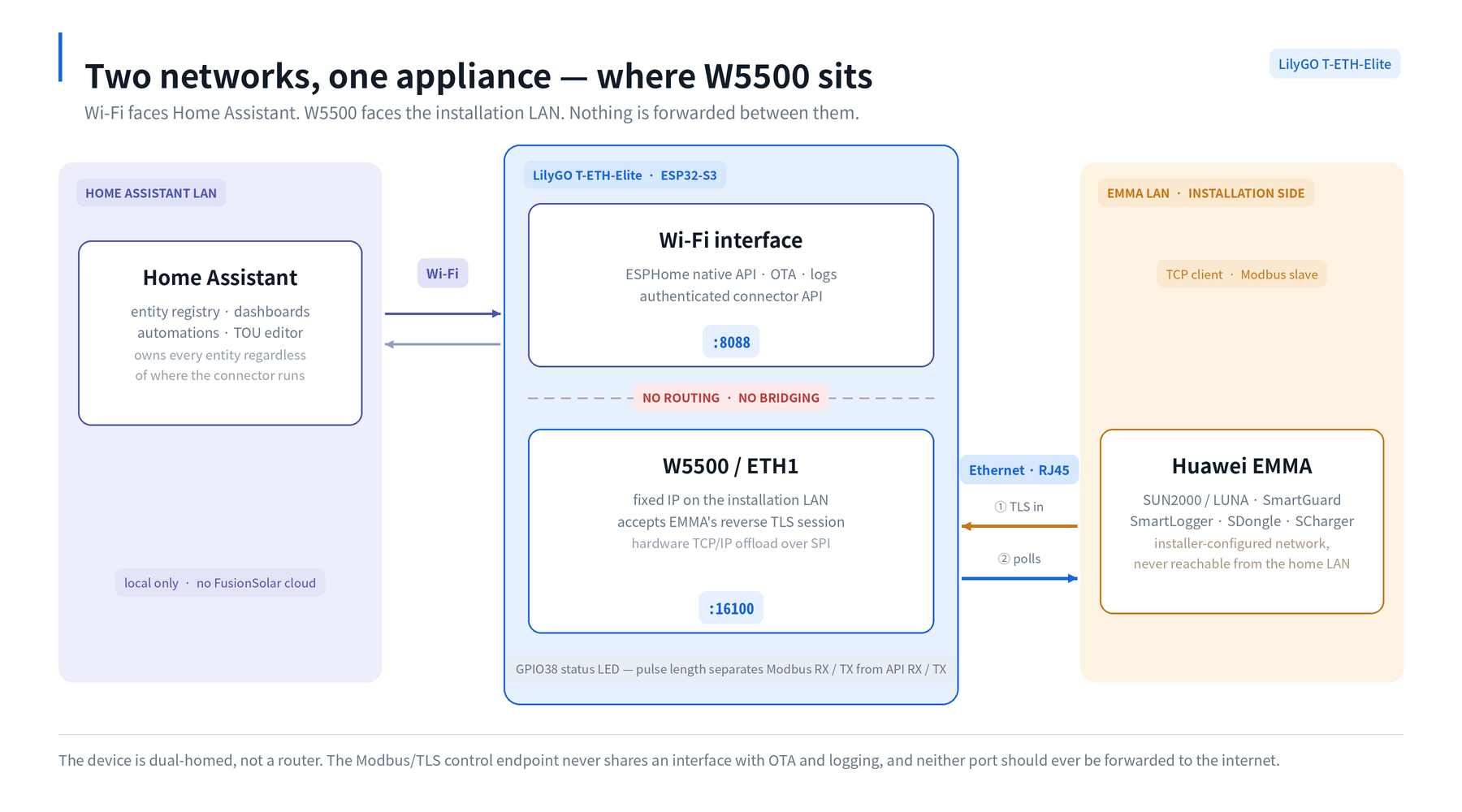
Fig. 2 — The register catalog is created disabled. Enabling an entity is what puts its register into the connector's subscription, and the three polling tiers only ever carry what someone is actually looking at.
Three interchangeable runtimes share the same integration, the same entity catalog and the same /api/v1 connector contract: embedded inside Home Assistant, standalone Python on Linux, or ESPHome on a LilyGO T-ETH-Elite. Switching runtime changes the transport only — entities, dashboards, automations and device IDs survive the move.
Where Does W5500 Fit?
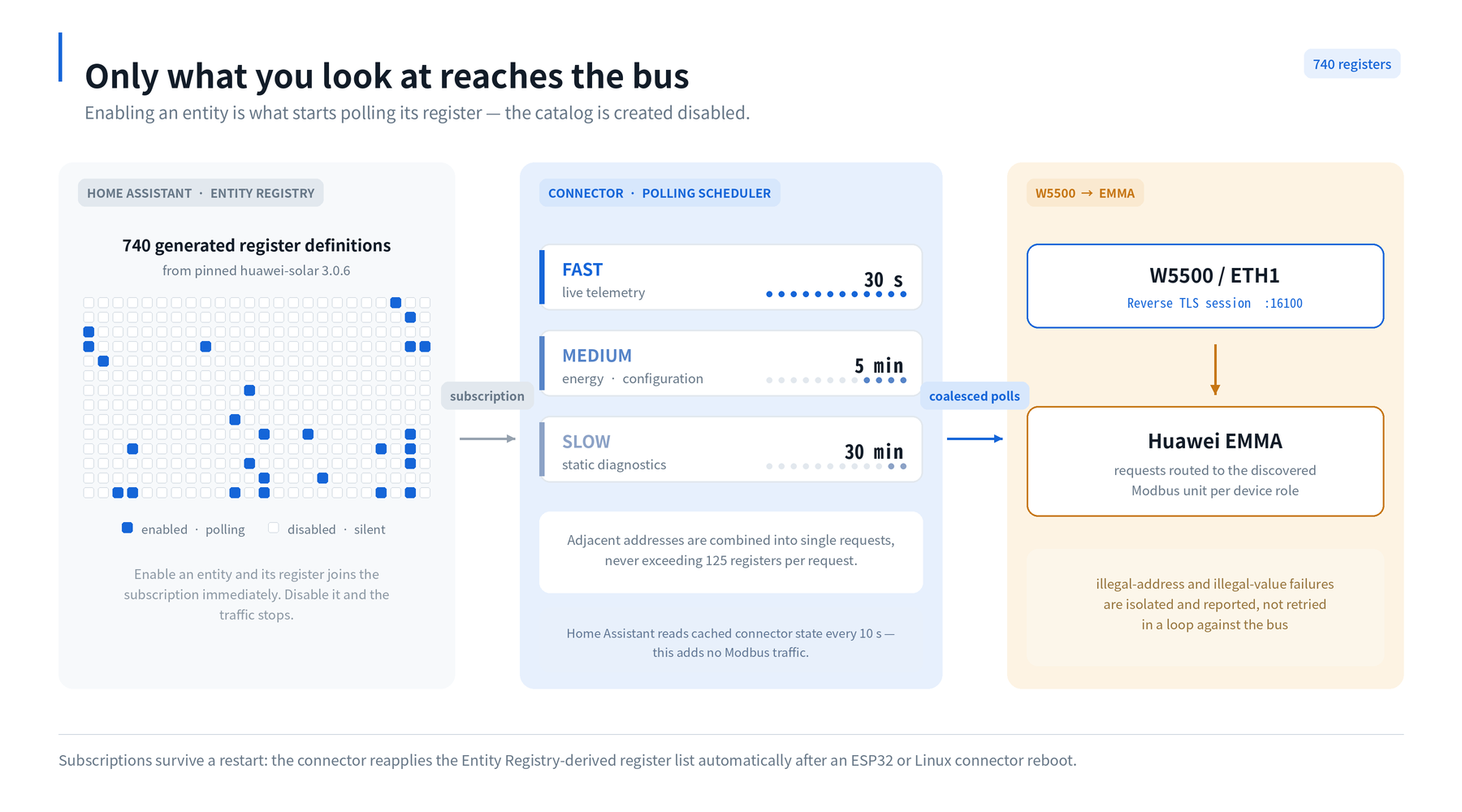
Fig. 3 — Wi-Fi carries the ESPHome API, OTA and the connector API on port 8088. W5500 holds a fixed address on the installation LAN and accepts only EMMA's reverse TLS session on port 16100. Nothing is forwarded between the two.
The ESPHome runtime is the one built around WIZnet silicon, and it uses the W5500 for something more interesting than "Wi-Fi is unreliable here."
Home Assistant LAN <-- Wi-Fi --> ESP32-S3 <-- W5500 / ETH1 --> EMMA LAN
       API / OTA                   :8088        TLS/Modbus :16100
The two interfaces face two different networks on purpose, and the device is explicitly not a router or a bridge between them:
- Wi-Fi side carries the ESPHome native API, OTA, logs, and the token-authenticated connector API on port
8088. This is the side Home Assistant talks to. - W5500 side holds a fixed IP (
emma_eth_ip) on the solar-installation LAN and accepts exactly one thing: EMMA's reverse TLS connection on port16100.
That separation is the whole design argument. The installer-configured EMMA network never becomes reachable from the home LAN, and the Modbus/TLS control endpoint never rides on the same interface as OTA and logging. W5500's hardware TCP/IP offload handles the socket and link layer on the EMMA side, while the ESP32-S3 runs the TLS session, the 0x41 parsing, the register catalog and the polling scheduler.
Configuration is ordinary ESPHome:
# The EMMA-facing interface on LilyGO T-ETH-Elite
ethernet:
  type: W5500
  # ... SPI pins per board ...
  manual_ip:
    static_ip: 192.168.88.20
    gateway: 192.168.88.1
Certificates are generated from a repo checkout with python tools/generate_esphome_tls.py --server-name 192.168.88.20, and only ca-cert.pem is imported into EMMA's trusted-CA settings. The certificate SAN must match the exact W5500 IP or DNS name configured in EMMA — a detail that trips up most first attempts.
One small hardware touch worth copying: the T-ETH-Elite build drives the GPIO38 system LED by pulse timing rather than colour, because it is a single binary LED — short pulse for Modbus RX, medium for Modbus TX, double for API RX, long for API TX. You can read the traffic pattern of both networks off one LED.
WIZnet's role: W5500 is the isolated wired path to the energy-management LAN. It terminates EMMA's outbound TCP session on port
16100with a fixed address, while the ESP32-S3 handles TLS, Modbus mastering, and the Home Assistant entity logic.
Why This Project Matters for Wired IoT Design
Most W5500 + ESP32 projects use Ethernet as a better network. This one uses Ethernet as a second network — a deliberate air gap between a vendor-controlled installation LAN and the user's home LAN, with a single audited application-layer crossing point.
That pattern generalises well beyond solar. Any time a piece of installed infrastructure dials outbound into your network on a vendor protocol — building controllers, meters, EV chargers, HVAC gateways — the same shape applies: a low-power SPI Ethernet interface facing the vendor segment, a separate management interface facing the operator, and no forwarding between them.
There is also a maintenance lesson in the repository layout. Register metadata, ports, intervals and limits live in Python; python tools/generate_esphome_catalog.py then emits the ESP32 header tables and a JSON contract, and CI fails the build if the generated files are stale. The ESP32 firmware needs neither Python nor the huawei-solar package to build, yet all three runtimes change from one source of truth. If you maintain firmware and a server-side integration together, that is a pattern worth stealing.
Related Maker Reading
Two other Maker posts pull solar-inverter data into Home Assistant over W5500, each with a different transport. Placing this project beside them shows what the reverse TLS link actually buys:
| This project | OpenDTU-OnBattery | AhoyDTU | |
|---|---|---|---|
| Target device | Huawei EMMA / SUN2000 / LUNA | Hoymiles via OpenDTU Fusion | Hoymiles microinverters |
| Link to the device | Modbus over TLS, :16100 | Board-level link, then Ethernet | Sub-GHz RF |
| Who opens it | EMMA dials out; the connector accepts, then polls | Controller connects outward | Controller polls over RF |
| W5500's role | Boundary — terminates the reverse session on an isolated installation LAN | Wired uplink to the MQTT broker | Optional, as a user-built ETH firmware variant |
| Home Assistant path | Native HACS integration, 740 entities | MQTT broker → Home Assistant | MQTT / JSON |
The two neighbours treat Ethernet as a faster uplink on one flat LAN. This project treats it as a network boundary, which is the part worth copying.
❓ FAQ
Is this the same as the huawei_solar HACS integration? No. huawei_solar connects out to a Modbus TCP endpoint. This project accepts EMMA's inbound reverse TLS connection and then polls it, which is the opposite direction.
What is the 0x41 frame? A Huawei private startup frame that EMMA sends before standard Modbus traffic. Generic Modbus servers do not parse it, so the connection fails at the handshake.
Does the W5500 run the TLS or the Modbus logic? No. W5500 provides the hardware TCP/IP path and the fixed address on the EMMA LAN. TLS, the 0x41 parsing, register decoding and polling all run on the ESP32-S3.
Is the ESP32 bridging the two networks? No. It is a dual-homed appliance with no forwarding. Wi-Fi carries the ESPHome API, OTA and the connector API on 8088; W5500 accepts only EMMA's TLS connection on 16100.
Do I need the ESP32 at all? No — the connector also runs embedded in Home Assistant or as standalone Python on Linux. The ESPHome/W5500 runtime is the one that buys you network isolation and low idle power.
Does any of this touch Huawei's cloud? No. It is local-only operation, and neither port should ever be forwarded to the internet.

