Temperature and humidity measurement with HTU21D chip
w5500
2
Project description
For our future stand we don’t need to have laboratory accuracy readings. A sensor with a I2C HTU21D interface can be used to monitor temperature and humidity. It shows humidity with an accuracy of about 2% and temperature with an accuracy of about 0.3%. HTU21D is a good and cheap sensor.
Next step: we take the fork and connect PC/ plug in via Ethernet or WiFi.
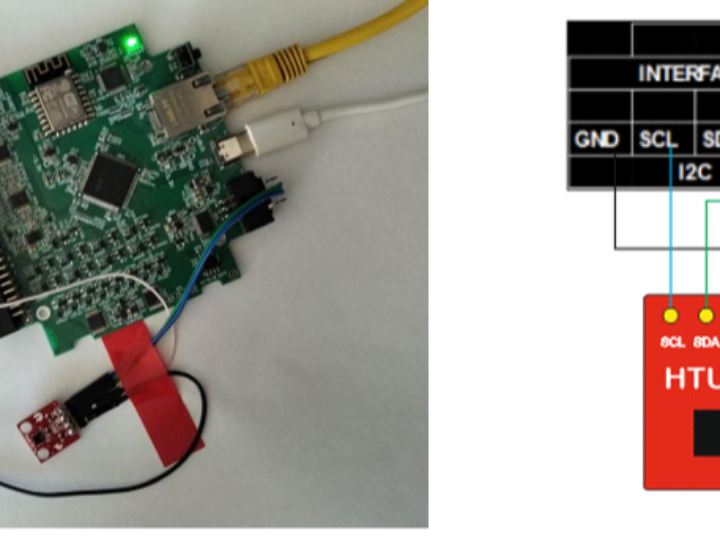
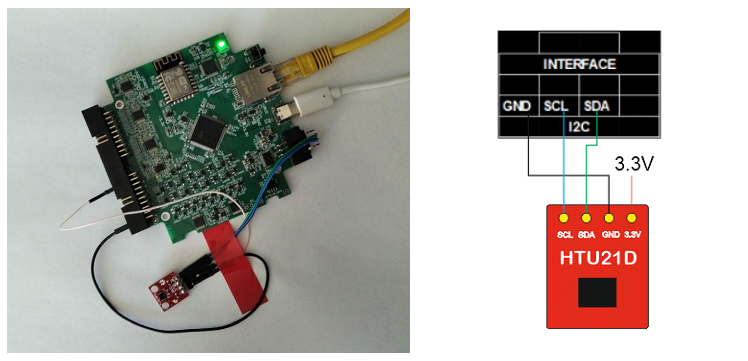
Connect the sensor as shown in the Figure.
To read the data, we need to know the address and the I2C read commands.
• Address I2C 0x40
• Temperature read command 0xE3
• Moisture read command 0xE5
We need to set a GET HTTP request sequence to Fork with a specific query string. The commands in Fork are based on the principle «key = value» or just «key». Each query in the browser will receive a response from Fork. You can also combine queries using the & symbol.
1. Start with I2C
Provide the I_MODE command value I2C
http://192.168.0.205/control?I_MODE=I2CIn the end we’ll get I2C
2. Read the temperature in ASCII_HEX format. For this purpose we will use two commands.
The first G_REQ_RES_FORM is to specify the format of the query and the response in value ascii_hex.
The second I_I2C_WRITE_READ command is to generate a sequence I2C to the restart.
Value – consists of a few bytes.

The result will be presented in the form of a sequence of bytes that the sensor has responded to.
Here ‘s the request we got
http://192.168.0.205/control?g_req_res_form=ascii_hex&i_i2c_write_read=40010003E3In response to this request, we received ASCII_HEX,69FC69
3. Let’s read humidity data. Specified the format of the data and created a sequence for using the I2C. As with temperature data, but only the command for the sensor has changed.
http://192.168.0.205/control?g_req_res_form=ascii_hex&i_i2c_write_read=40010003E5Example of the answer of ASCII_HEX, 2ADE29We got respond from the sensor.
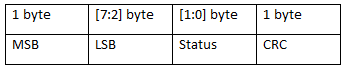
Now we need to single out the temperature and humidity data we need. For temperature and humidity, the package is arranged in the same way and does not depend on the data bytes.
We will also need formulas to translate data. Unfortunately, in datasheet in formulas there is an error with the power of two, so I will write here corrected formulas.
For temperature
Stemp – sensor data, n – number of bits of readings
For humidity
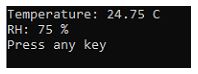
Overall as a result we received the following sensor readings
Temperature: 25.89 ℃
Relative humidity: 78%
We turn on the I2C on the interface output by hitting “init I2C” button. And we use “read temperature and RH” button to send a command so we can immediately get temperature and humidity readings.
We can also upload a page to Fork and ask directly from there. To do this, you will need to change one line in the code.
var url_path 'http://192.168.0.205/
to
var url_path '/';http://192.168.0.205/file_managerhttp://192.168.0.205/user_example_i2c.htmlFirst, we connect/plug in the fork module and create the target’s device
from forkapi.fork import Fork
dev1 = Fork('192.168.0.205')dev1.I2CEnable()addr = 0x4
data = b'\xE3
res = dev1.I2CWriteRead(addr,3,data)