Skip to content

Basic Task 1: Complete the initialization of the W5500 main control board (static IP configuration)

Basic Task 1: Complete the initialization of the W5500 main control board (static IP configuration) and ensure that it can be pinged by computers on the local a

Arnold

Published December 05, 2025 · © Apache License 2.0 (Apache-2.0)

Basic Task 1: Complete the initialization of the W5500 main control board (static IP configuration)

Project description

This section tests the first basic task, compiling using the Arduino IDE software.

I. Software Configuration

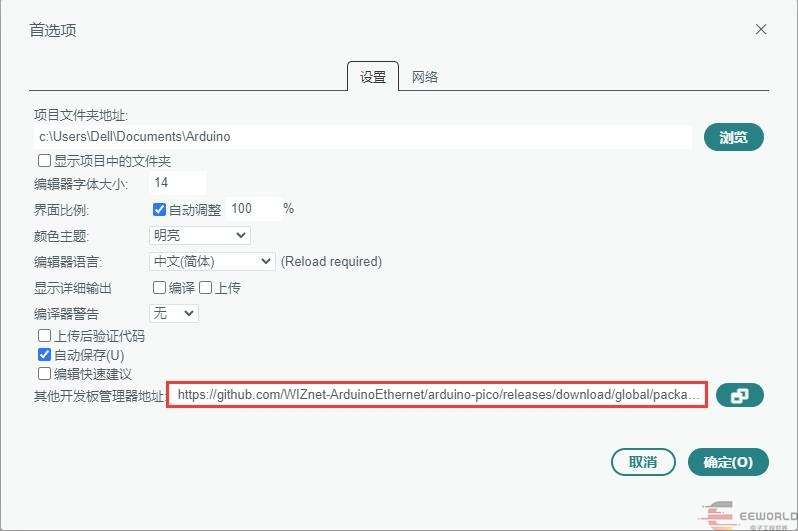
1.1 Adding Development Board Library Files

https://github.com/WIZnet-ArduinoEthernet/arduino-pico/releases/download/global/package_rp2040-ethernet_index.json

Basic Task 1: Complete the initialization of the W5500 main control board (static IP configuration)


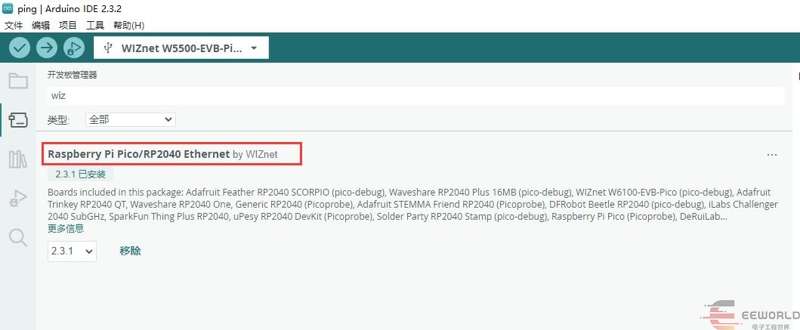
1.2 Installing Development Board Library Files

Basic Task 1: Complete the initialization of the W5500 main control board (static IP configuration)

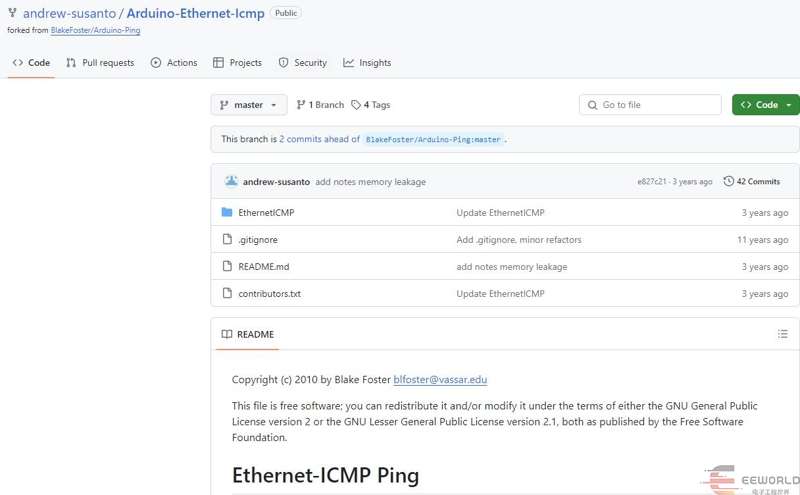
1.3 Downloading the Software Package

https://github.com/WIZnet-ArduinoEthernet/arduino-pico/releases/download/global/package_rp2040-ethernet_index.json

Basic Task 1: Complete the initialization of the W5500 main control board (static IP configuration)

1.4 Adding Libraries

Manually add the library files by copying the downloaded files to the following folder.

Basic Task 1: Complete the initialization of the W5500 main control board (static IP configuration)

II. Software

Test Code:

#include <SPI.h>
#include <Ethernet.h>
#include <Dns.h>
#include <EthernetICMP.h>
// 网卡mac地址
byte mac[] = { 0x00, 0x01, 0x00, 0x00, 0x00, 0xFF };
DNSClient dnClient;
IPAddress dstip;
SOCKET pingSocket = 0;
char buffer[256];
EthernetICMPPing ping(pingSocket, (uint16_t)random(0, 255));
// 静态ip地址、DNS服务、网关、子网掩码
IPAddress ip(192, 168, 1, 205);
IPAddress myDns(192, 168, 1, 1);
IPAddress gateway(192, 168, 1, 1);
IPAddress subnet(255, 255, 255, 0);
void setup() {
 // 配置LED
 pinMode(LED_BUILTIN, OUTPUT);
 // 配置串口
 Serial.begin(115200);
 while (!Serial) {
   ;  // 等待串口连接
 }
 // 静态IP设置
 Serial.println("Ethernet Begin");
 Ethernet.init(17);
 Ethernet.begin(mac, ip, myDns, gateway, subnet);
 // 输出网卡mac地址、IP地址、子网掩码、DNS、网关
 Serial.print("My Mac address: ");
 byte macBuffer[6];               // 设置mac地址存储buff
 Ethernet.MACAddress(macBuffer);  // 读取mac地址
 for (byte octet = 0; octet < 6; octet++) {
   Serial.print(macBuffer[octet], HEX);
   if (octet < 5) {
     Serial.print('-');
   }
 }
 Serial.println("");
 Serial.print("My IP address: ");
 Serial.println(Ethernet.localIP());
 Serial.print("My subnet: ");
 Serial.println(Ethernet.subnetMask());
 Serial.print("My DNS address: ");
 Serial.println(Ethernet.dnsServerIP());
 Serial.print("My GateWay address: ");
 Serial.println(Ethernet.gatewayIP());
 dnClient.begin(Ethernet.dnsServerIP());
 const char domains[] = "www.eeworld.com.cn";
   if (dnClient.getHostByName(domains, dstip) == 1) {
   Serial.print(domains);
   Serial.print(" = ");
   Serial.println(dstip);
 }
 else Serial.println(F("dns lookup failed"));
}
void loop() {
 EthernetICMPEchoReply echoReply = ping(dstip, 4);
 if (echoReply.status == SUCCESS)
 {
   sprintf(buffer,
           "Reply[%d] from: %d.%d.%d.%d: bytes=%d time=%ldms TTL=%d",
           echoReply.data.seq,
           echoReply.addr[0],
           echoReply.addr[1],
           echoReply.addr[2],
           echoReply.addr[3],
           REQ_DATASIZE,
           millis() - echoReply.data.time,
           echoReply.ttl);
 }
 else
 {
   sprintf(buffer, "Echo request failed; %d", echoReply.status);
 }
 Serial.println(buffer);
 digitalWrite(LED_BUILTIN, HIGH);  // turn the LED on (HIGH is the voltage level)
 delay(100);                      // wait for a second
 digitalWrite(LED_BUILTIN, LOW);   // turn the LED off by making the voltage LOW
 delay(500);                      // wait for a second
}

III. Running

3.1 Obtaining a Static IP Address

After downloading the program, output the configured static IP address via serial port.

Basic Task 1: Complete the initialization of the W5500 main control board (static IP configuration)

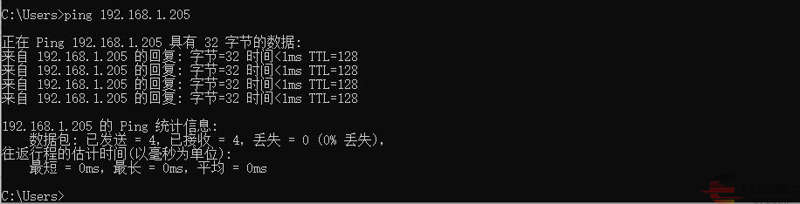
3.2 Pinging the Network

Basic Task 1: Complete the initialization of the W5500 main control board (static IP configuration)

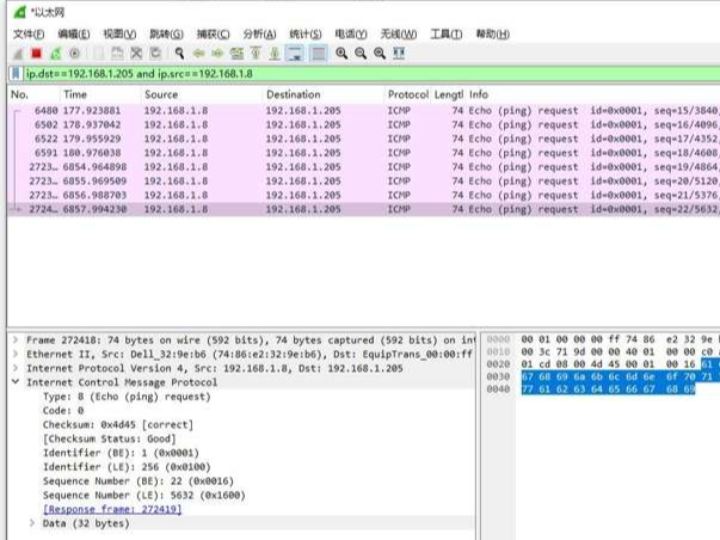
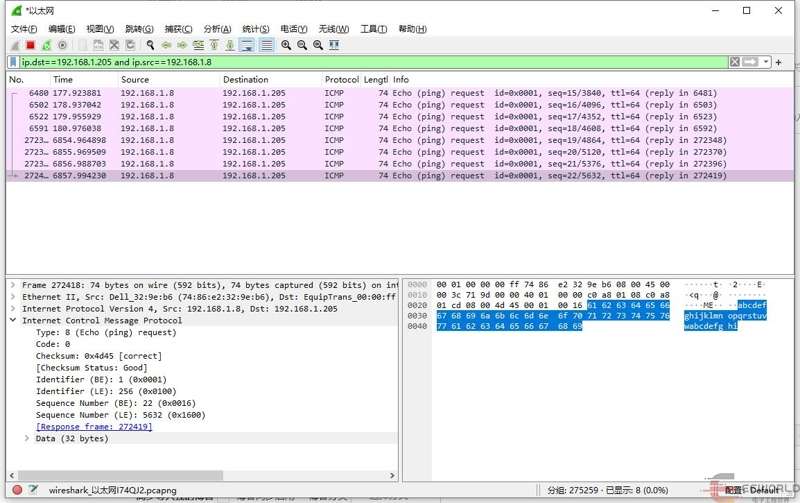
3.3 Capturing with a Capture Tool

Basic Task 1: Complete the initialization of the W5500 main control board (static IP configuration)
This post is from the DigiKey Technology Forum.

Comments

Similar projects you might like

Comments