An Isolated Thermocouple Reader
0
Project description
Project Overview
IsoTherm은 여러 지점의 온도를 측정하고, 그 결과를 WIZnet W5500을 통해 Ethernet으로 전달하는 온도 모니터링 장치입니다.
프로젝트에서는 T-type 온도 센서를 사용합니다. 산업용 장비와 실험 환경에서 널리 사용되는 방식이며, 센서의 작은 전기 신호는 Texas Instruments의 AMC3306M05를 통해 RP2040으로 전달됩니다. 또한 LMT01이 장치 내부 온도를 측정해 온도값을 보정합니다.
<T-type 온도 센서 예시>
이미지 출처 : https://kr.rs-online.com/web/p/thermocouples/8140159
RP2040에서는 PIO(Programmable I/O)를 사용해 센서 데이터를 읽습니다. 이 프로젝트에서는 AMC3306M05에 필요한 클럭을 만들고 센서 데이터를 빠르게 읽는 데 사용합니다. 센서 데이터를 CPU가 직접 하나씩 처리하지 않아도 되기 때문에, RP2040은 온도 계산과 다른 작업에 더 집중할 수 있습니다.
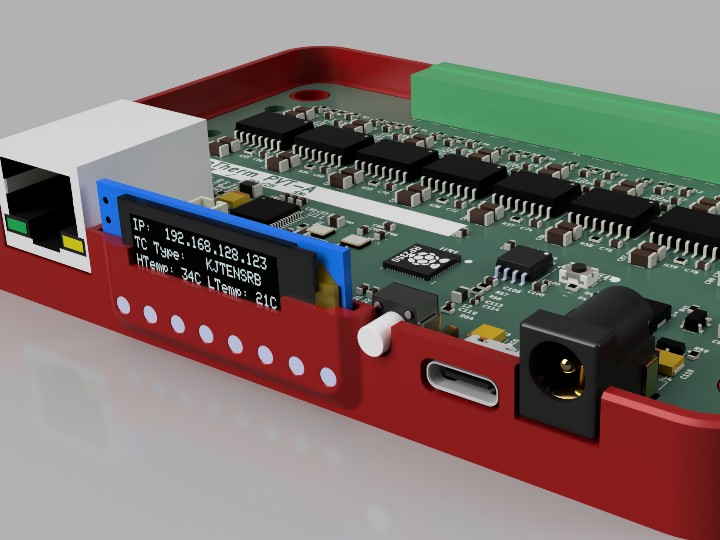
장치에는 OLED 디스플레이도 포함되어 있습니다. 측정된 온도와 장치의 IP 주소 같은 정보를 화면에서 바로 확인하는 용도로 사용됩니다. 특히 IP 주소를 장치에서 직접 확인할 수 있어 Ethernet 연결이나 현장 설정 시 편리합니다.
전체 흐름은 다음과 같습니다.

이미지 출처 : AI 생성
T-type 센서는 외부 온도를 측정하고, LMT01은 장치 내부 온도를 확인합니다. PIO가 센서 데이터를 빠르게 받아 RP2040으로 전달하면, RP2040이 온도값을 처리하고 W5500이 최종 결과를 네트워크로 전송합니다.
외부 시스템과의 통신에는 주로 Modbus over Ethernet이 사용됩니다.


이미지 출처 : https://bbenchoff.com/pages/IsoTherm.html
Where WIZnet Fits
이 프로젝트에서 W5500은 측정된 온도값을 PC나 제어 시스템으로 전달하는 Ethernet 통신 장치입니다.
각 부품의 역할은 다음과 같습니다.
T-type 온도 센서: 외부 대상의 온도 측정
AMC3306M05: 센서의 작은 신호를 읽고 측정 회로를 전기적으로 분리
PIO: 센서 신호를 빠르고 일정하게 수집
LMT01: 장치 내부 온도 측정 및 온도 보정
RP2040: 측정값 계산 및 데이터 처리
W5500: 처리된 데이터를 Ethernet으로 전송
RP2040은 온도 측정과 계산에 집중하고, W5500은 네트워크 통신을 담당합니다.
W5500은 네트워크 통신 기능을 하드웨어에서 처리하며 RP2040과 SPI 방식으로 연결됩니다. 이 구조를 사용하면 온도 측정과 네트워크 기능을 나누어 구성할 수 있습니다.
IsoTherm에는 작은 OLED 화면도 있습니다. 화면에 현재 IP 주소를 표시해 현장에서 장비의 네트워크 주소를 바로 확인할 수 있습니다.
Implementation Notes
IsoTherm에서는 PIO의 작은 처리 장치인 State Machine을 사용합니다. 하나는 AMC3306M05에 필요한 클럭을 만들고, 다른 하나는 그 타이밍에 맞춰 센서 데이터를 읽습니다. 수집된 데이터는 일정량씩 RP2040으로 전달됩니다.
이 방식의 장점은 CPU가 센서 신호를 계속 직접 확인할 필요가 없다는 점입니다. 프로젝트에서는 DMA도 함께 사용해 PIO에 쌓인 데이터를 메모리로 자동 이동시켜 CPU의 부담을 줄입니다.
다만 공개된 자료에는 W5500 초기화 코드와 Modbus 통신 코드 전체가 포함되어 있지 않습니다. 따라서 실제 GPIO 번호, SPI 속도, IP 설정값 등은 확인할 수 없습니다.
센서 채널이 많아질수록 필요한 PIO 자원도 늘어납니다. RP2040에는 총 8개의 State Machine이 있어 8채널을 모두 처리하면서 별도의 클럭까지 생성하기에는 부족합니다. 제작자는 더 많은 State Machine을 제공하는 RP2350을 생산 버전에 사용하는 방향을 언급합니다.
Practical Tips / Pitfalls
PIO는 온도를 계산하는 기능이 아닙니다. 센서 신호를 빠르고 일정하게 읽어 RP2040으로 전달하는 역할을 합니다.
W5500은 온도를 직접 측정하지 않습니다. RP2040에서 처리한 결과를 Ethernet으로 전달합니다.
T-type 센서와 LMT01의 역할은 다릅니다. T-type 센서는 외부 온도, LMT01은 장치 내부 온도를 측정합니다.
AMC3306M05는 온도 센서가 아닙니다. 센서에서 발생하는 작은 전기 신호를 측정하기 위한 칩입니다.
IP 주소를 화면에 표시하면 설치와 점검이 편리합니다. IsoTherm은 OLED에 현재 IP 주소를 표시합니다.
센서 채널을 늘릴 때는 RP2040의 PIO 자원도 확인해야 합니다.
FAQ
Q: IsoTherm에서는 어떤 온도 센서를 사용하나요?
A: 실제 테스트에는 T-type 온도 센서가 사용됩니다. 산업용 장비와 계측 환경에서 사용하는 온도 측정 방식이며, 원문에는 특정 제조사나 모델명은 공개되어 있지 않습니다.
Q: PIO는 왜 사용하나요?
A: AMC3306M05의 빠른 디지털 신호를 일정한 타이밍으로 읽기 위해 사용합니다. CPU가 모든 신호를 직접 처리하지 않아도 되므로 RP2040의 부담을 줄일 수 있습니다.
Q: 왜 W5500을 사용하나요?
A: RP2040은 온도 측정과 데이터 처리에 집중하고, W5500은 Ethernet 통신을 담당하도록 역할을 나누기 위해 사용합니다. 측정 결과는 Modbus over Ethernet으로 외부 시스템에 전달됩니다.
Q: W5500은 RP2040과 어떻게 연결하나요?
A: SPI 방식으로 연결합니다. RP2040에서 처리한 데이터를 W5500으로 전달하기 위한 통신 연결입니다.
Q: 초보자도 이 프로젝트를 이해할 수 있나요?
A: 기본 흐름은 어렵지 않습니다. 센서 측정 → PIO로 데이터 수집 → RP2040에서 계산 → W5500으로 Ethernet 전송 순서로 이해하면 됩니다.
Project Overview
IsoTherm is a temperature monitoring device that measures temperatures at multiple points and sends the results over Ethernet using the WIZnet W5500.
The project uses a T-type temperature sensor. This type of sensor is widely used in industrial equipment and laboratory environments. The small electrical signal from the sensor is passed through Texas Instruments' AMC3306M05 and then delivered to the RP2040. An LMT01 is also used to measure the internal temperature of the device and compensate the measured temperature values.
<T-type temperature sensor example>
Image source: https://kr.rs-online.com/web/p/thermocouples/8140159
The RP2040 uses PIO (Programmable I/O) to read the sensor data. In this project, PIO is used to generate the clock required by the AMC3306M05 and to read the sensor data at high speed. Because the CPU does not need to process every sensor signal directly, the RP2040 can focus more on temperature calculation and other tasks.
The device also includes an OLED display. It is used to show information such as the measured temperature and the device's IP address. In particular, being able to check the IP address directly on the device is useful during Ethernet setup and on-site configuration.
The overall data flow is as follows.
![]()
Image source: AI-generated
The T-type sensor measures the external temperature, while the LMT01 monitors the internal temperature of the device. PIO receives the sensor data quickly and passes it to the RP2040, which processes the temperature values. The W5500 then sends the final results over the network.
Communication with external systems is mainly handled using Modbus over Ethernet.


Image source: https://bbenchoff.com/pages/IsoTherm.html
Where WIZnet Fits
In this project, the W5500 serves as the Ethernet communication device that sends measured temperature values to a PC or control system.
The role of each component is as follows.
T-type temperature sensor: Measures the temperature of the external target
AMC3306M05: Reads the small sensor signal and provides electrical isolation between the measurement circuit and the main system
PIO: Collects sensor signals quickly and at consistent timing
LMT01: Measures the internal temperature of the device and supports temperature compensation
RP2040: Calculates measured values and processes data
W5500: Sends the processed data over Ethernet
The RP2040 focuses on temperature measurement and calculation, while the W5500 handles network communication.
The W5500 processes network communication functions in hardware and connects to the RP2040 through SPI. This structure makes it possible to separate the temperature measurement functions from the networking functions.
IsoTherm also includes a small OLED display. It shows the current IP address so that the network address of the device can be checked directly in the field.
Implementation Notes
IsoTherm uses the State Machines inside the RP2040's PIO. One State Machine generates the clock required by the AMC3306M05, while another reads the sensor data according to that timing. The collected data is then transferred to the RP2040 in blocks.
The main advantage of this approach is that the CPU does not need to continuously monitor the sensor signal directly. The project also uses DMA to automatically move the data collected by PIO into memory, reducing CPU workload.
However, the publicly available materials do not include the complete W5500 initialization code or Modbus communication code. Therefore, the actual GPIO pin assignments, SPI speed, IP configuration, and other detailed settings cannot be confirmed.
As the number of sensor channels increases, more PIO resources are required. The RP2040 has a total of eight State Machines, which is not enough to handle all eight channels while also generating a separate clock. The author mentions using the RP2350, which provides more State Machines, for a production version.
Practical Tips / Pitfalls
PIO does not calculate temperature. Its role is to read the sensor signal quickly and at consistent timing, then pass the data to the RP2040.
The W5500 does not measure temperature directly. It sends the results processed by the RP2040 over Ethernet.
The T-type sensor and LMT01 have different roles. The T-type sensor measures the external temperature, while the LMT01 measures the internal temperature of the device.
The AMC3306M05 is not a temperature sensor. It is a measurement device used to read the small electrical signal generated by the sensor.
Displaying the IP address on the screen makes installation and troubleshooting easier. IsoTherm shows the current IP address on the OLED.
When increasing the number of sensor channels, the available PIO resources of the RP2040 must also be considered.
FAQ
Q: What type of temperature sensor does IsoTherm use?
A: The actual tests use a T-type temperature sensor. This type of temperature measurement is commonly used in industrial equipment and measurement environments. The original project does not specify a particular manufacturer or model.
Q: Why is PIO used?
A: PIO is used to read the high-speed digital signal from the AMC3306M05 with consistent timing. Because the CPU does not need to process every signal directly, the workload on the RP2040 is reduced.
Q: Why is the W5500 used?
A: The RP2040 can focus on temperature measurement and data processing, while the W5500 handles Ethernet communication. The measurement results are sent to external systems using Modbus over Ethernet.
Q: How is the W5500 connected to the RP2040?
A: It is connected through SPI. This communication interface is used to transfer processed data from the RP2040 to the W5500.
Q: Can beginners understand this project?
A: The basic flow is not difficult to understand. It can be viewed as sensor measurement → data collection with PIO → calculation on the RP2040 → Ethernet transmission through the W5500.

