How Do You Detect a Power Outage by Listening to Your Neighbors' Wi-Fi? - WifiWatch
ESP-WiFiWatch passively scans neighbors' Wi-Fi for sudden outages while WIZnet's W5500 Ethernet handles all management, keeping the monitor independent of what
0
Components
Hardware components
WIZnet - W5500
x 1

Project description
How Do You Detect a Power Outage by Listening to Your Neighbors' Wi-Fi?
ESP-WiFiWatch passively scans the surrounding 2.4 GHz Wi-Fi spectrum for a sudden, simultaneous disappearance of normally-stable neighboring access points — treating that as an early signal of a wider power outage — while keeping its own management, MQTT, and OTA traffic entirely on a separate WIZnet W5500 Ethernet link so the monitor never depends on the very medium it's watching.
COMPONENTS Hardware components
| Part | Role |
|---|---|
| ESP32 (WT32-ETH01) | Low-cost/reference platform: ESP32 + Wi-Fi + wired 10/100 Ethernet |
| ESP32-S3 (Waveshare ESP32-S3-ETH + PoE) | Permanent-installation platform with onboard WIZnet W5500 and PoE |
| WIZnet W5500 | Hardware TCP/IP Ethernet controller carrying all management traffic |
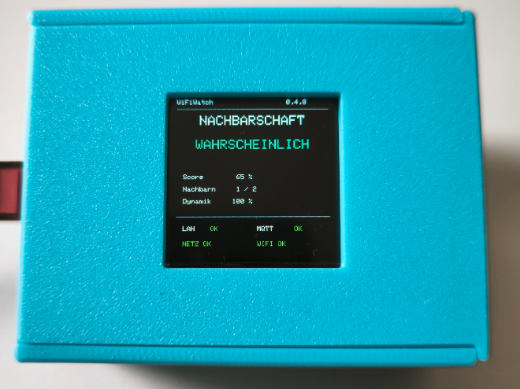
| ST7789 SPI TFT (240×240, optional) | Local status display; runs on both hardware platforms |
PROJECT DESCRIPTION
📌 Listening for Silence, Not Noise
Most home-network monitoring tools watch for something going wrong on the network they're connected to. ESP-WiFiWatch does something more indirect: it passively scans the 2.4 GHz Wi-Fi environment around it — the neighbors' access points, not its own — every 15 to 300 seconds, and builds a long-term baseline of which BSSIDs are normally stable. When a meaningful slice of that stable neighborhood suddenly goes quiet at the same time, the project treats that as a plausible sign of a wider power outage, since routers and access points across a block tend to disappear together when the mains supply actually drops, in a way that random individual Wi-Fi flakiness usually doesn't.
The project explicitly separates this from monitoring the user's own Wi-Fi: a separate, independent watch list tracks the user's own SSIDs/BSSIDs for their own connectivity alarm, kept apart from the neighborhood baseline so a personal router reboot doesn't get mistaken for a neighborhood-wide event.
🔍 Why the Wi-Fi Radio Never Joins a Network
The design choice that makes this project worth a WIZnet write-up: ESP-WiFiWatch's Wi-Fi radio is never associated with an access point. It only scans. Every other job the device does — the web interface, MQTT publishing, Home Assistant integration, OTA firmware updates, and mDNS — goes out over a completely separate wired path, driven by a WIZnet W5500.
That split exists for a reason specific to this project's use case: if the monitoring device used Wi-Fi for its own management traffic, a real neighborhood outage — the exact event it's trying to detect — could also disrupt its own network connection, right when a Home Assistant alert would matter most. Keeping the Wi-Fi radio purely passive, and routing everything else through hardware Ethernet, means the monitoring path's health is independent of the health of the thing being monitored.
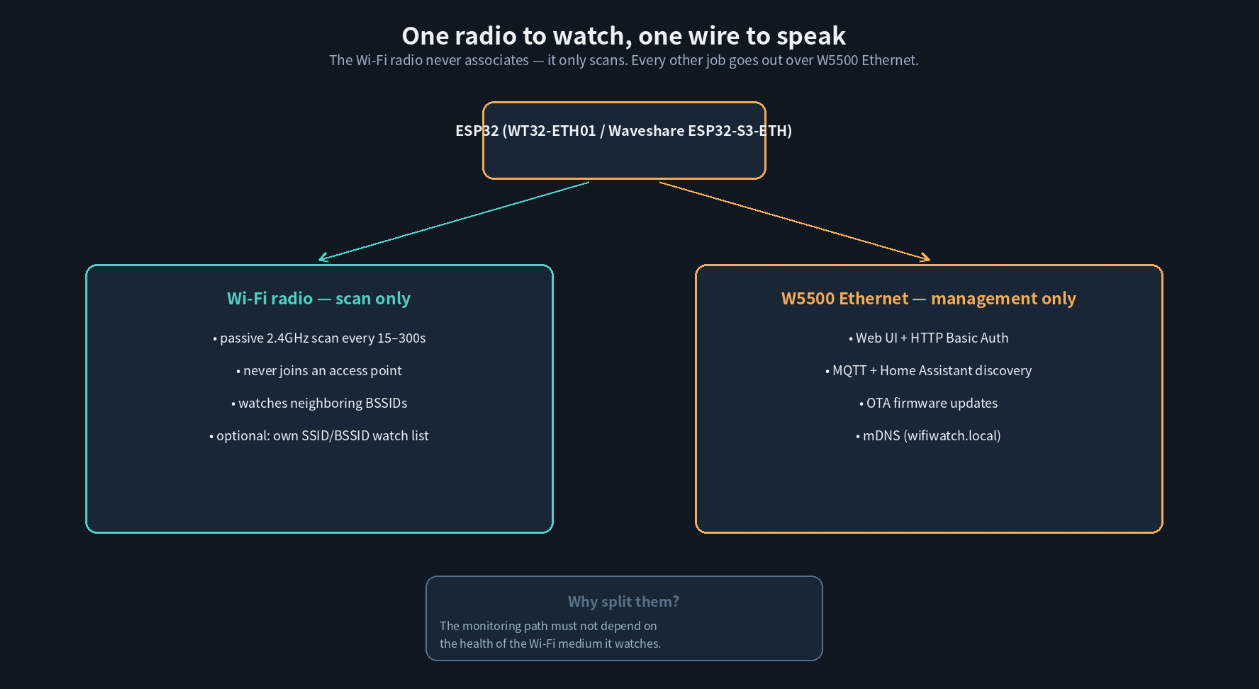
Generated diagram: the two roles are deliberately never allowed to share a radio.
🌐 Two Boards, One Firmware, One W5500 Pin Map
ESP-WiFiWatch v0.4.8 is explicitly multi-platform: the same application source builds for two different hardware targets from one PlatformIO project.
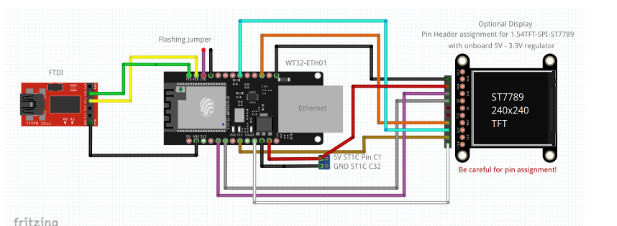
- WT32-ETH01 is kept as the low-cost/reference platform — an ESP32 with 2.4 GHz Wi-Fi and wired 10/100 Ethernet, enough GPIOs for the optional display, and a cheap way to test whether a given location's Wi-Fi environment is even useful for this detection method.
- Waveshare ESP32-S3-ETH + PoE is the recommended platform for a permanent installation. It pairs an ESP32-S3 with an onboard WIZnet W5500, wired internally on GPIO9 (RST), GPIO10 (INT), GPIO11 (MOSI), GPIO12 (MISO), GPIO13 (SCLK), and GPIO14 (CS) — a pin block the project's README explicitly reserves, noting those GPIOs "are therefore not display pins" so the optional ST7789 status screen is wired on a separate header group instead.
PoE is the more relevant detail for the permanent-installation case: a single Ethernet cable delivers both data and power, and — this is the part that actually matters for a power-outage detector — if the upstream switch or router is on a UPS, WiFiWatch keeps observing the neighborhood Wi-Fi even while local mains power at the install site is down. The project reports this tested successfully with the Waveshare PoE module and a UniFi USW-24-PoE switch.
🧮 Turning "Neighbors Went Quiet" Into a Calibrated Signal
The detection logic is built to resist both false positives and false negatives, and the project documents its scoring model explicitly rather than treating it as a black box:
- A composite outage score weights three signals: 50% loss relative to the stable long-term baseline, 30% sudden drop compared with the previous short-term scans, and 20% loss of particularly strong/stable BSSIDs specifically — short-lived SSIDs like passing vehicle hotspots are deliberately given little influence, since they don't normally become stable baseline members in the first place.
- That score maps onto six probability bands published over MQTT and shown in Home Assistant, from
very_unlikelythroughpossibletovery_likely. - A separate binary alarm only fires after two consecutive scans land at
likelyorvery_likely(roughly one minute at the default 30-second interval), and clears the same way — after real-world testing showed single-scan RF dropouts could briefly touchlikelyand trigger false alarms on their own.
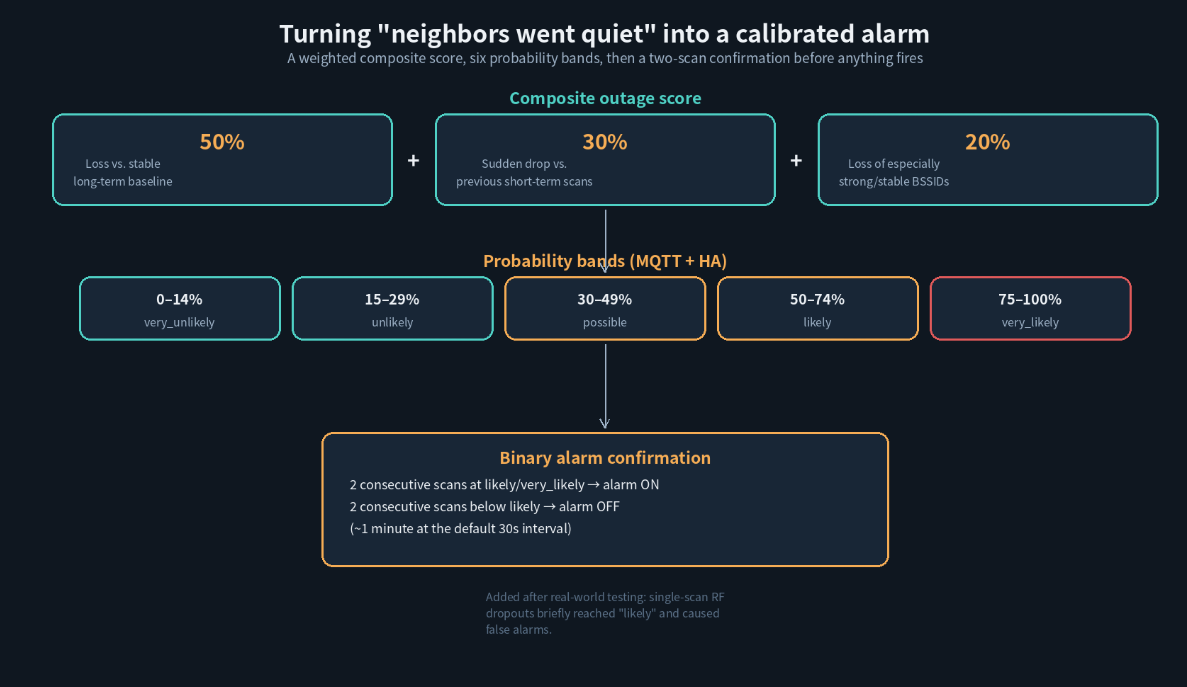
Generated diagram: three weighted signals, six bands, one confirmation gate.
The learned baseline itself lives in the ESP32's NVS flash and is treated carefully: a fresh device runs roughly a 10-minute learning phase, but a reboot with an existing baseline skips that — it loads the saved baseline immediately, runs a shorter ~5-minute validation pass, and keeps adapting slowly afterward, so a firmware update or power blip doesn't force a full blind relearn. The baseline is also not written to flash after every scan (to limit wear), and learning is deliberately paused during likely/very_likely conditions so an actual outage doesn't slowly get absorbed into the "new normal."
🏠 MQTT, Home Assistant, and Language-Aware Display
Every piece of state — system status, outage score and level, per-channel neighborhood counts, the user's own watch-list status, and control topics for relearning or resetting the baseline — is published under a configurable MQTT base topic, with Home Assistant MQTT Discovery grouping everything under one device automatically. MQTT payloads and Home Assistant object IDs stay in fixed English strings regardless of UI language, while the human-facing labels shown in the web UI, the optional TFT, and Home Assistant's entity names follow whichever language the user selects — a detail worth noting for anyone building similar multi-language MQTT devices, since it avoids the common trap of translating the wire protocol itself.
🧭 Where It Fits — Value and Limits
The value here is a genuinely different use of a WIZnet chip than most Ethernet-shield projects: W5500 isn't providing the main sensing capability, it's providing connectivity independence — the guarantee that the device reporting on a Wi-Fi outage isn't itself vulnerable to that same outage's usual side effects. That pattern (keep the sensing radio free, put management on a separate deterministic link) generalizes well beyond Wi-Fi monitoring to any device where the thing being measured and the thing doing the measuring share too much infrastructure by default.
The limits are stated plainly in the project's own roadmap. The detection method depends on a location having enough stable neighboring access points to build a meaningful baseline in the first place — an isolated rural install with few visible neighbors gives it little to work with. The two hardware platforms are still being compared side by side rather than one being fully deprecated, external-antenna performance on the Waveshare board is still an open evaluation item, IPv6 support is on the "later" list, and the probability thresholds are explicitly described as calibrated from limited real-world data so far, with further tuning expected as more installations report back.
🔗 Related WIZnet Maker Projects
| Project | Board | W5500 Role | Difference from ESP-WiFiWatch |
|---|---|---|---|
| ESP-WiFiWatch (this project) | WT32-ETH01 / Waveshare ESP32-S3-ETH | Management-only Ethernet; Wi-Fi radio never associates | — |
| esp32-modbus-mqtt-bridge | Waveshare ESP32-S3 + W5500 | W5500 as primary network with Wi-Fi STA as automatic fallback | Wi-Fi is a connectivity backup here; in ESP-WiFiWatch, Wi-Fi never carries connectivity at all — it's the sensor |
| A PoE Smart Access Panel Powered by W5500 | Waveshare ESP32-S3-ETH (same board) | PoE + wired Ethernet for a security-critical access-control application | Same exact board and PoE rationale, applied to door access instead of Wi-Fi-environment sensing |
| ESPHome-W5500-Ethernet-on-ESP32-boards | ESP32-C3 + external W5500 | W5500 wired via ESPHome's built-in ethernet: platform | Uses ESPHome's declarative YAML instead of custom Arduino/PlatformIO firmware to reach Home Assistant |
- esp32-modbus-mqtt-bridge targets the same Waveshare ESP32-S3 + W5500 pairing and reaches the same Home Assistant destination via MQTT, but treats Wi-Fi as a legitimate fallback network when the wired link is unavailable. ESP-WiFiWatch's Wi-Fi radio is never a connectivity option at all — it's dedicated entirely to sensing, which is the more unusual design choice of the two.
- A PoE Smart Access Panel Powered by W5500 runs on the identical Waveshare ESP32-S3-ETH board for a completely different reason: door access authentication that "cannot tolerate even a momentary drop in connectivity." Both projects independently arrive at the same conclusion — PoE Ethernet over Wi-Fi — for applications where a dropped connection has real consequences.
- ESPHome-W5500-Ethernet-on-ESP32-boards shows the W5500 wired to a smaller ESP32-C3 board and brought up through ESPHome's
ethernet:YAML block rather than hand-written firmware — a useful comparison point for makers weighing a no-code ESPHome approach against ESP-WiFiWatch's custom PlatformIO application for a similar "get W5500 talking to Home Assistant" goal.
❓ FAQ
Q. Does ESP-WiFiWatch connect to my own Wi-Fi network to work? No. Its Wi-Fi radio only performs passive scans and never associates with any access point, including the user's own. All connectivity — web UI, MQTT, Home Assistant, OTA — goes over the wired W5500 Ethernet link instead.
Q. Why not just use Wi-Fi for management too, to simplify the wiring? Because the whole point is detecting Wi-Fi outages. If the device's own management traffic depended on Wi-Fi, a real neighborhood power outage — which typically takes down the local Wi-Fi environment along with the mains power — could disrupt the monitor's own reporting at exactly the moment it matters.
Q. Do I need the PoE board, or does the cheaper WT32-ETH01 work? Both are supported from the same firmware. WT32-ETH01 is the inexpensive reference/testing platform; the Waveshare ESP32-S3-ETH + PoE board is recommended for permanent installations, mainly because PoE lets it stay powered from a UPS-backed switch during an actual outage.
Q. How fast does it detect an outage? The composite score updates every scan (15–300 seconds, default 30), but the binary alarm requires two consecutive likely/very_likely scans before firing — about a minute at the default interval — specifically to filter out single-scan RF dropouts that aren't real outages.
Q. Does it also monitor my own router? Yes, separately. A configurable watch list tracks the user's own SSIDs/BSSIDs independently of the neighborhood baseline, with its own two-scan-confirmed alarm, so a personal Wi-Fi issue and a neighborhood-wide outage are reported as distinct events.
이웃집 Wi-Fi를 엿들어서 정전을 감지할 수 있을까?
ESP-WiFiWatch는 주변 2.4GHz Wi-Fi 스펙트럼을 수동으로 스캔해서, 평소 안정적이던 이웃 AP들이 갑자기 동시에 사라지는 현상을 정전의 조기 신호로 판단합니다. 동시에 자체 관리·MQTT·OTA 트래픽은 전부 별도의 WIZnet W5500 이더넷 링크로만 처리해서, 감시 장치 자신이 감시 대상과 같은 장애에 휘말리지 않도록 설계했습니다.
COMPONENTS 하드웨어 구성 요소
| 부품 | 역할 |
|---|---|
| ESP32 (WT32-ETH01) | 저비용/레퍼런스 플랫폼: ESP32 + Wi-Fi + 유선 10/100 이더넷 |
| ESP32-S3 (Waveshare ESP32-S3-ETH + PoE) | 상시 설치용 플랫폼, WIZnet W5500과 PoE 내장 |
| WIZnet W5500 | 모든 관리 트래픽을 담당하는 하드웨어 TCP/IP 이더넷 컨트롤러 |
| ST7789 SPI TFT (240×240, 선택) | 로컬 상태 표시용, 두 하드웨어 플랫폼 모두 지원 |
PROJECT DESCRIPTION
📌 소음이 아니라 침묵을 듣는다
대부분의 홈 네트워크 모니터링 도구는 자신이 연결된 네트워크에 문제가 생기는 걸 감시합니다. ESP-WiFiWatch는 좀 더 간접적인 방식을 씁니다: 15~300초마다 주변 2.4GHz Wi-Fi 환경 — 자기 자신이 아니라 이웃의 AP들 — 을 수동으로 스캔하면서, 평소 안정적으로 보이는 BSSID들의 장기 베이스라인을 만듭니다. 그 안정적인 이웃 집합의 상당 부분이 갑자기 동시에 사라지면, 이 프로젝트는 이를 더 넓은 범위의 정전 가능성으로 판단합니다. 한 블록 전체의 공유기·AP는 실제로 전원이 나가면 한꺼번에 사라지는 경향이 있고, 이는 개별 Wi-Fi 기기의 무작위적인 불안정성과는 다른 패턴이기 때문입니다.
이 프로젝트는 이걸 사용자 자신의 Wi-Fi 모니터링과 명확히 분리합니다: 별도의 독립적인 감시 목록이 사용자 자신의 SSID/BSSID를 추적해서 자체 연결 경보를 처리하며, 이웃 베이스라인과는 분리되어 있어서 개인 공유기 재부팅이 동네 전체 정전으로 오인되지 않습니다.
🔍 왜 Wi-Fi 라디오는 절대 네트워크에 연결하지 않는가
이 프로젝트를 WIZnet 콘텐츠로 다룰 가치가 있게 만드는 설계 선택입니다: ESP-WiFiWatch의 Wi-Fi 라디오는 절대 AP에 연결되지 않습니다. 스캔만 합니다. 웹 인터페이스, MQTT 게시, Home Assistant 연동, OTA 펌웨어 업데이트, mDNS까지 — 나머지 모든 역할은 완전히 별도의 유선 경로로 나가며, WIZnet W5500이 이를 구동합니다.
이 분리에는 이 프로젝트의 사용 사례에 특화된 이유가 있습니다: 만약 이 감시 장치가 자체 관리 트래픽에 Wi-Fi를 썼다면, 실제 동네 정전 — 바로 이 장치가 감지하려는 그 사건 — 이 Home Assistant 알림이 가장 중요한 바로 그 순간에 장치 자신의 네트워크 연결까지 끊어버릴 수 있습니다. Wi-Fi 라디오를 순수하게 수동 상태로 유지하고 나머지를 전부 하드웨어 이더넷으로 돌리면, 감시 경로의 건강 상태가 감시 대상의 건강 상태와 무관해집니다.
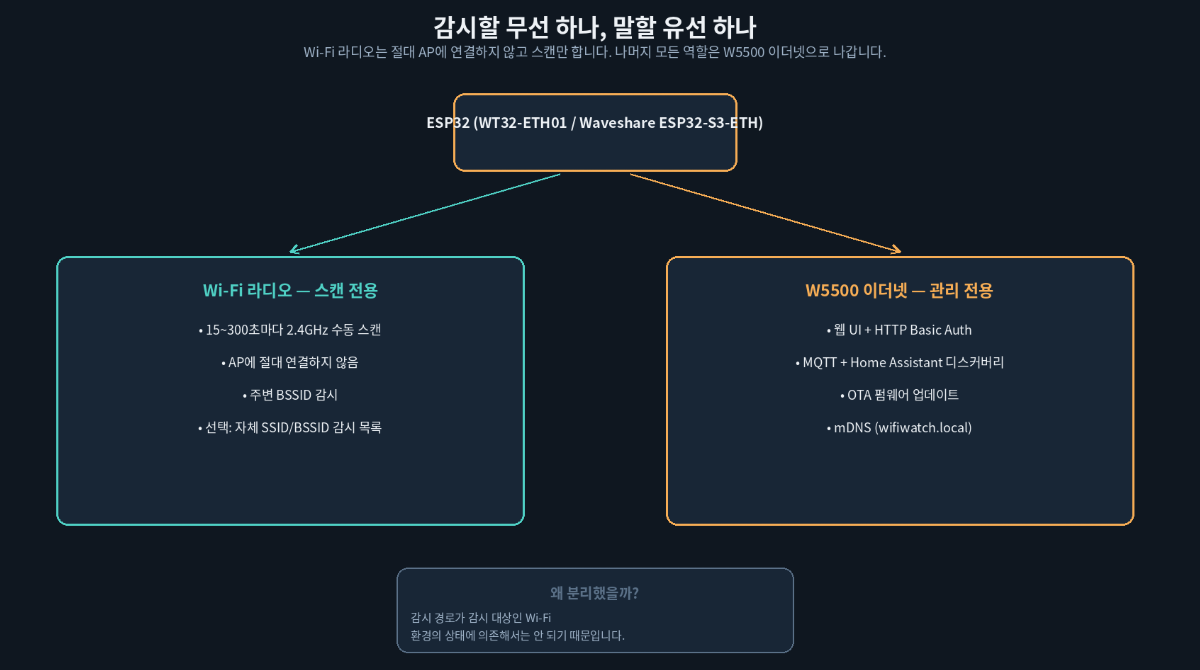
생성된 다이어그램: 두 역할이 라디오를 공유하지 않도록 의도적으로 분리되어 있습니다.
🌐 두 보드, 하나의 펌웨어, 하나의 W5500 핀맵
ESP-WiFiWatch v0.4.8은 명시적으로 멀티플랫폼입니다 — 동일한 애플리케이션 소스가 하나의 PlatformIO 프로젝트에서 서로 다른 두 하드웨어 타깃으로 빌드됩니다.
- WT32-ETH01은 저비용/레퍼런스 플랫폼으로 유지됩니다 — 2.4GHz Wi-Fi와 유선 10/100 이더넷을 갖춘 ESP32, 선택적 디스플레이를 위한 충분한 GPIO, 그리고 특정 설치 장소의 Wi-Fi 환경이 이 탐지 방식에 애초에 쓸 만한지 저렴하게 테스트해볼 수 있는 수단입니다.
- Waveshare ESP32-S3-ETH + PoE는 상시 설치에 권장되는 플랫폼입니다. ESP32-S3에 WIZnet W5500이 내장되어 있고, GPIO9(RST), GPIO10(INT), GPIO11(MOSI), GPIO12(MISO), GPIO13(SCLK), GPIO14(CS)로 내부 배선되어 있습니다 — 프로젝트 README는 이 핀 블록을 명시적으로 예약해두고 "따라서 이 GPIO들은 디스플레이 핀이 아니다"라고 밝히며, 선택 사항인 ST7789 상태 화면은 별도의 헤더 그룹에 배선하도록 했습니다.
PoE는 상시 설치 케이스에서 더 중요한 디테일입니다: 이더넷 케이블 하나로 데이터와 전원을 동시에 공급하는데 — 정전 감지기 입장에서 실제로 중요한 부분은 — 상위 스위치나 라우터가 UPS에 물려 있다면, 설치 장소의 상용 전원이 나가도 WiFiWatch는 계속 이웃 Wi-Fi를 관찰할 수 있다는 점입니다. 프로젝트는 Waveshare PoE 모듈과 UniFi USW-24-PoE 스위치로 이를 실제 테스트해 성공했다고 밝히고 있습니다.
🧮 "이웃이 조용해졌다"를 검증된 신호로 바꾸기
탐지 로직은 오탐과 미탐 양쪽을 모두 견디도록 설계되어 있고, 프로젝트는 이 채점 모델을 블랙박스로 두지 않고 명시적으로 문서화하고 있습니다:
- 복합 정전 점수는 세 가지 신호에 가중치를 둡니다: 안정적인 장기 베이스라인 대비 손실 50%, 직전 단기 스캔 대비 급격한 하락 30%, 특히 강하고 안정적인 BSSID의 손실 20% — 지나가는 차량 핫스팟 같은 단명 SSID는 애초에 안정적인 베이스라인 멤버가 되지 않으므로 의도적으로 영향력이 작게 설계되어 있습니다.
- 이 점수는 MQTT로 게시되고 Home Assistant에 표시되는 6단계 확률 구간(
very_unlikely부터possible을 거쳐very_likely까지)에 매핑됩니다. - 별도의 이진 경보는
likely또는very_likely가 2회 연속 나올 때만(기본 30초 간격 기준 약 1분) 울리고, 해제도 같은 방식입니다 — 실제 테스트에서 단발성 RF 드롭아웃이 잠깐likely에 도달해 스스로 거짓 경보를 일으키는 걸 확인한 뒤 추가된 로직입니다.
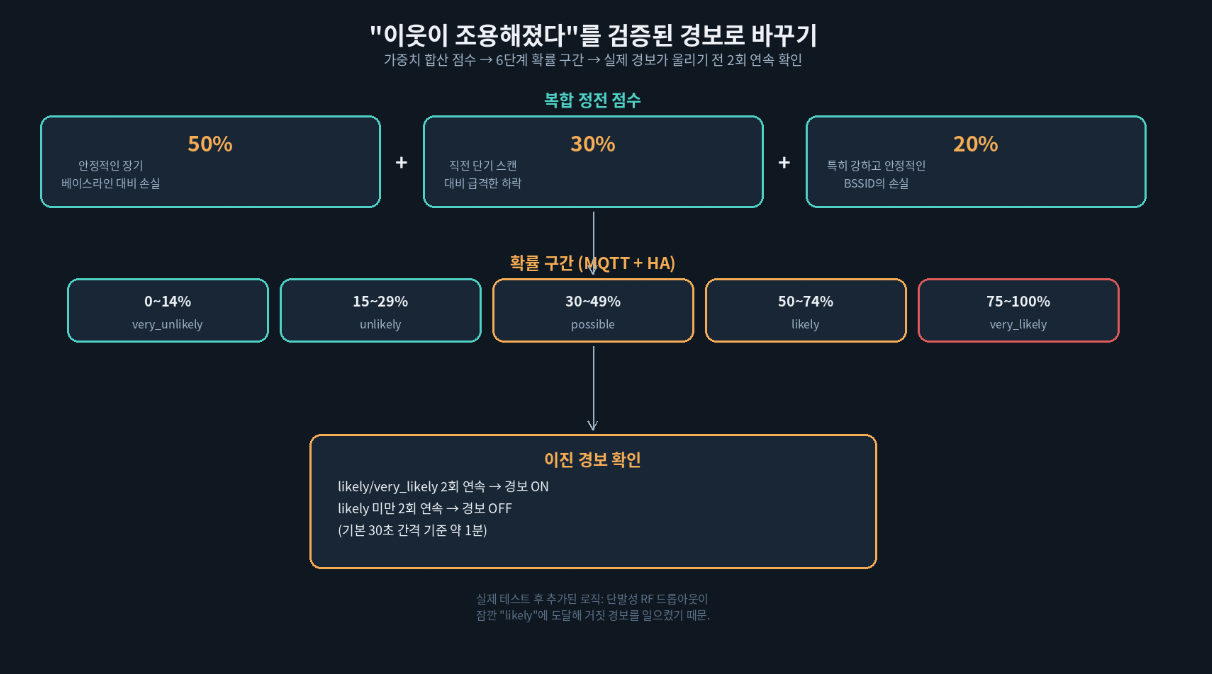
생성된 다이어그램: 세 가지 가중 신호, 여섯 개의 구간, 하나의 확인 게이트.
학습된 베이스라인 자체는 ESP32의 NVS 플래시에 저장되며 신중하게 다뤄집니다: 새 기기는 약 10분간 학습 단계를 거치지만, 기존 베이스라인이 있는 상태로 재부팅하면 이 과정을 건너뜁니다 — 저장된 베이스라인을 즉시 불러와 약 5분짜리 더 짧은 검증 단계를 거친 뒤 이후에는 천천히 계속 적응합니다. 덕분에 펌웨어 업데이트나 순간 정전 때문에 처음부터 다시 눈먼 채로 학습할 필요가 없습니다. 베이스라인은 매 스캔마다 플래시에 기록되지도 않고(플래시 마모 제한), likely/very_likely 상태에서는 학습이 의도적으로 멈춰서 실제 정전이 서서히 "새로운 정상"으로 흡수되는 일도 막습니다.
🏠 MQTT, Home Assistant, 언어별 표시
시스템 상태, 정전 점수와 단계, 채널별 이웃 개수, 사용자 자신의 감시 목록 상태, 베이스라인 재학습/초기화용 제어 토픽까지 — 모든 상태 값이 설정 가능한 MQTT 베이스 토픽 아래에 게시되고, Home Assistant MQTT Discovery가 이를 자동으로 하나의 장치로 묶어줍니다. MQTT 페이로드와 Home Assistant 오브젝트 ID는 UI 언어와 무관하게 고정된 영문 문자열을 유지하는 반면, 웹 UI·선택적 TFT·Home Assistant 엔티티 이름에 표시되는 사람이 보는 라벨은 사용자가 선택한 언어를 따릅니다 — 비슷한 다국어 MQTT 기기를 만드는 사람이라면 참고할 만한 디테일인데, 와이어 프로토콜 자체를 번역해버리는 흔한 함정을 피하고 있기 때문입니다.
🧭 이 프로젝트가 자리하는 위치 — 가치와 한계
여기서의 가치는 대부분의 이더넷 실드 프로젝트와는 꽤 다른 방식으로 WIZnet 칩을 쓴다는 데 있습니다 — W5500이 주된 감지 기능을 제공하는 게 아니라 연결의 독립성을 제공합니다: Wi-Fi 정전을 보고하는 장치 자신이 그 정전의 흔한 부작용에 함께 휘말리지 않는다는 보장입니다. "감지용 라디오는 자유롭게 두고, 관리는 별도의 결정론적 링크로 보낸다"는 이 패턴은 Wi-Fi 모니터링을 넘어, 측정 대상과 측정 주체가 기본적으로 인프라를 너무 많이 공유하는 모든 장치에 일반화해서 적용할 수 있습니다.
한계는 프로젝트 자체 로드맵에 솔직하게 적혀 있습니다. 이 탐지 방식은 애초에 의미 있는 베이스라인을 만들 만큼 안정적인 이웃 AP가 충분히 있는 장소에 의존합니다 — 눈에 보이는 이웃이 적은 외딴 시골 설치 환경에서는 활용할 데이터가 거의 없습니다. 두 하드웨어 플랫폼은 아직 하나가 완전히 폐기되지 않고 나란히 비교되는 중이고, Waveshare 보드의 외부 안테나 성능은 아직 평가 진행 중인 항목이며, IPv6 지원은 "나중에" 목록에 있고, 확률 임계값은 지금까지의 제한적인 실제 데이터로 보정된 것이라고 명시되어 있어 더 많은 설치 사례가 보고될수록 추가 튜닝이 예상됩니다.
🔗 관련 WIZnet Maker 프로젝트
| 프로젝트 | 보드 | W5500 역할 | ESP-WiFiWatch와의 차이 |
|---|---|---|---|
| ESP-WiFiWatch (이 프로젝트) | WT32-ETH01 / Waveshare ESP32-S3-ETH | 관리 전용 이더넷; Wi-Fi 라디오는 절대 연결 안 함 | — |
| esp32-modbus-mqtt-bridge | Waveshare ESP32-S3 + W5500 | W5500이 주 네트워크, Wi-Fi STA가 자동 폴백 | 여기서 Wi-Fi는 연결 백업 역할; ESP-WiFiWatch에서는 Wi-Fi가 연결을 전혀 담당하지 않고 센서 역할만 함 |
| A PoE Smart Access Panel Powered by W5500 | Waveshare ESP32-S3-ETH (동일 보드) | 보안이 중요한 출입 통제 애플리케이션을 위한 PoE + 유선 이더넷 | 완전히 동일한 보드와 PoE 논리를, Wi-Fi 환경 감지 대신 도어 액세스에 적용 |
| ESPHome-W5500-Ethernet-on-ESP32-boards | ESP32-C3 + 외장 W5500 | ESPHome 내장 ethernet: 플랫폼으로 W5500 연결 | Home Assistant에 닿기 위해 커스텀 Arduino/PlatformIO 펌웨어 대신 ESPHome의 선언적 YAML을 사용 |
- esp32-modbus-mqtt-bridge는 동일한 Waveshare ESP32-S3 + W5500 조합을 타깃하고 MQTT로 같은 Home Assistant 목적지에 도달하지만, 유선 링크를 쓸 수 없을 때 Wi-Fi를 정당한 폴백 네트워크로 취급합니다. ESP-WiFiWatch의 Wi-Fi 라디오는 애초에 연결 수단이 될 수 없습니다 — 완전히 감지 전용이라는 점이 둘 중 더 특이한 설계 선택입니다.
- A PoE Smart Access Panel Powered by W5500은 완전히 동일한 Waveshare ESP32-S3-ETH 보드에서 완전히 다른 이유로 동작합니다 — "순간적인 연결 끊김조차 용납할 수 없는" 도어 액세스 인증입니다. 두 프로젝트는 서로 독립적으로 같은 결론에 도달합니다 — 연결 끊김이 실제 결과로 이어지는 애플리케이션에는 Wi-Fi 대신 PoE 이더넷을.
- ESPHome-W5500-Ethernet-on-ESP32-boards는 더 작은 ESP32-C3 보드에 W5500을 연결하고, 손으로 짠 펌웨어 대신 ESPHome의
ethernet:YAML 블록으로 띄우는 모습을 보여줍니다 — "W5500을 Home Assistant와 연결한다"는 비슷한 목표에 대해, 코드 없는 ESPHome 방식과 ESP-WiFiWatch의 커스텀 PlatformIO 애플리케이션을 저울질하는 메이커에게 좋은 비교 대상입니다.
FAQ
Q. ESP-WiFiWatch가 동작하려면 제 Wi-Fi 네트워크에 연결해야 하나요? 아니요. Wi-Fi 라디오는 수동 스캔만 수행하며 사용자 자신의 AP를 포함해 어떤 AP에도 연결하지 않습니다. 웹 UI, MQTT, Home Assistant, OTA를 포함한 모든 연결은 대신 유선 W5500 이더넷 링크로 나갑니다.
Q. 배선을 단순하게 하려면 관리 트래픽도 그냥 Wi-Fi로 처리하면 안 되나요? 안 됩니다. 이 프로젝트의 핵심이 바로 Wi-Fi 정전을 감지하는 것이기 때문입니다. 장치 자신의 관리 트래픽이 Wi-Fi에 의존했다면, 로컬 Wi-Fi 환경을 상용 전원과 함께 무너뜨리는 실제 동네 정전이 하필 가장 중요한 순간에 감시 장치 자신의 보고 기능까지 끊어버릴 수 있습니다.
Q. PoE 보드가 꼭 필요한가요, 더 저렴한 WT32-ETH01로도 되나요? 둘 다 같은 펌웨어에서 지원됩니다. WT32-ETH01은 저비용 레퍼런스/테스트 플랫폼이고, Waveshare ESP32-S3-ETH + PoE 보드는 상시 설치에 권장됩니다 — 주로 PoE 덕분에 실제 정전 중에도 UPS가 물린 스위치에서 계속 전원을 공급받을 수 있기 때문입니다.
Q. 정전을 얼마나 빨리 감지하나요? 복합 점수는 매 스캔(15~300초, 기본 30초)마다 갱신되지만, 이진 경보는 likely/very_likely가 2회 연속 나와야 울립니다 — 기본 간격 기준 약 1분 — 실제 정전이 아닌 단발성 RF 드롭아웃을 걸러내기 위한 의도적인 설계입니다.
Q. 제 공유기도 감시하나요? 네, 별도로 감시합니다. 설정 가능한 감시 목록이 사용자 자신의 SSID/BSSID를 이웃 베이스라인과 독립적으로 추적하며, 자체적인 2회 확인 경보를 가지고 있어서 개인 Wi-Fi 문제와 동네 전체 정전이 서로 다른 이벤트로 보고됩니다.
Documents
-
WT32-ETH01 reference wiring
tested pinout for the low-cost platform
-
Waveshare ESP32-S3-ETH reference wiring
tested pinout including the onboard W5500


