How Does an ESPHome W5500 PoE Door Lock Use TOTP and MQTT Face Recognition?
This ESPHome door lock combines W5500 Ethernet with a separate PoE adapter, rotating TOTP codes, MQTT face events, and UDP door-state checks.
0
Components
Hardware components
WIZnet - W5500
x 1

SPI Ethernet controller configured in ESPHome for the ESP32-S3 door-lock controller. PoE power conversion is provided separately.
Project description
📌 Overview
NonaSuomy's ESPHome PoE Door Lock is a 2025 project that converts a keypad deadbolt into a wired smart lock. It combines an ESP32-S3 controller, a WIZnet W5500 Ethernet module, a separate PoE power adapter, a 3x4 keypad, motor-position switches, and Home Assistant integration. The project was first published on GitHub in March 2025, introduced to the Home Assistant Community in May, and received functional source updates through September 2025.
Its most distinctive feature is the way several access methods meet at one controller. A visitor can enter a fixed PIN or a time-based one-time password on the keypad. A separate face-recognition system can send a match event through MQTT. Home Assistant provides another control path, while an independent door contact confirms that the door is closed before the regular locking action proceeds.
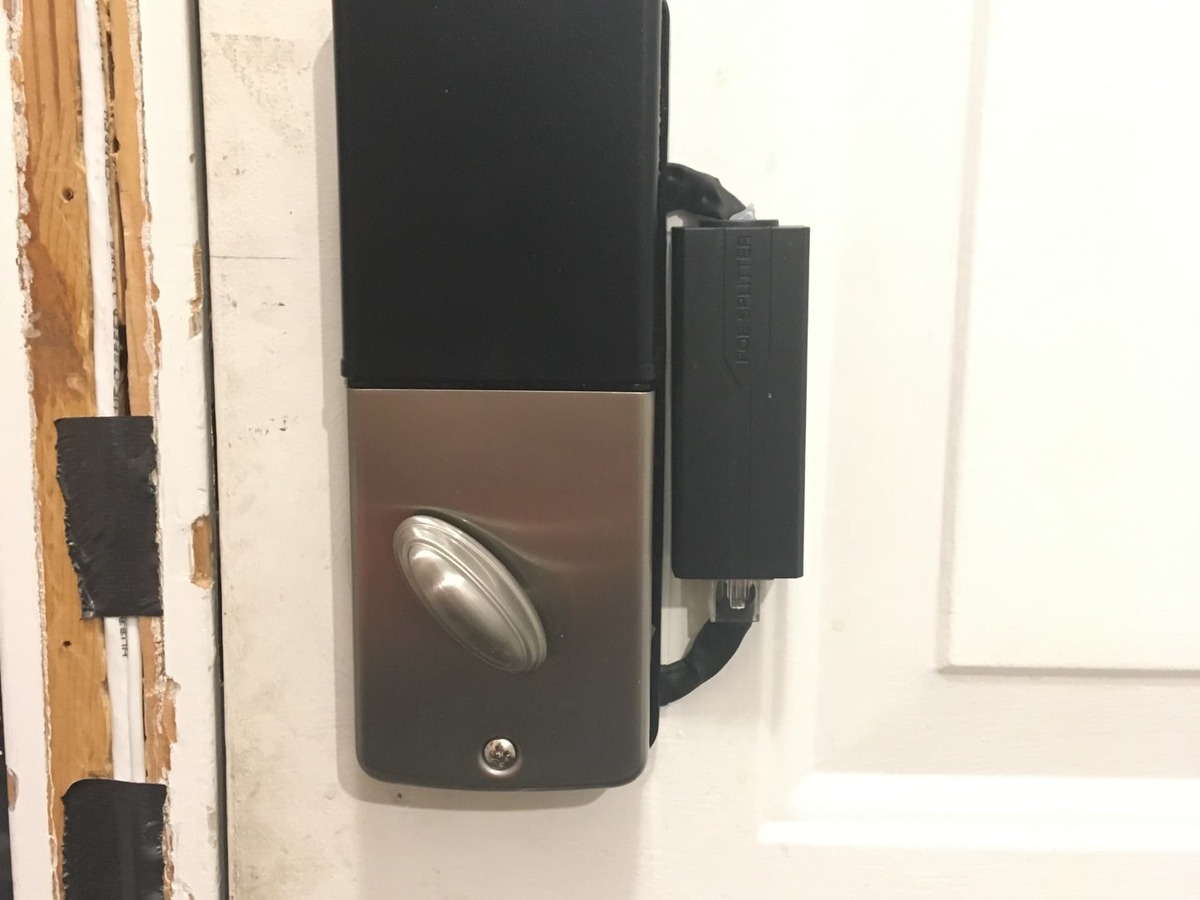
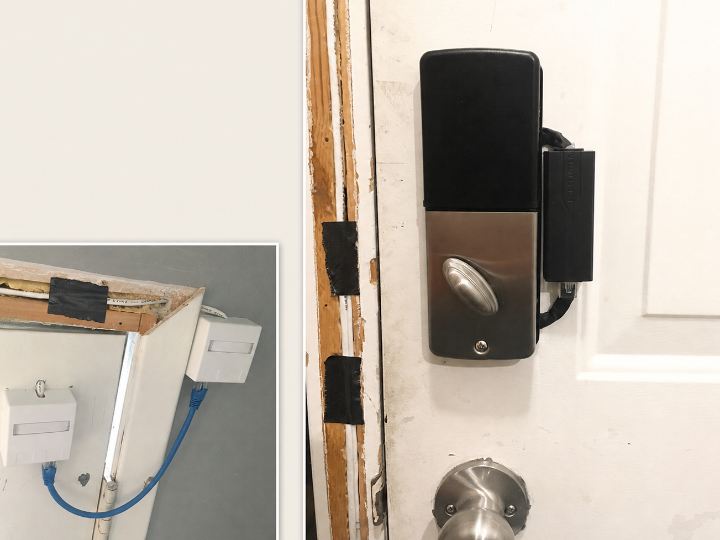
The modified keypad deadbolt shown in NonaSuomy's original Home Assistant Community post.
Project in one sentence: External ML recognizes a face, W5500 Ethernet delivers the MQTT event, and ESPHome requires local keypad confirmation. A separate UDP door-state path guards locking.
What ESPHome, PoE, TOTP, and MQTT Mean Here
Four technologies form the foundation of this project:
- ESPHome is a YAML-based firmware environment for devices such as the ESP32. It makes the lock's keypad, motor, switches, network services, and Home Assistant entities easier to describe and maintain.
- PoE, or Power over Ethernet, carries network data and electrical power through the Ethernet cable. In this prototype, the W5500 handles Ethernet communication and a separate modified PoE adapter converts the incoming power for the lock electronics.
- TOTP, or Time-based One-Time Password, is the rotating six-digit code commonly shown by authenticator apps. The app and the lock store the same shared secret value and use it with the current time to calculate a new code every 30 seconds.
- MQTT is a lightweight publish-and-subscribe messaging protocol. The vision system publishes a recognition result to a topic, and the ESPHome lock subscribes to that topic.
Face recognition is the project's machine-learning, or ML, function. The camera and an external recognition service analyze the image. The lock receives a compact result containing fields such as the matched name and a confidence score calculated by the recognition system, so image inference and physical motor control can remain on separate devices.
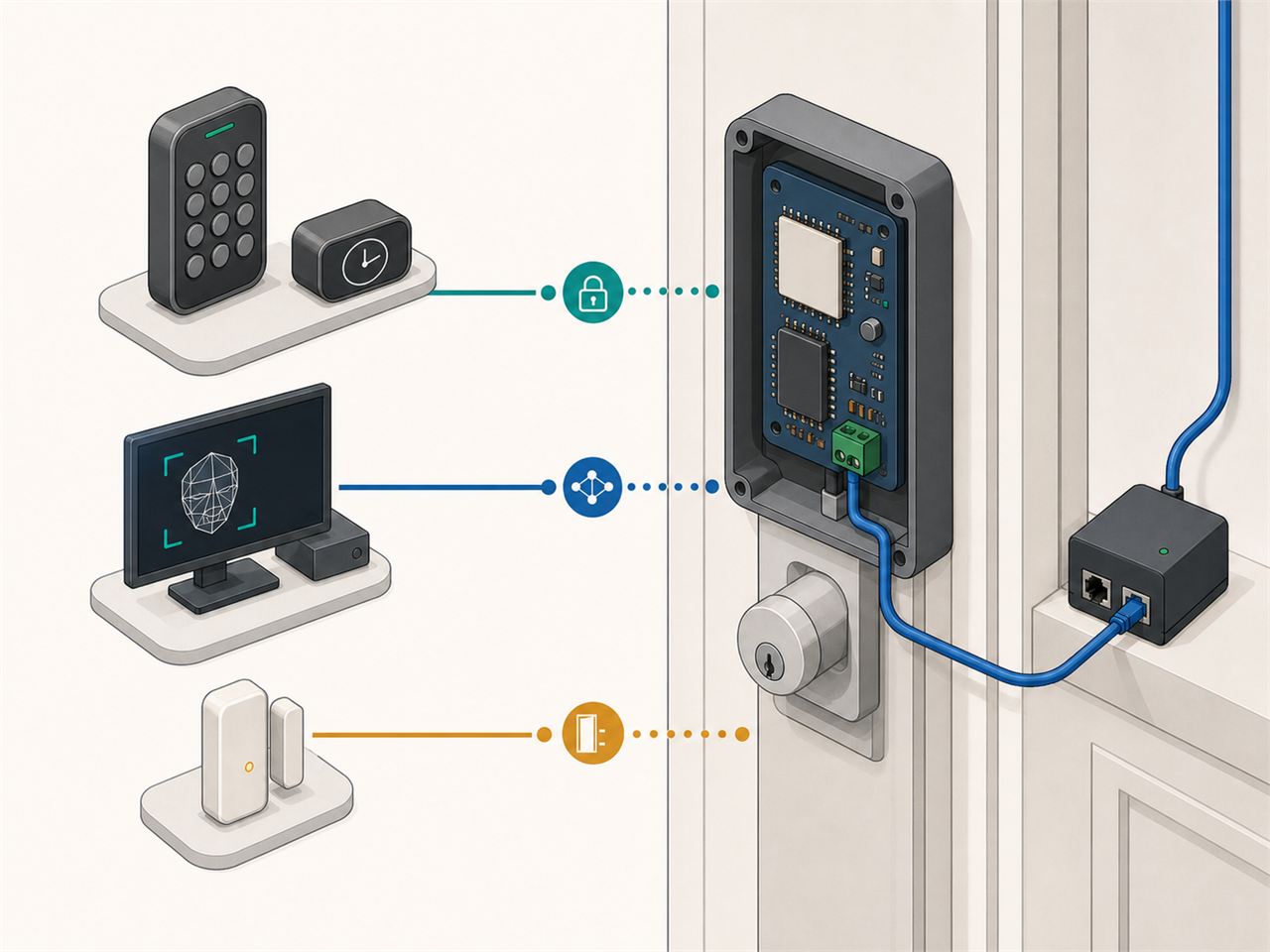
Generated illustration: alternative keypad and face-event paths, plus the door-state input used by the wired controller.
Inside the ESP32-S3 Door Lock
The published YAML targets an ESP32-S3 DevKitC-1 running ESP-IDF 5.4.2. A small W5500 module connects over SPI with clock on GPIO42, MOSI on GPIO44, MISO on GPIO40, chip select on GPIO39, interrupt on GPIO41, and reset on GPIO43. The Wi-Fi block is commented out, making wired Ethernet the active network path in the shared configuration.
Through that link, ESPHome can reach Home Assistant, subscribe to MQTT events, synchronize time for TOTP, receive OTA updates, and listen for the door-contact message sent over UDP. The ESP32-S3 then connects the network side to the physical side: keypad input, indicator LEDs, a buzzer, a motor driver, and two limit switches that report the locked and unlocked positions.
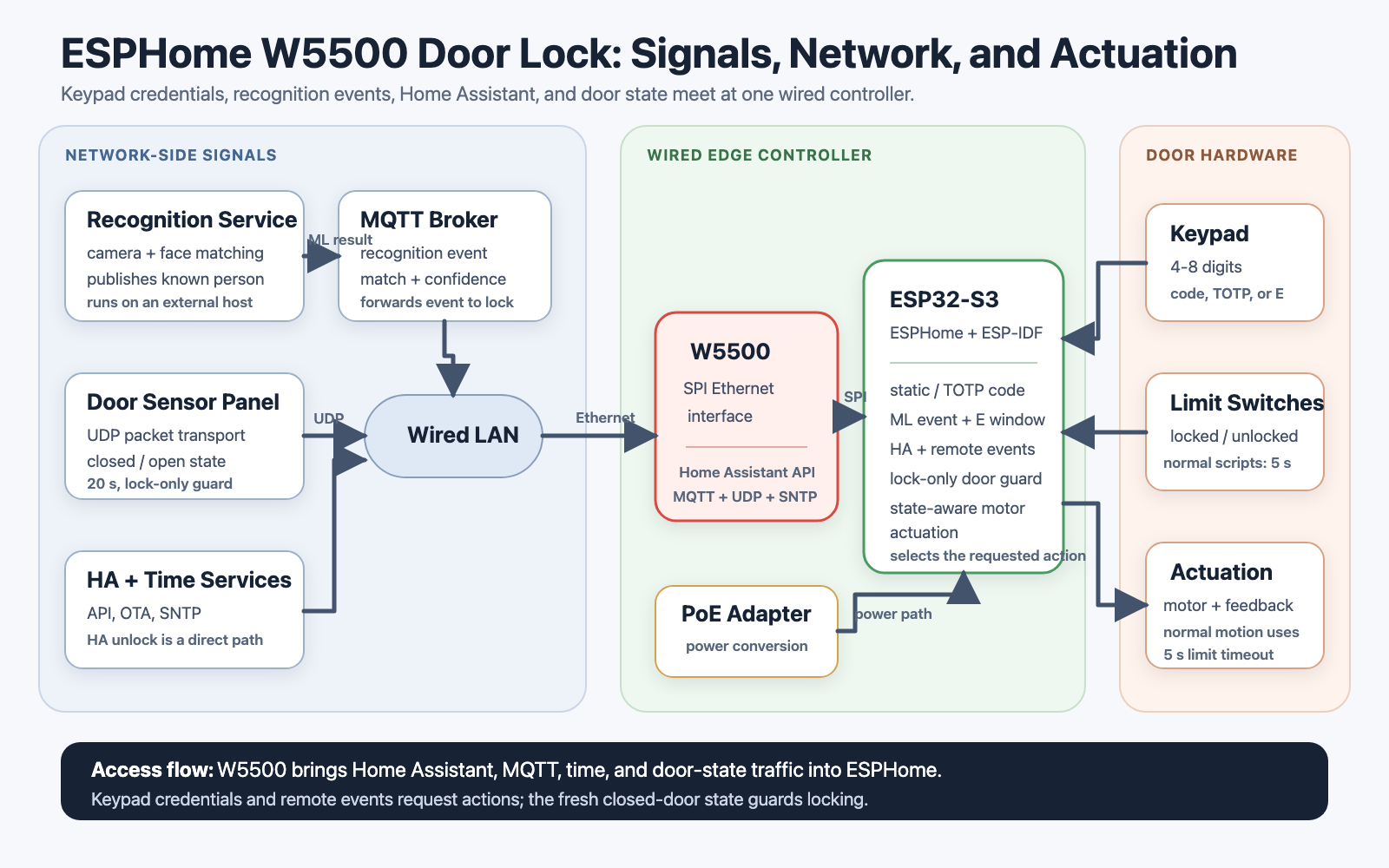
Generated technical diagram: network services and user inputs converge at the ESP32-S3 lock controller, while the PoE power stage remains separate.
TOTP Keypad Access
TOTP adds a rotating keypad credential alongside the project's stored 4 to 8 digit code. An authenticator app and the door lock are provisioned with the same shared secret. After the lock receives accurate time through the Simple Network Time Protocol, or SNTP, both sides independently calculate the same six-digit code for the current 30-second period.
The user types that six-digit value and presses E. ESPHome first checks the stored fixed code and then the current TOTP value. A valid entry starts the unlock script, and the configuration schedules an automatic lock request 30 seconds later. This design allows a temporary code to work locally at the keypad without sending the code from a cloud service for every entry.
Time synchronization is therefore part of the access path, not just a clock feature. The repository links to NonaSuomy's custom ESPHome TOTP component, and the Documents panel also includes RFC 6238 for builders who want to validate code generation against standard test vectors.
MQTT Face-Recognition Event Flow
The second distinctive access path begins outside the door lock. A camera and an external face-recognition service perform the ML inference. The project documentation names Frigate, CompreFace, and Double Take, while the active YAML subscribes to the Double Take-style topic double-take/cameras/hqbackyardcam.
When a message arrives, ESPHome reads the first result, requires its match field to be true, and checks the configured confidence threshold of greater than 95. A qualifying event turns on the green indication and opens a local action window for up to 30 seconds. The person at the door then presses E on the keypad. Depending on the current limit-switch state, that confirmation requests either unlock or lock.
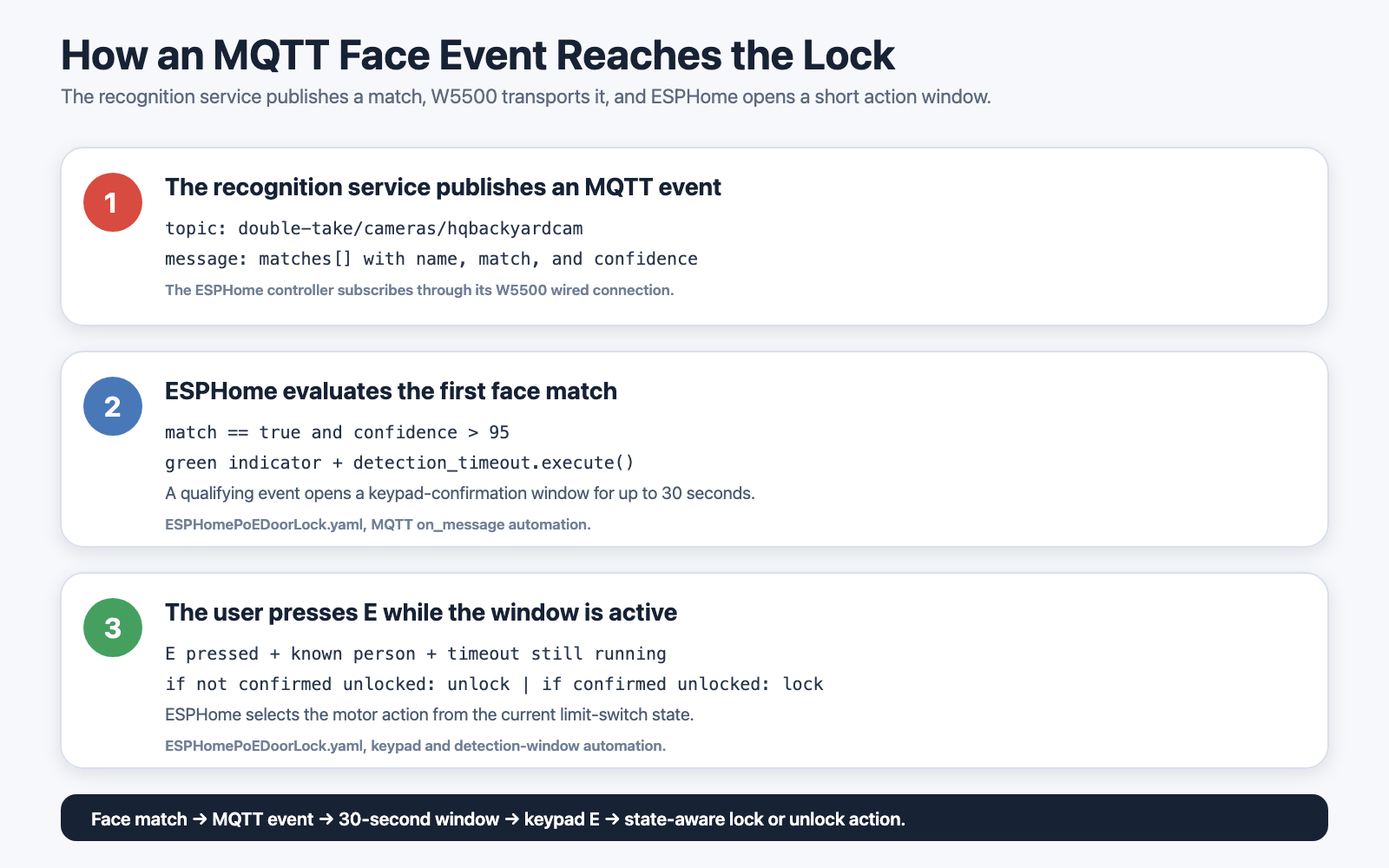
Generated technical diagram: external recognition publishes an MQTT event, ESPHome evaluates it, and the visitor confirms the action at the keypad.
The vision host handles image processing and model inference, MQTT carries the result, and the ESP32-S3 handles the short confirmation window and motor action. The Ethernet door lock only needs the event data, not the camera's full video stream.
Door State, Motor Feedback, and Auto-Lock
Access credentials answer who or what requested an action. The door contact and limit switches answer whether the physical mechanism is ready to complete it.
A separate ESPHome alarm-panel project sends the door state to UDP port 18511. For the normal lock script to proceed, that status must be less than 20 seconds old and report that the door is closed. The two local limit switches identify the locked and unlocked motor positions, and the regular lock and unlock scripts stop after reaching a limit or after a five-second timeout.
After a successful keypad unlock, the YAML schedules a lock request 30 seconds later. Together, the door-contact check, motor-position feedback, and timeout make the automation aware of more than a network command alone.
⚙️ W5500 Ethernet and the PoE Power Stage
The W5500 provides the wired IP connection between the ESP32-S3 and the surrounding services. In this project, that path carries Home Assistant API traffic, MQTT face events, SNTP time, OTA communication, and UDP door-state messages. These services explain why Ethernet is central to the design: authentication time, remote events, supervisory control, and physical-state updates all meet at the same ESPHome controller.
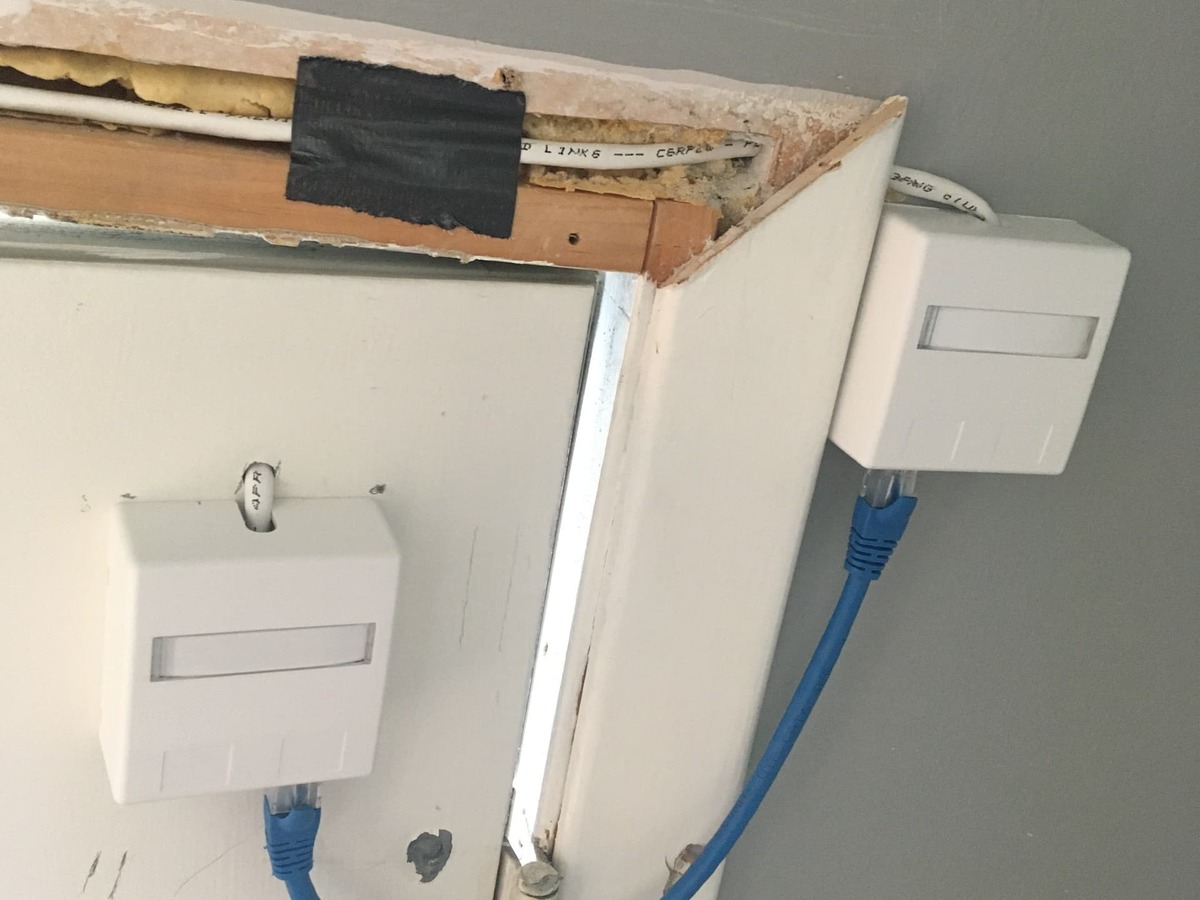
The original project photo shows the modified PoE adapter mounted separately beside the lock prototype.
PoE supplies the power path through the cable, but the conversion stage is separate from the W5500 module. NonaSuomy describes the side-mounted adapter as a prototype arrangement and lists a more integrated PoE design among future improvements. That distinction is useful for anyone planning a smaller enclosure or calculating the power budget for the motor and controller.
Access Paths at a Glance
The shared configuration brings several requests into the same lock logic:
- A stored 4 to 8 digit PIN can unlock the door from the keypad.
- A rotating six-digit TOTP can unlock the door from the keypad.
- A qualifying MQTT face event opens a 30-second local
E-key confirmation window. - Home Assistant exposes the lock for dashboard and automation control.
- The UDP door-contact message guards the normal locking action by confirming a recent closed-door state.
These are alternative control and state paths rather than one fixed sequence that every user must complete. That flexibility is one reason the source is valuable as an ESPHome access-control reference.
Public Source and Before Installation
The repository is detailed enough to study the W5500 pin mapping, MQTT topic and JSON handling, TOTP check, UDP listener, motor scripts, limit switches, indicators, and Home Assistant entities. It is a public prototype rather than a complete installation package: the referenced local components/ directory and aes.hpp file are absent, and the exact deadbolt, PoE adapter, schematic, bill of materials, and enclosure design are not specified.
Before adapting it to a real entrance, builders should validate TOTP provisioning with known test vectors, use broker ACLs and encrypted transport such as TLS where supported, protect local network and UDP traffic, and test every motor timeout. Physical checks are equally important: preserve mechanical key access and manual interior egress, define behavior during a power failure, confirm electrical protection and motor current, and follow applicable lock and building requirements.
Best use of the source: Reproduce the network and control flow on a bench first, then complete the missing mechanical, electrical, security, and fail-safe design for the specific door.
Related WIZnet Maker Reading Path
The PoE ESPHome access panel with 3D face recognition and fingerprint is a useful next comparison because it places a dedicated 3D face sensor at the panel. The present door-lock project instead receives a recognition event produced by an external vision system.
For a broader wired access controller, the IntelliDrive ESP32-W5500 gate controller suite combines MQTT, BLE, OTA, and fingerprint functions around an ESP32 and W5500.
The W55RP20 Smart Doorbell Demo shows another ML boundary: pet classification runs on the device before an Ethernet alert is sent, while this lock receives a face-recognition result from elsewhere on the network.
Source-Backed Summary
NonaSuomy's project shows how an existing keypad deadbolt can become a wired ESPHome access controller with rotating TOTP codes, external ML events over MQTT, and physical door-state checks. The ESP32-S3 manages user input and the motor, the W5500 connects the network services, and the separate PoE stage supplies power through the Ethernet cable.
The project was published in 2025 and its source evolved through September of that year. Although additional files and installation engineering are needed for a reproducible door deployment, the public YAML provides a substantial reference for connecting Home Assistant, TOTP, MQTT-based face recognition, UDP state reporting, and wired Ethernet in one access-control prototype.
❓ FAQ
Q1. What does ESPHome do in this door lock?
ESPHome defines the ESP32-S3 firmware in YAML, including W5500 Ethernet, keypad input, indicators, MQTT and UDP messages, Home Assistant entities, and motor-control scripts.
Q2. How is TOTP different from a fixed keypad PIN?
A fixed PIN remains the same until it is changed. TOTP uses a shared secret and current time to generate a new six-digit value every 30 seconds.
Q3. Where does face-recognition ML run, and what does MQTT carry?
ML inference runs on an external camera or recognition host. MQTT carries the resulting event data, including the match and confidence information used by the ESPHome automation.
Q4. What are the separate roles of W5500 and PoE?
W5500 provides SPI-based wired Ethernet for the ESP32-S3. The separate PoE adapter receives power from the Ethernet cable and converts it for the lock electronics.
Q5. What should be checked before reproducing the project?
Builders need to supply the missing custom-component and AES files, verify TOTP provisioning, select and document the lock and PoE hardware, secure the local network services, and test mechanical egress, key override, power-loss behavior, and motor fail-safes.
한국어 (Korean)
📌 개요
NonaSuomy의 ESPHome PoE Door Lock은 기존 숫자 키패드 데드볼트를 유선 스마트 도어락으로 개조한 2025년 프로젝트입니다. ESP32-S3 컨트롤러, WIZnet W5500 Ethernet 모듈, 별도의 PoE 전원 어댑터, 3x4 키패드, 모터 위치 스위치, Home Assistant 연동을 하나의 시스템으로 구성했습니다. GitHub에는 2025년 3월 처음 공개됐고, 5월에 Home Assistant Community에 소개됐으며, 실제 기능 변경은 2025년 9월까지 이어졌습니다.
이 프로젝트의 특징은 여러 출입 방법이 하나의 컨트롤러에서 만난다는 점입니다. 방문자는 고정 PIN 또는 시간 기반 일회용 비밀번호를 키패드에 입력할 수 있습니다. 별도의 얼굴 인식 시스템은 MQTT로 매칭 이벤트를 보낼 수 있습니다. Home Assistant도 별도의 제어 경로를 제공하고, 독립적인 문 접점은 문이 닫힌 것을 확인한 뒤 일반 잠금 동작을 진행하도록 돕습니다.
NonaSuomy가 Home Assistant Community 원문에 공개한 개조형 키패드 데드볼트.
한 문장으로 보는 프로젝트: 외부 ML이 얼굴을 인식하고 W5500 Ethernet이 MQTT 이벤트를 전달하면 ESPHome이 현지 키패드 확인을 받습니다. 별도의 UDP 문 상태 경로는 잠금 동작을 보호합니다.
이 프로젝트에서 ESPHome, PoE, TOTP, MQTT가 뜻하는 것
이 프로젝트를 이해하려면 네 가지 기술을 먼저 알면 됩니다.
- ESPHome은 ESP32 같은 장치의 펌웨어를 YAML 설정으로 구성하는 환경입니다. 도어락의 키패드, 모터, 스위치, 네트워크 서비스, Home Assistant 엔티티를 비교적 쉽게 정의하고 관리할 수 있습니다.
- PoE, 즉 Power over Ethernet은 Ethernet 케이블 하나로 네트워크 데이터와 전력을 함께 전달하는 기술입니다. 이 프로토타입에서는 W5500이 Ethernet 통신을 맡고, 별도로 개조한 PoE 어댑터가 들어온 전력을 도어락 회로에 맞게 변환합니다.
- TOTP, 즉 Time-based One-Time Password는 인증 앱에서 볼 수 있는 주기적으로 바뀌는 6자리 코드입니다. 앱과 도어락이 같은 공유 비밀값인 시크릿과 현재 시간을 사용해 30초마다 새로운 값을 계산합니다.
- MQTT는 네트워크 장치가 특정 토픽에 메시지를 발행하고 구독하는 가벼운 통신 방식입니다. 비전 시스템이 얼굴 인식 결과를 발행하고, ESPHome 도어락이 해당 토픽을 구독합니다.
얼굴 인식은 이 프로젝트의 머신러닝, 즉 ML 기능입니다. 카메라와 외부 인식 서비스가 영상을 분석하고, 도어락에는 매칭된 이름과 confidence, 즉 인식 시스템이 계산한 일치 점수 같은 결과만 전달합니다. 덕분에 이미지 추론과 실제 모터 제어를 서로 다른 장치에 나눌 수 있습니다.
생성 일러스트: 키패드와 얼굴 이벤트는 서로 다른 출입 경로이며, 문 상태 정보는 잠금 판단에 사용됩니다.
ESP32-S3 도어락 내부 구성
공개 YAML은 ESP-IDF 5.4.2로 동작하는 ESP32-S3 DevKitC-1을 대상으로 합니다. 소형 W5500 모듈은 SPI로 연결되며 클록 GPIO42, MOSI GPIO44, MISO GPIO40, 칩 선택 GPIO39, 인터럽트 GPIO41, 리셋 GPIO43을 사용합니다. 공유된 설정에서 Wi-Fi 부분은 주석 처리돼 있어 유선 Ethernet이 실제 네트워크 경로로 설정돼 있습니다.
이 유선 연결을 통해 ESPHome은 Home Assistant에 접속하고, MQTT 이벤트를 구독하며, TOTP에 필요한 시간을 동기화하고, OTA 업데이트와 UDP 문 접점 메시지를 처리합니다. ESP32-S3는 이 네트워크 기능을 키패드 입력, 표시 LED, 부저, 모터 드라이버, 잠금과 열림 위치를 확인하는 두 개의 리미트 스위치와 연결합니다.
생성 기술 구조도: 네트워크 서비스와 사용자 입력이 ESP32-S3 도어락 컨트롤러로 모이고, PoE 전원 단계는 별도로 구성됩니다.
TOTP 키패드 출입
TOTP는 프로젝트에 저장된 4자리에서 8자리 고정 코드와 함께 사용할 수 있는 30초마다 바뀌는 키패드 인증 방식입니다. 인증 앱과 도어락에 같은 공유 비밀값을 설정하고, 도어락이 SNTP라는 네트워크 시간 동기화 방식으로 정확한 시간을 받으면 양쪽은 현재 30초 구간에 해당하는 동일한 6자리 코드를 각각 계산합니다.
사용자는 이 6자리 값을 입력한 뒤 E 키를 누릅니다. ESPHome은 먼저 저장된 고정 코드를 확인하고, 이어서 현재 TOTP 값을 비교합니다. 올바른 값이면 열림 스크립트를 시작하고, 설정은 30초 뒤 자동 잠금 요청을 예약합니다. 매번 클라우드에서 비밀번호를 받아오지 않아도 키패드 현장에서 임시 코드를 사용할 수 있는 구조입니다.
따라서 시간 동기화는 단순한 시계 기능이 아니라 출입 과정의 일부입니다. 저장소는 NonaSuomy의 사용자 정의 ESPHome TOTP 컴포넌트를 연결하고 있으며, Documents 패널에는 코드 생성을 표준 테스트 값으로 확인할 수 있도록 RFC 6238도 함께 정리했습니다.
MQTT 얼굴 인식 이벤트 흐름
두 번째 특징적인 출입 경로는 도어락 외부에서 시작합니다. 카메라와 외부 얼굴 인식 서비스가 ML 추론을 수행합니다. 프로젝트 문서는 Frigate, CompreFace, Double Take를 언급하고, 실제 YAML은 Double Take 방식의 double-take/cameras/hqbackyardcam 토픽을 구독합니다.
메시지가 들어오면 ESPHome은 첫 번째 결과의 match 값이 true인지 확인합니다. 이어서 일치 점수가 95를 넘는 이벤트만 다음 단계로 보내고, 초록색 표시와 함께 최대 30초의 키패드 확인 시간을 시작합니다. 방문자가 그 안에 E를 누르면 현재 리미트 스위치 상태에 따라 열림 또는 잠금 동작을 요청합니다.
생성 기술 구조도: 외부 인식 시스템이 MQTT 이벤트를 발행하고, ESPHome이 조건을 확인한 뒤 방문자가 키패드에서 동작을 확정합니다.
비전 호스트는 영상 처리와 모델 추론을 맡고, MQTT는 그 결과를 전달하며, ESP32-S3는 확인 시간과 모터 동작을 관리합니다. Ethernet 도어락에는 카메라 영상 전체가 아니라 이벤트 데이터만 전달됩니다.
문 상태, 모터 피드백, 자동 잠금
출입 인증 정보가 누가 또는 무엇이 동작을 요청했는지 알려준다면, 문 접점과 리미트 스위치는 실제 기구부가 동작할 준비가 됐는지를 알려줍니다.
별도의 ESPHome 알람 패널 프로젝트가 UDP 18511번 포트로 문 상태를 보냅니다. 일반 잠금 스크립트가 진행되려면 이 상태가 20초 이내에 수신된 값이고, 문이 닫혀 있다고 보고해야 합니다. 두 개의 로컬 리미트 스위치는 잠금 및 열림 위치를 확인하며, 일반 잠금과 열림 스크립트는 해당 위치에 도달하거나 5초가 지나면 모터를 멈춥니다.
키패드로 정상적으로 연 뒤에는 YAML이 30초 후 잠금 요청을 예약합니다. 문 접점 확인, 모터 위치 피드백, 타임아웃을 함께 사용하기 때문에 단순한 네트워크 명령보다 실제 문 상태를 더 많이 반영할 수 있습니다.
⚙️ W5500 Ethernet과 PoE 전원 단계
W5500은 ESP32-S3와 주변 서비스 사이의 유선 IP 연결을 제공합니다. 이 프로젝트에서는 Home Assistant API 트래픽, MQTT 얼굴 이벤트, SNTP 시간, OTA 통신, UDP 문 상태 메시지가 이 경로를 사용합니다. 인증에 필요한 시간, 원격 이벤트, 관리 제어, 물리 상태 정보가 하나의 ESPHome 컨트롤러에서 만난다는 점이 Ethernet의 핵심 역할입니다.
원본 프로젝트 사진에서 개조된 PoE 어댑터가 도어락 프로토타입 옆에 별도로 장착된 모습을 볼 수 있습니다.
PoE는 케이블을 통한 전원 경로를 제공하지만 전력 변환 단계는 W5500 모듈과 별개입니다. NonaSuomy는 옆에 장착한 어댑터를 프로토타입 구성으로 설명하고, 향후 개선 항목으로 더 통합된 PoE 설계를 제시했습니다. 더 작은 케이스를 설계하거나 모터와 컨트롤러의 전력 예산을 계산할 때 꼭 구분해야 하는 부분입니다.
한눈에 보는 출입 및 제어 경로
공개 설정은 여러 요청을 하나의 도어락 로직으로 연결합니다.
- 저장된 4자리에서 8자리 PIN으로 키패드에서 문을 열 수 있습니다.
- 주기적으로 바뀌는 6자리 TOTP로 키패드에서 문을 열 수 있습니다.
- 조건을 만족한 MQTT 얼굴 이벤트는 최대 30초 동안 현장에서
E키로 확인할 수 있게 합니다. - Home Assistant는 대시보드와 자동화에서 도어락을 제어할 수 있게 합니다.
- UDP 문 접점 메시지는 최근에 확인된 닫힘 상태를 기준으로 일반 잠금 동작을 보호합니다.
이 기능들은 모든 사용자가 한 번에 거치는 하나의 고정 순서가 아니라, 서로 다른 제어 및 상태 경로입니다. 이런 유연성이 이 소스를 ESPHome 출입 제어 참고 자료로 볼 만한 이유입니다.
공개 소스와 설치 전에 확인할 점
저장소에는 W5500 핀 배치, MQTT 토픽과 JSON 처리, TOTP 확인, UDP 수신, 모터 스크립트, 리미트 스위치, 표시 장치, Home Assistant 엔티티를 살펴볼 수 있을 만큼 상세한 내용이 있습니다. 다만 완성된 설치 패키지보다는 공개 프로토타입에 가깝습니다. YAML이 참조하는 로컬 components/ 디렉터리와 aes.hpp 파일이 없고, 정확한 데드볼트와 PoE 어댑터 모델, 회로도, BOM, 케이스 설계는 제시되지 않았습니다.
실제 출입문에 적용하기 전에는 표준 테스트 값으로 TOTP 설정을 검증하고, 브로커 ACL을 적용하며 가능한 환경에서는 TLS 같은 암호화 전송을 사용해야 합니다. 로컬 네트워크와 UDP 통신을 보호하고, 모든 모터 타임아웃도 시험해야 합니다. 기구적인 확인도 중요합니다. 기계식 열쇠와 실내 수동 탈출 경로를 유지하고, 정전 시 동작, 전기 보호, 모터 전류를 확인하며, 해당 지역의 도어락 및 건축 관련 요구 사항을 따라야 합니다.
가장 좋은 활용 방법: 먼저 벤치 환경에서 네트워크와 제어 흐름을 재현한 뒤, 실제 문에 맞는 기구, 전원, 보안, 페일세이프 설계를 완성하는 것입니다.
관련 WIZnet Maker 읽을거리
3D 얼굴 인식과 지문 기능을 갖춘 PoE ESPHome 출입 패널은 전용 3D 얼굴 센서를 패널에 배치한 사례입니다. 이번 도어락이 외부 비전 시스템에서 생성한 얼굴 인식 이벤트를 받는 방식과 비교해 볼 수 있습니다.
더 폭넓은 유선 출입 컨트롤러가 궁금하다면 IntelliDrive ESP32-W5500 게이트 컨트롤러에서 MQTT, BLE, OTA, 지문 기능이 ESP32와 W5500 주변에 어떻게 구성되는지 볼 수 있습니다.
W55RP20 Smart Doorbell Demo는 또 다른 ML 역할 분리를 보여줍니다. 이 도어락은 네트워크의 다른 장치에서 만든 얼굴 인식 결과를 받는 반면, 해당 도어벨은 장치에서 반려동물 분류를 실행한 뒤 Ethernet 알림을 보냅니다.
소스 기반 요약
NonaSuomy의 프로젝트는 기존 키패드 데드볼트를 주기적으로 바뀌는 TOTP, MQTT 외부 ML 이벤트, 실제 문 상태 확인을 갖춘 유선 ESPHome 출입 컨트롤러로 만드는 방법을 보여줍니다. ESP32-S3가 사용자 입력과 모터를 관리하고, W5500이 네트워크 서비스를 연결하며, 별도의 PoE 단계가 Ethernet 케이블을 통해 전원을 공급합니다.
프로젝트는 2025년에 공개됐고 소스는 같은 해 9월까지 발전했습니다. 실제 문에 그대로 재현하려면 추가 파일과 설치 설계가 필요하지만, 공개 YAML은 Home Assistant, TOTP, MQTT 얼굴 인식, UDP 상태 보고, 유선 Ethernet을 하나의 출입 제어 프로토타입으로 연결하는 충분한 참고 자료를 제공합니다.
❓ FAQ
Q1. 이 도어락에서 ESPHome은 어떤 역할을 하나요?
ESPHome은 W5500 Ethernet, 키패드 입력, 표시 장치, MQTT와 UDP 메시지, Home Assistant 엔티티, 모터 제어 스크립트를 포함한 ESP32-S3 펌웨어를 YAML로 구성합니다.
Q2. TOTP는 고정 키패드 PIN과 어떻게 다른가요?
고정 PIN은 사용자가 바꾸기 전까지 같은 값입니다. TOTP는 공유 시크릿과 현재 시간을 사용해 30초마다 새로운 6자리 값을 만듭니다.
Q3. 얼굴 인식 ML은 어디에서 실행되고 MQTT는 무엇을 전달하나요?
ML 추론은 외부 카메라 또는 인식 호스트에서 실행됩니다. MQTT는 ESPHome 자동화가 사용하는 매칭 여부와 일치 점수를 포함한 결과 이벤트를 전달합니다.
Q4. W5500과 PoE는 각각 어떤 역할을 하나요?
W5500은 ESP32-S3에 SPI 기반 유선 Ethernet을 제공합니다. 별도의 PoE 어댑터는 Ethernet 케이블에서 전력을 받아 도어락 회로에 맞게 변환합니다.
Q5. 프로젝트를 재현하기 전에 무엇을 확인해야 하나요?
누락된 사용자 정의 컴포넌트와 AES 파일을 준비하고, TOTP 설정을 검증하며, 도어락과 PoE 하드웨어를 선택해 문서화해야 합니다. 네트워크 서비스를 보호하고, 실내 수동 탈출, 기계식 열쇠, 정전 시 동작, 모터 페일세이프도 시험해야 합니다.
Documents
-
Home Assistant Community Project
Original project article, installation photos, and system description.
-
ESPHome Door Lock Repository
Primary repository with README, firmware YAML, helper, photos, and demo media.
-
ESPHome Door Lock YAML
Main configuration showing W5500 pins, MQTT face-match handling, TOTP checks, UDP door state, and motor logic.
-
Custom ESPHome TOTP Component
TOTP component branch linked by the author. Builders should validate secret provisioning and test-vector compatibility.
-
RFC 6238 TOTP Standard
IETF specification for time-based one-time passwords and reference test vectors.
-
Double Take Repository
Face-recognition event aggregator named by the project and reflected in its MQTT topic.
-
Frigate Face Recognition Documentation
Current Frigate documentation explaining face-recognition processing and configuration.
-
ESPHome Alarm Panel Repository
Related source project for the separate UDP door-state provider referenced by the lock README.
-
ESPHome Ethernet Component
Official ESPHome documentation for wired Ethernet configurations including W5500.
-
W5500 Product Documentation
Official WIZnet documentation for the SPI Ethernet controller used in the project.


