ezDV
ezDV: How Soldering a W5500 onto a Wi-Fi FreeDV Device Added Wired Ethernet Without Touching the Radio Code
0
Components
Hardware components
WIZnet - W5500
x 1

Project description
Summary
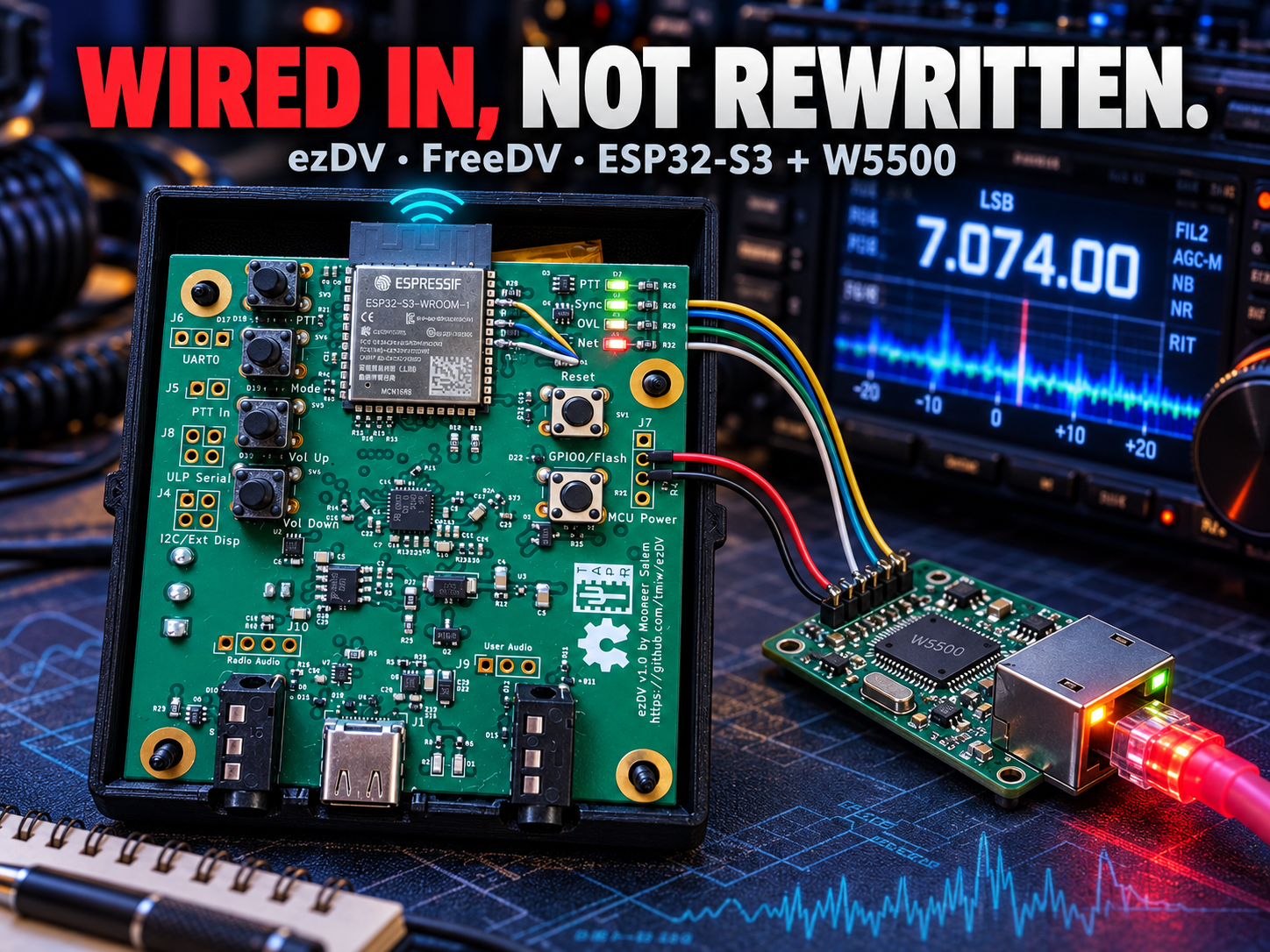
ezDV is a battery-powered handheld based on the ESP32-S3 that connects to a radio and sends and receives FreeDV digital voice without a PC. FreeDV developer Mooneer Salem (K6AQ) designed it, and TAPR sells it as a kit. It was built as a Wi-Fi-only device, but since firmware 1.1.0 (July 2024) users can solder on an external W5500 module for wired Ethernet. The W5500 runs in MACRAW mode under the ESP32-S3's lwIP stack and shares that stack with Wi-Fi. That let the author keep the radio communication code as is and add wired networking by adding an EthernetInterface class and cleaning up the parts that depended on Wi-Fi (web UI, NTP, hostname and radio settings).

Overview
FreeDV is an open-source mode that carries digitized voice in the narrow voice channel of the HF bands. Most operators run the FreeDV program on a PC and connect it to the radio through a sound card. A dedicated box, the SM1000 (STM32-based, about $200), existed but sold out during the chip shortage, and ezDV was planned as a low-cost portable replacement. It was presented in a 2022 TAPR DCC paper.
ezDV connects to a radio in two ways:
- Analog — a 3.5mm TRRS jack works with any radio. A separate jack is provided for a headset
- Network — with the FlexRadio 6000 series (the user guide also lists the 8000 series) and the Icom IC-705, ezDV connects over the network with no cable and handles both CAT control and audio
It targets amateur radio operators who work portable outdoors or want to use FreeDV without a PC. The TAPR store lists it at $80 (on sale for $55 as of October 8, 2026).
→ FreeDV ezDV page: https://freedv.org/ezdv/
→ TAPR store page: https://tapr.org/product/ezdv/
Architecture

The key to the design is that the audio path and the network path are separate. FreeDVTask handles FreeDV encoding and decoding. Audio to and from the radio goes through the TLV320 codec in analog mode, or through the network tasks for FlexRadio and IC-705. The network tasks are written with BSD sockets or the ESP-IDF components built on them (esp_http_server, esp_websocket_client), and lwIP underneath decides whether traffic leaves over Wi-Fi or Ethernet.
Technology Background
Codec2 and FreeDV Modes
Codec2 is a low-bit-rate voice codec that compresses speech to a few hundred to a few thousand bits per second. FreeDV adds forward error correction (FEC) to Codec2 frames and turns them into a radio modem waveform. The goal is to fit digital voice into the roughly 2.4 kHz bandwidth of a regular SSB voice signal.
ezDV supports three modes (per README_freedv.md in the Codec2 repository):
| Mode | Voice codec | Modem waveform | Bandwidth | FEC |
|---|---|---|---|---|
| 1600 | Codec2 1300 | 14 DQPSK + 1 pilot carrier | 1125 Hz | Golay (23,12) |
| 700D | Codec2 700C | 17-carrier OFDM/QPSK | 1000 Hz | LDPC (224,112) |
| 700E | Codec2 700C | 21-carrier OFDM/QPSK | 1500 Hz | LDPC (112,56) |
On ezDV, FreeDVTask runs the Codec2 library on the ESP32-S3. The newer RADE mode is not supported.
→ Codec2 FreeDV mode table: https://github.com/drowe67/codec2/blob/main/README_freedv.md
FlexRadio's Waveform API and VITA-49
FlexRadio SDR transceivers expose an API that lets external programs register new modulation modes, called waveforms. Control commands travel over TCP port 4992, and audio samples flow as UDP packets in VITA-49 format. VITA-49 is a packet standard for exchanging IQ and audio data from radio equipment over a network.
When ezDV connects to the radio, it registers two waveforms: FreeDV-USB (FDVU) and FreeDV-LSB (FDVL). When the operator selects FDVU on the radio, the radio sends the received modem signal over UDP, and ezDV demodulates it with FreeDV and sends the decoded voice back to the radio as VITA packets. The audio plays on the radio side (SmartSDR). FlexVitaTask groups 42 samples (5.25 ms) of 8 kHz audio into one block, converts it to 24 kHz and packs it into a single VITA packet.

→ ezDV user guide: https://tmiw.github.io/ezDV/
ESP-IDF esp_netif and Multiple Interfaces
ESP-IDF uses lwIP as its default TCP/IP stack and adds an abstraction layer on top called esp_netif. Each physical interface, such as Wi-Fi or Ethernet, becomes one esp_netif object, and applications talk through the same BSD socket API without knowing which interface carries the traffic. With multiple interfaces, each gets its own IP address, and the default route is set either by interface priority (route_prio) or directly by the application. ezDV puts Ethernet first in its interface list and calls setAsDefaultInterface() on the interface that gets an IP address (NetworkTask.cpp).
This structure let ezDV add Ethernet as "one more esp_netif." Once EthernetInterface.cpp creates the W5500 driver and attaches it to lwIP with esp_netif_attach(), the FlexRadio, Icom and web server tasks run over Ethernet as they are.
→ ESP-IDF network interface docs: https://docs.espressif.com/projects/esp-idf/en/v5.3/esp32s3/api-reference/network/esp_netif.html
Technical Highlights
- Publish/subscribe messaging between tasks — a thin wrapper over FreeRTOS called
DVTasklets tasks exchange messages instead of touching each other's data directly. The Theory of Operation document says this design reduces bugs such as race conditions - Full features without a PC — FreeDV transmit and receive, the voice keyer, over-the-air firmware updates and the web settings page all run on the device
- Spot reporting — received signals are reported automatically to FreeDV Reporter (WebSocket) and PSK Reporter (UDP 4739)
- Battery operation — 3.7V LiPo, USB-C charging, MAX17048 fuel gauge
- Open hardware — hardware under the TAPR OHL v1.0, firmware under GPL v3. The schematic PDF and 3D-printable enclosure files are in the repository
Where WIZnet Fits — A Second Interface Next to Wi-Fi
Bottom line: the W5500 in ezDV is not used as a TOE (hardware TCP/IP engine). EthernetInterface.cpp opens the W5500 only as a MAC+PHY through ESP-IDF's esp_eth_mac_new_w5500() and esp_eth_phy_new_w5500(), then attaches it to lwIP with esp_netif_attach(). ARP, IP, TCP and UDP all run in lwIP on the ESP32-S3 (sdkconfig: CONFIG_ETH_SPI_ETHERNET_W5500=y).
Because this is an experimental feature, the board has no footprint for the W5500. Users buy an off-the-shelf W5500 module and hand-solder four signal wires (SCLK, MISO, MOSI, CS) and two power wires to the ESP32-S3 module pins. The work started as PR #50 on June 11, 2024, was merged on July 29, 2024, and firmware 1.1.0 was released the same day.

| Item | Value (EthernetInterface.cpp) |
|---|---|
| SPI host · clock | SPI2_HOST · 40 MHz |
| SCLK / MISO / MOSI / CS | GPIO 42 / 41 / 40 / 39 |
| Interrupt | None (-1), 5 ms polling |
| MAC address | If the W5500 has none, a local MAC derived from the ESP32-S3 eFuse base MAC is set |
| IP | DHCP |
→ Ethernet setup manual: https://github.com/tmiw/ezDV/blob/main/manual/C-setting-up-ethernet-support.md
How one FlexRadio audio packet travels through ezDV and back to the radio
- The FlexRadio packs the received FDVU-mode audio into a VITA-49 packet and sends it to ezDV's UDP port
- The W5500 stores the frame from the RJ45 in its internal MACRAW receive buffer. The ESP-IDF driver opens socket 0 with MACRAW and the MAC filter enabled (
esp_eth_mac_w5500.c), so only frames for its own address, broadcast and multicast are accepted. The INT pin is not connected, so no signal goes to the ESP32-S3 - The ESP-IDF W5500 driver checks the receive status every 5 ms with a periodic timer and, when a frame is waiting, reads it over SPI2 and passes it to
esp_netif - lwIP unpacks the Ethernet, IP and UDP headers and places the payload in
FlexVitaTask's socket based on the destination port FlexVitaTaskstrips the VITA header, extracts the audio samples, downsamples 24 kHz to 8 kHz and writes them to an audio FIFO.FreeDVTaskreads the signal from that FIFO and demodulates it with Codec2FlexVitaTaskturns the decoded voice back into 24 kHz VITA packets and sends them to the radio's receive stream (FlexVitaTask.cpp). These packets take the same lwIP and W5500 path in reverse. On transmit, microphone audio follows the same path and leaves as a FreeDV signal
Think of the W5500 as a "second front door" cut into an existing office. The office used to have only one door, the wireless one, and the staff inside (the radio, web server and reporter tasks) never cared which door the mail came through. They took everything from the mailroom clerk (lwIP). At the new door, the W5500 picks out only the mail addressed to this office (MAC filter) and hands it to the clerk still sealed. Opening the envelopes and sorting them is still the clerk's job. So even with a second door, the staff work exactly the way they did before.
Why MACRAW fits better than TOE [Inferred] — the author did not state these reasons; they are what the code suggests
| Reason | Evidence |
|---|---|
| More than 8 sockets can be open at once | The web server alone allows max_open_sockets = 11. On top of that come the radio connection (Flex uses 2, TCP and UDP; Icom uses 3 UDP — only one radio type at a time), the FreeDV Reporter WebSocket, the PSK Reporter UDP socket and NTP. The W5500 has 8 hardware sockets, and lwIP is configured with CONFIG_LWIP_MAX_SOCKETS=16 |
| Same code as Wi-Fi | The Flex and PSK tasks call socket(AF_INET, ...) directly, while the web server and FreeDV Reporter use ESP-IDF components on top of lwIP. All of them assume lwIP, so using TOE would require separate code |
| ESP-IDF ships the driver | The W5500 driver in esp_eth runs in MACRAW mode and attaches to lwIP through esp_netif. ezDV initializes it in a few lines of configuration |
Without the W5500, the ESP32-S3 has no built-in Ethernet MAC, so wired networking would be impossible (the original ESP32 has a MAC but still needs a separate RMII PHY chip). The W5500 provides both MAC and PHY with just four SPI lines plus power. In exchange, skipping the interrupt pin adds SPI checks from 5 ms polling, and the ESP32-S3 still carries the TCP/IP processing, just as it does over Wi-Fi.
→ ESP-IDF Ethernet driver docs (ESP32-S3): https://docs.espressif.com/projects/esp-idf/en/v5.3/esp32s3/api-reference/network/esp_eth.html
→ ESP-IDF Ethernet driver docs (ESP32, internal EMAC): https://docs.espressif.com/projects/esp-idf/en/v5.3/esp32/api-reference/network/esp_eth.html
→ W5500 datasheet: https://docs.wiznet.io/Product/Chip/Ethernet/W5500/datasheet
Similar Projects on WIZnet Makers
- ESP32 HF QRP FT8 Transceiver — same amateur HF field, same ESP32-S3, and a web UI served over either Wi-Fi or Ethernet. ezDV is a device you attach to a radio, while this project builds the radio itself
→ Project link: https://maker.wiznet.io/sophia/projects/esp32-hf-qrp-ft8-transceiver/ - Ooznest Motion Control Core — the same software stack: an ESP32-S3 with ESP-IDF
esp_ethplacing the W5500 under lwIP as a MAC+PHY, with Wi-Fi built in alongside. The field, CNC, is completely different
→ Project link: https://maker.wiznet.io/Benjamin/projects/why-did-cnc-vendor-ooznest-choose-w5500-ethernet-for-its-grblhal-esp32-s3-board/ - esp32_mmdvm_hotspot — splits a DMR digital voice gateway into FreeRTOS tasks on an ESP32, much like ezDV. The W5500 is still only a proposal there. The original article notes that mixing Wi-Fi and W5500 needs a routing strategy, which touches the same issue ezDV ran into when running Wi-Fi and Ethernet together
→ Project link: https://maker.wiznet.io/TheoIm/projects/esp32-mmdvm-hotspot/
The first two projects, like ezDV, put Wi-Fi and wired Ethernet together on an ESP32-S3. esp32_mmdvm_hotspot already has LAN8720 wired Ethernet and proposes replacing it with a W5500. On ESP-IDF, placing the W5500 under lwIP lets existing socket code stay as it is [Inferred].
| Item | ezDV | ESP32 HF FT8 Transceiver | Ooznest MCC | esp32_mmdvm_hotspot |
|---|---|---|---|---|
| MCU | ESP32-S3 | ESP32-S3 | ESP32-S3 | ESP32 (variant unknown) |
| Field | FreeDV digital voice | HF radio · FT8 | CNC controller | DMR gateway |
| W5500 usage | MACRAW + lwIP (esp_eth) |
Unknown | MAC+PHY + lwIP (esp_eth) |
Proposal only |
| Wi-Fi alongside | Shared lwIP | Wi-Fi or Ethernet | Built in | Yes |
| Hardware | External module, hand-soldered | Unknown | Onboard [Inferred] (no schematic published) | Unknown |
| Status | Kit on sale, firmware 1.1.0 | Personal project | Unreleased | Personal project |
What sets ezDV apart is that it added wired Ethernet to a Wi-Fi device already on sale, with firmware and a few solder joints and no board change.
Where It Fits
- Radio rooms with unreliable Wi-Fi — connect to a FlexRadio by cable where metal racks and high-power transmitters sit nearby. VITA-49 audio rides on UDP with no retransmission, so any loss on the wireless hop turns directly into audio dropouts [Inferred]
- Events and Field Day — tie the radio and ezDV together through a single switch where the 2.4 GHz band is crowded
- Reference code for adding a W5500 to an ESP-IDF project — the single file
EthernetInterface.cpp(275 lines) covers driver creation, MAC address handling, event handling and shutdown, ready to reuse - Designing dual Wi-Fi and Ethernet devices — a real-world look at the issues that come up when two interfaces share routing on one lwIP stack (see below)
Limitations and Future Improvements
ezDV is a project in which one developer brought FreeDV off the PC, and Ethernet is an experimental feature built on top of it. A few areas could still improve.
- Hardware modification required — the board has no W5500 footprint, so the module must be soldered on, and the enclosure may need cutting to route the wires. A W5500 footprint or expansion header on a future board would open this up to regular users [Inferred]
- Routing can get tangled when Wi-Fi is also active — in PR #50 the author wrote that Wi-Fi gets an IP address much faster than Ethernet, and that existing sockets are not disconnected when Ethernet comes up. Radio connections can therefore stay on Wi-Fi, so the author recommends turning Wi-Fi off when using Ethernet
→ PR #50: https://github.com/tmiw/ezDV/pull/50 - Polling — the plan was to use GPIO38 as the interrupt, but it was set aside for future use (PR #50), and the driver now polls every 5 ms. Receive latency can grow by up to 5 ms, with SPI checks running continuously [Inferred]. No measurements have been published
- Ethernet stabilization history — four commits fixing Ethernet-related crashes and shutdown issues landed in July 2024 (commit history). Since then
EthernetInterface.cpphas not changed, and only the documentation was updated on August 31, 2024 - Development pace — per GitHub, the last push was on October 30, 2024, and seven issues and PRs remain open. The newer RADE mode is not supported
FAQ
Q. Can I use Ethernet alone, without Wi-Fi? A. Yes. PR #50 removed the Wi-Fi dependency from the radio settings and hostname. The manual recommends turning Wi-Fi off when using Ethernet.
Q. Which W5500 module should I use? A. The manual uses an off-the-shelf W5500 module (sold on Amazon) as the example. You connect four SPI lines plus 3.3V and GND, with power taken from header J7 on the board. The interrupt and reset lines are not used.
Q. Can the IC-705 connect by wire too? A. The IC-705 has no wired LAN port, so it joins the router over Wi-Fi. If ezDV is on the same router over Ethernet, the two can talk on the same network. The author marked the IC-705 connection as tested in the PR #50 checklist.
Q. How does the analog connection differ from the network connection? A. The analog connection only carries audio through the TRRS jack, so it works with any radio. The network connection works only with FlexRadio and the IC-705, but adds CAT control (frequency, mode, PTT) without any cable.
Q. How do I build the firmware?
A. Install ESP-IDF v5.3, fetch the submodules and run idf.py build in the firmware folder. Ethernet support is already enabled in the default sdkconfig.
→ ezDV on GitHub: https://github.com/tmiw/ezDV
요약
ezDV 는 무전기에 연결해 PC 없이 FreeDV 디지털 음성을 송수신하는 ESP32-S3 기반 배터리형 휴대 장치입니다. FreeDV 개발자 Mooneer Salem(K6AQ)이 만들었고, TAPR 이 키트로 판매합니다. 원래 Wi-Fi 전용으로 설계됐지만 펌웨어 1.1.0(2024-07)부터 외장 W5500 모듈을 납땜해 유선 Ethernet 을 쓸 수 있습니다. W5500 은 MACRAW 모드로 ESP32-S3 의 lwIP 아래에 붙어 Wi-Fi 와 같은 스택을 나눠 씁니다. 그래서 무전기와 통신하는 코드는 그대로 두고, EthernetInterface 클래스 추가와 Wi-Fi 에 묶여 있던 부분(웹 화면·NTP·호스트 이름·무전기 설정) 정리로 유선을 추가할 수 있었습니다.
개요
FreeDV 는 HF 무선 대역의 좁은 음성 채널에 음성을 디지털로 실어 보내는 오픈소스 모드입니다. 보통은 PC 에서 FreeDV 프로그램을 돌리고 사운드카드로 무전기와 연결합니다. 전용 기기인 SM1000(STM32 기반, 약 $200)이 있었지만 칩 부족으로 품절됐고, ezDV 는 이를 대신할 저가 휴대 장치로 기획됐습니다. 2022년 TAPR DCC 논문으로 발표됐습니다.
ezDV 는 무전기와 두 가지 방식으로 연결합니다.
- 아날로그 — 3.5mm TRRS 잭으로 어떤 무전기와도 연결합니다. 헤드셋용 잭이 따로 있습니다
- 네트워크 — FlexRadio 6000 계열(사용자 가이드는 8000 계열도 표기)과 Icom IC-705 에는 케이블 없이 네트워크로 붙어 CAT 제어와 오디오를 함께 주고받습니다
대상은 야외 휴대 운용을 하거나, PC 없이 FreeDV 를 쓰고 싶은 아마추어 무선사입니다. TAPR 판매 페이지 기준 정가는 $80 입니다(2026-10-08 할인가 $55).
→ FreeDV ezDV 소개: https://freedv.org/ezdv/
→ TAPR 판매 페이지: https://tapr.org/product/ezdv/
아키텍처
구조의 핵심은 오디오 경로와 네트워크 경로가 분리돼 있다는 점입니다. FreeDV 인코딩·디코딩은 FreeDVTask 가 맡고, 무전기와 오디오를 주고받는 쪽은 아날로그면 TLV320 코덱, FlexRadio·IC-705 면 네트워크 태스크가 맡습니다. 네트워크 태스크들은 BSD 소켓이나 그 위의 ESP-IDF 컴포넌트(esp_http_server, esp_websocket_client)로 짜여 있고, 그 아래의 lwIP 가 Wi-Fi 와 Ethernet 중 어디로 내보낼지 정합니다.
기술 배경
Codec2 와 FreeDV 모드
Codec2 는 사람 목소리를 초당 수백~수천 비트로 압축하는 저비트율 음성 코덱이고, FreeDV 는 Codec2 프레임에 오류 정정(FEC)을 붙여 무선 모뎀 파형으로 바꾸는 규격입니다. 일반 SSB 음성이 쓰는 약 2.4kHz 대역 안에 디지털 음성을 넣는 것이 목표입니다.
ezDV 가 지원하는 세 모드는 이렇습니다(Codec2 저장소 README_freedv.md 기준).
| 모드 | 음성 코덱 | 모뎀 파형 | 대역폭 | FEC |
|---|---|---|---|---|
| 1600 | Codec2 1300 | 14개 DQPSK + 파일럿 1개 | 1125 Hz | Golay (23,12) |
| 700D | Codec2 700C | 17개 반송파 OFDM/QPSK | 1000 Hz | LDPC (224,112) |
| 700E | Codec2 700C | 21개 반송파 OFDM/QPSK | 1500 Hz | LDPC (112,56) |
ezDV 에서는 FreeDVTask 가 이 Codec2 라이브러리를 ESP32-S3 에서 돌립니다. 새 모드인 RADE 는 지원하지 않습니다.
→ Codec2 FreeDV 모드 표: https://github.com/drowe67/codec2/blob/main/README_freedv.md
FlexRadio 의 웨이브폼 API 와 VITA-49
FlexRadio 의 SDR 무전기는 외부 프로그램이 새 변조 방식(웨이브폼)을 등록할 수 있는 API 를 엽니다. 제어 명령은 TCP 4992 로 오가고, 오디오 샘플은 VITA-49 형식의 UDP 패킷으로 흐릅니다. VITA-49 는 무선 장비가 IQ·오디오 데이터를 네트워크로 주고받기 위해 만든 패킷 규격입니다.
ezDV 는 무전기에 연결하면 FreeDV-USB(FDVU)·FreeDV-LSB(FDVL) 두 웨이브폼을 등록합니다. 사용자가 무전기 화면에서 FDVU 모드를 고르면, 무전기가 수신한 모뎀 신호를 UDP 로 보내고, ezDV 가 FreeDV 로 복조한 음성을 다시 VITA 패킷으로 무전기에 돌려보냅니다. 소리는 무전기 쪽(SmartSDR)에서 납니다. FlexVitaTask 는 8 kHz 음성 42샘플(5.25 ms) 을 한 블록으로 묶고, 24 kHz 로 샘플레이트를 바꿔 VITA 패킷 하나에 담습니다.
→ ezDV 사용자 가이드: https://tmiw.github.io/ezDV/
ESP-IDF 의 esp_netif 와 다중 인터페이스
ESP-IDF 는 lwIP 를 기본 TCP/IP 스택으로 쓰고, 그 위에 esp_netif 라는 추상 계층을 둡니다. Wi-Fi·Ethernet 같은 물리 인터페이스는 각자 esp_netif 객체 하나가 되고, 애플리케이션은 어느 인터페이스인지 몰라도 같은 BSD 소켓 API 로 통신합니다. 인터페이스가 여럿이면 각자 IP 를 받고, 기본 경로는 인터페이스 우선순위(route_prio)나 애플리케이션이 직접 지정해 정합니다. ezDV 는 Ethernet 을 인터페이스 목록 맨 앞에 두고, IP 를 받은 인터페이스를 setAsDefaultInterface() 로 기본 경로로 지정합니다(NetworkTask.cpp).
ezDV 는 이 구조 덕분에 Ethernet 을 「또 하나의 esp_netif」로 추가했습니다. EthernetInterface.cpp 가 W5500 드라이버를 만들어 esp_netif_attach() 로 lwIP 에 붙이면, FlexRadio·Icom·웹 서버 태스크는 그대로 Ethernet 위에서도 동작합니다.
→ ESP-IDF 네트워크 인터페이스 문서: https://docs.espressif.com/projects/esp-idf/en/v5.3/esp32s3/api-reference/network/esp_netif.html
기술 특징
- 태스크 간 발행·구독 메시지 — FreeRTOS 위에
DVTask라는 얇은 래퍼를 두고, 태스크끼리 직접 데이터를 건드리지 않고 메시지로만 주고받습니다. 경쟁 조건 같은 버그를 줄이려는 설계라고 동작 원리 문서가 설명합니다 - PC 없는 전체 기능 — FreeDV 송수신, 음성 키어, 무선 펌웨어 업데이트, 웹 설정 화면이 모두 장치 안에서 돌아갑니다
- 운용 보고 — 수신한 신호를 FreeDV Reporter(웹소켓)와 PSK Reporter(UDP 4739)에 자동으로 보고합니다
- 배터리 운용 — 3.7V LiPo, USB-C 충전, MAX17048 배터리 게이지
- 오픈 하드웨어 — 하드웨어는 TAPR OHL v1.0, 펌웨어는 GPL v3. 회로도 PDF 와 3D 프린트용 케이스 파일이 저장소에 있습니다
W5500 이 맡은 일 — Wi-Fi 옆에 꽂은 두 번째 인터페이스
결론부터: ezDV 의 W5500 은 TOE(하드웨어 TCP/IP)로 쓰이지 않습니다. EthernetInterface.cpp 는 ESP-IDF 의 esp_eth_mac_new_w5500()·esp_eth_phy_new_w5500() 로 W5500 을 MAC+PHY 로만 열고, esp_netif_attach() 로 lwIP 에 붙입니다. ARP·IP·TCP·UDP 는 모두 ESP32-S3 의 lwIP 가 처리합니다(sdkconfig: CONFIG_ETH_SPI_ETHERNET_W5500=y).
실험적 기능이라 기판에 W5500 자리는 없습니다. 사용자가 시판 W5500 모듈을 사서 ESP32-S3 모듈 핀에 선 4개(SCLK·MISO·MOSI·CS)와 전원 2개를 직접 납땜합니다. 2024-06-11 PR #50 으로 시작해 2024-07-29 병합됐고, 같은 날 펌웨어 1.1.0 이 릴리스됐습니다.
| 항목 | 값 (EthernetInterface.cpp) |
|---|---|
| SPI 호스트 · 클럭 | SPI2_HOST · 40 MHz |
| SCLK / MISO / MOSI / CS | GPIO 42 / 41 / 40 / 39 |
| 인터럽트 | 없음(-1), 5 ms 주기 폴링 |
| MAC 주소 | W5500 에 MAC 이 없으면 ESP32-S3 eFuse 기본 MAC 에서 로컬 MAC 을 파생해 설정 |
| IP | DHCP |
→ Ethernet 설정 매뉴얼: https://github.com/tmiw/ezDV/blob/main/manual/C-setting-up-ethernet-support.md
FlexRadio 의 오디오 패킷 하나가 ezDV 를 거쳐 무전기로 돌아오는 길
- FlexRadio 가 FDVU 모드의 수신 오디오를 VITA-49 패킷에 담아 ezDV 의 UDP 포트로 보냅니다
- W5500 이 RJ45 로 들어온 프레임을 내부 MACRAW 수신 버퍼에 쌓습니다. ESP-IDF 드라이버는 소켓 0 을 MACRAW 와 MAC 필터를 켠 상태로 열기 때문에(
esp_eth_mac_w5500.c), 내 주소·브로드캐스트·멀티캐스트 프레임만 받습니다. INT 핀을 연결하지 않았으므로 ESP32-S3 에 알림 신호는 가지 않습니다 - ESP-IDF 의 W5500 드라이버가 주기 타이머로 5 ms 마다 수신 상태를 확인하고, 프레임이 있으면 SPI2 로 읽어
esp_netif에 넘깁니다 - lwIP 가 Ethernet·IP·UDP 헤더를 풀고, 목적지 포트를 보고
FlexVitaTask의 소켓에 페이로드를 넣습니다 FlexVitaTask가 VITA 헤더를 벗겨 오디오 샘플을 꺼내고, 24 kHz 를 8 kHz 로 낮춰 오디오 FIFO 에 넣습니다.FreeDVTask가 이 FIFO 에서 신호를 읽어 Codec2 로 복조합니다- 복조된 음성은
FlexVitaTask가 다시 24 kHz VITA 패킷으로 만들어 무전기의 수신 스트림으로 돌려보냅니다(FlexVitaTask.cpp). 이 패킷은 같은 lwIP·W5500 경로를 거꾸로 지나 무전기로 갑니다. 송신 때는 마이크 음성이 같은 길로 FreeDV 신호가 되어 나갑니다
비유하자면 W5500 은 기존 사무실에 새로 뚫은 「두 번째 출입문」입니다. 원래 이 사무실에는 무선이라는 출입문 하나뿐이었고, 안쪽 직원들(무전기·웹 서버·리포터 태스크)은 우편물이 어느 문으로 들어오는지 신경 쓰지 않고 접수 담당(lwIP)에게서만 받았습니다. W5500 은 새 문 앞에서 이 사무실 앞으로 온 우편물만 골라(MAC 필터) 봉투째 접수 담당에게 넘깁니다. 봉투를 뜯고 누구 앞인지 나누는 일은 여전히 접수 담당이 합니다. 그래서 문을 하나 더 냈는데도 직원들의 일하는 방식은 바뀌지 않았습니다.
TOE 대신 MACRAW 가 맞는 이유 [추정] — 작성자가 직접 밝힌 이유는 아니고, 코드에서 읽히는 근거입니다
| 이유 | 근거 |
|---|---|
| 동시에 열리는 소켓이 8개를 넘을 수 있습니다 | 웹 서버 하나만 max_open_sockets = 11 입니다. 여기에 무전기 연결(Flex 는 TCP·UDP 2개, Icom 은 UDP 3개 — 둘 중 하나만 씀), FreeDV Reporter 웹소켓, PSK Reporter UDP, NTP 가 더해집니다. W5500 의 하드웨어 소켓은 8개이고, lwIP 설정은 CONFIG_LWIP_MAX_SOCKETS=16 입니다 |
| Wi-Fi 와 같은 코드를 씁니다 | Flex·PSK 태스크는 socket(AF_INET, ...) 을 직접 쓰고, 웹 서버·FreeDV Reporter 는 lwIP 위의 ESP-IDF 컴포넌트를 씁니다. 모두 lwIP 를 전제로 하므로 TOE 로 쓰려면 별도 코드가 필요합니다 |
| ESP-IDF 가 드라이버를 기본 제공합니다 | esp_eth 의 W5500 드라이버는 MACRAW 로 동작하며 esp_netif 를 거쳐 lwIP 에 붙습니다. ezDV 는 이 드라이버를 설정 몇 줄로 초기화합니다 |
만약 W5500 이 없었다면, ESP32-S3 에는 내장 Ethernet MAC 이 없으므로 유선을 붙일 수 없습니다(ESP32 원형 칩에는 MAC 이 있지만 RMII PHY 칩이 따로 필요합니다). W5500 은 SPI 선 4개와 전원만으로 MAC 과 PHY 를 한꺼번에 줍니다. 대신 인터럽트 핀을 쓰지 않아 5 ms 폴링에 따른 SPI 확인 부담이 생기고, TCP/IP 처리는 Wi-Fi 때와 마찬가지로 ESP32-S3 가 집니다.
→ ESP-IDF Ethernet 드라이버 문서(ESP32-S3): https://docs.espressif.com/projects/esp-idf/en/v5.3/esp32s3/api-reference/network/esp_eth.html
→ ESP-IDF Ethernet 드라이버 문서(ESP32, 내장 EMAC): https://docs.espressif.com/projects/esp-idf/en/v5.3/esp32/api-reference/network/esp_eth.html
→ W5500 데이터시트: https://docs.wiznet.io/Product/Chip/Ethernet/W5500/datasheet
WIZnet Makers 유사 사례
- ESP32 HF QRP FT8 Transceiver — 같은 아마추어 HF 분야, 같은 ESP32-S3 에, Wi-Fi 와 Ethernet 중 하나로 웹 화면을 여는 구조입니다. ezDV 가 무전기에 붙이는 장치라면, 이쪽은 무전기 자체를 만든 프로젝트입니다
→ 프로젝트 링크: https://maker.wiznet.io/sophia/projects/esp32-hf-qrp-ft8-transceiver/ - Ooznest Motion Control Core — ESP32-S3 에서 ESP-IDF
esp_eth로 W5500 을 MAC+PHY 로 lwIP 아래에 두고, Wi-Fi 도 함께 빌드하는 같은 소프트웨어 스택입니다. 분야는 CNC 로 전혀 다릅니다
→ 프로젝트 링크: https://maker.wiznet.io/Benjamin/projects/why-did-cnc-vendor-ooznest-choose-w5500-ethernet-for-its-grblhal-esp32-s3-board/ - esp32_mmdvm_hotspot — DMR 디지털 음성 게이트웨이를 ESP32 의 FreeRTOS 태스크로 나눈 구조가 ezDV 와 닮았습니다. W5500 은 아직 제안 단계이며, 원 글도 Wi-Fi 와 W5500 을 섞을 때는 경로 설계가 필요하다고 짚는데, ezDV 가 Wi-Fi 와 동시 사용에서 겪은 문제도 이 지점과 닿아 있습니다
→ 프로젝트 링크: https://maker.wiznet.io/TheoIm/projects/esp32-mmdvm-hotspot/
앞의 두 사례는 ezDV 처럼 ESP32-S3 에 Wi-Fi 와 유선을 함께 두는 구조이고, esp32_mmdvm_hotspot 은 이미 갖춘 LAN8720 유선을 W5500 으로 바꾸자는 제안 사례입니다. ESP-IDF 위에서는 W5500 을 lwIP 아래에 두면 기존 소켓 코드를 그대로 쓸 수 있습니다 [추정].
| 항목 | ezDV | ESP32 HF FT8 Transceiver | Ooznest MCC | esp32_mmdvm_hotspot |
|---|---|---|---|---|
| MCU | ESP32-S3 | ESP32-S3 | ESP32-S3 | ESP32(종류 미상) |
| 분야 | FreeDV 디지털 음성 | HF 무전기 · FT8 | CNC 컨트롤러 | DMR 게이트웨이 |
| W5500 사용 방식 | MACRAW + lwIP (esp_eth) |
미상 | MAC+PHY + lwIP (esp_eth) |
제안 단계 |
| Wi-Fi 병행 | 같은 lwIP 에서 병행 | Wi-Fi 또는 Ethernet | 함께 빌드 | 있음 |
| 하드웨어 | 외장 모듈 납땜 | 미상 | 온보드 [추정] (회로도 미공개) | 미상 |
| 상태 | 판매 중 키트, 펌웨어 1.1.0 | 개인 프로젝트 | 미발표 | 개인 프로젝트 |
ezDV 의 차별점은 이미 판매 중인 Wi-Fi 기기에, 기판을 바꾸지 않고 펌웨어와 납땜만으로 유선을 추가했다는 점입니다.
어디에 쓰나
- Wi-Fi 가 불안정한 무선실 — 금속 랙과 고출력 송신기가 있는 환경에서 FlexRadio 와 유선으로 연결합니다. VITA-49 오디오는 UDP 라 재전송이 없으므로, 무선 구간의 손실이 그대로 음성 끊김이 됩니다 [추정]
- 행사장·필드데이 — 2.4GHz 대역이 붐비는 곳에서 스위치 하나로 무전기와 ezDV 를 묶습니다
- ESP-IDF 프로젝트에 W5500 을 붙이는 예제 —
EthernetInterface.cpp하나(275줄)에 드라이버 생성, MAC 주소 처리, 이벤트 처리, 종료 처리가 다 들어 있어 그대로 참고할 수 있습니다 - Wi-Fi·Ethernet 겸용 장치 설계 — 같은 lwIP 위에서 두 인터페이스가 경로를 나눌 때 생기는 문제(아래)를 실제 사례로 볼 수 있습니다
한계 및 개선 방향
ezDV 는 개인 개발자가 FreeDV 를 PC 밖으로 꺼낸 프로젝트이고, Ethernet 은 그 위에 얹은 실험적 기능입니다. 다만 다음과 같은 개선 지점이 있습니다.
- 하드웨어 개조가 필요합니다 — 기판에 W5500 자리가 없어 납땜해야 하고, 선을 빼려면 케이스를 잘라야 할 수 있습니다. 다음 기판에 W5500 자리나 확장 커넥터를 두면 일반 사용자도 쓸 수 있습니다 [추정]
- Wi-Fi 와 동시에 쓰면 경로가 꼬일 수 있습니다 — 작성자는 PR #50 에서 「Wi-Fi 가 Ethernet 보다 IP 를 훨씬 빨리 받고, Ethernet 이 올라와도 이미 맺은 소켓은 끊지 않는다」고 적었습니다. 그래서 무전기 연결이 Wi-Fi 에 남을 수 있어, Ethernet 을 쓸 때는 Wi-Fi 를 끄라고 권합니다
→ PR #50: https://github.com/tmiw/ezDV/pull/50 - 폴링 방식 — 처음에는 GPIO38 을 인터럽트로 쓰려 했지만 향후 용도로 비워 두고(PR #50), 지금은 5 ms 폴링입니다. 수신 지연이 최대 5 ms 늘고 SPI 확인이 계속 일어날 수 있습니다 [추정]. 실측 수치는 공개되지 않았습니다
- Ethernet 안정화 이력 — 2024년 7월 한 달 동안 Ethernet 관련 충돌·종료 문제 커밋 4건이 들어갔습니다(커밋 이력). 이후
EthernetInterface.cpp코드 변경은 없고, 2024-08-31 에 문서만 고쳐졌습니다 - 개발 속도 — GitHub 기준 마지막 push 가 2024-10-30 이고, 열린 이슈·PR 이 7개 남아 있습니다. 새 RADE 모드도 지원하지 않습니다
FAQ
Q. Wi-Fi 없이 Ethernet 만으로 쓸 수 있나요? A. 됩니다. PR #50 에서 무전기 설정과 호스트 이름이 Wi-Fi 에 의존하지 않도록 정리됐습니다. 매뉴얼은 Ethernet 을 쓸 때 Wi-Fi 를 꺼 두라고 권합니다.
Q. 어떤 W5500 모듈을 쓰나요? A. 매뉴얼은 시판 W5500 모듈(아마존 판매품)을 예로 듭니다. SPI 4선과 3.3V·GND 를 연결하며, 전원은 기판의 J7 에서 가져옵니다. 인터럽트·리셋 선은 쓰지 않습니다.
Q. IC-705 도 유선으로 연결되나요? A. IC-705 자체는 유선 LAN 포트가 없어 Wi-Fi 로 공유기에 붙습니다. ezDV 가 Ethernet 으로 같은 공유기에 연결돼 있으면 같은 네트워크 안에서 통신할 수 있습니다. 작성자는 PR #50 테스트 목록에서 IC-705 연결을 확인 완료로 표시했습니다.
Q. 아날로그 연결과 네트워크 연결은 무엇이 다른가요? A. 아날로그는 TRRS 잭으로 오디오만 주고받으므로 무전기를 가리지 않습니다. 네트워크 연결은 FlexRadio·IC-705 에서만 되지만, 케이블 없이 CAT 제어(주파수·모드·PTT)까지 함께 됩니다.
Q. 펌웨어는 어떻게 빌드하나요?
A. ESP-IDF v5.3 을 설치하고 서브모듈을 받은 뒤 firmware 폴더에서 idf.py build 를 실행합니다. Ethernet 지원은 기본 sdkconfig 에 이미 켜져 있습니다.
→ ezDV GitHub: https://github.com/tmiw/ezDV

