Freshtrack
Freshtrack
0
Components
Hardware components
WIZnet - W5500
x 1

Project description
FreshTrack은 어떤 회사인가?
FreshTrack Systems Pty Ltd는 호주 신선 농산물 산업을 위한 공급망 관리 및 추적성 솔루션을 개발하는 회사입니다.
주요 고객은 농산물의 생산, 선별, 포장, 유통에 참여하는 Grower, Packer, Marketer, Buyer이며, FreshTrack은 이 과정에서 발생하는 데이터를 하나의 시스템으로 연결합니다.
주요 사업 영역은 다음과 같습니다.
- 농산물 생산 및 공급망 추적
- 선별·포장 공정 관리
- 바코드 및 라벨 발행
- RFID 및 NFC 기반 작업자·제품 식별
- EDI를 통한 거래 데이터 연동
- 저울, 스캐너, 프린터 등 현장 장비 통합
- FreshTrack Cloud 기반 데이터 관리
FreshTrack의 특징은 클라우드 소프트웨어만 제공하지 않는다는 점입니다. 자체 PCB와 MCU 펌웨어, CAN·RS232·Ethernet 인터페이스, Windows 기반 장치 관리 프로그램까지 개발해 기존 산업 장비를 FreshTrack Cloud와 연결합니다.
회사의 본사는 Perth, Western Australia에 있으며, 주소는 Level 28, 140 St Georges Terrace, Perth WA 6000입니다. 주요 농산물 생산 지역인 Victoria의 Mildura 지역에도 팀을 두고 있습니다.
FreshTrack의 핵심 목적은 농산물이 수확된 이후 선별, 포장, 라벨링, 팔레트 구성, 출하까지 거치는 과정을 데이터로 연결해 제품이 언제, 어디에서, 어떤 공정을 거쳤는지 추적할 수 있도록 하는 것입니다.
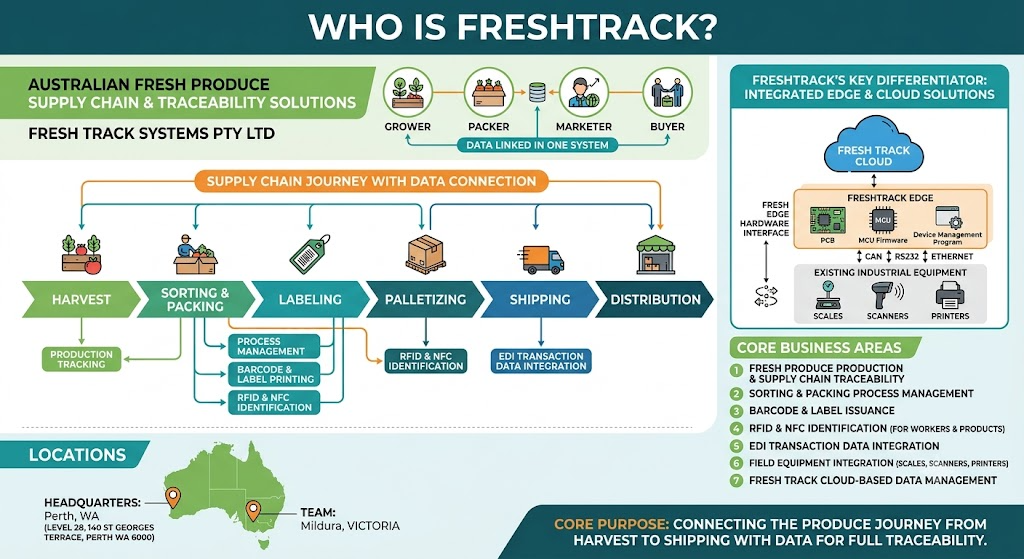
이미지 출처 : AI 생성
FreshTrack Hardware Stack은 무엇을 하는가?
FreshTrack은 기존 선별기나 포장 설비에서 발생하는 물리적인 신호를 클라우드 데이터로 변환하기 위해 여러 종류의 자체 PCB를 사용합니다.
전체 구조는 다음과 같습니다.
센서 · 버튼 · 저울 · 스캐너 · NFC 장치
↓
FreshTrack Controller PCB
↓
Ethernet · CAN · RS232
↓
CloudLink Windows Service
↓
HTTPS
↓
FreshTrack Cloud
현장 PCB가 모든 클라우드 기능을 직접 처리하는 구조는 아닙니다.
MCU 기반 장치는 센서 입력과 장비 통신을 담당하고, 로컬 네트워크의 CloudLink가 여러 장비의 데이터를 모아 FreshTrack Cloud로 전송합니다.
이렇게 현장 제어와 클라우드 통신을 분리하면 작은 MCU에서 HTTPS, 인증, 클라우드 API와 같은 무거운 기능을 처리할 필요가 없습니다.
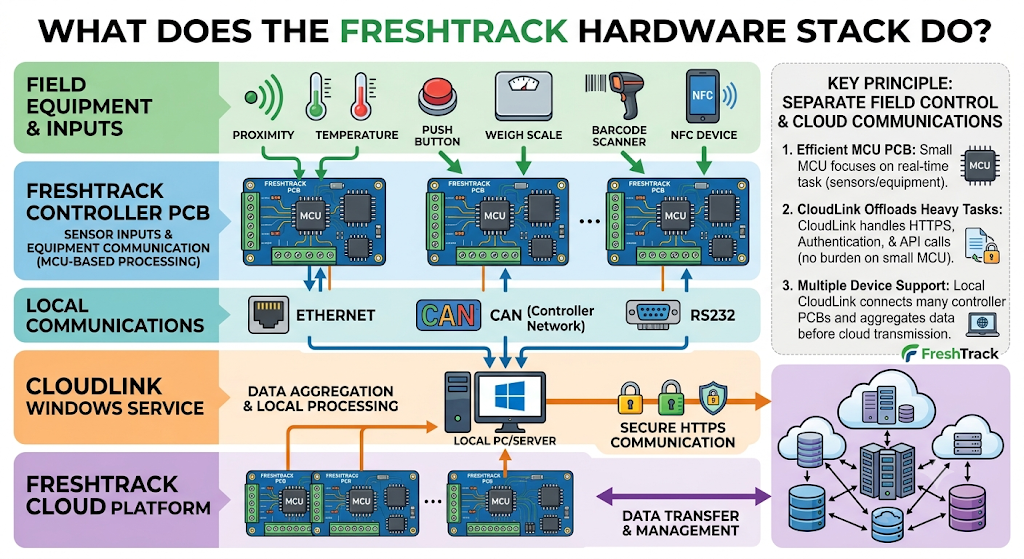
이미지 출처 : AI 생성
FreshTrack의 주요 하드웨어
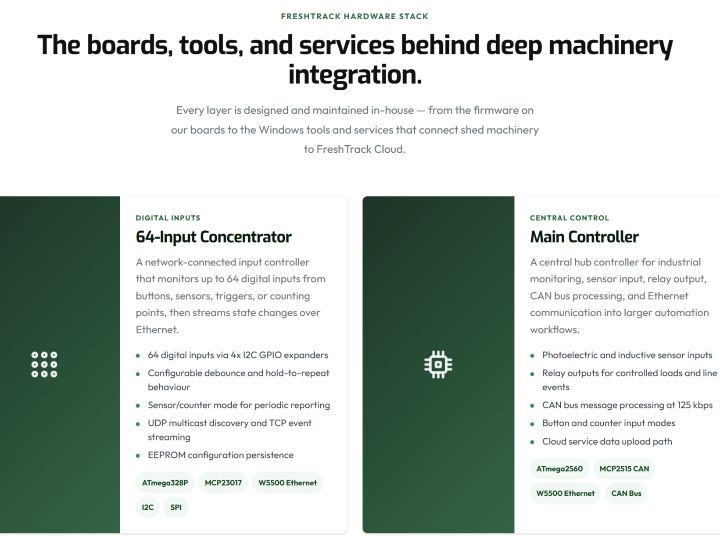
64-Input Concentrator
64-Input Concentrator는 선별·포장 설비에서 발생하는 다수의 디지털 신호를 한 장치에서 수집하기 위한 네트워크 입력 컨트롤러입니다.
주요 구성은 다음과 같습니다.
- ATmega328P
- MCP23017 GPIO Expander × 4
- WIZnet W5500
- 최대 64개 디지털 입력
- EEPROM 기반 설정 저장
- UDP multicast 장치 검색
- TCP 기반 이벤트 전달
MCP23017 네 개를 I2C로 연결해 최대 64개의 입력을 확장하고, 버튼이나 센서의 상태가 변경되면 이벤트를 생성합니다.
Debounce, hold-to-repeat, sensor/counter mode 같은 기능도 MCU에서 처리합니다.
생성된 이벤트는 W5500을 통해 Ethernet 네트워크로 전달됩니다.
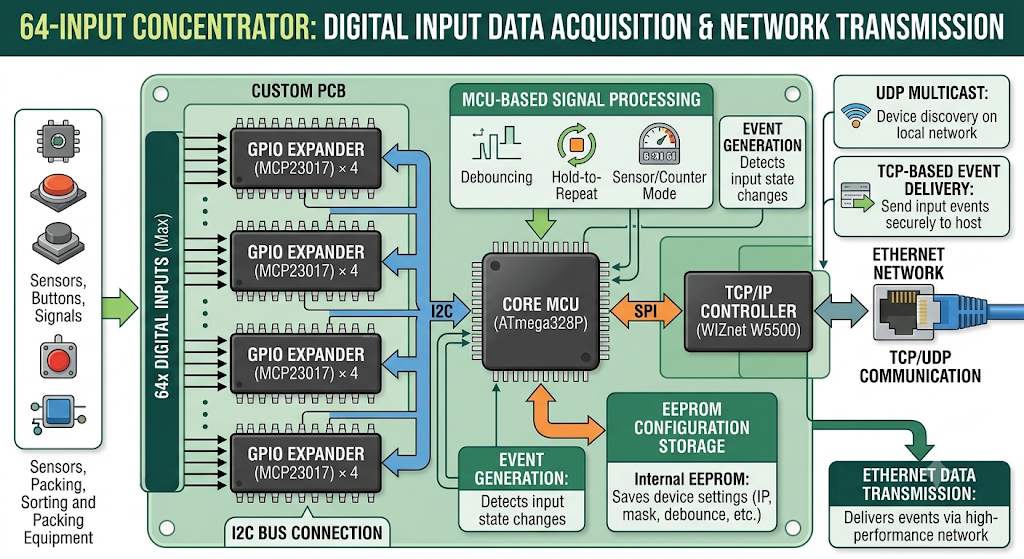
이미지 출처 : AI 생성
Main Controller
Main Controller는 단순한 입력 수집기보다 한 단계 더 복잡한 현장 자동화 컨트롤러입니다.
주요 구성은 다음과 같습니다.
- ATmega2560
- WIZnet W5500
- MCP2515 CAN Controller
- 광전 및 근접 센서 입력
- Relay 출력
- 버튼 및 카운터 입력
- 125 kbps CAN 통신
- Ethernet 연결
Main Controller는 센서 입력을 읽는 것뿐 아니라 Relay를 제어하고 CAN 장치와 통신합니다.
W5500은 여기서 네트워크 인터페이스를 담당하여 컨트롤러에서 생성된 데이터를 로컬 Ethernet 네트워크로 전달합니다.
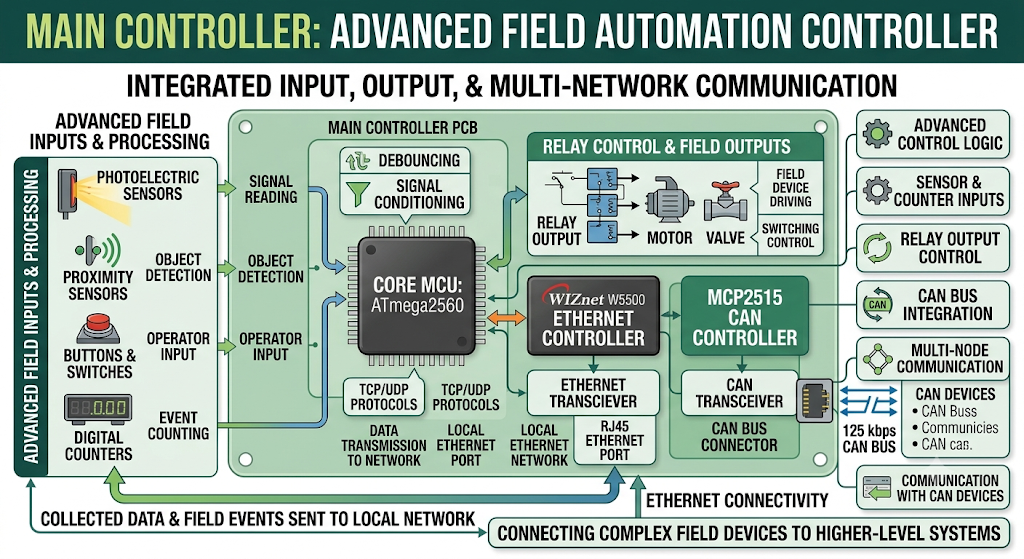
이미지 출처 : AI 생성
NFC Emulator
NFC Emulator는 산업용 저울의 데이터를 모바일 장치에서 NFC로 읽을 수 있도록 변환합니다.
구성은 다음과 같습니다.
ATmega1284P
ST25DV NFC Tag
RS232 계열 시리얼 통신
Watchdog
Stale-data 감지
MCU가 저울의 값을 읽어 NFC Tag의 데이터를 갱신하고, 작업자는 모바일 장치로 현재 중량 정보를 확인할 수 있습니다.
NFC Reader
NFC Reader는 작업자 또는 작업 위치를 식별하는 데 사용됩니다.
주요 구성은 다음과 같습니다.
ATmega328P
PN5180 NFC Reader
MCP2515 CAN Controller
ISO15693 UID 읽기
여러 작업대의 NFC Reader를 CAN Bus로 연결할 수 있으며, NFC 태그를 읽은 결과를 라벨 발행이나 작업 기록과 연동할 수 있습니다.
PCB Configurator와 CloudLink
FreshTrack은 현장 PCB를 관리하기 위한 Windows 소프트웨어도 자체 개발했습니다.
PCB Configurator는 다음 기능을 담당합니다.
UDP multicast 기반 장치 검색
MAC/IP 설정
장치 이름 및 입력 설정
펌웨어 업데이트
실시간 이벤트 모니터링
CloudLink는 Windows Service 형태로 동작하며 FreshTrack의 현장 장비와 클라우드 사이의 Gateway 역할을 합니다.
CloudLink는 다음 인터페이스를 처리합니다.
FreshTrack PCB와 TCP/IP 통신
기존 산업 장비와 RS232 통신
스캐너 및 프린터 연결
FreshTrack Cloud와 HTTPS 통신
WIZnet W5500은 어디에 사용되는가?
FreshTrack이 공개한 하드웨어 중 W5500 사용이 확인되는 장치는 두 가지입니다.
1. 64-Input Concentrator
구조는 다음과 같습니다.
Digital Inputs
→ MCP23017 × 4
→ ATmega328P
→ SPI
→ W5500
→ Ethernet
→ CloudLink
ATmega328P는 입력 감지와 이벤트 처리에 집중하고, W5500은 Ethernet 및 TCP/UDP 통신을 담당합니다.
특히 ATmega328P는 SRAM이 2 KB에 불과합니다. 반면 W5500은 자체 TCP/IP 엔진과 총 32 KB의 송수신 버퍼를 갖고 있기 때문에 MCU가 전체 TCP/IP 소프트웨어 스택과 패킷 버퍼를 직접 관리할 필요를 줄일 수 있습니다.
FreshTrack이 W5500의 선정 이유를 공식적으로 설명한 자료는 공개되어 있지 않습니다. 하지만 제한된 메모리를 가진 8-bit MCU에서 UDP discovery와 TCP event streaming을 함께 운용한다는 점에서 W5500의 하드웨어 TCP/IP 구조는 이 시스템과 잘 맞습니다.
2. Main Controller
Main Controller의 데이터 경로는 다음과 같습니다.
Sensors / Relay / CAN
→ ATmega2560
→ SPI
→ W5500
→ Ethernet
→ CloudLink
ATmega2560은 센서 처리, Relay 제어, CAN 통신 등 현장 제어 기능을 담당하고 W5500은 네트워크 통신을 분리해서 처리합니다.
이 구조에서는 MCU 애플리케이션이 네트워크 프로토콜보다 I/O와 장비 제어 로직에 집중할 수 있습니다.
W5500의 역할을 어떻게 봐야 하는가?
FreshTrack에서 W5500은 클라우드 통신 모듈 자체가 아니라 현장 장비를 로컬 IP 네트워크에 연결하는 Ethernet Controller입니다.
전체 경로는 다음과 같습니다.
ATmega MCU
→ W5500
→ Local Ethernet
→ CloudLink
→ HTTPS
→ FreshTrack Cloud
역할이 명확하게 분리되어 있습니다.
W5500
Ethernet 연결
TCP/UDP 통신
로컬 네트워크 데이터 전달
CloudLink
여러 장비 연결 관리
스캐너 및 프린터 연동
HTTPS
클라우드 API 통신
FreshTrack Cloud
추적성 데이터 저장
생산·포장·출하 데이터 관리
상위 비즈니스 시스템 제공
8-bit MCU에 모든 기능을 넣는 대신 각 계층이 필요한 역할만 처리하도록 구성한 점이 FreshTrack 하드웨어 구조의 핵심입니다.
구현 참고사항
FreshTrack은 Hardware 페이지에서 사용된 MCU, 주변 장치와 통신 방식을 공개하고 있지만 펌웨어 소스 코드나 회로도는 공개하지 않았습니다.
따라서 다음 항목은 확인할 수 없습니다.
실제 W5500 SPI 핀 배치
SPI 동작 속도
W5500 socket 번호
TX/RX buffer 할당
TCP 포트 번호
W5500 초기화 코드
재접속 및 오류 처리 로직
따라서 FreshTrack의 실제 코드라고 가정한 예제 코드를 작성하는 것은 적절하지 않습니다.
공개 자료에서 확인되는 W5500 관련 구현은 다음 수준입니다.
64-Input Concentrator
ATmega328P가 입력 및 이벤트 로직 처리
W5500으로 Ethernet 연결
UDP multicast로 장치 검색
TCP로 이벤트 전송
Main Controller
ATmega2560이 센서·Relay·CAN 처리
W5500으로 Ethernet 연결
로컬 네트워크를 통해 상위 시스템과 통신
W5500 자체는 SPI 인터페이스와 8개의 하드웨어 Socket, 총 32 KB의 내부 송수신 메모리를 제공합니다.
실무 팁 / 주의사항
SPI 속도는 PCB 조건에 맞춰 결정해야 합니다. W5500은 고속 SPI를 지원하지만 실제 안정적인 속도는 배선 길이와 신호 품질에 따라 달라집니다.
UDP와 TCP의 역할을 분리해야 합니다. FreshTrack처럼 UDP는 장치 검색, TCP는 지속적인 이벤트 전달에 사용할 경우 각각의 Socket 상태를 독립적으로 관리해야 합니다.
Socket과 TX/RX Buffer를 미리 설계해야 합니다. 필요한 동시 연결 수에 맞춰 W5500의 8개 Socket과 내부 메모리를 배분해야 합니다.
Ethernet 연결 복구를 고려해야 합니다. 케이블 탈착이나 Switch 재부팅 이후 PHY Link와 TCP Session을 자동으로 복구할 수 있어야 합니다.
산업 현장에서는 EMI와 ESD를 함께 고려해야 합니다. Relay, Motor, 긴 센서 배선 주변에서는 전원, 접지, RJ45 Magnetics와 Ethernet 보호 회로가 중요합니다.
클라우드 기능과 현장 제어를 분리하는 것이 좋습니다. FreshTrack처럼 MCU는 장비 제어에 집중하고 별도의 Gateway에서 HTTPS와 클라우드 API를 처리하면 MCU의 메모리 요구량과 펌웨어 복잡도를 낮출 수 있습니다.
FAQ
Q1. FreshTrack은 왜 W5500을 사용하나요?
FreshTrack이 W5500 선정 이유를 직접 공개하지는 않았습니다. 다만 64-Input Concentrator는 SRAM이 2 KB인 ATmega328P에서 UDP 장치 검색과 TCP 이벤트 전달을 처리해야 합니다. W5500이 TCP/IP 처리와 패킷 버퍼를 별도로 제공하기 때문에 제한된 MCU 자원에서 Ethernet 통신을 구현하기 적합한 구조입니다.
Q2. ATmega328P와 ATmega2560은 W5500에 어떻게 연결되나요?
W5500은 MCU와 SPI로 통신합니다. 일반적으로 SCLK, MOSI, MISO, Chip Select가 사용되며 MCU가 SPI를 통해 W5500의 Register와 TX/RX Buffer에 접근합니다. FreshTrack PCB의 실제 GPIO 번호와 SPI 속도는 공개되어 있지 않습니다.
Q3. W5500은 FreshTrack에서 구체적으로 어떤 역할을 하나요?
64-Input Concentrator에서는 최대 64개 입력에서 발생한 이벤트를 Ethernet으로 전달합니다. Main Controller에서는 센서, Relay, CAN과 관련된 데이터를 로컬 네트워크로 전달합니다. 두 장치 모두 W5500을 통해 CloudLink와 연결됩니다.
Q4. 초보자도 비슷한 장치를 만들 수 있나요?
W5500을 MCU에 연결해 기본 TCP/UDP 통신을 구현하는 것은 SPI와 IP 네트워크 기초를 알고 있다면 접근할 수 있습니다. 하지만 FreshTrack과 같은 전체 시스템을 구현하려면 GPIO 확장, CAN, RS232, Ethernet, Windows Service 및 클라우드 연동까지 다뤄야 하므로 전체 프로젝트 기준으로는 중급 이상의 임베디드 개발 경험이 필요합니다.
Q5. FreshTrack 구조에서 가장 중요한 네트워크 설계 포인트는 무엇인가요?
현장 MCU가 직접 모든 클라우드 기능을 처리하지 않는다는 점입니다. W5500은 현장 장치를 안정적인 로컬 Ethernet 노드로 만들고, HTTPS와 클라우드 API는 CloudLink가 담당합니다. 이 계층 분리는 작은 MCU의 메모리와 펌웨어 복잡도를 줄이면서 기존 산업 장비를 클라우드 시스템에 연결하기 쉽게 만듭니다.
What Kind of Company Is FreshTrack?
FreshTrack Systems Pty Ltd is an Australian company that develops supply chain management and traceability solutions for the fresh produce industry.
Its main customers include Growers, Packers, Marketers, and Buyers involved in the production, sorting, packing, and distribution of agricultural products. FreshTrack connects the data generated throughout these processes into a unified system.
Its main business areas include:
Agricultural production and supply chain traceability
Sorting and packing process management
Barcode and label generation
RFID- and NFC-based worker and product identification
Transaction data integration through EDI
Integration of field equipment such as scales, scanners, and printers
Data management through FreshTrack Cloud
One of FreshTrack’s key characteristics is that it does not provide cloud software alone. The company also develops its own PCBs, MCU firmware, CAN, RS232, and Ethernet interfaces, as well as Windows-based device management software to connect existing industrial equipment to FreshTrack Cloud.
The company is headquartered in Perth, Western Australia, at Level 28, 140 St Georges Terrace, Perth WA 6000. It also has a team in the Mildura region of Victoria, one of Australia’s major agricultural production areas.
FreshTrack’s core objective is to connect the processes that agricultural products go through after harvest—including sorting, packing, labeling, palletization, and shipping—so that users can trace when and where a product was handled and which processes it passed through.
Image source: AI-generated
What Does the FreshTrack Hardware Stack Do?
FreshTrack uses several types of in-house PCBs to convert physical signals generated by existing sorting and packing equipment into cloud data.
The overall architecture is as follows:
Sensors · Buttons · Scales · Scanners · NFC Devices
↓
FreshTrack Controller PCB
↓
Ethernet · CAN · RS232
↓
CloudLink Windows Service
↓
HTTPS
↓
FreshTrack Cloud
The field PCBs do not directly handle every cloud function.
MCU-based devices are responsible for sensor inputs and equipment communication, while CloudLink on the local network collects data from multiple devices and sends it to FreshTrack Cloud.
By separating field control from cloud communication, small MCUs do not need to handle resource-intensive functions such as HTTPS, authentication, and cloud APIs.
Image source: AI-generated
FreshTrack’s Main Hardware
64-Input Concentrator
The 64-Input Concentrator is a networked input controller designed to collect a large number of digital signals from sorting and packing equipment in a single device.
Its main components and functions include:
ATmega328P
MCP23017 GPIO Expander × 4
WIZnet W5500
Up to 64 digital inputs
EEPROM-based configuration storage
UDP multicast device discovery
TCP-based event delivery
Four MCP23017 devices are connected over I2C to expand the system to as many as 64 inputs. When the state of a button or sensor changes, the controller generates an event.
Functions such as debounce, hold-to-repeat, and sensor/counter modes are also handled by the MCU.
The generated events are transmitted over the Ethernet network through the W5500.
Image source: AI-generated
Main Controller
The Main Controller is a more advanced field automation controller than a simple input collection device.
Its main components and functions include:
ATmega2560
WIZnet W5500
MCP2515 CAN Controller
Photoelectric and proximity sensor inputs
Relay outputs
Button and counter inputs
125 kbps CAN communication
Ethernet connectivity
The Main Controller not only reads sensor inputs but also controls relays and communicates with CAN devices.
The W5500 serves as the network interface, transmitting data generated by the controller over the local Ethernet network.
Image source: AI-generated
NFC Emulator
The NFC Emulator converts data from industrial scales so that it can be read by mobile devices over NFC.
Its components include:
ATmega1284P
ST25DV NFC Tag
RS232-class serial communication
Watchdog
Stale-data detection
The MCU reads values from the scale and updates the NFC tag data, allowing workers to check the current weight using a mobile device.
NFC Reader
The NFC Reader is used to identify workers or work locations.
Its main components include:
ATmega328P
PN5180 NFC Reader
MCP2515 CAN Controller
ISO15693 UID reading
Multiple NFC Readers at different workstations can be connected through a CAN bus, and NFC tag scan results can be linked to label printing or work records.
PCB Configurator and CloudLink
FreshTrack has also developed its own Windows software for managing field PCBs.
The PCB Configurator is responsible for:
UDP multicast-based device discovery
MAC/IP configuration
Device name and input configuration
Firmware updates
Real-time event monitoring
CloudLink runs as a Windows Service and acts as a gateway between FreshTrack’s field equipment and the cloud.
CloudLink handles the following interfaces:
TCP/IP communication with FreshTrack PCBs
RS232 communication with existing industrial equipment
Scanner and printer connections
HTTPS communication with FreshTrack Cloud
Where Is the WIZnet W5500 Used?
Among the hardware publicly described by FreshTrack, two devices are confirmed to use the W5500.
1. 64-Input Concentrator
The architecture is as follows:
Digital Inputs
→ MCP23017 × 4
→ ATmega328P
→ SPI
→ W5500
→ Ethernet
→ CloudLink
The ATmega328P focuses on input detection and event processing, while the W5500 handles Ethernet and TCP/UDP communication.
The ATmega328P has only 2 KB of SRAM. In contrast, the W5500 includes its own TCP/IP engine and a total of 32 KB of transmit and receive buffer memory. This reduces the need for the MCU to directly manage a complete software TCP/IP stack and packet buffers.
FreshTrack has not publicly explained why it selected the W5500. However, the W5500’s hardware TCP/IP architecture is well suited to this system because it allows an 8-bit MCU with limited memory to support both UDP discovery and TCP event streaming.
2. Main Controller
The Main Controller’s data path is as follows:
Sensors / Relay / CAN
→ ATmega2560
→ SPI
→ W5500
→ Ethernet
→ CloudLink
The ATmega2560 handles field control functions such as sensor processing, relay control, and CAN communication, while the W5500 handles network communication separately.
This architecture allows the MCU application to focus on I/O and equipment control logic rather than network protocol processing.
How Should the Role of the W5500 Be Understood?
In the FreshTrack system, the W5500 is not the cloud communication module itself. It is the Ethernet controller that connects field equipment to the local IP network.
The complete communication path is:
ATmega MCU
→ W5500
→ Local Ethernet
→ CloudLink
→ HTTPS
→ FreshTrack Cloud
The responsibilities are clearly separated.
W5500
Ethernet connectivity
TCP/UDP communication
Local network data transfer
CloudLink
Management of multiple device connections
Scanner and printer integration
HTTPS
Cloud API communication
FreshTrack Cloud
Traceability data storage
Production, packing, and shipping data management
Higher-level business system services
Rather than placing every function on an 8-bit MCU, the FreshTrack hardware architecture assigns each layer only the responsibilities it needs to handle.
Implementation Notes
FreshTrack discloses the MCUs, peripheral devices, and communication methods used on its Hardware page, but it does not publish the firmware source code or schematics.
Therefore, the following details cannot be verified:
Actual W5500 SPI pin assignments
SPI operating frequency
W5500 socket numbers
TX/RX buffer allocation
TCP port numbers
W5500 initialization code
Reconnection and error-handling logic
For this reason, it would not be appropriate to provide example code and present it as FreshTrack’s actual implementation.
The publicly verifiable W5500 implementation details are limited to the following.
64-Input Concentrator
ATmega328P handles input and event logic
W5500 provides Ethernet connectivity
UDP multicast is used for device discovery
TCP is used for event transmission
Main Controller
ATmega2560 handles sensors, relays, and CAN communication
W5500 provides Ethernet connectivity
Communication with higher-level systems takes place over the local network
The W5500 itself provides an SPI interface, eight hardware sockets, and a total of 32 KB of internal transmit and receive memory.
Practical Tips / Pitfalls
Select the SPI speed according to PCB conditions. The W5500 supports high-speed SPI, but the actual stable operating frequency depends on factors such as trace length and signal integrity.
Separate the roles of UDP and TCP. In a design like FreshTrack’s, where UDP is used for device discovery and TCP is used for continuous event delivery, the state of each socket should be managed independently.
Plan socket and TX/RX buffer allocation in advance. The W5500’s eight sockets and internal memory should be allocated according to the number of simultaneous connections required.
Design for Ethernet connection recovery. The system should be able to automatically recover the PHY link and TCP session after events such as cable disconnection or network switch reboot.
Consider both EMI and ESD in industrial environments. Around relays, motors, and long sensor cables, power design, grounding, RJ45 magnetics, and Ethernet protection circuitry become important.
Separate cloud functions from field control. As in the FreshTrack architecture, allowing the MCU to focus on equipment control while a separate gateway handles HTTPS and cloud APIs can reduce MCU memory requirements and firmware complexity.
FAQ
Q1. Why does FreshTrack use the W5500?
FreshTrack has not publicly stated the specific reason for selecting the W5500. However, the 64-Input Concentrator must handle UDP device discovery and TCP event delivery on an ATmega328P with only 2 KB of SRAM. Because the W5500 handles TCP/IP processing and packet buffering separately, it is a suitable architecture for implementing Ethernet communication with limited MCU resources.
Q2. How are the ATmega328P and ATmega2560 connected to the W5500?
The W5500 communicates with the MCU over SPI. SCLK, MOSI, MISO, and Chip Select are typically used, and the MCU accesses the W5500 registers and TX/RX buffers through SPI. FreshTrack has not published the actual GPIO assignments or SPI operating frequency used on its PCBs.
Q3. What exactly does the W5500 do in the FreshTrack system?
In the 64-Input Concentrator, it transmits events generated by up to 64 inputs over Ethernet. In the Main Controller, it transfers sensor, relay, and CAN-related data over the local network. Both devices connect to CloudLink through the W5500.
Q4. Can beginners build a similar device?
Implementing basic TCP/UDP communication by connecting a W5500 to an MCU is approachable for developers who understand SPI and basic IP networking. However, recreating a complete system like FreshTrack requires knowledge of GPIO expansion, CAN, RS232, Ethernet, Windows Services, and cloud integration, making the overall project more appropriate for developers with intermediate or higher embedded systems experience.
Q5. What is the most important network design principle in the FreshTrack architecture?
The key point is that the field MCU does not directly handle every cloud function. The W5500 turns the field device into a local Ethernet node, while CloudLink handles HTTPS and cloud API communication. This layered architecture reduces the memory and firmware complexity required on small MCUs while making it easier to connect existing industrial equipment to a cloud system.

