micro_ros_arduino
ROS 2 (Robot Operating System 2) is the de facto standard middleware for industrial robotics development
0
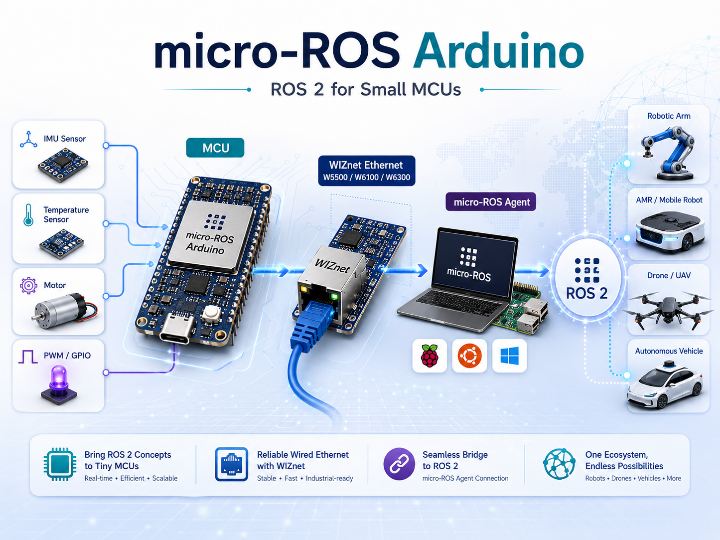
Project description
Project Overview
ROS 2 (Robot Operating System 2) is the de facto standard middleware for industrial robotics development — autonomous vehicles, drones, collaborative robots, and more. However, running the full ROS 2 stack requires a Linux OS and hundreds of megabytes of RAM, making it completely impractical for small microcontrollers like the STM32, ESP32, or RP2040.
micro-ROS was created to solve exactly this problem. It is a lightweight middleware that lets you use ROS 2's core concepts — Publisher, Subscriber, Service, and Action — even in bare-metal environments with only tens of kilobytes of RAM. micro_ros_arduino is the official repository that packages micro-ROS as a precompiled library, ready to use directly from the Arduino IDE or CLI.
Core Architecture
Understanding micro-ROS requires knowing three layers:
[ ROS 2 Host PC / Raspberry Pi ]
        │
   micro-ROS Agent (Docker)       ← "Proxy" in the ROS 2 world
        │  (Serial / UDP / Ethernet)
[ MCU — Arduino Sketch ]
   micro-ROS Client               ← Micro XRCE-DDS protocol
        │
   Sensors (I2C/SPI/ADC)  ←→  Actuators (PWM/GPIO)
What is the micro-ROS Agent?
An MCU cannot run the full DDS (Data Distribution Service) stack. Instead, it connects to the Agent using eProsima's Micro XRCE-DDS client-server protocol. The Agent then creates the actual DDS entities on its side, acting as a proxy that registers the MCU as a real participant in the ROS 2 network.
- If the Agent is not running, the MCU node simply does not exist in the ROS 2 world
- The Agent is typically run as a Docker container on a PC or Raspberry Pi
Sensor / Actuator Communication
micro-ROS does not define any protocol for sensor or actuator communication — that remains plain embedded firmware. Inside the Arduino sketch:
- Reading sensors: In a timer callback, read values via I2C/SPI/ADC → pack into a ROS 2 message like
sensor_msgs::Imu→ callrcl_publish() - Controlling actuators: A subscriber callback receives
geometry_msgs::Twist→ directly drive a motor via PWM/GPIO inside that callback
"MCU ↔ Agent communication" and "MCU ↔ hardware I/O" are completely independent paths. DDS and XRCE are not involved in hardware I/O at all.
Supported Boards & Transports
| Transport | Function | Notes |
|---|---|---|
| Serial | set_microros_transports() | USB Serial — the current default path |
| WiFi UDP | set_microros_wifi_transports() | Boards with built-in WiFi, e.g. ESP32 |
| Native Ethernet | set_microros_native_ethernet_transports() | Portenta H7 (built-in lwIP), Teensy 4.1 (NativeEthernet) |
| Custom Transport | rmw_uros_set_custom_transport() | Implement just 4 callbacks (open/close/write/read) to connect any communication medium |
Officially Supported Boards
These boards are directly tested and maintained by the micro-ROS team.
| Board | Architecture | Min. Version | Memory Config | Status |
|---|---|---|---|---|
| Arduino Portenta H7 M7 Core | STM32H747 (Cortex-M7) | v1.8.5 | colcon.meta | ✅ Supported |
| Arduino Nano RP2040 Connect | RP2040 | v1.8.5 | colcon_verylowmem.meta | ✅ Supported |
| OpenCR | STM32F746 (Cortex-M7) | v1.4.16 | colcon.meta | ✅ Supported |
| Teensy 4.1 | iMXRT1062 (Cortex-M7) | v1.8.5 | colcon.meta | ✅ Supported |
| Teensy 3.2 / 3.1 | MK20DX256 (Cortex-M4) | v1.8.5 | colcon_lowmem.meta | ✅ Supported |
| Teensy 3.6 | MK66FX1M0 (Cortex-M4) | v1.8.5 | colcon_lowmem.meta | ✅ Supported |
| ESP32 Dev Module | ESP32 (Xtensa LX6) | v1.8.5 | colcon.meta | ✅ Supported |
| Teensy 4.0 | iMXRT1062 (Cortex-M7) | v1.8.5 | colcon.meta | ⚠️ Not tested |
| Teensy 3.5 | MK64FX512 (Cortex-M4) | v1.8.5 | colcon_lowmem.meta | ⚠️ Not tested |
Community-Contributed Boards
These boards were validated by external contributors and added via pull requests. They are outside the micro-ROS team's official support scope but are functional in practice.
| Board | Architecture | Notes | .meta |
|---|---|---|---|
| Arduino Due | SAM3X8E (Cortex-M3) | Requires SAM patch | colcon_verylowmem.meta |
| Arduino Zero | SAMD21 (Cortex-M0+) | Requires SAM patch | colcon_verylowmem.meta |
| Arduino Giga R1 | STM32H747 (Cortex-M7) | — | colcon.meta |
| Arduino UNO R4 WiFi | RA4M1 (Cortex-M4) | — | colcon.meta |
| Arduino UNO R4 Minima | RA4M1 (Cortex-M4) | — | colcon.meta |
| Arduino Opta | STM32H747 (Cortex-M7) | Industrial PLC form factor | colcon.meta |
| Raspberry Pi Pico | RP2040 (Cortex-M0+) | Used with ESP-AT WiFi module | colcon_verylowmem.meta |
| Seeed Studio XIAO SAMD21 | SAMD21 (Cortex-M0+) | ESP-AT, ultra-compact form factor | colcon_verylowmem.meta |
| Seeed Studio XIAO RP2040 | RP2040 (Cortex-M0+) | ESP-AT, ultra-compact form factor | colcon_verylowmem.meta |
| Wio Terminal | SAMD51 (Cortex-M4) | Built-in LCD + WiFi | colcon.meta |
| STM32-E407 | STM32F407 (Cortex-M4) | — | colcon.meta |
| Kakute F7 | STM32F745 (Cortex-M7) | Drone flight controller board | colcon.meta |
What the .meta Files Mean
micro-ROS applies different memory pool configurations depending on how much RAM the MCU has.
| .meta File | Target | Characteristics |
|---|---|---|
colcon.meta | RAM-rich boards (Cortex-M7, ESP32, etc.) | Default config — full feature set available |
colcon_lowmem.meta | Mid-range memory (Teensy 3.x, etc.) | Reduced memory pools, some features limited |
colcon_verylowmem.meta | Small RAM (Cortex-M0+, M3) | Minimal config, limits on number of publishers/subscribers |
Known Limitations: As stated in the README's "Known Issues" section, the precompiled distribution library is Serial-centric. WiFi/Ethernet support is added via per-board conditional compilation. Teensy boards require a Teensyduino patch; Arduino Due/Zero require a SAM patch.
How Is It Different from ROS 1?
When first encountering micro-ROS, a natural question is: "How is this different from the original ROS?" Comparing it to rosserial — the standard way to connect MCUs to ROS 1 — makes micro-ROS's position even clearer.
ROS 1 vs. ROS 2 — Core Structural Differences
ROS 1 (2010–) relies on a single ROS Master that centrally manages the names and addresses of all nodes. If the Master crashes, the entire system stops. There was no real-time guarantee and no built-in security layer. It was convenient for research prototyping, but had serious limitations for production deployment.
ROS 2 (2017–) was designed to address all of these issues head-on.
| Feature | ROS 1 | ROS 2 |
|---|---|---|
| Communication middleware | Custom XMLRPC + TCPROS | DDS (Fast DDS, Cyclone DDS — swappable) |
| Central coordinator | ROS Master required | No Master — nodes discover each other directly |
| Real-time support | Not available | RTOS + DDS QoS enables real-time guarantees |
| Security | None | DDS Security — authentication & encryption built in |
| Node lifecycle management | None | Managed Node — state machine controls node lifetime |
| Multi-platform | Linux-centric | Linux / Windows / macOS / RTOS (FreeRTOS, etc.) |
| Current support status | ROS Noetic — EOL May 2025 | Actively developed (Kilted Kaiju, 2025) |
The last LTS release of ROS 1, Noetic, reached end-of-life in May 2025. Starting new projects on ROS 2 is now effectively mandatory.
Comparison with rosserial
In the ROS 1 era, rosserial was the standard way to connect MCUs to ROS (GitHub: ros-drivers/rosserial, Stars 547 · Forks 523). maker.wiznet.io also has a published project demonstrating rosserial with WIZnet hardware.
Architecture Comparison
[ rosserial architecture ]
MCU (rosserial client)
  │  USB Serial or TCP
  ▼
rosserial_python / rosserial_server   ← Simple protocol bridge
  │
  ▼
ROS 1 Master → ROS 1 Nodes
 ──────────────────────────────────────
 [ micro-ROS architecture ]
MCU (micro-ROS client, Micro XRCE-DDS)
  │  Serial / UDP / Ethernet
  ▼
micro-ROS Agent                       ← Creates DDS entities as proxy
  │
  ▼
ROS 2 DDS network (no Master)
The rosserial bridge is simply a protocol translator — it converts MCU messages into ROS 1 format. The micro-ROS Agent, by contrast, creates actual DDS nodes on behalf of the MCU and registers the MCU as a real first-class participant in the ROS 2 world.
Feature Comparison
| Feature | rosserial | micro-ROS (micro_ros_arduino) |
|---|---|---|
| Target ROS version | ROS 1 (Noetic, EOL May 2025) | ROS 2 (Humble, Iron, Kilted, etc.) |
| Host-side component | rosserial_python / rosserial_server | micro-ROS Agent (Docker) |
| Communication middleware | Custom rosserial protocol (lightweight serial bridge) | Micro XRCE-DDS (DDS standard-based) |
| Supported transports | UART, USB Serial, TCP | UART, USB Serial, UDP, CAN-FD |
| Real-time / RTOS support | Limited | FreeRTOS / Zephyr integration available |
| Node lifecycle | None | Supported (Managed Node) |
| QoS policies | None | DDS QoS (reliability, durability, etc.) |
| Security | None | DDS Security available |
| Setup complexity | Low — works out of the box with Arduino IDE | Medium — requires running the Agent and build configuration |
| Ecosystem future | Heading toward end-of-support | Growing alongside the ROS 2 standard ecosystem |
| WIZnet Ethernet support | W5100/W5200/W5500 via ArduinoTcpHardware — already supported | Connectable via Custom Transport API — no official example yet |
Which One Should You Choose?
rosserial is still a reasonable choice when:
- Integrating with an existing ROS 1 legacy system
- Rapid prototyping or educational use — you want to connect an MCU to ROS without complex setup
- A simple sensor node where Arduino + USB Serial is sufficient
micro-ROS is the right choice when:
- Starting a new ROS 2-based project (ROS 1 is EOL)
- Building industrial robots or AMRs that require real-time control
- You need DDS QoS, security, or node lifecycle management in a production system
- Multiple MCU nodes need to operate in a distributed environment
WIZnet perspective: rosserial already supports TCP connections via W5100/W5200/W5500 through
ArduinoTcpHardware. micro-ROS has no official WIZnet example yet — which is precisely the open opportunity to claim first-mover position. If rosserial is "proven ROS 1 legacy connectivity," then micro-ROS + WIZnet is the chance to establish a new standard for the ROS 2 era.
WIZnet Product Integration Opportunities
Current Status → Not yet used
Neither the official nor community-supported board lists include any SPI Ethernet chip-based modules like the W5500, W6100, or W6300. The "Native Ethernet" transport uses only on-board PHY solutions (Portenta H7's lwIP, Teensy 4.1's NativeEthernet) — unrelated to WIZnet chips.
Why This Is an Opportunity
The Custom Transport API (rmw_uros_set_custom_transport()) requires implementing just four functions — open, close, write, and read — to connect any communication medium to micro-ROS.
WIZnet chips are uniformly abstracted through the Arduino Ethernet.h-compatible API (EthernetUDP), from W5500 all the way to W6300. Wrapping those four functions around an EthernetUDP socket is not technically difficult.
// Custom Transport skeleton (pseudocode)
bool wiznet_transport_open(uxrCustomTransport* transport) {
    Ethernet.begin(mac, ip);
    udp.begin(port);
    return true;
}
size_t wiznet_transport_write(uxrCustomTransport* transport,
                              const uint8_t* buf, size_t len, uint8_t* err) {
    udp.beginPacket(agent_ip, agent_port);
    udp.write(buf, len);
    udp.endPacket();
    return len;
}
size_t wiznet_transport_read(uxrCustomTransport* transport,
                             uint8_t* buf, size_t len,
                             int timeout, uint8_t* err) {
    // udp.parsePacket() + udp.read() ...
}
Product Positioning
| Product | Positioning |
|---|---|
| W5500 / W6100 | Standard Ethernet.h compatible — simplest custom transport to implement. Natural fit for reliable wired backbone in industrial robots/AMRs (same selling point as the mros2 case: avoiding WiFi instability) |
| W6300 | 80 Mbps throughput + IPv4/IPv6 dual-stack. Opportunity for a pioneering demo of IPv6-based micro-ROS Agent connectivity (udp6 transport not yet common in the official ecosystem) |
| W55RP20 | RP2040 + W5500 integrated chip. Raspberry Pi Pico is already a registered community board, making "Pico-compatible + on-chip Ethernet" a natural positioning story |
Prior Art: mROS2 + W5500
A guide connecting an mros2-esp32 node to wired Ethernet via a WIZ850io (W5500) module on an ESP32-S3 over SPI is already published on maker.wiznet.io.
🔗 SPI-Ethernet Module W5500 Usage Manual for mros2-esp32
A guide switching an mros2-esp32 node from WiFi to wired Ethernet using ESP32-S3 + WIZ850io (W5500).
Results: avg. ping < 1 ms / iperf TCP ~40 Mbps / 0% packet loss over 30-minute topic echo test
mROS2 is a lightweight ROS2 stack from Japan's NAIST group, while micro_ros_arduino is the official implementation from the OSRF/micro-ROS organization — the standard in the ROS 2 ecosystem. In short:
- mROS2 + W5500 → already validated, lightweight but not the ROS 2 ecosystem standard
- Official micro-ROS + WIZnet → an unclaimed gap, with higher impact because it uses the standard ROS 2 middleware (Micro XRCE-DDS)
maker.wiznet.io — ROS 2 / micro-ROS Project Roundup
A categorized list of ROS 2 and micro-ROS related projects published on maker.wiznet.io.
🤖 micro-ROS + WIZnet Direct Integration
| Project | Author | Key Content | Link |
|---|---|---|---|
| mros2-esp32 + W5500 Wired Ethernet | lawrence | Switches an mros2 node from WiFi to wired Ethernet using ESP32-S3 + WIZ850io. Validated: ping < 1 ms, TCP 40 Mbps, 0% packet loss | Link |
| micro-ROS for Raspberry Pi Pico SDK | Benjamin | Analysis of NITKK-ROS-Team's official Pico SDK-based micro-ROS + roadmap to implement Ethernet transport on W55RP20 (RP2040+W5500 integrated chip). Makes the case for TOE-based micro-ROS performance advantages | Link |
| micro-ROS + PlatformIO (Portenta H7) | Benjamin | Sets up micro-ROS on Arduino Portenta H7 with PlatformIO; publishes custom IMU messages (roll/pitch/yaw) over UDP; integrates with ROS 2 Humble | Link |
| w5500-ros2driver | mason | ROS 2 driver project based on the W5500 | Link |
📦 ROS 1 / rosserial + WIZnet
| Project | Author | Key Content | Link |
|---|---|---|---|
| rosserial | lawrence | Analysis of ros-drivers/rosserial. Demonstrates wired connection of ROS 1 nodes via W5100/W5200/W5500-based Ethernet Shield using ArduinoTcpHardware | Link |
📊 Summary Comparison
| Entry | Framework | WIZnet Chip | Status |
|---|---|---|---|
| mros2-esp32 + W5500 | mROS2 (unofficial ROS2 stack) | W5500 (WIZ850io) | ✅ Fully validated with performance data |
| micro-ROS Pico SDK + W55RP20 | Official micro-ROS | W55RP20 (RP2040+W5500) | 🔄 Roadmap proposed (PoC stage) |
| micro-ROS + PlatformIO (H7) | Official micro-ROS | — (WiFi/Serial) | ✅ Confirmed working, no WIZnet applied |
| w5500-ros2driver | ROS 2 driver | W5500 | 📄 Published |
| rosserial | ROS 1 | W5100/W5200/W5500 | ✅ Officially supported (ArduinoTcpHardware) |
Conclusion: No project on maker.wiznet.io has yet fully implemented official micro-ROS with WIZnet Ethernet transport. The mROS2 (unofficial stack) + W5500 combination is the only prior art with validated performance data. Implementing and publishing a WIZnet wired Ethernet transport for the official micro-ROS ecosystem remains a first-mover opportunity.
Summary
micro_ros_arduino is currently the most standard and widely adopted Arduino implementation of micro-ROS, connecting small MCUs with only tens of kilobytes of RAM to the full ROS 2 ecosystem. A clear technical path exists to connect WIZnet SPI Ethernet chips via the Custom Transport API, and doing so would be the first such implementation in the ecosystem.

