Cardia: An ECG Web Monitor with Arduino and W5100 Ethernet
An open-source AD8232 ECG monitor using Arduino and W5100 Ethernet to deliver heart rate and waveform data to a web dashboard.
0
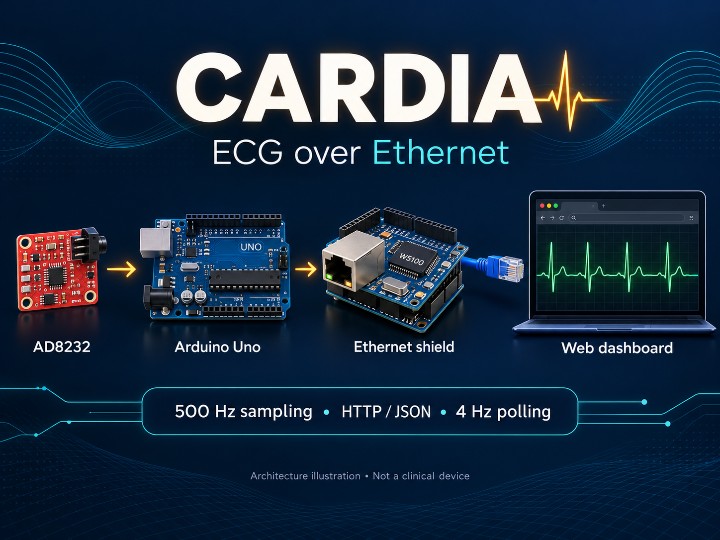
Components
Hardware componentsArduino - Ethernet Shield W5100
x 1
WIZnet W5100-based Ethernet Shield; README and firmware identify W5100.
Arduino Uno R3
x 1
Arduino Uno or compatible, as listed in the source README.
ECG Module (AD8232 i.e. Electro-Cardiogram)
x 1
AD8232 single-lead ECG breakout; exact board manufacturer is not specified in the README.
Project description
Cardia: Bringing Single-Lead ECG to the Web with W5100 Ethernet
Open-source project curation | Original work by Nisa Maaşoğlu
Cardia connects an AD8232 ECG front end and an Arduino Uno to a browser dashboard through wired Ethernet. Its appeal is the complete signal path: the microcontroller acquires an analog signal, detects R-peaks, estimates heart rate, and exposes the results as JSON for a lightweight web interface.
System architecture
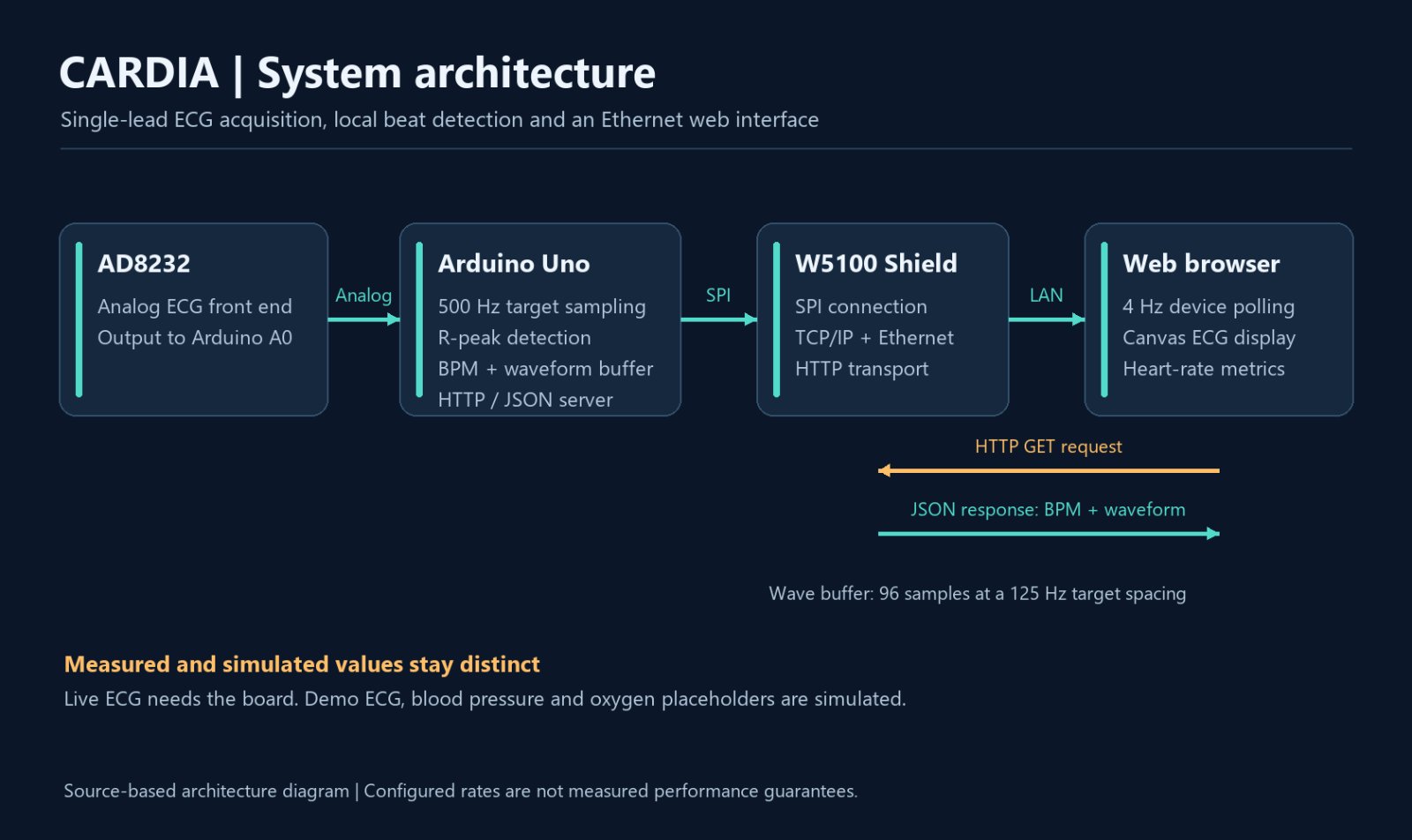
The AD8232 provides an analog ECG signal to Arduino A0. The Arduino samples the signal, detects R-peaks, calculates BPM and maintains a short waveform buffer; its firmware also builds the HTTP/JSON response. The W5100 Shield connects this server to the LAN over SPI and Ethernet. A browser polls the device every 250 ms and draws the returned waveform. Demo mode replaces the hardware data with a synthetic source.
Evidence of WIZnet integration
The README hardware list and firmware comments explicitly identify a W5100 Ethernet Shield. The sketch includes SPI.h and Ethernet.h, initializes the network with Ethernet.begin(mac, ip), creates an EthernetServer on port 80, accepts clients, and writes HTTP/JSON responses through EthernetClient. This provides implementation evidence beyond a component mention. This article is based on public documentation and source review; it does not report an independent hardware test or physical chip identification.
How the data flows
The firmware reads the AD8232 output on A0 at a scheduled target interval of 2 ms. An adaptive signal envelope sets the R-peak threshold, with hysteresis, a 250 ms refractory period, interval filtering, and averaging over up to five recent R–R intervals. Every fourth sample enters a 96-value waveform buffer.
The Ethernet endpoint returns signal samples and derived metrics, including BPM, beat interval, amplitude, a signal-quality flag, and a beat counter. In device mode, the browser requests updates every 250 ms and draws the waveform on Canvas. The 500 Hz acquisition target, 125 Hz decimated waveform spacing, and 4 Hz HTTP polling describe separate parts of the design, rather than measured performance guarantees.
What is measured, and what is simulated?
With hardware connected, heart rate and related signal metrics come from the ECG path. Blood pressure, oxygen saturation, and the cardiovascular index are generated UI placeholders, explicitly grouped as Simulated. Demo mode also synthesizes the ECG waveform and labels the interface accordingly. A dashboard screenshot alone therefore does not prove successful live acquisition.
With leads-off detection disabled, the quality field is an amplitude-based heuristic (at least 60 ADC counts). It should not be interpreted as verified electrode contact or clinical signal quality.
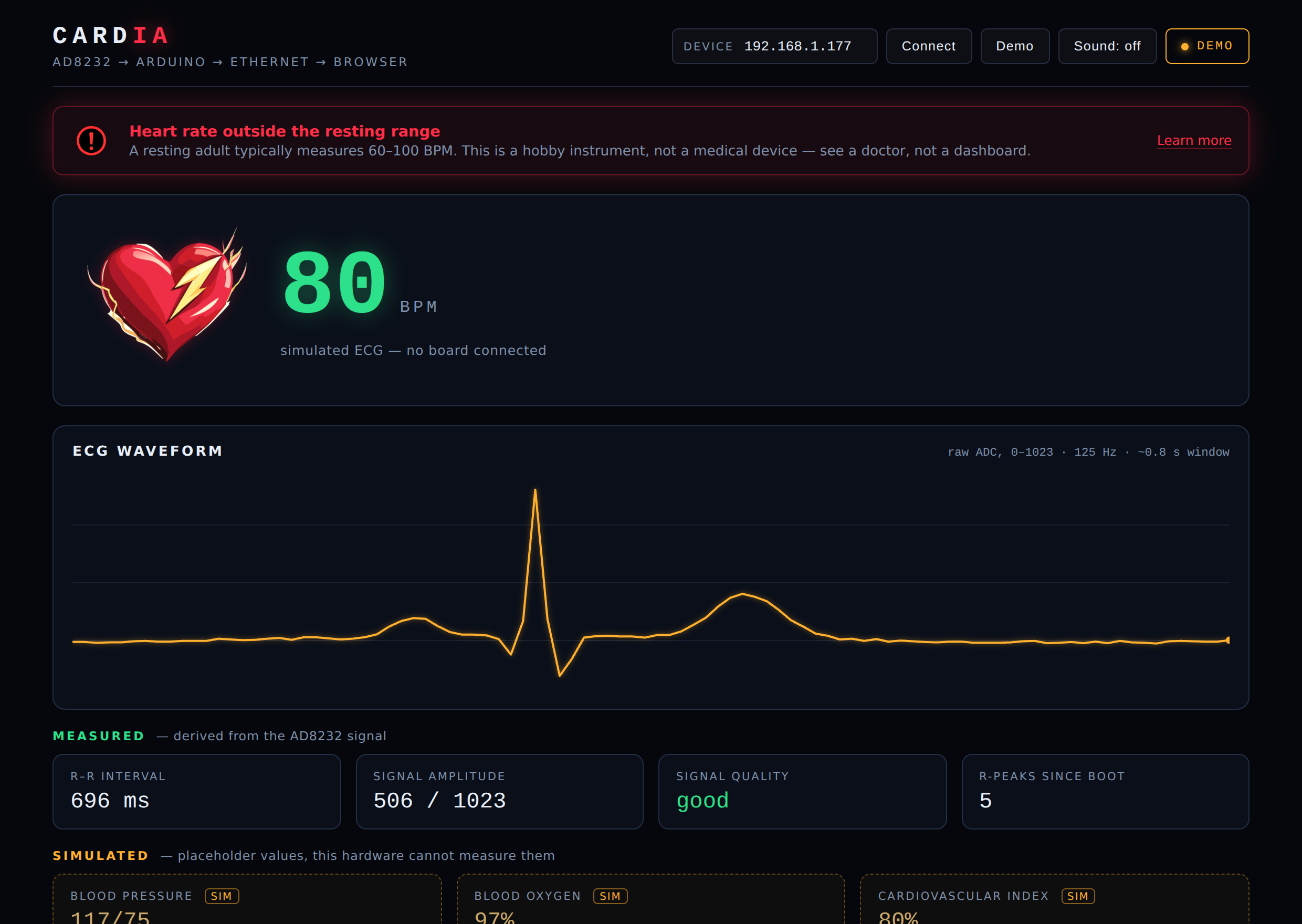
Screenshot source: Nisa Maaşoğlu / Cardia — docs/dashboard.png
What makers can learn
Read firmware/cardia_ecg/cardia_ecg.ino for acquisition and the HTTP server, and web/app.js for polling, rendering, and demo generation. The repository describes configuring a free LAN address, flashing the sketch, serving the web folder locally, and connecting the dashboard to the device. Leads-off detection is disabled by USE_LEADS_OFF=0. Its optional LO+→D10 and LO−→D11 assignments conflict with the usual Uno W5100 Shield roles of D10 (chip select) and D11 (MOSI). Enabling this feature requires different available pins, matching code changes, and verification.
Cardia is a useful study in moving sensor data from an MCU to a web interface through W5100 Ethernet. It is presented as a hobby and learning project, not a clinical diagnostic instrument.
Cardia: 단일 리드 ECG를 W5100 Ethernet으로 웹에 연결하다
오픈소스 프로젝트 큐레이션 | 원작: Nisa Maaşoğlu
Cardia는 AD8232 센서와 Arduino Uno로 읽은 단일 리드 ECG 신호를 유선 네트워크의 웹 대시보드로 전달하는 프로젝트다. 센서 값을 그대로 보여주는 데 그치지 않고, Arduino에서 R 피크를 검출하고 심박수를 계산한 뒤 Ethernet을 통해 JSON으로 제공한다. 작은 마이크로컨트롤러의 신호 처리와 브라우저 시각화를 연결한다는 점이 흥미롭다.
시스템 아키텍처
AD8232가 아날로그 ECG 신호를 Arduino의 A0 핀으로 전달합니다. Arduino는 신호 샘플링, R 피크 검출, BPM 계산과 짧은 파형 버퍼 관리를 수행하고 HTTP·JSON 응답도 구성합니다. W5100 Shield는 SPI와 Ethernet으로 이 서버를 LAN에 연결합니다. 브라우저는 250 ms마다 데이터를 요청해 파형을 그리며, Demo 모드에서는 하드웨어 데이터 대신 합성 신호를 사용합니다.
WIZnet 사용 근거
원본 README의 Hardware 항목과 펌웨어 주석에 W5100 Ethernet Shield가 명시돼 있다. 펌웨어는 SPI.h와 Ethernet.h를 포함하고 Ethernet.begin(mac, ip), EthernetServer server(80), server.available()를 사용한다. 실제 HTTP 응답을 EthernetClient에 기록하는 코드까지 확인할 수 있어, 단순히 부품 이름만 언급한 저장소보다 구현 근거가 구체적이다. 다만 이 큐레이션은 공개 문서와 소스 검토에 기반하며, 실물 보드를 직접 시험하거나 W5100 칩을 독립적으로 식별한 결과는 아니다.
센서에서 브라우저까지
AD8232의 아날로그 출력을 Arduino A0에서 읽는다. 펌웨어는 2 ms 간격, 즉 목표 500 Hz로 샘플링하며, 변화하는 최소·최대 신호 범위에 맞춰 검출 임계값을 조정한다. 히스테리시스, 250 ms 불응 구간, R–R 간격 필터를 함께 적용하고 최근 최대 다섯 간격으로 BPM을 평균화한다.
W5100 기반 Ethernet Shield를 거쳐 HTTP 포트 80에서 raw, bpm, ibi, amplitude, quality, beats, uptime, wave 필드를 JSON으로 제공한다. 파형 버퍼는 네 샘플마다 하나를 보관하는 96개 표본 구조다. 브라우저는 장치 모드에서 250 ms마다 데이터를 요청하고 Canvas로 파형을 그린다. 샘플링 목표 500 Hz, 파형 표본 간격 125 Hz, HTTP 폴링 4 Hz는 서로 다른 주기이며 실측 처리량 보장을 의미하지 않는다.
측정값과 데모를 구분하는 설계
장치 연결 시 ECG에서 얻는 심박수와 R–R 간격 등을 표시한다. 혈압, 산소포화도, 심혈관 지수는 AD8232 측정값이 아니라 브라우저에서 생성한 시뮬레이션 값이다. 저장소는 이를 별도 Simulated 영역으로 구분한다. 보드 없이 확인하는 Demo 모드는 ECG 자체도 합성 데이터이므로, 대시보드 화면만으로 실측 성공을 판단해서는 안 된다.
quality 필드는 기본 설정에서 신호 진폭이 60 ADC 카운트 이상인지로 판단하는 간단한 휴리스틱이다. 전극 접촉 상태나 임상적 신호 품질을 검증하는 지표로 해석하면 안 된다.
화면 출처: Nisa Maaşoğlu / Cardia — docs/dashboard.png
살펴볼 파일과 재현 흐름
firmware/cardia_ecg/cardia_ecg.ino에서 신호 처리와 HTTP 서버를, web/app.js에서 장치 폴링과 데모 생성을 확인할 수 있다. 원본 안내는 LAN 내 사용 가능한 고정 IP 설정, 펌웨어 업로드, web 폴더의 로컬 웹 서버 실행, 장치 주소 입력 순서로 구성돼 있다. 전극 이탈 검출은 USE_LEADS_OFF=0으로 꺼져 있다. 선택적 LO+→D10, LO−→D11 배선은 일반적인 Uno용 W5100 Shield의 D10(칩 선택)·D11(MOSI)과 충돌하므로 그대로 활성화하면 안 된다. 다른 핀으로 재배치하고 코드를 함께 수정한 뒤 검증해야 한다.
큐레이터 관점: 센서 데이터 획득 → MCU 분석 → W5100 유선 통신 → 웹 표현이라는 흐름을 한 저장소에서 따라갈 수 있다. 교육용 신호 처리와 Ethernet 기반 계측 UI를 공부하기 좋은 사례다. 저장소가 밝히듯 취미·학습용 프로젝트이며 임상 진단용 의료기기가 아니다.
Sources / 출처
Original repository — nisamaasoglu/Cardia
README: hardware, architecture and demo scope
Arduino firmware: Ethernet server and signal processing
Dashboard source: polling and simulated values
MIT license — Copyright (c) 2026 Hayrunnisa Maaşoğlu
W5100 Shield pin reference: D10 chip select and D11 MOSI
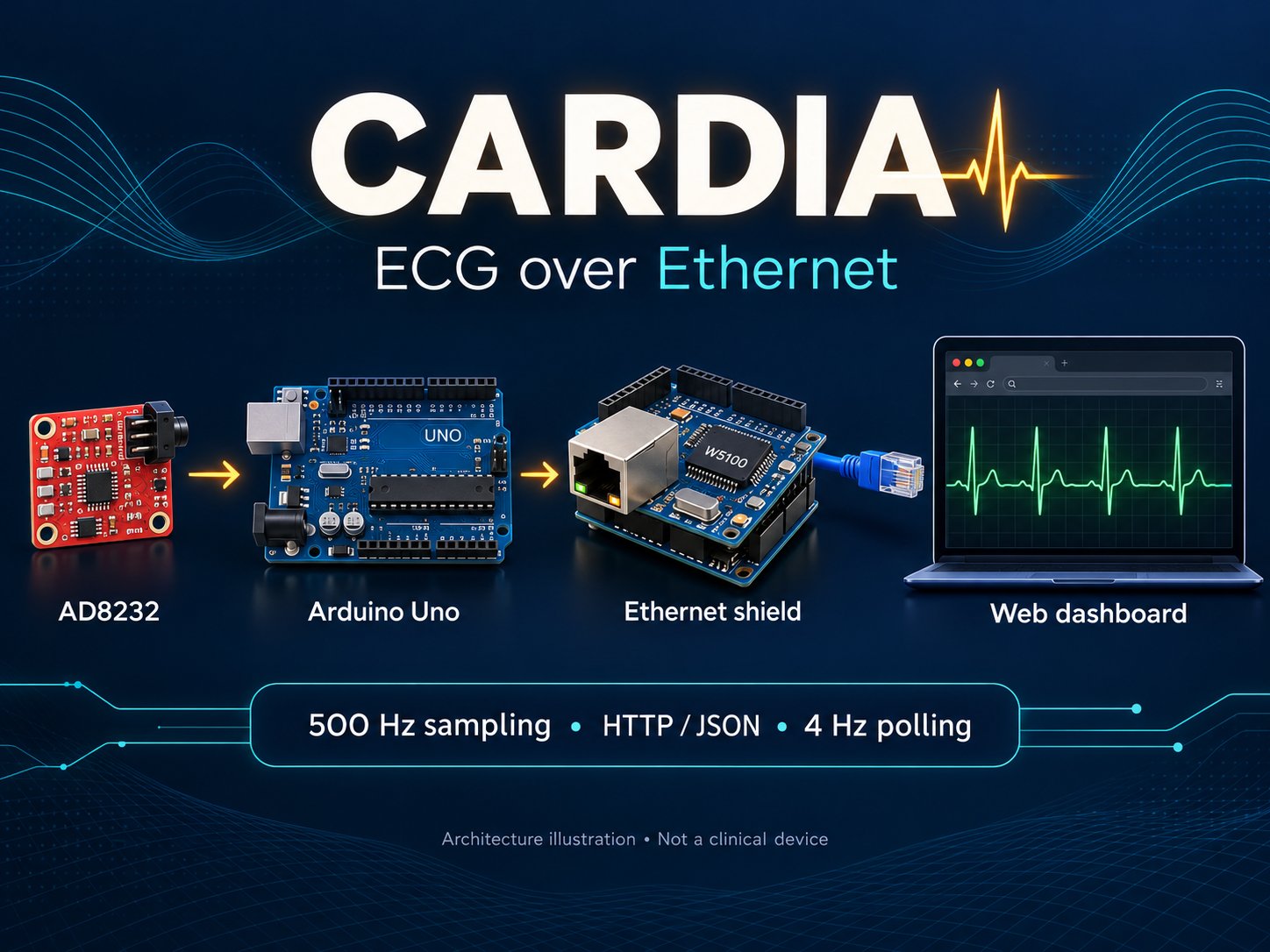
Reviewed on 2026-10-25. Original project credit remains with its author. Cover artwork is an AI-generated architecture illustration, not a photograph or a live measurement screenshot.
Documents
-
Cardia source code
Original Arduino firmware and web dashboard by Nisa Maaşoğlu. MIT license.
-
README and hardware documentation
Hardware list, operating modes and setup instructions. Dashboard screenshot is demo mode.


