Cranet: ESP32-S3 Network Diagnostics Handheld with W5500 Wired Ethernet, Wi-Fi and BLE
ESP32-S3 network diagnostics device: W5500 SPI Ethernet with DHCP/static IP, ping and subnet scan, plus Wi-Fi and BLE scanning on an ILI9341 UI.
0
Components
Hardware components
WIZnet - W5500
x 1

ashhim/cranet
Project description
Overview
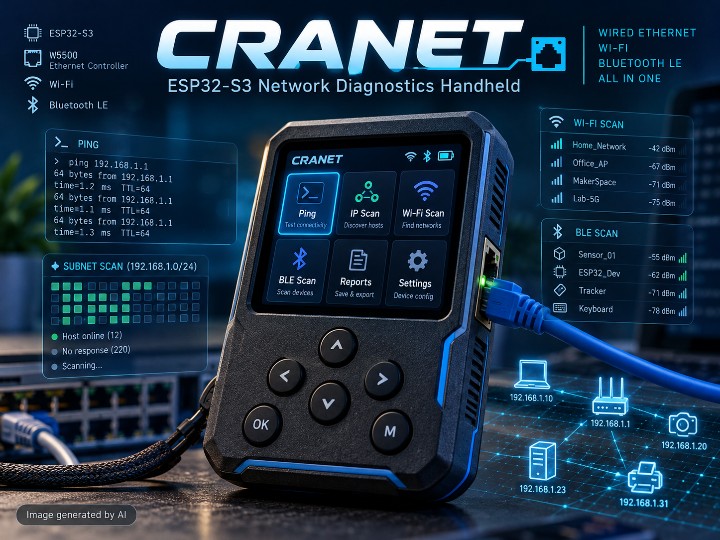
Cranet is a portable network management and diagnostics device built on an ESP32-S3, with a WIZnet W5500 SPI Ethernet controller as its wired port, the ESP32-S3's own Wi-Fi and Bluetooth Low Energy radios as wireless interfaces, and a 320 × 240 ILI9341 TFT driven by six navigation buttons. From a single menu it brings up the wired link over DHCP or a static address, pings the gateway and public DNS servers, sweeps the local subnet for hosts and open ports, scans nearby Wi-Fi access points and BLE devices, and collects everything into an on-screen report.
This article describes the repository as of 2026-07-19 (the last push to the default branch), where the README labels the firmware Version 1.0. The firmware is written in C++ on the Arduino Core for ESP32, and the author presents it as a modular, object-oriented design in which each subsystem lives in its own .cpp/.h pair coordinated by a central CranetApp controller.
The README gives the Wi-Fi and BLE subsystems as much space as the Ethernet one, so Cranet should be read as a multi-interface network tool rather than an Ethernet-only instrument. What makes it interesting from a WIZnet point of view is that the W5500 is not an add-on: EthernetManager starts it unconditionally at boot, and the scanner uses the wired interface first when it is available.
Hardware & Software Configuration
The README lists the hardware as a set of discrete parts around the ESP32-S3. The repository contains no photos or schematics of an assembled unit, so the configuration below comes from the README's component table and GPIO tables only.
| Component | Role in Cranet (per README) |
|---|---|
| ESP32-S3 | Main MCU running the firmware, networking and UI |
| WIZnet W5500 | SPI Ethernet controller for the wired network port |
| ILI9341 TFT | 320 × 240 SPI color display (Adafruit GFX / Adafruit ILI9341) |
| Six push buttons | Up, Down, Back, Enter, Home, Function |
| Integrated Wi-Fi | 2.4 GHz IEEE 802.11 scanning, connection and monitor mode |
| Integrated BLE | Nearby device discovery |
| Flash (Preferences) | Persistent settings in the cranet namespace |
The W5500 sits on its own SPI bus, separate from the display bus. The README's Ethernet pin table is:
| Signal | GPIO |
|---|---|
| W5500 CS | 14 |
| W5500 IRQ | 10 |
| W5500 RESET | 9 |
| SPI MOSI | 11 |
| SPI MISO | 12 |
| SPI SCK | 13 |
The display uses GPIO 38 (CS), 36 (DC), 37 (RESET) and a second SPI bus on GPIO 40/39/41, and the buttons are on GPIO 1, 2, 15, 16, 17 and 18. Button handling uses a 30 ms debounce, a 700 ms long-press threshold and a 120 ms auto-repeat interval for Up and Down.
On the software side, the entry point is cranet.ino, whose loop() calls only app.update(). The main modules are EthernetManager, WiFiManager, BluetoothManager, Scanner, ReportManager, Settings, Display, Menu, Buttons and Utils, with hardware constants in CranetConfig.h and shared types in CranetTypes.h. On first boot the settings default to hostname CRANET, brightness 255, language EN, a black theme, ping target 192.168.1.1 and Ethernet in DHCP mode.
System Architecture
CranetApp owns every manager. At startup it brings up serial, settings, display, buttons, Ethernet, Wi-Fi, Bluetooth, the scanner, reporting and the menu, in that order, and then runs a single update loop. That loop reads buttons, advances the menu, polls each network manager and redraws the screen. The network-facing managers expose their state to the scanner and the report builder, which are the two consumers that turn raw interface data into results the user can read.
flowchart TB
  BTN["6 buttons<br/>GPIO 1,2,15-18"] --> APP["CranetApp<br/>ESP32-S3 loop"]
  APP --> UI["DisplayManager<br/>ILI9341 320x240"]
  APP --> ETH["EthernetManager<br/>ETH.begin W5500"]
  APP --> WIFI["WiFiManager<br/>scan · monitor"]
  APP --> BLE["BluetoothManager<br/>BLE scan"]
  ETH -->|"SPI CS14 IRQ10"| W5500["W5500<br/>wired LAN"]
  SCAN["Scanner<br/>ping · ports · DNS"] -->|"wired first"| ETH
  SCAN -->|"wireless path"| WIFI
  REP["ReportManager<br/>in-memory report"] --> ETH
  REP --> BLE
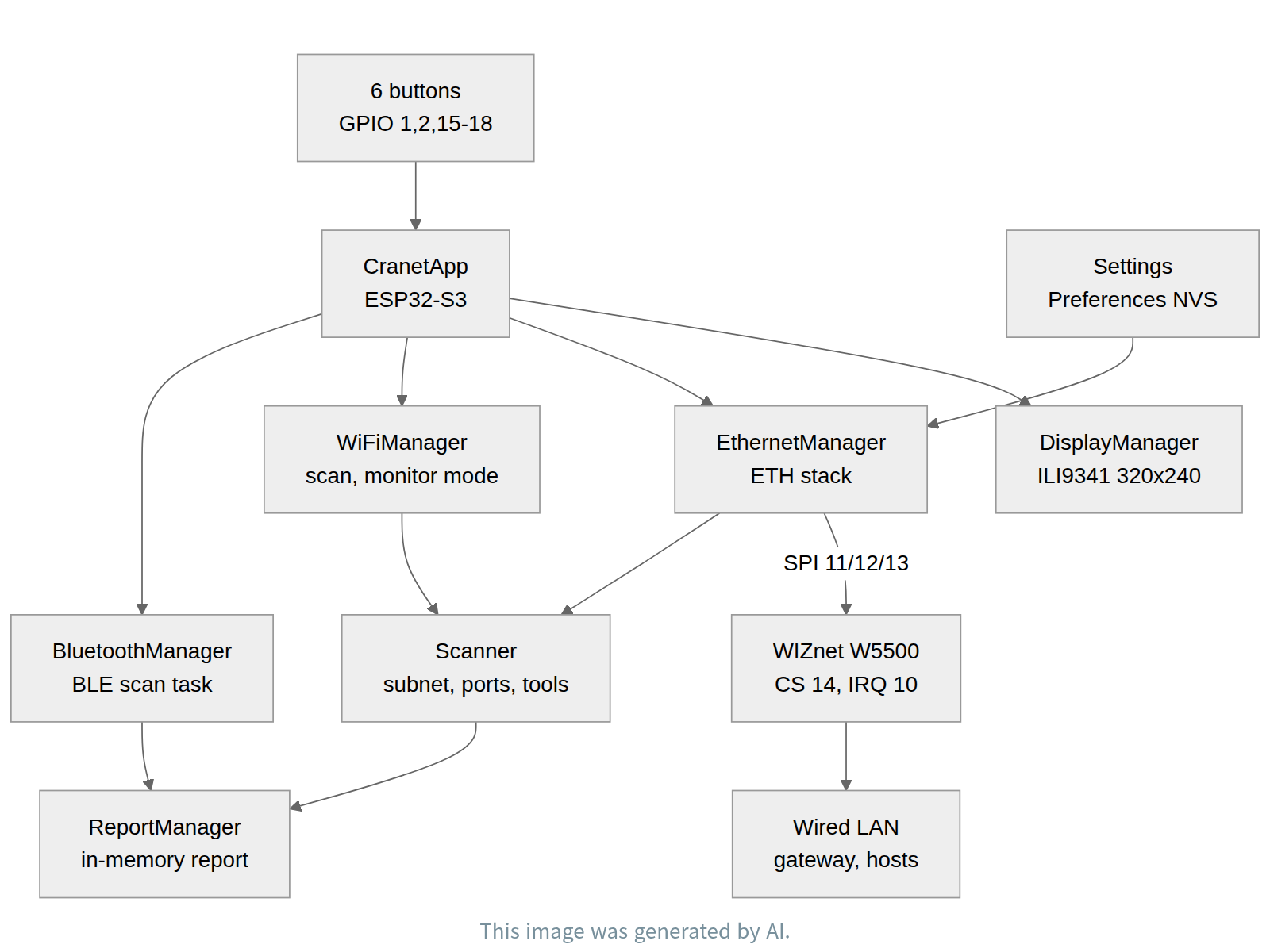
The Ethernet side is event-driven. The README lists the events the firmware reacts to, namely Ethernet start, cable connected, IP assigned, IP lost, cable disconnected and Ethernet stopped, and maps them to user-visible states such as Link Up / Waiting IP, Connected, Lost IP and Released. Each event updates a network snapshot (hostname, IP, gateway, subnet mask, two DNS servers, MAC, link speed and link state) that the display, the scanner and the report read. The BLE scan runs in a separate FreeRTOS task guarded by a mutex, with a default scan duration of 5 seconds, so a long scan does not freeze the menu.
Role of the WIZnet W5500
The W5500 is Cranet's wired network interface, and the code that drives it is EthernetManager.cpp. At line 27 the firmware calls ETH.begin(ETH_PHY_W5500, 1, kEthPhyCs, kEthPhyIrq, kEthPhyRst, ethSpi_), which registers the W5500 with the Arduino-ESP32 ETH stack over a dedicated SPI instance. This call is not behind a build option or a settings flag, so every Cranet build starts the W5500 at boot. The chip-select, interrupt and reset constants correspond to the README pin table: CS on GPIO 14, IRQ on GPIO 10 and RESET on GPIO 9, with MOSI/MISO/SCK on GPIO 11/12/13.
Here is how data moves through the chip. The ESP32-S3 talks to the W5500 over SPI. Arduino-ESP32's ETH layer uses the W5500 as the Ethernet MAC/PHY and runs IP networking on the ESP32 side, so the wired port appears to the firmware as a normal network interface with its own DHCP client, IP address and link events. Once the link is up, EthernetManager either applies the static IP, gateway, subnet and DNS values stored by SettingsManager or accepts a DHCP lease, which it can also renew or release on request.
Traffic on this interface is all diagnostic. ICMP echo requests go out through the W5500 to the default gateway, to 8.8.8.8 and to 1.1.1.1, and each result records the target, success or failure and round-trip time. The Scanner.cpp module uses the wired interface first when choosing which network to work on. Through that interface it walks the local subnet host by host, probes common TCP ports (it flags hosts exposing 554, 8000, 8080 or 37777 as possible IP cameras), and runs TCP connect, HTTP/HTTPS, DNS lookup and simplified traceroute tests. The results flow back into the Ethernet snapshot, the scanner's IpHostInfo list, and finally into ReportManager, which takes Ethernet status, gateway, subnet, DNS and MAC from EthernetManager when it builds a report.
In short, the W5500 is the cable-side interface that Cranet diagnoses. It is where the device plugs into the network under test, and the source of the link, addressing and reachability data shown on the screen.
FAQ
Does Cranet support both DHCP and static addressing on the wired port? Yes. The README says DHCP is enabled by default. A static IP, gateway, subnet mask and primary and secondary DNS can be stored through SettingsManager, and they are applied when EthernetManager initializes. The DHCP lease can also be renewed or released from the firmware.
Which pins does the W5500 use? According to the README, CS on GPIO 14, IRQ on GPIO 10, RESET on GPIO 9, and SPI MOSI/MISO/SCK on GPIO 11/12/13. This bus is separate from the display's SPI pins.
What happens if the Ethernet controller fails to start? The README says the Ethernet subsystem reports the failure and the rest of the firmware keeps running, so the Wi-Fi, BLE and UI functions stay available.
Can reports be saved to an SD card? Not in Version 1.0. Reports are built in memory and kept until the next one is generated. The README says the report format is prepared for future SD card export, and the display GPIO table already reserves GPIO 35 for an SD card CS line.
Can I reuse this code in my own product? No. The README states "All Rights Reserved" and limits the repository to portfolio, educational and demonstration use. Copying, modification, redistribution and commercial use require the author's written permission.
About the Author
Cranet is developed by HASHIM (GitHub: ashhim). The README describes the project as an original work intended to demonstrate embedded systems engineering, network programming and firmware architecture, and lists a LinkedIn profile (linkedin.com/in/ashhim) for licensing and collaboration inquiries.
개요
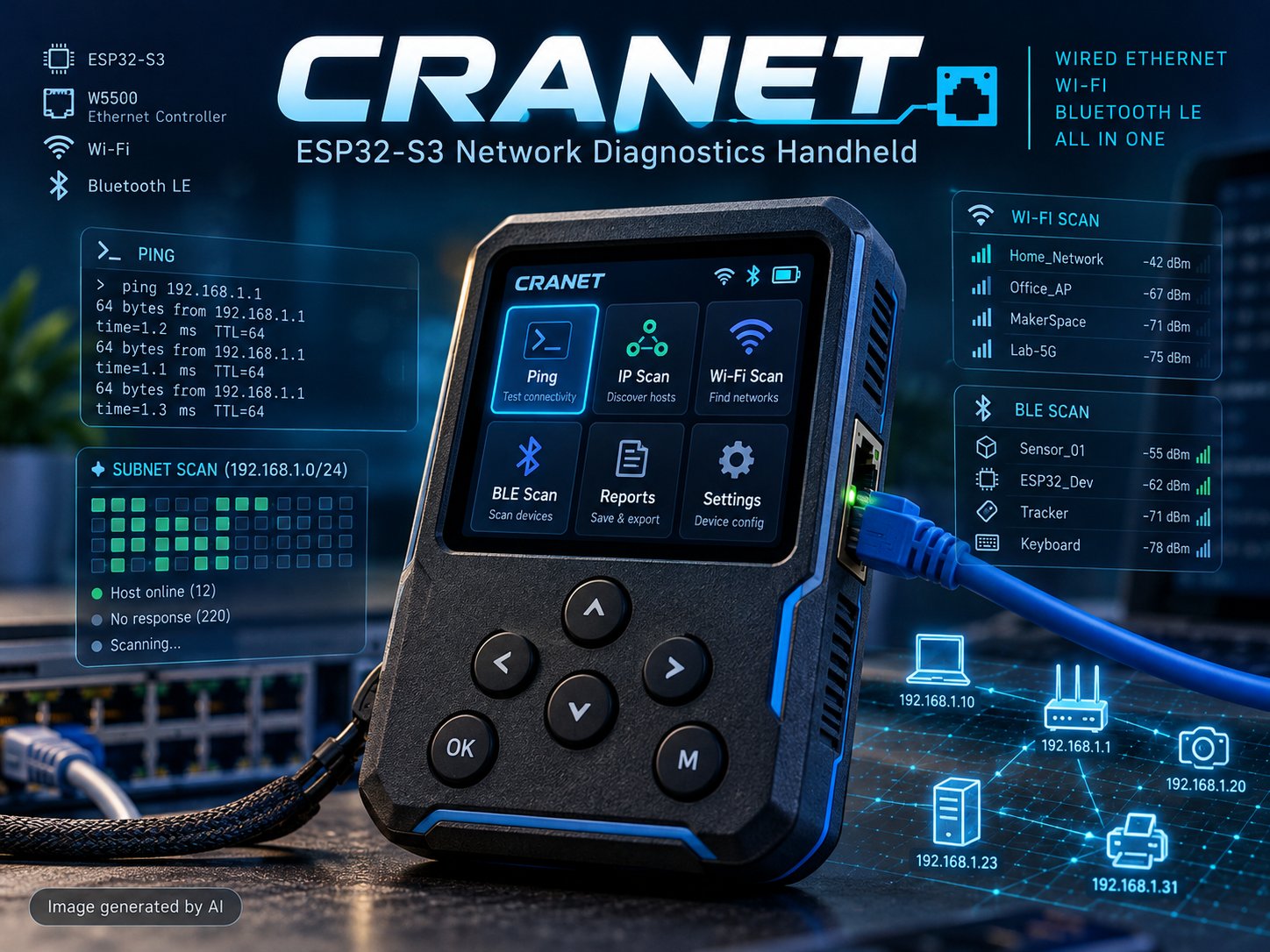
Cranet은 ESP32-S3 기반의 휴대형 네트워크 관리·진단 장치다. 유선 포트로 WIZnet W5500 SPI 이더넷 컨트롤러를 쓰고, 무선 인터페이스로 ESP32-S3에 내장된 Wi-Fi·Bluetooth Low Energy를 쓰며, 버튼 6개로 조작하는 320 × 240 ILI9341 TFT 화면을 갖췄다. 메뉴 하나에서 DHCP 또는 고정 주소로 유선 링크를 올리고, 게이트웨이와 공용 DNS 서버에 ping을 보내고, 로컬 서브넷의 호스트와 열린 포트를 훑고, 주변 Wi-Fi AP와 BLE 기기를 스캔하고, 그 결과를 화면용 리포트 하나로 모은다.
이 글은 2026-07-19 시점(기본 브랜치 최종 push)의 저장소를 기준으로 하며, 이 시점 README는 펌웨어를 Version 1.0으로 표기한다. 펌웨어는 Arduino Core for ESP32 위의 C++이다. 저자는 이를 모듈형 객체지향 설계로 소개하는데, 서브시스템마다 .cpp/.h 한 쌍을 두고 중앙 컨트롤러 CranetApp이 전체를 조율하는 구조다.
README는 Wi-Fi·BLE 서브시스템을 이더넷과 같은 비중으로 설명한다. 그러니 Cranet은 이더넷 전용 계측기가 아니라 여러 인터페이스를 다루는 네트워크 도구로 읽어야 한다. WIZnet 관점에서 주목할 점은 W5500이 부가 옵션이 아니라는 것이다. EthernetManager가 부팅 때 조건 없이 W5500을 올리고, 스캐너는 유선 인터페이스가 있으면 그쪽을 먼저 쓴다.
하드웨어·소프트웨어 구성
README는 하드웨어를 ESP32-S3와 그 주변의 개별 부품으로 설명한다. 저장소에는 조립된 장치의 사진이나 회로도가 없으므로, 아래 구성은 README의 부품 표와 GPIO 표에만 근거한다.
| 부품 | Cranet에서의 역할(README 기준) |
|---|---|
| ESP32-S3 | 펌웨어·네트워킹·UI를 실행하는 메인 MCU |
| WIZnet W5500 | 유선 네트워크 포트용 SPI 이더넷 컨트롤러 |
| ILI9341 TFT | 320 × 240 SPI 컬러 디스플레이(Adafruit GFX / Adafruit ILI9341) |
| 푸시 버튼 6개 | Up, Down, Back, Enter, Home, Function |
| 내장 Wi-Fi | 2.4 GHz IEEE 802.11 스캔·연결·모니터 모드 |
| 내장 BLE | 주변 기기 탐색 |
| 플래시(Preferences) | cranet 네임스페이스에 설정 영구 저장 |
W5500은 디스플레이와 분리된 별도 SPI 버스에 연결된다. README의 이더넷 핀 표는 다음과 같다.
| 신호 | GPIO |
|---|---|
| W5500 CS | 14 |
| W5500 IRQ | 10 |
| W5500 RESET | 9 |
| SPI MOSI | 11 |
| SPI MISO | 12 |
| SPI SCK | 13 |
디스플레이는 GPIO 38(CS), 36(DC), 37(RESET)과 GPIO 40/39/41의 두 번째 SPI 버스를 쓰고, 버튼은 GPIO 1, 2, 15, 16, 17, 18에 있다. 버튼 처리 값은 디바운스 30 ms, 롱프레스 판정 700 ms이며, Up·Down 자동 반복 간격은 120 ms다.
소프트웨어의 진입점은 cranet.ino이고, 그 loop()는 app.update()만 호출한다. 주요 모듈은 EthernetManager, WiFiManager, BluetoothManager, Scanner, ReportManager, Settings, Display, Menu, Buttons, Utils이며, 하드웨어 상수는 CranetConfig.h, 공용 타입은 CranetTypes.h에 있다. 처음 부팅하면 설정 기본값이 적용된다. 호스트명 CRANET, 밝기 255, 언어 EN, 검은 테마, ping 대상 192.168.1.1, 이더넷 DHCP 모드다.
추가 사진은 원본 저장소에서 볼 수 있다: https://github.com/ashhim/cranet
시스템 구조
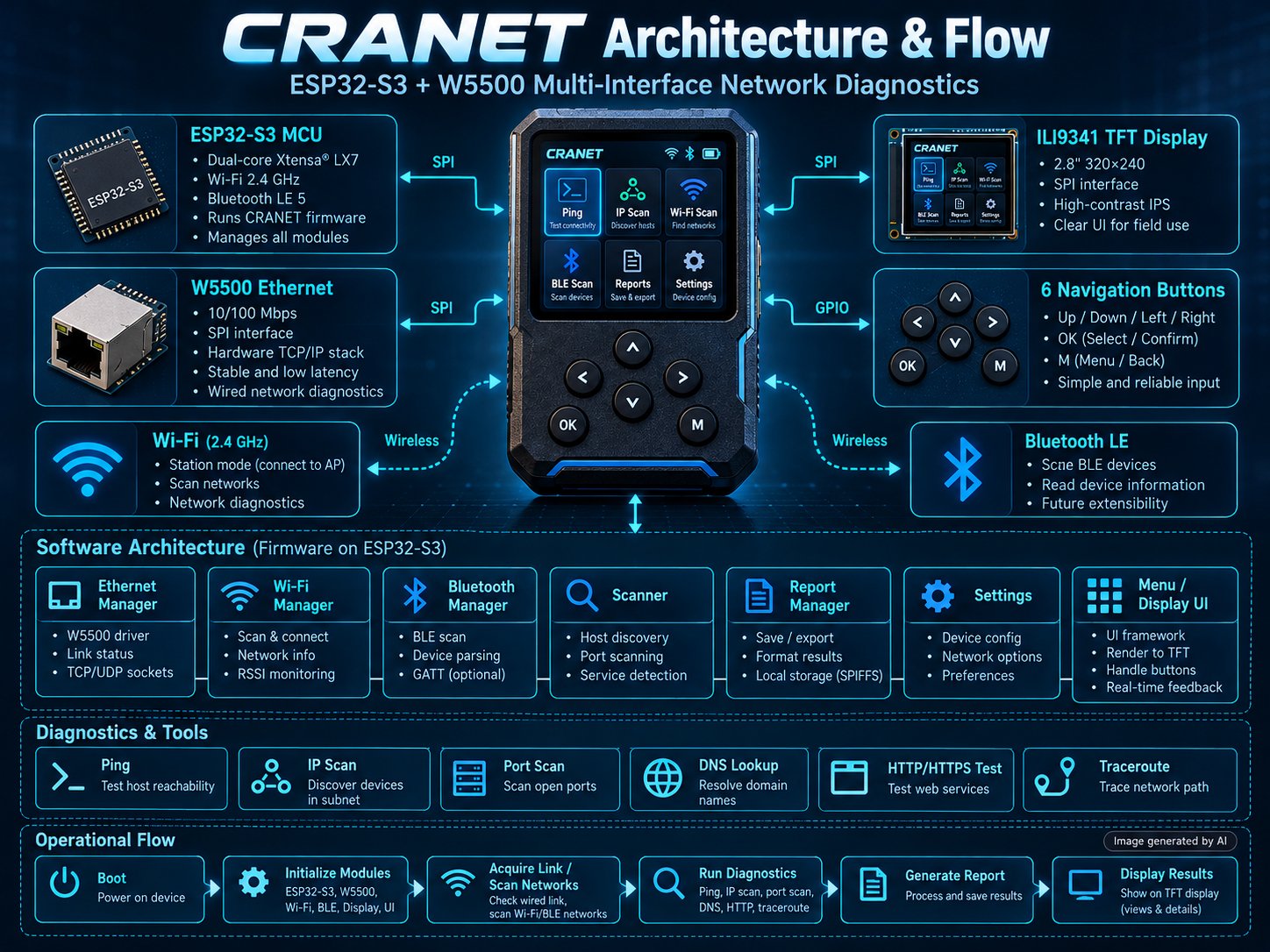
CranetApp이 모든 매니저를 소유한다. 부팅 때 시리얼, 설정, 디스플레이, 버튼, 이더넷, Wi-Fi, Bluetooth, 스캐너, 리포트, 메뉴 순으로 초기화한 뒤 하나의 업데이트 루프를 돈다. 이 루프가 버튼을 읽고, 메뉴를 진행하고, 각 네트워크 매니저를 폴링하고, 화면을 다시 그린다. 네트워크 매니저들이 내놓는 상태는 스캐너와 리포트 생성기가 가져다 쓴다. 인터페이스의 원시 데이터를 사용자가 읽을 결과로 바꾸는 소비자가 이 둘이다.
이더넷 쪽은 이벤트 기반으로 동작한다. README가 나열한 이벤트는 이더넷 시작, 케이블 연결, IP 할당, IP 상실, 케이블 분리, 이더넷 정지다. 펌웨어는 이를 Link Up / Waiting IP, Connected, Lost IP, Released 같은 화면 상태로 바꾼다. 이벤트가 올 때마다 네트워크 스냅숏(호스트명, IP, 게이트웨이, 서브넷 마스크, DNS 두 개, MAC, 링크 속도, 링크 상태)이 갱신되고, 디스플레이·스캐너·리포트가 이 스냅숏을 읽는다. BLE 스캔은 뮤텍스로 보호되는 별도 FreeRTOS 태스크에서 돌고 기본 스캔 시간은 5초다. 그래서 스캔이 길어져도 메뉴가 멈추지 않는다.
WIZnet W5500의 역할
W5500은 Cranet의 유선 네트워크 인터페이스이고, 이를 구동하는 코드는 EthernetManager.cpp다. 27번째 줄에서 펌웨어는 ETH.begin(ETH_PHY_W5500, 1, kEthPhyCs, kEthPhyIrq, kEthPhyRst, ethSpi_)를 호출해, 전용 SPI 인스턴스로 연결된 W5500을 Arduino-ESP32 ETH 스택에 등록한다. 이 호출은 빌드 옵션이나 설정 플래그로 막혀 있지 않으므로, 어느 Cranet 빌드든 부팅 때 W5500을 올린다. CS·IRQ·RESET 상수는 README 핀 표와 맞아떨어진다. CS는 GPIO 14, IRQ는 GPIO 10, RESET은 GPIO 9이고 MOSI/MISO/SCK는 GPIO 11/12/13이다.
데이터가 칩을 지나는 경로는 이렇다. ESP32-S3는 SPI로 W5500과 통신한다. Arduino-ESP32의 ETH 계층은 W5500을 이더넷 MAC/PHY로 쓰고 IP 네트워킹은 ESP32 쪽에서 처리한다. 그래서 펌웨어가 보기에 유선 포트는 DHCP 클라이언트, IP 주소, 링크 이벤트를 따로 갖춘 평범한 네트워크 인터페이스다. 링크가 올라오면 EthernetManager는 SettingsManager에 저장된 고정 IP·게이트웨이·서브넷·DNS 값을 적용하거나 DHCP 임대를 받는다. DHCP 임대는 요청에 따라 갱신하거나 해제할 수도 있다.
이 인터페이스를 지나는 트래픽은 모두 진단용이다. ICMP echo 요청이 W5500을 거쳐 기본 게이트웨이, 8.8.8.8, 1.1.1.1로 나가고, 결과마다 대상, 성공 여부, 왕복 시간이 기록된다. Scanner.cpp 모듈은 작업할 네트워크를 고를 때 유선 인터페이스를 먼저 쓴다. 이 인터페이스로 로컬 서브넷을 호스트 단위로 훑고, 흔한 TCP 포트를 확인하며(554, 8000, 8080, 37777이 열린 호스트는 IP 카메라 후보로 표시한다), TCP 연결, HTTP/HTTPS, DNS 조회, 간이 traceroute 테스트를 실행한다. 결과는 이더넷 스냅숏과 스캐너의 IpHostInfo 목록을 거쳐 ReportManager로 간다. 리포트를 만들 때 이더넷 상태, 게이트웨이, 서브넷, DNS, MAC 값은 EthernetManager에서 가져온다.
정리하면 W5500은 Cranet이 진단하는 케이블 쪽 인터페이스다. 장치가 점검 대상 네트워크에 물리적으로 꽂히는 지점이고, 화면에 나오는 링크·주소·도달성 데이터가 나오는 곳이다.
자주 묻는 질문
유선 포트에서 DHCP와 고정 주소를 모두 지원하나? 그렇다. README에 따르면 기본값은 DHCP다. 고정 IP, 게이트웨이, 서브넷 마스크, 1·2차 DNS는 SettingsManager로 저장해 두면 EthernetManager 초기화 때 적용된다. 펌웨어에서 DHCP 임대를 갱신하거나 해제할 수도 있다.
W5500은 어떤 핀을 쓰나? README 기준으로 CS는 GPIO 14, IRQ는 GPIO 10, RESET은 GPIO 9이고, SPI MOSI/MISO/SCK는 GPIO 11/12/13이다. 디스플레이 SPI 핀과는 분리돼 있다.
이더넷 컨트롤러가 시작에 실패하면 어떻게 되나? README에 따르면 이더넷 서브시스템이 실패를 알리고 펌웨어의 나머지 부분은 계속 동작한다. 따라서 Wi-Fi·BLE·UI 기능은 그대로 쓸 수 있다.
리포트를 SD 카드에 저장할 수 있나? Version 1.0에서는 안 된다. 리포트는 메모리에서 만들어지고, 다음 리포트가 생성될 때까지만 유지된다. README는 리포트 형식이 향후 SD 카드 내보내기에 대비해 설계됐다고 밝히며, 디스플레이 GPIO 표에 SD 카드 CS용 GPIO 35가 이미 잡혀 있다.
이 코드를 내 제품에 재사용할 수 있나? 안 된다. README는 "All Rights Reserved"를 명시하고 저장소 용도를 포트폴리오·교육·시연으로 한정한다. 복제, 수정, 재배포, 상업적 사용에는 저자의 서면 허락이 필요하다.
저자 소개
Cranet은 HASHIM(GitHub: ashhim)이 개발했다. README는 이 프로젝트를 임베디드 시스템 엔지니어링, 네트워크 프로그래밍, 펌웨어 아키텍처 역량을 보여 주기 위한 독자적 작업으로 소개한다. 라이선스·협업 문의처로는 LinkedIn 프로필(linkedin.com/in/ashhim)을 적어 두었다.


