Create a Web Server Using W5500-EVB
Create a Web Server Using W5500-EVB
0
Project description
I will introduce Web Server & W5500-EVB
It is Create by WIZnet and Very easy Making Web Server.
below description is W5500-EVB Overview.
Overview
- W5500 chip development platform for?net enabled?microcotroller applications
- Ethernet (W5500 Hardwired TCP/IP chip) and 32-bit ARM® Cortex™-M0 based designs
-?Arduino Pin-compatible?platform hardware.
Features
WIZnet W5500 Hardwired TCP/IP chip
Hardwired TCP/IP embedded Ethernet controller
SPI (Serial Peripheral Interface) Microcontroller Interface
32kB internal Tx/Rx socket buffer memory
Hardwired TCP/IP stack supports TCP, UDP, IPv4, ICMP, ARP, IGMP, and PPPoE protocols
Easy to implement of the other network protocols
W5500 Product page
For more information about?W5500-EVB?please also refer to the Wiki page


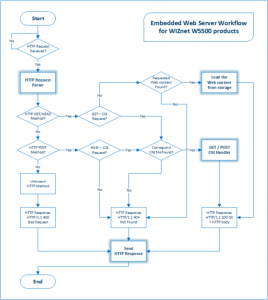 First, You Look for Desription Sequential Flow chart (Block Diagram)
Sequence = HTTP Request Parser -> HTTP GET Method -> Requested Web content Found -> Load the Web content from storage -> HTTP Response HTTP/1.1 200 OK + HTTP body -> Send HTTP Response.
Second,This project Use to HTTP Protocol based and HTTP header GET Method. But Not Used POST, PUT, HEAD etc.. header
For more information about?Hypertext Transfer Protocol?please also refer to the Wiki page
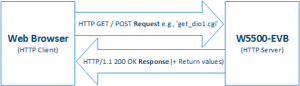
Third, HTTP is Configuration to Server / Client.
? HTTP Server : Embedded device(W5500-EVB)
? HTTP Client : Web browser (Internet Explore, Chrome etc..)
Web server is operating for HTTP based.
Request to Web server from Web browser -> Web server is Transport to response message to web browser(web page)
This project is Not Using Javascript & JSON. Just Using C & HTML Language. It is vey simply source code.
First, You Look for Desription Sequential Flow chart (Block Diagram)
Sequence = HTTP Request Parser -> HTTP GET Method -> Requested Web content Found -> Load the Web content from storage -> HTTP Response HTTP/1.1 200 OK + HTTP body -> Send HTTP Response.
Second,This project Use to HTTP Protocol based and HTTP header GET Method. But Not Used POST, PUT, HEAD etc.. header
For more information about?Hypertext Transfer Protocol?please also refer to the Wiki page
Third, HTTP is Configuration to Server / Client.
? HTTP Server : Embedded device(W5500-EVB)
? HTTP Client : Web browser (Internet Explore, Chrome etc..)
Web server is operating for HTTP based.
Request to Web server from Web browser -> Web server is Transport to response message to web browser(web page)
This project is Not Using Javascript & JSON. Just Using C & HTML Language. It is vey simply source code.
Step 1: Step : 1 Parts


- You will need the following to build a controller:
1. W5500-EVB(Evaluation) Board - from WIZnet
- Also You will need the?LPCXpresso
Configuration to NXP Cortex-M0 in W5500-EVB Board
It is Free Tool ! But, You need Free license Activate. Because a limitation Space.
So, access?NXP Free Tools - LPCXpresso?Web Site and Create new account.
For more information about?install LPCXpresso?please also refer to the Wiki page
and Flash magic tool for W5500-EVB porting. So, Check the this?Setting to Flash Magic.
First, You Look for Desription Sequential Flow chart (Block Diagram)
Sequence = HTTP Request Parser -> HTTP GET Method -> Requested Web content Found -> Load the Web content from storage -> HTTP Response HTTP/1.1 200 OK + HTTP body -> Send HTTP Response.
Second,This project Use to HTTP Protocol based and HTTP header GET Method. But Not Used POST, PUT, HEAD etc.. header
For more information about?Hypertext Transfer Protocol?please also refer to the Wiki page
Third, HTTP is Configuration to Server / Client.
? HTTP Server : Embedded device(W5500-EVB)
? HTTP Client : Web browser (Internet Explore, Chrome etc..)
Web server is operating for HTTP based.
Request to Web server from Web browser -> Web server is Transport to response message to web browser(web page)
This project is Not Using Javascript & JSON. Just Using C & HTML Language. It is vey simply source code.
Code
Check the Code .Step 3: Step 3 : Web Server Operate
This Content is Web Server LED Control and Web Server ADC Monitoring examples
It is WIZnet Ethernet Loop back based. and It's upload to github.
Follow this URLWIZnet Ethernet Loop back Code in github
Examples Source code :?Follow site
Follow the youtube :
1.?Web server LED control
2.?Web server ADC Monitoring

