SaberWizFi360
Saber Wall Light using WizFi360-EVB-Pico
6
Components
Hardware components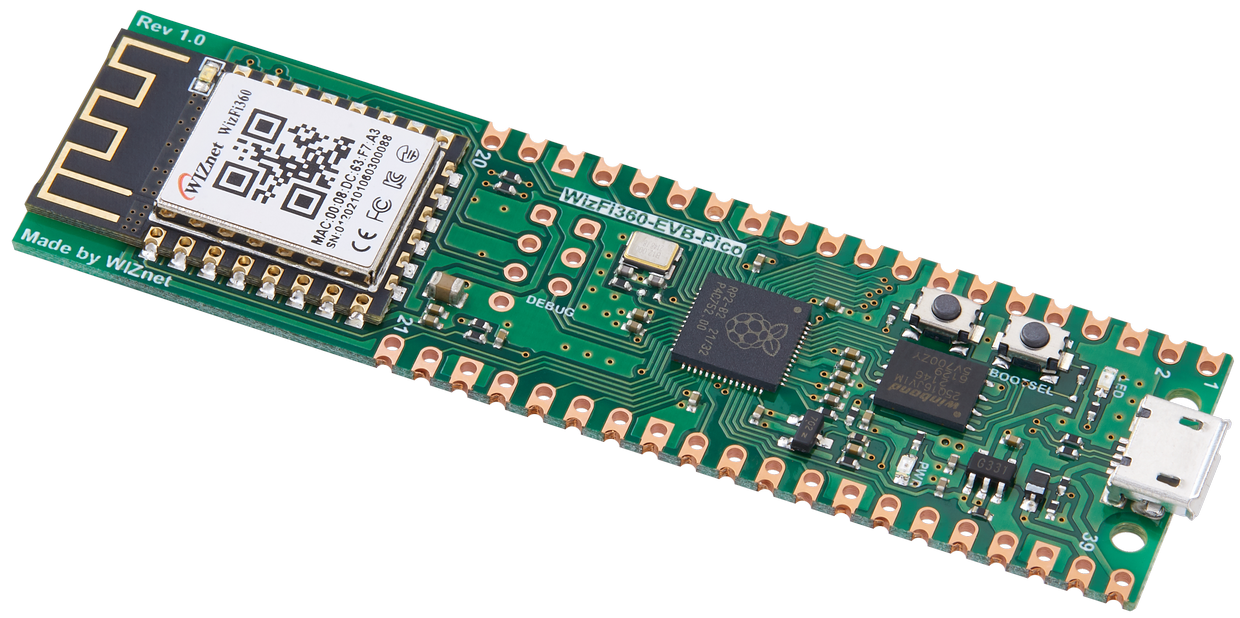
WIZnet - WizFi360-EVB-Pico
x 1
Project description
# SaberWIZFi360
IoT Saber Wall Light using WizFi360-EVB-Pico
PIR and Switch activated wall light. Works as a group able to turn each other on and off via MQTT hub topics.
Blog post and video talking about project coming soon.
# Hardware
- WizFi360-EVB-Pico: RP2040 board with Wifi adapter for connectivity and control
- 144, 1M WS2812B: The LED used to illuminate and animate the blade
- Logic Level Shifter: Used to drive 5V signal to WS2812B
- 1000uF Capacitor: Smooth out supply for the WS2812B strip
- 330Ω Resistor: Signal connection to the WS2812B strip
- 4x 75Ω (or 91Ω) Resistors for onboard LEDs
- SPST Non-latching Switch: For turn on or off the blade
- AM312: Small PIR sensor module
- 100nF Cap: Power smoothing for the AM312 to prevent false detects
- 100uF Cap: Power smoothing for the AM312 to prevent false detects
- 5Amp Fuse and Holder: Main power fuse
- 100℃ Thermal Fuse: Main power thermal fuse
- RGB 5mm LED - To use as signal LED
- Red 1.8mm LED - to use as a pulse LED against the device
- 6V >5Amp Power Suppl
- 1m White Acrylic 20mm Tube: The blade cover tube. White so it is diffusing the light
- 3D Printed Parts: Handle and pommel are 3D printed
Schema
Schematic included in the schematic folder.
Warning: The LEDs will draw 4Amps of current. You should assure yourself that the circuit and wiring can safely deliver that current.
Case
Case is 3D printed in PLA. I've modelled the case and wall mounts for the case in OpenSCAD. The model and SLA files available in the 3dmodels folder.
Blade
Blade is a 20mm x 3mm x 1000mm OPAL Acrylic Tube. You can find these on ebay, though I found ebay quite expensive. Bought mine from The Clear Plastic Shop in the UK.
# Software
C++ - For Raspberry Pico
- CMSIS_5 - RELEASE 5.8.0 CMSIS Framework
- [CMSIS-FreeRTOS]https://github.com/ARM-software/CMSIS-FreeRTOS.git() - RELEASE 10.5.6 CMSIS port of FreeRTOS
- CMSIS-Driver - RELEASE 2.70 WizFi360 Driver
- IoT_Socket - RELEASE 1.3.0 Socket framework
- coreMQTT - RELEASE 1.2.0 FreeRTOS MQTT library
- coreMQTT-Agent - FreeRTOS MQTT Agent library, using FreeRTOS tasks
- twinThingWizFi360 - Digital Twin library
- json-make - JSON creation used for the payload of all MQTT messages
- tiny-json - JSON parser used for the payload parsing of all MQTT messages
- PicoLED - Used to drive the WS2812B LED via PIO
Python - Management Software
See the LSaber1 project.
Python Test Code
Some test code to interact with the api are included in py/test folder. They expect some environment variables to point to the MQTT hub and credentials.
- MQTT_USER - Username and Client Id to connect to MQTT
- MQTT_PASSWD - Password to authenticate against MQTT
- MQTT_HOST - Hostname of MQTT server
- MQTT_PORT - Port that MQTT is listen on, normally 1883
# Build and Deploy
Clone project
git clone --recurse-submodules https://github.com/jondurrant/SaberWIZFi360main.cpp include "Credentials.env" for the Wifi AP name and passwd, MQTT Host, Port, Username and password. I've not included this file in the repo. Please create one looking something like this:
#define SID "SID"
#define PASSWD "PWD"

#define MQTTHOST "IP"
#define MQTTPORT 1883
#define MQTTUSER "jon"
#define MQTTPASSWD "PWD"
To build C++ :
mkdir build
cd build
cmake ..
make
# Plug
For more on how I use a Raspberry PI to build, deploy code and debug the Pico see my course on Udemy
For more on FreeRTOS kernel development with the Pico or Pico W please see my course on Udemy


