How Does Joypad OS Combine W5500 GameCube Ethernet and AI Controller Tools?
Joypad OS 2.2 pairs an experimental W5500 GBA-to-Dolphin bridge with separate UART-based MCP and emulator AI controller tools.
0
Components
Hardware components
WIZnet - W5500
x 1

Hardwired TCP/IP controller used over SPI in the experimental gc2eth_feather GBA-to-Dolphin bridge
Project description
📌 Overview
Robert Dale Smith, founder of Joypad, maintains Joypad OS as an open-source firmware platform for controller adapters, custom controllers, and assistive input devices. The repository now contains a W5500-based GBA-to-Dolphin Ethernet bridge alongside MCP, vision-agent, and robot-learning experiments.
The important word is "alongside." The W5500 target carries real GBA Joybus traffic to Dolphin over TCP. The MCP path sends controller states over UART, while the VLM and LeRobot paths currently operate with a software NES emulator. They share one repository, but they are not one end-to-end transport.
Joypad OS in one line: one controller platform contains an experimental W5500 bridge and separate AI control tools, with clear boundaries between the two.
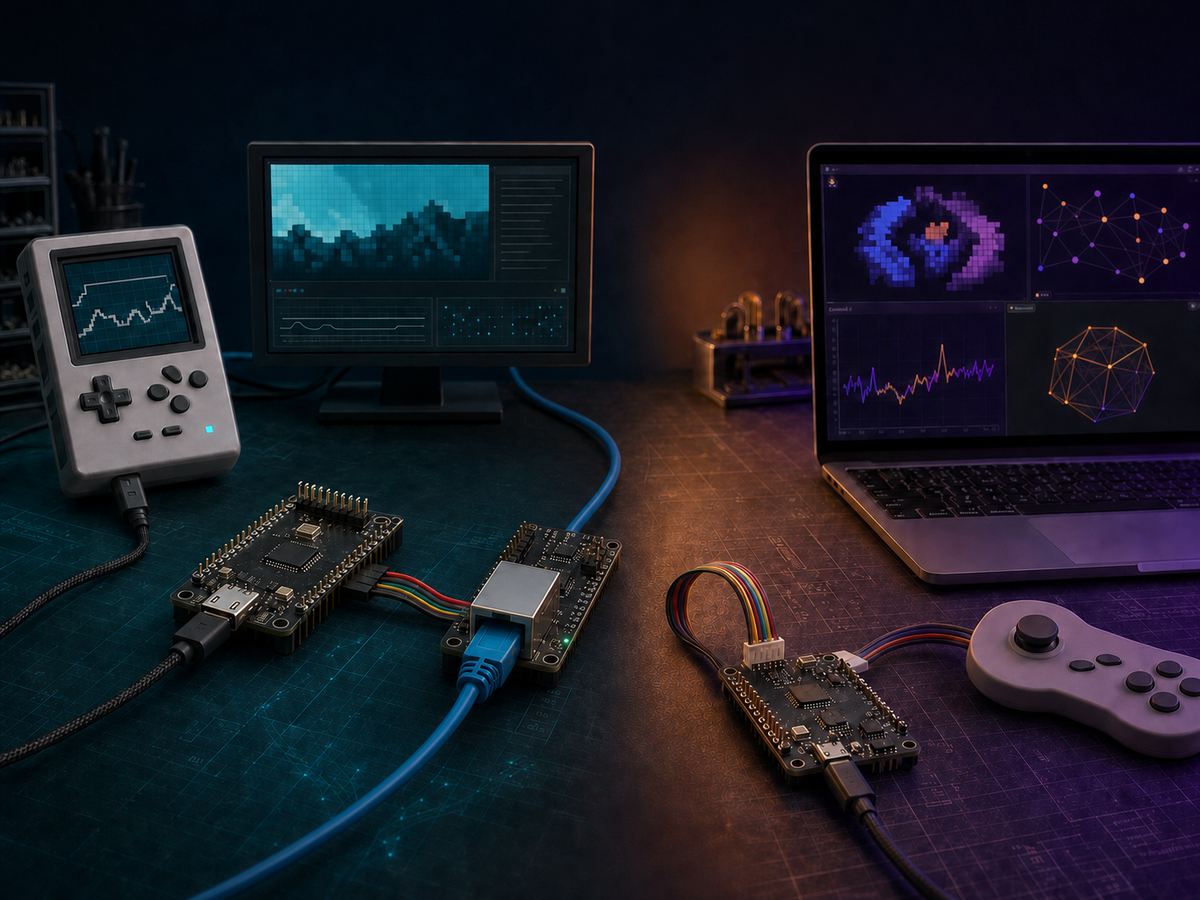 AI-generated editorial illustration for this article. It is not a Joypad product photograph or wiring diagram.
The current reference points are Joypad OS v2.2.0, released on July 8, 2026, and main commit e62fcff from July 17. The main branch is newer than the release tag, so a source target can exist without a ready-to-flash v2.2.0 image.
One Repository, Separate Data Paths
The current source exposes three related but distinct paths:
gc2eth_feather_usbhostconnects a real GBA link-cable signal to Dolphin through RP2040, W5500, and two TCP connections.joypad-mcpexposes controller and observation actions as MCP tools, then sends full desired controller states through a 115200-baud serial link.joypad-botand its LeRobot files observe and controlnes-pyin software. The public source does not show those models driving a real console through the W5500 target.
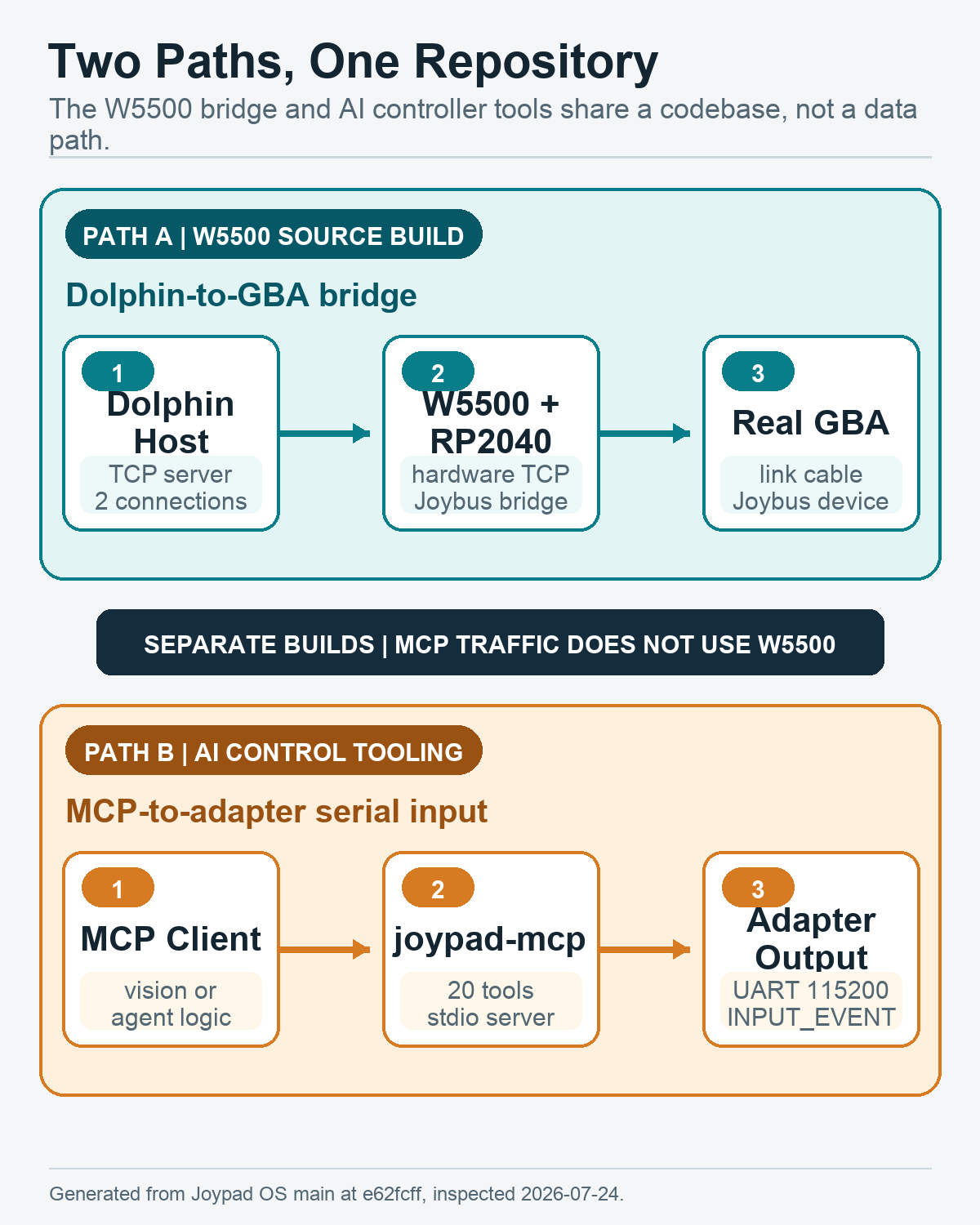 Generated technical diagram: the Ethernet and AI paths share the Joypad OS repository, not the same connection.
The build configuration keeps the same boundary. MCP traffic does not use the W5500 target. The W5500 application does not enable the UART-host configuration required by the current MCP transport, so an MCP client does not inject input into gc2eth_feather.
The W5500 GBA-to-Dolphin Bridge
The gc2eth_feather configuration targets an Adafruit Feather RP2040 USB Host plus a W5500 Ethernet FeatherWing. A real GBA sits behind a GameCube-to-GBA link cable; Dolphin supplies the GameCube side. A physical GameCube console is not part of this path.
The target's pin and network settings are explicit:
- Joybus data uses GP4.
- W5500 uses SPI1 with SCK GP14, MOSI GP15, MISO GP8, and CS GP10.
- The project sets SPI to 20 MHz for this board.
- The bridge uses static IP
192.168.1.250; the Dolphin host is192.168.1.159. - Socket 0 connects to TCP port
54970for commands and responses. - Socket 1 connects to TCP port
49420for Dolphin clock synchronization.
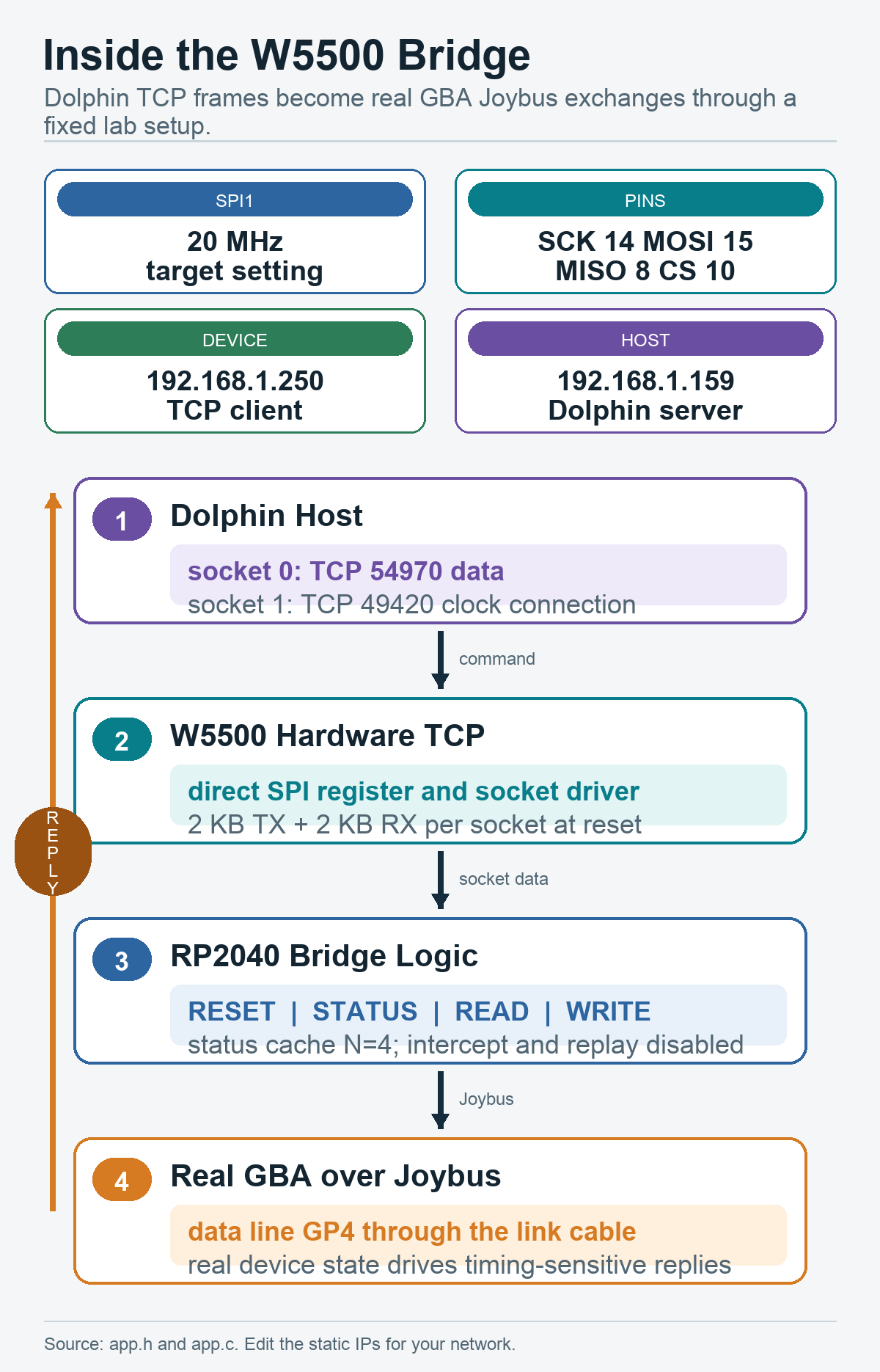 Generated technical diagram from the current
 app.h and app.c configuration.
Socket 1 is unusual but important. The firmware drains and discards its received bytes because the connection itself is what allows Dolphin's GBA device to proceed. Socket 0 carries RESET, STATUS, READ, and WRITE exchanges to the app.c bridge logic, which performs the corresponding Joybus transaction and returns the real device response.
The 20 MHz value is a project setting, not the W5500's device limit. WIZnet's official W5500 documentation specifies an SPI clock up to 80 MHz. The Joypad source comments that a higher setting increased jitter on the tested PCB, so the firmware chooses the lower value for this experiment.
Build Status and Runtime Defaults
The W5500 path is real source code, not a keyword mention. Its CMake target compiles a direct w5500.c SPI driver, opens W5500 hardware TCP sockets, and reads and writes socket buffers without lwIP or a software TCP/IP stack on the RP2040.
At the same time, this is an experimental source-build target. It is present in the general APPS list and can be invoked with:
make gc2eth_feather_usbhost
It is absent from RELEASE_APPS, and the v2.2.0 release does not include a dedicated W5500 Feather UF2. The static IP constants also have to be reviewed for another network.
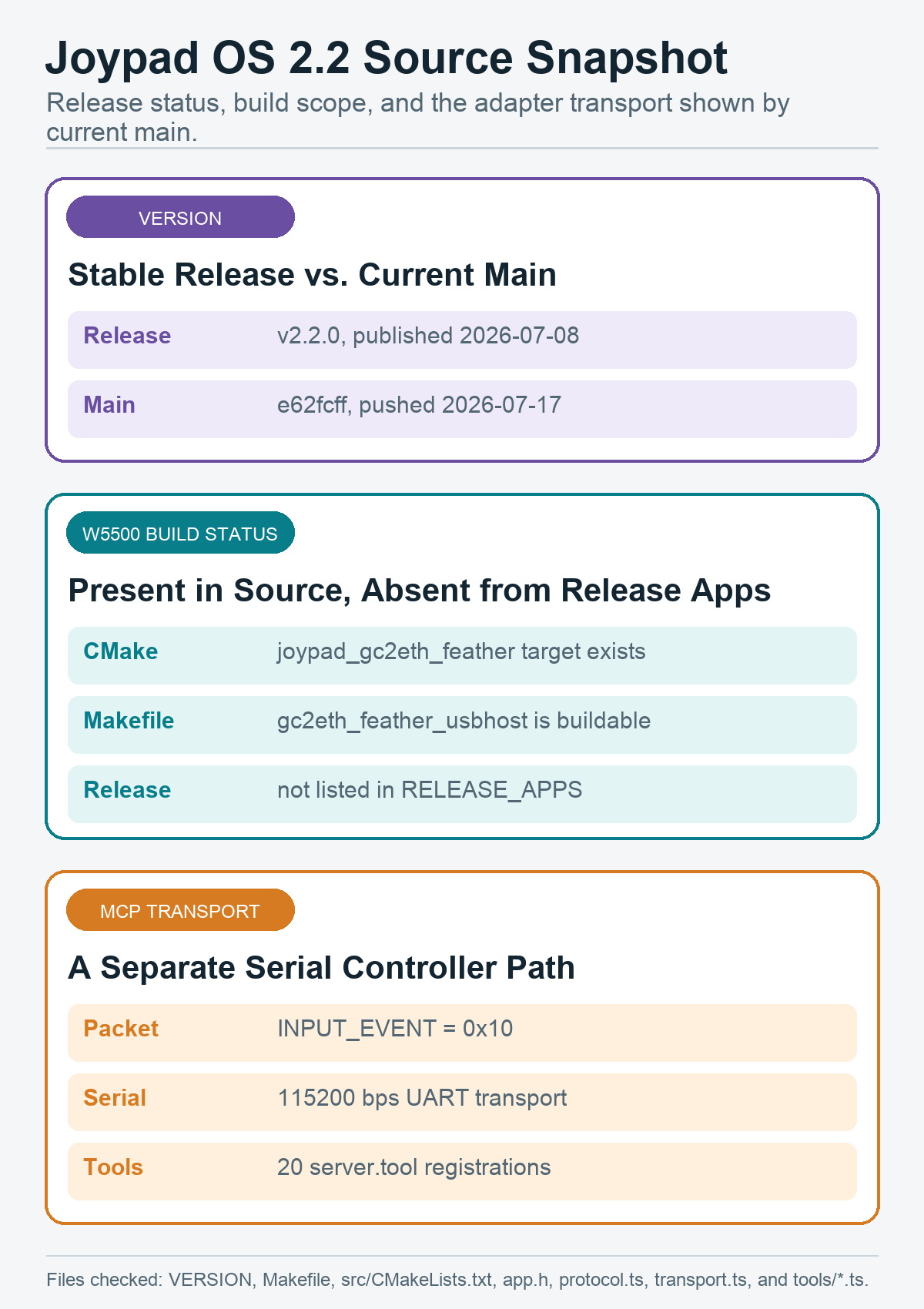 Generated source snapshot based on the current VERSION, Makefile, CMake, bridge, and MCP files.
The bridge keeps several timing experiments in source, but its defaults are conservative. STATUS caching refreshes after four served polls; speculative STATUS, WRITE caching, and READ caching default to off. Intercept-and-replay code is explicitly disabled because generated responses did not reproduce the live JSTAT.RECV transitions expected by Madden. The active path is direct passthrough.
No single latency number is used here because comments and development commits refer to different workloads and measurement points. The public source supports the architecture and successful Madden multiboot research, not a general benchmark for every game or network.
The AI Path: MCP, Vision, and LeRobot
joypad-mcp is a Node.js MCP server. MCP itself uses stdio; downstream, its SerialPort transport sends INPUT_EVENT packet type 0x10 at 115200 baud to compatible Joypad OS UART-host firmware.
Counting the current server.tool registrations gives 20 tools: four connection, eight input, three observation, and five vision tools. That is one more than the 19-tool sentence still present in the README. The source includes both list_cameras and analyze_game_state.
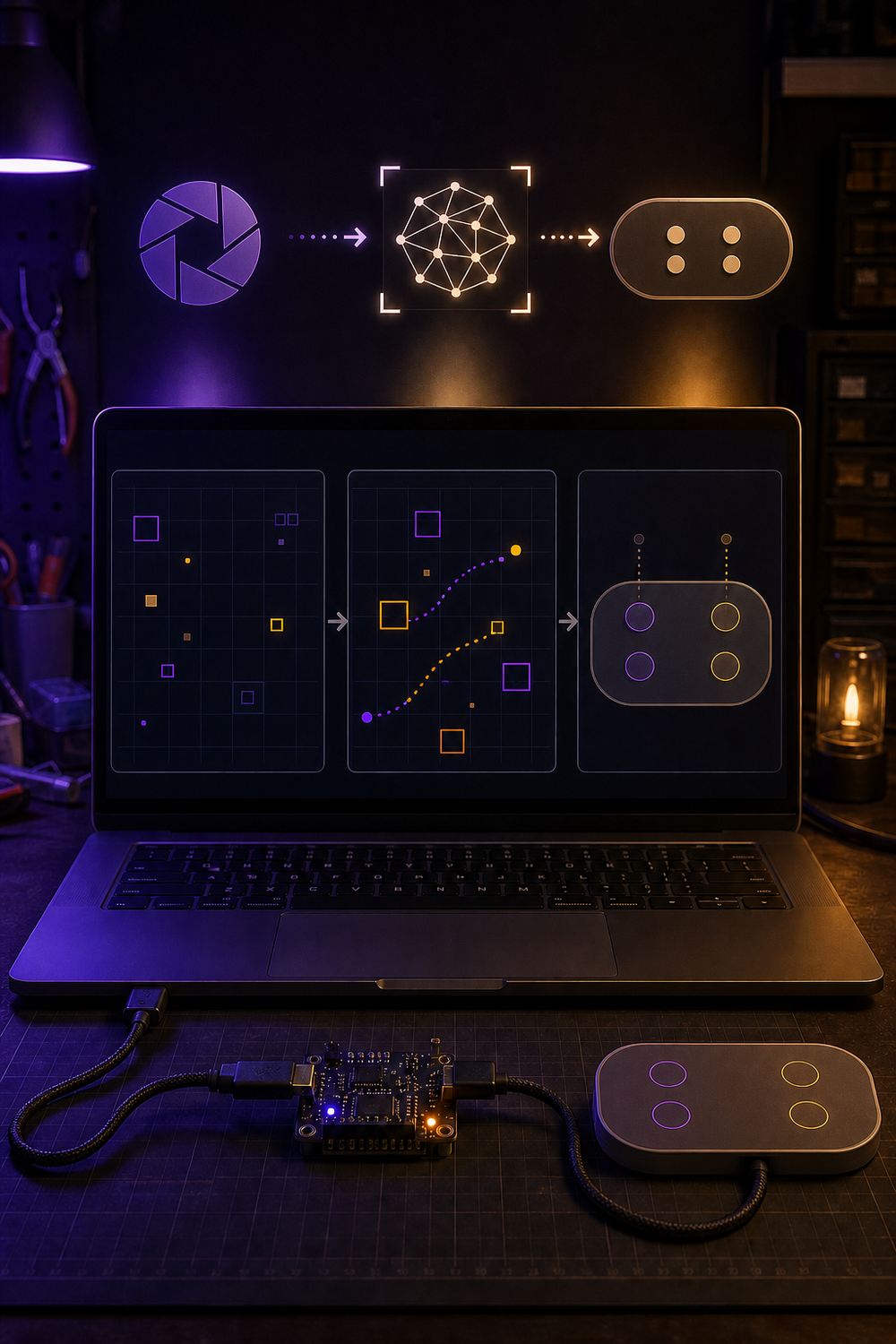 AI-generated conceptual illustration of the separate AI controller path. No Ethernet hardware is shown because MCP does not use W5500 here.
The tool boundary matters. read_state returns the state requested by MCP; it does not confirm delivery to or application by a console. The joypad-bot V1 loop is also software-only: a vision-capable model observes nes-py, chooses a button action, and advances the emulator.
The repository has progressed beyond a roadmap-only LeRobot note. recorder.py, train.py, and inference.py provide an emulator-side record, train, and live inference workflow, and the maintainer reports an end-to-end Diffusion Policy run. However, there is no public real-console integration, dataset, checkpoint, success-rate benchmark, or W5500 connection for this path.
⚙️ Why the W5500 Role Matters
W5500 gives the bridge a microcontroller-controlled, wired TCP endpoint beside a timing-sensitive Joybus interface. The firmware manages the W5500 at register and socket level, while the RP2040 stays responsible for protocol translation and real-device I/O.
That separation is the reusable design pattern. W5500 terminates the wired TCP connection; RP2040 preserves the device-side transaction. The same pattern can be useful when an embedded bridge must keep local I/O timing visible and still exchange framed data with a host over Ethernet.
The project's current scope is clear: this W5500 build is a research target, not a retail adapter, stable release image, AI-over-Ethernet appliance, or universal low-latency benchmark. Its value is the unusually inspectable implementation: pins, fixed IPs, two TCP sockets, direct W5500 access, Joybus forwarding, cache controls, and trace hooks are all public.
Project and Community Context
Joypad OS grew from USB2PCE and USBRetro into a broader firmware ecosystem. The official shop currently lists maintained USB2USB, BT2USB, USB2GC, and USB2PCE adapters, while the W5500 target remains a separate research build.
The public repository also shows active user-driven development. A 2026 Neo Geo tournament request led to a contributor PR with real RP2040-Zero testing for tournament-safe remapping rules. That work is not part of the W5500 bridge, but it shows how controller use cases are feeding back into the platform.
The repository specifies the Apache License 2.0. Repository and visual assets should still be used without implying permission to use Joypad trademarks.
Related WIZnet Maker Projects
- libogc2 adds WIZnet network interfaces to the GameCube/Wii homebrew SDK. It is the closest code-side reference, but it is not an RP2040 GBA-to-Dolphin or MCP bridge.
- W5500 Ethernet Adapter for GameCube: ETH2SP1 shows the same W5500 and GameCube intersection as a commercial Ethernet adapter, not Joypad's experimental firmware path.
- Swiss provides the console-software context for W5500-family networking. Joypad OS instead approaches the problem through Joybus, adapter firmware, and host tools.
❓ FAQ
Q. Is gc2eth_feather a ready-to-flash v2.2.0 download? No. The source target exists, but it is excluded from the stable release application list and has no dedicated v2.2.0 UF2.
Q. Does this bridge connect directly to a physical GameCube? No. A real GBA connects through the link cable, while Dolphin provides the GameCube side.
Q. Does Joypad MCP send controller input over W5500? No. The current MCP server sends INPUT_EVENT packets through a 115200-baud serial connection to compatible UART-host firmware.
Q. Why does the W5500 target open two TCP sockets? Socket 0 carries the GBA command and response stream. Socket 1 maintains Dolphin's clock connection, and its incoming bytes are discarded.
Q. Can the AI tools already control a real console through this bridge? The public source does not demonstrate that integration. Its VLM and LeRobot workflows currently target a software NES emulator.
한국어 (Korean)
📌 개요
Robert Dale Smith는 Joypad의 설립자이며, 컨트롤러 어댑터, 커스텀 컨트롤러, 보조 입력 장치를 위한 오픈소스 펌웨어 플랫폼인 Joypad OS를 관리하고 있습니다. 이 저장소에는 W5500 기반 GBA-to-Dolphin Ethernet 브리지와 MCP, 비전 에이전트, 로봇 학습 실험이 함께 들어 있습니다.
핵심은 "함께"라는 표현입니다. W5500 타깃은 실제 GBA의 Joybus 트래픽을 TCP로 Dolphin에 전달합니다. MCP 경로는 UART로 컨트롤러 상태를 보내며, VLM과 LeRobot 경로는 현재 소프트웨어 NES 에뮬레이터에서 동작합니다. 하나의 저장소를 공유하지만 하나의 end-to-end 전송 경로는 아닙니다.
한 문장으로 보는 Joypad OS: 하나의 컨트롤러 플랫폼 안에 실험적인 W5500 브리지와 별도의 AI 제어 도구가 있으며, 두 경로의 경계가 분명합니다.
이 글을 위해 생성한 AI 편집 일러스트입니다. Joypad 제품 사진이나 배선도가 아닙니다.
이번 업데이트는 2026년 7월 8일 공개된 Joypad OS v2.2.0과 7월 17일의 main 커밋 e62fcff를 기준으로 확인했습니다. main 브랜치는 릴리스 태그보다 앞서 있으므로, 저장소에 소스가 있다고 해서 v2.2.0용 플래시 이미지가 제공된다는 뜻은 아닙니다.
하나의 저장소, 분리된 데이터 경로
현재 소스에는 서로 관련되지만 구분되는 세 가지 경로가 있습니다.
gc2eth_feather_usbhost는 실제 GBA 링크 케이블 신호를 RP2040, W5500, 두 개의 TCP 연결을 거쳐 Dolphin으로 전달합니다.joypad-mcp는 컨트롤러와 관찰 동작을 MCP 도구로 노출하고, 원하는 컨트롤러 상태 전체를 115200-baud serial link로 보냅니다.joypad-bot과 LeRobot 파일은 소프트웨어의nes-py를 관찰하고 제어합니다. 공개 소스에는 해당 모델이 W5500 타깃을 거쳐 실제 콘솔을 조작하는 구현이 없습니다.
생성 기술 다이어그램: Ethernet 경로와 AI 경로는 Joypad OS 저장소를 공유하지만 같은 연결을 사용하지 않습니다.
현재 빌드 설정도 같은 경계를 유지합니다. MCP traffic은 W5500 target을 사용하지 않습니다. W5500 애플리케이션에는 현재 MCP 전송에 필요한 UART-host 설정이 활성화되어 있지 않으므로 MCP 클라이언트는 gc2eth_feather에 입력을 주입하지 않습니다.
W5500 GBA-to-Dolphin 브리지
gc2eth_feather 설정은 Adafruit Feather RP2040 USB Host와 W5500 Ethernet FeatherWing을 대상으로 합니다. 실제 GBA는 GameCube-to-GBA 링크 케이블 뒤에 있고, Dolphin이 GameCube 측을 담당합니다. 이 경로에 실제 GameCube 본체는 없습니다.
타깃의 핀과 네트워크 설정은 다음과 같습니다.
- Joybus data는 GP4를 사용합니다.
- W5500은 SPI1을 사용하며 SCK GP14, MOSI GP15, MISO GP8, CS GP10입니다.
- 이 프로젝트는 해당 보드에서 SPI를 20 MHz로 설정합니다.
- 브리지 고정 IP는
192.168.1.250, Dolphin host는192.168.1.159입니다. - socket 0은 명령과 응답을 위해 TCP
54970에 연결합니다. - socket 1은 Dolphin clock 동기화를 위해 TCP
49420에 연결합니다.
현재 app.h와 app.c 설정을 바탕으로 생성한 기술 다이어그램입니다.
socket 1은 특이하지만 중요합니다. 연결 자체가 Dolphin의 GBA 장치를 진행시키기 때문에 펌웨어는 수신 바이트를 비워서 버립니다. socket 0은 RESET, STATUS, READ, WRITE 교환을 app.c 브리지 로직에 전달하고, 브리지 로직은 해당 Joybus 트랜잭션을 실행한 뒤 실제 장치 응답을 되돌려 보냅니다.
20 MHz는 프로젝트 설정이지 W5500 장치의 한계가 아닙니다. WIZnet의 공식 W5500 문서는 최대 80 MHz SPI clock을 명시합니다. Joypad 소스는 테스트한 PCB에서 더 높은 설정이 jitter를 늘렸다고 기록하므로 이 실험에서는 낮은 값을 선택합니다.
빌드 상태와 런타임 기본값
W5500 경로는 단순한 키워드 언급이 아니라 실제 소스입니다. CMake 타깃은 직접 구현한 w5500.c SPI driver를 빌드하며, lwIP나 RP2040 software TCP/IP stack 없이 W5500 hardware TCP socket과 buffer를 직접 제어합니다.
동시에 이 기능은 실험적인 소스 빌드 타깃입니다. 일반 APPS 목록에는 있고 다음 명령으로 빌드할 수 있지만:
make gc2eth_feather_usbhost
RELEASE_APPS에는 없으며 v2.2.0 릴리스에도 전용 W5500 Feather UF2가 없습니다. 고정 IP 상수도 자신의 네트워크에 맞게 검토해야 합니다.
현재 VERSION, Makefile, CMake, 브리지, MCP 파일을 바탕으로 생성한 소스 스냅샷입니다.
브리지에는 여러 timing experiment가 남아 있지만 기본값은 보수적입니다. STATUS cache는 네 번 제공한 뒤 갱신하며, speculative STATUS, WRITE cache, READ cache는 기본적으로 꺼져 있습니다. Intercept-and-replay는 Madden이 기대하는 실제 JSTAT.RECV 변화를 생성 응답으로 재현하지 못해 명시적으로 비활성화되어 있습니다. 현재 동작 경로는 direct passthrough입니다.
개발 코멘트와 커밋이 서로 다른 workload와 측정 지점을 다루기 때문에 이 글에서는 하나의 latency 수치를 일반화하지 않습니다. 공개 소스는 구조와 Madden multiboot 연구 성공은 보여주지만, 모든 게임과 네트워크에 적용되는 범용 benchmark는 제공하지 않습니다.
AI 경로: MCP, Vision, LeRobot
joypad-mcp는 Node.js MCP 서버입니다. MCP 자체는 stdio를 사용하고, downstream SerialPort 전송은 INPUT_EVENT packet type 0x10을 115200 baud로 호환되는 Joypad OS UART-host 펌웨어에 보냅니다.
현재 server.tool 등록을 세면 20개 도구입니다. 연결 4개, 입력 8개, 관찰 3개, 비전 5개입니다. README의 19개라는 문장보다 하나 많으며, 현재 소스에는 list_cameras와 analyze_game_state가 모두 들어 있습니다.
별도의 AI controller path를 설명하기 위해 생성한 AI 개념 일러스트입니다. MCP가 여기서 W5500을 사용하지 않으므로 Ethernet hardware는 그리지 않았습니다.
도구의 경계도 중요합니다. read_state는 MCP가 요청한 상태를 반환하며 콘솔 전달 또는 적용 여부를 확인하지 않습니다. joypad-bot V1 역시 소프트웨어 경로입니다. 비전 모델이 nes-py 화면을 보고 버튼 동작을 선택한 뒤 에뮬레이터를 진행합니다.
LeRobot 부분은 이제 단순 계획보다 진전되었습니다. recorder.py, train.py, inference.py가 emulator-side record, train, live inference 흐름을 제공하고, 관리자는 Diffusion Policy end-to-end 실행을 기록했습니다. 그러나 공개된 실제 콘솔 통합, dataset, checkpoint, 성공률 benchmark, W5500 연결은 없습니다.
⚙️ W5500 역할이 중요한 이유
W5500은 timing-sensitive Joybus interface 옆에 MCU가 제어하는 유선 TCP endpoint를 제공합니다. 펌웨어가 W5500 register와 socket을 관리하고, RP2040은 protocol translation과 실제 장치 I/O를 담당합니다.
재사용 가능한 설계 패턴은 역할 분리입니다. W5500이 유선 TCP 연결을 종료하고, RP2040이 장치 측 트랜잭션을 보존합니다. embedded bridge가 로컬 I/O timing을 유지하면서 Ethernet으로 host와 frame data를 교환해야 할 때 참고할 수 있는 구조입니다.
프로젝트의 현재 범위는 명확합니다. 이 W5500 빌드는 판매용 어댑터, 안정 릴리스 이미지, AI-over-Ethernet appliance, 범용 low-latency benchmark가 아니라 research target입니다. 핀, 고정 IP, 두 TCP socket, direct W5500 access, Joybus forwarding, cache control, trace hook이 모두 공개되어 있다는 점이 핵심 가치입니다.
프로젝트와 커뮤니티 맥락
Joypad OS는 USB2PCE와 USBRetro에서 더 넓은 펌웨어 생태계로 발전했습니다. 공식 shop은 현재 USB2USB, BT2USB, USB2GC, USB2PCE 어댑터를 제공하지만 W5500 타깃은 이 제품군과 구분되는 research build입니다.
공개 저장소에는 사용자 요구가 개발로 이어지는 과정도 보입니다. 2026년 Neo Geo tournament 요청은 tournament-safe remapping rule과 RP2040-Zero 실기 테스트를 포함한 contributor PR로 이어졌습니다. W5500 브리지 기능은 아니지만, 실제 컨트롤러 사용 환경이 플랫폼 개발에 반영되는 사례입니다.
저장소는 Apache License 2.0을 명시합니다. Apache-2.0은 Joypad 상표 사용권을 포함하지 않습니다.
관련 WIZnet Maker 프로젝트
- libogc2는 GameCube/Wii homebrew SDK에 WIZnet network interface를 추가합니다. 코드 관점에서 가장 가까운 참고 자료지만 RP2040 GBA-to-Dolphin 또는 MCP bridge는 아닙니다.
- W5500 Ethernet Adapter for GameCube: ETH2SP1은 같은 W5500과 GameCube 교차점을 상용 Ethernet adapter로 보여줍니다. Joypad의 실험적 firmware path와는 다릅니다.
- Swiss는 W5500 계열 GameCube networking의 console-software 맥락을 제공합니다. Joypad OS는 Joybus, adapter firmware, host tool 관점에서 접근합니다.
❓ FAQ
Q. gc2eth_feather를 v2.2.0에서 바로 플래시할 수 있나요? 아니요. 소스 타깃은 있지만 안정 릴리스 애플리케이션 목록에서 제외되어 있고 전용 v2.2.0 UF2도 없습니다.
Q. 이 브리지가 실제 GameCube 본체에 직접 연결되나요? 아니요. 실제 GBA는 링크 케이블로 연결되고 Dolphin이 GameCube 측을 담당합니다.
Q. Joypad MCP가 W5500으로 컨트롤러 입력을 보내나요? 아니요. 현재 MCP 서버는 호환되는 UART-host 펌웨어에 115200-baud serial connection으로 INPUT_EVENT packet을 보냅니다.
Q. W5500 타깃이 TCP socket을 두 개 여는 이유는 무엇인가요? socket 0은 GBA command와 response stream을 담당합니다. socket 1은 Dolphin clock connection을 유지하며 수신 바이트는 버립니다.
Q. AI 도구가 이 브리지를 통해 실제 콘솔을 이미 제어하나요? 공개 소스에는 해당 통합이 없습니다. VLM과 LeRobot workflow는 현재 software NES emulator를 대상으로 합니다.
Documents
-
Joypad OS GitHub repository
Open-source controller firmware platform containing the W5500 bridge and separate AI controller tools
-
Joypad OS v2.2.0 release
Latest stable release checked for packaged application assets
-
W5500 bridge hardware configuration
Joybus and SPI pins, static IP addresses, 20 MHz target setting, and both Dolphin TCP ports
-
W5500 bridge app source
Dolphin TCP, Joybus passthrough, cache controls, tracing, and disabled intercept-replay experiment
-
W5500 driver source
Direct W5500 SPI, register, hardware socket, TX-buffer, and RX-buffer implementation
-
joypad-mcp source
MCP stdio server, 20 registered tools, screenshots, and 115200-baud UART INPUT_EVENT transport
-
joypad-bot and LeRobot tools
Software NES vision loop plus emulator-side recording, training, and inference tools
-
W5500 official documentation
Official WIZnet features, memory, interfaces, and electrical specifications
-
Apache License 2.0
Repository license


