DMX Core PoE Control
DMX Core PoE Control
0
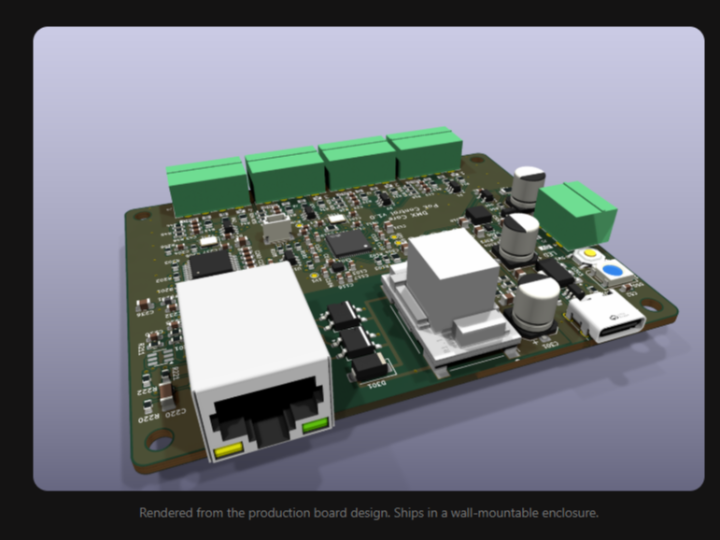
Components
Hardware components
WIZnet - W5500
x 1

Project description
Overview
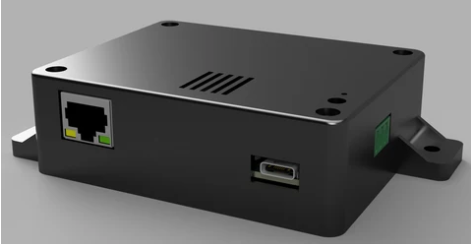
DMX Core PoE Control is a wall-mountable PoE controller designed for lighting, audio, and show-control environments.
The product turns physical rotary encoders and push buttons into network control inputs. These inputs can control levels, presets, cues, mutes, fader moves, and other functions on systems such as DMX Core 100, Symetrix, Q-SYS, or Bitfocus Companion.
The hardware is built around:
- Raspberry Pi RP2350 microcontroller
- WIZnet W5500 Ethernet controller
- Isolated Silvertel PoE module
- IEEE 802.3af PoE power input
- 4 control ports
- Panel LED port for addressable RGB LEDs
- USB-C configuration and backup power
- Wall-mountable enclosure
This makes DMX Core PoE Control a practical example of a compact Ethernet control surface where WIZnet W5500 provides reliable wired network connectivity and PoE simplifies installation.
What Problem Does This Controller Solve?
Lighting and audio systems often need simple wall-mounted controls.
In many venues, users do not need a full lighting console or software interface. They only need a physical knob or button to control common actions such as:
- Master dimmer
- Zone level
- Fixture channel
- Audio volume
- DSP fader
- Mute
- Preset recall
- Cue trigger
- Blackout
- Flash or momentary action
Without a dedicated wall controller, these actions may require a computer, tablet, software interface, or larger control surface.
DMX Core PoE Control solves this by turning simple rotary encoders and push buttons into Ethernet-based control inputs.
One Ethernet cable provides both power and communication, so the controller can be installed cleanly in a wall, rack, panel, or control position.
How Is the System Structured?
DMX Core PoE Control sits between physical control hardware and network-based control systems.
The user interacts with knobs, buttons, and panel LEDs.
The controller reads those inputs, processes the actions with the RP2350 MCU, and sends control messages over Ethernet through the WIZnet W5500.
The basic structure can be described as follows:
Rotary Encoders / Push Buttons
        |
        | Control Ports
        |
DMX Core PoE Control
        |
        | RP2350 MCU
        |
WIZnet W5500 Ethernet
        |
        | PoE Ethernet
        |
DMX Core 100 / Symetrix / Q-SYS / Bitfocus Companion
This architecture separates the system into three clear roles:
- Physical input layer: knobs, push buttons, and panel LEDs
- Embedded control layer: RP2350 firmware and configuration
- Network control layer: W5500 Ethernet and target control system
The result is a compact control surface that can be placed wherever the user needs physical control.
What Does W5500 Add to DMX Core PoE Control?
W5500 provides the Ethernet interface for the controller.
In this product, Ethernet is not just a communication option. It is the main connection between the wall controller and the control system.
Reliable Wired Control
Lighting, audio, and show-control systems often require predictable and stable communication.
A wired Ethernet connection is more reliable than wireless control in fixed installations such as venues, control rooms, studios, auditoriums, and building systems.
W5500 provides this wired Ethernet path.
Compact Embedded Ethernet
W5500 integrates the Ethernet MAC, PHY, and hardwired TCP/IP stack.
This helps the controller provide 10/100 Ethernet in a compact embedded design without requiring a more complex Ethernet implementation.
Good Fit for OSC and Control Protocols
The controller can send OSC over UDP for DMX Core 100 and other OSC servers.
It can also support firmware modes for Symetrix, Q-SYS, and Bitfocus Companion.
W5500 provides the Ethernet foundation needed for these network control protocols.
Stable Always-On Operation
Wall controllers are expected to stay installed and ready for long-term use.
W5500 helps provide the stable Ethernet connection needed for an always-on control device.
Why Is PoE Important?
PoE is a major part of the product concept.
DMX Core PoE Control can be powered by an IEEE 802.3af or 802.3at PoE switch or injector. The same Ethernet cable carries both control data and power.
Single-Cable Installation
With PoE, the installer only needs one Ethernet cable.
That cable provides both power and network communication.
This is especially useful for wall-mounted controllers because it avoids a separate power adapter or local power wiring.
Clean Wall and Panel Deployment
A control surface is often installed in visible locations.
PoE makes the installation cleaner because the controller does not need a separate power supply near the wall plate or panel.
Centralized Power
Power can come from a PoE switch or injector in the network cabinet.
This makes the controller easier to manage in professional installations.
USB-C Backup Option
The product can also be powered from USB-C 5 V. If both PoE and USB-C are connected, PoE has priority.
This provides flexibility for setup, testing, and backup power.
How Do the Control Ports Work?
DMX Core PoE Control provides 4 control ports on pluggable 3.5 mm screw terminals.
Each port can be used with:
- One rotary encoder with push switch
- Up to three push buttons
This gives the installer flexibility depending on the control surface design.
A port can be used for a knob or buttons.
The controller also includes input protection and filtering on every input line.
This is important for field wiring because wall controls can be installed away from the main unit and may be exposed to cable noise or handling.
What Can the Knobs Control?
With DMX Core 100, each knob can step a Control Value.
The Control Value can then drive whatever the system designer assigns in the Core.
Possible targets include:
- Master dimmer
- Zone intensity
- Fixture channel
- Audio output level
- DSP fader
- Another Control Value
This means the knob does not need to own the actual level state.
The Core owns the value, and the knob simply sends step commands.
This is important because if there are multiple controllers in different rooms, they can control the same value without drifting out of sync.
What Can the Buttons Control?
Buttons can send OSC addresses or trigger actions in the target system.
A button can be used for actions such as:
- Play a cue
- Apply a preset
- Toggle a mute
- Toggle a Control Value
- Blackout
- Flash
- Momentary action
- Trigger a script
This makes the product useful not only as a dimmer knob controller, but also as a compact wall control station for common show-control actions.
How Does It Work with DMX Core 100?
With DMX Core 100, the controller communicates using OSC over UDP.
Each knob can step a Control Value on the Core.
The Control Value then drives the assigned function inside DMX Core 100.
This design keeps the value state inside DMX Core 100 rather than inside the wall controller.
The benefit is that the same level can be shared across different surfaces and interfaces.
If power is lost, the controller does not need to restore a local knob state. After power returns, it finds the Core again and continues sending control actions.
How Does It Work with Symetrix and Q-SYS?
DMX Core PoE Control can also run firmware for direct DSP control.
With Symetrix firmware, the controller uses the Composer control protocol over TCP.
With Q-SYS firmware, it uses the External Control Protocol over TCP.
In these modes, the knobs and buttons can control DSP functions such as:
- Fader nudges
- Mutes
- Preset recalls
- Triggers
- Snapshots
This means the same hardware can be used as a wall controller for audio DSP systems, even without a DMX Core 100.
How Does It Work with Bitfocus Companion?
With Companion firmware, the controller becomes a surface for Bitfocus Companion.
In this mode, the knobs and buttons behave like keys on a Companion surface.
Companion decides what each control does.
This makes the controller useful for wider AV and show-control workflows where one physical surface can trigger actions across many systems supported by Companion.
How Is the Controller Configured?
The controller is configured through a single text file called config.txt.
There are two ways to edit the configuration:
- Web page on the controller
- USB-C drive mode
When the controller is on the network, the user can open its local web page to view status, edit settings, read logs, and upload firmware.
When connected to a computer over USB-C, the controller appears as a small drive named POECONTROL, and the same config.txt file can be edited in a normal text editor.
This makes configuration practical for both network-connected setup and locked-down networks.
What Does the Web Page Provide?
The controller has a web page at its local network address.
The web page can provide:
- Live status
- Configuration editor
- Server list
- Log view
- Firmware upload
- Password setting
- Restart function
The web page can also be disabled entirely with configuration if the controller must not expose a network management interface.
This is useful for security-sensitive installations.
What Does USB-C Add?
USB-C is used for configuration, firmware updates, and optional power.
When connected to a computer, the controller appears as a small drive.
Useful files include:
- config.txt for settings
- status.txt for device status and error messages
- servers.txt for discovered DMX Core or OSC servers
- readme.txt for quick reference
Firmware can also be updated by copying a UF2 file to the drive.
This makes field setup easier because no special software is required.
What Is the Role of the RP2350?
The RP2350 is the main microcontroller of DMX Core PoE Control.
It handles:
- Reading rotary encoder inputs
- Reading button inputs
- Managing panel LED output
- Running firmware logic
- Handling configuration
- Managing USB-C drive mode
- Communicating with W5500
- Sending network control messages
- Supporting firmware update behavior
This makes the RP2350 the embedded control core of the product, while W5500 provides the Ethernet interface.
System Architecture
The complete system can be divided into four layers.
Physical Control Layer
---------------------------------
Rotary encoders
Push buttons
Panel RGB LEDs
Wall or panel wiring

Embedded Controller Layer
---------------------------------
RP2350 MCU
Input processing
Configuration handling
Firmware logic
USB-C drive mode

Network Layer
---------------------------------
WIZnet W5500 Ethernet
RJ45 connector
IEEE 802.3af PoE
DHCP or fixed IP

Target System Layer
---------------------------------
DMX Core 100
Symetrix DSP
Q-SYS DSP
Bitfocus Companion
Other OSC server
This layered structure shows how DMX Core PoE Control turns physical user input into network control actions.
The knobs and buttons provide the human interface.
The RP2350 processes the control events.
The W5500 sends those events through Ethernet.
The target system owns the actual value, cue, preset, fader, or action.
What Applications Can Use This Design?
DMX Core PoE Control can be used in many lighting, audio, AV, and control applications.
Possible applications include:
- Wall-mounted lighting control
- Zone dimmer control
- Auditorium control panels
- Studio control surfaces
- Small venue lighting presets
- Audio volume control
- DSP fader control
- Q-SYS wall controls
- Symetrix wall controls
- Cue trigger panels
- Blackout or mute buttons
- Companion control surfaces
- AV room control
- Show-control input panels
The combination of physical controls, Ethernet, and PoE makes it suitable for permanent installations.
Why Is This a Good W5500 Use Case?
DMX Core PoE Control is a good W5500 use case because Ethernet is central to the product.
The controller is not a standalone knob box.
It is a network-connected control surface that sends control messages to a remote system.
W5500 helps the controller:
- Connect physical wall controls to Ethernet
- Send OSC and other control messages
- Use wired networking for reliable installations
- Work with PoE-based deployment
- Fit inside a compact embedded hardware design
- Support always-on wall control operation
- Integrate with lighting, audio, and AV systems
This makes W5500 an important part of the product architecture.
Conclusion
DMX Core PoE Control is a compact PoE-powered wall controller for lighting, audio, and AV systems.
It turns rotary encoders and push buttons into Ethernet-based control inputs for DMX Core 100, Symetrix, Q-SYS, Bitfocus Companion, or other OSC-compatible systems.
The product uses RP2350 as the main controller, WIZnet W5500 for Ethernet, and an isolated Silvertel PoE module for power.
With W5500, the controller gains stable wired Ethernet communication.
With PoE, the controller can be installed with a single Ethernet cable for both power and control.
This project shows how W5500 can be used in a professional control surface where reliable Ethernet, simple installation, and flexible protocol support are all important.
Q&A
What is DMX Core PoE Control?
DMX Core PoE Control is a PoE-powered wall controller that turns rotary encoders and push buttons into Ethernet control inputs.
Which WIZnet product is used?
The controller uses WIZnet W5500 for Ethernet connectivity.
What MCU is used?
The controller uses a Raspberry Pi RP2350 microcontroller.
Does it support PoE?
Yes. It supports IEEE 802.3af PoE and can also be powered by USB-C 5 V.
What can each control port support?
Each control port can support one rotary encoder with push switch, or up to three push buttons.
How many control ports are available?
The controller has 4 control ports.
What systems can it control?
It can control DMX Core 100, Symetrix, Q-SYS, Bitfocus Companion, or other OSC-compatible systems depending on the firmware and configuration.
How is it configured?
It is configured through a single config.txt file, edited either from the controller’s web page or through USB-C drive mode.
Why is W5500 useful in this product?
W5500 provides reliable wired Ethernet connectivity for sending control messages from wall-mounted knobs and buttons to lighting, audio, and AV systems.
Why is PoE useful in this product?
PoE allows one Ethernet cable to carry both power and control data, making wall and panel installation cleaner and easier.


