WizFI Chip Counter
WizFI Chip Counter
8
Components
Hardware components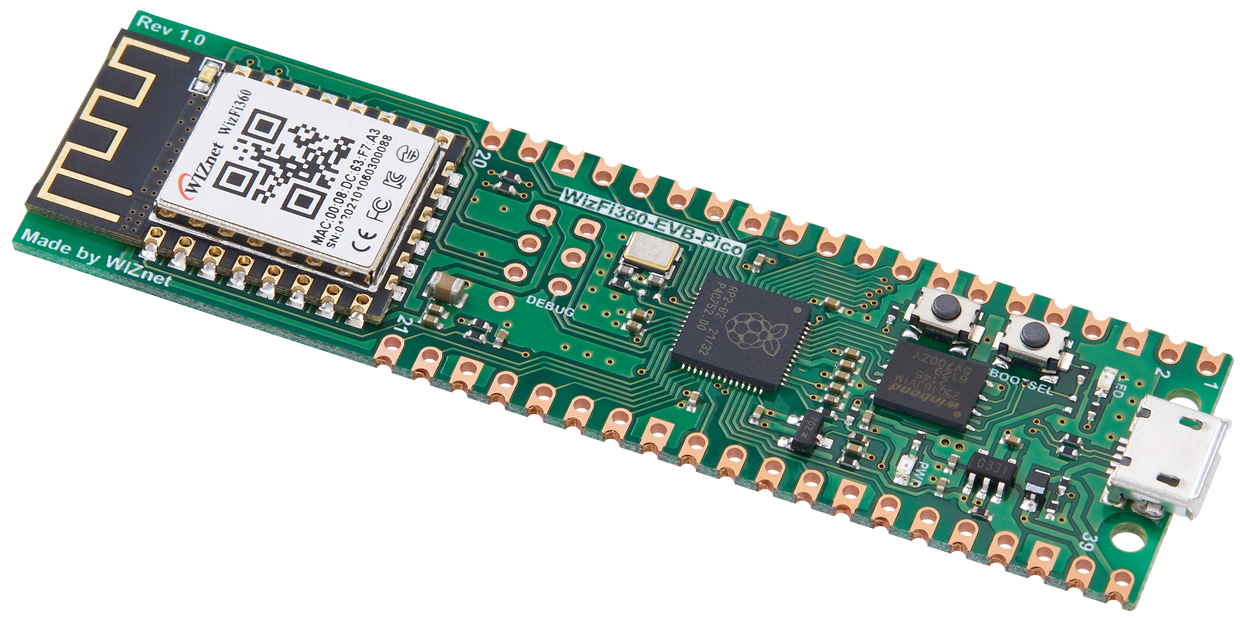
WIZnet - WizFi360-EVB-Pico
x 1
Project description
Since I'm working for a Electronic Chip solution company, I always faced a lot of issue while counting chips and finding products in our stock room.
After a period of time, I had decided to make a chip counter device to reduce the burden on counting chips.
I used WIZnet's WizFi360-EVB-PICO to create this solution with python coding.
Since I'm a new guy for programming, using cirucitpyhton coding with WizFi360-EVB-PICO could easily help me to achieve my target.
How to add your circuitpython to WizFi360-EVB-PICO: Link
For the PC section, I used Python codes that includes few libraries to create a exe file that could communicate with WizFi360 through TCP and it could save data to excel files.
Structure:

The stucture for this solution is simple.
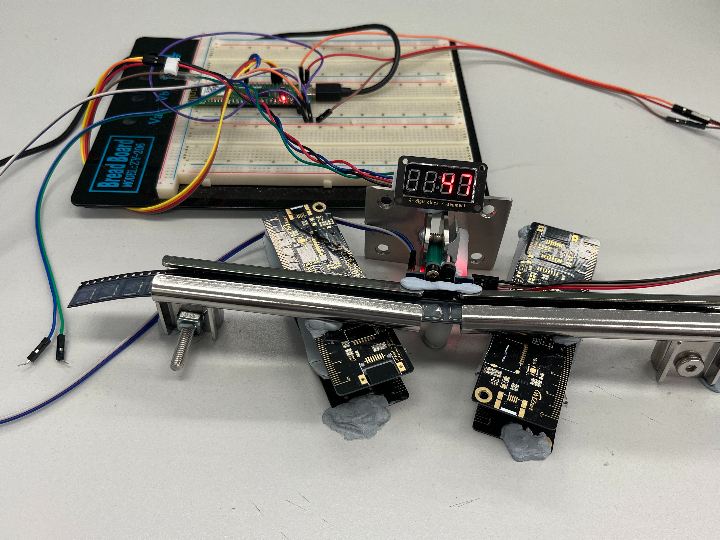
1. ITR9606 Sensors X 2 - It used IR sensor to determine is the holes on the chip counter belt.
a) Positive - There is a hole.
b) Negatove - There is no hole.
2. RP2040
a) Received instruction from PC through WizFi360
b) It used to calculate the amount of holes and converted into chip counts.
c) Control and Delivery message to WizFi360 for sending data to PC.
3. WizFi360 (TCP Server) - Received information and instructions from RP2040 and PC to allow both parties to communicate.
4. PC (TCP Client) - Communicate with WIzFi360.
a) It connects and provide instruction to RP2040 through WizFi360
b) It recevied chip counts from RP2040 and display it on the PC terminal.
c) Chip count could be saved into Excel file.
Step 1: Count the holes from the wheel type package
Required Library:
import board
from digitalio import DigitalInOut
from digitalio import Direction
Activate GPIOs on WizFi360-EVB-PICO collect data from the sensors
"""digitalio pin create"""
"""Adding counter"""
pulses = DigitalInOut(board.GP13)
pulses.direction = Direction.INPUT

"""Subtracting counter"""
pulses2 = DigitalInOut(board.GP1)
pulses2.direction = Direction.INPUT
Create a Class to easily manage the data traffic through each functions
class pulse_detect:
"""Holes counter"""
counter = 0
"""Chips counter"""
C_counter = 0
"""Wait counter"""
wait_count = 0
"""Current stage of the counter"""
current_stage = None
"""Set the Previous stage of the counters are OFF"""
previous_stage = 0b00
"""Determine the flow of the adding counter"""
flow = None
"""Determine the flow for the substracting counter"""
flow2 = None

def __init__(self, pulse,pulse2):
    """Left Counter (Adding counter)"""
    self.pulse = pulse
    """Right Counter (Subtract counter)"""
    self.pulse2 = pulse2
The theory is simiple, using binary to conside the second bit is for the "Adding counter" and the first bit is for "Substracting counter".
Digitalio in circuit python could only show True and False status of the result.
Therefore converting the information into binary, it will be easy for me to combine both flows in a same binary variable.
#Determine the current stage of the module
def stage (self):
        """Two IR Sensor - Direction counting"""
        if self.pulse.value is False:
            self.flow = 0b00
        elif self.pulse.value is True: """Found a hole in the adding counter"""
            self.flow = 0b10
            #self.p_counter += 1
        if self.pulse2.value is False:
            self.flow2 = 0b00
        elif self.pulse2.value is True: """Found a hole in the subtracting counter"""
            self.flow2 = 0b01
        """Save this current stage for both counters"""
        self.current_stage = self.flow +self.flow2
By using this method, we could easily add and subtract the bits to get a pattern of the flow.
Adding = A, Substract = S
Adding flow:
AS AS AS AS AS
00 ->10 ->11 ->01 ->00
As you could see, the adding counter will move before the substracting counter moves. Thus, it means the counter is walking to the adding direction.
Substracting flow:
AS AS AS AS AS
00 ->01 ->11 ->10 ->00
If the counter is heading to the subtracting direction, the subtracting counter should receive data before the adding counter.
For my case, counting the status after both counters are positive will be easy for me to detect the flow. Therefore, I used this stage as my determine point of the counter flow.
def hole_count(self):
        """Two IR Sensor - Direction counting"""
        if self.previous_stage is 0b11 and self.current_stage is not self.previous_stage:
            """Adding counter finish the pulse cycle"""
            if self.current_stage is 0b01:
                self.counter += 1 """Add hole count"""
            """Substracting counter finish pulse cycle"""
            elif self.current_stage is 0b10:
                self.counter -= 1 """Subtract hole count"""
            self.wait_count = 0 """If there is a stage change, clear all wait count"""
        elif self.current_stage is self.previous_stage:
            """If same stage, it will consider as stop counting"""
            self.wait_count += 1

        self.previous_stage = self.current_stage #Update the stage

        self.C_counter = round(self.counter /3) """3 holes = 1 chip"""
Step 2: Count and manage the chip counts:
From the above function, I had calcuate the chip count by dividing the total chip count by 3. Therefore it could show the current chip count using TM1637 display.
Required library for display:
import TM1637There are two modes for this counter device.
a) It counts the total amount of chips that has bypass the chip counter.
By receving the command of "CV", it will start counting.
If the counter didn't received any stage changes for a period of time, it will end the counting and send the data to the PC through WizFi360.
b) It counts your requested amount that the user has inputted into the terminal.
The counter will receive the requested amount form the PC. The counter will starts to check the chip count.
If the chip count has reach to the requested amount, it will return the total chip count to PC.
def chip_count(self, data):
        Max = data.decode() """data from TCP is in bytes"""
        R_data = 0 """Total chip count (Display and Return total chip count to PC)"""
        wait = 0 """Calculated wait time"""
        if Max is "CV": """if it received "CV" msg, it will be count mode"""
            mode = 1
            display.number(R_data) """display the current count"""
        else: """if it received requested chip count, it will be request mode"""
            mode = 0
            display.number(R_data)
        while True: """start counting"""
            if mode is 0:    """Request mode"""
                if R_data is int(Max): """If it reaches the requested amount"""
                    self.C_counter = 0
                    self.counter = 0
                    return R_data """Return value for WizFi360 and clear data"""
            elif mode is 1: """Count mode"""
                wait = self.wait_count /10000 """check timer from wait_count"""
                if wait > 1: """if it counts more than 10000 times"""
                    self.C_counter = 0
                    self.counter = 0
                    self.wait_count = 0
                    return R_data """return current chip count and clear data"""

            time.sleep(1/1000000000000) """creating delay for counting"""
            self.stage() """check the current stage of the counters"""
            self.hole_count() """chip count"""
            if R_data is not int(self.C_counter): """if it is still counting,"""
                R_data = int(self.C_counter)
                print ("Chip count: " + str(R_data))
                display.number(R_data) """display the current chip count"""
Step 3: TCP connection using WizFi360
Since I was developing this project, WIZnet does not have specific library for me to easily create TCP communication.
However, I found that the AT commands for WizFi360 are similiar with ESP AT commands.
Thus, I based on this library to create my codes.
Links:
My library based on ESP (Included how to add circuitpyhton in WizFi360-EVB-PICO)
After a period of time, WIZnet has made their own library based on WizFi360 AT-command. If anyone is interested on using WizFi360 with circuitpython, please go to this link below.
Required Library:
import from adafruit_espatcontrol import adafruit_espatcontrolPreparation for create a connection with WizFi360
""" WizFi360 Section"""
""" Get wifi details and more from a secrets.py file"""
try:
    from secrets import secrets
except ImportError:
    print("WiFi secrets are kept in secrets.py, please add them there!")
    raise

"""Debug Level"""
"""Change the Debug Flag if you have issues with AT commands"""
debugflag = True
#LED = board.GP25

RX = board.GP5
TX = board.GP4
resetpin = DigitalInOut(board.GP20)
rtspin = False
uart = busio.UART(TX, RX, baudrate=115200, receiver_buffer_size=2048)

print("ESP AT commands")
print(uart.baudrate)
""" For Boards that do not have an rtspin like challenger_rp2040_wifi set rtspin to False."""
esp = adafruit_espatcontrol.ESP_ATcontrol(
    uart, 115200, reset_pin=resetpin, rts_pin=rtspin, debug=debugflag
)
print("Resetting ESP module")
esp.hard_reset()
print("Checking connection")
After the setup has been done, we could set WizFi360 to connect with a router for communicate with a PC.
Please remember to connect the router that is the same as your PC.
while not esp.is_connected:
  try:
    """Some ESP do not return OK on AP Scan."""
    """See https://github.com/adafruit/Adafruit_CircuitPython_ESP_ATcontrol/issues/48"""
    """ Comment out the next 3 lines if you get a No OK response to AT+CWLAP"""
    print("Scanning for AP's")
    for ap in esp.scan_APs():
        print(ap)
    print("Checking connection...")
    """secrets dictionary must contain 'ssid' and 'password' at a minimum"""
    print("Connecting...")
    esp.connect(secrets)
    print("Connected to AT software version ", esp.version)
    print("IP address ", esp.local_ip)

  except (ValueError, RuntimeError, adafruit_espatcontrol.OKError) as e:
    print("Failed to get data, retrying\n", e)
    print("Resetting ESP module")
    continue
Step 4: Create the TCP communication for the PC
For this project, WizFi360 will act as a TCP server to allow different PC that has this PC terminal to connect with the module and collect chip count result.
Setup:
"""Create the counter class"""
detect = pulse_detect (pulses, pulses2)
"""Create a TCP Server"""
esp.socket_create(5000)
while True:
    data = esp.socket_receive(1) """Collect data from PC"""
    if data:
       r_msg = detect.chip_count(data) """Chip count start"""
       esp.socket_send(str(r_msg).encode()) """Return the chip count value"""
Step 5: Creating PC Terminal using Python - TCP
This terminal is easy to use and the result will use pyinstaller to create a exe file.
The following image is the terminal that I made with python coding.
It has the ability to connect with WizFi360, request counting method, display final chip count and put the collected chip count save into excel file.

For creating a TCP connection, PC side just required to use socket library to create a TCP socket in TCP client.
Required library:
import socketTCP client could directly combine with tkinter's button to connect WizFi360.
class Wifi360Network:
    HOST = "10.0.1.113"  """Standard loopback interface address (localhost)"""
    PORT = 5000  """Port to listen on (non-privileged ports are > 1023)"""
    status = 0  """0 = not connected, 1 = connected"""
    data = None
    popup = None

    def __init__(self):
        """Create a socket"""
        self.s = socket.socket(socket.AF_INET, socket.SOCK_STREAM)
        self.total_count = None
        self.file_id = None
        self.sheet_id = None
        self.product_id = None
        """Excel Related"""
        self.wb = None
        self.ws = None

    def change(self):
        chip = A_amount.get() """Get requested amount from terminal"""
        self.s.sendall(chip.encode()) """Sent data"""

    def create(self):
        if self.status == 0:
            self.s.connect((self.HOST, self.PORT)) """Connect with WizFi360"""
            Network.configure(text='Connected')
            self.status = 1
        elif self.status == 1:
            self.s.close() """Close the socket"""
            Network.configure(text='Connect')
            self.status = 0
            """Wait for the next connection"""
            self.s = socket.socket(socket.AF_INET, socket.SOCK_STREAM)

    def receive(self):
        self.data = self.s.recv(1024) """Collect Chip count from WizFi360"""
        if self.data:
            D_amount.configure(state=NORMAL)
            """ The Chip count will display on the terminal"""
            D_amount.insert(END, "Counted Amount:\r\n")
            D_amount.insert(END, str(self.data.decode()))
            D_amount.configure(state=DISABLED)
            print("Collected:" + str(self.data))
        else: """If no data, shows "No Data" result"""
            D_amount.configure(state=NORMAL)
            D_amount.insert(END, "No data")
            D_amount.configure(state=DISABLED)
Step 5: Creating PC Terminal using Python - Tkinter
The best way to create a terminal in python is using Tkinter.
By creating different kinds of windows, labels, button and Entry to allow user use.
Create a Window Terminal:
The Window Terminal is required to create before making other components of the terminal.
""" Open a window """
window = Tk()
window.title("Chip Counter")
window.geometry("250x270") """ Size """
Buttons:
The buttons are used for connecting with WizFi360 and collect different kind of data for deliverying it to different location.
""" Buttons"""
Network = Button(window, text="Connect", command=wifi.create, font=("Arial", 10))
Network.grid(row=0, column=1)

button = Button(window, text="Send", command=wifi.change, font=("Arial", 10))
button.grid(row=1, column=2)

Update = Button(window, text="Update", command=wifi.receive, font=("Arial", 10))
Update.grid(row=2, column=1)

Count_value = Button(window, text="Count", command=wifi.count, font=("Arial", 10))
Count_value.grid(row=0, column=2)

Clear = Button(window, text="Clear", command=clear, font=("Arial", 10))
Clear.grid(row=2, column=2)

Ex_save = Button(window, text="Save", command=wifi.create_excel, font=("Arial", 10))
Ex_save.grid(row=7, column=2)
Entries:
The Entries is collecting all the inputs from the user. It will collect data for excel and WizFi360
""" Entries """
A_amount = Entry(window, width=10, font=("Arial", 10))
A_amount.grid(row=1, column=1)

PN_input = Entry(window, width=10, font=("Arial", 10))
PN_input.grid(row=5, column=1)

sheet_input = Entry(window, width=10, font=("Arial", 10))
sheet_input.grid(row=6, column=1)

file_name = Entry(window, width=10, font=("Arial", 10))
file_name.grid(row=7, column=1)
Display and Lables:
Lables are showing the information to let user to understand the purpose for those Entries.
""" Labels """
label = Label(window, text="Input Amount:", font=("Arial", 10))
label.grid(row=1, column=0)

Connect_b = Label(window, text="Connect to WizFi360", font=("Arial", 10))
Connect_b.grid(row=0, column=0)

label_excel = Label(window, text="Excel", font=("Arial", 10))
label_excel.grid(row=4, column=0)

Product_name = Label(window, text="Product Name:", font=("Arial", 10))
Product_name.grid(row=5, column=0)

Sheet_name = Label(window, text="Sheet Name:", font=("Arial", 10))
Sheet_name.grid(row=6, column=0)

label_file = Label(window, text="Name of the file:", font=("Arial", 10))
label_file.grid(row=7, column=0)

Ex_status = Label(window)
Ex_status.grid(row=8, column=0, sticky=EW)
Display are used for displaying the chip count recevied from WizFi360. For more information about the interaction with WizFi360, please refer to TCP section.
# Create a Display
D_amount = Text(window, width=10, height=5, font=("Arial", 10))
D_amount.grid(row=2, column=0)
D_amount.configure(state=DISABLED)
Result:

Step 6: Creating a PC Terminal using python -Openpyxl
For making my application could be more likely to be a system, I had added a automatic excel data input to my terminal.
The terminal has the ability to save the total chip count provided by WizFi360 module and save it into excel file.
User required to provide the excel file directory and name.
If the user provide another directory or different name, it will create a new excel file for the user.
All those function are required to use Openpyxl. This library is allow user to easily open and save excel files using python coding.
Required Library:
import openpyxl """ Main Library for Openpyxl """
from openpyxl import Workbook """ For creating a new Excel file and basic functions"""
from openpyxl.utils import get_column_letter """ Covert numbers to column alphabets"""
Find cells - It is used to find the related item is it located in the excel file.
def find_cell(self):
    for row in self.ws.iter_rows(min_row=1, max_row=self.ws.max_row + 1, max_col=1):
        for cell in row:
            cell_r = cell.row
            if cell.value == self.product_id: """ If found, reutrn location """
                cell_c = get_column_letter(cell.column + 1)
                msg = "found"
                return msg, cell_r, cell_c
            else: """ If not, check the next cell is it empty """
                cell_c = get_column_letter(cell.column)
                if self.ws[str(cell_c) + str(cell_r + 1)].value is None:
                    msg = "not found"
                    return msg, cell_r, cell_c
Create excel - It will based on the information from the find cell to determine the next step for this progress.
a) Found file - > It will starts to find the cell is it located in the file
Found item -> Update the total chip count for that item.
Could not find the item -> Create the new item to the excel. (Pop up created)
b) Could not find the file -> it will create a new file based on the directory provided by the user. (Pop up created)
def create_excel(self):
    self.product_id = PN_input.get()
    self.sheet_id = sheet_input.get()
    self.file_id = file_name.get()
    self.total_count = int(self.data)
    try: """ Tried to open the file """
        self.wb = openpyxl.load_workbook(self.file_id)
        self.ws = self.wb[self.sheet_id]
        msg, cell_r, cell_c = self.find_cell() """ If found, find item"""
        if msg == "not found": """ Not found -> make new item in the excel """
            msg = "Part No. not found, Do you want to add this part No.?"
            self.pop(msg, cell_r, cell_c)
        elif msg == "found": """ Found -> Save chip count"""
            if self.ws[str(cell_c) + str(cell_r)].value is None:
                self.ws[str(cell_c) + str(cell_r)] = self.total_count
                msg = "Saved"
            else: """ Found and Update Chip count"""
                self.ws[str(cell_c) + str(cell_r)] = self.total_count + int(
                    self.ws[str(cell_c) + str(cell_r)].value)
                msg = "Added"
            Ex_status.config(text=msg, font=("Arial", 10), fg="#F5190B")
        self.wb.save(self.file_id)
    except FileNotFoundError: """ Could not find the file """
        msg = "No such file, Do you want to create this file?"
        self.pop(msg)
Popups - These two functions handles the input from create excel.
Based on the inputs, it will popup new windows to allow user to make decision to create new data to the excel file or change the information to save the data.
a) No such item Pop up - It will asked for saving new item to the excel

b) No such excel file - It will asked for creating a new excel on your provided directory.

In general, I had made a function of it to collect message from the previous function create_excel. The function has already determine the situation and provided related message to allow Popup function to display.
The popup function is mainly handling the display setup for the Popup.
def pop(self, msg: str, cell_r=None, cell_c=None):
    self.popup = Toplevel(window) """ Popup Window"""
    self.popup.title("Error")
    self.popup.geometry("350x100")
    """ Display Message """
    e_label = Label(self.popup, text=msg, font=("Arial", 10), padx=20)
    e_label.grid(row=0, column=0)
    """ Yes Button"""
    y_button = Button(self.popup, text="Yes", command=lambda: self.choice("YES", msg, cell_r, cell_c),
                      font=("Arial", 10))
    y_button.grid(row=1, column=0, sticky=EW)
    """ No Button """
    n_button = Button(self.popup, text="No", command=lambda: self.choice("NO", msg, cell_r, cell_c),
                      font=("Arial", 10))
    n_button.grid(row=2, column=0, sticky=EW)
After the user has selected their decision, it will take action by using the following function.
def choice(self, option: str, msg: str, cell_r=None, cell_c=None):
    self.popup.destroy()
    if option == "YES": """ Yes """
        """ Check the input message to determine the handling """
        """ Can't find part number """
        if msg == "Part No. not found, Do you want to add this part No.?":
            self.ws[str(cell_c) + str(cell_r + 1)].value = self.product_id
            cell_c = chr(ord(cell_c) + 1)
            self.ws[str(cell_c) + str(cell_r+1)].value = self.total_count
            Ex_status.config(text="Added new item", font=("Arial", 10), fg="#F5190B")
            self.wb.save(self.file_id)
        else: """ Can't find the file """
            self.wb = Workbook()
            self.ws = self.wb.active
            self.ws.title = self.sheet_id
            self.ws['A1'] = "Product Name"
            self.ws['B1'] = "QTY"
            self.ws['A2'] = self.product_id
            self.ws['B2'] = self.total_count
            self.wb.save(self.file_id)
            Ex_status.config(text="Created a New file", font=("Arial", 10), fg="#F5190B")
    else: """ If cancel, provide return notification on the window"""
        Ex_status.config(text="Check file location", font=("Arial", 10), fg="#F5190B")
Simple Demostraction on using WizFi Chip Counter:
Improvement:
Since I'm don't have any knowledge on hardware boards designs, I hope my next version could be working as a actual product.
Next Version:
My plan for the next version of this application will add a barcode reader to read other important information for keeping stock records.


