μWebSockets wih w5100/w5500
Simple to use implementation of WebSockets for microcontrollers
9
Project description
μWebSockets



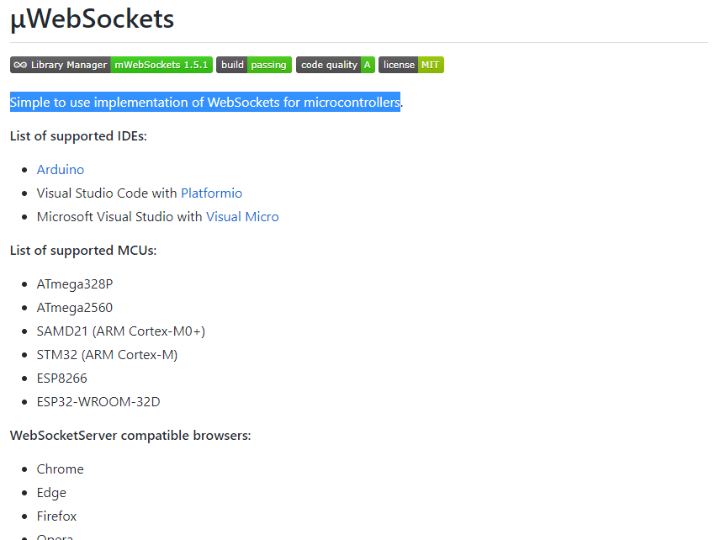
Simple to use implementation of WebSockets for microcontrollers.
List of supported IDEs:
- Arduino
- Visual Studio Code with Platformio
- Microsoft Visual Studio with Visual Micro
List of supported MCUs:
- ATmega328P
- ATmega2560
- SAMD21 (ARM Cortex-M0+)
- STM32 (ARM Cortex-M)
- ESP8266
- ESP32-WROOM-32D
WebSocketServer compatible browsers:
- Chrome
- Edge
- Firefox
- Opera
The Autobahn|Testsuite reports for server and client >
Some tests will never pass just because of memory lack in ATmega family.
Table of contents
Requirements
- Development board (confirmed working, other boards may or may not work):
- Arduino Uno (ATmega328P)
- Arduino Pro Mini (ATmega328P)
- Arduino Mega2560
- Arduino Zero / SAMD21 M0 (ARM Cortex-M0)
- STM Nucleo-64 (ARM Cortex-M)
- WeMos D1 mini (ESP8266)
- NodeMCU v3 (ESP8266)
- ESPDUINO-32 (ESP32-WROOM-32D)
- Ethernet module or shield (confirmed working):
- Arduino Ethernet Shield (W5100)
- Arduino Ethernet Shield 2 (W5500)
- WizNet W5500 module
- ENC28j60
- Libraries:
- EthernetENC if you decide to use ENC28j60
Installation
Use Arduino Download Manager or follow this guide.
config.h
Change the following definition if you use a different network controller:
...

#define NETWORK_CONTROLLER ETHERNET_CONTROLLER_W5X00
ETHERNET_CONTROLLER_W5X00
ETHERNET_CONTROLLER_ENC28J60
NETWORK_CONTROLLER_WIFI
ETHERNET_CONTROLLER_W5X00stands for the official Arduino Ethernet library.
Uncomment these if you want additional information on the serial monitor:
//#define _DEBUG
//#define _DUMP_HANDSHAKE
//#define _DUMP_FRAME_DATA
//#define _DUMP_HEADER
Increase the following value if you expect big data frames (or decrease for devices with a small amount of memory).
constexpr uint16_t kBufferMaxSize{ 256 };
Physical connection
If you have a WeMos D1 in the size of Arduino Uno simply attaching a shield does not work. You have to wire the ICSP on an Ethernet Shield to proper pins.
| Ethernet Shield (W5100/W5500) | Arduino Pro Mini | WeMos D1 |
|---|---|---|
| (ICSP) MISO | PIN 12 | D12 / MISO |
| (ICSP) MOSI | PIN 11 | D11 / MOSI |
| (ICSP) SCK | PIN 13 | D13 / SCK |
| (SS) PIN 10 | PIN 10 | D10 / SS |
| W5500 / ENC28j60 | Arduino Uno / Pro Mini | Arduino Mega2560 |
|---|---|---|
| MISO | PIN 12 | PIN 50 |
| MOSI | PIN 11 | PIN 51 |
| SCS | PIN 10 | PIN 53 |
| SCLK | PIN 13 | PIN 52 |
Usage examples
Server
#include <WebSocketServer.h>
using namespace net;

WebSocketServer server{3000};

void setup() {
  // Ethernet/WiFi initialization goes here ...
  // ...

  server.onConnection([](WebSocket &ws) {
    const char message[]{ "Hello from Arduino server!" };
    ws.send(WebSocket::DataType::TEXT, message, strlen(message));

    ws.onClose([](WebSocket &ws, const WebSocket::CloseCode code,
                 const char *reason, uint16_t length) {
      // ...
    });
    ws.onMessage([](WebSocket &ws, const WebSocket::DataType dataType,
                   const char *message, uint16_t length) {
      // ...
    });
  });

  server.begin();
}

void loop() {
  server.listen();
}
Verify clients
// verifyClient callback is called for every header during handshake
// (except for those required by protocol, like "Connection", "Upgrade" etc.)
server.begin([](const IPAddress &ip, const char *header, const char *value) {
  // verify ip ...

  // verify "Origin" header:
  if (strcmp_P(header, (PGM_P)F("Origin")) == 0)
    if (strcmp_P(value, (PGM_P)F("file://")) == 0) return false;

  return true;
});
Subprotocol negotiation
// If you won't pass callback for `protocolHandler` then server will use the
// first requested subprotocol if any
wss.begin(nullptr, [](const char *protocols) {
  // iterate csv protocols and return the one that is supported by your server
  // or nullptr to ignore
});

// You can check client protocol in other callbacks
wss.onConnection([](WebSocket &ws) {
  const auto protocol = ws.getProtocol();
  // ...
  }
});
Node.js server examples here
Client
#include <WebSocketClient.h>
using namespace net;

WebSocketClient client;

void setup() {
  // Ethernet/WiFi initialization goes here ...
  // ...

  client.onOpen([](WebSocket &ws) {
    const char message[]{ "Hello from Arduino client!" };
    ws.send(WebSocket::DataType::TEXT, message, strlen(message));
  });
  client.onClose([](WebSocket &ws, const WebSocket::CloseCode code,
                   const char *reason, uint16_t length) {
    // ...
  });
  client.onMessage([](WebSocket &ws, const WebSocket::DataType dataType,
                     const char *message, uint16_t length) {
    // ...
  });

  client.open("echo.websocket.org", 80);
}

void loop() {
  client.listen();
}
Chat
Node.js server on Raspberry Pi (/node.js/chat.js)

Browser client (/node.js/chat-client.htm)
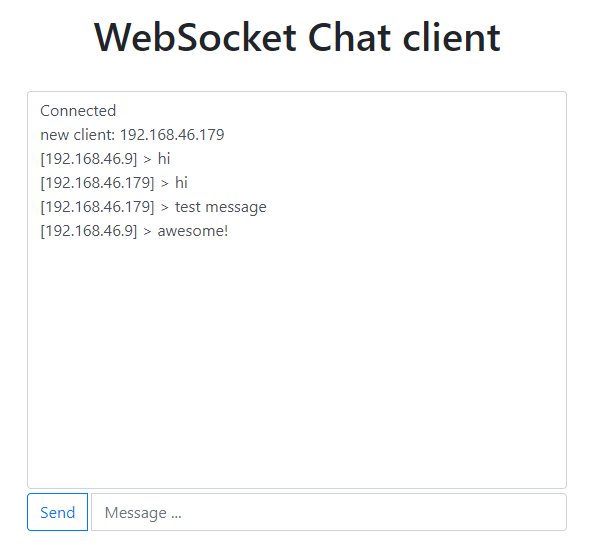
Arduino Uno client (/examples/chat/chat.ino)

More examples here
Approx memory usage
simple-client.inoexample (without debug output, 128 bytes data buffer)
Ethernet.h (W5100 and W5500)
| Board | Program space | Dynamic memory |
|---|---|---|
| Arduino Uno | 24 648 bytes (76%) | 829 bytes (40%) |
| Arduino Mega2560 | 25 640 bytes (10%) | 857 bytes (10%) |
| Arduino Pro Mini | 24 648 bytes (80%) | 829 bytes (40%) |
| Arduino Zero | 30 596 bytes (11%) | 3 056 bytes (9%) |
EthernetENC.h (ENC28j60)
| Board | Program space | Dynamic memory |
|---|---|---|
| Arduino Uno | 31 062 bytes (96%) | 1 406 bytes (68%) |
| Arduino Mega2560 | 32 074 bytes (12%) | 1 406 bytes (17%) |
| Arduino Pro Mini | 31 062 bytes (101%) | 1 406 bytes (68%) |
| Arduino Zero | 36 796 bytes (14%) | 3 684 bytes (11%) |
WiFi
| Board | Program space | Dynamic memory |
|---|---|---|
| Generic ESP8266 | 286 328 bytes (29%) | 27 356 bytes (33%) |
| WeMos D1 mini | 286 328 bytes (27%) | 27 356 bytes (33%) |
| NodeMCU | 286 328 bytes (27%) | 27 356 bytes (33%) |


