How to Achieve High-Speed Ethernet with W6300 on Raspberry Pi RP2350
Achieve 80+ Mbps Ethernet on RP2350 using WIZnet W6300 via QSPI with hardware TCP/IP offload for low MCU overhead.
0
Components
Hardware components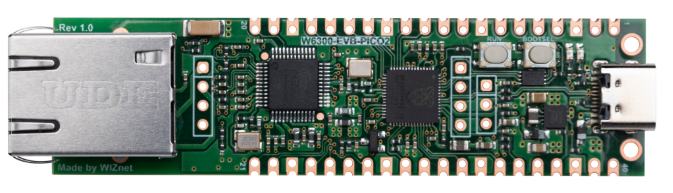
WIZnet - W6300-EVB-Pico2
x 1

Project description
Step 1: Understanding the Hardware
The W6300-EVB-Pico2 is a Pico 2–style evaluation board built around the Raspberry Pi RP2350 and WIZnet’s W6300 hardwired TCP/IP Ethernet controller. The key design choice is the high-speed QSPI host interface, enabling 10/100 Mbps Ethernet with reported 80+ Mbps data rates while keeping MCU overhead low through a hardware TCP/IP Offload Engine (TOE).
Core W6300 networking hooks called out in the source:
Integrated 10/100 Ethernet PHY
8 independent hardware sockets
64KB total SRAM for socket buffering
Dual-stack IPv4/IPv6
Wake-on-LAN and low-power modes
Secure boot with Arm TrustZone (platform security feature)
Board-level platform highlights (as described in the article):
RP2350 with 520KB internal RAM
16 Mbit SPI flash
USB Type-C for power/data
Common peripherals (UART, SPI, I2C, PWM, ADC, PIO)
-20°C to +85°C operating range, CE/FCC noted
Why this matters for makers and product teams: QSPI bandwidth + hardware TCP/IP typically means higher sustained throughput and more deterministic firmware behavior than software stacks (e.g., fewer RAM spikes, less CPU time spent on retransmissions/checksums). The article frames this board for IoT and industrial embedded systems needing reliable wired networking.
Step 2: Software/Firmware Setup
The source notes documentation is still in progress and that sample code was not yet available at the time of writing; it expects the typical WIZnet pattern (C examples first, then Arduino libraries later).
For a starting point, WIZnet’s product doc page identifies the board as an RP2350 + W6300 “hardwired TCP/IP” evaluation platform.
// Conceptual integration example based on WIZnet ioLibrary (not project-specific)
// Goal: initialize WIZnet chip memory, then open sockets using hardware TCP/IP offload.
uint8_t tx_size[8] = {2,2,2,2,2,2,2,2}; // example per-socket TX allocation (KB units are conceptual)
uint8_t rx_size[8] = {2,2,2,2,2,2,2,2}; // example per-socket RX allocation
// W6300 QSPI + TOE bring-up would follow ioLibrary-style init flow:
wizchip_init(tx_size, rx_size);
// Then configure network parameters (MAC/IP/GW/DNS) and use socket APIs
// to open TCP/UDP sockets handled by W6300 hardware.
Implementation notes (what to verify in real code):
Confirm the QSPI mode/pins and board-specific wiring in the official user guide/docs.
Confirm the buffer allocation units and valid per-socket mapping for W6300.
Use W6300 hardware sockets to avoid running a full software TCP/IP stack on the RP2350 for best stability/throughput.
FAQ
Q1: Why use W6300 instead of an MCU software TCP/IP stack (e.g., LwIP)?
A: W6300 uses a hardwired TCP/IP Offload Engine, so the Ethernet controller handles protocol work (sockets, retransmission behavior, checksums) in hardware. This reduces RP2350 CPU load and RAM pressure compared to software stacks, helping sustain high throughput (the source highlights 80+ Mbps) while keeping firmware timing more predictable for industrial control and always-on IoT use.
Q2: How is W6300 connected to RP2350 on the W6300-EVB-Pico2?
A: The design emphasizes a high-speed QSPI interface between the RP2350 and W6300, which is the main enabler for pushing Ethernet performance beyond what typical SPI-based controllers can sustain at scale. QSPI increases effective bus bandwidth by transferring more bits per clock, helping the host move frame payloads fast enough to reach the 80+ Mbps range mentioned in the source.
Q3: What performance benefit does QSPI + TOE provide on this board?
A: The source claims Ethernet data rates exceeding 80 Mbps on a 10/100 link, attributing it to the W6300’s QSPI interface and hardwired TCP/IP processing. Practically, that means the RP2350 spends less time doing packet handling and more time running the application, which is especially valuable for sensor gateways, control loops, and edge devices that must remain responsive under sustained traffic.
Q4: What stability and security advantages are highlighted?
A: For stability, the board is positioned for low MCU overhead networking by relying on the W6300 hardwired stack and hardware sockets. For security, the article mentions secure boot with Arm TrustZone (platform security capability) alongside low-power features and Wake-on-LAN, targeting embedded systems that need reliable wired connectivity in real deployments rather than “best effort” networking.
Q5: How does W6300 Ethernet compare to Wi-Fi for embedded/industrial IoT?
A: Ethernet with a hardwired TCP/IP controller is typically chosen when you need deterministic connectivity, predictable latency, and fewer field issues caused by RF conditions. The W6300-EVB-Pico2 is explicitly positioned for applications needing reliable wired Ethernet with low MCU overhead and includes 10/100 + integrated PHY, dual IPv4/IPv6, and multiple hardware sockets—traits that align with industrial controllers and networked sensors more than consumer Wi-Fi nodes.

