IR Tracker Offline: Cloud-Free Smart Meter Monitoring with ESP32-C3 and W5500
Cloud-free smart meter tracker using ESP32-C3 and optional W5500 Ethernet, with Wi-Fi fallback and local APIs for Home Assistant, MQTT, and more.
0
Project description
📌전력량계 데이터를 클라우드 없이 활용하다
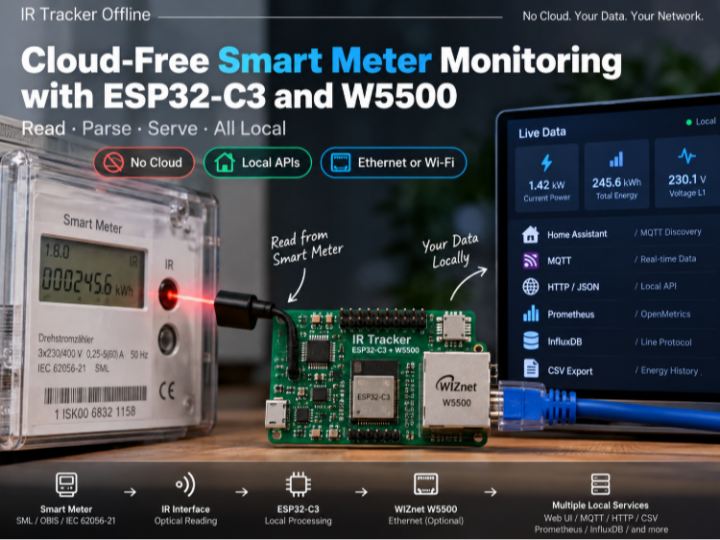
IR Tracker Offline은 가정용 전력량계의 광학 IR 포트에서 데이터를 읽고, 이를 ESP32-C3에서 직접 분석하여 로컬 네트워크에 제공하는 프로젝트입니다.
전력량계에서 전달되는 SML/OBIS 또는 IEC 62056-21/D0 데이터를 ESP32-C3에서 직접 처리하기 때문에 별도의 클라우드 서버가 필요하지 않습니다.
파싱된 데이터는 로컬 Web UI뿐 아니라 MQTT, Home Assistant, HTTP/JSON, CSV, Prometheus/OpenMetrics, InfluxDB 등 여러 시스템에서 동시에 활용할 수 있습니다.
즉, 이 프로젝트의 핵심 구조는 다음과 같습니다.
Electricity Meter → IR Interface → ESP32-C3 → Local Processing → W5500 Ethernet / Wi-Fi → Local Services
파싱된 계량기 데이터는 여러 로컬 인터페이스를 통해 제공한다는 점이 일반적인 단순 Smart Meter Reader와 차별되는 부분입니다.
🔍 전력량계에서는 어떤 데이터를 읽을까?
IR Tracker Offline은 전력량계의 광학 포트를 통해 SML 또는 IEC 62056-21/D0 데이터를 읽습니다.
계량기가 제공하는 실제 값은 제조사와 설정에 따라 달라질 수 있기 때문에, 이 프로젝트는 L1/L2/L3 전력, 전압, 전류 등의 값을 항상 존재한다고 가정하지 않습니다.
계량기가 해당 OBIS 정보를 제공하는 경우에만 해당 값을 사용하도록 구성되어 있습니다.
이러한 방식은 서로 다른 전력량계를 지원해야 하는 실제 설치 환경에서 중요한 설계 포인트입니다.
IR receiver의 GPIO나 통신 속도를 알 수 없는 경우를 위한 진단 기능도 제공하며, 단순히 데이터를 수신했다는 이유만으로 핀을 결정하는 것이 아니라 정상적인 telegram을 확인한 이후 설정을 확정하도록 설계되어 있습니다.
🔒 Read-Only by Design
계량기의 데이터를 읽는 역할에 집중합니다.
Zero-export 제어, 배터리 충전 제한, 인버터 출력 조정 또는 Load Scheduling 같은 제어 기능은 프로젝트의 범위에 포함하지 않습니다.
대신 읽어온 데이터를 Home Assistant나 다른 Energy Management System이 사용할 수 있도록 전달합니다.
이처럼 Meter Reading과 Control Logic을 분리하면 프로젝트의 역할이 명확해지고, 다른 자동화 플랫폼과 결합하기도 쉬워집니다.
데이터 저장에도 구분이 있습니다. 전력 및 에너지 누적값은 장기 히스토리에 사용할 수 있지만 순간 전압과 전류 데이터는 RAM에서만 사용하며 장기 히스토리에는 저장하지 않습니다.
⚙️ W5500은 어디에 사용될까?
이 프로젝트에서 WIZnet W5500은 ESP32-C3에 선택적으로 유선 Ethernet을 추가하는 역할을 합니다.
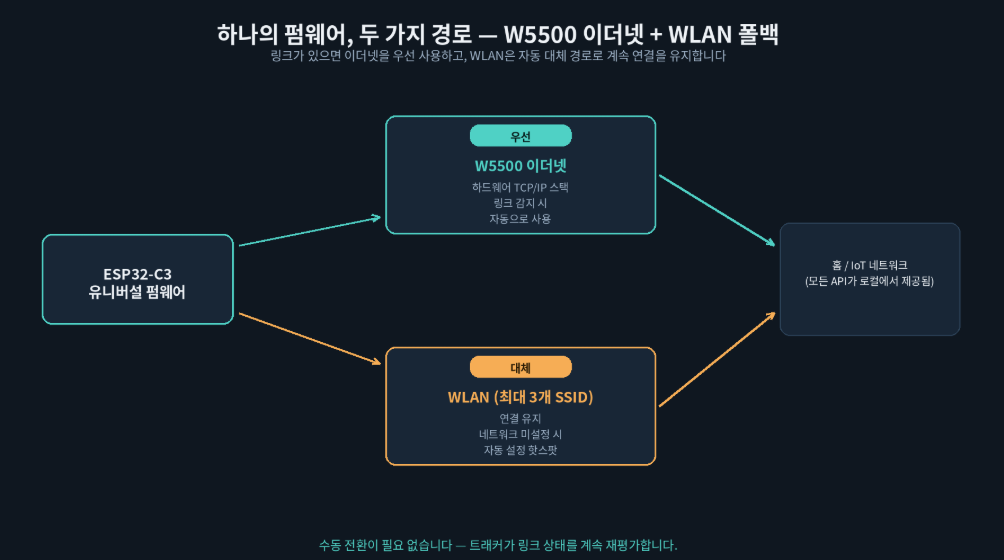
특히 흥미로운 부분은 Ethernet용과 Wi-Fi용으로 펌웨어를 따로 관리하는 것이 아니라, 하나의 Universal Firmware에서 두 네트워크 구성을 모두 지원한다는 점입니다.
Wi-Fi Only
또는
ESP32-C3 + W5500 Ethernet + Wi-Fi Fallback
구성이 동일한 펌웨어를 기반으로 동작할 수 있습니다.
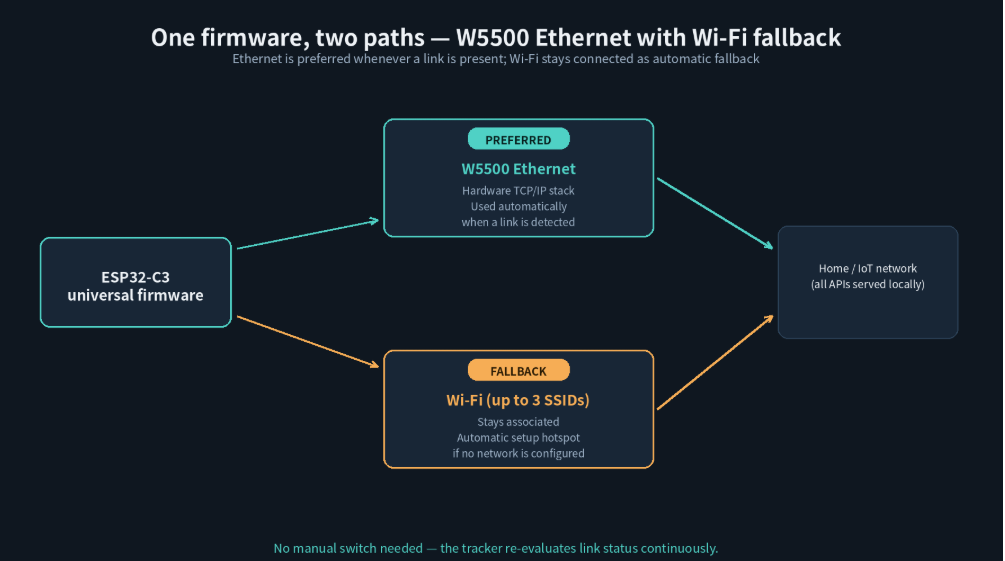
W5500 Ethernet link가 사용 가능한 경우 유선 네트워크가 우선 사용되고, Wi-Fi는 자동 fallback 경로로 유지됩니다.
이를 통해 Wi-Fi와 W5500 Ethernet 구성을 하나의 firmware architecture에서 지원할 수 있습니다.
💡 왜 이런 구조가 유용할까?
Wi-Fi coverage가 제한된 설치 환경에서는 optional W5500 Ethernet이 유선 네트워크 경로를 제공할 수 있습니다.
IR Tracker Offline은 Wi-Fi만 사용하는 대신 W5500 Ethernet을 선택적으로 추가하여 유선 네트워크를 우선 경로로 사용할 수 있도록 했습니다.
유선 연결이 가능하면 Ethernet을 사용하고, Ethernet을 사용할 수 없는 경우 Wi-Fi를 그대로 유지하는 구조입니다.
즉, W5500은 기존 Wi-Fi 기능을 대체하는 것이 아니라 네트워크 선택지를 하나 더 추가하는 역할을 합니다.
이 구조는 Smart Meter뿐 아니라 항상 네트워크 연결을 유지해야 하는 Sensor Gateway, Building Automation Device 또는 Industrial IoT Node에서도 참고할 만합니다.
🌐 하나의 데이터, 여러 개의 로컬 인터페이스
IR Tracker Offline의 또 다른 특징은 특정 Smart Home Platform 하나에 종속되지 않는다는 것입니다.
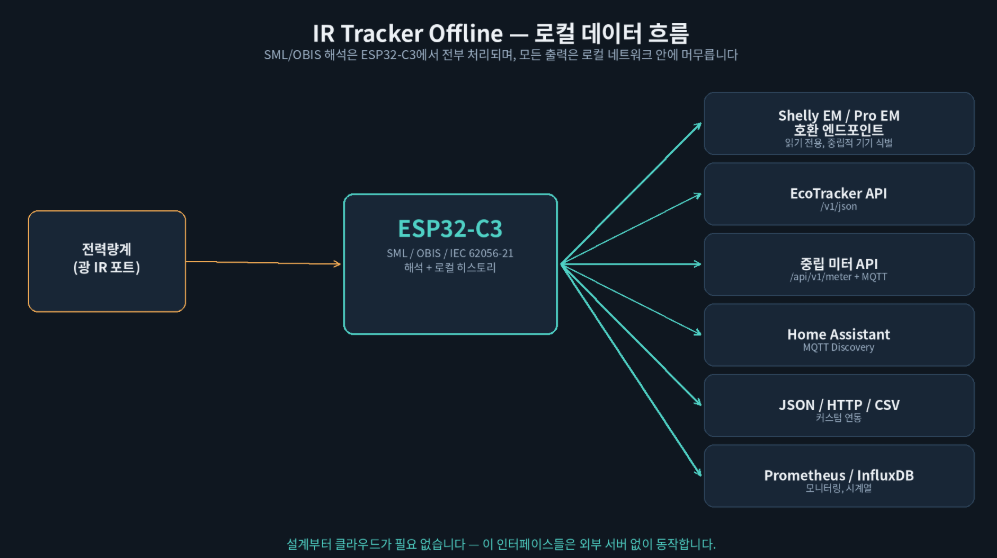
프로젝트에서는 Shelly EM/Pro EM compatible read endpoint, EcoTracker-style /v1/json, neutral /api/v1/meter JSON/MQTT schema, Home Assistant MQTT Discovery, JSON/HTTP/CSV, Prometheus/OpenMetrics, InfluxDB Line Protocol 등 다양한 로컬 인터페이스를 제공합니다.
즉,
One Meter → Multiple Local Interfaces
라는 구조입니다.
Home Assistant를 사용할 수도 있고 MQTT Broker나 자체 서버에서 직접 데이터를 사용할 수도 있습니다.
클라우드를 거치지 않고 로컬 네트워크 안에서 여러 시스템이 동일한 계량기 데이터를 공유할 수 있다는 점이 이 프로젝트의 가장 큰 특징 중 하나입니다.
📊 Local Energy History
계량기 데이터는 단순히 실시간 값으로만 제공되지 않습니다.
프로젝트는 시간, 일, 주, 월, 연간 및 장기 단위의 Energy History를 관리할 수 있으며 Web UI를 통해 이를 확인할 수 있습니다.
따라서 별도의 Cloud Database가 없어도 기본적인 에너지 사용 추이를 로컬에서 확인할 수 있습니다.
🧩 하나의 Firmware, 두 가지 Network Configuration
Universal Firmware는 Wi-Fi와 optional W5500 Ethernet을 지원하며, 네트워크 구성과 관계없이 동일한 애플리케이션 기능을 사용할 수 있도록 구성되어 있습니다.
🔗 관련 WIZnet Maker 프로젝트
- OpenDTU-OnBattery는 ESP32와 W5500을 조합해 유선 Ethernet으로 스마트 미터에 접근합니다. 차이점은 범위입니다: OpenDTU-OnBattery는 읽은 값을 바탕으로 인버터 출력을 능동적으로 제어하는 반면, IR Tracker Offline은 엄격하게 읽기 전용을 유지합니다.
- Power Monitoring — CircuitSetup 6채널 ESP32 에너지 미터 W5500을 통해 MQTT 데이터를 제공한다는 점은 유사하지만, 측정 방식은 다릅니다. 차이점은 데이터 출처입니다: IR Tracker Offline처럼 유틸리티 계량기의 광학 SML/OBIS 출력을 해석하는 대신, 커스텀 보드에 장착된 CT 센서로 전류를 직접 측정합니다.
IR Tracker Offline의 특징은 여기에 하나의 Meter Reading을 다양한 Local API로 동시에 제공하는 구조까지 결합했다는 점입니다.
❓ FAQ
Q.이 프로젝트를 사용하려면 클라우드 서비스가 필요한가요? 아니요. 모든 SML/OBIS/IEC 62056-21 해석은 ESP32-C3에서 이루어지며, 기기가 제공하는 모든 인터페이스(HTTP, MQTT, Prometheus, Influx, CSV)는 로컬 네트워크 안의 기기에서 직접 서빙됩니다.
Q. 이 펌웨어를 사용하려면 반드시 W5500이 필요한가요? 아니요. "유니버설" 펌웨어는 WLAN만으로도 동작합니다. W5500은 선택 사항이며, 펌웨어가 링크를 감지하면 자동으로 우선 사용하고 WLAN은 자동 폴백으로 남습니다.
Q. 제 계량기에서도 L1/L2/L3, 전압, 전류가 표시되나요? 사용 중인 계량기가 해당 OBIS 값을 광 인터페이스로 실제 전송하는 경우에만 표시됩니다 — 펌웨어는 계량기가 제공하지 않는 데이터를 만들어낼 수 없습니다.
Q. 이 트래커로 배터리, 인버터, 부하 차단 시스템을 제어할 수 있나요? 아니요 — 설계상 읽기 전용입니다. 역송전 제한, 충전 한도, 스케줄과 같은 제어 로직은 인버터, 배터리 시스템, 또는 홈 자동화 플랫폼에 맡겨야 합니다.
Q. 이 펌웨어를 상업용 제품에 사용할 수 있나요? PolyForm Noncommercial 1.0.0 라이선스로 배포되며, 상업적 사용은 제외합니다.
Q. 이더넷/PoE 보드는 검증된 하드웨어인가요? 펌웨어의 W5500 지원 자체는 구현되어 있지만, 저자에 따르면 전용 LAN/PoE 캐리어 보드는 아직 실제 하드웨어로 검증되지 않았습니다.
📌 Smart Meter Data Without the Cloud
IR Tracker Offline is an ESP32-C3-based smart-meter monitoring project that reads data directly from the optical IR port of a household electricity meter and processes it locally.
SML/OBIS or IEC 62056-21/D0 telegrams are parsed directly on the device, eliminating the need for a cloud service to interpret or distribute the measurements.
The processed data can then be used simultaneously by the local Web UI, MQTT, Home Assistant, HTTP/JSON, CSV, Prometheus/OpenMetrics, InfluxDB, and other local integrations.
The overall architecture is straightforward:
Electricity Meter → IR Interface → ESP32-C3 → Local Processing → W5500 Ethernet / Wi-Fi → Local Services
The parsed meter data is made available through multiple local interfaces.
🔍 What Does the Meter Provide?
IR Tracker Offline reads either SML or IEC 62056-21/D0 data from the optical interface of the electricity meter.
Available measurements depend on the actual meter and its configuration.
For this reason, the firmware does not assume that every meter provides per-phase L1/L2/L3 values, voltage, current, or every possible OBIS field.
Those measurements are used only when the meter actually provides them.
This is an important implementation detail for a project intended to work with different real-world electricity meters.
The firmware also includes a diagnostic mechanism for installations where the IR receiver GPIO or baud rate is unknown. Rather than accepting a guessed configuration immediately, it confirms the interface after receiving a valid telegram.
🔒 Read-Only by Design
IR Tracker Offline focuses on reading and distributing meter data.
It does not implement battery charging control, zero-export limiting, inverter control, or load scheduling.
Those decisions are left to Home Assistant, an inverter, an energy-management system, or another application consuming the tracker's data.
Separating meter acquisition from control keeps the role of the firmware clear and makes the tracker easier to integrate into different energy-management systems.
The same philosophy is also reflected in data history. Power and energy information can be retained for historical analysis, while instantaneous voltage and current values remain in RAM rather than being permanently stored in the history database.
⚙️ Where the W5500 Fits
The WIZnet W5500 provides an optional wired Ethernet path for the ESP32-C3.
One of the most interesting design choices is that the project does not maintain completely separate firmware builds for Wi-Fi and Ethernet operation.
The Universal Firmware can support either:
ESP32-C3 + Wi-Fi
or
ESP32-C3 + W5500 Ethernet + Wi-Fi Fallback
using the same application architecture.
When a usable W5500 Ethernet connection is present, the wired network becomes the preferred path, while Wi-Fi remains available as an automatic fallback.
This allows the application services to operate independently of the physical network interface currently carrying the traffic.
💡 Why Is This Useful for a Smart Meter?
Smart meters are frequently installed in utility closets, basements, or metal meter cabinets where Wi-Fi reception can be unreliable.
Adding W5500 Ethernet gives the installation a wired alternative without removing Wi-Fi support.
When Ethernet is available, the tracker can use the wired network. If Ethernet is unavailable, Wi-Fi remains available as the alternative connection.
In other words, the W5500 does not replace the existing wireless architecture. It adds another network path to it.
The same approach can be useful in sensor gateways, building-automation devices, and other always-on IoT nodes where a wired connection is preferred but wireless connectivity is still useful as a backup.
🌐 One Meter Reading, Multiple Local Interfaces
A major strength of IR Tracker Offline is that it is not tied to a single smart-home platform.
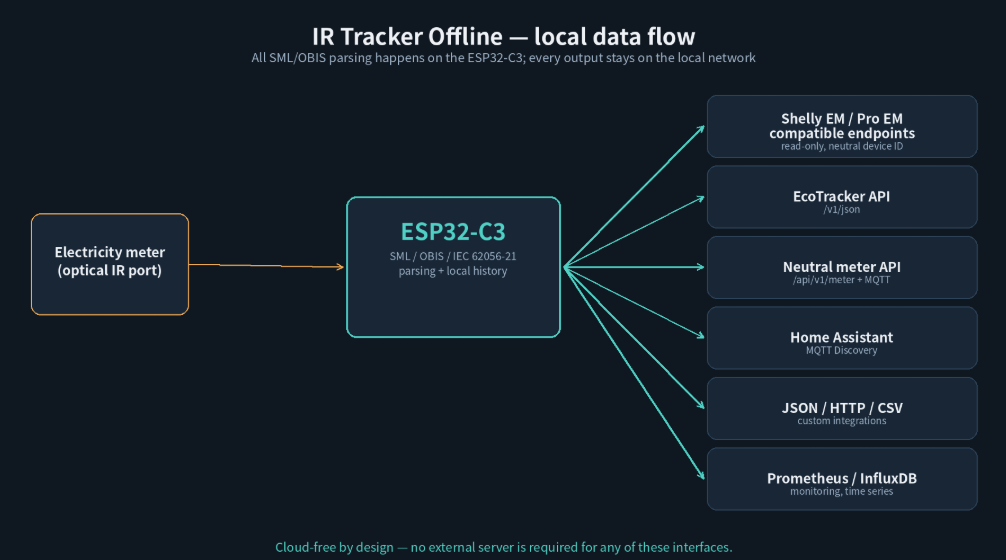
The firmware exposes Shelly EM/Pro EM-compatible read endpoints, an EcoTracker-style /v1/json API, a neutral /api/v1/meter JSON/MQTT schema, Home Assistant MQTT Discovery, JSON/HTTP/CSV, Prometheus/OpenMetrics, and InfluxDB Line Protocol.
The concept is simple:
One Meter → Multiple Local Interfaces
The same meter information can therefore be consumed by Home Assistant, an MQTT broker, monitoring software, or a custom local application without relying on a proprietary cloud backend.
📊 Local Energy History
The project provides more than real-time meter readings.
Energy data can be maintained at hourly, daily, weekly, monthly, yearly, and long-term levels and viewed through the local Web UI.
This allows basic energy-use analysis to remain entirely inside the local network without requiring an external cloud database.
🧩 One Firmware, Two Network Configurations
The interesting engineering point is not simply that the project uses a W5500.
It is that the application layer is largely independent of whether the device is currently communicating through Ethernet or Wi-Fi.
The Universal Firmware supports both Wi-Fi operation and optional W5500 Ethernet, allowing the same application features to be used with either network path.
🔗 Related WIZnet Maker Projects
- OpenDTU-OnBattery pairs an ESP32 with a W5500 to reach smart meters (Shelly 3EM, SDM, PZEM) over a wired Ethernet connection. The difference is scope: OpenDTU-OnBattery actively controls inverter output based on what it reads, while IR Tracker Offline stays strictly read-only.
- Power Monitoring — CircuitSetup 6-Channel ESP32 Energy Meter It also focuses on energy monitoring rather than active control. The difference is the data source: it measures current directly via CT sensors on a custom board, rather than parsing a utility meter's own optical SML/OBIS output the way IR Tracker Offline does.
IR Tracker Offline adds another architectural difference by deliberately distributing one parsed meter reading through multiple local interfaces at the same time.
❓ FAQ
Q. Does this project require a cloud service? No. All SML/OBIS/IEC 62056-21 parsing happens on the ESP32-C3, and every interface it exposes (HTTP, MQTT, Prometheus, Influx, CSV) is served from the device on the local network.
Q. Do I need the W5500 to use this firmware? No. The "universal" firmware works over Wi-Fi alone. W5500 is an optional addition the firmware prefers automatically whenever it detects a link, with Wi-Fi remaining as the automatic fallback.
Q. Will my meter show L1/L2/L3, voltage, and current? Only if your specific meter transmits those OBIS values over its optical interface — the firmware can't produce data the meter doesn't provide.
Q. Can this tracker control my battery, inverter, or load-shedding setup? No — by design it's read-only. Control logic (zero-export limiting, charge limits, schedules) is left to your inverter, battery system, or home-automation platform.
Q. Can I use this firmware in a commercial product? The project is licensed under PolyForm Noncommercial 1.0.0, which does not grant commercial use.
Q. Is the Ethernet/PoE board proven hardware? The firmware's W5500 support is implemented, but per the author, the dedicated LAN/PoE carrier board has not yet been validated on real hardware.

