Wizfi210 connect
Wireless
No replies yet. Be the first to reply.
Join the discussion.
Wireless
No replies yet. Be the first to reply.
Join the discussion.
Share projects and connect with makers.
Joined before the site update? first.
New to WIZnet Makers?
We sent a verification link to your address. Open it to activate your account, then log in.
Accounts from this email provider are reviewed by an administrator after verification. Approval usually takes one business day.
Already have an account?
Enter your email address. If it belongs to an account, we'll send a link to set a new password. Members who joined before the site update use this to set their password.
If an account uses that address, we sent a link to set a new password. The link works once and expires in 30 minutes.
Know your password?
Need an account?
RE: Wizfi210 connect
by kaizen ·
Hi
I don’t understand about your environment.
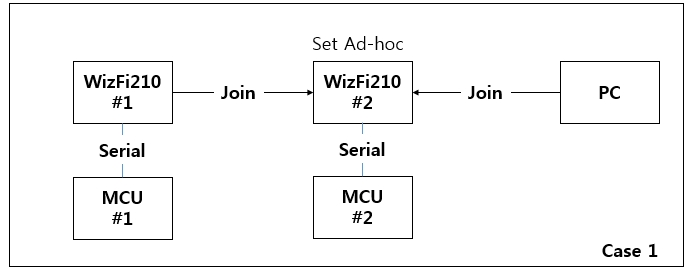
How to connect between WizFi210#2 and PC. Is it TCP?
Or else, is it connected between MCU#2 and PC using Serial Interface?
In other word, Do you want to use case 1 or case 2 or another case?
RE: Wizfi210 connect
by wtx ·
Thank you for your reply!
I want to choose case1.Selecting TCP,wizfi210#1 can send datato wizfi210#2,wizfi210#2 can send data to PC.But wizfi210#2 can’t send data to wifiz210#1 or wizfi210#1 can’t receive data from wizfi210#2.
These are wizfi210#2 setting
{+++、
at+wd、
at+wm=1、
at+wauth=1,
wizfi210、
at+ndhcp=0、
at+nset=192.168.1.105,255.255.255.0,192.168.1.1、
at+wa=wizfi210,8
at+nctcp=192.168.1.101,5000、
at+nstcp=5000、
at+cid=?
ata2
}
These are wizfi210#1 setting
{+++、
at+wd、
at+wm=1、
at+ndhcp=0、
at+nset=192.168.1.101,255.255.255.0,192.168.1.1
at+wa=wizfi210,8
at+nstcp=5000
ata2
}
RE: Wizfi210 connect
by ssekim ·
Hello wtx
I just tested it and succeeded, Please try it again as below.
<#1>
at+wd
[OK]
at+wm=1
[OK]
at+ndhcp=0
[OK]
at+wauth=0
[OK]
at+nset=192.168.1.101,255.255.255.0,192.168.1.1
[OK]
at+wa=wizfi210,8
IP SubNet Gateway
192.168.1.101: 255.255.255.0: 192.168.1.1
[OK]
at+nauto=1,1,5000
[OK]
ata2
[OK]
<#2>
at+wd
[OK]
at+wm=1
[OK]
at+ndhcp=0
[OK]
at+wauth=0
[OK]
at+nset=192.168.1.102,255.255.255.0,192.168.1.1
[OK]
at+wa=wizfi210,8
IP SubNet Gateway
192.168.1.102: 255.255.255.0: 192.168.1.1
[OK]
at+nauto=0,1,192.168.1.101,5000
[OK]
ata2
[OK]
RE: Wizfi210 connect
by danil ·
Hi Wtx,
I want ask you about how can you complete send data from MTU to Wizfi? did your system connecting like this picture http://postimg.org/image/943kqka2r/?
RE: Wizfi210 connect
by kaizen ·
Hi
Yes, You’re right. Maybe, wtx also connect like you.