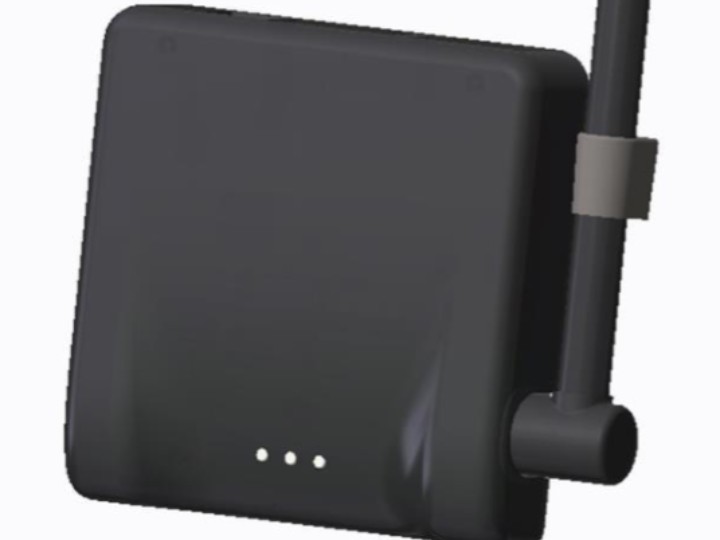
Radian Wristband Gateway (SPRGW01)
Semnox's Radian Gateway links RFID wristbands in entertainment venues to the Parafait server, using a WIZnet serial-to-Ethernet (S2E) module for its LAN connect
0
Components
Hardware components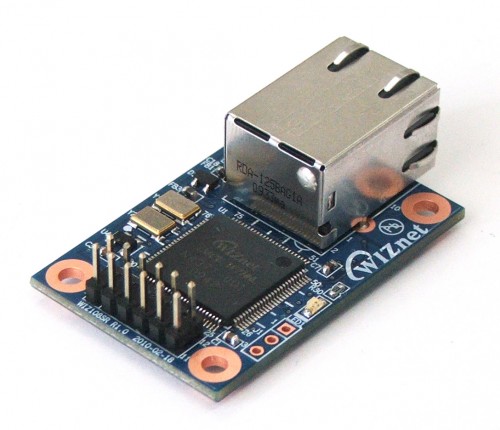
WIZnet - WIZ107SR
x 1

Project description
Overview
Semnox Solutions, headquartered in Mangalore, India, builds the Parafait operations suite for amusement venues and family entertainment centers. Parafait brings together POS, ticketing, cashless payments, access control and membership management, and Radian is its wearable product for timed sessions.
Trampoline parks and indoor play areas have to let guests in and out in fixed time blocks. Traditionally this meant fixed time slots, color-coded wristbands and human timekeepers. Radian automates the process with an RFID wristband that tells the guest, through light and vibration, how much time is left and when the session ends. Guests can start right away for the time they choose, and the wristband lets them know when time is up.
Every wristband in the venue communicates with the server through the Radian Gateway. Semnox's installation manual instructs installers to use WIZnet's WIZ107SR / WIZ108SR Configuration Tool when connecting the gateway to the LAN, and the device found in the tool's screenshot reports its model name as WIZ107SR.
Key features of the Radian system:
- Timed Session Notification: session status shown through wristband light and vibration patterns
- RFID Enabled: guests tap an RFID reader to start and end a session
- Battery Monitoring: wristband battery levels shown in POS; issue is blocked below a set level
- Gateway Roaming: a wristband with a weak signal connects to the next available gateway
- Parafait Integration: wristbands configured through Web Management Studio (WMS) and Parafait POS
Technical Architecture
The Radian system consists of wristbands, gateways, charging stations, and the Parafait server and POS.
| Component | Description |
|---|---|
| Radian Wristband | RFID wristband with light and vibration alerts, about 24 hours per full charge on average (Model PARAWTCH01) |
| Radian Gateway | Single point of communication for all wristbands in the venue (Model PARAGWW01) |
| Network Interface | WIZnet WIZ107SR S2E module (W7100A based), firmware 4.06, TCP server on port 5000 |
| Charging Station | Wall-mounted, charges 50 wristbands at once |
| Server / Software | Parafait Server Service, Parafait POS, Web Management Studio |
Data flow
The wristbands and gateway communicate over wireless RF, and the gateway connects to the Parafait server on the venue LAN through the WIZ107SR module. The server keeps a ParafaitRadianServer log and a log for each gateway, which show the communication status between wristbands and gateways.
  Radian wristband (RFID, light + vibration)
           │ wireless RF
           ▼
  Radian Gateway
    └─ WIZnet WIZ107SR (W7100A): Serial 115200 bps ↔ Ethernet, TCP Server :5000
           │ LAN (static IP)
           ▼
  Parafait Server Service ──► Parafait POS / WMS
Gateway setup
The gateway setup procedure in Semnox's manual uses the WIZnet configuration tool directly.
- Click Search in the WIZ107/108 Config Tool to find devices on the same network (UDP broadcast).
- Select the device by the MAC address printed on the gateway. The tool shows the device's model name (WIZ107SR) and firmware version.
- Enter a static IP, subnet mask and gateway. The manual's screenshot shows the module in TCP server mode on port 5000.
- On the Serial tab, check BaudRate 115200, Time 7ms, Size 0, Character 00.
- On the Option tab, set Inactivity Time to 0 seconds.
- Click Reset to restart the gateway.
WIZnet Role in This Project
In the Radian Gateway, the WIZnet WIZ107SR module is the network interface that converts the gateway's serial data to Ethernet and carries it to the Parafait server.
The configuration screenshot in Semnox's manual shows the gateway's network module reporting Model name: WIZ107SR and Firmware version: 4.06, with a MAC address starting with WIZnet's 00:08:DC prefix. Semnox's installation material thus identifies the gateway's network module as WIZ107SR. According to WIZnet's documentation, the WIZ107SR is a compact serial-to-Ethernet module built on the W7100A iMCU (8051 core with a hardwired TCP/IP core), and WIZnet lists v4.0.6 as its latest public firmware. The public materials do not establish whether Semnox uses an unmodified WIZnet binary. WIZ107SR's documented function is to convert serial data to Ethernet/TCP/IP and back.
The values Semnox specifies use the data packing function of the WIZ107SR. Based on the definitions in WIZnet's configuration tool manual, each value works as follows:
| Parameter | Semnox setting | Meaning |
|---|---|---|
| BaudRate | 115200 | Serial speed inside the gateway |
| Time | 7ms | Serial data collected for 7ms is sent at once |
| Size / Character | 0 / 00 | Length- and character-based packing not used |
| Inactivity Time | 0s | Module inactivity timer not used |
These settings show how the WIZ107SR's serial side and packing conditions are configured for the gateway. The Semnox manual documents the serial and network settings but does not expose the gateway firmware's internal data path. With Inactivity Time set to 0, the module does not close an idle connection on its own timer; this setting alone does not show how the server side handles the session.
Wireless communication with the wristbands is handled by a separate radio section inside the gateway; the WIZ107SR covers only the LAN side.
WIZnet lists the WIZ107SR as discontinued and points to the WIZ750SR for new designs. This refers to the module, not to the Radian solution or the SPRGW01 gateway.
The same design in the XCESS access reader
Semnox's XCESS reader for theme-park turnstiles is a separate product with its own manual. The XCESS manual instructs installers to configure the reader's "LAN Interface Board" with WIZnet's WIZ105SR configuration tool. In Parafait Management Studio, each reader is registered by the LAN board's MAC address, its IP, and TCP Port 5000, the same port number shown in the Radian Gateway's WIZ107SR screenshot. XCESS runs in either LAN mode or Wi-Fi mode depending on a configuration value (External LAN).
Developer Takeaways
The Radian Gateway offers these reference points for designing gateways that connect wireless devices to a wired server:
- Serial-to-Ethernet split design: the radio section produces only serial data, and network handling is left to the WIZ107SR. TCP/IP processing stays out of the radio firmware.
- Data packing settings: the gateway uses a 7ms timer condition. XCESS uses 200ms and 32 bytes instead, showing values chosen to fit each device.
- Standardized field installation: the manual turns MAC search, static IP setup and serial value checks into a procedure installers can follow step by step.
- One module approach across a product family: both the gateway and the access reader connect to the server through WIZnet S2E modules, so the server manages devices consistently by MAC and IP.
Related Maker Content and Application Value
1. Vehicle Speed Enforcement System with WIZ750SR-TTL
A commercial system that uses the WIZ750SR, which WIZnet describes as compatible with the WIZ107/108SR, as its network interface. Both products connect device serial data to Ethernet through a WIZnet S2E module, but that system is traffic enforcement equipment while Radian is a wristband gateway for entertainment venues.
https://maker.wiznet.io/Alan/resellers/vehicle-speed-enforcement-system-with-wiz750sr-ttl/
2. Rently Access Panel with Intercom
An access control device connected to a server over wired Ethernet. Rently builds a W5500 chip directly into the device, while Semnox adds a WIZ107SR module to put a serial device on the network.
https://maker.wiznet.io/ElenaLee/resellers/how-does-the-rently-access-panel-with-intercom-use-w5500-for-wired-cloud-access-control/
Comparing these cases shows WIZnet S2E modules being used to connect serial-based devices to a server network. Radian applies this approach to a new field: amusement venue operations.
FAQ
Q1. Does the WIZnet module communicate with the wristbands directly?
No. Wireless communication with the wristbands is handled by the radio section inside the gateway. The WIZ107SR converts the gateway's serial data to Ethernet and connects it to the Parafait server.
Q2. How is the gateway's network configured?
Use the WIZ107/108 Config Tool to find the gateway on the network, select it by MAC address, then set a static IP and the serial values. Semnox recommends using a static IP.
Q3. What do Time 7ms and Inactivity Time 0 mean?
Time 7ms is a packing condition that collects incoming serial data for 7ms and sends it at once. Inactivity Time 0 means the module's inactivity timer is not used, so the module does not close an idle connection on its own timer.
Q4. Can the gateway be purchased separately?
The Radian solution is currently presented for inquiry and quotation as part of the Parafait system. Standalone SPRGW01 availability is not stated in public materials.
Verified Scope and Sources
| Source | Link | Checked Date |
|---|---|---|
| Parafait Radian article (Parafait Blog) | parafait.com Radian | 2026-10-19 |
| Radian Wristbands Installation Instructions (FCC ID G7H-SPRGW01) | fccid.io G7H-SPRGW01 | 2026-10-19 |
| XCESS Installation & Configuration (FCC ID G7H-SPRW002) | fccid.io G7H-SPRW002 | 2026-10-19 |
| WIZnet WIZ107SR Documentation | docs.wiznet.io WIZ107SR | 2026-10-19 |
| WIZnet S2E Configuration Tool Manual | docs.wiznet.io S2E Config Tool | 2026-10-19 |
WIZnet module use is confirmed in the gateway setup procedure of Semnox's installation manual, where the configuration tool identifies the device as a WIZ107SR running firmware 4.06. The full SPRGW01 BOM and the radio section that talks to the wristbands are not published. The WIZ107SR is a discontinued WIZnet module, while the sales status of the Radian solution and the standalone SPRGW01 gateway is separate and not fully established by public documents.
The Radian Gateway is a case of a WIZnet WIZ107SR module used in a new setting: amusement venue operations. Receiving wireless wristband data as serial and passing it to the server over Ethernet is a simple design, yet it becomes the single point through which every wristband in the venue reaches the server. The design is also a useful reference for developers connecting wireless sensors or readers to existing wired server infrastructure.
Semnox Radian Gateway: RFID 손목밴드 운영을 위한 WIZ107SR 기반 Serial-to-Ethernet 연결
Semnox Radian Gateway는 놀이시설의 RFID 손목밴드와 Parafait 서버를 연결하는 게이트웨이로, Semnox 설치 자료의 설정 화면은 게이트웨이의 네트워크 모듈을 WIZnet WIZ107SR 시리얼-이더넷(S2E) 모듈로 표시합니다.
Overview
Semnox Solutions는 인도 망갈로르에 본사를 둔 기업으로, 놀이시설과 엔터테인먼트 센터를 위한 Parafait 운영 솔루션을 만듭니다. Parafait는 POS, 티켓 발급, 캐시리스 결제, 출입 통제, 회원 관리를 하나로 묶은 시스템이며, Radian은 그 안의 시간제 세션용 웨어러블 제품입니다.
트램펄린 파크나 실내 놀이터는 손님을 정해진 시간 단위로 입장시키고 내보내야 합니다. 기존에는 고정 시간대, 색깔별 손목밴드, 시간 관리 인력으로 이 일을 처리했습니다. Radian은 손님이 차는 RFID 손목밴드가 빛과 진동으로 남은 시간과 종료 시점을 알려 주는 방식으로 이 과정을 자동화합니다. 손님은 원하는 시간만큼 바로 입장하고, 시간이 끝나면 손목밴드가 알려 줍니다.
시설 안의 모든 손목밴드는 Radian Gateway를 통해 서버와 통신합니다. Semnox 설치 매뉴얼은 이 게이트웨이를 LAN에 연결할 때 WIZnet의 WIZ107SR / WIZ108SR Configuration Tool을 사용하도록 안내하며, 도구 화면에서 검색된 장치의 모델명은 WIZ107SR로 표시됩니다.
Radian 시스템의 주요 특징은 다음과 같습니다.
- Timed Session Notification: 손목밴드의 발광·진동 패턴으로 세션 상태 알림
- RFID Enabled: 입장·퇴장 시 RFID 리더에 태그해 세션 시작과 종료
- Battery Monitoring: POS에서 손목밴드 배터리 상태 확인, 기준 이하면 발급 차단
- Gateway Roaming: 신호가 약한 손목밴드는 다음 게이트웨이로 연결
- Parafait Integration: Web Management Studio(WMS)와 Parafait POS로 손목밴드 설정
Technical Architecture
Radian 시스템은 손목밴드, 게이트웨이, 충전 스테이션, Parafait 서버와 POS로 구성됩니다.
| Component | Description |
|---|---|
| Radian Wristband | RFID 손목밴드, 발광·진동 알림, 완충 시 평균 24시간 사용 (Model PARAWTCH01) |
| Radian Gateway | 시설 안 모든 손목밴드의 단일 통신 지점 (Model PARAGWW01) |
| Network Interface | WIZnet WIZ107SR S2E 모듈 (W7100A 기반), 펌웨어 4.06, TCP Server / Port 5000 |
| Charging Station | 벽걸이형, 한 대에 손목밴드 50개 동시 충전 |
| Server / Software | Parafait Server Service, Parafait POS, Web Management Studio |
데이터 흐름
손목밴드와 게이트웨이는 무선 RF로 통신하고, 게이트웨이는 WIZ107SR 모듈을 통해 시설 LAN의 Parafait 서버와 연결됩니다. 서버에는 ParafaitRadianServer 로그와 게이트웨이별 로그가 남아, 손목밴드와 게이트웨이의 통신 상태를 확인할 수 있습니다.
  Radian 손목밴드 (RFID, 발광·진동)
           │ 무선 RF
           ▼
  Radian Gateway
    └─ WIZnet WIZ107SR (W7100A): Serial 115200 bps ↔ Ethernet, TCP Server :5000
           │ LAN (고정 IP)
           ▼
  Parafait Server Service ──► Parafait POS / WMS
게이트웨이 설정
Semnox 매뉴얼의 게이트웨이 설정 절차는 WIZnet 설정 도구를 그대로 사용합니다.
- WIZ107/108 Config Tool에서 Search를 눌러 같은 네트워크의 장치를 찾습니다(UDP 브로드캐스트).
- 게이트웨이에 인쇄된 MAC 주소로 장치를 선택합니다. 도구에 장치의 모델명(WIZ107SR)과 펌웨어 버전이 표시됩니다.
- 고정 IP, Subnet Mask, Gateway를 입력합니다. 매뉴얼 화면에서 모듈은 TCP Server 모드, Port 5000으로 설정되어 있습니다.
- Serial 탭에서 BaudRate 115200, Time 7ms, Size 0, Character 00을 확인합니다.
- Option 탭에서 Inactivity Time을 0초로 설정합니다.
- Reset으로 게이트웨이를 재시작합니다.
WIZnet Role in This Project
Radian Gateway에서 WIZnet WIZ107SR 모듈은 게이트웨이의 시리얼 데이터를 Ethernet으로 바꿔 Parafait 서버까지 전달하는 네트워크 인터페이스입니다.
Semnox 매뉴얼의 설정 화면에는 게이트웨이의 네트워크 모듈이 Model name: WIZ107SR, Firmware version: 4.06으로 표시되고, MAC 주소도 WIZnet의 00:08:DC로 시작합니다. 즉 Semnox 설치 자료는 게이트웨이의 네트워크 모듈을 WIZ107SR로 표시합니다. WIZnet 문서에 따르면 WIZ107SR은 W7100A iMCU(8051 코어 + Hardwired TCP/IP Core) 기반의 소형 시리얼-이더넷 모듈이며, WIZnet 문서상 최신 공개 펌웨어는 v4.0.6입니다. 다만 Semnox가 WIZnet 순정 펌웨어를 수정 없이 사용하는지는 공개 자료로 알 수 없습니다. WIZ107SR의 문서상 기능은 시리얼 데이터와 Ethernet/TCP/IP 데이터를 서로 변환하는 것입니다.
Semnox가 지정한 설정값은 WIZ107SR의 데이터 패킹(Data Packing) 기능을 사용합니다. WIZnet 설정 도구 매뉴얼의 정의를 기준으로 보면 각 값의 역할은 다음과 같습니다.
| Parameter | Semnox 설정 | 의미 |
|---|---|---|
| BaudRate | 115200 | 게이트웨이 내부 시리얼 통신 속도 |
| Time | 7ms | 7ms 동안 모은 시리얼 데이터를 한 번에 전송 |
| Size / Character | 0 / 00 | 길이·문자 기준 패킹은 사용하지 않음 |
| Inactivity Time | 0s | 모듈의 무통신 타이머 사용 안 함 |
이 설정값은 게이트웨이에 맞춰 WIZ107SR의 시리얼 쪽과 패킹 조건을 어떻게 구성했는지 보여 줍니다. Semnox 매뉴얼은 시리얼·네트워크 설정을 설명하지만, 게이트웨이 펌웨어 내부의 데이터 경로는 공개하지 않습니다. Inactivity Time이 0이므로 모듈 자체의 타이머로 유휴 연결을 끊지는 않습니다. 다만 이 설정만으로 서버 쪽이 세션을 어떻게 유지하는지까지 알 수는 없습니다.
손목밴드와의 무선 통신은 게이트웨이 안의 별도 무선부가 담당하며, WIZ107SR은 LAN 쪽만 맡습니다.
WIZnet은 WIZ107SR을 단종 모듈로 표시하고 WIZ750SR을 대안으로 안내합니다. 이는 모듈의 상태이며, Radian 솔루션이나 SPRGW01 게이트웨이의 단종을 뜻하지 않습니다.
같은 구조의 XCESS 출입 리더
Semnox의 테마파크 회전문용 리더 XCESS는 별도 매뉴얼을 가진 별도 제품입니다. XCESS 매뉴얼은 리더의 "LAN Interface Board"를 WIZnet WIZ105SR 설정 도구로 설정하도록 안내합니다. Parafait Management Studio에는 각 리더를 LAN 보드의 MAC 주소, IP, TCP Port 5000으로 등록하며, 이는 Radian Gateway의 WIZ107SR 설정 화면에 나온 포트와 같습니다. XCESS는 설정값(External LAN)에 따라 LAN 모드와 Wi-Fi 모드 중 하나로 동작합니다.
Developer Takeaways
Radian Gateway는 무선 장치를 유선 서버에 연결하는 게이트웨이를 설계할 때 다음과 같은 참고 포인트를 제공합니다.
- Serial-to-Ethernet 분리 설계: 무선부는 시리얼 데이터만 만들고, 네트워크 처리는 WIZ107SR에 맡기는 구조입니다. 무선부 펌웨어에 TCP/IP 처리를 넣지 않는 구성입니다.
- Data Packing 설정: 게이트웨이는 7ms 타이머 조건을 사용합니다. XCESS는 200ms, 32바이트로 다르게 설정해 장치 성격에 맞게 값을 고른 사례를 보여 줍니다.
- 현장 설치 절차의 표준화: MAC 주소 검색, 고정 IP 설정, 시리얼 값 확인으로 이어지는 절차를 매뉴얼에 그대로 넣어 설치 인력이 바로 따라 할 수 있게 했습니다.
- 같은 모듈 방식의 제품군 확장: 게이트웨이와 출입 리더가 모두 WIZnet S2E 방식으로 서버에 연결되어, 서버 쪽에서는 장치를 MAC과 IP로 일관되게 관리합니다.
Related Maker Content and Application Value
1. Vehicle Speed Enforcement System with WIZ750SR-TTL
WIZnet이 WIZ107/108SR과 호환된다고 소개하는 WIZ750SR을 상용 시스템의 네트워크 인터페이스로 사용한 사례입니다. 두 제품 모두 장치의 시리얼 데이터를 S2E 모듈로 Ethernet에 연결하지만, 이 사례는 교통 단속 장비이고 Radian은 놀이시설 손목밴드 게이트웨이라는 차이가 있습니다.
https://maker.wiznet.io/Alan/resellers/vehicle-speed-enforcement-system-with-wiz750sr-ttl/
2. Rently Access Panel with Intercom
출입 통제 장치를 유선 Ethernet으로 서버에 연결하는 사례입니다. Rently는 W5500 칩을 장치에 직접 넣었고, Semnox는 WIZ107SR 모듈을 붙여 시리얼 장치를 네트워크에 연결했다는 차이가 있습니다.
https://maker.wiznet.io/ElenaLee/resellers/how-does-the-rently-access-panel-with-intercom-use-w5500-for-wired-cloud-access-control/
이 사례들을 비교하면 WIZnet S2E 모듈이 시리얼 기반 장치를 서버 네트워크에 연결하는 방법으로 쓰이고 있음을 볼 수 있습니다. Radian은 이 방식을 놀이시설 운영 시스템이라는 새로운 분야에 적용한 사례입니다.
FAQ
Q1. WIZnet 모듈이 손목밴드와 직접 통신하나요?
아닙니다. 손목밴드와의 무선 통신은 게이트웨이 안의 무선부가 담당합니다. WIZ107SR은 게이트웨이의 시리얼 데이터를 Ethernet으로 바꿔 Parafait 서버와 연결하는 역할을 합니다.
Q2. 게이트웨이의 네트워크 설정은 어떻게 하나요?
WIZ107/108 Config Tool로 네트워크의 게이트웨이를 검색하고, MAC 주소로 장치를 선택한 뒤 고정 IP와 시리얼 값을 설정합니다. Semnox는 고정 IP 사용을 권장합니다.
Q3. Time 7ms와 Inactivity Time 0은 무슨 의미인가요?
Time 7ms는 시리얼로 들어온 데이터를 7ms 동안 모았다가 한 번에 보내는 패킹 조건입니다. Inactivity Time 0은 모듈의 무통신 타이머를 쓰지 않는다는 뜻으로, 모듈이 자체 타이머로 유휴 연결을 끊지 않습니다.
Q4. 게이트웨이만 따로 구매할 수 있나요?
Radian 솔루션은 현재 Parafait 시스템의 일부로 도입 문의와 견적을 받고 있습니다. SPRGW01 게이트웨이 단품 판매 여부는 공개 자료에 나와 있지 않습니다.
Verified Scope and Sources
| Source | Link | Checked Date |
|---|---|---|
| Parafait Radian 소개 글 (Parafait Blog) | parafait.com Radian | 2026-10-19 |
| Radian Wristbands Installation Instructions (FCC ID G7H-SPRGW01) | fccid.io G7H-SPRGW01 | 2026-10-19 |
| XCESS Installation & Configuration (FCC ID G7H-SPRW002) | fccid.io G7H-SPRW002 | 2026-10-19 |
| WIZnet WIZ107SR Documentation | docs.wiznet.io WIZ107SR | 2026-10-19 |
| WIZnet S2E Configuration Tool Manual | docs.wiznet.io S2E Config Tool | 2026-10-19 |
WIZnet 모듈 사용은 Semnox 설치 매뉴얼의 게이트웨이 설정 절차에서 확인되며, 설정 도구가 장치를 펌웨어 4.06의 WIZ107SR로 표시합니다. SPRGW01의 전체 BOM과 손목밴드와 통신하는 무선부는 공개되어 있지 않습니다. WIZ107SR은 단종된 WIZnet 모듈이며, Radian 솔루션과 SPRGW01 게이트웨이 단품의 판매 상태는 이와 별개로 공개 자료만으로 완전히 확인되지 않습니다.
Radian Gateway는 WIZnet WIZ107SR 모듈이 놀이시설 운영이라는 새로운 현장에서 쓰이는 사례입니다. 무선 손목밴드 데이터를 시리얼로 받아 Ethernet으로 서버에 전달하는 구조는 단순하지만, 시설의 모든 손목밴드가 서버와 이어지는 단일 통신 지점이 됩니다. 이 구조는 무선 센서나 리더를 기존 유선 서버 인프라에 연결하려는 개발자에게도 참고가 됩니다.
