Gatekeeper
Gatekeeper
0
Project description
Overview
Gatekeeper is an access control system developed by Brynjar Ingimarsson.
The system is designed to control door locks and traffic barriers using custom hardware controllers, IP cameras, and an on-premises control server.
Each controller can control a magnetic lock or an electric vehicle barrier. It can also connect to card readers, keypads, push buttons, and other external trigger inputs.
The hardware controller is built with:
- ATmega328P microcontroller
- WIZnet W5500 Ethernet controller
- Wiegand interface for card readers or keypads
- 3 external button inputs
- 4 relay outputs
- Local web configuration interface
- Local network connection to the control server
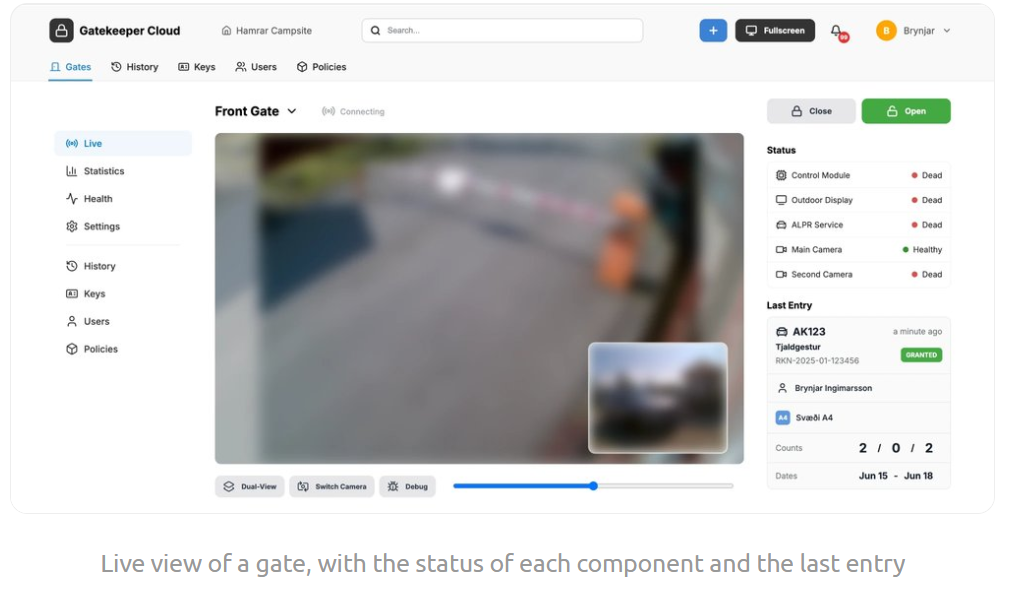
The system also supports a web interface for opening gates, viewing logs, managing users, configuring permissions, and checking live camera streams.
This makes Gatekeeper a practical example of using WIZnet W5500 in an access control controller where reliable Ethernet communication is needed between field hardware and a local control server.
What Problem Does Gatekeeper Solve?
Access control systems need to connect physical entry points to a central permission system.
A typical site may need to control:
- Door locks
- Magnetic locks
- Vehicle barriers
- Card reader access
- Keypad access
- Push button opening
- License plate access
- Traffic lights
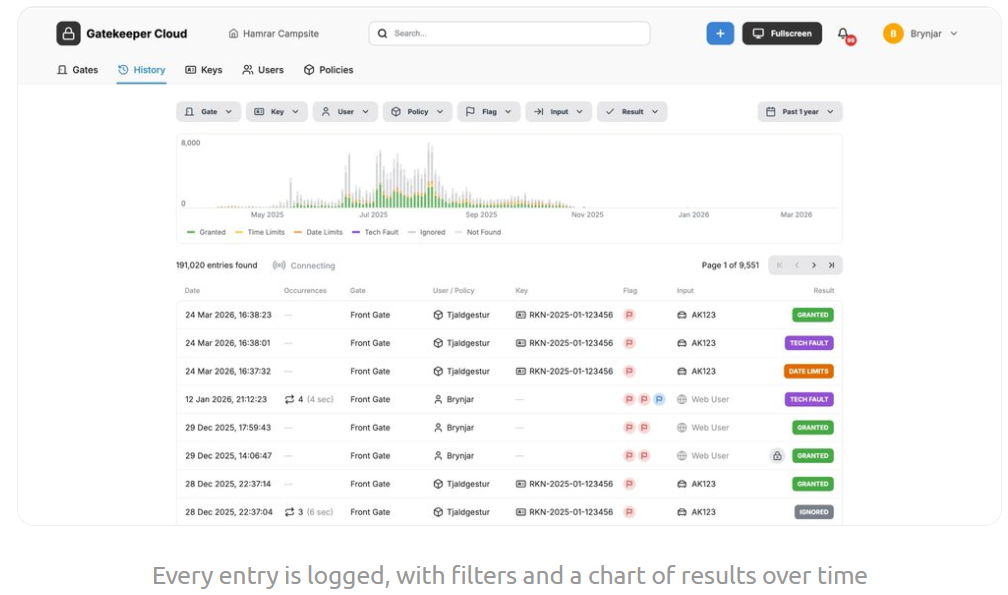
- Event logging
- User permissions
Without a networked controller, each gate or door may be controlled locally with limited visibility.
Gatekeeper solves this by using custom controllers that communicate with a local control server.
When a controller receives a card code, keypad code, button input, or vehicle detection event, it can send a request to the server. The server checks whether the access method is valid and then the controller toggles a relay to open the door or gate.
This gives the site a centralized way to manage access while still keeping physical control at each gate or door.
How Is the System Structured?
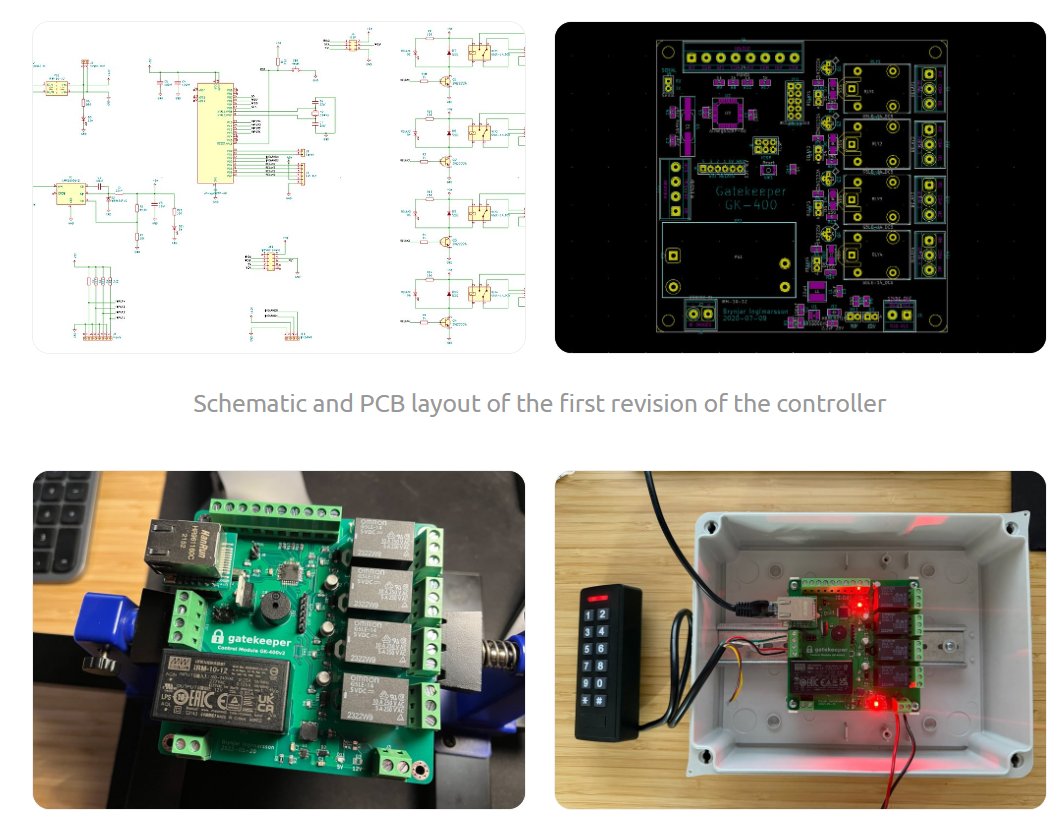
Gatekeeper consists of three main parts:
- Custom-designed hardware controllers
- IP cameras for license plate recognition and event images
- On-premises control server with a web interface
The hardware controller is installed near a door lock or traffic barrier.
The controller connects to the local network through W5500 Ethernet.
The control server manages users, access methods, logs, permissions, camera streams, and gate operation.
The basic structure can be described as follows:
Card Reader / Keypad / Button / Vehicle Sensor
        |
        | Wiegand / Digital Input
        |
Gatekeeper Hardware Controller
        |
        | ATmega328P
        |
WIZnet W5500 Ethernet
        |
        | Local Network
        |
On-Premises Control Server
        |
        | Access Granted / Denied
        |
Relay Outputs
        |
Door Lock / Magnetic Lock / Traffic Barrier / Lights
This architecture separates the system into clear roles:
- Input layer: card reader, keypad, external buttons, vehicle detection
- Controller layer: ATmega328P and relay control
- Network layer: W5500 Ethernet
- Server layer: permissions, logs, web interface, cameras, and REST API
- Output layer: magnetic lock, traffic barrier, red light, green light, and gate control
What Does W5500 Add to Gatekeeper?
W5500 provides the Ethernet interface for the hardware controller.
In Gatekeeper, the controller must communicate with the on-premises control server over a local network.
This makes Ethernet a central part of the system.
Reliable Local Network Communication
Access control devices are usually installed in fixed locations.
For fixed doors, gates, and vehicle barriers, wired Ethernet is often more reliable than wireless communication.
W5500 allows the controller to communicate with the server through the local network.
Practical Embedded Ethernet
The controller uses an ATmega328P microcontroller.
W5500 is a practical way to add Ethernet to this kind of small embedded controller.
The ATmega328P handles input processing and relay control.
W5500 handles the wired Ethernet connection.
Server-Based Permission Checking
When a card reader or keypad input is received, the controller can send a request to the server.
The server decides whether the code is valid.
If the code is valid, the controller toggles a relay to open the gate.
W5500 enables this server-connected access control flow.
Local Configuration
To connect a controller to the server, the device is connected to the local network and its web interface is opened.
The cloud IP and token can then be configured.
W5500 provides the Ethernet path needed for this local configuration workflow.
How Does Access Control Work?
The access flow can be described as follows:
- A user presents a card, enters a PIN, presses a button, or approaches a gate with a registered license plate
- The controller receives the input through Wiegand or external input lines
- The controller communicates with the local control server over Ethernet
- The server checks the user, access method, permission, and current validity
- If access is valid, the controller toggles a relay
- The relay opens the magnetic lock or vehicle barrier
- The system logs the access attempt
- If cameras are used, an image can be stored with the event
This structure lets the access decision stay in the server while the physical control remains close to the door or gate.
What Inputs Does the Controller Support?
The hardware controller supports multiple access and trigger inputs.
Wiegand Interface
The controller includes a Wiegand interface for card readers or keypads.
This allows the system to support common access control devices.
A user can authenticate with:
- Card number
- PIN code
- Keypad input
External Button Inputs
The controller includes external inputs for buttons or other triggers.
Two of the external inputs can open the gate unconditionally, even if the network is down.
This is useful for local emergency or manual operation.
A third button can ask the server before opening the gate.
The third button can be configured in the cloud interface with modes such as enabled, disabled, or timer controlled.
Vehicle Detection Input
Another input is used for vehicle detection in license plate access.
This helps ensure that the gate opens only when a vehicle is actually in front of the gate, not when a license plate is detected farther away.
What Outputs Does the Controller Support?
The controller includes 4 relays.
These relays can be used for:
- Opening a gate
- Closing a gate
- Controlling a red traffic light
- Controlling a green traffic light
- Controlling a magnetic lock
- Driving external access control hardware
This relay-based output structure makes the controller suitable for both pedestrian access and vehicle barrier systems.
How Does the Web Interface Help?
The control server exposes a web interface.
Through the web interface, administrators can:
- Manage users
- Set permissions
- Add access methods
- Operate gates
- View logs
- View live streams from gates
- Configure email alerts
- Review failed access attempts
- Manage non-admin user access
Each user can have associated access methods.
Access methods can include:
- Card number
- PIN
- License plate
Users can also have non-admin status, preventing them from changing access methods or settings.
This makes the system suitable for real site operation where different users need different permission levels.
How Are Logs and Alerts Handled?
Gatekeeper logs attempts to open gates.
The logs can include images from the cameras.
If an attempt fails, the system can show the reason, such as:
- Not found
- Expired
- Disabled
The system also supports email alerts.
Alerts can be limited by:
- Certain users
- Certain gates
- Certain hours
An image from the event can be attached to the email.
This makes the system useful not only for access control, but also for security monitoring and operational review.
How Is License Plate Recognition Used?
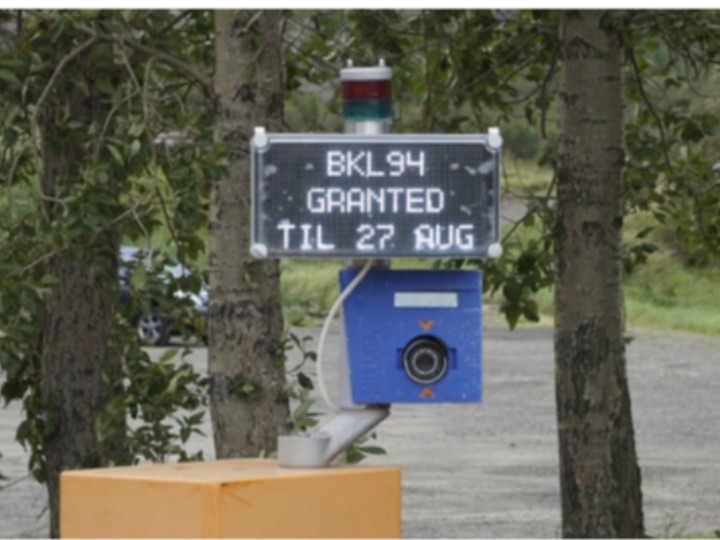
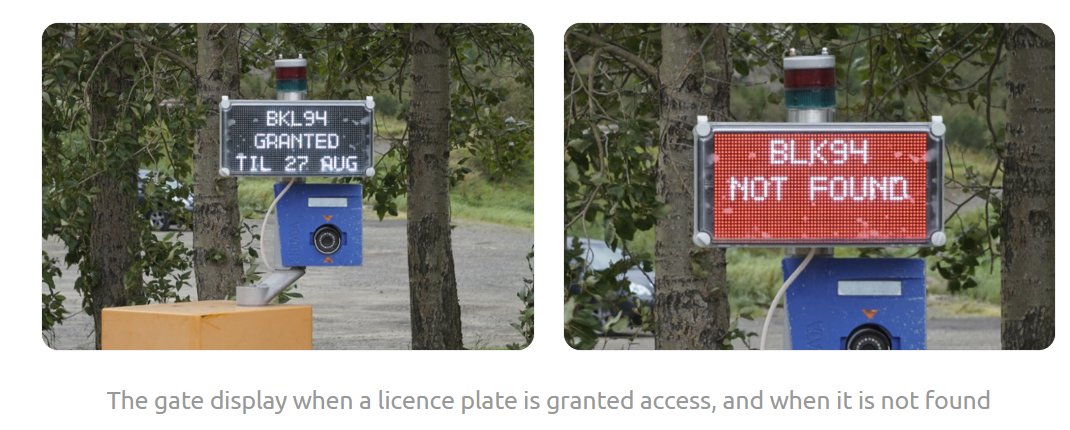
Gatekeeper can open gates when a camera detects a license plate.
For license plate recognition, the system uses a third-party solution called OpenALPR.
In this mode, an IP camera detects or captures the vehicle license plate.
The system checks whether the license plate is associated with a valid user or access method.
A vehicle detection input helps confirm that the car is actually in front of the gate before opening.
This reduces the risk of opening a gate based on a plate detected in the wrong location.
What Does the REST API Add?
Gatekeeper allows external services to modify users and access methods through a REST API.
This makes the system easier to integrate with other software.
Possible uses include:
- Synchronizing users from another system
- Adding temporary access methods
- Updating permissions
- Automating access changes
- Connecting with booking, facility, or membership systems
The REST API turns the access control system into a more flexible software platform rather than a closed standalone controller.
System Architecture
The complete system can be divided into several layers.
Access Input Layer
---------------------------------
Card reader
Keypad
External buttons
Vehicle detection input
License plate camera

Controller Layer
---------------------------------
ATmega328P microcontroller
Wiegand interface
Input processing
Relay control
Local web configuration

Network Layer
---------------------------------
WIZnet W5500 Ethernet
Local network
Controller-to-server communication

Server Layer
---------------------------------
On-premises control server
User permissions
Access methods
Logs
Email alerts
REST API
Live camera streams

Output Layer
---------------------------------
Magnetic lock
Electric vehicle barrier
Red traffic light
Green traffic light
Gate open / close relay control
This layered structure shows how Gatekeeper connects physical access hardware to server-based permission management.
The W5500 provides the Ethernet path between the controller and the local control server.
What Applications Can Use This Design?
Gatekeeper can be used in many access control applications.
Possible applications include:
- Door access control
- Magnetic lock control
- Vehicle barrier control
- Campsite gate management
- Parking gate access
- Card reader access systems
- Keypad access systems
- License plate-based access control
- Facility entrance control
- Local server-based access control
- Traffic light-controlled gate systems
- Web-managed gate operation
The original system is being tested at a large campsite in Iceland, making it a practical example of access control for real gate and barrier operation.
Why Is This a Good W5500 Use Case?
Gatekeeper is a good W5500 use case because Ethernet is central to the controller architecture.
The hardware controller must communicate with the control server over the local network.
W5500 helps the system:
- Connect an ATmega328P controller to Ethernet
- Send access requests to the local control server
- Receive access decisions from the server
- Support local network configuration
- Enable server-based user and permission management
- Connect door and barrier hardware to a web-managed system
- Support fixed access control installations
This makes W5500 an important part of the access control controller, not just an optional network add-on.
Conclusion
Gatekeeper is a network-connected access control system for door locks and traffic barriers.
The system combines custom hardware controllers, IP cameras, and an on-premises control server.
The controller uses an ATmega328P microcontroller and a WIZnet W5500 Ethernet controller to connect physical access hardware to the local network.
It supports Wiegand card readers or keypads, external buttons, vehicle detection inputs, and 4 relay outputs for controlling locks, barriers, and traffic lights.
The control server provides user permission management, web-based gate operation, live camera streams, event logs, email alerts, and REST API integration.
This project shows how W5500 can be used in a practical access control controller where reliable Ethernet communication is needed between field hardware and a local control server.
Q&A
What is Gatekeeper?
Gatekeeper is an access control system for door locks and traffic barriers.
Which WIZnet product is used?
The hardware controller uses WIZnet W5500 for Ethernet connectivity.
What MCU is used?
The controller uses an ATmega328P microcontroller.
What does the controller connect to?
The controller can connect to card readers, keypads, external buttons, vehicle detection inputs, and relay-controlled locks or barriers.
What is the role of W5500?
W5500 connects the hardware controller to the local network so it can communicate with the on-premises control server.
How does access approval work?
When a code, card, or other input is received, the controller sends a request to the control server. If the server approves it, the controller toggles a relay to open the door or gate.
Does the system support license plate recognition?
Yes. The system can open gates when a camera detects a valid license plate, using OpenALPR for license plate recognition.
What outputs does the controller have?
The controller has 4 relays for opening or closing gates and controlling red and green traffic lights.
Can the gate be opened if the network is down?
Yes. Two external inputs can open the gate unconditionally, even if the network is down.
What applications can use this design?
This design can be used for door access control, magnetic lock control, vehicle barrier control, parking gates, campsite gates, keypad access, RFID card access, and license plate-based access control.
