[WIZnet W7500 SURF5] - LED project production
Based on the existing STM32 project, a simple LED project was created using surf5.
0
![[WIZnet W7500 SURF5] - LED project production](/upload/_thumb/1280/project/10936/cover2.jpg.jpg)
Components
Hardware components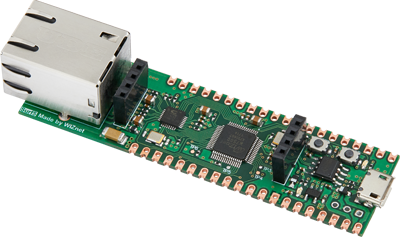
WIZnet - Surf5
x 1


microsoft - VS Code
x 1
Project description
[WIZnet W7500 SURF5] - Create LED project
Based on the existing STM32 project, we created a basic project as follows.
![[WIZnet W7500 SURF5] - LED project production](/upload/_thumb/1280/ckeditor5/462689943%5F1701608181%2Epng.jpg)
The HAL driver and CMSIS code provided by WIZnet have been added to the library.
![[WIZnet W7500 SURF5] - LED project production](/upload/_thumb/1280/ckeditor5/462689943%5F1701608497%2Epng.jpg)
The linker script and startup code were modified from those used in STM32.
![[WIZnet W7500 SURF5] - LED project production](/upload/_thumb/1280/ckeditor5/462689943%5F1701608518%2Epng.jpg)
The default memory configuration is as follows. The SRAM is not large at 16KB.
![[WIZnet W7500 SURF5] - LED project production](/upload/_thumb/1280/ckeditor5/462689943%5F1701608402%2Epng.jpg)
The STM32's startup code calls the SYstemInit() function, and in the code provided by WIZnet, this function includes system clock settings.
![[WIZnet W7500 SURF5] - LED project production](/upload/_thumb/1280/ckeditor5/462689943%5F1701608563%2Epng.jpg)
![[WIZnet W7500 SURF5] - LED project production](/upload/_thumb/1280/ckeditor5/462689943%5F1701608586%2Epng.jpg)
I changed the external crystal frequency and PLL_VALUE value in the w7500x.h header so that the MCU default clock is 48Mhz.
![[WIZnet W7500 SURF5] - LED project production](/upload/_thumb/1280/ckeditor5/462689943%5F1701608627%2Epng.jpg)
In the bspInit() function, set the system tick timer to run every 1ms to be used as a reference for the operation of the delay() and millis() functions later.
![[WIZnet W7500 SURF5] - LED project production](/upload/_thumb/1280/ckeditor5/462689943%5F1701608652%2Epng.jpg)
Variables used in systematic interrupts are used in the delay() and millis() functions.
![[WIZnet W7500 SURF5] - LED project production](/upload/_thumb/1280/ckeditor5/462689943%5F1701608663%2Epng.jpg)
Add basic information for LED driving in led.c and initialize using HAL functions provided by WIZnet.
![[WIZnet W7500 SURF5] - LED project production](/upload/_thumb/1280/ckeditor5/462689943%5F1701608670%2Epng.jpg)
![[WIZnet W7500 SURF5] - LED project production](/upload/_thumb/1280/ckeditor5/462689943%5F1701608694%2Epng.jpg)
These are HAL functions for GPIO control. We added code to control GPIO using these functions.
![[WIZnet W7500 SURF5] - LED project production](/upload/_thumb/1280/ckeditor5/462689943%5F1701608722%2Epng.jpg)
I added test code to make the LED blink every 500ms.
![[WIZnet W7500 SURF5] - LED project production](/upload/_thumb/1280/ckeditor5/462689943%5F1701608726%2Epng.jpg)
In the build options, change the MCU core used to cortex-m0 and modify the options because there is no hardware FPU. Also, -Wno-comment was added to WIZnet's HAL driver code to eliminate warnings.
![[WIZnet W7500 SURF5] - LED project production](/upload/_thumb/1280/ckeditor5/462689943%5F1701608742%2Epng.jpg)
The build proceeds normally.
![[WIZnet W7500 SURF5] - LED project production](/upload/_thumb/1280/ckeditor5/462689943%5F1701608750%2Epng.jpg)
The W7500 chip used in the SURF5 board is a SoC developed by WIZnet and includes a Cortex-M0 core. In order to debug with a debugger such as STLINK, it must be supported by a tool such as OpenOCD, but it is not yet supported.
And WIZnet provides FLASH downloadable firmware for the KEIL compiler. If you download the file with the FLM extension from the link below, you can use it with the KEIL compiler.
https://docs.wiznet.io/Product/Mbed-WIZwiki-Platform/Getting-Started/how-to-debug-wizwiki-w7500
Create a WIZnet.W7500_DFP.1.0.0 folder under the tools folder and copy the Flash folder and the firmware file for downloading W7500_128.FLM provided by WIZnet into it. The WIZnet.W7500_DFP.pdsc file is the CMSIS-Pack configuration file, and related content must be added here.
![[WIZnet W7500 SURF5] - LED project production](/upload/_thumb/1280/ckeditor5/462689943%5F1701609381%2Epng.jpg)
<?xml version="1.0" encoding="utf-8"?>
<package schemaVersion="1.2" xmlns:xs="http://www.w3.org/2001/XMLSchema-instance" xs:noNamespaceSchemaLocation="PACK.xsd">
  <vendor>Nuvoton</vendor>
  <url>https://github.com/OpenNuvoton/cmsis-packs/raw/master/Nuvoton_DFP/</url>
  <name>NuMicro_DFP</name>
  <description>Nuvoton ARM Cortex-M NuMicro Family Device Support</description>

  <releases>
    <release version="1.0.0" date="2023-12-02">
      First Released
    </release>
  </releases>

  <keywords>
    <!-- keywords for indexing -->
    <keyword>WIZnet</keyword>
    <keyword>Device Support</keyword>
    <keyword>Device Family Package W7500</keyword>
    <keyword>W7500</keyword>
  </keywords>

  <devices>
    <!-- generated, do not modify this section! -->
    <family Dfamily="W7500 Family" Dvendor="WIZnet:122">
      <!-- *************************  Subfamily 'Generic'  ***************************** -->
      <subFamily DsubFamily="Generic">
        <description>The WIZnet W7500 Series 32-bit microcontroller</description>
        <!-- *************************  Device 'Generic M051'  ***************************** -->
        <device Dname="W7500">
          <processor  Dcore="Cortex-M0"  Dclock="48000000"/>
          <memory     id="FLASH"   start="0x00000000"  size="0x20000"    startup="1"   default="1"/>
          <memory     id="SRAM"    start="0x20000000"  size="0x4000"     init   ="0"   default="1"/>
          <algorithm  name  ="Flash/W7500_128.FLM"     start="0x00000000"  size="0x20000"  RAMstart="0x20000000"  RAMsize="0x4000"  default="1"/>
        </device>
      </subFamily>
    </family>
  </devices>

</package>pyocd list --targets --pack=tools/WIZnet.W7500_DFP.1.0.0![[WIZnet W7500 SURF5] - LED project production](/upload/_thumb/1280/ckeditor5/462689943%5F1701609459%2Epng.jpg)
If you only want to download firmware to FLASH, proceed with the command below.
pyocd load -t w7500 build/wiznet-surf5-fw.elf --pack=tools/WIZnet.W7500_DFP.1.0.0![[WIZnet W7500 SURF5] - LED project production](/upload/_thumb/1280/ckeditor5/462689943%5F1701609467%2Epng.jpg)
I tested the board by connecting the SWD pins to a STLINK compatible product.
![[WIZnet W7500 SURF5] - LED project production](/upload/_thumb/1280/ckeditor5/462689943%5F1701609484%2Epng.jpg)
For debugging in VSCode, I added pyOCD to the launch.json file. To use the added CMSIS-Pack, specify the location in the --pack option.
 "configurations": [
    {
      "cwd": "${workspaceFolder}",
      "executable": "./build/wiznet-surf5-fw.elf",
      "name": "Debug with PyOCD",
      "request": "launch",
      "type": "cortex-debug",
      "runToEntryPoint": "main",
      "showDevDebugOutput": "none",
      "servertype": "pyocd",
      "serverArgs": [
        "--target", "w7500",
        "--pack", "tools/WIZnet.W7500_DFP.1.0.0"
      ],
      "windows": {
        "gdbPath": "${env:ARM_TOOLCHAIN_DIR}/arm-none-eabi-gdb.exe",
      },
    },
  ]
When you start debugging, FLASH is downloaded and debugging mode begins.
![[WIZnet W7500 SURF5] - LED project production](/upload/_thumb/1280/ckeditor5/462689943%5F1701609516%2Epng.jpg)
You can see that debugging starts normally. You can now debug your board while adding breakpoints.
![[WIZnet W7500 SURF5] - LED project production](/upload/_thumb/1280/ckeditor5/462689943%5F1701609523%2Epng.jpg)


