Speed-o-meter
Speed-o-meter
0
Components
Hardware componentsArduino Pro Nano
x 1
WIZ550io Ethernet adapter
x 1
Servo
x 1
Addressable LED strip
x 1
FTDI Adapter
x 1
Breadboard and jumper wires
x 1
Monowall Stats API
x 1
Project description
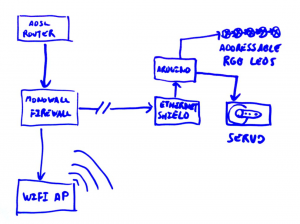
The heart of the system is an Arduino clone that is requesting the information, decoding it, calculating the rate since the last sample, and moving a servo to the correct position for that value. Addressable LEDs were also added that follow the position of the arrow to add a little glow.
The Arduino connects to a Monowall firewall and polls for the current downstream usage using an API for the web interface.
The case is an old Apple screen case. The internal frame was laser cut from some recycled plastic, and the arrow is 3D printed.
-
The Monowall Stats API
The API I am using to access the usage data from the Monowall firewall is intended for use on the web admin interface but can be used for anything. Unlike the rest of the interface that is written in PHP, this is written in C to make it more efficient. The actual call is simple if you know about. Just type http://firewall.ip.address/stats.cgi?interface in to your browser replacing the interface with the WAN name from?https://firewall.ip.address/interfaces_assign.php . This will return 3 numbers. The first is the time of the request, second is the data downloaded, and the third is the data uploaded. You will need to use the last reading and the current one to calculate the actual throughput.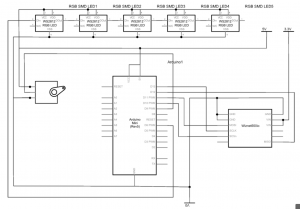
-
The issue of authentication
Currently the Arduino is connecting directly to the Monowall firewall on port 80 and requesting "/stats.cgi?vr0". This is an endpoint for the Web GUI API to monitor network usage in real time. vr0 is the name in the Interface on the WAN side. In the HTTP headers we are sending "Authorization: Basic ****************************" where the starts are replaced with "username:password" base 64 encoded. This works well, but the password is as good as in the clear so is a bit of a security issue. Even if we have a secure connection between the firewall and the Speed-o-meter anyone administering the firewall will also be sending the password insecurely. The solution to this is to use as HTTPS connection to the firewall, but the Arduino is not powerful enough to use HTTPS on its own. Normally I would proxy the request via a server that can connect via HTTPS, and this is what I started to do, but then I decided will look at creating a Monowall plugin. This plugin will either give access to the bandwidth data without authentication or encryption, or perhaps push the data to the Arduino. https://www.youtube.com/watch?v=-isknvvgQwA

