W5100S??MQTT connects to Baidu Tiangong cloud platform
W5100S??MQTT connects to Baidu Tiangong cloud platform
0
Components
Hardware components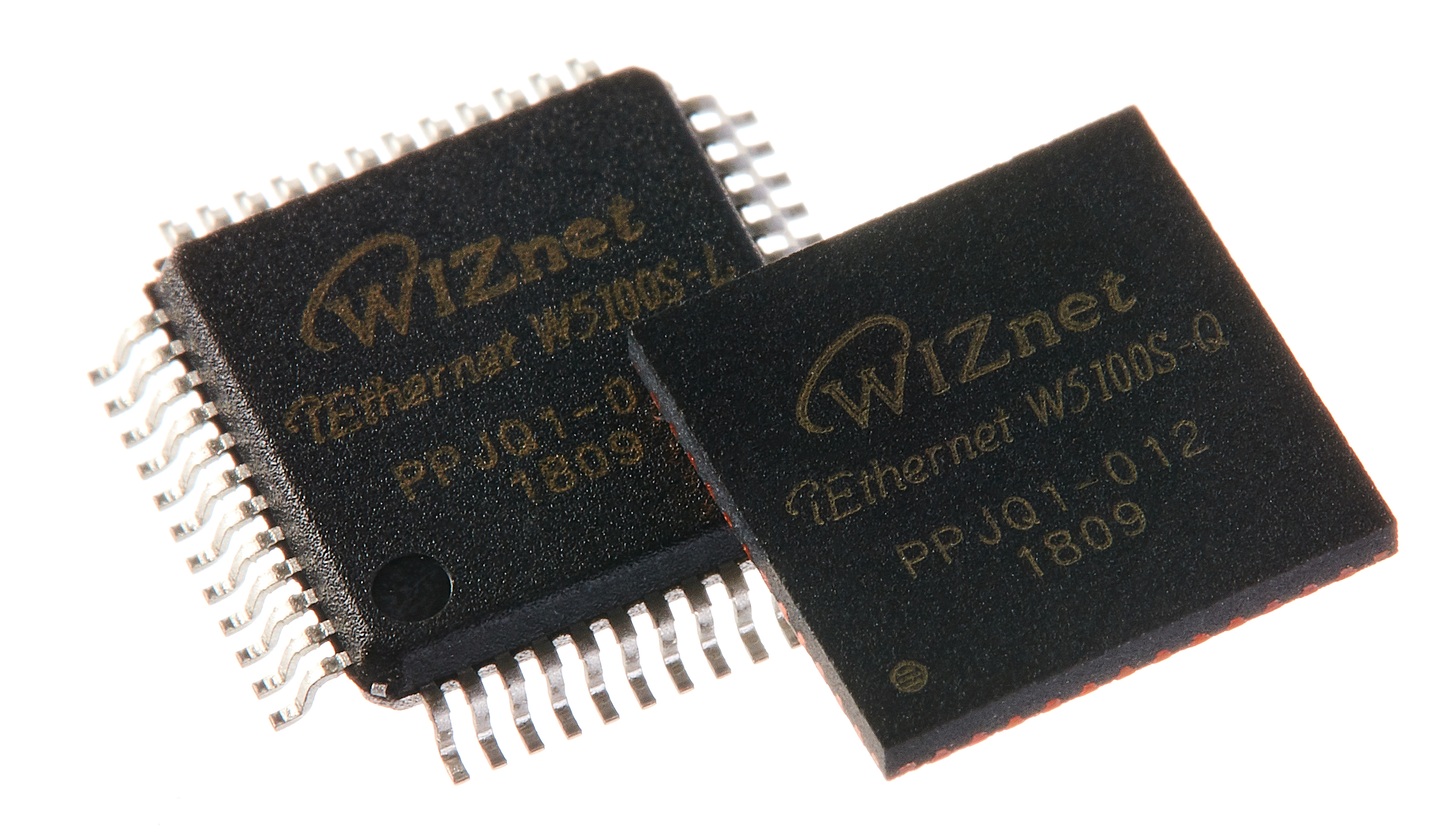
WIZnet - W5100S
x 1

stm32f1x
x 1
Project description
Prepare
- Software environment: Windows
- Hardware environment: STM32F103 + W5500
- Development tools: Keil uVision5
- Debugging Tool: Serial Debugging Wizard
- Connected platform: Baidu Yuntiangong (?https://cloud.baidu.com/)
2. Introduction to MQTT
MQTT official website address: (?http://mqtt.org/)2.1 Characteristics of the MQTT protocol
MQTT is a client-server based message publish/subscribe transmission protocol.?The MQTT protocol is lightweight, simple, open, and easy to implement.?These characteristics make it applicable to a wide range.?In many cases, including restricted environments such as machine-to-machine (M2M) communication and the Internet of Things (IoT).?It has been widely used in satellite sensors to communicate with sensors, occasionally marking medical devices, smart homes, and some miniaturized devices. The current version of the MQTT protocol is MQTT v3.1.1 released in 2014. In addition to the standard version, there is a simplified version of MQTT-SN.?This protocol is primarily for embedded devices.?These devices typically work on hundreds of TCP/IP networks, such as: ZigBee. The MQTT protocol runs on TCP/IP or other network protocols and provides lossless and orderly bidirectional connections.?Its features include:- The publish/subscribe message pattern used, which provides one-to-many message distribution to decouple applications.
- Message transmission mechanism that protects the content of the payload.
- There are three types of Quality of Service (QoS) for transmitting messages:
- At most once, message loss or duplication can occur at this level, and message distribution depends on the underlying TCP/IP network.?That is: <= 1
- At most once, this level ensures that messages arrive, but messages may be duplicates.?That is: >= 1
- Only once, make sure that the message arrives only once.?That is: = 1. This level can be used in some more demanding billing systems.
2.2 MQTT?Protocol principle and implementation
Need to implement the MQTT protocol: client and server There are three types of identities in the MQTT protocol: publisher, broker (server), and subscriber (subscribe).?Among them, the publisher and subscriber of a message are both clients, the message broker is a server, and the publisher of a message can also be a subscriber. Messages transmitted by MQTT are divided into two parts: subject and message payload. The topic can be understood as the type of message.?After a subscriber subscribes, they will receive the message content (payload) of the topic. The payload, which can be understood as the content of the message, refers to the content that the subscriber specifically wants to use2.3 Baidu Yuntiang MQTT connection steps
2.3.1.?Enter the management console(Please login in advance); 23.?2. Select the "IoT Access IoT Hub" section
 23.?3. Create a project

 (The routine is used with data type equipment. For detailed information on data type and equipment type differences, please go to Baidu Yuntiangong for inquiries)
23.?4. After submitting the project, enter the project creation sub-user
(The routine is used with data type equipment. For detailed information on data type and equipment type differences, please go to Baidu Yuntiangong for inquiries)
23.?4. After submitting the project, enter the project creation sub-user

 Name: the username in the MQTT connection message
 Identity: determine the way of access, you can use a key connection.
 Strategy: Link permissions and corresponding themes.
 Key: Keep it safe.?This is the password for the connection.?(Forgetting can be reset in the identity list)
After the project has been created successfully, register: name, identity, key.?You can modify the corresponding string through the routine to connect the device you created.
3. Routine experimental phenomenon
First, we must look at the experimental phenomenon after the programming process.Note: The test of receiving messages and posting messages to the topics after the W5100S subscribes to the topic is the establishment of the second device B in Baidu Cloud.?Device B broadcasts a message and receives a topic message from the W5100S.?This is to check if the W5100S can receive the subject message or send it.
3.1 The serial port prints the message "Connection successful" or "Specific reason for connection failure". 3.2 Subscribe to topics
 3.3.?Receive topic messages
 3.4.?Post a topic message

4. Example code
Because the code involves the unpacking part of MQTT, the detailed explanation is too detailed. Therefore, this discussion only discusses function functions and code frameworks, and does not disassemble function implementation too much. 4.1.?The general framework flow of the main function-
-
-
-
-
-
-
-
-
-
-
-
-
-
-
-
-
-
int main(void)
-
{
-
systick_init (72); // Inicializa el temporizador de tic
-
USART1_Config (); // Inicializar USART1: 115200 @ 8-N-1
-
reset_break_gpio_init (); // Restablecer e interrumpir la inicializacion del pin
-
-
spi_gpio_init (); // inicializacion del pin SPI
-
spiinitailize (); // inicializacion de configuracion SPI
-
reg_wizchip_spi_cbfunc (spi_read_byte, spi_send_byte); // asignacion de funciones de datos de lectura y escritura SPI
-
reg_wizchip_cs_cbfunc (cs_low, cs_high); // asignacion de funcion de control de seleccion de chip SPI
-
-
FSMC_gpio_init (); // Inicializacion de pin FSMC c
-
FSMCInitialize (); // Inicializacion de configuracion de FSMC
-
-
printf (" r n Tecnologia Wei Shi - agente oficial de WIZnet W5100S. Soporte tecnico completo, gran ventaja de precio! r n r n");
-
reset_w5100s (); // Restablecimiento de hardware W5100S
-
PHY_check (); // programa de verificacion de cable de red
-
set_w5100s_mac (); // Establecer direccion W5100SMAC
-
set_w5100s_netinfo (); // Establecer parametros de red W5100S
-
wizchip_init (txsize, rxsize); // Inicializa el tamano del bufer de envio y recepcion de 4 sockets
-
printf (" r n La configuracion del parametro de red W5100S esta completa, utilice la direccion W5100SIP 'PING' de la computadora para verificar si la red es fluida");
-
-
while (1) / * funcion para ejecucion de bucle * /
-
{
-
do_tcp_client (); // prueba de bucle invertido de datos del cliente TCP
-
-
delay_ms(100);
-
-
if (Usuario1 == 0) // Suscribirse
-
{
-
while(User1 == 0);
-
MQTT_STATE = MQTT_PKT_SUBSCRIBE;
-
}
-
// if (KEY_5 == 0) // cancelar suscripcion
-
// {
-
// MQTT_STATE = MQTT_PKT_UNSUBSCRIBE;
-
// }
-
si no (Usuario0 == 0) // Publicar
-
{
-
while(User0 == 0);
-
MQTT_STATE =MQTT_PKT_PUBLISH;
-
}
-
}
-
}
-
uint8 buff [2048]; / * define un cache de 2 KB * /
-
uint8 BD_TG_server_ip [4] = {163,177,150,12}; // direccion IP del servidor BD_TG
-
uint16 BD_TG_server_port = 1883; // numero de puerto del servidor BD_TG
-
-
-
int MQTT_STATE = MQTT_PKT_CONNECT; // conectar
-
const char * topics [] = {"test"}; // topic
-
uint8 BD_TG_ping_pak [2] = {0xC0,0x00}; // Mensaje de latido
-
-
unsigned char * data_ptr = NULL; // el puntero se refiere a nulo
-
/**
-
* @ breve funcion de demostracion de bucle invertido del cliente TCP.
-
* @ param Ninguno
-
* @ return Ninguno
-
*/
-
void do_tcp_client(void)
-
{
-
uint16 len=0;
-
-
switch (getSn_SR (SOCK_TCPC)) / * Obtener el estado del socket * /
-
{
-
caso SOCK_CLOSED: / * el socket esta cerrado * /
-
socket(SOCK_TCPC,Sn_MR_TCP,local_port++,Sn_MR_ND);
-
break;
-
-
case SOCK_INIT: / * el socket esta en estado de inicializacion * /
-
connect (SOCK_TCPC, BD_TG_server_ip, BD_TG_server_port); / * servidor de conexion de socket * /
-
break;
-
-
case SOCK_ESTABLISHED: / * el socket esta en estado de establecimiento de conexion * /
-
if(getSn_IR(SOCK_TCPC) & Sn_IR_CON)
-
{
-
setSn_IR (SOCK_TCPC, Sn_IR_CON); / * Borrar el bit de bandera de interrupcion de recepcion * /
-
}
-
-
len = getSn_RX_RSR (SOCK_TCPC); / * Definir len como la longitud de los datos recibidos * /
-
if(len>0)
-
{
-
recv (SOCK_TCPC, buff, len); / * Recibir datos del servidor * /
-
data_ptr = buff;
-
if(data_ptr != NULL)
-
BD_TG_RevPro(data_ptr);
-
if(publish_buf[0] == 0x31)
-
{
-
LED_ALL_ON;
-
}
-
else if(publish_buf[0] == 0x32)
-
{
-
LED_ALL_OFF;
-
}
-
}
-
-
switch(MQTT_STATE)
-
{
-
/ * El protocolo MQTT esta conectado a la plataforma de agente BD_TG * /
-
case MQTT_PKT_CONNECT:
-
BD_TG_DevLink();
-
MQTT_STATE = MQTT_PKT_PINGREQ;
-
break;
-
/ * Suscribirse a temas * /
-
case MQTT_PKT_SUBSCRIBE:
-
BD_TG_Subscribe(topics,1);
-
MQTT_STATE = MQTT_PKT_PINGREQ;
-
break;
-
/ * Mensaje de liberacion de nivel Qos2 * /
-
case MQTT_PKT_PUBLISH:
-
-
BD_TG_Publish (* temas, "Prueba de publicacion MQTT"); // Publicar un mensaje
-
delay_ms (300); // Espera la respuesta de la plataforma
-
/ * Recibir PubRec enviado por la plataforma y responder a la respuesta de PubRel * /
-
len=getSn_RX_RSR(SOCK_TCPC);
-
recv(SOCK_TCPC,buff,len);
-
data_ptr = buff;
-
if(data_ptr != NULL)
-
BD_TG_RevPro(data_ptr);
-
delay_ms (100); // La respuesta de PubRel espera la respuesta de la plataforma
-
len=getSn_RX_RSR(SOCK_TCPC);
-
recv(SOCK_TCPC,buff,len);
-
data_ptr = buff;
-
if(data_ptr != NULL)
-
BD_TG_RevPro(data_ptr);
-
MQTT_STATE = MQTT_PKT_PINGREQ;
-
/ * Enviar una respuesta Ping una vez cada 120 segundos para mantener una conexion larga * /
-
break;
-
case MQTT_PKT_UNSUBSCRIBE:
-
MQTT_UnSubscribe(topics,1);
-
MQTT_STATE = MQTT_PKT_PINGREQ;
-
break;
-
case MQTT_PKT_PINGREQ:
-
if(BD_TG_ping_time > 120)
-
{
-
send(SOCK_TCPC,BD_TG_ping_pak,2);
-
BD_TG_ping_time = 0;
-
}
-
break;
-
}
-
break;
-
-
case SOCK_CLOSE_WAIT: / * el socket esta esperando para cerrarse * /
-
close(SOCK_TCPC);
-
break;
-
}
-
}
-
const char * topics [] = {"test"}; // topic
-
-
BD_TG_Subscribe (temas, 1); // Tema de suscripcion, cantidad 1
-
-
BD_TG_Publish (* temas, "Prueba de publicacion MQTT"); // Temas publicados, mensajes publicados
-
-
MQTT_UnSubscribe (temas, 1); // Temas no suscritos, cantidad 1
For basic subscription and MQTT publication, modify the above parameters to complete.
For other functions, you need to modify the corresponding parameters according to the function description in the package.
The above code is?www.w5100s.com?Within the 17.MQTT_BDTG routine, this routine has been tested and can be connected to the Baidu Tiangong Cloud platform normally to achieve MQTT subscription, publication and other related functions.


