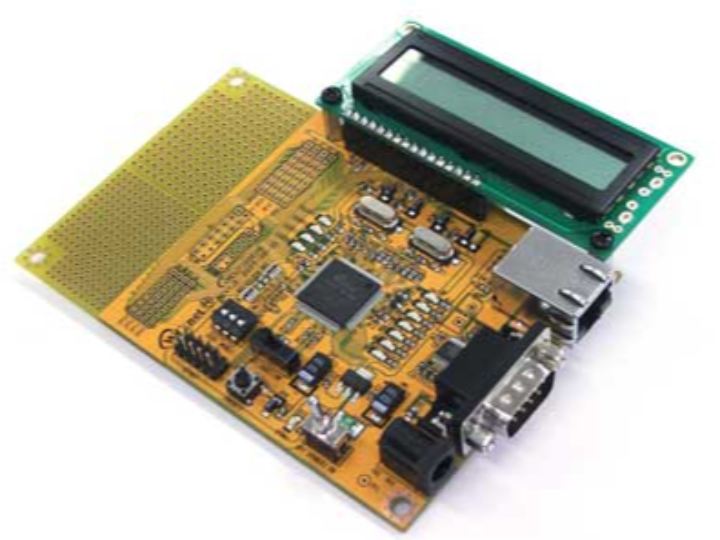
WizNet W7100 on the iMCU7100 evaluation board
webserver display
9
Components
Hardware components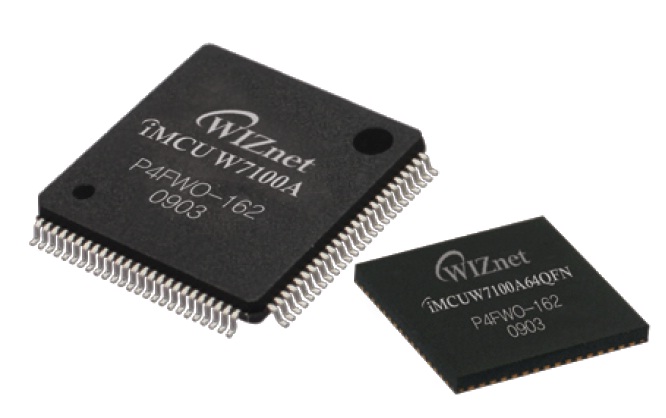
WIZnet - W7100A
x 1

Project description
Step 1. To-Do... |
|---|
There is a new Circuit Cellar Contest going on, this time with the Wiznet W7100 microcontroller. What do we have to do? We have to make a W7100.DAT file for Bascom-8051
|
Step 2: Creating the W7100.DAT |
Used the existing REG51.DAT as a template. Here the registers used in the REG51.DAT-file of Bascom-8051 Here the registers used in the W7100.DAT-file. In green the new ones. In the DAT-file: In the [BIT]-section (all registers that ends with a 0 or a 8), all registers that can be manipulated by bit, and in the [BYTE]-section all others. In the [MISC]-section the name of the microcontroller: |
Step 3: Getting the first test program in the W7100 |
We can test the W7100.DAT file with a small program to blink the three LEDs. $regfile = "W7100.DAT" Do We need WizISP to put the BIN or HEX file in the W7100. Connect the iMCU7100 to a serial port on your computer, start the WizISP-program that can be found on the Wiznet-site. Put the BOOT-switch to the right (ON), power the board, select the right COM-port and open the port in the WizISP-program. When you have compiled the above example in Bascom-8051 you will have a HEX and a BIN-file. Load this file. You should see this: With a push on AUTO your W7100 will be erased, blank checked, programmed and verified. And after all is well, it will start. You can leave the BOOT-switch to the right, but when you push the reset button the W7100 will stay in its boot loader. Putting the BOOT-switch to the left and pressing reset will restart the W7100. If all is done correct you will see the three LEDs go on for 1 second, off for 1 second and that is repeated. I have noticed it is very handy to minimize the WizISP program, every time you do a recompile of your Bascom-8051-program you will be noticed like this: When you forget to switch the BOOT-switch to ON you will get an error-message. When you have, later on, HyperTerminal open, you will also get an error-message. If you want every detail of the W7100-registers used, you could have a look here: Tutorial Wiz810MJ I have written before.
|
Step 4: Get the LCD and serial working |
Time for the real work, getting the LCD working. Have tested with the Bascom-8051 LCD-commands but it wasn't working. Have still to find why not. But remembered I wrote LCD-routines for the Siemens 80C535 before so used these. And also for the serial port, have to fill two registers to get it working. But don't worry you will see these are the only non-standard Bascom-8051 things to put in.
Put the next values in the registers to get the baudrate right
Just for now, a few subroutines to drive the LCD
After this line you should see something on your LCD
And after this line you should see something on your terminal In the next loop the three LEDs should be blinking
|
Step 5: Include-file W7100.INC |
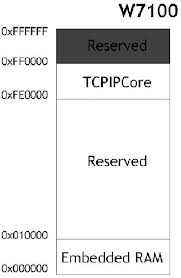
We have to create an Include-file with all registers of the W7100 in it. If you have seen the W5100-include file for the Wiz810MJ-module you will see a lot of similarity. If we take a look at the TCPIPCore-memory-map: we see FE0000-FE0034 Common Registers 8 sockets can be used on the W7100 and it is real easy to figure out which registers belongs to which socket. Have a look at a part of the W7100.INC Bascom-8051 include file. 'Socket Mode register |
Step 6: Two routines to read and write in the TCPIPCore registers (FE0000-FEFFFF) |
Here you see the external RAM of the W7100, 64 Kbytes SRAM, and 64 Kbytes for the TCPIP-core (including RX/TX buffers). Going over the C-examples I have seen the register DPX0 is used to gain access to this piece of memory.
Have written two small subroutines to get access to the FE0000-FEFFFF part of the memory: Sub W7100_write The 000000-00FFFF can be accessed through Bascom-8051 INP and OUT commands. If you check the WIZMEMCPY.C routine on the CD, or website of Wiznet, you will see a routine to move a bulk of bytes from the lower part of RAM (Embedded RAM) to the RX/TX-buffers (TCPIPCore) and visa-versa. The adresspointers DPTR and DPTR1 are incremented or decremented simultaneous. I think the copy is done with a small routine that can be found in the boot loader. With the WCONF register access to the bootloader is managed. Registers DPX0/1, DPH0/1, DPL0/1 are used for this action. |