


Open-Source Platform for Server Room Environmental Monitoring : sensormeter-poe
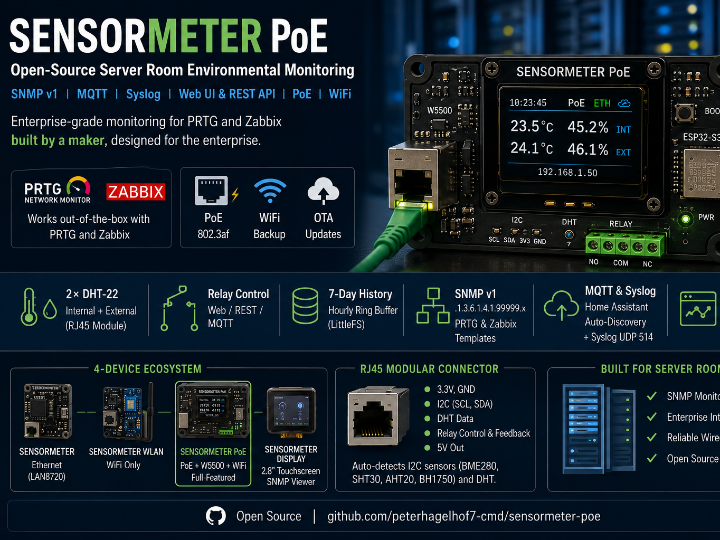
Dedicated PoE environmental sensors for server rooms and network closets — the kind that speak SNMP and integrate directly with PRTG and Zabbix
Espressif - ESP32
x 1


WIZnet - W5500
x 1
Open-Source Platform for Server Room Environmental Monitoring — ESP32-S3 + W5500 PoE, SNMP, MQTT, and a 4-Device Ecosystem
Overview
Dedicated PoE environmental sensors for server rooms and network closets — the kind that speak SNMP and integrate directly with PRTG(Paessler GmbH is a German software company founded in 1997) and Zabbix(Zabbix LLC is a company based in Riga, Latvia, founded in 2005) — cost anywhere from $150 to $500 per unit. The founder of Paessler, the company behind PRTG, personally tested and documented SNMP-capable environmental sensors ranging from the Querx at €200 and the HWg-STE at €170 to the Comet System T7611 at €500. In the North American market, comparable products include the AKCP sensorProbe1+ Pro at $190, the NTI E-MICRO-TRHP at $315, and the Room Alert 3S at $295. When the Openviro Axe PoE launched on Crowd Supply in 2025 at $149, it was considered the affordable option in this space.
The Sensormeter PoE builds the same functionality for $15–25 in hardware parts. PRTG (paessler.com), trusted by more than 500,000 users worldwide, and the open-source Zabbix (zabbix.com) both work with any SNMP-capable device regardless of manufacturer. Because Sensormeter PoE implements standard SNMP correctly, it integrates into these enterprise monitoring platforms with no extra drivers or certifications required. Built by a maker, designed for the enterprise server room.
The Sensormeter Family — A 4-Device Ecosystem
Sensormeter PoE is not a standalone project. It is the fourth member of a family of four ESP32 firmware projects that share a common SNMP OID base (.1.3.6.1.4.1.99999.x), an identical RJ45 module pinout, unified PRTG and Zabbix templates, and a single flash script that manages all four devices. The Sensormeter Display — a 2.8-inch touchscreen viewer — queries all three sensor variants over SNMP without any code changes. RJ45 sensor and relay modules are physically interchangeable between Sensormeter and Sensormeter PoE.

| Device | Hardware | Network | Role |
|---|---|---|---|
| Sensormeter | WT32-ETH01 | Ethernet (LAN8720) | Original, up to 2 sensors |
| Sensormeter WLAN | ESP32-WROOM-32 | WiFi only | Low-cost wireless variant |
| Sensormeter PoE | Waveshare ESP32-S3-ETH | W5500 + WiFi + PoE | Full-featured: relay, auto-detect, MQTT actor |
| Sensormeter Display | HW-458B (ESP32 + ST7789) | WiFi | Touchscreen SNMP viewer |
Sensormeter PoE — What It Does
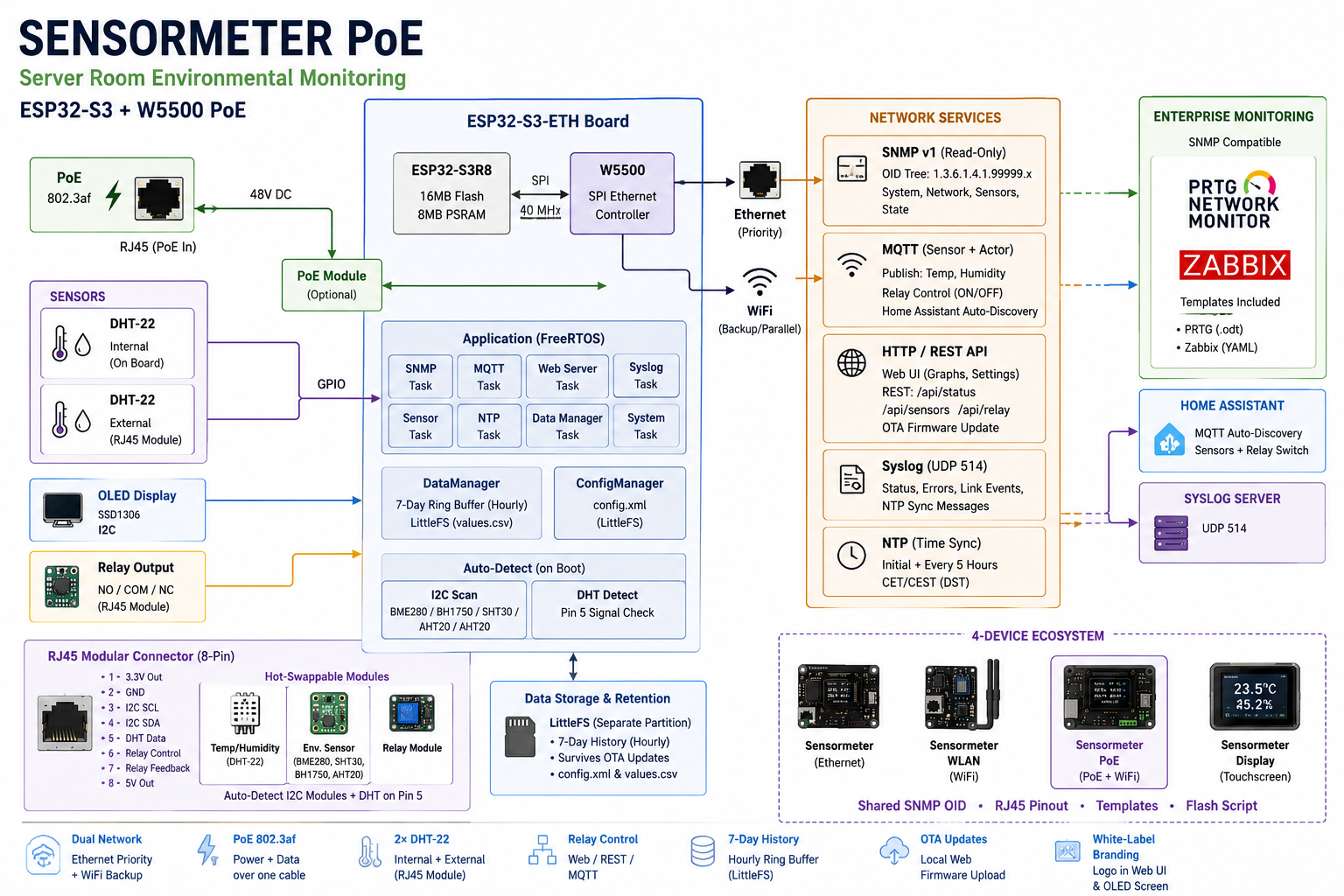
A single board handles the complete monitoring and control chain: two DHT-22 temperature and humidity sensors (one internal, one external over RJ45), an SSD1306 OLED display with 10-second rotating screens, a relay output for actuator control, and automatic I2C module detection on boot. Eight FreeRTOS tasks run concurrently, with a central DataManager maintaining a 7-day hourly ring buffer in LittleFS. Because LittleFS runs on a separate partition from the firmware, settings (config.xml) and measurement history (values.csv) survive OTA firmware updates intact.
Hardware
The Waveshare ESP32-S3-ETH combines an ESP32-S3R8 (16 MB Flash, 8 MB PSRAM) with a W5500 SPI Ethernet controller and an optional PoE piggyback module (802.3af). Ethernet takes priority, but WiFi runs in parallel simultaneously. If neither interface obtains an IP address within 5 minutes, the firmware automatically opens a fallback AP named installer at 192.168.4.1, allowing initial configuration through any web browser.
The Role of W5500
The W5500 carries all time-critical network traffic — SNMP polling responses, Syslog UDP bursts, and MQTT broker connections — over a stable wired path. The SPI clock is fixed at 40 MHz due to the GPIO matrix pin constraints on the Waveshare board (80 MHz causes W5500 reset failures; 60 MHz shows no improvement). Ethernet and WiFi operate as independent network interfaces, and every IP configuration change goes through a Ping verification step before being applied, preventing misconfiguration from locking out access.
Protocol Stack
SNMP v1 (read-only, port 161): System information, network status, sensor 1 and 2 values, and system state are exposed under the OID tree .1.3.6.1.4.1.99999.x. PRTG works with any SNMP-capable hardware sensor regardless of manufacturer, so entering the IP address and community string is all it takes to have temperature and humidity appear on a PRTG or Zabbix dashboard.
MQTT: Home Assistant Auto-Discovery registers temperature and humidity sensor entities along with a relay switch entity automatically — no manual YAML configuration required. The device acts as both a sensor (publishing every 60 seconds) and an actor (receiving ON/OFF relay commands).
HTTP / REST API: An AsyncWebServer on port 80 serves a 7-day temperature and humidity graph (Chart.js), a password-protected settings page, local OTA firmware upload, and REST endpoints including /api/status, /api/sensors, and /api/relay.
Syslog: A formatted status message (system name, Ethernet IP, WiFi IP, RSSI, sensor values, ISO 8601 timestamp, uptime) is sent to UDP port 514 on every measurement cycle. Sensor errors, link-down events, and NTP failures trigger immediate additional messages.
NTP: Initial synchronization 60 seconds after boot via de.pool.ntp.org, then every 5 hours and on every link-up event. CET/CEST daylight saving time is applied automatically.
PRTG and Zabbix Integration
A complete PRTG device template (.odt) and a Zabbix YAML template with pre-configured triggers are included in the repository. Zabbix officially covers SNMP-based server room environmental monitoring as a documented use case on its blog, and Sensormeter PoE fits directly into that workflow. Both templates share the same OID offsets across Sensormeter, Sensormeter WLAN, and Sensormeter PoE, so they work across all three variants without modification.
RJ45 Modular Connector
An 8-pin RJ45 jack exposes 3.3V, GND, I2C SCL/SDA (shared with the OLED), a DHT data pin, relay control and feedback, and a 5V supply rail. On boot, the firmware automatically scans for I2C devices (BME280, BH1750, SHT30, AHT20 address table) and probes for a DHT signal on Pin 5. The detected module type is displayed on the settings page and logged — no manual configuration needed. Because sensor pins (3/4, 5) and relay pins (6/7) do not overlap, a combo module with both a sensor and a relay can be active simultaneously.
White-Label Branding
A BrandingManager handles vendor name and a 128×64 1-bit logo. The logo appears on a dedicated OLED rotation screen and in the web interface header. The included convert-logo.ps1 script converts any standard PNG or JPG to the required binary format automatically. The entire branding can be customized without touching the firmware, making the device ready for OEM delivery or resale as-is.
Project Status
All four family members are at v0.9.0-rc4 Beta. Sensormeter PoE completed its first hardware Board-Bringup on July 18, 2026, with Ethernet+PoE, web server, SNMP, sensor, NTP, and OTA verified on a real device. Three bugs found during that session — an SNMP constructor crash before app_main(), a loopTask stack overflow, and an infinite error loop when no display is connected — were fixed immediately and cross-ported to all sibling projects. Relay, external RJ45 module, and MQTT broker testing are pending hardware availability.
Comparison with a Similar WIZnet Maker Project
The WIZnet maker community already has a project using the same ESP32-S3 + W5500 + PoE combination: MultiSensor, which integrates BME280, BH1750, SCD41 (CO₂), and mmWave presence sensors and connects to Home Assistant via ESPHome and MQTT. The hardware foundation is similar, but the design goals are different.
| MultiSensor | Sensormeter PoE | |
|---|---|---|
| Link | maker.wiznet.io/irina/.../multisensor-esp32-s3-w5500-poe-smart-home-multi-sensor-board | github.com/peterhagelhof7-cmd/sensormeter-poe |
| MCU | ESP32-S3 | ESP32-S3 |
| Ethernet | W5500 + PoE | W5500 + PoE |
| Design target | Smart home automation | Server room IT infrastructure monitoring |
| Sensors | BME280 / BH1750 / SCD41 / mmWave | DHT-22 × 2 (internal + external RJ45) |
| SNMP | ❌ | ✅ v1 · OID tree · PRTG & Zabbix templates |
| MQTT | ✅ Home Assistant | ✅ Home Assistant (sensor + relay actor) |
| Relay control | ❌ | ✅ Web / REST / MQTT |
| Syslog | ❌ | ✅ UDP 514 |
| Enterprise monitoring | ❌ | ✅ PRTG / Zabbix templates included |
| Data retention | ❌ | ✅ 7-day ring buffer (LittleFS) |
| White-label branding | ❌ | ✅ OEM-ready |
| 4-device family ecosystem | ❌ | ✅ Shared SNMP OID + RJ45 module compatibility |
The two projects are not in competition. MultiSensor targets smart home sensor hubs; Sensormeter PoE targets enterprise IT operations. They are a good illustration of how the same hardware combination — ESP32-S3 + W5500 + PoE — can evolve in two distinct and equally practical directions.
Ref. links
This project
- Sensormeter PoE: https://github.com/peterhagelhof7-cmd/sensormeter-poe
- Family overview: https://github.com/peterhagelhof7-cmd/sensormeter-family
Comparison project (WIZnet maker)
- MultiSensor (ESP32-S3 + W5500 + PoE, smart home): https://maker.wiznet.io/irina/projects/multisensor-esp32-s3-w5500-poe-smart-home-multi-sensor-board/
Hardware
- Waveshare ESP32-S3-ETH: https://www.waveshare.com/wiki/ESP32-S3-ETH
- WIZnet W5500: https://docs.wiznet.io/Product/iEthernet/W5500/overview
Monitoring platforms
- PRTG official site: https://www.paessler.com/prtg
- PRTG environmental monitoring guide: https://kb.paessler.com/en/topic/46133
- Zabbix official site: https://www.zabbix.com
- Zabbix environmental monitoring blog: https://blog.zabbix.com/environmental-monitoring-with-zabbix/2220/
Commercial product references
- HWg-STE PoE: https://www.hw-group.com/press/hwg-ste-poe-snmp-thermometer
- Openviro Axe PoE: https://www.crowdsupply.com/craft-computing/openviro-axe-poe
- NTI E-MICRO-TRHP: https://www.networktechinc.com/environment-monitor-micro.html


