Notes about the WizYasep protocol
Notes about the WizYasep protocol
0
Components
Hardware components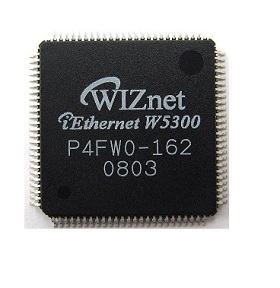
WIZnet - W5300
x 1

Project description
he WizYasep (currently) implements an application-specific network protocol that is simple (hence cheap and easy to use) yet efficient and flexible. Unlike other widely used protocols, WizYasep synchronises the displays very finely to prevent "tear/shear" of moving pictures. Software can display data through the network without a complex library.
Warning If this was not obvious before, this system uses UDP, IP and other Internet Protocols but it is not meant or designed to be connected to the WWW. It is reserved for isolated LANs to keep latency low and prevent anything from messing with it. 'K ?
Protocol design and safety considerations The WizYasep uses a Wiznet hardware IP stack, please consult the?W5300 datasheet?for more details. ARP (MAC resolution) and PING are provided in hardware by default, they are active to provide the most basic network management ("is the board alive and properly configured ?"). This is the only case where the WizYasep board emits data, the rest of the protocol over UDP does only receive data (there is no ACK to keep things simple, fast and more resilient). The protocol is also implemented with resiliency in mind: the network stack is automatically reset if unusual conditions are detected (for example buffer overflows). At the same time it is not very restrictive and accepts certain malformed data. The worst that can happen is:
Protocol overview For every picture/frame, all data is sent in advance to one UDP socket. Hubs and router often "store and forward" data so this transmission might be delayed and the uncertainty increases if there is other kind of traffic on the links. The W5300 stores all the frame's data in its FIFO. 128KB is available but for practical reasons, only 56K are currently used. I haven't yet had to drive 19K LED with a single WizYasep board and if the FIFO is filled so much, something wrong is going on (buffer overflow) and the whole protocol is reset. Note:?in my tests, the W5300 does not seem to handle well UDP packets that are larger than 1200 bytes. Check the packet sizes if you don't see any output... Pixel data are expected to be received in the right packet order. Normally, a simple LAN with a central hub should NOT reorder the packets. For this reason, packet sequence numbers are not used in the payload. After all the data are delivered to all the WizYasep, the data source sends a small broadcast packet (2 bytes over UDP) over the control/sync port. This triggers the simultaneous display refresh for all the receiving WizYasep boards of the network. The contents of their FIFO is read and reframed to feed the attached LED strings. The Ethernet network is the only cause of delay between screens, which is a fraction of a millisecond and no image deformation is visible.
Settings The Ethernet link is designed for 100Mbps operation and supports 10Mbps for backward compatibility. 1000BaseT is not supported but it can be connected to a Gigabit hub/router (which will downgrade the link to 100Mbps). This can be useful if the main system controller has to drive many Wiznet boards. The IP address/mask/port and the MAC address are configurable. Their value are stored in the onboard SPI Flash memory, which can be updated with?#SPI Flasher. They can also be configured on demand, during fabrication. The usual parameters are
Algorithm Any computer with a TCP/IP network stack can send data to the WizYasep. The main display loop works this way:
Packet format
Offline behaviour The WizYasep can detect when the network is down. However, a simple timeout (after the last valid packet) also works well so the display turns black one second after the last update. The internal configuration of the number of pixels is useful for this blanking. There is no check of the number of pixels received from the network. A higher number of pixels will not be seen, while a lower number will only blank one part of the screen.
Warning If this was not obvious before, this system uses UDP, IP and other Internet Protocols but it is not meant or designed to be connected to the WWW. It is reserved for isolated LANs to keep latency low and prevent anything from messing with it. 'K ?
Protocol design and safety considerations The WizYasep uses a Wiznet hardware IP stack, please consult the?W5300 datasheet?for more details. ARP (MAC resolution) and PING are provided in hardware by default, they are active to provide the most basic network management ("is the board alive and properly configured ?"). This is the only case where the WizYasep board emits data, the rest of the protocol over UDP does only receive data (there is no ACK to keep things simple, fast and more resilient). The protocol is also implemented with resiliency in mind: the network stack is automatically reset if unusual conditions are detected (for example buffer overflows). At the same time it is not very restrictive and accepts certain malformed data. The worst that can happen is:
- missing data or packet -> image is warped/shifted
- altered data -> image changes color
- too many data -> extra data are not shown
Protocol overview For every picture/frame, all data is sent in advance to one UDP socket. Hubs and router often "store and forward" data so this transmission might be delayed and the uncertainty increases if there is other kind of traffic on the links. The W5300 stores all the frame's data in its FIFO. 128KB is available but for practical reasons, only 56K are currently used. I haven't yet had to drive 19K LED with a single WizYasep board and if the FIFO is filled so much, something wrong is going on (buffer overflow) and the whole protocol is reset. Note:?in my tests, the W5300 does not seem to handle well UDP packets that are larger than 1200 bytes. Check the packet sizes if you don't see any output... Pixel data are expected to be received in the right packet order. Normally, a simple LAN with a central hub should NOT reorder the packets. For this reason, packet sequence numbers are not used in the payload. After all the data are delivered to all the WizYasep, the data source sends a small broadcast packet (2 bytes over UDP) over the control/sync port. This triggers the simultaneous display refresh for all the receiving WizYasep boards of the network. The contents of their FIFO is read and reframed to feed the attached LED strings. The Ethernet network is the only cause of delay between screens, which is a fraction of a millisecond and no image deformation is visible.
Settings The Ethernet link is designed for 100Mbps operation and supports 10Mbps for backward compatibility. 1000BaseT is not supported but it can be connected to a Gigabit hub/router (which will downgrade the link to 100Mbps). This can be useful if the main system controller has to drive many Wiznet boards. The IP address/mask/port and the MAC address are configurable. Their value are stored in the onboard SPI Flash memory, which can be updated with?#SPI Flasher. They can also be configured on demand, during fabrication. The usual parameters are
- IP : 192.168.41.1xx
- MAC address : please provide one
- Network mask : 192.168.41.00
- UDP data port: 60001d
- UDP sync port: 60000d
Algorithm Any computer with a TCP/IP network stack can send data to the WizYasep. The main display loop works this way:
- Set a timer (can be 20ms for 50Hz refresh)
- Read and process the image data (it usually takes a little time) to assemble the UDP packets
- Send the data for all the packets in a sub-frame, for all the receiving Wizyasep send the packet The loop organises the packets so the first packet is sent to each Wizyasep, then the second... It is better than sending all the data to one WizYasep, then all the data to the other, because it reduces congestion in the hub/router, prevents packet loss due tu buffer overflows (particularly in a Gigabit network)
- Wait for timer expiration
- Send the Sync packet to the control port
struct {
  char signature;
  char sequence;
} sync_payload= { 'L', 'a' };
// 0x4C6x, only the 4 LSB of "sequence" vary,
// so this shows in ASCII as "La" "Lb" "Lc" "Ld"..."Lp"
(beware of Endian ;-) ) - goto 1
Packet format
- Data socket :
- Link/data errors are highly unlikely in practice
- This adds code and bugs
- Control socket
struct {
  char signature;
  char sequence;
} sync_payload= { 'L', 'a' };
// 0x4C6x, only the 4 LSB of "sequence" vary,
// so this shows in ASCII as "La" "Lb" "Lc"..."Lp"
BTW : beware of byte ordering ;-)
Of course, only send one per complete frame. The protocol is reset if more than 512 bytes are received on this port.
Data formatting and pixel ordering
Pixels are transmitted as RGB byte triplets. By default, the byte ordering is preserved but the hardware can reorder (RGB, GRB, RBG, GBR, BGR, BRG) The data for one string (output) is sent in the same order, as well. Control software must reorganise data according to the display's geometry (zig-zag etc.) The first triplet is displayed by the first LED of the string (closest to the WizYasep or data input). There is one channel per physical output. Channels only work in pairs : one channel will be unused / disconnected if the display has an odd number of LED strings. This will obviously waste a bit of bandwidth but this is marginal in practical cases. Currently the number of channels is set at fabrication time but it should be user-configurable in the future. All channels have the same pixel count or length : if one output has less pixels, then the missing data must still be sent. Usually, displays have a balanced number of outputs so this is not a drawback. Pixels are sent with channel interleaving: all the first pixels of the channels are sent first. Then come all the second pixels of all channels, etc. For 4 channels, the pixels are in this order: C1 C2 C3 C4 C1 C2 C3 C4?C1 C2 C3 C4?C1 C2 C3 C4... The WizYasep can't know how many LEDs are actually connected so more or less could be actually sent, with the obvious side effects of truncated or partial display.Offline behaviour The WizYasep can detect when the network is down. However, a simple timeout (after the last valid packet) also works well so the display turns black one second after the last update. The internal configuration of the number of pixels is useful for this blanking. There is no check of the number of pixels received from the network. A higher number of pixels will not be seen, while a lower number will only blank one part of the screen.


