Underwater Cyclops
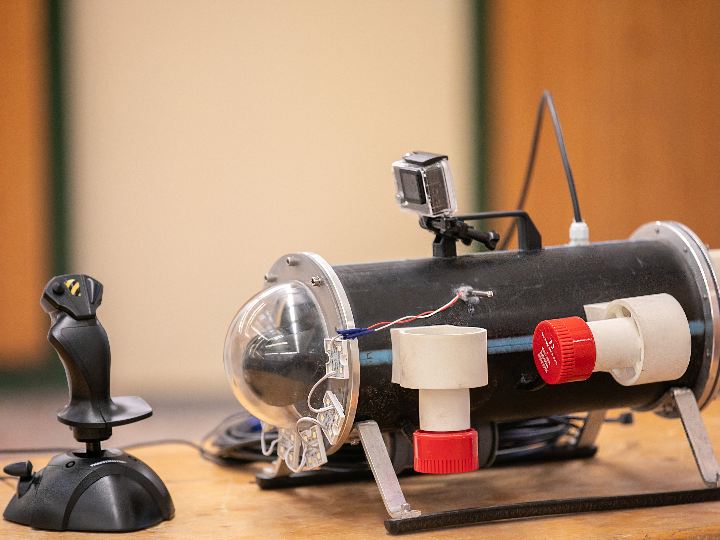
It can give you a controlling device that can helps you to build an underwater robot communicating via Ethernet cable.
10
Project description
Components and supplies
Think globally, actlocally
Can students help the water service providers to work more efficiently?
Water is key element, there would not be life without it on Earth. Everybody is aware of these facts. The underwater robot we produced is able to do different duties cost-effectively which scuba divers cannot do. The robot is remotely controlled and moves on a predefined route, and can perform predefined tasks. In the recent years a prototype was made which was awarded on a competition of the Hungarian Association for Innovation, from these experiences we started to build another ROV. We have to use water carefully. More and more people are convinced to change there water using habits.
Are service providers able to be more provident?
Our small researcher group called Bánkirobot, looked up for our local water utility company with this question and wanted to find ways of cooperation. The experts were open-minded. All of them listened carefully to our presentation of the robot and they instantly shared some potential areas for using the Underwater Cyclops to save water more efficiently.
1. The maintenance of water reservoirs, which form an integral part of the water utilities. This task is performed by NYÍRSÉGVÍZ Zrt. twice a year, based on the annual maintenance schedule, surface cleaning after the pools are drained, assembly work ability testing, repair work.
In order to increase the efficiency of maintenance, important information is available if, prior to maintenance, photo or video recordings are made, which the experts evaluated. The service provider’s expectation is to make sure about the surface it is fine without drain the reservoir. If the repair is required, the utility could check the photos, and videos, and could make the preparations, and after the repair.
2. By archiving the recordings of regular examinations, it is possible to compare with the recordings made in earlier periods, so that possible major repairs and investments can be solved cost-effectively and the life expectancy of the pools can be determined.
According to preliminary estimates, it is ideal to avoid draining thousands of cubic meters of water!
You can modify this!
We built a robot using 1 temperature measuring sensor, a photo resistor and 5 bilge pump motors. You have to split the UTP cable and use a switch in order to communicate with the Ethernet shield and with the IP camera in the same time. We used a D-link DCS-5030L IP camera. We will attach for you the Python and the Arduino code. In the computer you have to set for you an IP address, you can do this in the IPV4 settings. In the Arduino code you have to write your Ethernet shield's mac address and another IP address but in the same range (example: In the PC you set 192.168.1.12 and in the Arduino and in the Python code you have to set 192.168.1.14). You can find a picture about the UTP cable splitting.
Code
Underwater ROV code
arduino
It's an open source code, you can modify this, or cut useful lines.
#include <OneWire.h>
#include <DallasTemperature.h>
#include   <SPI.h>
#include <Ethernet.h>
#include <EthernetUdp.h>

#define   ONE_WIRE_BUS 2
OneWire oneWire(ONE_WIRE_BUS);
DallasTemperature sensors(&oneWire);

byte   mac[] = {
 0x90, 0xA2, 0xDA, 0x0D, 0x7F, 0xFC
};
IPAddress ip(192, 168,   1, 102);
unsigned int localPort = 8877;

int fenymennyiseg=A1;
char   datain[UDP_TX_PACKET_MAX_SIZE];
char  ReplyBuffer[] = "ack";
float temperature;


EthernetUDP   Udp;
int motorA1=39;
int motorA2=41;
int speedA=11; //FEL LE DUPLA   MOTOROK
int motorB1=45;
int motorB2=43;
int speedB=9; //FEL-LE MOTOR
int   motorC1=49;
int motorC2=47;
int speedC=5; // BAL ELRE HTRA MOZGAT
int motorD1=53;
int   motorD2=31;
int speedD=3; //JOBB ELRE HTRA MOZGAT
int LEDEK = 8;
char ertek[10];
int   oldButtonState = LOW;
int regiallas = LOW;
int x=0;
int y=0;
int   fenylampa=7;

int sdcs=4;
int ethcs=10;
int valtgomb=0;

void   setup()
{
 Ethernet.begin(mac, ip);
 Udp.begin(localPort);
  Serial.begin(9600);
   sensors.begin();
 pinMode(motorA1,OUTPUT);
  pinMode(motorA2,OUTPUT);
 pinMode(speedA,OUTPUT);
 pinMode(motorB1,OUTPUT);
  pinMode(motorB2,OUTPUT);
 pinMode(speedB,OUTPUT);
 pinMode(motorC1,OUTPUT);
  pinMode(motorC2,OUTPUT);
 pinMode(speedC,OUTPUT);
 pinMode(motorD1,OUTPUT);
  pinMode(motorD2,OUTPUT);
 pinMode(speedD,OUTPUT);
 pinMode(LEDEK, OUTPUT);
  pinMode(sdcs, OUTPUT);
 digitalWrite(sdcs, HIGH);
   pinMode(ethcs, OUTPUT);
    digitalWrite(ethcs, LOW);
   digitalWrite(LEDEK,HIGH);
   pinMode(fenylampa,OUTPUT);
    digitalWrite(fenylampa,HIGH);
   digitalWrite(speedC,LOW);


}

void loop()
{
 String fenyallas= String(analogRead(1), DEC);
  String valasz= String("ack ");
 String pont= String("\
");
 sensors.requestTemperatures();
  temperature=sensors.getTempCByIndex(0);
 String homerseklet=String(temperature);


String Buffer=fenyallas+pont+valasz+pont+homerseklet;
char   cBuffer[Buffer.length()];
Buffer.toCharArray(cBuffer, Buffer.length());
Serial.println(cBuffer);

  int packetSize = Udp.parsePacket();
 if (packetSize)
 {
   IPAddress   remote = Udp.remoteIP();

   Udp.read(ertek, UDP_TX_PACKET_MAX_SIZE);
    Serial.println("Contents:");
   for(int i = 0; i<10;i+= 2)
   {
      Serial.print( *(int*)(&ertek[i]));
     Serial.print(",");
   }
    Serial.print("\
");


//------------------------------------------------------------------------------------
    if( *(int*)(&ertek[2]) <=-100 && valtgomb!=1)//ELORE-HATRA y tengely
     {
        analogWrite(speedC, abs(*(int*)(&ertek[2])));
       analogWrite(speedD,   abs(*(int*)(&ertek[2])));
       digitalWrite(motorC1, HIGH);
       digitalWrite(motorC2,   LOW);
       digitalWrite(motorD1, LOW);
       digitalWrite(motorD2, HIGH);

     }
       else
         if(*(int*)(&ertek[2]) >=100 &&   valtgomb!=1)
         {
           analogWrite(speedC, *(int*)(&ertek[2]));
            analogWrite(speedD, *(int*)(&ertek[2]));
       digitalWrite(motorC1,   LOW);
       digitalWrite(motorC2, HIGH);
       digitalWrite(motorD1, HIGH);
        digitalWrite(motorD2, LOW);

         }
           else
              if(*(int*)(&ertek[2]) < 50 && *(int*)(&ertek[2]) >-50 && valtgomb!=1)
              {
               analogWrite(speedC, 0);
               analogWrite(speedD,   0);
             }
//------------------------------------------------------------------------------------
if(   *(int*)(&ertek[0]) >=50 && valtgomb!=1)//FEL-LE X tengely
     {
       analogWrite(speedA,   *(int*)(&ertek[0]));
       analogWrite(speedB, *(int*)(&ertek[0]));
       digitalWrite(motorA1,   HIGH);
       digitalWrite(motorA2, LOW);
       digitalWrite(motorB1, HIGH);
        digitalWrite(motorB2, LOW);
     }
       else
         if(*(int*)(&ertek[0])   <=-50 && valtgomb!=1)
         {
           analogWrite(speedA, abs(*(int*)(&ertek[0])));
            analogWrite(speedB, abs(*(int*)(&ertek[0])));
       digitalWrite(motorA1,   LOW);
       digitalWrite(motorA2, HIGH);
       digitalWrite(motorB1, LOW);
        digitalWrite(motorB2, HIGH);
         }
           else
             if(*(int*)(&ertek[0])   < 50 && *(int*)(&ertek[0]) >-50 && valtgomb!=1)
             {

                analogWrite(speedA, 0);
               analogWrite(speedB, 0);
              }
//------------------------------------------------------------------------------------ledek   be/ki
 int newButtonState = *(int*)(&ertek[4]);

 if (newButtonState   == HIGH && oldButtonState == LOW)
 {
   if (x == 0) {
     // Toggle   on
     digitalWrite(LEDEK, HIGH);
     x = 1;
   } else {
     //   Toggle off
     digitalWrite(LEDEK, LOW);
     x = 0;
   }
 }

  oldButtonState = newButtonState;
//------------------------------------------------------------------------------------//fenymennyisegmero   KI/BE
 int gomballas = *(int*)(&ertek[8]);

 if (gomballas ==   HIGH && regiallas == LOW)
 {
   if (y == 0)
   {
     // Toggle   on
     digitalWrite(fenylampa, HIGH);
     y = 1;

   } else   {
     // Toggle off
     digitalWrite(fenylampa, LOW);
     y = 0;
    }
 }

 regiallas = gomballas;

//------------------------------------------------------------------------------------
valtgomb=*(int*)(&ertek[6]);
if(valtgomb==1)
  {
   if( *(int*)(&ertek[0]) >=50 && valtgomb==1)//fordulas
     {
        analogWrite(speedC, *(int*)(&ertek[0]));
       analogWrite(speedD,   *(int*)(&ertek[0]));
       digitalWrite(motorC1, HIGH);
       digitalWrite(motorC2,   LOW);
       digitalWrite(motorD1, HIGH);
       digitalWrite(motorD2, LOW);
      }
      else
       if(*(int*)(&ertek[0]) <=-50 && valtgomb==1)
         {
         analogWrite(speedC, abs(*(int*)(&ertek[0])));
         analogWrite(speedD,   abs(*(int*)(&ertek[0])));
       digitalWrite(motorC1, HIGH);
       digitalWrite(motorC2,   LOW);
       digitalWrite(motorD1, HIGH);
       digitalWrite(motorD2, LOW);
         }
         else
           if(*(int*)(&ertek[0]) < 50 && *(int*)(&ertek[0])   >-50 && valtgomb==1)
           {
             analogWrite(speedC, 0);
              analogWrite(speedD, 0);
           }
}


//------------------------------------------------------------------------------------
    Udp.beginPacket(Udp.remoteIP(), Udp.remotePort());
   Udp.write(cBuffer);
    Udp.endPacket();

 }
   else
   {
     digitalWrite(motorA1,LOW);
      digitalWrite(motorA2,LOW);
     digitalWrite(motorB1,LOW);
     digitalWrite(motorB2,LOW);
      digitalWrite(motorC1,LOW);
     digitalWrite(motorC2,LOW);
     digitalWrite(motorD1,LOW);
      digitalWrite(motorD2,LOW);
   }
 delay(50);
}
Python code
import socket
import pygame
import struct
import time
import   datetime as dt
dt.datetime.now()

UDP_IP = '192.168.1.102'
UDP_PORT   = 8877
sock = socket.socket(socket.AF_INET, socket.SOCK_DGRAM)
sock.settimeout(2)


pygame.init()


pygame.joystick.init()

joy_count   = pygame.joystick.get_count()


if joy_count < 1 : print ("Nincs joystick   csatlakoztatva.")
else :
    fenymennyiseg=open("feny.csv","w")
    fenymennyiseg.write("DATUM;FENYMENNY\
")


    while True :
        joystick = pygame.joystick.Joystick(0)
         joystick.init()

        pygame.event.pump()

         y_tengely = int(joystick.get_axis(1) * 255)
        x_tengely = int(joystick.get_axis(0)   * 255)
        gomb = int(joystick.get_button(1))
        valtgomb = int(joystick.get_button(3))
         fenygomb = int(joystick.get_button(2))


        sock.sendto(struct.pack("hhhhh", x_tengely,   y_tengely, gomb, valtgomb, fenygomb), (UDP_IP, UDP_PORT))
        data, addr   = sock.recvfrom(1024)
        #print ("received from: ",addr)


        adat=data.decode("utf-8")
        sszesadat=adat.split()
         print (sszesadat[0])


        if (int(joystick.get_button(2))==1)   :
            fenymennyiseg=open("feny.csv","a")
            fenymennyiseg.write("{0};{1}\
".format(dt.datetime.now().strftime("%H:%M"),sszesadat[0]))
             time.sleep(0.1)
            fenymennyiseg.close()


        if sszesadat[1] != 'ack' :
            print (sszesadat)
            print   ("Nincs valasz")
            break
Python code
python
import socket
import pygame
import struct
import time
import
  datetime as dt
dt.datetime.now()

UDP_IP = '192.168.1.102'
UDP_PORT
  = 8877
sock = socket.socket(socket.AF_INET, socket.SOCK_DGRAM)
sock.settimeout(2)


pygame.init()


pygame.joystick.init()

joy_count
  = pygame.joystick.get_count()


if joy_count < 1 : print ("Nincs joystick
  csatlakoztatva.")
else :
    fenymennyiseg=open("feny.csv","w")
    fenymennyiseg.write("DATUM;FENYMENNY\
")


    while True :
        joystick = pygame.joystick.Joystick(0)

        joystick.init()

        pygame.event.pump()


        y_tengely = int(joystick.get_axis(1) * 255)
        x_tengely = int(joystick.get_axis(0)
  * 255)
        gomb = int(joystick.get_button(1))
        valtgomb = int(joystick.get_button(3))

        fenygomb = int(joystick.get_button(2))


        sock.sendto(struct.pack("hhhhh", x_tengely,
  y_tengely, gomb, valtgomb, fenygomb), (UDP_IP, UDP_PORT))
        data, addr
  = sock.recvfrom(1024)
        #print ("received from: ",addr)


        adat=data.decode("utf-8")
        sszesadat=adat.split()

        print (sszesadat[0])


        if (int(joystick.get_button(2))==1)
  :
            fenymennyiseg=open("feny.csv","a")
            fenymennyiseg.write("{0};{1}\
".format(dt.datetime.now().strftime("%H:%M"),sszesadat[0]))

            time.sleep(0.1)
            fenymennyiseg.close()


        if sszesadat[1] != 'ack' :
            print (sszesadat)
            print
  ("Nincs valasz")
            break
Underwater ROV code
arduino
It's an open source code, you can modify this, or cut useful lines.
#include <OneWire.h>
#include <DallasTemperature.h>
#include
  <SPI.h>
#include <Ethernet.h>
#include <EthernetUdp.h>


#define
  ONE_WIRE_BUS 2
OneWire oneWire(ONE_WIRE_BUS);
DallasTemperature sensors(&oneWire);


byte
  mac[] = {
  0x90, 0xA2, 0xDA, 0x0D, 0x7F, 0xFC
};
IPAddress ip(192, 168,
  1, 102);

unsigned int localPort = 8877;


int fenymennyiseg=A1;
char
  datain[UDP_TX_PACKET_MAX_SIZE];
char  ReplyBuffer[] = "ack";
float temperature;


EthernetUDP
  Udp;

int motorA1=39;
int motorA2=41;
int speedA=11; //FEL LE DUPLA
  MOTOROK
int motorB1=45;
int motorB2=43;
int speedB=9; //FEL-LE MOTOR
int
  motorC1=49;
int motorC2=47;
int speedC=5; // BAL ELRE HTRA MOZGAT
int motorD1=53;
int
  motorD2=31;
int speedD=3; //JOBB ELRE HTRA MOZGAT
int LEDEK = 8;
char ertek[10];
int
  oldButtonState = LOW;
int regiallas = LOW;
int x=0;
int y=0;

int
  fenylampa=7;


int sdcs=4;
int ethcs=10;
int valtgomb=0;


void
  setup()
{

  Ethernet.begin(mac, ip);
  Udp.begin(localPort);


  Serial.begin(9600);
    sensors.begin();
  pinMode(motorA1,OUTPUT);

  pinMode(motorA2,OUTPUT);
  pinMode(speedA,OUTPUT);
  pinMode(motorB1,OUTPUT);

  pinMode(motorB2,OUTPUT);
  pinMode(speedB,OUTPUT);
  pinMode(motorC1,OUTPUT);

  pinMode(motorC2,OUTPUT);
  pinMode(speedC,OUTPUT);
  pinMode(motorD1,OUTPUT);

  pinMode(motorD2,OUTPUT);
  pinMode(speedD,OUTPUT);
  pinMode(LEDEK, OUTPUT);

  pinMode(sdcs, OUTPUT);
  digitalWrite(sdcs, HIGH);
    pinMode(ethcs, OUTPUT);

    digitalWrite(ethcs, LOW);
    digitalWrite(LEDEK,HIGH);
    pinMode(fenylampa,OUTPUT);

    digitalWrite(fenylampa,HIGH);
    digitalWrite(speedC,LOW);


}


void loop()
{
  String fenyallas= String(analogRead(1), DEC);

  String valasz= String("ack ");
  String pont= String("\
");
  sensors.requestTemperatures();

  temperature=sensors.getTempCByIndex(0);
  String homerseklet=String(temperature);


String Buffer=fenyallas+pont+valasz+pont+homerseklet;
char
  cBuffer[Buffer.length()];
Buffer.toCharArray(cBuffer, Buffer.length());
Serial.println(cBuffer);


  int packetSize = Udp.parsePacket();
  if (packetSize)
  {

    IPAddress
  remote = Udp.remoteIP();


    Udp.read(ertek, UDP_TX_PACKET_MAX_SIZE);

    Serial.println("Contents:");
    for(int i = 0; i<10;i+= 2)
    {

      Serial.print( *(int*)(&ertek[i]));
      Serial.print(",");
    }

    Serial.print("\
");


//------------------------------------------------------------------------------------

    if( *(int*)(&ertek[2]) <=-100 && valtgomb!=1)//ELORE-HATRA y tengely
      {

        analogWrite(speedC, abs(*(int*)(&ertek[2])));
        analogWrite(speedD,
  abs(*(int*)(&ertek[2])));
        digitalWrite(motorC1, HIGH);
        digitalWrite(motorC2,
  LOW);
        digitalWrite(motorD1, LOW);
        digitalWrite(motorD2, HIGH);


      }
        else
          if(*(int*)(&ertek[2]) >=100 &&
  valtgomb!=1)
          {
            analogWrite(speedC, *(int*)(&ertek[2]));

            analogWrite(speedD, *(int*)(&ertek[2]));

        digitalWrite(motorC1,
  LOW);
        digitalWrite(motorC2, HIGH);
        digitalWrite(motorD1, HIGH);

        digitalWrite(motorD2, LOW);


          }
            else

              if(*(int*)(&ertek[2]) < 50 && *(int*)(&ertek[2]) >-50 && valtgomb!=1)

              {
                analogWrite(speedC, 0);
                analogWrite(speedD,
  0);
              }
//------------------------------------------------------------------------------------
if(
  *(int*)(&ertek[0]) >=50 && valtgomb!=1)//FEL-LE X tengely
      {
        analogWrite(speedA,
  *(int*)(&ertek[0]));
        analogWrite(speedB, *(int*)(&ertek[0]));
        digitalWrite(motorA1,
  HIGH);
        digitalWrite(motorA2, LOW);
        digitalWrite(motorB1, HIGH);

        digitalWrite(motorB2, LOW);
      }
        else
          if(*(int*)(&ertek[0])
  <=-50 && valtgomb!=1)
          {
            analogWrite(speedA, abs(*(int*)(&ertek[0])));

            analogWrite(speedB, abs(*(int*)(&ertek[0])));
        digitalWrite(motorA1,
  LOW);
        digitalWrite(motorA2, HIGH);
        digitalWrite(motorB1, LOW);

        digitalWrite(motorB2, HIGH);
          }
            else
              if(*(int*)(&ertek[0])
  < 50 && *(int*)(&ertek[0]) >-50 && valtgomb!=1)
              {


                analogWrite(speedA, 0);
                analogWrite(speedB, 0);

              }
//------------------------------------------------------------------------------------ledek
  be/ki

  int newButtonState = *(int*)(&ertek[4]);


  if (newButtonState
  == HIGH && oldButtonState == LOW)
  {

    if (x == 0) {
      // Toggle
  on
      digitalWrite(LEDEK, HIGH);
      x = 1;

    } else {
      //
  Toggle off
      digitalWrite(LEDEK, LOW);
      x = 0;
    }
  }


  oldButtonState = newButtonState;
//------------------------------------------------------------------------------------//fenymennyisegmero
  KI/BE

  int gomballas = *(int*)(&ertek[8]);


  if (gomballas ==
  HIGH && regiallas == LOW)
  {

    if (y == 0)
    {
      // Toggle
  on
      digitalWrite(fenylampa, HIGH);
      y = 1;


    } else
  {
      // Toggle off
      digitalWrite(fenylampa, LOW);
      y = 0;

    }
  }


  regiallas = gomballas;


//------------------------------------------------------------------------------------
valtgomb=*(int*)(&ertek[6]);
if(valtgomb==1)

  {
    if( *(int*)(&ertek[0]) >=50 && valtgomb==1)//fordulas
      {

        analogWrite(speedC, *(int*)(&ertek[0]));
        analogWrite(speedD,
  *(int*)(&ertek[0]));
        digitalWrite(motorC1, HIGH);
        digitalWrite(motorC2,
  LOW);
        digitalWrite(motorD1, HIGH);
        digitalWrite(motorD2, LOW);

      }
       else
        if(*(int*)(&ertek[0]) <=-50 && valtgomb==1)

         {
          analogWrite(speedC, abs(*(int*)(&ertek[0])));
          analogWrite(speedD,
  abs(*(int*)(&ertek[0])));
        digitalWrite(motorC1, HIGH);
        digitalWrite(motorC2,
  LOW);
        digitalWrite(motorD1, HIGH);
        digitalWrite(motorD2, LOW);

         }
          else
            if(*(int*)(&ertek[0]) < 50 && *(int*)(&ertek[0])
  >-50 && valtgomb==1)
            {
              analogWrite(speedC, 0);

              analogWrite(speedD, 0);
            }

 }


//------------------------------------------------------------------------------------

    Udp.beginPacket(Udp.remoteIP(), Udp.remotePort());
    Udp.write(cBuffer);

    Udp.endPacket();

  }
    else
    {
      digitalWrite(motorA1,LOW);

      digitalWrite(motorA2,LOW);
      digitalWrite(motorB1,LOW);
      digitalWrite(motorB2,LOW);

      digitalWrite(motorC1,LOW);
      digitalWrite(motorC2,LOW);
      digitalWrite(motorD1,LOW);

      digitalWrite(motorD2,LOW);
    }
  delay(50);
}
Downloadable files
Splitting UTP cable

Photo resistor example circuit
You have to use a 10k resistor and you can choose another input pin.

DS18B20 temperature sensor example circuit
You can use another input pin
Photo resistor example circuit
You have to use a 10k resistor and you can choose another input pin.
Splitting UTP cable
DS18B20 temperature sensor example circuit
You can use another input pin

