Upgrade problem
Serial-to-Ethernet & ConfigTool
No replies yet. Be the first to reply.
Join the discussion.
Serial-to-Ethernet & ConfigTool
No replies yet. Be the first to reply.
Join the discussion.
Share projects and connect with makers.
Joined before the site update? first.
New to WIZnet Makers?
We sent a verification link to your address. Open it to activate your account, then log in.
Accounts from this email provider are reviewed by an administrator after verification. Approval usually takes one business day.
Already have an account?
Enter your email address. If it belongs to an account, we'll send a link to set a new password. Members who joined before the site update use this to set their password.
If an account uses that address, we sent a link to set a new password. The link works once and expires in 30 minutes.
Know your password?
Need an account?
RE: Upgrade problem
by Edward ·
Hi.
You firmware download using github source file ?
important below picture number 2 checking
[attachment=0]687474703a2f2f77697a77696b692e6e65742f77696b692f6c69622f6578652f66657463682e7068703f743d3134333430383731393926773d35303026683d34393426746f6b3d346536613034266d656469613d70726f64756374733a77697a3535307332653a77697a3.png[/attachment]
below to link is binary file is Boot + App file…
wizwiki.net/wiki/doku.php?id=pro … e_download
please firmware re download.
Thank you
RE: Upgrade problem
by Edward ·
Hi.
You firmware download using github source file ?
important below picture number 2 checking
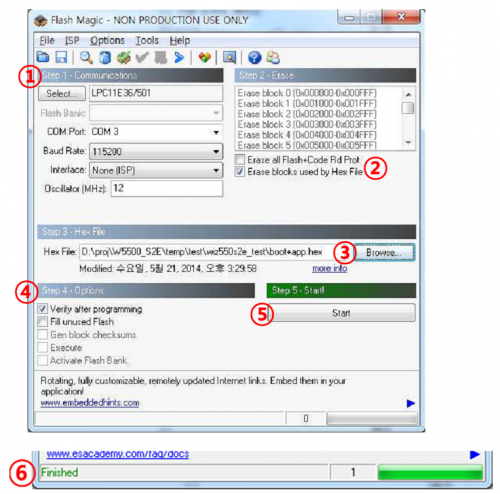
below to link is binary file is Boot + App file…
wizwiki.net/wiki/doku.php?id=pro … e_download
please firmware re download.
Thank you
RE: Upgrade problem
by logistica888 ·
Hi
I used the instruction of picture number 2
The big difference is that in your “binary_v1.0.1.zip” file in the link:
wizwiki.net/wiki/doku.php?id=pro … e_download
I can find these files:
WIZ550S2E_App.bin
WIZ550S2E_App.hex
WIZ550S2E_Boot.hex
I have not a single “boot+app.hex” file, like the picture 2
First test: I try to download first WIZ550S2E_Boot.hex then WIZ550S2E_App.hex
Second test: I try to download first WIZ550S2E_App.hex then WIZ550S2E_Boot.hex
Flash Magic is happy in both cases, it finishes the download, and it verifies files
But the effect is always the same:
-The status LEDs on the base board flash alternately
-The WIZnet_Configuration_Tool shows “BootLoader 1.0.1” in the “Firmware Version” box
No change
The Application doesn’t start
The problem is not solved
Thank you
RE: Upgrade problem
by logistica888 ·
Hi
Maybe I understand the problem
At the beginning I failed a TFTP update
In the eeprom the flag that enable TFTP upgrade is active
I upgrade correctly boot an app code with FlasMagic
When start the boot program is looking a TFTP upgrade
If there is not, boot has a TFTP_FAIL, and the app can’t start.
To start the app, I must clean the eeprom
Now should be fine
Thank you