Turn on my computer!
Turn on my computer!
0
Components
Hardware componentsArduino
x 1
web server
x 1
Project description
The task of turning on or rebooting a remote computer for a person associated with development occurs quite often.?In order not to strain colleagues and home, let's shift these responsibilities to the arduino, especially since?Ethernet shields on the W5100 have?fallen in price on Ebay .
 We will connect according to the following scheme:
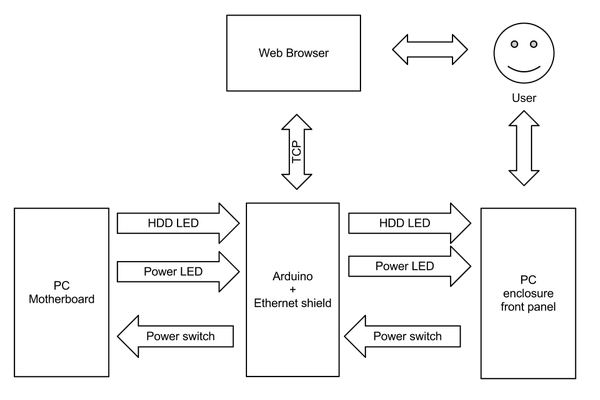 Thus, when the arduino is turned on, the functionality of the front panel of the computer is fully preserved, and the power button works in any situation.
In addition to an arduino and an Ethernet shield, you will need a relay, optocouplers and a piece of breadboard and other small things.?An approximate diagram of the switching device is shown below.?You can definitely do without a relay and probably without optocouplers, but I wanted to completely isolate the motherboard from the switching device.
Thus, when the arduino is turned on, the functionality of the front panel of the computer is fully preserved, and the power button works in any situation.
In addition to an arduino and an Ethernet shield, you will need a relay, optocouplers and a piece of breadboard and other small things.?An approximate diagram of the switching device is shown below.?You can definitely do without a relay and probably without optocouplers, but I wanted to completely isolate the motherboard from the switching device.

 It remains to flash the arduino, assemble a sandwich of three boards and connect it between the motherboard and the front panel of the case.?Be careful with the polarity when connecting the LEDs.?After turning on the arduino, it blinks three times with all LEDs and lights up the control LED if it was possible to start the web server.?Everything.?The internet switch is ready to go.

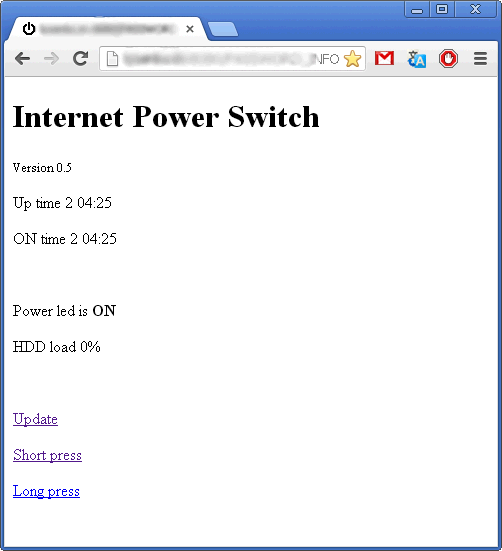 The Arduino script can be found?here?.?Note that if the motherboard starts flashing the status LED, this will be misinterpreted by the script.?To use sleep mode instead of shutdown, you need to supplement the script with an analyzer of this behavior.?In this case, it would be more correct to connect the status LED via an optocoupler to one of the ADC pins.
Update:
Conclusions:
The Arduino script can be found?here?.?Note that if the motherboard starts flashing the status LED, this will be misinterpreted by the script.?To use sleep mode instead of shutdown, you need to supplement the script with an analyzer of this behavior.?In this case, it would be more correct to connect the status LED via an optocoupler to one of the ADC pins.
Update:
Conclusions:
We will connect according to the following scheme:
Thus, when the arduino is turned on, the functionality of the front panel of the computer is fully preserved, and the power button works in any situation.
In addition to an arduino and an Ethernet shield, you will need a relay, optocouplers and a piece of breadboard and other small things.?An approximate diagram of the switching device is shown below.?You can definitely do without a relay and probably without optocouplers, but I wanted to completely isolate the motherboard from the switching device.
It remains to flash the arduino, assemble a sandwich of three boards and connect it between the motherboard and the front panel of the case.?Be careful with the polarity when connecting the LEDs.?After turning on the arduino, it blinks three times with all LEDs and lights up the control LED if it was possible to start the web server.?Everything.?The internet switch is ready to go.
The Arduino script can be found?here?.?Note that if the motherboard starts flashing the status LED, this will be misinterpreted by the script.?To use sleep mode instead of shutdown, you need to supplement the script with an analyzer of this behavior.?In this case, it would be more correct to connect the status LED via an optocoupler to one of the ADC pins.
Update:
Conclusions:
- The device learned to be compact, which allows you to place it inside a PC case.
- And inexpensive, with a homemade aruinka, you can meet $20.
- There is feedback on the power and screw indicators.?In many ways, a psychological advantage, but you don’t have to languish in anticipation - you can immediately see that the computer has started and the screw is spinning.
- The device is expandable.?At what both in the hardware and in the software plan.?At minimal cost, you can also add relays and sensors.?Extend the functionality by working via SMS, etc.
- It can be recommended as a start in the study of MK.?The device combines several technologies, it is interesting to work with it, it is quite simple and, moreover, useful.?Can be used to monitor a home computer, for example.

